This article shows how to use regex + code to validate a date format, support single and leading zero month and day format (1 or 01), check for the 30 or 31 days of the month, and leap year validation.
Below are the requirements for a valid date.
- Year format, 1900, 2099
regex - Month format, 1, 01, 2, 02… 12
regex - Day format, 1, 01… 31
regex - Leap year, February 29 days.
code - Common year, February 28 days.
code - 31 Days of month – 1, 3, 5, 7, 8, 10, 12.
code - 30 Days of month – 4, 6, 9, 11,.
code - ISO 8601,
yyyy-MM-ddoruuuu-M-d, e.g 2020-11-03.regex
((?:19|20)[0-9][0-9])-(0?[1-9]|1[012])-(0?[1-9]|[12][0-9]|3[01])
The above regex can implement the requirements of 1, 2, 3, and 8. For requirements of 4, 5, 6, 7, we need manual code checking. The acceptable date range from 1900-01-01 or 1900-1-1 to 2099-12-31.
1. Regex for a date format, Year, Month and Day.
1.1 Regex to validate year, accepts 1900-2099.
  (19|20)[0-9][0-9]

  # explanation
  19[0-9][0-9]  # 1900-1999
  |             # ..or
  20[0-9][0-9]  # 2000-2099
In the future, if we want to support year starts with 21xx, update the regex like the below:
(19|20|21)[0-9][0-9]
1.2 Regex to validate month, accepts 01-09 (leading zero), 1-9 (single digit) and 10,11,12.
  0?[1-9]|1[012]

  # explanation
  0?[1-9]       #	01-09 or 1-9
  |             #	..or
  1[012]        #	10,11,12
1.3 Regex to validate day, accepts 01-09 (leading zero), 1-9 (single digit), 10-19, 20-29 and 30-31.
  0?[1-9]|[12][0-9]|3[01]

  # explanation
  0?[1-9]       #  01-09 or 1-9
  |             #  ..or
  [12][0-9]     #  10-19 or 20-29
  |             #  ..or
  3[01]         #  30, 31
1.4 We have regex for the year, month, and day, try to combine with different delimiters to form a different date format.
Regex to validate date format dd/mm/yyyy (General) or d/M/uuuu (Java date formater)
  # (dd)/(mm)/(yyyy)
  (0?[1-9]|[12][0-9]|3[01])/(0?[1-9]|1[012])/((?:19|20)[0-9][0-9])
Regex to validate date format yyyy-mm-dd (General) or uuuu-M-d (Java date formater)
  # (yyyy)-(mm)-(dd)
  ((?:19|20)[0-9][0-9])-(0?[1-9]|1[012])-(0?[1-9]|[12][0-9]|3[01])
Regex to validate date format yyyy.mm.dd (General) or uuuu.M.d (Java date formater)
  # (yyyy).(mm).(dd)
  ((?:19|20)[0-9][0-9])\\.(0?[1-9]|1[012])\\.(0?[1-9]|[12][0-9]|3[01])$
P.S ?: means match but don’t capture it. See below #3 JavaDateValidator.
2. 30 or 31 days and Leap year.
Now, we can use the above regex to capture the year, month, and day. Later we will check for 30 or 31 days of a month and leap year.
2.1 For 30 or 31 days of month.
- For Month 1,3,5,7,8,10,12 has 31 days.
- For Month 4,6,9,11 has 30 days.
  if ((month.equals("4") || month.equals("6") || month.equals("9") ||
        month.equals("04") || month.equals("06") || month.equals("09") ||
        month.equals("11")) && day.equals("31")) {
    isValid = false;
  }
2.2 For a leap year, 366 days per year, and February has 29 days; For a common year, 365 days per year, and February has 28 days.
  if (month.equals("2") || month.equals("02")) {
    if (day.equals("30") || day.equals("31")) {
        isValid = false;
    } else if (day.equals("29")) {  // feb 29 days? leap year checking
        if (!isLeapYear(year)) {
            isValid = false;
        }
    }
  }

  private static boolean isLeapYear(int year) {
       return (year % 4 == 0 && (year % 100 != 0 || year % 400 == 0));
  }
"Every year that is exactly divisible by four is a leap year, except for years that are exactly divisible by 100, but these centurial years are leap years if they are exactly divisible by 400. For example, the years 1700, 1800, and 1900 are not leap years, but the years 1600 and 2000 are."
Source: Wikipedia Leap year.
3. Java Regex Date Validator
Here is the final version.
package com.mkyong.regex.date;

import java.util.regex.Matcher;
import java.util.regex.Pattern;

public class DateValidatorRegex {

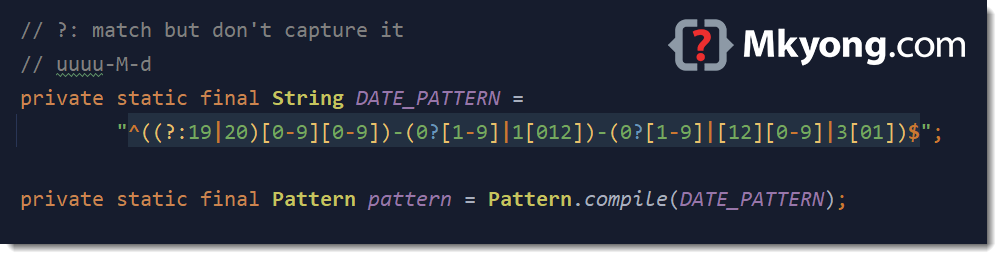
    // ?: match but don't capture it
    // uuuu-M-d
    private static final String DATE_PATTERN =
            "^((?:19|20)[0-9][0-9])-(0?[1-9]|1[012])-(0?[1-9]|[12][0-9]|3[01])$";

    private static final Pattern pattern = Pattern.compile(DATE_PATTERN);

    public static boolean isValid(final String date) {

        boolean result = false;

        Matcher matcher = pattern.matcher(date);

        if (matcher.matches()) {

            // it is a valid date format yyyy-mm-dd
            // assign true first, later we will check the leap year and odd or even months
            result = true;

            // (?:19|20), match but don't capture it, otherwise it will messy the group order
            // for example, 2020-2-30, it will create 4 groups.
            // group(1) = 2020, group(2) matches (19|20) = 20, group(3) = 2, group(4) = 30
            // So, we put (?:19|20), don't capture this group.

            int year = Integer.parseInt(matcher.group(1));
            // why string? month matches 02 or 2
            String month = matcher.group(2);
            String day = matcher.group(3);

            // 30 or 31 days checking
            // only 1,3,5,7,8,10,12 has 31 days
            if ((month.equals("4") || month.equals("6") || month.equals("9") ||
                    month.equals("04") || month.equals("06") || month.equals("09") ||
                    month.equals("11")) && day.equals("31")) {
                result = false;
            } else if (month.equals("2") || month.equals("02")) {
                if (day.equals("30") || day.equals("31")) {
                    result = false;
                } else if (day.equals("29")) {  // leap year? feb 29 days.
                    if (!isLeapYear(year)) {
                        result = false;
                    }
                }
            }

        }

        return result;
    }

    private static boolean isLeapYear(int year) {
        return (year % 4 == 0 && (year % 100 != 0 || year % 400 == 0));
    }
}
4. Unit Tests
Below are JUnit 5 parameterized tests for the above Java date validators.
package com.mkyong.regex.date;

import org.junit.jupiter.params.ParameterizedTest;
import org.junit.jupiter.params.provider.MethodSource;

import java.util.stream.Stream;

import static org.junit.jupiter.api.Assertions.assertFalse;
import static org.junit.jupiter.api.Assertions.assertTrue;

public class DateValidatorTest {

    @ParameterizedTest(name = "#{index} - Run test with date = {0}")
    @MethodSource("validDateProvider")
    void test_date_regex_valid(String date) {
        assertTrue(DateValidatorRegex.isValid(date));
    }

    @ParameterizedTest(name = "#{index} - Run test with date = {0}")
    @MethodSource("invalidDateProvider")
    void test_date_regex_invalid(String date) {
        assertFalse(DateValidatorRegex.isValid(date));
    }

    static Stream<String> validDateProvider() {
        return Stream.of(
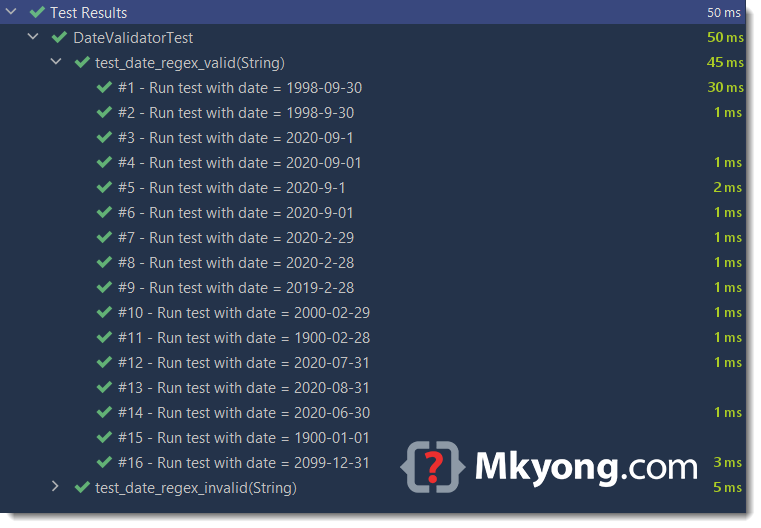
                "1998-09-30",
                "1998-9-30",
                "2020-09-1",
                "2020-09-01",
                "2020-9-1",
                "2020-9-01",
                "2020-2-29",             // leap year
                "2020-2-28",             // leap year
                "2019-2-28",             // common year
                "2000-02-29",            // 2000 is a leap year, % 400 == 0
                "1900-02-28",            // 1900 is a common year
                "2020-07-31",
                "2020-08-31",
                "2020-06-30",
                "1900-01-01",
                "2099-12-31");
    }

    static Stream<String> invalidDateProvider() {
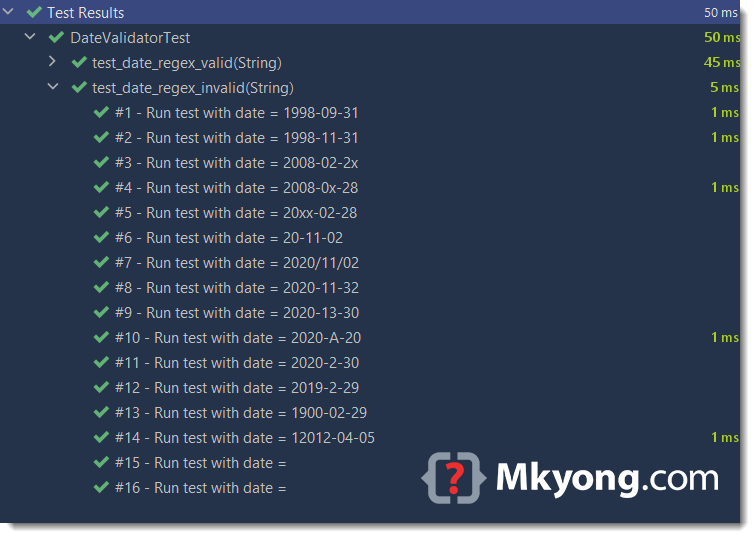
        return Stream.of(
                "1998-09-31",               // invalid day, sep max 30
                "1998-11-31",               // invalid day, nov max 30
                "2008-02-2x",               // invalid day 2x
                "2008-0x-28",               // invalid month 0x
                "20xx-02-28",               // invalid year 20xx
                "20-11-02",                 // invalid year 20, must be yyyy
                "2020/11/02",               // invalid date format, yyyy-mm-dd
                "2020-11-32",               // invalid day, 32
                "2020-13-30",               // invalid month 13
                "2020-A-20",                // invalid month A
                "2020-2-30",                // leap year, feb max 29
                "2019-2-29",                // common year, feb max 28
                "1900-02-29",               // 1900 is a common year, feb max 28
                "12012-04-05",              // support only 4 digits years
                " ",                        // empty
                "");                        // empty
    }

}
All tests are passed.
5. Java 8 DateTimeFormatter + ResolverStyle.STRICT
For anti-regex developer, consider the Java 8 DateTimeFormatter + ResolverStyle.STRICT solution to validate the date format. For complete example and unit tests, please refer to this article – Check if date is valid in Java
public static boolean isValid(final String date) {

    boolean valid = false;

    try {

        // ResolverStyle.STRICT for 30, 31 days checking, and also leap year.
        LocalDate.parse(date,
                DateTimeFormatter.ofPattern("uuuu-M-d")
                        .withResolverStyle(ResolverStyle.STRICT)
        );

        valid = true;

    } catch (DateTimeParseException e) {
        e.printStackTrace();
        valid = false;
    }

    return valid;
}
Download Source Code
$ git clone https://github.com/mkyong/core-java
$ cd java-regex/date

Hi,
I want to check if a file has correct date format as YYYYMMDD for all the days (leap and non-leap year) and if it is in incorrect format then the assertion should fail
Fails at 35/12/2022
So very nice, Tks very mich
I like your commented version of the regular expression but why not just compile that using Pattern.compile(DATE_PATTERN, Pattern.COMMENTS); ?
instead of rewriting it?
Hi,
I read this article and wanted to try and write a regex including 30/31 days and leap years (according to the article Despot posted). Haven’t tested the speed of it, but wanted to share the regex anyways.
It’s testing dates in format DD-MM-YYYY (so from 01-01-0000 to 31-12-9999).
^(0[1-9]|1[0-9]|2[0-8]|29((?=-([0][13-9]|1[0-2])|(?=-(0[1-9]|1[0-2])-([0-9]{2}(0[48]|[13579][26]|[2468][048])|([02468][048]|[13579][26])00))))|30(?=-(0[13-9]|1[0-2]))|31(?=-(0[13578]|1[02])))-(0[1-9]|1[0-2])-[0-9]{4}$
Thank you! It works great! 😀
Shouldn’t “^ and $” be used.I tried mentioned code and changed it for MM/DD/YYYY.But it was accepting 13/14 as valid date.Then I used “^ and $” as told at http://stackoverflow.com/questions/2137929/how-can-i-use-a-regular-expression-to-validate-month-input .And now its working as expected!!!!!!!