By default, Maven local repository is defaulted to ${user.home}/.m2/repository folder :
- Unix/Mac OS X –
~/.m2/repository - Windows –
C:\Users\{your-username}\.m2\repository
When we compile a Maven project, Maven will download all the project’s dependency and plugin jars into the Maven local repository, save time for next compilation.
1. Find Maven Local Repository
1.1 If the default .m2 is unable to find, maybe someone changed the default path. Issue the following command to find out where is the Maven local repository:
mvn help:evaluate -Dexpression=settings.localRepository
1.2 Example :
Terminal
D:\> mvn help:evaluate -Dexpression=settings.localRepository

[INFO] Scanning for projects...
[INFO]
[INFO] ------------------< org.apache.maven:standalone-pom >-------------------
[INFO] Building Maven Stub Project (No POM) 1
[INFO] --------------------------------[ pom ]---------------------------------
[INFO]
[INFO] --- maven-help-plugin:3.1.0:evaluate (default-cli) @ standalone-pom ---
[INFO] No artifact parameter specified, using 'org.apache.maven:standalone-pom:pom:1' as project.
[INFO]

C:\opt\maven-repository

[INFO] ------------------------------------------------------------------------
[INFO] BUILD SUCCESS
[INFO] ------------------------------------------------------------------------
[INFO] Total time: 2.598 s
[INFO] Finished at: 2018-10-24T16:44:18+08:00
[INFO] ------------------------------------------------------------------------
In above output, The Maven local repository is relocated to C:\opt\maven-repository
2. Update Maven Local Repository
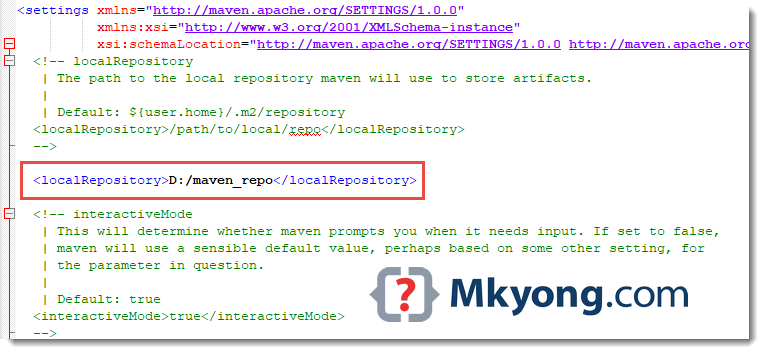
2.1 Find this file {MAVEN_HOME}\conf\settings.xml and update the localRepository.
{MAVEN_HOME}\conf\settings.xml
<settings>
  <!-- localRepository
   | The path to the local repository maven will use to store artifacts.
   |
   | Default: ~/.m2/repository
  <localRepository>/path/to/local/repo</localRepository>
  -->

<localRepository>D:/maven_repo</localRepository>
Note
Issue
Issue
mvn -version to find out where is Maven installed.
2.2 Save the file, done, the Maven local repository is now changed to D:/maven_repo.

Thanks!
while creating a MAVEN project in eclipse getting below error.
Could not resolve archetype org.apache.maven.archetypes:maven-archetype-webapp:1.0 from any of the configured repositories.
after Finding Maven Local Repository do I need to update
settings.xml not setting.xml
Article is updated, thanks.
I have been looking for a multiple local repository fall back solution. In otherwords, if the group intranet server (hosting the maven repo) isn’t available, then check the local (C:/) repo and if you can’t find something there, go to maven central.
Hi,
All your tutorials are very well explained, in detail and in step by step way.
You are doing a wonderful job!
quick question, there is a repository.xml in the local repository. What is that used for?
As I understand jars are downloaded by Maven automatically , when we adding dependency in pom . But from where maven download jars ?
Short , Simple and Best description…!Thanks
Hi,
It would be easy to proceed through the tutorial if we can have next and previous button at the end of topic. 🙂
Hi i’m using netbeans 7.3 and i can’t find maven repository browser in (window->other ).
I’m using netbeans as well. Don’t use Netbeans to try to browse a repository. Maven is meant to run OUTSIDE of an IDE.
You just missed about the eclipse update for this solution. I found a best practice to change maven local repository here
http://jroadie.com/maven/how-to-change-maven-local-repository/
Thanks a lot, just curious, when you said
Find {M2_HOME}\conf\setting.xml, update localRepository to something else.
You wanted to say
Find {MAVEN_HOME}\conf\setting.xml, update localRepository to something else.
Or it is correct?
Thanks 🙂
Exactly !!!
both are same M2_HOME= MAVEN_HOME
simple and helpful, thanks
Hi there
I’m quite new to maven and I’ve been trying to rotate the location of the settings.xml file, as I need it under version control, thus in a specific directory.
So far I tried “export MAVEN_OPTS=-Dorg.apache.maven.user-settings=/path/to/directory/settings.xml”
But unfortunatly that doesn’t work. It tried this because it works with switching the local repo with “export MAVEN_OPTS=-Dmaven.local.repo=/path/to/repo”.
Does anybody know how this could be accompished without using “mvn -s /path/to/directory/settings.xml someplugin:someGoal” ? Any hints, tips, tricks would be great,…. google could not really solve this… 🙁
Cheers Oskar
Short and sweet.Thanks alot man!!
Very info.
I’m follower of your blog/sites of Java. Thanks a lot for your efforts to make my life easy.
Hi yong i’m doing what you were specify in tutorial, but i’m getting BUILD-ERROR.
How to resolve that, plz help me
Thanks. Simple and clear description.
Keep up the good work.
Still am not getting the repo folder
go to the the C:Documents and SettingsYour User folder .m2
Hi younus,
may be few reasons.
And check for the maven home environment variable has set . if not do it correctly.
check whether you have any other maven installation in your machine. after you setting the
environment and path variables restart the machine.
for my case I had a previous maven installation and repo folder created according to that setting file local repository location. (although when I type mvn –version it shown the current maven directory ).
Then I restarted and now working fine.
Hi,
im new to maven
Help me
how create a .m2 directory in c:users/directory
Is there a typo in the text for “settings.xml”? I think the line:
should read:
based on the directory structure you displayed in the image.
I was even second guessing whether Maven translated _ to / or something, until I read your comment.
Short and clean. Thanks a lot!!