Problem
By default, while starting the Tomcat server instance in Eclipse, the project’s dependency libraries will not deploy to the Eclipse’s Tomcat plugin library folder ‘WEB-INF/lib’ correctly. See this “.classpath” file, that is generated by Maven “mvn eclipse:eclipse” command.
<classpath>
  <classpathentry kind="src" path="src/main/java" including="**/*.java"/>
  <classpathentry kind="src" path="src/main/resources" excluding="**/*.java"/>
  <classpathentry kind="output" path="target/classes"/>

  <classpathentry kind="var"
    path="M2_REPO/org/apache/struts/struts-core/1.3.10/struts-core-1.3.10.jar" />
  <classpathentry kind="var"
    path="M2_REPO/org/apache/struts/struts-taglib/1.3.10/struts-taglib-1.3.10.jar"/>

  <classpathentry kind="con" path="org.eclipse.jdt.launching.JRE_CONTAINER"/>
</classpath>
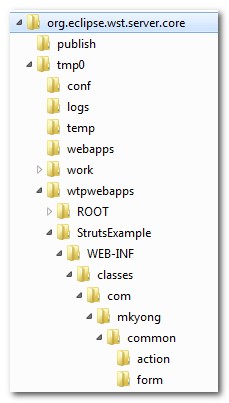
See the following Tomcat plugin folder, obviously, the dependency libraries are not deploy.
$workspace_folder\.metadata\.plugins\org.eclipse.wst.server.core\tmp0\wtpwebapps\StrutsExample
Solution
As i know, there are two solutions :
1. Java EE dependencies module
In Eclipse IDE, right click on the project, click properties and select the Java EE module dependencies and check all the project dependency libraries.
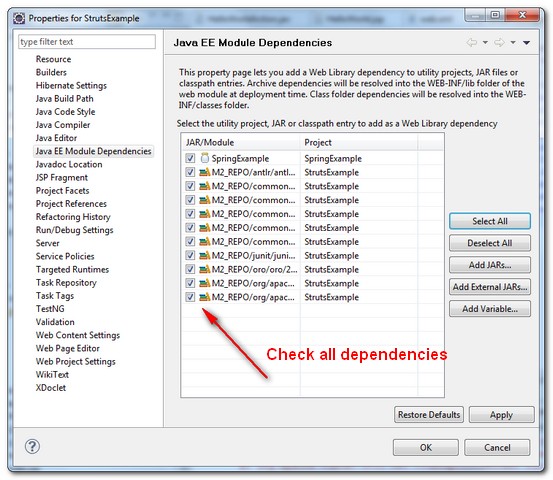
This will update the Eclipse’s classpath (.classpath) by adding corresponds “attributes” tag
<classpath>
  <classpathentry kind="src" path="src/main/java" including="**/*.java"/>
  <classpathentry kind="src" path="src/main/resources" excluding="**/*.java"/>
  <classpathentry kind="output" path="target/classes"/>
  <classpathentry kind="var"
    path="M2_REPO/org/apache/struts/struts-core/1.3.10/struts-core-1.3.10.jar" >
    <attributes>
      <attribute name="org.eclipse.jst.component.dependency" value="/WEB-INF/lib"/>
    </attributes>
  </classpathentry>
  <classpathentry kind="var"
    path="M2_REPO/org/apache/struts/struts-taglib/1.3.10/struts-taglib-1.3.10.jar" >
    <attributes>
     <attribute name="org.eclipse.jst.component.dependency" value="/WEB-INF/lib"/>
    </attributes>
  </classpathentry>
  <classpathentry kind="con" path="org.eclipse.jdt.launching.JRE_CONTAINER"/>
</classpath>
See the Tomcat plugin folder again, all dependency libraries are deployed to the “WEB-INF/lib” folder correctly.
$workspace_folder\.metadata\.plugins\org.eclipse.wst.server.core\tmp0\wtpwebapps\StrutsExample
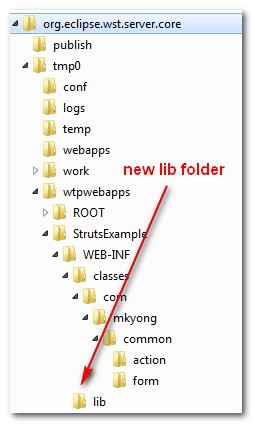
In Eclipse, you may need to delete the existing Tomcat server instant in the server tab, and create a new tomcat server instance to take effect.
2. WTP Support
Alternatively, you can issue the following command to make Maven support Eclipse WTP tool.
mvn eclipse:eclipse -Dwtpversion=2.0
The above command will generate a new file named “org.eclipse.wst.common.component” under project’s “.settings” folder.
<project-modules id="moduleCoreId" project-version="2.0">
  <wb-module deploy-name="StrutsExample">
    <property name="context-root" value="StrutsExample"/>
    <wb-resource deploy-path="/" source-path="src/main/webapp"/>
    <property name="java-output-path" value="/target/classes"/>
    <dependent-module archiveName="struts-core-1.3.10.jar" deploy-path="/WEB-INF/lib"
handle="module:/classpath/var/M2_REPO/org/apache/struts/struts-core/1.3.10/struts-core-1.3.10.jar">
      <dependency-type>uses</dependency-type>
    </dependent-module>
    <dependent-module archiveName="struts-taglib-1.3.10.jar" deploy-path="/WEB-INF/lib"
handle="module:/classpath/var/M2_REPO/org/apache/struts/struts-taglib/1.3.10/struts-taglib-1.3.10.jar">
      <dependency-type>uses</dependency-type>
    </dependent-module>
    <wb-resource deploy-path="/WEB-INF/classes" source-path="src/main/java"/>
    <wb-resource deploy-path="/WEB-INF/classes" source-path="src/main/resources"/>
  </wb-module>
</project-modules>
Now, start the server again, all dependency libraries will be deployed to the “WEB-INF/lib” folder automatically.

It’s crazy how trying to solve a problem in my project in 2023, going into a post from 2012, finding the solution and still seeing several people who more than 10 years ago were so unhappy with this problem, just like me
lol
Thanks so much. I was stumped by this for ages until I came across this site.
I’ve stuck into this blocker for an entire week suspecting that there is a problem with my GWT for Eclipse plugin… but answer is so simple!
Mr yong,
i was trying this example and as a part of it i downloaded your sample project above above and imported it to my workspace also downloaded struts 1.3.all and extracted it made a user library out of it and add to deployment assembly(very sure that struts-taglib.jar was added).But when i run the project i get the following error message.
HTTP Status 500 – javax.servlet.ServletException: javax.servlet.jsp.JspException: Cannot find bean: “helloWorldForm” in any scope
Thanks for solution…. After this i got another error.. got it solved by following the steps in http://www.ibm.com/developerworks/forums/thread.jspa?messageID=14527523
Thanks again.
Siva
Installing “Maven Integration for Eclipse WTP” from Eclipse Marketplace solved that for me.
I think that is a better solution as, with that plugin, libraries deployed to WEB-INF/lib will be updated when maven dependencies are updated/added/deleted.
But for me EclipseWTP plugin, some time not recognizing maven scopes properly.
Thank’s a lot for these solutions!
The 2nd solution may be is not good, because it differs from the original view (Libraries section looks different, and root directory for the project become webapp instead of WebContent). May be it’s ok, but anyway. So 1st is better for me.
I tried a new Eclipse Juno, WTP 3.4.0 and m2eclipse 1.1.1 – the 1st solution worked, but there are some light differences:
1) “Java EE module dependencies” is called “Deployment Assembly” now.
2) U have to choose “Maven Dependencies” in the “Add” dialog, after choosing “Java Build Path Entries”, instead of choosing all libraries independently.
Thank you very much. Alternative 2 worked for me.
Thanks so much , Your posted ended my two struggle on the issue
Hello :),
Thanks, very much for this work. It’s very helpful.
Best regards.
Mansour.
Thanks you saved me from insanity ……
I spent a week thinking of having done something wrong in my project ….
thanks a lot, a lot a lot!!! – you saved me! I’ve stuck into this blocker for an entire week suspecting that there is a problem with my GWT for Eclipse plugin… but answer is so simple! you are great, Man!
I also had the same problem ….
very very annoying
Thanks for the advice. For Eclipse Helios the option is “Deployment Assembly” in the project properties window. Then click Add button and next select Java Build Path Entries, then select Maven dependencies.
WOOT! Thanks for this!
Nice, nice, nice…
Tks a lot!!!
😉
I was looking for a solution to this problem and I could not find. And then you appeared under the following key words in Google:
“Eclipse tomcat deploy jar repository dependencies.”
Thank you very much, my friend. Postulate for president, man.
It’s glad to know that my sharing did help others 🙂
I was extremely pleased to find this site. I wanted to thank you for this great examine!! I definitely enjoying every amount of it and I have you bookmarked to view new stuff you publish.