Here’s a guide to show you how to use “mvn site:deploy” to deploy your generated documentation site to server automatically, via WebDAV mechanism.
P.S In this article, we are using Apache server 2.x with WebDAV enabled.
1. Enabled WebDAV
See this guide to learn how to enable WebDAV access on Apache server 2.x.
2. Configure Where to Deploy
In pom.xml, configure where to deploy your site within “distributionManagement” tag.
<distributionManagement>
    <site>
      <id>mkyongserver</id>
      <url>dav:http://127.0.0.1/sites/</url>
    </site>
</distributionManagement>
The “dav” prefix is added before the HTTP protocol, it means deploy your site via WebDAV mechanism. Alternately, you can replace it with “scp” if your server is supported “scp” access.
Tell Maven to use “wagon-webdav-jackrabbit” extension for deployment.
<build>
	<extensions>
		<extension>
			<groupId>org.apache.maven.wagon</groupId>
			<artifactId>wagon-webdav-jackrabbit</artifactId>
			<version>1.0-beta-7</version>
		</extension>
	</extensions>
</build>
Some claimed to use “
wagon-webdav“, but this is not working for me, so, use “wagon-webdav-jackrabbit” instead.
<extension>
            <groupId>org.apache.maven.wagon</groupId>
            <artifactId>wagon-webdav</artifactId>
            <version>1.0-beta-2</version>
</extension>
See a full pom.xml file.
<project xmlns="http://maven.apache.org/POM/4.0.0"
  xmlns:xsi="http://www.w3.org/2001/XMLSchema-instance"
  xsi:schemaLocation="http://maven.apache.org/POM/4.0.0
  http://maven.apache.org/maven-v4_0_0.xsd">
  <modelVersion>4.0.0</modelVersion>
  <groupId>com.mkyong.core</groupId>
  <artifactId>mkyong-core</artifactId>
  <packaging>jar</packaging>
  <version>1</version>
  <name>mkyong-core</name>
  <url>http://maven.apache.org</url>
  <build>
	<extensions>
		<extension>
			<groupId>org.apache.maven.wagon</groupId>
			<artifactId>wagon-webdav-jackrabbit</artifactId>
			<version>1.0-beta-7</version>
		</extension>
	</extensions>
  </build>
  <distributionManagement>
    <site>
      <id>mkyongserver</id>
      <url>dav:http://127.0.0.1/sites/</url>
    </site>
  </distributionManagement>
</project>
3. Configure WebDAV Authentication
Normally, WebDAV is required authentication access. So, you need to put the related authentication detail (username and password) in %MAVEN_PATH%/conf/settings.xml.
File : settings.xml
<servers>
	<server>
		<id>mkyongserver</id>
		<username>USERNAME</username>
		<password>PASSWORD</password>
	</server>
</servers>
The server id in Maven’s “
settings.xml” file will be referenced by the site id in “pom.xml” file.
4. mvn site:deploy
Issue “mvn site:deploy” :
D:\workspace-new\mkyong-core>mvn site:deploy
[INFO] Scanning for projects...
[INFO] Searching repository for plugin with prefix: 'site'.
[INFO] ------------------------------------------------------------------------
[INFO] Building mkyong-core
[INFO]    task-segment: [site:deploy]
[INFO] ------------------------------------------------------------------------
[INFO] [site:deploy {execution: default-cli}]
http://127.0.0.1/sites/ - Session: Opened
//......
#http://127.0.0.1/sites//./css/maven-base.css - Status code: 201
Transfer finished. 4594 bytes copied in 0.044 seconds
18 April 2011 4:23:40 PM org.apache.commons.httpclient.auth.AuthChallengeProcessor
selectAuthScheme
INFO: digest authentication scheme selected
Uploading: ./css/maven-theme.css to http://127.0.0.1/sites/
//......
Transfer finished. 10120 bytes copied in 0.142 seconds
http://127.0.0.1/sites/ - Session: Disconnecting
http://127.0.0.1/sites/ - Session: Disconnected
[INFO] ------------------------------------------------------------------------
[INFO] BUILD SUCCESSFUL
[INFO] ------------------------------------------------------------------------
[INFO] Total time: 5 seconds
[INFO] Finished at: Mon Apr 18 16:23:43 SGT 2011
[INFO] Final Memory: 9M/16M
[INFO] ------------------------------------------------------------------------
D:\workspace-new\mkyong-core>
All your sites folders and files, under project folder – “target/site” will be deployed to server automatically.
5. Output
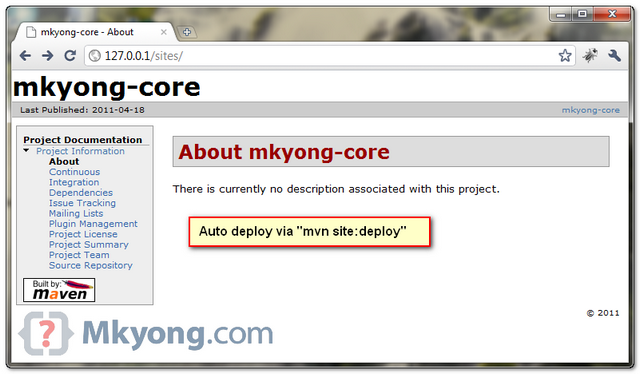
In this case, you can access the deployed site via this URL : http://127.0.0.1/sites/, see following figure :
Done.
References
- http://maven.apache.org/plugins/maven-site-plugin/usage.html
- http://mojo.codehaus.org/wagon-maven-plugin/usage.html
- http://maven.apache.org/plugins/maven-site-plugin/deploy-mojo.html
- http://maven.40175.n5.nabble.com/site-deploy-using-DAV-with-digest-auth-td125042.html
- http://www.sonatype.com/books/maven-book/reference/site-generation-sect-deploy-site.html
- https://mkyong.com/apache/how-to-enable-webdav-in-apache-server-2-2-x-windows/

How can I deploy a site with pom structure using webdav? I mean… http://blabla/sites/com/test/artifact/version/index.html
where distributionManager is: http://blabla/sites/
When I use maven-site with old sftp,scp,ftp create this structure in deployment point, and I set the distribution manager only in the parent pom. All the hierarchi use this distributionManager and create site with the pom groupId and artifactId… with webdav I can’t 🙁 any ideas? workarround?
I have more than 100 artifacts… so change all pom isn’t a good idea 🙁
I was getting a 401, 403 error while uploading the war file to Apache server.
Following worked me
1. Edit httpd.conf add following
require user admin
2. If you have not changed your local repo then move your settings.xml file from maven installation (mine was d:\maven\conf\settings.xml ) to .m2/settings.xml
Hope this helps 🙂
Sorry I missed this XML
1. Edit httpd.conf add following
require user admin
 <LimitExcept GET OPTIONS PUT>
        require user admin
    </LimitExcept>