In this tutorial, we will show you how to use Maven-Tomcat plugin to package and deploy a WAR file to Tomcat, both in Tomcat 6 and 7.
Libraries used :
- Maven 3
- Tomcat 6.0.37
- Tomcat 7.0.53
Deploy URL = http://localhost:8080/manager/text
Command =
mvn tomcat7:deploy
Tomcat 6
Deploy URL = http://localhost:8080/manager/
Command = mvn tomcat6:deploy
1. Tomcat 7 Example
This example shows you how to package and deploy a WAR file on Tomcat 7.
1.1 Tomcat Authentication
Add an user with roles manager-gui and manager-script.
<?xml version='1.0' encoding='utf-8'?>
<tomcat-users>

	<role rolename="manager-gui"/>
	<role rolename="manager-script"/>
	<user username="admin" password="password" roles="manager-gui,manager-script" />

</tomcat-users>
1.2 Maven Authentication
Add above Tomcat’s user in the Maven setting file, later Maven will use this user to login Tomcat server.
<?xml version="1.0" encoding="UTF-8"?>
<settings ...>
	<servers>

		<server>
			<id>TomcatServer</id>
			<username>admin</username>
			<password>password</password>
		</server>

	</servers>
</settings>
1.3 Tomcat7 Maven Plugin
Declares a Maven Tomcat plugin.
	<plugin>
		<groupId>org.apache.tomcat.maven</groupId>
		<artifactId>tomcat7-maven-plugin</artifactId>
		<version>2.2</version>
		<configuration>
			<url>http://localhost:8080/manager/text</url>
			<server>TomcatServer</server>
			<path>/mkyongWebApp</path>
		</configuration>
	</plugin>
How it works?
During deployment, it tells Maven to deploy the WAR file to Tomcat server via “http://localhost:8080/manager/text” , on path “/mkyongWebApp“, using “TomcatServer” (in settings.xml) username and password for authentication.
1.4 Deploy to Tomcat
Commands to manipulate WAR file on Tomcat.
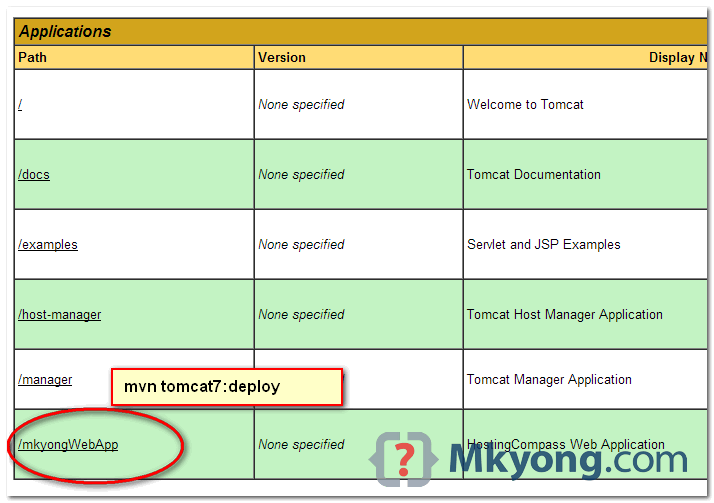
mvn tomcat7:deploy
mvn tomcat7:undeploy
mvn tomcat7:redeploy
Example
> mvn tomcat7:deploy

...
[INFO] Deploying war to http://localhost:8080/mkyongWebApp
Uploading: http://localhost:8080/manager/text/deploy?path=%2FmkyongWebApp&update=true
Uploaded: http://localhost:8080/manager/text/deploy?path=%2FmkyongWebApp&update=true (13925 KB at 35250.9 KB/sec)

[INFO] tomcatManager status code:200, ReasonPhrase:OK
[INFO] OK - Deployed application at context path /mkyongWebApp
[INFO] ------------------------------------------------------------------------
[INFO] BUILD SUCCESS
[INFO] ------------------------------------------------------------------------
[INFO] Total time: 8.507 s
[INFO] Finished at: 2014-08-05T11:35:25+08:00
[INFO] Final Memory: 28M/308M
[INFO] ------------------------------------------------------------------------
2. Tomcat 6 Example
This example shows you how to package and deploy a WAR file on Tomcat 6. The steps are same with Tomcat 7, just the deploy url and command name are different.
2.1 Tomcat Authentication
<?xml version='1.0' encoding='utf-8'?>
<tomcat-users>

	<role rolename="manager-gui"/>
	<role rolename="manager-script"/>
	<user username="admin" password="password" roles="manager-gui,manager-script" />

</tomcat-users>
2.2 Maven Authentication
<?xml version="1.0" encoding="UTF-8"?>
<settings ...>
	<servers>

		<server>
			<id>TomcatServer</id>
			<username>admin</username>
			<password>password</password>
		</server>

	</servers>
</settings>
2.3 Tomcat6 Maven Plugin
	<plugin>
		<groupId>org.apache.tomcat.maven</groupId>
		<artifactId>tomcat6-maven-plugin</artifactId>
		<version>2.2</version>
		<configuration>
			<url>http://localhost:8080/manager</url>
			<server>TomcatServer</server>
			<path>/mkyongWebApp</path>
		</configuration>
	</plugin>
2.4 Deploy to Tomcat
mvn tomcat6:deploy
mvn tomcat6:undeploy
mvn tomcat6:redeploy
Example
> mvn tomcat6:deploy

...
[INFO] Deploying war to http://localhost:8080/mkyongWebApp
Uploading: http://localhost:8080/manager/deploy?path=%2FmkyongWebApp
Uploaded: http://localhost:8080/manager/deploy?path=%2FmkyongWebApp (13925 KB at 32995.5 KB/sec)

[INFO] ------------------------------------------------------------------------
[INFO] BUILD SUCCESS
[INFO] ------------------------------------------------------------------------
[INFO] Total time: 22.652 s
[INFO] Finished at: 2014-08-05T12:18:54+08:00
[INFO] Final Memory: 30M/308M
[INFO] ------------------------------------------------------------------------

What’s Wrong here, please save my time by your valuable concern.
settings.xml
TomcatServer
tomcat
tomcat
POM.xml
—-
org.apache.tomcat.maven
tomcat7-maven-plugin
2.2
http://localhost:2020/manager/text
TomcatServer
/myApplication
But still>>
BUILD FAILURE
[INFO] ————————————————————————
[INFO] Total time: 21.375 s
[INFO] Finished at: 2019-09-14T23:35:42+05:30
[INFO] Final Memory: 14M/177M
[INFO] ————————————————————————
[ERROR] Failed to execute goal org.apache.tomcat.maven:tomcat7-maven-plugin:2.2:deploy (default-cli) on project application: Cannot invoke Tomcat manager: Connection refused: connect -> [Help 1]
Hi Mk,
i am getting below Error. I am using tomcat8. I hope we can use the same deploy command as tomcat7.
mvn tomcat7:deploy
I can able to deploy manually from tomcat manager but not via mvn.
Error:
————————————————————————
[INFO] BUILD FAILURE
[INFO] ————————————————————————
[INFO] Total time: 4.987 s
[INFO] Finished at: 2018-08-23T23:10:26-04:00
[INFO] Final Memory: 15M/207M
[INFO] ————————————————————————
[ERROR] Failed to execute goal org.apache.tomcat.maven:tomcat7-maven-plugin:2.2:deploy (default-cli) on project BeecroftShoppingWeb: Cannot invoke Tomcat manager: Broken pipe -> [Help 1]
[ERROR]
[ERROR] To see the full stack trace of the errors, re-run Maven with the -e switch.
[ERROR] Re-run Maven using the -X switch to enable full debug logging.
[ERROR]
[ERROR] For more information about the errors and possible solutions, please read the following articles:
[ERROR] [Help 1] http://cwiki.apache.org/confluence/display/MAVEN/MojoExecutionException
Great tutorial as always.
Thanks.
pom.xml
org.apache.tomcat.maven
tomcat7-maven-plugin
2.2
http://localhost:8080/manager/text
TomcatServer
/WebMaven
admin
pass
Tomcat Users:
Maven’s settings.xml :
TomcatServer
admin
pass
mvn clean install tomcat7:deploy
After following all the steps mentioned above I get the below mentioned error every time.
[ERROR] Failed to execute goal org.apache.tomcat.maven:tomcat7-maven-plugin:2.2:deploy (default-cli) on project WebMaven: Tomcat return http status error: 403, Reason Phrase: : HTTP Status 403 – Forbiddenh1 {font-family:Tahoma,Arial,sans-serif;color:white;background-color:#525D76;font-size:22px;} h2 {font-family:Tahoma,Arial,sans-serif;color:white;background-color:#525D76;font-size:16px;} h3 {font-family:Tahoma,Arial,sans-serif;color:white;background-color:#525D76;font-size:14px;} body {font-family:Tahoma,Arial,sans-serif;color:black;background-color:white;} b {font-family:Tahoma,Arial,sans-serif;color:white;background-color:#525D76;} p {font-family:Tahoma,Arial,sans-serif;background:white;color:black;font-size:12px;} a {color:black;} a.name {color:black;} .line {height:1px;background-color:#525D76;border:none;}HTTP Status 403 – Forbidden
Type Status Report
Description The server understood the request but refuses to authorize it.
Apache Tomcat/8.5.30 -> [Help 1]
[ERROR]
[ERROR] [Help 1] http://cwiki.apache.org/confluence/display/MAVEN/MojoExecutionException
thanks 🙂
you are brilliant.
this is quite old. tomcat is at 9 already. is there a maven9 plugin?
Looks like the plugin is upto tomcat 8 only
I am getting a HTTP Status 404 – /SpringMVC/
type Status report
message /SpringMVC/
description The requested resource is not available.
Apache Tomcat/8.0.32
I imported the pom.xml and exported a war to tomcat 8.???
I have errors, when i try deploy war like in tutorial. When i run tomcat manual i have: “Cannot invoke Tomcat manager: Software caused connection abort” and when i didn’t run tomcat manual: “Cannot invoke Tomcat manager: Connection refused: connect”. Before executing “mvn tomcat7:deploy” tomcat must be launched manually or not ?
Hi Mkyong…
i did configuration in my pom.xml as
org.apache.tomcat.maven
tomcat7-maven-plugin
2.2
http://192.165.0.242:8080/manager/text
TomcatServer
/testdemo
i have got I/O Exception caught when processing request:Connection reset by peer..
Plz give me solution on this …
Thanks
adding
into tomcat-users.xml …..solved my issue
Hi Mykong, excellent post!, I have a doubt, is possible make a deploy with scope to run tests? , BR
Caused by: org.apache.maven.plugin.PluginContainerException: A required class was missing while executing org.codehaus.mojo:tomcat-maven-plugin:1.1:deploy: org/apache/commons/codec/binary/Base64
am getting the above error message when i try to deploy. The tomcat-maven-plugin:1.1 jar is existing in my local repository.
thanks,it works
Thanks MKyong. Your topic is great.
I found I had to specify this in the pom using tomcat7, note the groupId, artifactId, and url. I got this from the plugin documentation page at http://tomcat.apache.org/maven-plugin-2.2/:
org.apache.tomcat.maven
tomcat7-maven-plugin
2.2
http://localhost:8080/manager/text
TomcatServer
/demoservices
This worked for me anyway. I also put my settings.xml in the .m2 repo folder, don’t know if that was necessary. Thank you very much mkyong!
Thanks, article is updated with Tomcat7 example.
This not work for tomcat7. MKYong should indicate at the beginning that this tutorial works for tomcat6. For tomcat7 the role for the tomcat’s user should be “manager-script”, the url in pom.xml should be http://127.0.0.1:8080/manager/text and the command should be mvn tomcat7:deploy
Sorry for the misleading, article is updated with Tomcat 6 and 7 example.
Is it possible hot code swapping with Eclipse & Maven tomcat plugin?
You can run
“tomcat:run” or “tomcat7:run”
minor update, for Tomcat 7 and above, configuraton parameter for maven plugin for tomcat need to be changed to http://127.0.0.1:8080/manager
Hey Thanks for above tutorial.
I want to generate a valid WAR file from my github repo.
Is it possible using maven? How would you do it?
Can I use same logic as you mentioned above, only using github credentials instead of tomcat?
Plz guide me ASAP.
Thanks
Awesome work.
Very easy to implement and works like a charm. Thanks for the tip.
Hi Mkyong,
Thanks for the great post.Keep posting stuff like this:)
I have a question that how to configure tomcat path to use maven tomcat plugin .I have searched a lot on web but couldn’t find suggestions that help me to get out of this problem.
Please can you provide any suggestion how to configure tomcat path to use this plugin.
Hi,
I use tomcat-7.0.42, and I manually copied maven build war file into server.
But it do not work. It gives 404 error when hit the url.
As I see in this topic configuration for tomcat6. Fotr tomcat7 you shud specify url as http://127.0.0.1:8080/manager/html
me too
For Tomcat 7 just change the user role in tomcat-users.xml and please paste this instead of the example information and it will works.
I’ve successfully configured Bonita to Tomcat. However, when I’m trying to deploy my “.war” file on the server, the following error appears
FAIL – Application at context path /MyProcess–1.0 could not be started
how can I resolve this??
I also had following problem:
Cannot invoke Tomcat manager: Server returned HTTP response code: 403 for URL
while using Tomcat 7. The solution was using maven goal “tomcat7:deploy”. For details see http://tomcat.apache.org/maven-plugin-2.0/tomcat7-maven-plugin/plugin-info.html
Article is updated with Tomcat7 example.
[ERROR] Failed to execute goal org.codehaus.mojo:tomcat-maven-plugin:1.1:redeploy (default-cli) on project cms-sql: Cannot invoke Tomcat manager: Server returned HTTP response code: 403 for URL: http://10.70.4.200:9090/manager/deploy?path=%2FCMSService&war=&update=true -> [Help 1]
org.apache.maven.lifecycle.LifecycleExecutionException: Failed to execute goal org.codehaus.mojo:tomcat-maven-plugin:1.1:redeploy (default-cli) on project cms-sql: Cannot invoke Tomcat manager
I had trouble deploying as I had incorrectly set the roles in my tomcat users file.
I fixed it using:
POM.xml
org.codehaus.mojo
tomcat-maven-plugin
http://127.0.0.1:8080/manager/html
TomcatServer
/[yourApp]
admin
password
tomcat_users.xml
I had trouble deploying as I had incorrectly set the roles in my tomcat users file.
I fixed it using:
Tomcat-users xml
Work for me only with
Thanks both.
Ahh, I read this comment only after fixing the code myself to make it run on tomcat7 and with the updated tomcat7-maven-plugin…
hi
below warning is coming while deploying the war file with mvn tomcat:deploy
[WARNING] Unrecognised tag: ‘server’ (position: START_TAG seen … | variables for plugins in the POM.\n |\n |–>\n\n… @183:9) @ /usr/local/apache-maven/conf/settings.xml, line 183, column 9
I was also getting same error
[ERROR] Failed to execute goal org.codehaus.mojo:tomcat-maven-plugin:1.1:exploded (default-cli) on project Struts-Redirect: Cannot invoke Tomcat manager: http://127.0.0.1
:9091/manager/deploy?path=%2FStruts-Redirect&war=file%3A%2FE%3A%2Fstufff%2F111111111struts%2FStruts2-Hello-World-Example%2FStruts2Example%2Ftarget%2FStruts-Redirect%2F ->
[Help 1]
Paste below lines in manager.xml present at $CATALINA_BASE/conf/[enginename]/[hostname] folder ($CATALINA_BASE\conf\Catalina\localhost\manager.xml)
For more information refer to Manager App HOW-TO @
http://tomcat.apache.org/tomcat-6.0-doc/manager-howto.html
If it doesn’t work put your settings.xml file under the location m2/settings.xml file.
Hope this helps.
how can i make war file from maven project?
mvn war:warormvn packageto run the full building life cyclesThank you so much mkyong.
Hi Mr. Mkyong,
Thank you very much for this handy explanation.
I have a question related to the usage of proxy server.
To access to my remote server I have to pass by a proxy server.
How can I deal with this issue?
Thank you very much
Best Regards
Thanks MKYong and Santosh! This helped so much!
hii mr mkyong
how to integration struts2 , spring3 and hibernate 3 using maven
thank you mr mkyong
hii mr mkyong how to integration struts2,hibernate3,spring3 using maven
thamk you mr mkyong
When i am trying to deploy the project using “mvn tomcat:deploy” I am getting the error below. I have made the changes as specified by you. Can you please help me out.
[ERROR] Failed to execute goal org.codehaus.mojo:tomcat-maven-plugin:1.1:exploded (default-cli) on project Struts-Redirect: Cannot invoke Tomcat manager: http://127.0.0.1 :9091/manager/deploy?path=%2FStruts-Redirect&war=file%3A%2FE%3A%2Fstufff%2F111111111struts%2FStruts2-Hello-World-Example%2FStruts2Example%2Ftarget%2FStruts-Redirect%2F -> [Help 1] org.apache.maven.lifecycle.LifecycleExecutionException: Failed to execute goal org.codehaus.mojo:tomcat-maven-plugin:1.1:exploded (default-cli) on project Struts-Redirect : Cannot invoke Tomcat manager at org.apache.maven.lifecycle.internal.MojoExecutor.execute(MojoExecutor.java:217) at org.apache.maven.lifecycle.internal.MojoExecutor.execute(MojoExecutor.java:153) at org.apache.maven.lifecycle.internal.MojoExecutor.execute(MojoExecutor.java:145) //... at org.codehaus.plexus.classworlds.launcher.Launcher.main(Launcher.java:352) Caused by: org.apache.maven.plugin.MojoExecutionException: Cannot invoke Tomcat manager at org.codehaus.mojo.tomcat.AbstractCatalinaMojo.execute(AbstractCatalinaMojo.java:149) at org.codehaus.mojo.tomcat.AbstractWarCatalinaMojo.execute(AbstractWarCatalinaMojo.java:70) at org.apache.maven.plugin.DefaultBuildPluginManager.executeMojo(DefaultBuildPluginManager.java:107) at org.apache.maven.lifecycle.internal.MojoExecutor.execute(MojoExecutor.java:209) ... 19 more Caused by: java.io.FileNotFoundException: http://127.0.0.1:9091/manager/deploy?path=%2FStruts-Redirect&war=file%3A%2FE%3A%2Fstufff%2F111111111struts%2FStruts2-Hello-World -Example%2FStruts2Example%2Ftarget%2FStruts-Redirect%2F at sun.net.www.protocol.http.HttpURLConnection.getInputStream(HttpURLConnection.java:1434) at org.codehaus.mojo.tomcat.TomcatManager.invoke(TomcatManager.java:604) at org.codehaus.mojo.tomcat.TomcatManager.deployImpl(TomcatManager.java:662) at org.codehaus.mojo.tomcat.TomcatManager.deploy(TomcatManager.java:245) at org.codehaus.mojo.tomcat.AbstractDeployMojo.deployWar(AbstractDeployMojo.java:175) at org.codehaus.mojo.tomcat.AbstractDeployMojo.invokeManager(AbstractDeployMojo.java:85) at org.codehaus.mojo.tomcat.AbstractCatalinaMojo.execute(AbstractCatalinaMojo.java:141) ... 22 moreDo you see war file in your project build folder?
Yes.
The war file is there.
The error show above is after maven starts deploying the war.
I searched on google also but didn’t find any solution for this.
How about if you copy the Maven generated war file into Tomcat folder manually?
Hi,
I am using tomcat 7.0.6.The following changes worked for me.
1)File : tomcat-users.xml
2)maven: settings.xml
3)pom.xml
Thanks it helped. But I have made some more changes to make my deployment work.
-First add an entry of CATALINA_HOME in environment variables and also update the path variable to %CATALINA_HOME%bin.
– To deploy the application it is mandatory to start the server and then fire the command mvn tomcat:deploy
-Please note in tomcat7 to access the text interface we need to use the below url in pom.xml file
http://127.0.0.1:8080/manager/text
TomcatServer
/myWebapp
I already tried everything in this post/comment, but I still getting the error call “I/O exception, reset by peer”. How can I resolve this?
Hi mkyong,
I am getting following error while running the code.
[INFO] Deploying war to http://localhost:8080/ShoppingCartWeb
[DEBUG] No server specified for authentication - using defaults
[INFO] ------------------------------------------------------------------------
[INFO] BUILD FAILURE
[INFO] ------------------------------------------------------------------------
[INFO] Total time: 22.905s
[INFO] Finished at: Fri Aug 17 16:25:45 BST 2012
[INFO] Final Memory: 6M/16M
[INFO] ------------------------------------------------------------------------
[ERROR] Failed to execute goal org.codehaus.mojo:tomcat-maven-plugin:1.1:deploy (default-cli) on project ShoppingCartWeb: Cannot invoke Tomcat manager: Unexpected end of file from server -> [Help 1]
org.apache.maven.lifecycle.LifecycleExecutionException: Failed to execute goal org.codehaus.mojo:tomcat-maven-plugin:1.1:deploy (default-cli) on project ShoppingCartWeb: Cannot invoke Tomcat manager
        at org.apache.maven.lifecycle.internal.MojoExecutor.execute(MojoExecutor.java:217)
        at org.apache.maven.lifecycle.internal.MojoExecutor.execute(MojoExecutor.java:153)
        at org.apache.maven.lifecycle.internal.MojoExecutor.execute(MojoExecutor.java:145)
        at org.apache.maven.lifecycle.internal.LifecycleModuleBuilder.buildProject(LifecycleModuleBuilder.java:84)
        at org.apache.maven.lifecycle.internal.LifecycleModuleBuilder.buildProject(LifecycleModuleBuilder.java:59)
        at org.apache.maven.lifecycle.internal.LifecycleStarter.singleThreadedBuild(LifecycleStarter.java:183)
        at org.apache.maven.lifecycle.internal.LifecycleStarter.execute(LifecycleStarter.java:161)
        at org.apache.maven.DefaultMaven.doExecute(DefaultMaven.java:320)
        at org.apache.maven.DefaultMaven.execute(DefaultMaven.java:156)
        at org.apache.maven.cli.MavenCli.execute(MavenCli.java:537)
        at org.apache.maven.cli.MavenCli.doMain(MavenCli.java:196)
        at org.apache.maven.cli.MavenCli.main(MavenCli.java:141)
        at sun.reflect.NativeMethodAccessorImpl.invoke0(Native Method)
        at sun.reflect.NativeMethodAccessorImpl.invoke(NativeMethodAccessorImpl.java:39)
        at sun.reflect.DelegatingMethodAccessorImpl.invoke(DelegatingMethodAccessorImpl.java:25)
        at java.lang.reflect.Method.invoke(Method.java:597)
        at org.codehaus.plexus.classworlds.launcher.Launcher.launchEnhanced(Launcher.java:290)
        at org.codehaus.plexus.classworlds.launcher.Launcher.launch(Launcher.java:230)
        at org.codehaus.plexus.classworlds.launcher.Launcher.mainWithExitCode(Launcher.java:409)
        at org.codehaus.plexus.classworlds.launcher.Launcher.main(Launcher.java:352)
Caused by: org.apache.maven.plugin.MojoExecutionException: Cannot invoke Tomcat manager
        at org.codehaus.mojo.tomcat.AbstractCatalinaMojo.execute(AbstractCatalinaMojo.java:149)
        at org.codehaus.mojo.tomcat.AbstractWarCatalinaMojo.execute(AbstractWarCatalinaMojo.java:70)
        at org.apache.maven.plugin.DefaultBuildPluginManager.executeMojo(DefaultBuildPluginManager.java:101)
        at org.apache.maven.lifecycle.internal.MojoExecutor.execute(MojoExecutor.java:209)
        ... 19 more
Caused by: java.net.SocketException: Unexpected end of file from server
        at sun.net.www.http.HttpClient.parseHTTPHeader(HttpClient.java:781)
        at sun.net.www.http.HttpClient.parseHTTP(HttpClient.java:640)
        at sun.net.www.http.HttpClient.parseHTTPHeader(HttpClient.java:778)
        at sun.net.www.http.HttpClient.parseHTTP(HttpClient.java:640)
        at sun.net.www.protocol.http.HttpURLConnection.getInputStream(HttpURLConnection.java:1195)
        at org.codehaus.mojo.tomcat.TomcatManager.invoke(TomcatManager.java:604)
        at org.codehaus.mojo.tomcat.TomcatManager.deployImpl(TomcatManager.java:662)
        at org.codehaus.mojo.tomcat.TomcatManager.deploy(TomcatManager.java:295)
        at org.codehaus.mojo.tomcat.AbstractDeployWarMojo.deployWar(AbstractDeployWarMojo.java:85)
        at org.codehaus.mojo.tomcat.AbstractDeployMojo.invokeManager(AbstractDeployMojo.java:85)
        at org.codehaus.mojo.tomcat.AbstractCatalinaMojo.execute(AbstractCatalinaMojo.java:141)
        ... 22 more
[ERROR]
[ERROR]
my pom.xml is
<project xmlns="http://maven.apache.org/POM/4.0.0" xmlns:xsi="http://www.w3.org/2001/XMLSchema-instance"
  xsi:schemaLocation="http://maven.apache.org/POM/4.0.0 http://maven.apache.org/maven-v4_0_0.xsd">
  <modelVersion>4.0.0</modelVersion>
  <groupId>com.boogies.shoppingcartweb</groupId>
  <artifactId>ShoppingCartWeb</artifactId>
  <packaging>war</packaging>
  <version>1.0-SNAPSHOT</version>
  <name>ShoppingCartWeb Maven Webapp</name>
  <url>http://maven.apache.org</url>
  <dependencies>
    <dependency>
      <groupId>junit</groupId>
      <artifactId>junit</artifactId>
      <version>3.8.1</version>
      <scope>test</scope>
    </dependency>
  </dependencies>
  <build>
    <finalName>ShoppingCartWeb</finalName>
     <plugins>
    <plugin>
	<groupId>org.codehaus.mojo</groupId>
	<artifactId>tomcat-maven-plugin</artifactId>
	<configuration>
		<url>http://127.0.0.1:8080/manager</url>
		<server>TomcatServer</server>
		<path>/ShoppingCartWeb</path>
	</configuration>
	</plugin>
        </plugins>
  </build>
</project>
and
settings.xml contains server information
 <server>
        <id>TomcatServer</id>
		<username>admin</username>
		<password>password</password>
    </server>
How this tomcat plugin works? How tomcat plugin contact to tomcat server.DO i need to start tomcat server manually for that?
Thanks in advance,
King George