In this tutorial we will show you how to use mvn archetype:generate to generate a project from a list of existing Maven templates. In Maven 3.1.1, there are 1000+ templates, crazy, Maven team should filter out some useless templates.
Normally, we just use the following two templates :
maven-archetype-webapp– Java Web Project (WAR)maven-archetype-quickstart– Java Project (JAR)
1. Maven 1000+ Templates
If you type mvn archetype:generate, 1000+ templates will be prompted on screen and you are no way to see it or choose what you want. To solve it, output the template list to a text file like this :
$ mvn archetype:generate > templates.txt

//waiting few seconds, then exits
Press CTRL + C

$ vim templates.txt
2. Maven archetype:generate
Steps to guide you how to generate a web project from an existing Spring-Hibernate template :
2.1 List out the Maven templates :
$ mvn archetype:generate

[INFO] Scanning for projects...
[INFO]
[INFO] ------------------------------------------------------------------------
[INFO] Building Maven Stub Project (No POM) 1
[INFO] ------------------------------------------------------------------------
[INFO]
[INFO] >>> maven-archetype-plugin:2.2:generate (default-cli) @ standalone-pom >>>
[INFO]
[INFO] <<< maven-archetype-plugin:2.2:generate (default-cli) @ standalone-pom <<<
[INFO]
[INFO] --- maven-archetype-plugin:2.2:generate (default-cli) @ standalone-pom ---
[INFO] Generating project in Interactive mode
[INFO] No archetype defined. Using maven-archetype-quickstart (org.apache.maven.archetypes:maven-archetype-quickstart:1.0)

Choose archetype:

311: remote -> jboss:mobicents-ra-archetype (An archetype for slee resource adaptor.)
//...

314: remote -> ml.rugal.archetype:springmvc-spring-hibernate (A pretty useful JavaEE application archetype based on springmvc spring and hibernate)

//...
486: remote -> org.apache.maven.archetypes:maven-archetype-j2ee-simple (An archetype which contains a simplifed sample J2EE application.)
487: remote -> org.apache.maven.archetypes:maven-archetype-marmalade-mojo (-)
488: remote -> org.apache.maven.archetypes:maven-archetype-mojo (An archetype which contains a sample a sample Maven plugin.)
489: remote -> org.apache.maven.archetypes:maven-archetype-plugin (An archetype which contains a sample Maven plugin.)
491: remote -> org.apache.maven.archetypes:maven-archetype-portlet (An archetype which contains a sample JSR-268 Portlet.)
492: remote -> org.apache.maven.archetypes:maven-archetype-profiles (-)
493: remote -> org.apache.maven.archetypes:maven-archetype-quickstart (An archetype which contains a sample Maven project.)
//...
2.2 Choose number “314” for ml.rugal.archetype:springmvc-spring-hibernate templete, and fill in the detail :
This number 314 may vary at your environment. Find your correct number with the technique listed in step 1 above.
Choose a number or apply filter (format: [groupId:]artifactId, case sensitive contains): 493: 314
Choose ml.rugal.archetype:springmvc-spring-hibernate version:
1: 0.1
2: 0.2
3: 0.3
Choose a number: 3: 3
Downloading: http://repo.maven.apache.org/maven2/ml/rugal/archetype/springmvc-spring-hibernate/0.3/springmvc-spring-hibernate-0.3.jar
Downloaded: http://repo.maven.apache.org/maven2/ml/rugal/archetype/springmvc-spring-hibernate/0.3/springmvc-spring-hibernate-0.3.jar (29 KB at 19.7 KB/sec)
Downloading: http://repo.maven.apache.org/maven2/ml/rugal/archetype/springmvc-spring-hibernate/0.3/springmvc-spring-hibernate-0.3.pom
Downloaded: http://repo.maven.apache.org/maven2/ml/rugal/archetype/springmvc-spring-hibernate/0.3/springmvc-spring-hibernate-0.3.pom (4 KB at 5.5 KB/sec)
Define value for property 'groupId': : com.mkyong.web
Define value for property 'artifactId': : myweb
Define value for property 'version':  1.0-SNAPSHOT: :
Define value for property 'package':  com.mkyong.web: :
Confirm properties configuration:
groupId: com.mkyong.web
artifactId: myweb
version: 1.0-SNAPSHOT
package: com.mkyong.web
 Y: : y
[INFO] ----------------------------------------------------------------------------
[INFO] Using following parameters for creating project from Archetype: springmvc-spring-hibernate:0.3
[INFO] ----------------------------------------------------------------------------
[INFO] Parameter: groupId, Value: com.mkyong.web
[INFO] Parameter: artifactId, Value: myweb
[INFO] Parameter: version, Value: 1.0-SNAPSHOT
[INFO] Parameter: package, Value: com.mkyong.web
[INFO] Parameter: packageInPathFormat, Value: com/mkyong/web
[INFO] Parameter: package, Value: com.mkyong.web
[INFO] Parameter: version, Value: 1.0-SNAPSHOT
[INFO] Parameter: groupId, Value: com.mkyong.web
[INFO] Parameter: artifactId, Value: myweb
[INFO] project created from Archetype in dir: /Users/mkyong/Documents/workspace/maven/template/myweb
[INFO] ------------------------------------------------------------------------
[INFO] BUILD SUCCESS
[INFO] ------------------------------------------------------------------------
[INFO] Total time: 35.210s
[INFO] Finished at: Tue Oct 28 15:32:10 MYT 2014
[INFO] Final Memory: 10M/29M
[INFO] ------------------------------------------------------------------------
It will generate the following project folders and files.
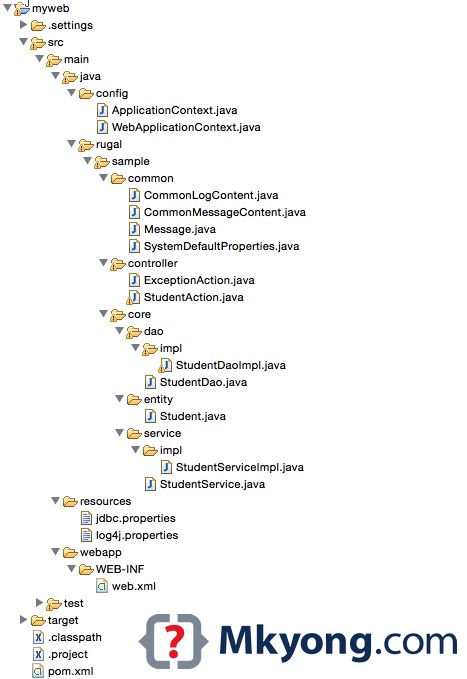
Figure : Generated Project structure in Eclipse IDE.
To imports the project into Eclipse, type
mvn eclipse:eclipse, and import it as a normal project :
$ cd myweb
$ pwd
/Users/mkyong/Documents/workspace/maven/template/myweb

$ mvn eclipse:eclipse
3. More Examples
If you know which archetypeArtifactId to use, just skip the command in interactive mode like this :
3.1 maven-archetype-quickstart (Java Project)
$ mvn archetype:generate -DgroupId=com.mkyong.core -DartifactId=ProjectName
	-DarchetypeArtifactId=maven-archetype-quickstart -DinteractiveMode=false
Review this example – How to create a Java project with Maven
3.2 maven-archetype-webapp (Java Web Project)
$ mvn archetype:generate -DgroupId=com.mkyong.web -DartifactId=ProjectName
	-DarchetypeArtifactId=maven-archetype-webapp -DinteractiveMode=false
Review this example – How to create a Java web application project with Maven

Good one for beginners.
I have an error
The desired archetype does not exist (org.apache.maven.archetypes:maven-archetype-mojo:RELEASE)
what should I do to get the archetype ?
thx
I have an error :
————————————————————————
The desired archetype does not exist (org.apache.maven.archetypes:maven-archetype-mojo:RELEASE)
————————————————————————
what should I do to get the archetype :maven-archetype-mojo?
If when you type “mvn -version” at the command prompt you get the error: “Files was unexpected at this time.”
Then check that your JAVA_HOME variable is not enclosed in double quotes.
My environment variable JAVA_HOME, was set to “C:\Program Files (x86)\Java\jdk1.6.0_11” (with the quotes)…
I solved the problem by removing the double quotes and set JAVA_HOME to C:\Program Files (x86)\Java\jdk1.6.0_11… all sorted!!
Hi Paul,
How to add JAR File for Maven?
Hi Paul,
How to configure POM.XML in Maven and how to set the path for Maven? Please reply me once you check my problem?
Hi Paul,
can i know, how to set the path in Environment variable for Maven? is it needful for set the path in environment variable for Maven. can you please help me on this problem?
I want EJB + WEB application development details with maven how i can generate.
First of all thank you for the tutorials.
If a run the command mvn archetype:generate, I get a list with hundreds of results and I do not know, wich archetype to use, because I do not see them all and I do not get explanations. Is there a way to get to know all the available templates.
I need a project template with jsf, hibernate, spring, mysql. How can I find an appropiate template? Is there a site to search for?
Tom
To see all archetypes list do in command line:
mvn archetype:generate > archetypes_list.txt
ctrl+C
and you will have full info in archetypes_list.txt
wow, nice trick, thanks!
great work you have done!!!!!!!!!!!!!!!!!!!!!!!!!!!!!!!!!!!
thanks for this tutorial………..
If I choose any option with ‘struts2’, e.g 3 or 8, It can’t download it. Wonder how do I setup a blank struts project with Maven.
Maven is using Appfuse to generate the struts2 template , you can always see the Maven’s error detail with a “-e” option.
E.g “mvn archetype:generate -e”
It look like the Maven has some Appfuse integration problem, no worry , you can access the Appfuse site and copy the Maven’s command directly.
Here you go ~
http://appfuse.org/display/APF/AppFuse+QuickStart
You can also access the Appfuse archetypes template here
http://repo2.maven.org/maven2/org/appfuse/archetypes/