In this tutorial, we will show you how to use Maven to manage a Java project – create, add dependencies and package a Java project into an executable jar file. At the end, we will create an executable jar file to hash a given string with the SHA-256 algorithm.
Technologies used :
- Maven 3.5.3
- JDK 8
- Apache Commons Codec 1.11
1. Create a Project from Maven Template
In a terminal (*uix or Mac) or command prompt (Windows), navigate to the folder you want to create the Java project. Type this command :
mvn archetype:generate
	-DgroupId={project-packaging}
	-DartifactId={project-name}
	-DarchetypeArtifactId={maven-template}
	-DinteractiveMode=false
This tells Maven to generate a Java project from a Maven template. For example,
D:\>mvn archetype:generate -DgroupId=com.mkyong.hashing -DartifactId=java-project -DarchetypeArtifactId=maven-archetype-quickstart -DinteractiveMode=false

...
[INFO] ------------------------------------------------------------------------
[INFO] BUILD SUCCESS
[INFO] ------------------------------------------------------------------------
[INFO] Total time: 3.992 s
[INFO] Finished at: 2018-09-27T17:15:57+08:00
[INFO] ------------------------------------------------------------------------
Above command will generate a Java project from maven-archetype-quickstart template.
2. Maven Directory Layout
The following project directory structure will be created. In short, source code puts in folder /src/main/java/, unit test code puts in /src/test/java/.
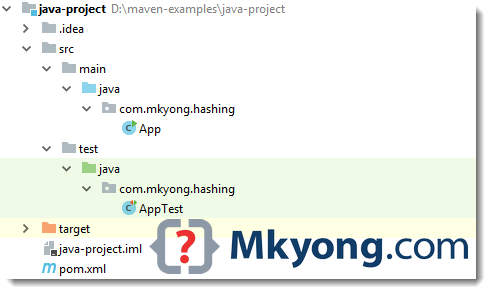
P.S Above figure is captured from IntelliJ IDEA, just ignore those .idea folder.
Read this Maven standard directory layout.
3. POM file
Review the generated pom.xml. It’s quite empty, just a single jUnit dependency.
<project xmlns="http://maven.apache.org/POM/4.0.0"
	xmlns:xsi="http://www.w3.org/2001/XMLSchema-instance"
         xsi:schemaLocation="http://maven.apache.org/POM/4.0.0
		 http://maven.apache.org/maven-v4_0_0.xsd">
    <modelVersion>4.0.0</modelVersion>
    <groupId>com.mkyong.hashing</groupId>
    <artifactId>java-project3</artifactId>
    <packaging>jar</packaging>
    <version>1.0-SNAPSHOT</version>
    <name>java-project</name>
    <url>http://maven.apache.org</url>
    <dependencies>
        <dependency>
            <groupId>junit</groupId>
            <artifactId>junit</artifactId>
            <version>3.8.1</version>
            <scope>test</scope>
        </dependency>
    </dependencies>
</project>
This POM file is like the Ant build.xml file, it describes the entire project information, everything from directory structure, project plugins, project dependencies, how to build this project and etc, read this official POM guide.
4. Update POM
4.1 Add compiler properties to tell Maven use a specified JDK version to compile the source code.
	<properties>
		<!-- https://maven.apache.org/general.html#encoding-warning -->
        <project.build.sourceEncoding>UTF-8</project.build.sourceEncoding>

        <maven.compiler.source>1.8</maven.compiler.source>
        <maven.compiler.target>1.8</maven.compiler.target>
    </properties>
4.2 Update jUnit to 4.12
	<dependency>
		<groupId>junit</groupId>
		<artifactId>junit</artifactId>
		<version>4.12</version>
		<scope>test</scope>
	</dependency>
4.3 Add commons-codec for SHA hashing.
	<!-- Dependency for hashing -->
	<!-- https://search.maven.org/artifact/commons-codec/commons-codec/1.11/jar -->
	<dependency>
		<groupId>commons-codec</groupId>
		<artifactId>commons-codec</artifactId>
		<version>1.11</version>
	</dependency>
4.4 Complete updated version.
<project xmlns="http://maven.apache.org/POM/4.0.0"
	xmlns:xsi="http://www.w3.org/2001/XMLSchema-instance"
         xsi:schemaLocation="http://maven.apache.org/POM/4.0.0
		 http://maven.apache.org/maven-v4_0_0.xsd">
    <modelVersion>4.0.0</modelVersion>
    <groupId>com.mkyong.hashing</groupId>
    <artifactId>java-project</artifactId>
    <packaging>jar</packaging>
    <version>1.0-SNAPSHOT</version>
    <name>java-project</name>
    <url>http://maven.apache.org</url>

    <properties>
        <!-- https://maven.apache.org/general.html#encoding-warning -->
        <project.build.sourceEncoding>UTF-8</project.build.sourceEncoding>
        <maven.compiler.source>1.8</maven.compiler.source>
        <maven.compiler.target>1.8</maven.compiler.target>
    </properties>

    <dependencies>
        <dependency>
            <groupId>junit</groupId>
            <artifactId>junit</artifactId>
            <version>4.12</version>
            <scope>test</scope>
        </dependency>
        <dependency>
            <groupId>commons-codec</groupId>
            <artifactId>commons-codec</artifactId>
            <version>1.11</version>
        </dependency>
    </dependencies>

</project>
5. Write Code
5.1 Update the App.java to accept an input and hash it with a SHA-256 algorithm.
package com.mkyong.hashing;

import org.apache.commons.codec.digest.DigestUtils;

public class App {

    public static void main(String[] args) {

        if (args.length < 1) {
            System.err.println("Please provide an input!");
            System.exit(0);
        }
        System.out.println(sha256hex(args[0]));

    }

    public static String sha256hex(String input) {
        return DigestUtils.sha256Hex(input);
    }

}
5.2 Unit Test.
package com.mkyong.hashing;

import org.junit.Assert;
import org.junit.Test;

public class AppTest {

    private String INPUT = "123456";

    @Test
    public void testLength() {
        Assert.assertEquals(64, App.sha256hex(INPUT).length());
    }

    @Test
    public void testHex() {
        String expected = "8d969eef6ecad3c29a3a629280e686cf0c3f5d5a86aff3ca12020c923adc6c92";
        Assert.assertEquals(expected, App.sha256hex(INPUT));
    }

}
Done.
6. Maven Build
6.1 Let build it with mvn package
D:\java-project>mvn package
[INFO] Scanning for projects...
[INFO]
[INFO] ------------------< com.mkyong.hashing:java-project >-------------------
[INFO] Building java-project 1.0-SNAPSHOT
[INFO] --------------------------------[ jar ]---------------------------------
[INFO]
......

-------------------------------------------------------
 T E S T S
-------------------------------------------------------
Running com.mkyong.hashing.AppTest
Tests run: 2, Failures: 0, Errors: 0, Skipped: 0, Time elapsed: 0.067 sec

Results :

Tests run: 2, Failures: 0, Errors: 0, Skipped: 0

[INFO]
[INFO] --- maven-jar-plugin:2.4:jar (default-jar) @ java-project ---
[INFO] Building jar: D:\java-project\target\java-project-1.0-SNAPSHOT.jar
[INFO] ------------------------------------------------------------------------
[INFO] BUILD SUCCESS
[INFO] ------------------------------------------------------------------------
[INFO] Total time: 1.956 s
[INFO] Finished at: 2018-09-28T12:40:18+08:00
[INFO] ------------------------------------------------------------------------
It compiles, run unit test and package the project into a jar file and puts it into the project/target folder.
7. Run#1
7.1 Run it. Oops… By default, Maven didn’t add the project dependencies commons-codec into the jar file.
D:\java-project>java -cp target/java-project-1.0-SNAPSHOT.jar com.mkyong.hashing.App 123456

Exception in thread "main" java.lang.NoClassDefFoundError: org/apache/commons/codec/digest/DigestUtils
        at com.mkyong.hashing.App.sha256hex(App.java:18)
        at com.mkyong.hashing.App.main(App.java:13)
Caused by: java.lang.ClassNotFoundException: org.apache.commons.codec.digest.DigestUtils
        at java.base/jdk.internal.loader.BuiltinClassLoader.loadClass(Unknown Source)
        at java.base/jdk.internal.loader.ClassLoaders$AppClassLoader.loadClass(Unknown Source)
        at java.base/java.lang.ClassLoader.loadClass(Unknown Source)
        ... 2 more
7.2 To solve it, we can use this maven-shade-plugin to create an uber/fat-jar – group everything into a single jar file.
	<build>
        <plugins>

            <plugin>
                <groupId>org.apache.maven.plugins</groupId>
                <artifactId>maven-shade-plugin</artifactId>
                <version>3.2.0</version>
                <executions>
                    <!-- Attach the shade goal into the package phase -->
                    <execution>
                        <phase>package</phase>
                        <goals>
                            <goal>shade</goal>
                        </goals>
                    </execution>
                </executions>
            </plugin>

        </plugins>
    </build>
7.3 Package it again!
D:\java-project>mvn clean package
[INFO] Scanning for projects...
[...

[INFO] --- maven-shade-plugin:3.2.0:shade (default) @ java-project ---
[INFO] Including commons-codec:commons-codec:jar:1.11 in the shaded jar.
[INFO] Replacing original artifact with shaded artifact.

[INFO] Replacing D:\java-project\target\java-project-1.0-SNAPSHOT.jar
	with D:\java-project\target\java-project-1.0-SNAPSHOT-shaded.jar
...
Two jars will be generated, review the file size :
D:\java-project>dir target
 Volume in drive D is Samsung970
 Volume Serial Number is 10DF-E63D

 Directory of D:\java-project\target

28/09/2018  12:57 PM           335,643 java-project-1.0-SNAPSHOT.jar
28/09/2018  12:57 PM             3,053 original-java-project-1.0-SNAPSHOT.jar
...
8. Run#2
8.1 Run it again. Good, the result is expected.
D:\java-project>java -cp target/java-project-1.0-SNAPSHOT.jar com.mkyong.hashing.App 123456
8d969eef6ecad3c29a3a629280e686cf0c3f5d5a86aff3ca12020c923adc6c92
8.2 Can we run it as Jar? No, there is no main class.
D:\java-project>java -jar target/java-project-1.0-SNAPSHOT.jar 123456
no main manifest attribute, in target/java-project-1.0-SNAPSHOT.jar
8.3 To solve it, add the main class in maven-shade-plugin like this.
<plugin>
	<groupId>org.apache.maven.plugins</groupId>
	<artifactId>maven-shade-plugin</artifactId>
	<version>3.2.0</version>
	<executions>
		<!-- Attach the shade into the package phase -->
		<execution>
			<phase>package</phase>
			<goals>
				<goal>shade</goal>
			</goals>
			<configuration>
				<transformers>
					<transformer implementation="org.apache.maven.plugins.shade.resource.ManifestResourceTransformer">
						<mainClass>com.mkyong.hashing.App</mainClass>
					</transformer>
				</transformers>
			</configuration>
		</execution>
	</executions>
</plugin>
9. Run#3
9.1 Package it again!
D:\java-project>mvn clean package
9.2 Run it as Jar.
D:\java-project>java -jar target/java-project-1.0-SNAPSHOT.jar 123456
8d969eef6ecad3c29a3a629280e686cf0c3f5d5a86aff3ca12020c923adc6c92
Done.
10. POM
Final POM file.
<project xmlns="http://maven.apache.org/POM/4.0.0"
	xmlns:xsi="http://www.w3.org/2001/XMLSchema-instance"
         xsi:schemaLocation="http://maven.apache.org/POM/4.0.0
		 http://maven.apache.org/maven-v4_0_0.xsd">
    <modelVersion>4.0.0</modelVersion>
    <groupId>com.mkyong.hashing</groupId>
    <artifactId>java-project</artifactId>
    <packaging>jar</packaging>
    <version>1.0-SNAPSHOT</version>
    <name>java-project</name>
    <url>http://maven.apache.org</url>

    <properties>
        <!-- https://maven.apache.org/general.html#encoding-warning -->
        <project.build.sourceEncoding>UTF-8</project.build.sourceEncoding>
        <maven.compiler.source>1.8</maven.compiler.source>
        <maven.compiler.target>1.8</maven.compiler.target>
    </properties>

    <dependencies>
        <dependency>
            <groupId>junit</groupId>
            <artifactId>junit</artifactId>
            <version>4.12</version>
            <scope>test</scope>
        </dependency>
        <dependency>
            <groupId>commons-codec</groupId>
            <artifactId>commons-codec</artifactId>
            <version>1.11</version>
        </dependency>
    </dependencies>
    <build>
        <plugins>
            <plugin>
                <groupId>org.apache.maven.plugins</groupId>
                <artifactId>maven-shade-plugin</artifactId>
                <version>3.2.0</version>
                <executions>
                    <!-- Attach the shade into the package phase -->
                    <execution>
                        <phase>package</phase>
                        <goals>
                            <goal>shade</goal>
                        </goals>
                        <configuration>
                            <transformers>
                                <transformer
                                        implementation="org.apache.maven.plugins.shade.resource.ManifestResourceTransformer">
                                    <mainClass>com.mkyong.hashing.App</mainClass>
                                </transformer>
                            </transformers>
                        </configuration>
                    </execution>
                </executions>
            </plugin>

        </plugins>
    </build>
</project>
Download Source Code
$ cd java-project
$ mvn package
$ java -jar target/java-project-1.0-SNAPSHOT.jar 123456

Hello Sir,
I need to create a maven project which has resources folder in it. Can you please help me.
hi , I am trying to export a EAR package from RAD through command line so that I can create a jenkins pipeline task , It is an old Java Project ,so it does not have pom.xml ,can u please suggest how can i proceed further
Thank you for such a nice, step by step explanation. It is extremely helpful for me.
This doesn’t work in Windows unless you use quotes likke this “-DgroupId={project-packaging}”
Hi,
I am following your tutorial.it is nice.
Now I need a help about packaging executable jar using maven in Intellij IDEA. How can I include dependencies into a executable jar?Will you please write a blog about your solution on it?
Thanks
Try maven-shade-plugin, refer step 7, 8
Hi Mkyoung,
I’m trying to intall the oracle jar to my local repo as shown below –
mvn install:install-file -Dfile=D:\Git_Xponent\BCSCommonLibs\ojdbc6.jar -DgroupId=com.seec.insurance.uws.sharedlib -DartifactId=ojdbc6 -Dversion=0 -Dpackaging=jar -DgeneratePom=true
But I’m getting error as such –
[INFO] Scanning for projects…
Downloading: https://repo.maven.apache.org/maven2/org/apache/maven/plugins/maven-clean-plugin/2.5/maven-clean-plugin-2.5.pom
[WARNING] Failed to retrieve plugin descriptor for org.apache.maven.plugins:maven-clean-plugin:2.5: Plugin org.apache.maven.plugins:maven-clean-plugin:2.5 or one of its dependencies could not be resolved: Failed to read artifact descriptor for org.apache.maven.plugins:maven-clean-plugin:jar:2.5
Downloading: https://repo.maven.apache.org/maven2/org/apache/maven/plugins/maven-install-plugin/2.4/maven-install-plugin-2.4.pom
[WARNING] Failed to retrieve plugin descriptor for org.apache.maven.plugins:maven-install-plugin:2.4: Plugin org.apache.maven.plugins:maven-install-plugin:2.4 or one of its dependencies could not be resolved: Failed to read artifact descriptor for org.apache.maven.plugins:maven-install-plugin:jar:2.4
Downloading: https://repo.maven.apache.org/maven2/org/apache/maven/plugins/maven-deploy-plugin/2.7/maven-deploy-plugin-2.7.pom
[WARNING] Failed to retrieve plugin descriptor for org.apache.maven.plugins:maven-deploy-plugin:2.7: Plugin org.apache.maven.plugins:maven-deploy-plugin:2.7 or one of its dependencies could not be resolved: Failed to read artifact descriptor for org.apache.maven.plugins:maven-deploy-plugin:jar:2.7
Downloading: https://repo.maven.apache.org/maven2/org/apache/maven/plugins/maven-site-plugin/3.3/maven-site-plugin-3.3.pom
[WARNING] Failed to retrieve plugin descriptor for org.apache.maven.plugins:maven-site-plugin:3.3: Plugin org.apache.maven.plugins:maven-site-plugin:3.3 or one of its dependencies could not be resolved: Failed to read artifact descriptor for org.apache.maven.plugins:maven-site-plugin:jar:3.3
Downloading: https://repo.maven.apache.org/maven2/org/apache/maven/plugins/maven-antrun-plugin/1.3/maven-antrun-plugin-1.3.pom
[WARNING] Failed to retrieve plugin descriptor for org.apache.maven.plugins:maven-antrun-plugin:1.3: Plugin org.apache.maven.plugins:maven-antrun-plugin:1.3 or one of its dependencies could not be resolved: Failed to read artifact descriptor for org.apache.maven.plugins:maven-antrun-plugin:jar:1.3
Downloading: https://repo.maven.apache.org/maven2/org/apache/maven/plugins/maven-assembly-plugin/2.2-beta-5/maven-assembly-plugin-2.2-beta-5.pom
[WARNING] Failed to retrieve plugin descriptor for org.apache.maven.plugins:maven-assembly-plugin:2.2-beta-5: Plugin org.apache.maven.plugins:maven-assembly-plugin:2.2-beta-5 or one of its dependencies could not be resolved: Failed to read artifact descriptor for org.apache.maven.plugins:maven-assembly-plugin:jar:2.2-beta-5
Downloading: https://repo.maven.apache.org/maven2/org/apache/maven/plugins/maven-dependency-plugin/2.8/maven-dependency-plugin-2.8.pom
[WARNING] Failed to retrieve plugin descriptor for org.apache.maven.plugins:maven-dependency-plugin:2.8: Plugin org.apache.maven.plugins:maven-dependency-plugin:2.8 or one of its dependencies could not be resolved: Failed to read artifact descriptor for org.apache.maven.plugins:maven-dependency-plugin:jar:2.8
Downloading: https://repo.maven.apache.org/maven2/org/apache/maven/plugins/maven-release-plugin/2.3.2/maven-release-plugin-2.3.2.pom
[WARNING] Failed to retrieve plugin descriptor for org.apache.maven.plugins:maven-release-plugin:2.3.2: Plugin org.apache.maven.plugins:maven-release-plugin:2.3.2 or one of its dependencies could not be resolved: Failed to read artifact descriptor for org.apache.maven.plugins:maven-release-plugin:jar:2.3.2
Downloading: https://repo.maven.apache.org/maven2/org/apache/maven/plugins/maven-metadata.xml
Downloading: https://repo.maven.apache.org/maven2/org/codehaus/mojo/maven-metadata.xml
[WARNING] Could not transfer metadata org.apache.maven.plugins/maven-metadata.xml from/to central (https://repo.maven.apache.org/maven2): Failed to transfer file: https://repo.maven.apache.org/maven2/org/apache/maven/plugins/maven-metadata.xml. Return code is: 400 , ReasonPhrase:Bad Request.
[WARNING] Could not transfer metadata org.codehaus.mojo/maven-metadata.xml from/to central (https://repo.maven.apache.org/maven2): Failed to transfer file: https://repo.maven.apache.org/maven2/org/codehaus/mojo/maven-metadata.xml. Return code is: 400 , ReasonPhrase:Bad Request.
[WARNING] Failure to transfer org.apache.maven.plugins/maven-metadata.xml from https://repo.maven.apache.org/maven2 was cached in the local repository, resolution will not be reattempted until the update interval of central has elapsed or updates are forced. Original error: Could not transfer metadata org.apache.maven.plugins/maven-metadata.xml from/to central (https://repo.maven.apache.org/maven2): Failed to transfer file: https://repo.maven.apache.org/maven2/org/apache/maven/plugins/maven-metadata.xml. Return code is: 400 , ReasonPhrase:Bad Request.
[WARNING] Failure to transfer org.codehaus.mojo/maven-metadata.xml from https://repo.maven.apache.org/maven2 was cached in the local repository, resolution will not be reattempted until the update interval of central has elapsed or updates are forced. Original error: Could not transfer metadata org.codehaus.mojo/maven-metadata.xml from/to central (https://repo.maven.apache.org/maven2): Failed to transfer file: https://repo.maven.apache.org/maven2/org/codehaus/mojo/maven-metadata.xml. Return code is: 400 , ReasonPhrase:Bad Request.
[INFO] ————————————————————————
[INFO] BUILD FAILURE
[INFO] ————————————————————————
[INFO] Total time: 0.617 s
[INFO] Finished at: 2019-01-24T13:01:34+05:30
[INFO] Final Memory: 8M/245M
[INFO] ————————————————————————
[ERROR] No plugin found for prefix ‘install’ in the current project and in the plugin groups [org.apache.maven.plugins, org.codehaus.mojo] available from the repositories [local (C:\Users\sachin.nag\.m2\repository), central (https://repo.maven.apache.org/maven2)] -> [Help 1]
[ERROR]
[ERROR] To see the full stack trace of the errors, re-run Maven with the -e switch.
[ERROR] Re-run Maven using the -X switch to enable full debug logging.
[ERROR]
[ERROR] For more information about the errors and possible solutions, please read the following articles:
[ERROR] [Help 1] http://cwiki.apache.org/confluence/display/MAVEN/NoPluginFoundForPrefixException
Not able to figure what is the problem.
I am getting
Choose a number or apply filter (format: [groupId:]artifactId, case sensitive contains):
while installing maven plugins this error message is coming ..HOW to solve it??
An error occurred while collecting items to be installed
session context was:(profile=epp.package.jee, phase=org.eclipse.equinox.internal.p2.engine.phases.Collect, operand=, action=).
Problems downloading artifact: osgi.bundle,com.coderplus.m2e.jaxwscore,0.0.1.201505100425.
MD5 hash is not as expected. Expected: a8e4d4ede43c5da5ea1355e3a465872b and found 08b66fce7afe1fc3c48d295fc0c219f6.
Hi ,
I am not sure my question is related to the post but I am stuck and need help.
I am trying to create maven project running a bat file in java class.Problem is the project gets created in basedir which is the loaction of my java class instead I want to generate the project at specific path mentioned in bat file.
I did used cd specificlocation in my bat file before running maven command but still it uses the basedir . Can you please help me on this.
Thanks
Hi, how can we write a spark program without using maven in java
Hi, How to create multi module project with maven. Could provide an example with parent pom.xml? How to organize multi-module project with maven.
Thanks
Hi Mkyong.
Your tutorials are the best. Very well explained and simple, you go step by step.
Thank you very much!
My dependencies jar i.e. junit jar is not getting imported by maven. Due to which compile time error is coming.
hi mkyong,
i am following u r java articles for past 1 year .working first time with maven nice article
Nice tutorial by the way! May I ask how to convert Maven project into NetBeans IDE? I checked on other websites said that it could be automatically opened in NetBeans but I tried and failed to load the project in NetBeans. Anybody could help please? Thanks!!!
I don’t use Netbean, hope someone can answer this.
really nice ! tks !! Mkyong !
Hello Thank you for the tutorial. But I have the following error when running mvn package
C:xxxxxxxxxxxxxxxxxxxxxxxxxxxNumberGenerator>mvn package
[INFO] Scanning for projects…
[ERROR] The build could not read 1 project -> [Help 1]
[ERROR]
[ERROR] The project com.mkyong:NumberGenerator:1.0-SNAPSHOT (C:UserseagbokaDocumentsprojectsmvn-proj1NumberGeneratorpom.xml) has 1 error
[ERROR] Malformed POM C:UserseagbokaDocumentsprojectsmvn-proj1NumberGeneratorpom.xml: Unrecognised tag: ‘plugin’ (position: START_TAG seen …rn rn … @11:11) @ C:UserseagbokaDocumentsprojectsmvn-proj1NumberGeneratorpom.xml, line 11, column 11 -> [Help 2]
[ERROR]
[ERROR] To see the full stack trace of the errors, re-run Maven with the -e switch.
[ERROR] Re-run Maven using the -X switch to enable full debug logging.
[ERROR]
[ERROR] For more information about the errors and possible solutions, please read the following articles:
[ERROR] [Help 1] http://cwiki.apache.org/confluence/display/MAVEN/ProjectBuildingException
[ERROR] [Help 2] http://cwiki.apache.org/confluence/display/MAVEN/ModelParseException
I know something must be wrong with my pom.xml but I can figure out what it is ;
here is my pom file content
4.0.0
com.mkyong
NumberGenerator
jar
1.0-SNAPSHOT
NumberGenerator
http://maven.apache.org
org.apache.maven.plugins
maven-compiler-plugin
2.3.2
1.6
1.6
junit
junit
4.11
test
Thank you! Very easy to follow.
This worked well for me. Thank you for the demonstration.
I don’t understand how AppTest works, though? Are we just checking it will compile?
You can run the test manually via mvn test, when you package it mvn package, it will run the test automatically.
You are the best. Thanks
Please give, step by step may…!
How people can understand, you started with the command mvn….bla bla……, i started cmd and tried to execute your first command and getting errors. I am seeing your site in google but such a waste site like reoseinda.
Sorry, I should mention you have to install Maven first, article is updated.
Hi! i’m getting the error as follows;
E:surendramavenbinNumberGenerator>mvn eclipse:eclipse
‘mvn’ is not recognized as an internal or external command,
operable program or batch file.
Could you please help me to get a solution
Thanks in advance..
Set M2_HOME, JAVA_HOME and PATH
Please install Maven and configure the mavenbin folder to the environment. Refer to the updated article above.
thanks so much.
first time to practice with maven. nice tutrial
hi,
this is the error i am getting plss help
Downloading: http://10.132.96.226:9090/archiva/repository/internal/org/apache/ma
ven/plugins/maven-metadata.xml
Downloading: http://10.132.96.226:9090/archiva/repository/internal/org/codehaus/
mojo/maven-metadata.xml
[WARNING] Could not transfer metadata org.apache.maven.plugins/maven-metadata.xm
l from/to archiva.default (http://10.132.96.226:9090/archiva/repository/internal
/): Error transferring file: Server returned HTTP response code: 502 for URL: ht
tp://10.132.96.226:9090/archiva/repository/internal/org/apache/maven/plugins/mav
en-metadata.xml
[WARNING] Could not transfer metadata org.codehaus.mojo/maven-metadata.xml from/
to archiva.default (http://10.132.96.226:9090/archiva/repository/internal/): Err
or transferring file: Server returned HTTP response code: 502 for URL: http://10
.132.96.226:9090/archiva/repository/internal/org/codehaus/mojo/maven-metadata.xm
l
[INFO] ————————————————————————
[INFO] BUILD FAILURE
[INFO] ————————————————————————
[INFO] Total time: 1:59.247s
[INFO] Finished at: Wed Oct 23 16:41:07 IST 2013
[INFO] Final Memory: 4M/15M
[INFO] ————————————————————————
[ERROR] No plugin found for prefix ‘archetype’ in the current project and in the
plugin groups [org.apache.maven.plugins, org.codehaus.mojo] available from the
repositories [local (E:\apache-maven-3.0.3\maven_repo), archiva.default (http://
10.132.96.226:9090/archiva/repository/internal/)] -> [Help 1]
[ERROR]
[ERROR] To see the full stack trace of the errors, re-run Maven with the -e swit
ch.
[ERROR] Re-run Maven using the -X switch to enable full debug logging.
[ERROR]
[ERROR] For more information about the errors and possible solutions, please rea
d the following articles:
[ERROR] [Help 1] http://cwiki.apache.org/confluence/display/MAVEN/NoPluginFoundF
orPrefixException
u haven’t given the proxy to maven to download(access internet) files in the apache-maven-3.1.1confsettings.xml
optional
true
http
proxyuser
proxypass
proxy.host.net
80
local.net|some.host.com
Hi,
How to give internet access to maven, where to find my proxy server username and password, etc.., can you please provide me the exact resolution of above error
if you are running behind the proxy, please credentials which your company provided. also, please make sure the artifacts you are trying to download is exist in https://mvnrepository.com/artifact
Best one for a beginner 🙂
Excellent!!!
Works like butter…..I was not much knowing about Maven, but this gave me some confidence.
Hi !
” 1. Create a Project from Maven Template ”
I can not create a project . when I write code in cmd ( windows ) it’s Error .
please help to creat a project and run apache syncope .
TnQ
Have you downloaded Maven (http://maven.apache.org/download.cgi) and set to your environment variable? if not, no cmd knows what mvn is.
Make sure you installed and configured Maven properly. Set $MAVEN/bin to your environment.
hi,
Iam getting build error while creating the project:Property artifactID is missing,Can anyone let me know where to configure artifactID.
Take a look at your “pom.xml” file. One of the elements is the “artifactId” node.
Hi, I’m struggling to figure out how to actually import the library that I got through maven. Any suggestions how I can find out the name or path to the library that I got from maven?
For some reason I’m not able to figure out how to import the library into my class… 🙁
Hi There..
I have a machine i can not connect to the internet, and getting the error:
ERROR] No plugin found for prefix ?archetype? in the current project and in the
plugin groups [org.apache.maven.plugins, org.codehaus.mojo] available from the
repositories [local (C:\Documents and Settings\paris\.m2\repository), centra
l (http://repo1.maven.org/maven2)] -> [Help 1]
is there a way around this? can i download it? where? how? etc.
Many thanks in advance! 🙂
Daniel
For the first time, Maven need internet to download those plugins and dependencies, unless you configure a local repository manager.
Sir , please tell me how to configure local repository manager ?
Very good tutorial. Thanks bro’!!
I have builts the maven archetype project and it builds successfully, but when i open the project in eclipse it shows errors int he api and omod projects.. any idea how to solve those?
thanks
The complete explanation was great and I triggered successfully my application in one shot by looking this content.
Great work mkyong!
Works very nicely. I made it work with Java 1.7 on an AWS EC2. Thank you for a step by step example. Clear instructions.
Very good tutorial. I just miss something about the properties, one of them very important to create platform independent builds: “project.build.sourceEncoding”.
Good work and good website.
I am getting the same error as Paris :
[ERROR] No plugin found for prefix ‘archetype’ in the current project and in the
plugin groups [org.apache.maven.plugins, org.codehaus.mojo] available from the
repositories [local (C:\Documents and Settings\paris\.m2\repository), centra
l (http://repo1.maven.org/maven2)] -> [Help 1]
Please let me know a solution. I am trying to create a maven proj in Win 8. Many thanks!
Even it’s late, it could be useful for another person 😉
Check if you are behind a proxy, if so try to configure the proxy in the file settings.xml under Maven install folder :
someproxyid
true
http
myproxyhostname
8080
localhost|127.0.0.1
Excellent tutorial !!!!
thanks a lot
Very very thx, your very clear tutorial make me to easy 🙂
And this is why I like m2e/m2eclipse so much… you can execute all these commands by following some wizards.
That doesn’t change the fact that this is another great tutorial.
when I gave command :
mvn archetype:generate -DgroupId=com.mkyong.core -DartifactId=mkyong-core
-DarchetypeArtifactId=maven-archetype-quickstart -DinteractiveMode=false
i got following steps(in ubuntu) please help.. wht do i have to do after this steps …??
670: remote -> org.zkoss:zk-archetype-component (The ZK Component archetype)
671: remote -> org.zkoss:zk-archetype-webapp (The ZK wepapp archetype)
672: remote -> ru.circumflex:circumflex-archetype (-)
673: remote -> se.vgregion.javg.maven.archetypes:javg-minimal-archetype (-)
674: remote -> sk.seges.sesam:sesam-annotation-archetype (-)
675: remote -> tk.skuro:clojure-maven-archetype (A simple Maven archetype for Clojure)
676: remote -> uk.ac.rdg.resc:edal-ncwms-based-webapp (-)
Choose a number or apply filter (format: [groupId:]artifactId, case sensitive contains): 228: Choose archetype:
Your filter doesn’t match any archetype (hint: enter to return to initial list)
Choose a number or apply filter (format: [groupId:]artifactId, case sensitive contains): : 228
Choose archetype:
Your filter doesn’t match any archetype (hint: enter to return to initial list)
Choose a number or apply filter (format: [groupId:]artifactId, case sensitive contains): : mkyong-core
Choose archetype:
Your filter doesn’t match any archetype (hint: enter to return to initial list)
Choose a number or apply filter (format: [groupId:]artifactId, case sensitive contains):
No idea how to simulate this error, which Maven version you used? If the command is failing to generate the project structures, just ignore and create those folders manually.
Hi, this error has come for me on Window’s XP. If you use double quotes when running your command, it will work and create the directories as mentioned in the article. Hope this helps.
E.g.) E:E-BooksProjects>mvn archetype:generate “-DgroupId=com.user” “-DartifactId=
NumberGenerator” “-DarchetypeArtifactId=maven-archetype-quickstart” “-DinteractiveMode=false”
Hi mkYong,
You are doing a good job. I have some basic question
1. What is the difference between maved based java project and maven based web application project.
2. Your tutorial https://mkyong.com/spring-security/spring-security-hello-world-example/ is a maven based java project or maven based web application project.
Regards
Senthil
Hi!! What maven archetype number should I use if I want to create a project with JSF, Spring, Hibernate, MySQL?
If you have or know of a tutorial that can help me, can you please redirect me?
Im getting the below error, Please help me,
D:\MavenWorkspace>mvn archetype:generate -DgroupId=com.mkyong.core -DartifactId=mkyong-core -DarchetypeArtifactId=maven-archetype-quickstart -DinteractiveMode=false
[INFO] Scanning for projects…
[INFO] Searching repository for plugin with prefix: ‘archetype’.
[INFO] org.apache.maven.plugins: checking for updates from central
[WARNING] repository metadata for: ‘org.apache.maven.plugins’ could not be retrieved from repository: central due to an error: Error transferring file: Connection timed out: connect
[INFO] Repository ‘central’ will be blacklisted
[INFO] ————————————————————————
[ERROR] BUILD ERROR
[INFO] ————————————————————————
[INFO] The plugin ‘org.apache.maven.plugins:maven-archetype-plugin’ does not exist or no valid version could be found
[INFO] ————————————————————————
[INFO] For more information, run Maven with the -e switch
[INFO] ————————————————————————
[INFO] Total time: 21 seconds
[INFO] Finished at: Thu Aug 02 15:48:42 GMT+05:30 2012
[INFO] Final Memory: 1M/4M
[INFO] ————————————————————————
Hi,
Even I got the same error. Please make sure you are connected to internet directly or update the proxy settings in settings.xml file. It should work!
This is for your reference..
http://maven.apache.org/guides/mini/guide-configuring-maven.html
mkYong,
You’re a genius. My sincere gratitude for sharing this knowledge with us.
Kind Regards and Thanks.
I AM GETTING THIS ERROR WHILE CREATING JAVA PROJECT WITH MAVEN.
PLEASE ANYONE HELP ME OUT!!!
[ERROR] No plugin found for prefix ‘archetype’ in the current project and in the
plugin groups [org.apache.maven.plugins, org.codehaus.mojo] available from the
repositories [local (C:\Documents and Settings\paris\.m2\repository), centra
l (http://repo1.maven.org/maven2)] -> [Help 1]
[ERROR]
Above script was tested in Maven2, and now i used Maven3 to test it, it’s working fine also. Mind to guide me to simulate your error?
If you didn’t change the proxies setting in your Maven settings.xml, your machine could be behind a firewall or proxy so you can’t reach http://repo1.maven.org/maven2.
To test: hit this URL directly in a browser, and see if you are able to make the request.