There is no exact or official solution to convert an existing Java web project to a Maven based web application project. Basically, the Maven based project conversion will involve two major changes, which is :
- Folder structure – Follow this Maven’s folder structure.
- Dependency library – Put all your dependency libraries in pom.xml file.
Steps to convert Java based –> Maven based
This guide will show you how to convert the following servlet web application to Maven based structure, and support Eclipse IDE.
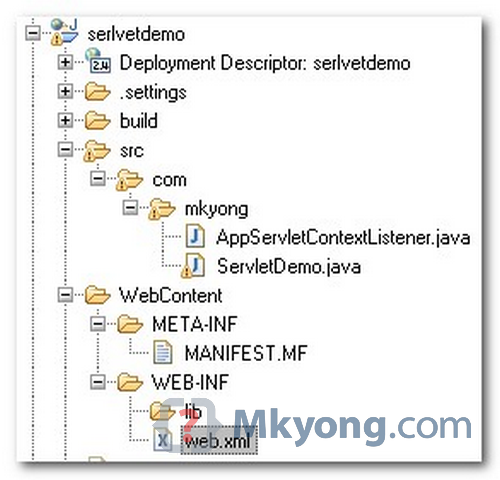
Existing Java web project structure
A simple Java servlet web application , with one “javaee.jar” dependency library

I’m with caroline – Where is the guide?
It seems article has been deleted. There are no steps given after screenshot of Java project.
hi. im need this article.. i think some part of this guide is missing…
Genio!
Thanks for the tutorial, really helpful !
For me the undeniably Eclipse; like NetBeans i have been doing extremely well at the time of compiling; easy and without complications.
Excellent; I have worked with some applications and it seemed to me a very useful tool when compiling my codes love JAVA.
I want to create a dynamic web project in eclipse using spring framework+hibernate without using maven and annotations.I already did the project using servlets and jsp.
Can u help me in developing the project?
Hi Mkyong, firstly thank you for this and for the many other tutorials that you have provided, I just wanted to ask if you can update this tutorial to use the new features of eclipse that assist in converting an existing project into a Maven project.
Where is the guide? it seems that this article is uncomplete?! i don’t get it. I have a web project on my eclipse, and i moved all my sources to the src/main/java, but still get the web project view!!! how can i have the maven view???
Thank you so much. I muddled through this and have my project working in Maven and Eclipse. Thank you very much for sharing this information.
Where do I copy my existing Tomcat .jsp, and .html files in Maven?
Thanks,
Eric
If there is a tool to generate the dependency configuration unit?
When the war file is ready, how do I deploy it to tomcat? how do I create the application folder under tomcat/webapps?
Thanks.
just put war there
please tell me what is the problem ?
the following is an exception when i run a war file in weblogic:
Error 500–Internal Server Error
org.springframework.beans.factory.CannotLoadBeanClassException: Cannot find class [ch.orange.pna.csr.web.MonitoringController] for bean with name ‘MonitoringController’ defined in ServletContext resource [/WEB-INF/CSR-servlet.xml]; nested exception is java.lang.ClassNotFoundException: Class bytes found but defineClass()failed for: ‘ch.orange.pna.csr.web.MonitoringController’
at org.springframework.beans.factory.support.AbstractBeanFactory.resolveBeanClass(AbstractBeanFactory.java:1141)
at org.springframework.beans.factory.support.AbstractAutowireCapableBeanFactory.predictBeanType(AbstractAutowireCapableBeanFactory.java:524)
at org.springframework.beans.factory.support.AbstractBeanFactory.isFactoryBean(AbstractBeanFactory.java:1177)
at org.springframework.beans.factory.support.AbstractBeanFactory.isFactoryBean(AbstractBeanFactory.java:758)
at org.springframework.beans.factory.support.DefaultListableBeanFactory.preInstantiateSingletons(DefaultListableBeanFactory.java:422)
at org.springframework.context.support.AbstractApplicationContext.finishBeanFactoryInitialization(AbstractApplicationContext.java:728)
at org.springframework.context.support.AbstractApplicationContext.refresh(AbstractApplicationContext.java:380)
at org.springframework.web.servlet.FrameworkServlet.createWebApplicationContext(FrameworkServlet.java:306)
at org.springframework.web.servlet.FrameworkServlet.initWebApplicationContext(FrameworkServlet.java:251)
at org.springframework.web.servlet.FrameworkServlet.initServletBean(FrameworkServlet.java:220)
at org.springframework.web.servlet.HttpServletBean.init(HttpServletBean.java:112)
at javax.servlet.GenericServlet.init(GenericServlet.java:258)
at weblogic.servlet.internal.ServletStubImpl$ServletInitAction.run(ServletStubImpl.java:1094)
at weblogic.security.acl.internal.AuthenticatedSubject.doAs(AuthenticatedSubject.java:321)
at weblogic.security.service.SecurityManager.runAs(SecurityManager.java:121)
at weblogic.servlet.internal.ServletStubImpl.createServlet(ServletStubImpl.java:970)
at weblogic.servlet.internal.ServletStubImpl.createInstances(ServletStubImpl.java:949)
at weblogic.servlet.internal.ServletStubImpl.prepareServlet(ServletStubImpl.java:888)
at weblogic.servlet.internal.ServletStubImpl.getServlet(ServletStubImpl.java:598)
at weblogic.servlet.internal.ServletStubImpl.invokeServlet(ServletStubImpl.java:406)
at weblogic.servlet.internal.ServletStubImpl.invokeServlet(ServletStubImpl.java:348)
at weblogic.servlet.internal.WebAppServletContext$ServletInvocationAction.run(WebAppServletContext.java:6981)
at weblogic.security.acl.internal.AuthenticatedSubject.doAs(AuthenticatedSubject.java:321)
at weblogic.security.service.SecurityManager.runAs(SecurityManager.java:121)
at weblogic.servlet.internal.WebAppServletContext.invokeServlet(WebAppServletContext.java:3892)
at weblogic.servlet.internal.ServletRequestImpl.execute(ServletRequestImpl.java:2766)
at weblogic.kernel.ExecuteThread.execute(ExecuteThread.java:224)
at weblogic.kernel.ExecuteThread.run(ExecuteThread.java:183)
Caused by: java.lang.ClassNotFoundException: Class bytes found but defineClass()failed for: ‘ch.orange.pna.csr.web.MonitoringController’
at weblogic.utils.classloaders.GenericClassLoader.findClass(GenericClassLoader.java:187)
at weblogic.utils.classloaders.ChangeAwareClassLoader.findClass(ChangeAwareClassLoader.java:61)
at java.lang.ClassLoader.loadClass(ClassLoader.java:289)
at java.lang.ClassLoader.loadClass(ClassLoader.java:235)
at weblogic.utils.classloaders.GenericClassLoader.loadClass(GenericClassLoader.java:224)
at weblogic.utils.classloaders.ChangeAwareClassLoader.loadClass(ChangeAwareClassLoader.java:41)
at org.springframework.util.ClassUtils.forName(ClassUtils.java:211)
at org.springframework.beans.factory.support.AbstractBeanDefinition.resolveBeanClass(AbstractBeanDefinition.java:385)
at org.springframework.beans.factory.support.AbstractBeanFactory.resolveBeanClass(AbstractBeanFactory.java:1138)
… 27 more
Caused by: java.lang.UnsupportedClassVersionError: ch/orange/pna/csr/web/MonitoringController (Unsupported major.minor version 50.0)
at java.lang.ClassLoader.defineClass0(Native Method)
at java.lang.ClassLoader.defineClass(ClassLoader.java:539)
at java.security.SecureClassLoader.defineClass(SecureClassLoader.java:123)
at weblogic.utils.classloaders.GenericClassLoader.findLocalClass(GenericClassLoader.java:480)
at weblogic.utils.classloaders.GenericClassLoader.findClass(GenericClassLoader.java:182)
… 35 more
Hi,
Thanks for the post and I have been your fan and following you all time.
I have a web project which is now grown a lot big and hence there is a need to convert it into maven and use the modules/trunk type architecture using which I can separate out the modules and keep then separately.
Any guide to create the same? May be part-2 of this series?
Problem is I have around 10 modules in the project and each module has set of dto’s, dao’s & services. Now I want to migrate to repository based maven structure which will hold these modules separately and jars will get added to my project.
I hope I am clear.
I have a already built maven project, now I want to add few more files to utilise their functionality. I tried to include those folders in the path required, but it shows error when I do a maven build. What are changes I need to do to add them, so that I can use them in the project.
Cheers for the example, very good and easy to understand. I only have one problem though
3. Configure the dependency libraries
is there no way Maven or Eclipse or anything can’t import from you lib folder or lookup the dependencies based on the jar names in this folder? It’s just I have 63 jars, Hibernate Spring Apache-Common JSF and a load more and not all (most in fact) I can’t find the maven dependency groupId/artifactId.
There is such a tool now, check out JBoss Tools 4.0.0(-Beta) from http://marketplace.eclipse.org/node/420896#.UJjaIcXA_Mo. You’ll be able to identify, select, adjust the scope, convert of your dependencies : http://docs.jboss.org/tools/whatsnew/maven/maven-news-4.0.0.Beta1.html
A screencast showcasing this feature : http://bit.ly/QUCyRj
I don’t know any tool that can automate the process, try search your jar in http://search.maven.org/ , if it’s not, then include your jar in local repository and add it into pom.xml manually.
Hello,
I am a beginner to Maven. Can you plz share a dynamic maven web project build using struts 1.2 flow?
Thanks,
Bharat
When i convert already existing web project and keep same project folder structure like the first image in this page and apply maven capability. Is there anyway I can achieve that….
Siva