In last tutorial, you created a web application with Maven. Here’s a guide to show you how to convert that web application to support Eclipse IDE.
Eclipse IDE support web application via WTP tool, so you need to make your Maven based project support it as well.
1. mvn eclipse:eclipse -Dwtpversion=2.0
To convert a Maven based Java project to support IDE, you use this command :
mvn eclipse:eclipse
For web application, you need extra parameter to make it support Eclipse’s wtp, instead, you should use this command :
mvn eclipse:eclipse -Dwtpversion=2.0
See output …
D:\workspace-new\mkyongweb-core>mvn eclipse:eclipse -Dwtpversion=2.0
[INFO] Scanning for projects...
[INFO] Searching repository for plugin with prefix: 'eclipse'.
[INFO] ------------------------------------------------------------------------
[INFO] Building mkyongweb-core Maven Webapp
[INFO]    task-segment: [eclipse:eclipse]
[INFO] ------------------------------------------------------------------------
[INFO] Preparing eclipse:eclipse
[INFO] No goals needed for project - skipping
[INFO] [eclipse:eclipse {execution: default-cli}]
[INFO] Adding support for WTP version 2.0.
[INFO] Using Eclipse Workspace: D:\workspace-new
[INFO] no substring wtp server match.
[INFO] Using as WTP server : Apache Tomcat v6.0
[INFO] Adding default classpath container: org.eclipse.jdt.launching.JRE_CONTAINER
[INFO] Not writing settings - defaults suffice
[INFO] Wrote Eclipse project for "mkyongweb-core" to D:\workspace-new\mkyongweb-core.
[INFO]
[INFO] ------------------------------------------------------------------------
[INFO] BUILD SUCCESSFUL
[INFO] ------------------------------------------------------------------------
[INFO] Total time: 2 seconds
[INFO] Finished at: Fri Apr 15 11:51:53 SGT 2011
[INFO] Final Memory: 7M/14M
[INFO] ------------------------------------------------------------------------
2. Eclipse WTP
Standard Eclipse’s “.classpath” and “.project” files are created. And you will noticed a new “.setting” folder is created and inside contains “org.eclipse.wst.common.component” and “org.eclipse.wst.common.project.facet.core.xml“, both files for WTP or Faces support in Eclipse.
File : org.eclipse.wst.common.project.facet.core.xml
<faceted-project>
  <fixed facet="jst.java"/>
  <fixed facet="jst.web"/>
  <installed facet="jst.web" version="2.4"/>
  <installed facet="jst.java" version="1.4"/>
</faceted-project>
Maven 2.x generated web application with JDK1.4 (see above), which is rather outdated, you may need to upgrade it to latest JDK version.
File : org.eclipse.wst.common.component
<project-modules id="moduleCoreId" project-version="2.0">
  <wb-module deploy-name="mkyongweb-core">
    <property name="context-root" value="mkyongweb-core"/>
    <wb-resource deploy-path="/" source-path="src/main/webapp"/>
    <property name="java-output-path" value="/target/classes"/>
    <wb-resource deploy-path="/WEB-INF/classes" source-path="src/main/resources"/>
  </wb-module>
</project-modules>
3. Import into Eclipse IDE
Now, you have everything what a Eclipse web application want, so, you can start import your Maven based web application into Eclipse IDE.
Steps :
In Eclipse IDE, menu bar , File -> Import… -> General -> Existing Projects into Workspace -> select root directory (select your project folder) -> Done.
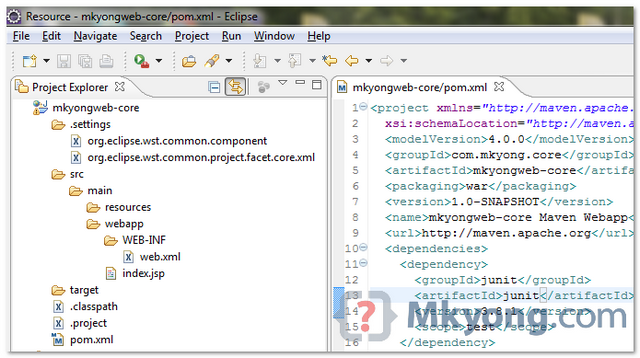
Done.
Reference
- http://maven.apache.org/plugins/maven-eclipse-plugin/eclipse-mojo.html
- http://maven.apache.org/plugins/maven-eclipse-plugin/wtp.html
- http://wiki.eclipse.org/WTP_FAQ#What_version_of_Eclipse_does_WTP_work_with.3F
- Unsupported WTP version: 1.5. This plugin currently supports only the following versions: 1.0 R7
- How to convert Java Project to Web Project in Eclipse

Very nice article. Really saved my day.
I want to put my project on github, how to get rid of eclipse related documents? I tried to delete eclipse related document, but import into eclipse has problem.
Hi Sir ,
thank you for this tutorial , i used the command mvn eclipse:eclipse -Dwtpversion=2.0 , but i’m getting a red cross on the project but i’m sure that i’m not having any error in the code
(I created the project from eclipse menu and not via the command , with archetypeId : maven-archetype-quickstart)
Hi All,
I am very new to Maven and multi modules. I have search and read many forums on converting Maven project to Eclipse IDE, but was confused and not successful in convertion. The parent pom referring to many module poms. Then I execute mvn clean, mvn eclise:clean and finally mvn eclipse:eclipse. No issue here. I import the existing maven project structure in two ways but still don’t work (AS Maven Project or AS Jave Project)
I use Eclipse import as Maven project and pointed to the project root. This way I see same structure in Eclipse IDE as the Maven. I only see (Maven and Java) build icons for root not for the modules. Then pick a DaoImpl.java and use Java Call Hierarchy for impact analysis and code walkthrough. But I got error msg from Eclipse: “ The resource is not on the build path of a java project”
1. What are the options?
2. At which level? (Add on the MyApp level or each Module level ?) Step by step please.
I have tried to add the compiled Module1.jar and Module2.jar from the Module target folder on MyApp –>properties –> Java Build Path –> Link Source –> Model1 –> target folder (Don’t work )
OR as –> Add Libraries –> Add Jar(s) (Don’t work)
— Module1.jar — Module2.jar
MyApp (M & J small icons indicated maven and java project)
———- Module1
———- src— main
—————— test
———- target
pom
——— Model2
———- src— main
—————— test
——— target
pom
pom
I have spend so much time and appreciate your guidance ?
How can something so common and particle yet confused and difficult to implement ? (We can’t change the Project structure b/c we need to check it back into Source Control.)
Did you have resolution? I have the same red cross on the project. However, I can run the project successfully. Any thoughts of removing the ‘red cross’? Thanks.
Check “Problem” view, to know what caused red cross.
Hi,
How did you fix this issue (red cross).
This was very helpful. Thank you !
I followed your tutorial and had a couple of hurdles that I would like to note for future users.
1. When you run certain maven commands the jdk version gets reset. I set the the jdk under project properties->build path and properties->facets. I also set the dynamic web module accordingly under facets.
2. Both in this tutorial and when I created my web project with the maven eclipse plugin, I found that my code was not being compiled. I had to set the inclusion and exclusion filters. Somehow maven had it setting all files to get excluded in the build process.
3. Oh and don’t forget to include your server libs on the build path of course.
Again thanks for the tutorials as they are really helpful.
Hi I am getting the below error after importing the maven web-based project into my workspace. Seeking some help on the below.
Description Resource Path Location Type
Classpath entry M2_REPO/junit/junit/3.8.1/junit-3.8.1.jar will not be exported or published. Runtime ClassNotFoundExceptions may result. mkyongweb-core P/mkyongweb-core Classpath Dependency Validator Message
Java compiler level does not match the version of the installed Java project facet. mkyongweb-core Unknown Faceted Project Problem (Java Version Mismatch)
Unbound classpath variable: ‘M2_REPO/junit/junit/3.8.1/junit-3.8.1.jar’ in project ‘mkyong-core’ mkyong-core Build path Build Path Problem
Unbound classpath variable: ‘M2_REPO/junit/junit/3.8.1/junit-3.8.1.jar’ in project ‘mkyongweb-core’ mkyongweb-core Build path Build Path Problem
The project cannot be built until build path errors are resolved mkyong-core Unknown Java Problem
The project cannot be built until build path errors are resolved mkyongweb-core Unknown Java Problem
Thanks & Regards,
Nawaz
I am also getting the same error but after trying that error will be gone…
I am using the ecplise version 3.6
mvn eclipse:eclipse -Dwtpversion=R7
But i am getting the warning
Classpath entry M2_REPO/junit/junit/3.8.1/junit-3.8.1.jar will not be exported or published. Runtime ClassNotFoundExceptions may result
can any one help me out of this situation….
hello,
very useful article.
But i am facing one problem after importing my project in eclipse.
In Deployment Descriptor folder there is a file called Error pages. I am not getng the problem with this page. Because of this page error on project is shown. So i am not able to run the application.
Please help me as early as possible.
Hi sayali.. I also got error after importing this project into Eclipse. The error mark on Error Pages. Still, I can successfully executing the application. Just run that application once.
nice one
I think “mvn eclipse:eclipse -Dwtpversion=1.5” is pretty outdated.
I found that the best way to work with Eclipse and Maven2 is to use the Eclipse’s m2eclipse plugin. http://m2eclipse.sonatype.org
See section on “Working With Eclipse and Dynamic Web Project” on this wiki:
http://code.google.com/p/jbosstown/wiki/GettingStartedWithMaven#Working_With_Eclipse_and_Dynamic_Web_Project
Nice tutorials, I was wondering if you have some nice tutrial on Webservices.
thanks for the suggestion, will write some web services in future
Great mkyoung… .I am very happy if u have any nice tutorial on JMX,JNDI,JAAS…
Very useful info!
Any idea why generated classpath in the .classpath file does not include “src/main/java” and “src/test/java”?
In other words, it seems like the generated .classpath file does not include the 2 lines below:
Maven should be include those folders in Eclipse project .classpath, if your folder is follow Maven’s folder structure, Would you mind yo send me your project, in order to further study on it.
I’ve been using this and getting the same error. It is important to remove ‘resources’ and make the directory ‘java’ before running… mvn eclipse:eclipse -Dwtpversion=2.0.