Generate javadoc jar for Maven based project

The “maven-javadoc” plugin uses “JDK\bin\javadoc.exe” command to generate javadocs, pack in jar file and deploy along with your project.
1. Maven JavaDoc Plugin
Add “maven-javadoc” plugin in your “pom.xml” file.
File : pom.xml
<project xmlns="http://maven.apache.org/POM/4.0.0"
    xmlns:xsi="http://www.w3.org/2001/XMLSchema-instance"
	xsi:schemaLocation="http://maven.apache.org/POM/4.0.0
	http://maven.apache.org/maven-v4_0_0.xsd">
	<modelVersion>4.0.0</modelVersion>
	<groupId>com.mkyong</groupId>
	<artifactId>mkyongcore</artifactId>
	<packaging>jar</packaging>
	<version>1.0</version>
	<name>mkyongcore project</name>
	<url>http://maven.apache.org</url>
	<build>
	<plugins>
		<plugin>
			<groupId>org.apache.maven.plugins</groupId>
			<artifactId>maven-javadoc-plugin</artifactId>
			<executions>
				<execution>
					<id>attach-javadocs</id>
					<goals>
						<goal>jar</goal>
					</goals>
				</execution>
			</executions>
		</plugin>
	</plugins>
	</build>
</project>
2. Deploy It
Issue “mvn install“, it will generate javadoc, package and deploy your project to local repository.
D:\mkyongweb-core>mvn install
[INFO] Scanning for projects...
[INFO] ------------------------------------------------------------------------
[INFO] Building mkyongcore project
[INFO]    task-segment: [install]
[INFO] ------------------------------------------------------------------------
//...
Loading source files for package com.mkyong.core...
Constructing Javadoc information...
Standard Doclet version 1.6.0_13
Building tree for all the packages and classes...
Generating D:/mkyongweb-core/target/apidocs\com/mkyong/core/\App.html...
Generating D:/mkyongweb-core/target/apidocs\com/mkyong/core/\package-frame.html...
Generating D:/mkyongweb-core/target/apidocs\com/mkyong/core/\package-summary.html...
Generating D:/mkyongweb-core/target/apidocs\com/mkyong/core/\package-tree.html...
Generating D:/mkyongweb-core/target/apidocs\constant-values.html...
Generating D:/mkyongweb-core/target/apidocs\com/mkyong/core/\class-use\App.html...
Generating D:/mkyongweb-core/target/apidocs\com/mkyong/core/\package-use.html...
Building index for all the packages and classes...
Generating D:/mkyongweb-core/target/apidocs\overview-tree.html...
Generating D:/mkyongweb-core/target/apidocs\index-all.html...
Generating D:/mkyongweb-core/target/apidocs\deprecated-list.html...
Building index for all classes...
Generating D:/mkyongweb-core/target/apidocs\allclasses-frame.html...
Generating D:/mkyongweb-core/target/apidocs\allclasses-noframe.html...
Generating D:/mkyongweb-core/target/apidocs\index.html...
Generating D:/mkyongweb-core/target/apidocs\help-doc.html...
Generating D:/mkyongweb-core/target/apidocs\stylesheet.css...
[INFO] Building jar: D:\mkyongweb-core\target\mkyongcore-1.0-javadoc.jar
[INFO] [install:install {execution: default-install}]
[INFO] Installing D:\mkyongweb-core\target\mkyongcore-1.0.jar to D:\maven\repo\com\mky
ong\mkyongcore\1.0\mkyongcore-1.0.jar
[INFO] Installing D:\mkyongweb-core\target\mkyongcore-1.0-javadoc.jar to D:\maven\repo
\com\mkyong\mkyongcore\1.0\mkyongcore-1.0-javadoc.jar
[INFO] ------------------------------------------------------------------------
[INFO] BUILD SUCCESSFUL
3. Output
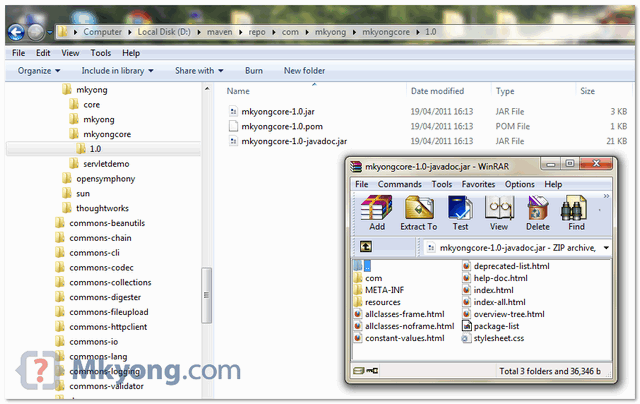
Browse to your local repository, 2 jar files are created :
- mkyongcore-1.0.jar (classes)
- mkyongcore-1.0-javadoc.jar (javadoc)
About Author

Founder of Mkyong.com, love Java and open source stuff. Follow him on Twitter. If you like my tutorials, consider make a donation to these charities.
How to access from container url?
It is a nice and time saving tutorial.