Often times, you need c or gcc compiler to compile open source projects in Mac OS X. The problem is Mac OS X doesn’t install the gcc compiler by default.
If you try to install or compile some projects that required c/gcc compiler, following errors message will be logged :
configure: error: C compiler cannot create executables

configure: error: no acceptable C compiler found in $PATH
In terminal, type “gcc“, you will get message “command not found”.
$ gcc
-bash: gcc: command not found
Solution
To install gcc compiler on Mac OS X, you need to download and install “Command Line Tools for Xcode”, which is available in Apple’s developer page. See following steps :
1. Register Apple Developer Account
Access Apple’s developer page, to process on the download, you need to register an Apple account, it’s free, but need to spend few minutes to fill in the survey.
2. Command Line Tools for Xcode
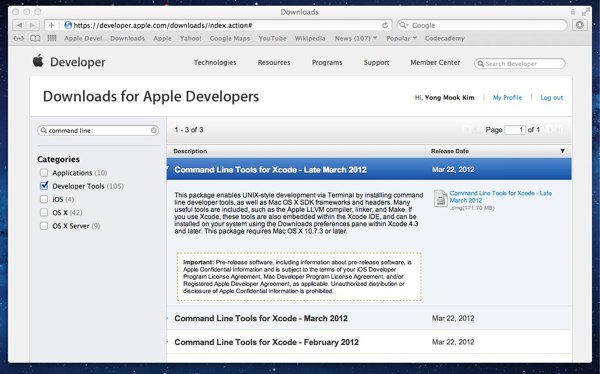
In Apple developer page, “Developer Tools” category, find “Command Line Tools for Xcode“, choose your version and click on the xx.dmg file (file size is 100mb ++) to start the download.
3. Installation
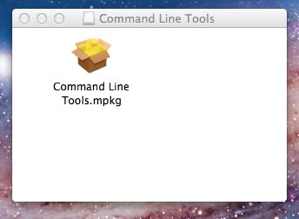
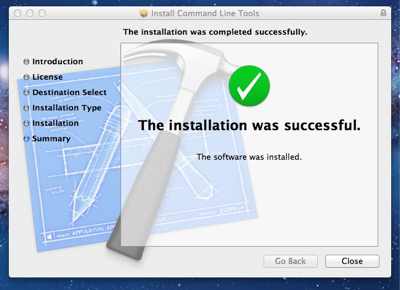
After .dmg file is downloaded, a small dialog will be prompted and show you this file – “Command Line Tools.mpkg“, just double click on it, follow the wizard guide to complete the installation.
4. Verification
After installation is completed, run “gcc -v” in terminal again. If everything fine, following output will be displayed.
mkyong$ gcc -v
Using built-in specs.
Target: i686-apple-darwin11
Configured with: {ignore long text…}
Thread model: posix
gcc version 4.2.1 (Based on Apple Inc. build 5658) (LLVM build 2336.9.00)
Done, the gcc version 4.2.1 is installed on Mac OS X successfully.

Thank you so much sir , i really feel very bad when my first program of hello world doesn’t run.But after following ur steps i am able to do coding now.
Thanks
I love how sometimes people give the simplest answers that do not really answer the ACTUAL question people are asking. This is how to install the clang/llvm gcc front end which is NOT gcc.
Muchas muchas gracias!
I wanted to install GNU GCC, not clang
This installs LLVM, not GCC. Type gcc –help and check the first lines.
Configured with: –prefix=/Applications/Xcode.app/Contents/Developer/usr –with-gxx-include-dir=/Applications/Xcode.app/Contents/Developer/Platforms/MacOSX.platform/Developer/SDKs/MacOSX10.14.sdk/usr/include/c++/4.2.1
Apple LLVM version 10.0.0 (clang-1000.11.45.5)
Target: x86_64-apple-darwin18.0.0
Thread model: posix
InstalledDir: /Applications/Xcode.app/Contents/Developer/Toolchains/XcodeDefault.xctoolchain/usr/bin
Found CUDA installation: /usr/local/cuda, version 8.0
this is what i got after gcc -v , can u please tell me whats went wrong
thanks!
it helps. thanks
Thanks! 🙂
This is wrong. This gcc is simply a facade for Clang + LLVM. Get your facts right before you write a freaking blog, you imbecile.
although this is a little harsh on the author, it’s exactly true
I did this, gcc gives me its version info, but I still get the message “C Compiler cannot create executables”
Do I need to do anything else to get rid of that message?
my lap is 10.9 version and it says this is only downloadable for 10.7 or before
Thanks a lot!. It was a great help. 🙂
I just tried the gcc installer (without xcode), works well:
https://github.com/kennethreitz/osx-gcc-installer
Oh for * sake. I wanted to install GCC, not xcode! FYI, xcode is not gcc. Also, xcode doesn’t contain gcc, but LLVM. There is slight, but definite difference.
One good approach to work with GCC in mac is to install docker and run a container with GCC and mount a directory with the container. That’s it
Thank you for this very clear explanation
Thank you so much! I am a student. They asked us to write a C program without explaining how to set up the environment=) This was very helpful=)
tnx nd is important!
G
Great help, I was getting stuck and this was amazing!
Helped!
Thanks a lot….i was successful in downloading the gcc on my mac.
thanks for sharing the thoughts, it was very helpful 🙂 🙂 .
Thanks a bunch, yet again.
valeu irmão! funcionou pra mim muito bem! thanks a lot! works great!
thanks so much, this got me out of a jam!
“Ayn:~ R$ gcc -v
Configured with: –prefix=/Developer/usr –with-gxx-include-dir=/usr/include/c++/4.2.1
xcrun: Error: failed to exec real xcrun. (No such file or directory)”
Thanks!
Hi, thanks for writing this post. I followed your instructions but command line tools won’t install properly.
I got this message instead when the installer told me installation had failed: “The installer can’t locate the data it needs to install the software. Check your install media or Internet connection and try again, or contact the software manufacturer for assistance.”
Do you have any idea what the problem might be?
Sincerely
Jia En
I am getting this msg at the “Apple Developers Page”We appreciate your patience as we work to bring our developer services back online. Certificates, Identifiers & Profiles, software downloads, and other developer services are now available. What is the alternative. Is there one??
I am getting this msg at the “Apple Developers Page”We appreciate your patience as we work to bring our developer services back online. Certificates, Identifiers & Profiles, software downloads, and other developer services are now available. What is the alternative, is there one??
Hi mkyong,
I am having a problem with command tools, i am using mac 10.8, downloaded the command tool, install it.The installation goes step by step as described. But when installation finish, it treats the software as an external drive, or doesn’t install it in “machintosh HD” as it is supposed to. As a result you can’t find command tool if you run “gcc-v”.I checked if there is any similar problem, but i don’t see anywhere. Any idea why?
Actually, you’re explaining the process of installing llvm-gcc which is actually not the actual gcc. Its a modified version made by Apple to compile C/Obj-C programs.
Although this is fine for most purposes, some other tools (I think its Ruby, not sure) require the original gcc package. Not the llvm one.
Thanks!
thanks!
Thanks a ton ..all your tutorials are excellent…and Big Thanks !
Thanks! Instructions worked perfectly.
When I search “command line” as you did, there is no “Command Line Tools for Xcode” listed. In fact, my categories are different from yours also. The categories on the left-hand bar say Platform: Safari, OSX, iOS, Java, General; and Type: Guide, Sample Code, Reference, General.
The closest thing that sounds like what I’m looking for is “Quartz Composer CommandLineTool”, but that isn’t a package. Please help, thank you,
Mareo
Mareo,
Your not supposed to search for command line. All he said was to go to https://developer.apple.com/downloads/index.action
and download command line tools for xcode from the list on that page… do not search for command line
Same exact issue here – no Command Line Tools for Xcode are available in the list. And his screenshot shows the ‘command line’ string being searched on. That should have no bearing on whether it’s in the list or not. Why would it show for some people and not others I wonder?
Thanks a lot. Your site is very useful.
hello,
thanks to your instructions I was able to get my Netbeans working! thanks! Also, Ive been trying to install wxwidgets but i havent been successful. Ive been through several forums and instrucional pages but still cant get it to work. Would you be able to help me out?
Just wanted to say thank you.
Thanks, it worked perfectly on Mountain Lion and I didn’t have to download the whole XCode package.
Best, Tom.
There’s also another way to install the command line tools, via the IDE itself (requires Xcode 4.3 or later):
– Open Xcode preferences, select downloads pane
– Under Components, click install command line tools button
Voila!
Thanks, Avee. The method listed by mkyong does not work or at least for me. I did fire up Xcode, navigated to the Download pane, selected Components tab, the clicked the “install” button for “Command Line Tools”. Thanks for the information.
THANK YOU SO MUCH
Thanks god for this guy.
Thank you mkyong, you are a very good man!
Hi! I tried compiling and running my codes in terminal. But this errors appears:
Undefined symbols:
“std::basic_ostream<char, std::char_traits >& std::operator<< <std::char_traits >(std::basic_ostream<char, std::char_traits >&, char const*)”, referenced from:
_main in ccvKjPUB.o
“std::ios_base::Init::Init()”, referenced from:
__static_initialization_and_destruction_0(int, int)in ccvKjPUB.o
“std::basic_string<char, std::char_traits, std::allocator >::size() const”, referenced from:
std::__verify_grouping(char const*, unsigned long, std::basic_string<char, std::char_traits, std::allocator > const&)in ccvKjPUB.o
“std::basic_string<char, std::char_traits, std::allocator >::operator[](unsigned long) const”, referenced from:
std::__verify_grouping(char const*, unsigned long, std::basic_string<char, std::char_traits, std::allocator > const&)in ccvKjPUB.o
std::__verify_grouping(char const*, unsigned long, std::basic_string<char, std::char_traits, std::allocator > const&)in ccvKjPUB.o
std::__verify_grouping(char const*, unsigned long, std::basic_string<char, std::char_traits, std::allocator > const&)in ccvKjPUB.o
“___gxx_personality_v0”, referenced from:
std::__verify_grouping(char const*, unsigned long, std::basic_string<char, std::char_traits, std::allocator > const&)in ccvKjPUB.o
_main in ccvKjPUB.o
___tcf_0 in ccvKjPUB.o
unsigned long const& std::min(unsigned long const&, unsigned long const&)in ccvKjPUB.o
__static_initialization_and_destruction_0(int, int)in ccvKjPUB.o
global constructors keyed to mainin ccvKjPUB.o
CIE in ccvKjPUB.o
“std::ios_base::Init::~Init()”, referenced from:
___tcf_0 in ccvKjPUB.o
“std::cout”, referenced from:
_main in ccvKjPUB.o
ld: symbol(s) not found
collect2: ld returned 1 exit status
here’s what’s inside or my codes:
#include
using namespace std;
int main() {
cout << "Hello World";
return 0;
}
Thanks!!! Everything works 🙂
AHHH oh my God I figured it out! I’ve been struggling in frustration with this for 36 hours, and I figured it out on my own! I’m not supposed to see the message by simply compiling. I then have to RUN the program. If only that part was BOLDED in my instruction booklet—> what a relief!
sorry to have bothered- thank you though!
Hello, I could use a little assistance.
I’ve installed the compiler as instructed. I’ve by this point created a source code using Bluefish text editor, following all instructions I was given. The book I’m learning from tells me to “compile the source code” for the file i’ve created (named DUMB.C). it tells me that the command to do so with “most compilers” is
gcc dumb.c -o dumb
I do this, and though I do not receive an error message… nothing happens. Nothing at all. And my instructions tell me that a message is supposed to be displayed on the screen. My question is… where my book tells me that the above is the command for “most compilers,” does that mean it may NOT be the proper command for this specific compiler?
Help is appreciated, I’m SO stuck and VERY frustrated.
Thanks,
Jason
after using
. Use
. Then you will see the message.
Thank you, I can now compile C/C++ programs in Netbeans 7.2. was looking for it.
hi, my macbook is 10.7.
i have already download the the xcode thing. But i don’t know how to reach to step 4 and do i key in “gcc function.php” or “gcc -v” into the blank in order to download the gcc compiler into macbook?
thank you.
In step3, gcc compiler is installed along with the xcode. Step 4 is for verification, run “terminal” (launchpad -> other) and “gcc -v” to test the installed version.
Ahh you are great my friend, thank you. I’ve spent one week for doing this. Thank you. Regards from Puebla, Mexico.
Mac OSX should bundle gcc compiler.
Hi
thanks a lot for explaining the steps clearly. im using the mac for the first time and installed it without any trouble.
Hi,
I have been visiting this site for a quite a while. The information found here are very useful and pretty neat. I did not care to add any comments. But I just want to say that this is very wonderful and I believe you will continue this work.
Thanks
Sundar
My Mac is version 10.6. The command tool lines are not available for my mac. How can I use the terminal to compile c grogram? Thanks in advance.
So the thuglife gangster terrorist scum at macintrash are in material violation of the GPL? Nice to know. Do they also work with Al Qaeda in Lebanon (Fatah al Islam, Asbat Al Ansar), Libya (Al Qaeda in North Africa Benghazi, Al Qaeda in North Africa Darniah), and Al Qaeda in Pakistan (Tehrik i Taliban), aka US federal government?
hello
i just followed your instructions above and downloaded the command line tools for xcode
ran the gcc -v command….everything ok but
im trying to compile a simple c++ test program but getting error:
“no such file or directory”
im using the g++ command
g++ function.cpp
thank you
Should be
gcc function.phpAwesome man thanks. Macbook osx 10.9