To validate email, uses JSF <f:validateRegex>, and puts following regular expression. This regex should be able to validates most of the email format, and I’m using it for few projects.
Email Regular Expression
^[_A-Za-z0-9-\+]+(\.[_A-Za-z0-9-]+)*@[A-Za-z0-9-]+(\.[A-Za-z0-9]+)*(\.[A-Za-z]{2,})$
P.S For detail explanation, refer to this how to validate email address with regular expression.
In this tutorial, we will show you a simple email input, and uses <f:validateRegex> to validate it.
Tools used :
- PrimeFaces 3.3
- JSF 2.2.11
- Eclipse 4.2
- Maven 3
- Tomcat 7
1. Email Validator Example
If email is invalid, display error message “Invalid email format”.
index.xhtml
<!DOCTYPE html>
<html xmlns="http://www.w3.org/1999/xhtml"
	xmlns:h="http://java.sun.com/jsf/html"
	xmlns:f="http://java.sun.com/jsf/core"
	xmlns:ui="http://java.sun.com/jsf/facelets"
	xmlns:p="http://primefaces.org/ui">

<h:head>

</h:head>
<h:body>
  <f:facet name="last">
	<h:outputStylesheet library="mytheme" name="css/style.css" />
  </f:facet>

  <h1>PrimeFaces email validator example</h1>

  <div style="width: 500px">
	<h:form>

	<p:inputText id="email" required="true" label="email" size="40"
		requiredMessage="Please enter your email address."
		validatorMessage="Invalid email format"
		value="#{userBean.email}">

	  <f:validateRegex
		pattern="^[_A-Za-z0-9-\+]+(\.[_A-Za-z0-9-]+)*@[A-Za-z0-9-]+(\.[A-Za-z0-9]+)*(\.[A-Za-z]{2,})$" />

	</p:inputText>
	<p:watermark for="email" value="Email Address *" />
	<p:message for="email" />

	<p:commandButton value="test" style="margin:20px"
		action="#{userBean.register}" ajax="false" />

   </h:form>
  </div>

</h:body>
</html>
UserBean.java – Do nothing, if email is ok, redirect to thanks page.
package com.mkyong;

import javax.faces.bean.ManagedBean;
import javax.faces.bean.SessionScoped;

@ManagedBean(name = "userBean")
@SessionScoped
public class UserBean {

	String email;

	public String getEmail() {
		return email;
	}

	public void setEmail(String email) {
		this.email = email;
	}

	public String register() {
		return "thanks?faces-redirect=true";
	}

}
2. Demo
http://localhost:8080/primefaces/index.jsf
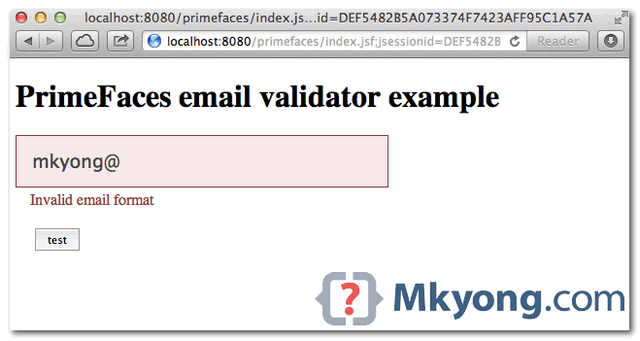
Display error message if email validation is failed.
Download Source Code
Download it – primefaces-email-validator-example.zip (11 KB)

THANKS A LOT DUDE.
Thanks, works perfectly, but not show me now the validatorMessage; at first it towards, but not anymore. Why can it be? Excuse my english.
Thank you. Just I need.
I tend not to leave a ton of remarks, however i did some searching
and wound up here PrimeFaces + JSF Email validator example.
And I do have a couple of questions for you if you don’t mind. Could it be simply me or does it look as if like some of the responses come across like left by brain dead individuals? 😛 And, if you are writing on additional online social sites, I’d like
to follow anything new you have to post. Could you list of all of all your community pages
like your Facebook page, twitter feed, or linkedin profile?
Thanks friend for the help, I was needing it, greets from Colombia, excuse my english
I have a inputText for email, but this is not requierd, . Can i only validate if thera ara anything wite??
Jorge, right only remove required=”true”.
regards
Not working, another idea?
And how Can I change the message?