In JSF, there is no official way to validate multiple components or fields. To solve it, you need to create a custom validator. In this tutorial, we will show you two unofficial ways to create a validator to validate multiple components – password and confirm password.
Two ways :
1. Register PostValidateEvent, puts validation inside.
2. Create a standard validator and get other components via f:attribute.
This example is tested under following technologies :
- JSF 2.1.11
- Tomcat 6, 7
- Java 1.6
- Maven 3
1. Validation in PostValidateEvent
The javax.faces.event.PostValidateEvent is a system event, that fire after all components are validated. The idea is register a PostValidateEvent, and attach to a validation method. see following :
<f:event listener="#{bean.methodToValidateMultipleFields}" type="postValidate" />
<!DOCTYPE html>
<html xmlns="http://www.w3.org/1999/xhtml"
  xmlns:h="http://java.sun.com/jsf/html"
  xmlns:f="http://java.sun.com/jsf/core">

<h:body>

<h1>Multiple-Components Validator in JSF 2.0</h1>

  <h:form id="register">

    <h:message for="RegisterGroupPanel" style="color:red;" />

    <h:panelGrid columns="3" id="RegisterGroupPanel">

	<!-- register a PostValidateEvent -->
	<f:event listener="#{user.validatePassword}" type="postValidate" />

	<h:outputLabel for="username" value="Username : " />
	<h:inputText id="username" value="#{user.username}" required="true"
		requiredMessage="Please enter username" />
	<h:message for="username" style="color: red;" />

	<h:outputLabel for="password" value="Password : " />
	<h:inputSecret id="password" value="#{user.password}" required="true"
		requiredMessage="Please enter password" />
	<h:message for="password" style="color: red;" />

	<h:outputLabel for="confirmPassword" value="Confirm password : " />
	<h:inputSecret id="confirmPassword" required="true"
		requiredMessage="Please enter confirm password" />
	<h:message for="confirmPassword" style="color: red;" />

    </h:panelGrid>

	<h:commandButton action="thanks" value="register" />

  </h:form>

</h:body>
</html>
In PostValidateEvent, the “listener” method must have this signature public void method-name(ComponentSystemEvent event)“. The rest of the code should be self-explanatory.
package com.mkyong;

import javax.faces.application.FacesMessage;
import javax.faces.bean.ManagedBean;
import javax.faces.bean.SessionScoped;
import javax.faces.component.UIComponent;
import javax.faces.component.UIInput;
import javax.faces.context.FacesContext;
import javax.faces.event.ComponentSystemEvent;

@ManagedBean(name = "user")
@SessionScoped
public class UserBean {

	public String username;
	public String password;

	public String getUsername() {
		return username;
	}

	public void setUsername(String username) {
		this.username = username;
	}

	public String getPassword() {
		return password;
	}

	public void setPassword(String password) {
		this.password = password;
	}

	public void validatePassword(ComponentSystemEvent event) {

	  FacesContext fc = FacesContext.getCurrentInstance();

	  UIComponent components = event.getComponent();

	  // get password
	  UIInput uiInputPassword = (UIInput) components.findComponent("password");
	  String password = uiInputPassword.getLocalValue() == null ? ""
		: uiInputPassword.getLocalValue().toString();
	  String passwordId = uiInputPassword.getClientId();

	  // get confirm password
	  UIInput uiInputConfirmPassword = (UIInput) components.findComponent("confirmPassword");
	  String confirmPassword = uiInputConfirmPassword.getLocalValue() == null ? ""
		: uiInputConfirmPassword.getLocalValue().toString();

	  // Let required="true" do its job.
	  if (password.isEmpty() || confirmPassword.isEmpty()) {
		return;
	  }

	  if (!password.equals(confirmPassword)) {

		FacesMessage msg = new FacesMessage("Password must match confirm password");
		msg.setSeverity(FacesMessage.SEVERITY_ERROR);
		fc.addMessage(passwordId, msg);
		fc.renderResponse();

	  }

	}
}
2. Custom Validator & Attribute
This method is copied from this article – Validator for multiple fields.
Defines “confirmPassword” component as #{confirmPassword}, attach to “password” component via f:attribute.
<h:inputSecret id="password" value="#{user.password}" required="true"
	requiredMessage="Please enter password">

	<f:validator validatorId="passwordValidator" />
	<f:attribute name="confirmPassword" value="#{confirmPassword}" />

</h:inputSecret>

<h:inputSecret id="confirmPassword" required="true"
	binding="#{confirmPassword}"
	requiredMessage="Please enter confirm password" />
<!DOCTYPE html>
<html xmlns="http://www.w3.org/1999/xhtml"
  xmlns:h="http://java.sun.com/jsf/html"
  xmlns:f="http://java.sun.com/jsf/core">

<h:body>

  <h1>Multiple-Components Validator in JSF 2.0</h1>

  <h:form id="register">

    <h:message for="RegisterGroupPanel" style="color:red;" />

    <h:panelGrid columns="3" id="RegisterGroupPanel">

	<h:outputLabel for="username" value="Username : " />
	<h:inputText id="username" value="#{user.username}" required="true"
		requiredMessage="Please enter username" />
	<h:message for="username" style="color: red;" />

	<h:outputLabel for="password" value="Password : " />
	<h:inputSecret id="password" value="#{user.password}" required="true"
		requiredMessage="Please enter password">
		<f:validator validatorId="passwordValidator" />
		<f:attribute name="confirmPassword" value="#{confirmPassword}" />
	</h:inputSecret>
	<h:message for="password" style="color: red;" />

	<h:outputLabel for="confirmPassword" value="Confirm password : " />
	<h:inputSecret id="confirmPassword" required="true"
		binding="#{confirmPassword}"
		requiredMessage="Please enter confirm password" />
	<h:message for="confirmPassword" style="color: red;" />

    </h:panelGrid>

	<h:commandButton action="thanks" value="register" />

  </h:form>

</h:body>
</html>
A custom validator class, and get the confirm password component via component.getAttributes.
package com.mkyong;

import javax.faces.application.FacesMessage;
import javax.faces.component.UIComponent;
import javax.faces.component.UIInput;
import javax.faces.context.FacesContext;
import javax.faces.validator.FacesValidator;
import javax.faces.validator.Validator;
import javax.faces.validator.ValidatorException;

@FacesValidator("passwordValidator")
public class PasswordValidator implements Validator {

	@Override
	public void validate(FacesContext context, UIComponent component,
		Object value) throws ValidatorException {

	  String password = value.toString();

	  UIInput uiInputConfirmPassword = (UIInput) component.getAttributes()
		.get("confirmPassword");
	  String confirmPassword = uiInputConfirmPassword.getSubmittedValue()
		.toString();

	  // Let required="true" do its job.
	  if (password == null || password.isEmpty() || confirmPassword == null
		|| confirmPassword.isEmpty()) {
			return;
	  }

	  if (!password.equals(confirmPassword)) {
		uiInputConfirmPassword.setValid(false);
		throw new ValidatorException(new FacesMessage(
			"Password must match confirm password."));
	  }

	}
}
3. Demo
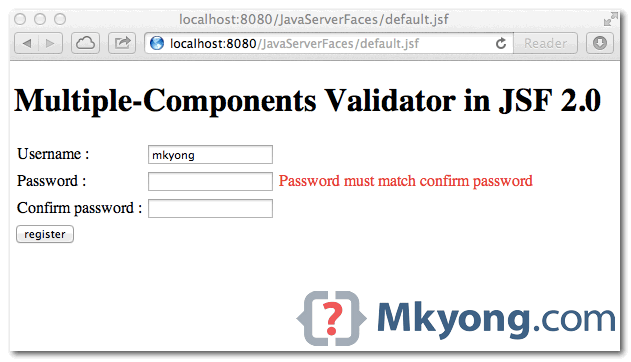
Above two solutions are doing the same thing, validate two components – password and confirm password.
No input, required="true" is fired.
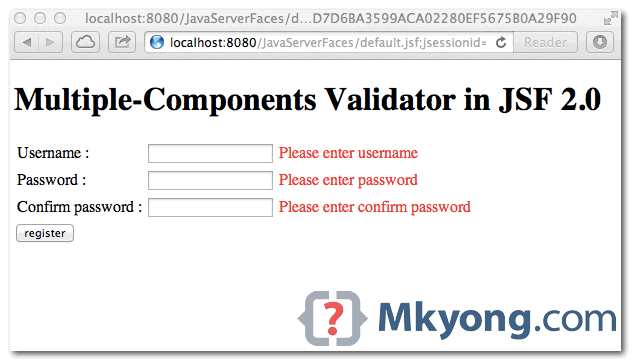
Validate multiple components / fields. Make sure password is equal to confirm password.

Hi, Neat post. There is an issue together with your site in internet explorer, may test this IE nonetheless is the marketplace leader and a huge part of folks will leave out your magnificent writing because of this problem. edegcdeakacabgfb
Hi,
in method 1, I suggest fc.validationFailed() should be added before fc.renderResponse(), otherwise args.validationFailed remains undefined inside a onComplete JS code (I’ve experimented this scenario in a real application)
Regards,
Luís Cláudio
This works great! Thanks!
In my case , i use spring web flow with primeface
for method 1, if the form submission is triggered by a primeface button with ajax=”false” ( since i need to integrate file download which must be called with ajax=”false”)
then the event is called but form submission cannot be rejected when validation is failed
So in my case , those validation should be done via spring web flow validator instead of JSF level!?
how to avoid the image corrupted while downloading from the image server in java????
Dear friends and mkyong,
This is a great article. (@mkyong) Thank you for writing such a great and guiding article.
Since I am a starter validator programmer, I didn’t find my way of retrieving a selectOneMenu component.
The below is the xhtml code for my case in the view:
 <h:selectOneMenu id ="selectedMetalCodeMenu" valueChangeListener="#{metalStockIntroducingProcessesBean.selectedMetalCodeChanges}" converter="metalCodeConverter" required="true" requiredMessage="#{lang.metalStockIntroducing_metalKodu_req_txt}" value="#{metalStokTanimlamaIslemleriBean.selectedMetal.metalKod}">
                                        <f:selectItems value="#{metalStokTanimlamaIslemleriBean.metalKodlariMenu}" />
                                    </h:selectOneMenu>
And I would like to retrieve that selectOneMenu component’s value by the following way (guided by your article) in my validator class:
UIInput metalCode = (UIInput) components.findComponent("selectedMetalCodeMenu");
String metalCodeText = metalCode.getLocalValue().toString();
However, I am retrieving null value in the metalCode variable while I can retrieve inputText components values perfectly .
I think for the retrieval of the selectOneMenu components, there should be a special treatment. What would you recommend?
Thank you.
Yours sincerely…