When user make changes in input components, such as h:inputText or h:selectOneMenu, the JSF “value change event” will be fired.
Two ways to implement it :
1. Method binding – In input component, specified a bean’s method directly in the “valueChangeListener” attribute.
JSF…
<h:selectOneMenu value="#{bean.value}" onchange="submit()"
	valueChangeListener="#{bean.valueChangeMethod}">
   	<f:selectItems value="#{bean.values}" />
</h:selectOneMenu>
Java…
The method which interact with value change event should accept a ValueChangeEvent parameter.
@ManagedBean(name="bean")
@SessionScoped
public class BeanBean{

	public void valueChangeMethod(ValueChangeEvent e){
		//...
	}

}
2. ValueChangeListener interface – In input component, add a “f:valueChangeListener” tag inside, and specified an implementation class of ValueChangeListener interface.
JSF…
<h:selectOneMenu value="#{bean.value}" onchange="submit()">
    <f:valueChangeListener type="ValueListenerXXX" />
   	<f:selectItems value="#{bean.values}" />
</h:selectOneMenu>
Java…
Implements ValueChangeListener interface and override the processValueChange() method.
public class ValueListenerXXX implements ValueChangeListener{

	@Override
	public void processValueChange(ValueChangeEvent event)
			throws AbortProcessingException {

		//...

	}
}
To make it work, you have to attach a onchange=”submit()” JavaScript to the input component; Otherwise, no event will be fired.
Full valueChangeListener example
Here’s a JSF 2.0 application, with a dropdownbox (h:selectOneMenu) and a textbox (h:inputText), when user make changes in the dropdown box, it will fire the “value change event” and update the textbox with newly selected dropdown box value.
This example is demonstrate in both “Method binding” and “ValueChangeListener” way.
1. Method binding
A country bean to provide a list of the countries and locale code for demonstration. You can bind the bean’s method via “valueChangeListener” attribute in input component. See below :
CountryBean.java
package com.mkyong;

import java.io.Serializable;
import java.util.LinkedHashMap;
import java.util.Map;
import javax.faces.bean.ManagedBean;
import javax.faces.bean.SessionScoped;
import javax.faces.event.ValueChangeEvent;

@ManagedBean(name="country")
@SessionScoped
public class CountryBean implements Serializable{

	private static final long serialVersionUID = 1L;

	private static Map<String,String> countries;

	private String localeCode = "en"; //default value

	static{
		countries = new LinkedHashMap<String,String>();
		countries.put("United Kingdom", "en"); //label, value
		countries.put("French", "fr");
		countries.put("German", "de");
		countries.put("China", "zh_CN");
	}

	public void countryLocaleCodeChanged(ValueChangeEvent e){
		//assign new value to localeCode
		localeCode = e.getNewValue().toString();

	}

	public Map<String,String> getCountryInMap() {
		return this.countries;
	}

	public String getLocaleCode() {
		return localeCode;
	}

	public void setLocaleCode(String localeCode) {
		this.localeCode = localeCode;
	}

}
JSF page
<?xml version="1.0" encoding="UTF-8"?>
<!DOCTYPE html PUBLIC "-//W3C//DTD XHTML 1.0 Transitional//EN"
"http://www.w3.org/TR/xhtml1/DTD/xhtml1-transitional.dtd">
<html xmlns="http://www.w3.org/1999/xhtml"
      xmlns:h="http://java.sun.com/jsf/html"
      xmlns:f="http://java.sun.com/jsf/core"
      xmlns:ui="http://java.sun.com/jsf/facelets"
      >
    <h:body>

    	<h1>JSF 2 valueChangeListener example</h1>

	  <h:form>

	  <h:panelGrid columns="2">

		Selected country :
		<h:inputText id="country" value="#{country.localeCode}" size="20" />

		Select a country {method binding}:
		<h:selectOneMenu value="#{country.localeCode}" onchange="submit()"
			valueChangeListener="#{country.countryLocaleCodeChanged}">
   			<f:selectItems value="#{country.countryInMap}" />
   		</h:selectOneMenu>

	  </h:panelGrid>

	</h:form>

    </h:body>
</html>
2. ValueChangeListener interface
Reuse above country bean to provide a list of the countries and locale code. Implements the ValueChangeListener interface and bind it via “f:valueChangeListener” tag. See below :
CountryValueListener.java
package com.mkyong;

import javax.faces.context.FacesContext;
import javax.faces.event.AbortProcessingException;
import javax.faces.event.ValueChangeEvent;
import javax.faces.event.ValueChangeListener;

public class CountryValueListener implements ValueChangeListener{

	@Override
	public void processValueChange(ValueChangeEvent event)
			throws AbortProcessingException {

		//access country bean directly
		CountryBean country = (CountryBean) FacesContext.getCurrentInstance().
			getExternalContext().getSessionMap().get("country");

		country.setLocaleCode(event.getNewValue().toString());

	}

}
JSF page
<?xml version="1.0" encoding="UTF-8"?>
<!DOCTYPE html PUBLIC "-//W3C//DTD XHTML 1.0 Transitional//EN"
"http://www.w3.org/TR/xhtml1/DTD/xhtml1-transitional.dtd">
<html xmlns="http://www.w3.org/1999/xhtml"
      xmlns:h="http://java.sun.com/jsf/html"
      xmlns:f="http://java.sun.com/jsf/core"
      xmlns:ui="http://java.sun.com/jsf/facelets"
      >
    <h:body>

    	<h1>JSF 2 valueChangeListener example</h1>

	  <h:form>

	  <h:panelGrid columns="2">

		Selected country :
		<h:inputText id="country" value="#{country.localeCode}" size="20" />

		Select a country {ValueChangeListener class}:
		<h:selectOneMenu value="#{country.localeCode}" onchange="submit()">
			<f:valueChangeListener type="com.mkyong.CountryValueListener" />
   			<f:selectItems value="#{country.countryInMap}" />
   		</h:selectOneMenu>

	  </h:panelGrid>

	 </h:form>

    </h:body>
</html>
Demo
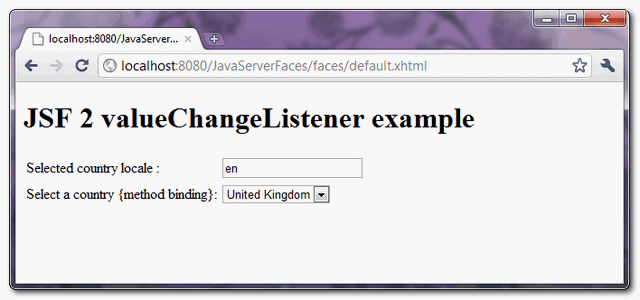
Default, country “United Kingdom” is selected.
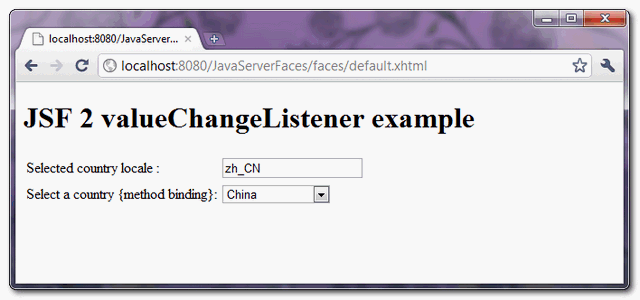
If country dropdown box value is changed, fire valueChangeListener, and update the textbox value with newly selected dropdrow box value.

the code is working to change the dropdownlist, but when i want to save it to database it doesnt works, can you teach me how to save the hashmap value to the database? thankyou sir
I have a drop down in a column of a table in UI . When i change one drop down value in a row then another related dropdown in another row should change and both values of drops down should be saved when i click on save button.
Any Idea can be appreciated highly…
please give an idea /example using trinidad lib and jsf1.2
If country dropdown box value is changed, fire valueChangeListener, and update the textbox value with newly selected dropdrow box value.
After the above logic how to update the text field value when we click on save button . when i click on save it getting back to his prevous value.
Filter execution threw an exception
excelente!
Maybe you can wrap your h:selectOneMenu into f:ajax and you don’t need to use onchange=”submit()”? And execute only @this value instead of whole form.
I get this error:hibernate.StaleObjectStateException: Row was updated or deleted by another transaction (or unsaved-value mapping was incorrect)
Could u tell me how to fix this error
I get this error: Conversion Error setting value ‘manu’ for ‘null Converter’ HELP PLS
you wrote about onchange=”submit()” where it is located? my browser tells me about cought exception submit() not found
ok, this.form.submit() works for me
nice article. helped me solve my issue in selectbox not updating to selected value
thank you
Hello,
I have used valueChangeListener for a rich:comboBox in my code. Its working fine but it calls the value cahnge methods once again when submit command button is clicked. I dont want it to call that methods when submit button is clicked. How can we do it? Please help.
Thanks
Saurabh
hi,
I am using valuechangelistner for a dropdown in datatable. But its not working as we expected. Event is called for each row of datatable, even though if i changed one row value.
Could you please help me .
Thanks in advance .
Is there any way that we can call Value Change Listener based on condition?
Basically I want to dispatch the call to Value change Listener only if some condition succeeds!!
Hi, I see your statements regarding the valueChangeListener but it does not work in my environment. I’m using NetBeans 7.x and my code is the same as the one you explained above.
So now is my question. I have four other drop downs (<h:selectOneMenu) an one button. I want to be able to get new selected values of those drop downs when I press the button and not before. If I do as described in the code above then the form get submit but all values in the drop downs disapear (oviously – a new page has been rendered when the form is submitted) but due to the submit call goes first then the server side valueChangeListener, I do not get the new values in the listeners argument myValueChangeListener(valueChangeEvent i_ev). How can I get the old values otherwise. Please help. Thanks in advance.
pls check this example
http://www.pretechsol.com/2013/04/jsf-value-change-listener-example.html
I have a text box with some value say “AAA”
If i call a method in Mangedbean, when i change the Select box, The AAA is not retained. Please explain
this is very good and learling codes examples.
Hi,
Thanks a lot for the explaination,
i have written the same code, without using VALUECHANGELISTENER, it was working
the jsp i have written was..
In my method setCountryOnText, i have called the SETTER method of my inputText
and i have set the value, Am i doing something wrong?
can you please tell me the difference between the procedure which you followed and the procedure which i am following?
Thanks a lot in advance
recently I have been looking your website ,You teach me all of them about jsf I own you thanks
Gebze Inst?tute of technology departman of Computer Engineering
Hi,
i have a little problem if i call the valueChangeListener=”#{country.countryLocaleCodeChanged} in my jsf page page but get the error: countryLocaleCodeChanged is not a property of country ?! I get that the event method countryLocalChanged(ValueChange event) is expecting a value and i do not provide the value in the jsf page?! Can anyone please tell me how to resolve this?
Thank you guys!!!
I think no need to worry about a parameter . when you define as valueChangeListener=”valuechange method it identified as a method which get the fired “event” as the paramter. so that is the convention. no need to explicity pass a parameter. fired event will do internally.
for the error you should check whether you have given the proper name for the @ManagedBean tag or any spelling mistake.
hi;
I have probleme with ,I want to rendre dynamique depending on its value another dataGrid displays; Please how to do that
I want to pass a parameter to another page, please how to do that!!!
should be posible through configuring managed bean property ?
hi;
I have probleme with ,I want to rendre dynamique depending on its value another dataGrid displays; Please how to do that
if i have a list of items(A,B,C) if i select B i want to show a panel asking the user to confirm is they want to go ahead with B how do i go about that.
Kindly let me know if you need more information.
Thanks in advance
am using JSF 1.2
Sorry didn`t use the rules for codes in the right way!
The javax.el.PropertyNotFoundException has appeared…
in my case is:
And the method:
public void setContaAtiva(ValueChangeEvent event) {
Integer conta = (Integer) event.getNewValue();
ContaRN contaRN = new ContaRN();
this.contaAtiva = contaRN.carregar(conta);
}
But occours:
javax.el.PropertyNotFoundException: The class ‘financeiro.web.ContextoBean’ does not have the property ‘setContaAtiva’.
at javax.el.BeanELResolver.getBeanProperty(BeanELResolver.java:661)
at javax.el.BeanELResolver.getValue(BeanELResolver.java:290)
at com.sun.faces.el.DemuxCompositeELResolver._getValue(DemuxCompositeELResolver.java:176)
at com.sun.faces.el.DemuxCompositeELResolver.getValue(DemuxCompositeELResolver.java:203)
at com.sun.el.parser.AstValue.getValue(AstValue.java:116)
…etc
I use this exact code, it’s great but has huge problem that I could not resolve.
lets just say I was in anther page where I have this for example ../faces/myotherpage.xhtml?cat=4 then I would go to my header where I have the drop down menu to change the language. Guess what happens? I see the page’s language changed yet the page Url becomes ../faces/myotherpage.xhtml which means it dropped cat=4 giving me null exception. Someone very expert told me to use on the dropdown menu so the page will be refreshed via ajax. Good work around but didn’t work for me for I have many ajax component that need to be refreshed not via ajax.. so how can this be resolved..
Thank you so much in advance for whom ever resolve this issue.
correction:
Someone very expert told me to use on the dropdown menu so the page will be refreshed via ajax entirely….
Hi,
In the above example, is it possible to do the same for more than 2 dropdowns? for e.g. if you have Country, State, City and High School as the dropdowns and change in any dropdown should reflect in all the dropdowns below a particular dropdown. For eg. change in country should refresh the state, city and school dropdowns. and change in state should refresh the city and the school dropdowns. I can make 2 dropdowns 2work but not all 4 as explained. PLEASE HELP AND REPLY ON MY EMAIL
Thanks for your example. You solved my problem