“f:validateLongRange” is a JSF range validator tag, which is used to check the range of a numeric value. For example,
<h:inputText id="age" value="#{user.age}">
	<f:validateLongRange minimum="1" maximum="150" />
</h:inputText>
When this form is submitted, the validator will make sure the “age” value is within the range from 1 to 150.
“f:validateLongRange” example
A JSF 2.0 example to show the use of “f:validateLongRange” tag to validate the range of a “age” input field, when the validator failed, display the error message via “h:message” tag.
1. Managed Bean
An user managed bean, with a “age” property.
package com.mkyong;

import java.io.Serializable;
import javax.faces.bean.ManagedBean;
import javax.faces.bean.SessionScoped;

@ManagedBean(name="user")
@SessionScoped
public class UserBean implements Serializable{

	int age;

	public int getAge() {
		return age;
	}

	public void setAge(int age) {
		this.age = age;
	}

}
2. JSF Page
JSF XHTML page, show the use of “f:validateLongRange” tag to make sure the “age” input value is within the range from 1 to 150.
<?xml version="1.0" encoding="UTF-8"?>
<!DOCTYPE html PUBLIC "-//W3C//DTD XHTML 1.0 Transitional//EN"
"http://www.w3.org/TR/xhtml1/DTD/xhtml1-transitional.dtd">
<html xmlns="http://www.w3.org/1999/xhtml"
      xmlns:h="http://java.sun.com/jsf/html"
      xmlns:f="http://java.sun.com/jsf/core"
      >
    <h:body>

    	<h1>JSF 2 validateLongRange example</h1>

	<h:form>

		<h:panelGrid columns="3">

			Enter your age :

			<h:inputText id="age" value="#{user.age}"
				size="10" required="true"
				label="Age" >
			        <f:validateLongRange maximum="150" minimum="1" />
			</h:inputText>

			<h:message for="age" style="color:red" />

		</h:panelGrid>

		<h:commandButton value="Submit" action="result" />

	</h:form>

    </h:body>
</html>
3. Demo
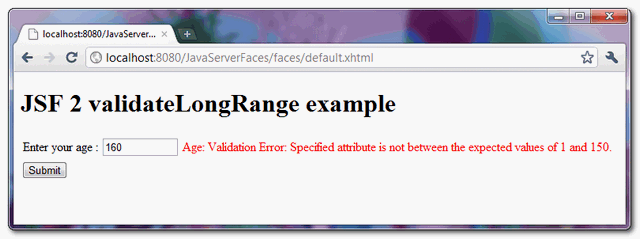
Maximum range validation failed.
Download Source Code
Download It – JSF-2-ValidateLongRange-Example.zip (9KB)

How can I set a custom message for this validation?
if I specify “01”, it accepts that input. How should fix that?
Is it not that <f:validateLongRange can be used with long data type in managed classs
long age;
You have used it as int age;