Since JSF 2.0, you can register javax.faces.event.PostConstructApplicationEvent and javax.faces.event.PreDestroyApplicationEvent system event to manipulate the JSF application life cycle.
1. PostConstructApplicationEvent – Perform a custom post-configuration after application has started.
2. PreDestroyApplicationEvent – Perform a custom cleanup task before application is about to be shut down.
In JSF, you can’t depends on the standard
ServletContextListeners to perform above task, because the ServletContextListeners may be run before JSF application is started.
The following example shows you how to create a PostConstructApplicationEvent and PreDestroyApplicationEvent system event in JSF 2.0.
1. Implements SystemEventListener
Create a class which implements javax.faces.event.SystemEventListener, and override the processEvent() and isListenerForSource() methods for your custom post-configuration and clean up task.
package com.mkyong;

import javax.faces.application.Application;
import javax.faces.event.AbortProcessingException;
import javax.faces.event.PostConstructApplicationEvent;
import javax.faces.event.PreDestroyApplicationEvent;
import javax.faces.event.SystemEvent;
import javax.faces.event.SystemEventListener;

public class FacesAppListener implements SystemEventListener{

  @Override
  public void processEvent(SystemEvent event) throws AbortProcessingException {

	if(event instanceof PostConstructApplicationEvent){
		System.out.println("PostConstructApplicationEvent is Called");
	}

	if(event instanceof PreDestroyApplicationEvent){
		System.out.println("PreDestroyApplicationEvent is Called");
	}

  }

  @Override
  public boolean isListenerForSource(Object source) {
	//only for Application
	return (source instanceof Application);

  }

}
2. Register System Events
Register both PostConstructApplicationEvent and PreDestroyApplicationEvent system event in faces-config.xml file like this :
faces-config.xml
<?xml version="1.0" encoding="UTF-8"?>
<faces-config
    xmlns="http://java.sun.com/xml/ns/javaee"
    xmlns:xsi="http://www.w3.org/2001/XMLSchema-instance"
    xsi:schemaLocation="http://java.sun.com/xml/ns/javaee
    http://java.sun.com/xml/ns/javaee/web-facesconfig_2_0.xsd"
    version="2.0">
    <application>

    	<!-- Application is started -->
    	<system-event-listener>
		<system-event-listener-class>
			com.mkyong.FacesAppListener
		</system-event-listener-class>
		<system-event-class>
			javax.faces.event.PostConstructApplicationEvent
		</system-event-class>
    	</system-event-listener>

    	<!-- Before Application is shut down -->
    	<system-event-listener>
		<system-event-listener-class>
			com.mkyong.FacesAppListener
		</system-event-listener-class>
		<system-event-class>
			javax.faces.event.PreDestroyApplicationEvent
		</system-event-class>
    	</system-event-listener>

    </application>
</faces-config>
3. Demo
Run your JSF application. The processEvent() method is executed after your JSF application is started, see figure below :
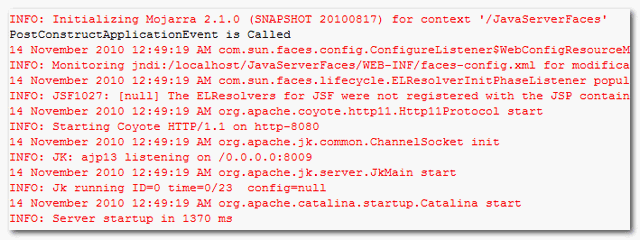
However, the
PreDestroyApplicationEvent is not really reliable, because JSF will not run it if it’s shut down abnormally. For example, Java process killed by system administrator, it’s always happened :). So, please use this system event wisely.
