In JSF application, you can change your application locale programmatically like this :
//this example change locale to france
FacesContext.getCurrentInstance().getViewRoot().setLocale(new Locale('fr');
It makes JSF support for internationalization or multiple languages easily.
Complete JSF internationalization example
In this tutorial, we show you a JSF 2.0 web application, which display a welcome page, retrieve a welcome message from properties file, and change the welcome message dynamically based on the selected language.
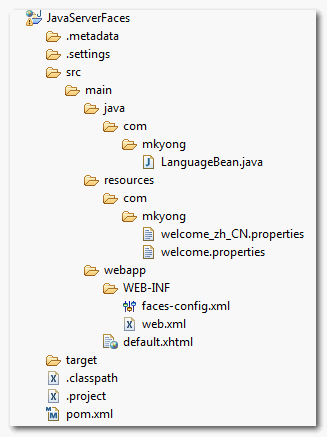
1. Project Folder
Directory structure for this example.
2. Properties file
Here’s two properties files to store English and Chinese message.
welcome.properties
welcome.jsf = Happy learning JSF 2.0
welcome_zh_CN.properties
welcome.jsf = \u5feb\u4e50\u5b66\u4e60 JSF 2.0
For UTF-8 or non-English characters, for example Chinese , you should encode it with native2ascii tool.
3. faces-config.xml
Include above properties file into your JSF application, and declared “en” as your default application locale.
faces-config.xml
<?xml version="1.0" encoding="UTF-8"?>
<faces-config
    xmlns="http://java.sun.com/xml/ns/javaee"
    xmlns:xsi="http://www.w3.org/2001/XMLSchema-instance"
    xsi:schemaLocation="http://java.sun.com/xml/ns/javaee
    http://java.sun.com/xml/ns/javaee/web-facesconfig_2_0.xsd"
    version="2.0">
     <application>
     	   <locale-config>
     	        <default-locale>en</default-locale>
     	   </locale-config>
	   <resource-bundle>
		<base-name>com.mkyong.welcome</base-name>
		<var>msg</var>
	   </resource-bundle>
     </application>
</faces-config>
4. Managed Bean
A managed bean, which provide language selection list , and a value change event listener to change the locale programmatically.
LanguageBean .java
package com.mkyong;

import java.io.Serializable;
import java.util.LinkedHashMap;
import java.util.Locale;
import java.util.Map;

import javax.faces.bean.ManagedBean;
import javax.faces.bean.SessionScoped;
import javax.faces.context.FacesContext;
import javax.faces.event.ValueChangeEvent;

@ManagedBean(name="language")
@SessionScoped
public class LanguageBean implements Serializable{

	private static final long serialVersionUID = 1L;

	private String localeCode;

	private static Map<String,Object> countries;
	static{
		countries = new LinkedHashMap<String,Object>();
		countries.put("English", Locale.ENGLISH); //label, value
		countries.put("Chinese", Locale.SIMPLIFIED_CHINESE);
	}

	public Map<String, Object> getCountriesInMap() {
		return countries;
	}


	public String getLocaleCode() {
		return localeCode;
	}


	public void setLocaleCode(String localeCode) {
		this.localeCode = localeCode;
	}

	//value change event listener
	public void countryLocaleCodeChanged(ValueChangeEvent e){

		String newLocaleValue = e.getNewValue().toString();

		//loop country map to compare the locale code
                for (Map.Entry<String, Object> entry : countries.entrySet()) {

        	   if(entry.getValue().toString().equals(newLocaleValue)){

        		FacesContext.getCurrentInstance()
        			.getViewRoot().setLocale((Locale)entry.getValue());

        	  }
               }
	}

}
5. JSF Page
A JSF page to display a welcome message from properties file, and attach a value change event listener to a dropdown box.
<?xml version="1.0" encoding="UTF-8"?>
<!DOCTYPE html PUBLIC "-//W3C//DTD XHTML 1.0 Transitional//EN"
"http://www.w3.org/TR/xhtml1/DTD/xhtml1-transitional.dtd">
<html xmlns="http://www.w3.org/1999/xhtml"
      xmlns:h="http://java.sun.com/jsf/html"
      xmlns:f="http://java.sun.com/jsf/core"
      xmlns:ui="http://java.sun.com/jsf/facelets"
      >

    <h:body>

    	<h1>JSF 2 internationalization example</h1>

     <h:form>

	<h2>
		<h:outputText value="#{msg['welcome.jsf']}" />
	</h2>

	<h:panelGrid columns="2">

		Language :
		<h:selectOneMenu value="#{language.localeCode}" onchange="submit()"
			valueChangeListener="#{language.countryLocaleCodeChanged}">
   			<f:selectItems value="#{language.countriesInMap}" />
   		</h:selectOneMenu>

	</h:panelGrid>

      </h:form>

    </h:body>
</html>
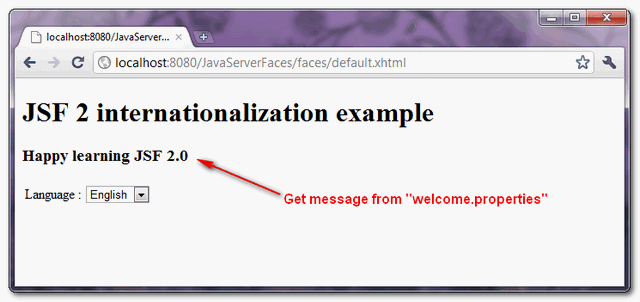
6. Demo
URL : http://localhost:8080/JavaServerFaces/faces/default.xhtml
Default, locale English is display.
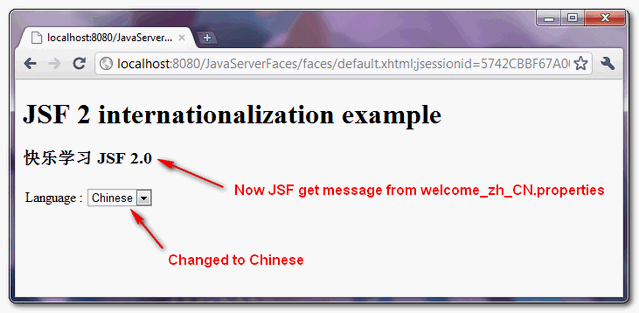
If user changes the dropdown box language, it will fire a value change event listener and change the application locale accordingly.

Hi there, hope everyone is well
I’ve been looking around about how to set the lang attribute based on the current language for the session without success. And I came across this example where the content is in chinese but the doctype declaration doesn’t have any dinamic attribute indicating the language in which the page is displayed. Also I may be wrong but the doctype declaration also indicates english with the “EN” (I have to check the standard for this).
As far as I know I can’t use expression language at the HTML tag declaration point, so the only way I see to do this is by javascript.
Can someone point me in some direction about this?
Thanks in advance
Hi, can you expand your example for having internationalization through URLs like http://host.example/en/some-view.xhtml ? That would be awesome.
I have a doubt here: what’s difference between oonchange vs valueChangeListener? Which one will be executed first?
Where does the submit() method come from for onchange in this example?
I have a doubt, to see if someone can answer it.
What happens if i want to update a page that contains a form, but i don’t want that the values of the view will be update, but only the literals ???
i guess that manually it’s possible to achieve that by a function that catches all values within a form and then restore it after the language was changed; but i inquire if there are some way to do it much more straightforward, using some function in JSF or even with some external library, cause it’s possible that it can be a common scene for many web applications
PD: sorry for my English.
Poor example. The is completely overlooked. For a proper example, look here: http://stackoverflow.com/q/4830588/157882.
To complement: To keep the locale in session you can put
in the pages you want to show with the seleted language.
And of course keep a variable of localeSelect in your languageBean.
Hi Mkyong,
I’ve got this tutorial working but I got a new problem which is: this only takes effect on the actual page. If I change pages then the previous language selected or the basic one remains. How can I change that please???
Hi Mkyong,
I’ve got this tutorial working but I got a new problem which is: this only takes effect on the actual page. If I change pages then the previous language selected or the basic one remains. How can I change that please???
this is gr8 for language change…can u tell how to do locale change(date format , amounts and currency)
Hi Mkyon
I have this problem: My application web has many xhtml and When I executed FacesContext.getCurrentInstance().getViewRoot().setLocale(newLocale); change language properly but when click to another xhtml, FacesContext.getCurrentInstance().getViewRoot().getLocale()); changes to default whithout executing the set method
¿What happens?
Thanks
Thanks Mkyong , i have finally made it working the issue were properties file names and Locale name- messages_en_GB.properties ,messages_fr_FR.properties and countries.put(“French”,Locale.FRANCE);
countries.put(“UK”, Locale.UK); //label, value
Hello Mkyong, Your effeorts for software community is great and cannot be matched with anybody. but i am afraid unfortnately i have spend many times on your tutorials and never but most of them work as like this, it does not work JSf2. I am sorry but soemtime it looks like it is pure time waste of time running ur code.
Please accept my apologies.
Thanks
Example http://www.webtuts.in/jsf2-internationalization-example/
Excuseme mykong. How can put spanish how default languaje and english, german supported languaje in:
private static Map countries;
static{
countries = new LinkedHashMap();
countries.put(“English”, Locale.ENGLISH); //label, value
countries.put(“Chinese”, Locale.SIMPLIFIED_CHINESE);
}
countries.put(“English”, Locale.ENGLISH); //label, value
countries.put(“Chinese”, Locale.SIMPLIFIED_CHINESE)
Hi, how can use “English”, from properties in this method
for example ResourceBundle rs=new ??. Thanks
Thank you 🙂
Thank you! This was very helpful!
thanks a lottttttttt
I’v been using your site always:) you saved me several times.
i love u mkyong:)
i tried it with my project but the change on dropdown list does not fire the countryLocaleCodeChanged method. I clearly spoored all the things but it doesnt work. only if i change default properties file in faces-config. any idea?
Please see my above message. i had same issue and working now, please do let me knwo more details i shall try to help u cheers
Error :Validation Error: Value is not valid
your sample code is giving plain error.
can you help in this ?
Why don’t you do :
FacesContext.getCurrentInstance().getViewRoot().setLocale(countries.get(newLocaleValue));
(without the loop) ?
There something wrong .
FacesContext.getCurrentInstance().getViewRoot().setLocale(new Locale(newLocaleValue));
I want this example to display the language of the combos in the actual language selected.
Could somebody point me how this can be done?
Hi,
i cannot change locale on jsf implement is myface2
when i change select item the alway is Happy learning JSF 2.0.but is show the FacesContext.getCurrentInstance().getViewRoot().getLocale() was change.
please help me.
thanks a lot
I Love You…
Hi,
I like so much this post, i have a question, how can i for that the internationalization keep in each page, because i have an error for this, when i press the indicate button that changes the language in that page but when i pass throught other page it back to the default. How can i do for that this keep the language always?
Regards
The same. Help me.
Hello Friends
I Have Problem To Making Site In Turkish Language.
This Is My Property File For Turkish
/*
login1=giri?
username1=kullan?c? ismi
help1=yard?m etmek
*/
But when I am Printing This Property In My JSF page It Is Printing Something Like Below.
/*
kullanıcı ismi
yardım etmek
giriÅŸ
*/
It Is Printing Some Extra Characters. I am Using UTF-8 encoding.
I have Also Implemented Spanish, French, Portugese, And German There Is Not Problem With It.
Just Problem In Turkish Language.
IF Any body Can Help.
Regards
kshitij
try write it in eclipse properties editor. it automatically converts your characters as \u…
Thanks for the example, but if i refresh the page, the locale is set again to the default language.
my bean is session scoped in faces-config.
whats the matter with it.
I have also facing the same problem, Have you find clue? please share if you got it. thanks
I got the solution. In jsf tag which has local attribute you can set all pages language through this tag.
first set the country code and assign the value to local attribute. tag should be top of the page.
What he meant:
In the you can set a locale (not local) attribute. Something like
after the . You obviuosly need to implement a getLocale() method in the LanguageBean for that.
Here’s my source with a different example (I think its easier to understand):
http://www.softwarepassion.com/java-ee-6-jsf-2-0-internationalization/
Ah stupid editor ate my tags. Correction:
In the “f:view” tag … after the “html” tag.
Hi,
nice tutorial for the beginner. This example work for one page when user click on other page it doesn’t work. when user select one language how it can b sett for all other pages?
Regards,
And what about the nations that the Locale not contains? E.g.: Mother Russia? 🙂
Can any one help me:
While I am trying the above example, I a getting the below exception:
An Error Occurred:
javax.el.PropertyNotFoundException: Property ‘localeCode’ not found on type com.igatepatni.LanguageBean
viewId=/default.xhtml
location=D:\sridhar\JSF_Pratice\.metadata\.plugins\org.eclipse.wst.server.core\tmp0\wtpwebapps\Jsf_internationalization\default.xhtml
phaseId=RENDER_RESPONSE(6)
Caused by:
javax.el.PropertyNotFoundException – Property ‘localeCode’ not found on type com.igatepatni.LanguageBean
at javax.el.BeanELResolver$BeanProperties.get(BeanELResolver.java:214)
/default.xhtml at line 25 and column 65 value=”#{language.localeCode}”
Regards,
M.sridhar.
Thank you for example but i have a question. ViewRoot’s locale isn’t only applicable for the current request? If we need a locale info for all session, what to do?
for all session , you ought use in the templates for all your pages