In JSF, you can use the <h:inputHidden /> tag to render a HTML hidden value field. For example,
JSF tag…
<h:inputHidden value="some text" />
Render this HTML code…
<input type="hidden" name="random value" value="some text" />
JSF hidden field example
A JSF 2 example to render a hidden field via <h:inputHidden /> tag, and access the hidden value in JavaScript.
1. Managed Bean
A simple managed bean, declared as “user”.
package com.mkyong.form;

import javax.faces.bean.ManagedBean;
import javax.faces.bean.SessionScoped;
import java.io.Serializable;

@ManagedBean(name="user")
@SessionScoped
public class UserBean implements Serializable {

	String answer = "I'm Hidden value!";

	public String getAnswer() {
		return answer;
	}

	public void setAnswer(String answer) {
		this.answer = answer;
	}
}
2. View Page
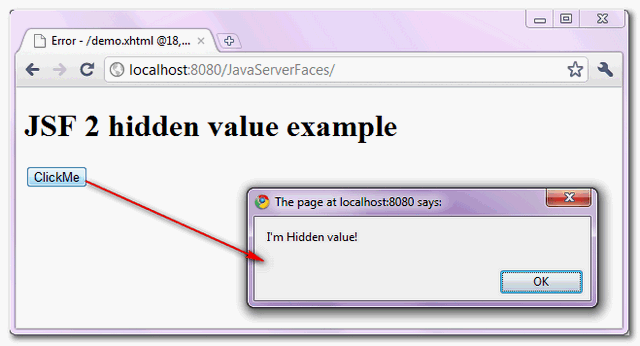
Render a hidden value via “h:inputHidden” tag, if the button is clicked, print the hidden value via JavaScript.
<?xml version="1.0" encoding="UTF-8"?>
<!DOCTYPE html PUBLIC "-//W3C//DTD XHTML 1.0 Transitional//EN"
"http://www.w3.org/TR/xhtml1/DTD/xhtml1-transitional.dtd">
<html xmlns="http://www.w3.org/1999/xhtml"
      xmlns:h="http://java.sun.com/jsf/html">

	<h:head>
	  <script type="text/javascript">
	    function printHiddenValue(){

	       alert(document.getElementById('myform:hiddenId').value);

	    }
	  </script>
	</h:head>
    <h:body>
    	<h1>JSF 2 hidden value example</h1>

	  <h:form id="myform">
    		<h:inputHidden value="#{user.answer}" id="hiddenId" />
    		<h:commandButton type="button" value="ClickMe" onclick="printHiddenValue()" />
    	  </h:form>

    </h:body>
</html>
3. Demo
URL : http://localhost:8080/JavaServerFaces/
Download Source Code
Download It – JSF-2-HiddenValue-Example.zip (9KB)
Note
You may interest to know how to pass new hidden value to backing bean in JSF.
You may interest to know how to pass new hidden value to backing bean in JSF.

worse tutorial.
JSF JavaDoc (https://javaserverfaces.dev.java.net/nonav/docs/2.0/pdldocs/facelets/h/inputHidden.html) – this link doesn’t work. But when you remove “dev” from link, it works
tag inputHidden support “oncilck” javascript Y/n