In JSF, “f:convertNumber” is a standard converter, which converts String into a specified “Number” format. In addition, it’s also used as a validator to make sure the input value is a valid number. See following common used examples :
Note : Assuming #{receipt.amount} contains a “0.1” value.
1. minFractionDigits attribute
<h:outputText value="#{receipt.amount}" >
	<f:convertNumber minFractionDigits="2" />
</h:outputText>
Display the value as “0.10”.
2. pattern attribute
<h:outputText value="#{receipt.amount}" >
	<f:convertNumber pattern="#0.000" />
</h:outputText>
Display the value as “0.100”.
The pattern format is defined in java.text.DecimalFormat.
3. currencyCode attribute
<h:outputText value="#{receipt.amount}" >
	<f:convertNumber currencyCode="GBP" type="currency" />
</h:outputText>
Display the value as “GBP0.10”.
The currencyCode is defined in ISO 4217. To use currencyCode attribute, the type attribute have to change to “currency“.
4. type=”percent” attribute
<h:outputText value="#{receipt.amount}" >
	<f:convertNumber type="percent" />
</h:outputText>
Display the value as “10%”.
P.S For other “f:convertNumber” attributes, you can visit this JSF “f:convertNumber” JavaDoc.
JSF f:convertNumber Example
The following JSF 2.0 complete example shows you how to use the “f:convertNumber” tag.
1. Managed Bean
A simple managed bean, with an “amount” property.
package com.mkyong;

import java.io.Serializable;
import javax.faces.bean.ManagedBean;
import javax.faces.bean.SessionScoped;

@ManagedBean(name="receipt")
@SessionScoped
public class ReceiptBean implements Serializable{

	double amount;

	public double getAmount() {
		return amount;
	}

	public void setAmount(double amount) {
		this.amount = amount;
	}

}
2. f:convertNumber examples
JSF XHTML page to use “f:convertNumber” tag to do the validation and also the String formater.
default.xhtml
<?xml version="1.0" encoding="UTF-8"?>
<!DOCTYPE html PUBLIC "-//W3C//DTD XHTML 1.0 Transitional//EN"
"http://www.w3.org/TR/xhtml1/DTD/xhtml1-transitional.dtd">
<html xmlns="http://www.w3.org/1999/xhtml"
      xmlns:h="http://java.sun.com/jsf/html"
      xmlns:f="http://java.sun.com/jsf/core"
      xmlns:c="http://java.sun.com/jsp/jstl/core"
      >
    <h:body>

    	<h1>JSF 2 convertNumber example</h1>

	   <h:form>

		<h:panelGrid columns="3">

			Amount :
			<h:inputText id="amount" value="#{receipt.amount}"
				size="20" required="true"
				label="Amount" >
				<!-- display in at least 2 decimal points -->
				<f:convertNumber minFractionDigits="2" />
			</h:inputText>

			<h:message for="amount" style="color:red" />

		</h:panelGrid>

		<h:commandButton value="Submit" action="receipt" />

	   </h:form>

    </h:body>
</html>
receipt.xhtml
<?xml version="1.0" encoding="UTF-8"?>
<!DOCTYPE html PUBLIC "-//W3C//DTD XHTML 1.0 Transitional//EN"
"http://www.w3.org/TR/xhtml1/DTD/xhtml1-transitional.dtd">
<html xmlns="http://www.w3.org/1999/xhtml"
      xmlns:h="http://java.sun.com/jsf/html"
      xmlns:f="http://java.sun.com/jsf/core"
      xmlns:c="http://java.sun.com/jsp/jstl/core"
      >
    <h:body>

    	<h1>JSF 2 convertNumber example</h1>

	  <ol>
		<li>
			Amount [minFractionDigits="2"] :
			<h:outputText value="#{receipt.amount}" >
				<f:convertNumber minFractionDigits="2" />
			</h:outputText>
		</li>
		<li>
			Amount [pattern="#0.000"] :
			<h:outputText value="#{receipt.amount}" >
				<f:convertNumber pattern="#0.000" />
			</h:outputText>
		</li>
		<li>
			Amount [currencySymbol="$"] :
			<h:outputText value="#{receipt.amount}">
				<f:convertNumber currencySymbol="$" type="currency" />
			</h:outputText>
		</li>
		<li>
			Amount [currencyCode="GBP"] :
			<h:outputText value="#{receipt.amount}" >
				<f:convertNumber currencyCode="GBP" type="currency" />
			</h:outputText>
		</li>
		<li>
			Amount [type="percent"] :
			<h:outputText value="#{receipt.amount}" >
				<f:convertNumber type="percent" />
			</h:outputText>
		</li>
	   </ol>

    </h:body>
</html>
3. Demo
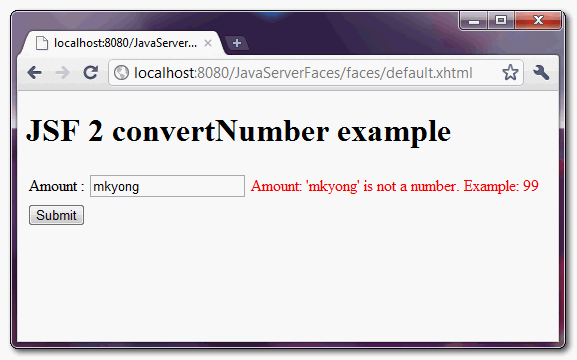
If user fill in an invalid number format, display the error message.
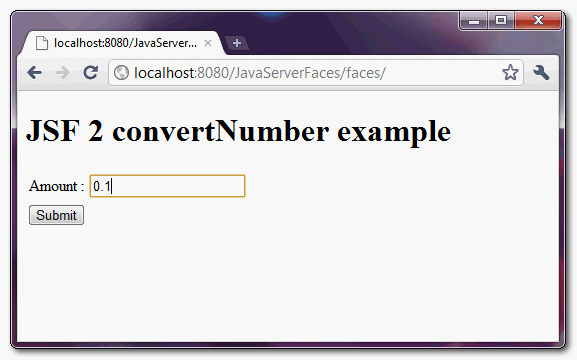
User key in a “0.01” value and click on the “submit” button.
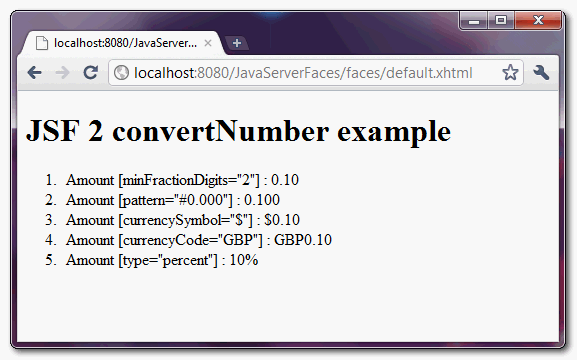
Display the submitted value into different display format.

Link to JavaDoc is broken.
i want to SHOW as K , for eg 4000 need to show as 4K, is any way?
In this example, how is it done that number is correctly converted to double when passed with “,” as separator?
amazing tutorial…
As always you give me the answer I was looking for. Thanks again. btw, you should add the Custom error messages to this specific blog
Great web site you have here.. It’s difficult to find high quality writing like yours nowadays. I really appreciate individuals like you! Take care!!
You, sir, are a legend.
Hi nice job, but i have a problem when i’m using , here is an example of how i’m using it. Hope you can tell me something about.
MyCurrencyBean
MyDataBean{
private double number;
private String type; //currency,number,percent


public double getNumber(){
return number;
}

public void setNumber(Double data){
this.number = data;

}

public String getType(){
 return type;
}
/* Here i set one of this three posible values: currency, number or percent
*/
public void setType(String dataType){
this.type = dataType;
}

}
myCurrency.xhtml
...
<h:outputText value=#{myDataBean.number}>
<f:formatNumber type="#{myDataBean.type}"/>
</h:outputText>
...
This throws me an exception, javax.faces.convert.ConverterException: ….: No se ha podido convertir ‘1.505.080’ en una cadena.
This translates as Could not convert ‘1.505.080’ into a String.
Strange but it passes for the following input, leaving the trailing alphabets.
Sample Input: 444rfg
What if user enters 0.105?
The answer will be 0.10 or 0.11?
0.10
I can never get your examples to work in Eclipse… Even though I understand your examples and think they are good. 🙂
Nice Application.
just to test !