f:convertDateTime” is a standard JSF converter tag, which converts String into a specified “Date” format. In addition, it’s used to implement the date validation as well.
The following JSF 2.0 example shows you how to use this “f:convertDateTime” tag.
1. Managed Bean
A simple managed bean, with a “date” property.
package com.mkyong;

import java.io.Serializable;
import java.util.Date;
import javax.faces.bean.ManagedBean;
import javax.faces.bean.SessionScoped;

@ManagedBean(name="receipt")
@SessionScoped
public class ReceiptBean implements Serializable{

	Date date;

	public Date getDate() {
		return date;
	}

	public void setDate(Date date) {
		this.date = date;
	}

}
2. f:convertDateTime examples
Implement the date validation with “f:convertDateTime” tag. The accepted date format is defined in the “pattern” attribute.
Note
The date format in “pattern” attribute is defined in the java.text.SimpleDateFormat.
The date format in “pattern” attribute is defined in the java.text.SimpleDateFormat.
default.xhtml
<?xml version="1.0" encoding="UTF-8"?>
<!DOCTYPE html PUBLIC "-//W3C//DTD XHTML 1.0 Transitional//EN"
"http://www.w3.org/TR/xhtml1/DTD/xhtml1-transitional.dtd">
<html xmlns="http://www.w3.org/1999/xhtml"
      xmlns:h="http://java.sun.com/jsf/html"
      xmlns:f="http://java.sun.com/jsf/core"
      xmlns:c="http://java.sun.com/jsp/jstl/core"
      >
    <h:body>

    	<h1>JSF 2 convertDate example</h1>

	<h:form>

		<h:panelGrid columns="3">

		  Receipt Date :
		 <h:inputText id="date" value="#{receipt.date}"
			size="20" required="true"
			label="Receipt Date" >

			<f:convertDateTime pattern="d-M-yyyy" />
		  </h:inputText>

		  <h:message for="date" style="color:red" />

		</h:panelGrid>

		<h:commandButton value="Submit" action="receipt" />

	   </h:form>

    </h:body>
</html>
receipt.xhtml
<?xml version="1.0" encoding="UTF-8"?>
<!DOCTYPE html PUBLIC "-//W3C//DTD XHTML 1.0 Transitional//EN"
"http://www.w3.org/TR/xhtml1/DTD/xhtml1-transitional.dtd">
<html xmlns="http://www.w3.org/1999/xhtml"
      xmlns:h="http://java.sun.com/jsf/html"
      xmlns:f="http://java.sun.com/jsf/core"
      xmlns:c="http://java.sun.com/jsp/jstl/core"
      >
    <h:body>

    	<h1>JSF 2 convertDate example</h1>

		Receipt Date :
		<h:outputText value="#{receipt.date}" >
			<f:convertDateTime pattern="d-M-yyyy" />
		</h:outputText>

    </h:body>
</html>
3. Demo
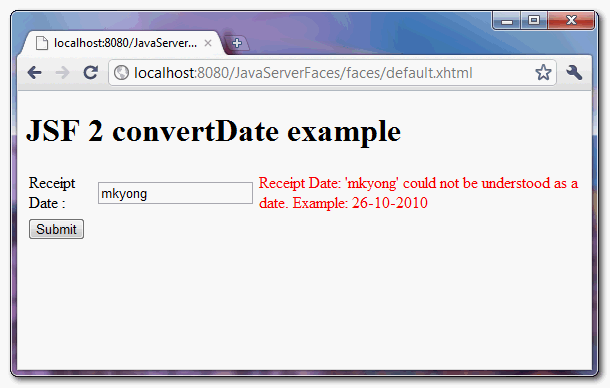
If an invalid date is provided, display the error message.
Download Source Code
Download It – JSF-2-ConvertDateTime-Example.zip (10KB)

Thanks a ton
Muchas gracias!!!!
Thanks for the post! Just curious… is it possible to use Calendar in the same way as Date?
Hello mkyong
I’m really like your posts very much. I want share your posts to programming community in my country. Can i translate your posts to vietnames? Thanks
Best regards,
Tri Phan
Thank you very much! You save me the day.
And thank you too to 1nv3r53 for the information.
Hi Mkyong i would like to tell one thing about you , Your posts and answers are very good.
please keep it up.
after 12/12/2112 i got error message , then as suggested format entered 12-12-2112
and got following:
org.apache.jasper.el.JspPropertyNotFoundException: /index.jsp(34,3) ‘#{receipt.date}’ Target Unreachable, identifier ‘receipt’ resolved to null
org.apache.jasper.el.JspValueExpression.setValue(JspValueExpression.java:95)
javax.faces.component.UIInput.updateModel(UIInput.java:818)
javax.faces.component.UIInput.processUpdates(UIInput.java:735)
javax.faces.component.UIComponentBase.processUpdates(UIComponentBase.java:1242)
javax.faces.component.UIForm.processUpdates(UIForm.java:281)
javax.faces.component.UIComponentBase.processUpdates(UIComponentBase.java:1242)
javax.faces.component.UIViewRoot.processUpdates(UIViewRoot.java:1231)
com.sun.faces.lifecycle.UpdateModelValuesPhase.execute(UpdateModelValuesPhase.java:78)
com.sun.faces.lifecycle.Phase.doPhase(Phase.java:101)
com.sun.faces.lifecycle.LifecycleImpl.execute(LifecycleImpl.java:118)
javax.faces.webapp.FacesServlet.service(FacesServlet.java:593)
Regards
Nice tut, however it must be noted that jsf convertDateTime tag defaults to GMT timezone for date/time converters and this can cause wrong Date to be set if application isn’t working with GMT . You could set the timeZone attribute in every DateTime converter.
To do it one time the setting to default to platform default timezone, add the below context param to web.xml
javax.faces.DATETIMECONVERTER_DEFAULT_TIMEZONE_IS_SYSTEM_TIMEZONE
true
Thanks to explaining this in simple way.
Your posts are really helpful. Thanks a lot
The Reference paragraph has a link to ConvertNumber Javadoc.
The right url is :
http://javaserverfaces.java.net/nonav/docs/2.0/pdldocs/facelets/f/convertDateTime.html
Reference link updated. Thanks for your comment. 🙂