In JSF, <h:selectBooleanCheckbox /> tag is used to render a single HTML input element of “checkbox” type.
//JSF...
<h:selectBooleanCheckbox value="#{user.rememberMe}" /> Remember Me

//HTML output...
<input type="checkbox" name="j_idt6:j_idt8" /> Remember Me
While <h:selectManyCheckbox /> tag is used to render a set of HTML input element of type “checkbox”, and format it with HTML table and label tags.
//JSF...
<h:selectManyCheckbox value="#{user.favNumber1}">
   	<f:selectItem itemValue="1" itemLabel="Number1 - 1" />
   	<f:selectItem itemValue="2" itemLabel="Number1 - 2" />
   	<f:selectItem itemValue="3" itemLabel="Number1 - 3" />
</h:selectManyCheckbox>

//HTML output...
<table>
<tr>
  <td>
	<input name="j_idt6:j_idt10" id="j_idt6:j_idt10:0" value="1" type="checkbox" />
	<label for="j_idt6:j_idt10:0" class=""> Number1 - 1</label></td>
  <td>
	<input name="j_idt6:j_idt10" id="j_idt6:j_idt10:1" value="2" type="checkbox" />
	<label for="j_idt6:j_idt10:1" class=""> Number1 - 2</label></td>
  <td>
	<input name="j_idt6:j_idt10" id="j_idt6:j_idt10:2" value="3" type="checkbox" />
	<label for="j_idt6:j_idt10:2" class=""> Number1 - 3</label></td>
  <td>
</tr>
</table>
JSF 2.0 example
Here’s a JSF 2.0 example to show the use of “h:selectBooleanCheckbox” and “h:selectManyCheckbox” tags.
h:selectBooleanCheckbox
Render a single checkbox, and wire it with a boolean property.
h:selectManyCheckbox
Render a group of checkboxes and populate the data in different ways :
- Hardcoded value in “f:selectItem” tag.
- Generate values with an Array and put it into “f:selectItems” tag.
- Generate values with a Map and put it into “f:selectItems” tag.
- Generate values with an Object array and put it into “f:selectItems” tag, then represent the value with “var” attribute.
1. Backing Bean
A backing bean to hold the submitted checkboxes values.
package com.mkyong;

import java.util.Arrays;
import java.util.LinkedHashMap;
import java.util.Map;

import javax.faces.bean.ManagedBean;
import javax.faces.bean.SessionScoped;

@ManagedBean(name="user")
@SessionScoped
public class UserBean{

	public boolean rememberMe;
	public String[] favNumber1;
	public String[] favNumber2;
	public String[] favNumber3;
	public String[] favNumber4;

	//getter and setter methods...

	public String getFavNumber1InString() {
		return Arrays.toString(favNumber1);
	}

	//Generated by Array
	public String[] getFavNumber2Value() {

		favNumber2 = new String[5];
		favNumber2[0] = "Number2 - 1";
		favNumber2[1] = "Number2 - 2";
		favNumber2[2] = "Number2 - 3";
		favNumber2[3] = "Number2 - 4";
		favNumber2[4] = "Number2 - 5";

		return favNumber2;
	}

	public String getFavNumber2InString() {
		return Arrays.toString(favNumber2);
	}


	//Generated by Map
	private static Map<String,Object> number3Value;
	static{
		number3Value = new LinkedHashMap<String,Object>();
		number3Value.put("Number3 - 1", "1"); //label, value
		number3Value.put("Number3 - 2", "2");
		number3Value.put("Number3 - 3", "3");
		number3Value.put("Number3 - 4", "4");
		number3Value.put("Number3 - 5", "5");
	}

	public Map<String,Object> getFavNumber3Value() {
		return number3Value;
	}

	public String getFavNumber3InString() {
		return Arrays.toString(favNumber3);
	}

	//Generated by Object array
	public static class Number{
		public String numberLabel;
		public String numberValue;

		public Number(String numberLabel, String numberValue){
			this.numberLabel = numberLabel;
			this.numberValue = numberValue;
		}

		public String getNumberLabel(){
			return numberLabel;
		}

		public String getNumberValue(){
			return numberValue;
		}

	}

	public Number[] number4List;

	public Number[] getFavNumber4Value() {

		number4List = new Number[5];
		number4List[0] = new Number("Number4 - 1", "1");
		number4List[1] = new Number("Number4 - 2", "2");
		number4List[2] = new Number("Number4 - 3", "3");
		number4List[3] = new Number("Number4 - 4", "4");
		number4List[4] = new Number("Number4 - 5", "5");

		return number4List;
	}

	public String getFavNumber4InString() {
		return Arrays.toString(favNumber4);
	}

}
2. JSF Page
A JSF page to demonstrate the use “h:selectBooleanCheckbox” and “h:selectManyCheckbox” tags.
<?xml version="1.0" encoding="UTF-8"?>
<!DOCTYPE html PUBLIC "-//W3C//DTD XHTML 1.0 Transitional//EN"
"http://www.w3.org/TR/xhtml1/DTD/xhtml1-transitional.dtd">
<html xmlns="http://www.w3.org/1999/xhtml"
      xmlns:h="http://java.sun.com/jsf/html"
      xmlns:f="http://java.sun.com/jsf/core"
      >
    <h:body>

    	<h1>JSF 2 checkboxes example</h1>
    	<h:form>

    	    <h2>1. Single checkbox</h2>
	    <h:selectBooleanCheckbox value="#{user.rememberMe}" /> Remember Me

	    <h2>2. Mutiple checkboxes</h2>

	    1. Hard-coded with "f:selectItem" :
   		<h:selectManyCheckbox value="#{user.favNumber1}">
   			<f:selectItem itemValue="1" itemLabel="Number1 - 1" />
   			<f:selectItem itemValue="2" itemLabel="Number1 - 2" />
   			<f:selectItem itemValue="3" itemLabel="Number1 - 3" />
   			<f:selectItem itemValue="4" itemLabel="Number1 - 4" />
   			<f:selectItem itemValue="5" itemLabel="Number1 - 5" />
   		</h:selectManyCheckbox>

	    <br />

	    2. Generated by Array :
   		<h:selectManyCheckbox value="#{user.favNumber2}">
   			<f:selectItems value="#{user.favNumber2Value}" />
   		</h:selectManyCheckbox>

   		<br />

	    3. Generated by Map :
   		<h:selectManyCheckbox value="#{user.favNumber3}">
   			<f:selectItems value="#{user.favNumber3Value}" />
   		</h:selectManyCheckbox>

	    <br />

	    4. Generated by Object with var :
   		<h:selectManyCheckbox value="#{user.favNumber4}">
   			<f:selectItems value="#{user.favNumber4Value}" var="n"
   			itemLabel="#{n.numberLabel}" itemValue="#{n.numberValue}" />
   		</h:selectManyCheckbox>

	    <br />

    	    <h:commandButton value="Submit" action="result" />
	    <h:commandButton value="Reset" type="reset" />

    	</h:form>

    </h:body>
</html>
result.xhtml…
<?xml version="1.0" encoding="UTF-8"?>
<!DOCTYPE html PUBLIC "-//W3C//DTD XHTML 1.0 Transitional//EN"
"http://www.w3.org/TR/xhtml1/DTD/xhtml1-transitional.dtd">
<html xmlns="http://www.w3.org/1999/xhtml"
      xmlns:h="http://java.sun.com/jsf/html"
      >

    <h:body>

    	<h1>JSF 2 checkboxes example</h1>

    	<h2>result.xhtml</h2>

    	<ol>
    		<li>user.rememberMe : #{user.rememberMe}</li>
    		<li>user.favNumber1 : #{user.favNumber1InString}</li>
    		<li>user.favNumber2 : #{user.favNumber2InString}</li>
    		<li>user.favNumber3 : #{user.favNumber3InString}</li>
    		<li>user.favNumber4 : #{user.favNumber4InString}</li>
    	</ol>
    </h:body>

</html>
3. Demo
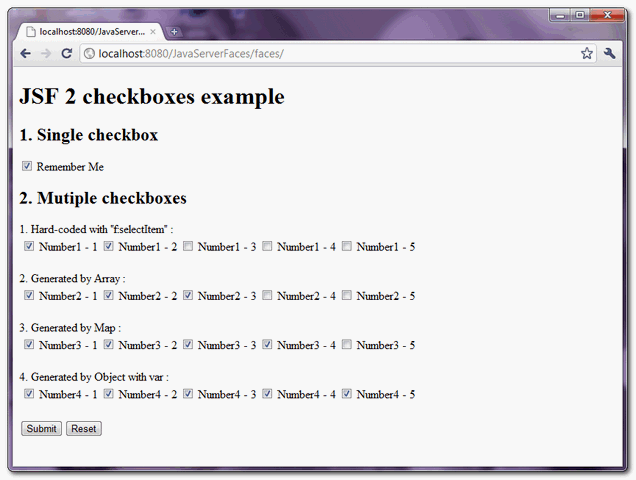
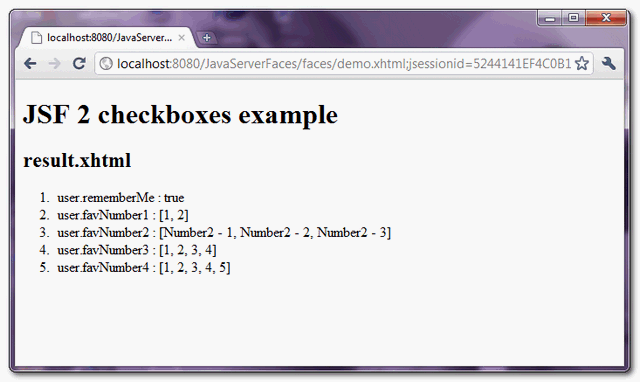
When “submit” button is clicked, link to “result.xhtml” page and display the submitted checkboxe values.
How to checked checkbox’s value by default?
h:selectBooleanCheckbox
The value of “f:selectItem” tag is checked if the boolean value is set to true. In above example, if you set boolean property “rememberMe” to true :
@ManagedBean(name="user")
@SessionScoped
public class UserBean{

	public boolean rememberMe = true;

	//...
The “rememberMe” checkbox value is checked by default.
h:selectManyCheckbox
The values of “f:selectItems” tag are checked if it matched to the “value” of “h:selectManyCheckbox” tag. In above example, if you set favNumber3 to {“1″,”3”} :
@ManagedBean(name="user")
@SessionScoped
public class UserBean{

	public String[] favNumber3 = {"1","3"};

	//...
The “favNumber3” checkboxes, “Number 1” and “Number 3” values are checked by default.

please exmples! How to insert value checkbox into database?
let’s say if the field type is varchar(1) , when value true=’1′ and false=’0′
Is it possible for h:selectManyCheckbox to be in SINGLE SELECTION mode and load the check box by using Map data type ??
Hi,
How to uncheck all checkboxes with commandButton? It doesn’t work properly when I use this piece of code:
I have the same behavior with:
I’m new in JSF. Can you give me some advices?
Daniel Souza
super work…I have problem with p:dataTable with p:selectManyCheckbox i need data Table which contains the permission and functionality with check box it look like this
functionality View Edit Remove
Login checkBox10 checkBox11 checkBox12
Manage User checkBox20 checkBox21 checkBox22
Manage Role checkBox30 checkBox31 checkBox32
when i submit form it needs display selected Check Box.
Hi Sir,
Thanks for sharing this. I would like to ask, How to insert selectManyCheckbox in datatable by using only selectManyCheckbox one value?.
Thanks in Advance.
Mark
Really its a good post, Thank you very much.
How can get checked/selected values as Map IN JSF 2.O ?
HI,
I need to get checked values as key pair. For example my checkbox label is ‘Lable1’ and value is ‘Id1’, i need to get checked value as key pair value collection. How can I do that ?
String format = “%-10s %-12s %-35s %-10s %-10s\r\n”;
retStr += String.format(format,
rs.getString(“range_date”).substring(0, 10),
rs.getString(“range_name”),
rs.getString(“event”),
rs.getString(“rso”),
rs.getString(“oic”));
When I debug and send the output also to the console, it’s properly formatted as per ‘format” above.
When it is display in a selectOneListBox wiht the font-family set to Courier, it displays as Courier, but the formatting is lost and there is only a single space between elements.
When I call a javascript ondblclick=”function(this)”, and display the string, the formatting is exactly as it should be.
It only appears the formatting is altered in the display of the list items on the page?
Hello,
I have a small difficulty, it would mean a lot if you could show me the way to solve it please.
I have an xhtml page which contains checkboxes, around 12.
I wish to bind the values of all the checkboxes i checked to a single variable in my backing bean.
Can you show me the way how to do it using JSF2.0 methods only please
Hello,
Thank you very much by example, but I have a problem.
At the time of action because the data do not reach the Backing Bean when the h: commandButton has an f: ajax, only when it does not have the f: ajax data if they are present in the Backing Bean.
What could be the problem?
<h:selectManyCheckbox value="#{user.favNumber4}"> <f:selectItems value="#{user.favNumber4Value}" var="n" itemLabel="#{n.numberLabel}" itemValue="#{n.numberValue}" /> </h:selectManyCheckbox> <h:commandButton value="Submit" action="result"> <f:ajax execute="otherElement" /> </h:commandButton>Hello,
thanks for sharing this. You demonstrated how to bind bean values to checkboxes.
Now do you know how it works for the other way round in JSF 2.0? I mean to initialize bean properties from a multicheckbox form ? This may be related to other post of your site using the f:metadata tag but for a an array of values ?
Thanks in advance.
Hinanos.