In this tutorial, we will show you how to integrate JSF 2.0 with Spring 3 using :
- JSF XML faces-config.xml
- Spring annotations
- JSR-330 standard injection
Tools and technologies used :
- JSF 2.1.13
- Spring 3.1.2.RELEASE
- Maven 3
- Eclipse 4.2
- Tomcat 6 or 7
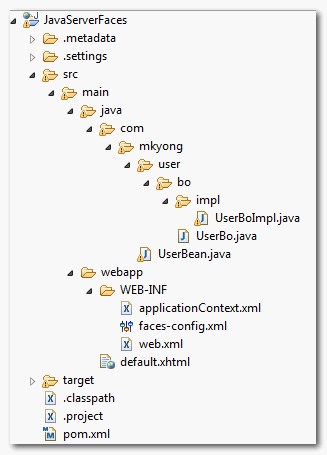
1. Directory Structure
A standard Maven project for demonstration.
2. Project Dependencies
Declares JSF 2, Spring 3, JSR-330 inject, and Tomcat’s dependencies.
<project xmlns="http://maven.apache.org/POM/4.0.0"
	xmlns:xsi="http://www.w3.org/2001/XMLSchema-instance"
	xsi:schemaLocation="http://maven.apache.org/POM/4.0.0
  	http://maven.apache.org/maven-v4_0_0.xsd">

	<modelVersion>4.0.0</modelVersion>
	<groupId>com.mkyong.common</groupId>
	<artifactId>JavaServerFaces</artifactId>
	<packaging>war</packaging>
	<version>1.0-SNAPSHOT</version>
	<name>JavaServerFaces Maven Webapp</name>
	<url>http://maven.apache.org</url>

	<dependencies>

		<!-- Spring framework -->
		<dependency>
			<groupId>org.springframework</groupId>
			<artifactId>spring-core</artifactId>
			<version>3.1.2.RELEASE</version>
		</dependency>

		<dependency>
			<groupId>org.springframework</groupId>
			<artifactId>spring-web</artifactId>
			<version>3.1.2.RELEASE</version>
		</dependency>

		<!-- JSR-330 -->
		<dependency>
			<groupId>javax.inject</groupId>
			<artifactId>javax.inject</artifactId>
			<version>1</version>
		</dependency>

		<!-- JSF -->
		<dependency>
			<groupId>com.sun.faces</groupId>
			<artifactId>jsf-api</artifactId>
			<version>2.1.13</version>
		</dependency>
		<dependency>
			<groupId>com.sun.faces</groupId>
			<artifactId>jsf-impl</artifactId>
			<version>2.1.13</version>
		</dependency>

		<dependency>
			<groupId>javax.servlet</groupId>
			<artifactId>jstl</artifactId>
			<version>1.2</version>
		</dependency>

		<dependency>
			<groupId>javax.servlet</groupId>
			<artifactId>servlet-api</artifactId>
			<version>2.5</version>
		</dependency>

		<dependency>
			<groupId>javax.servlet.jsp</groupId>
			<artifactId>jsp-api</artifactId>
			<version>2.1</version>
		</dependency>

		<!-- EL -->
		<dependency>
			<groupId>org.glassfish.web</groupId>
			<artifactId>el-impl</artifactId>
			<version>2.2</version>
		</dependency>

		<!-- Tomcat 6 need this -->
		<dependency>
			<groupId>com.sun.el</groupId>
			<artifactId>el-ri</artifactId>
			<version>1.0</version>
		</dependency>

	</dependencies>

	<build>
	<finalName>JavaServerFaces</finalName>

	<plugins>
	   <plugin>
		<groupId>org.apache.maven.plugins</groupId>
		<artifactId>maven-compiler-plugin</artifactId>
		<version>2.3.1</version>
		<configuration>
			<source>1.6</source>
			<target>1.6</target>
		</configuration>
	   </plugin>
	</plugins>
	</build>
</project>
3. JSF 2 + Spring Integration
Spring’s bean in Spring Ioc context, and JSF’s managed bean in JSF Ioc context, how to make both working together? The solution is defined Spring’s SpringBeanFacesELResolver in faces-config.xml. Check this official Spring guide.
<?xml version="1.0" encoding="UTF-8"?>
<faces-config xmlns="http://java.sun.com/xml/ns/javaee"
	xmlns:xsi="http://www.w3.org/2001/XMLSchema-instance"
	xsi:schemaLocation="http://java.sun.com/xml/ns/javaee
	http://java.sun.com/xml/ns/javaee/web-facesconfig_2_1.xsd"
	version="2.1">

	<application>
		<el-resolver>
    		    org.springframework.web.jsf.el.SpringBeanFacesELResolver
		</el-resolver>
  	</application>

</faces-config>
See following 3 examples to inject Spring’s bean in JSF managed bean.
3.1. XML Schema Example
Many developers still prefer to use XML to manage beans. With SpringBeanFacesELResolver, just uses EL ${userBo} to inject Spring’s bean into JSF’s managed bean.
package com.mkyong.user.bo;

public interface UserBo{

	public String getMessage();

}
package com.mkyong.user.bo.impl;

import com.mkyong.user.bo.UserBo;

public class UserBoImpl implements UserBo{

	public String getMessage() {

		return "JSF 2 + Spring Integration";

	}

}
package com.mkyong;

import java.io.Serializable;
import com.mkyong.user.bo.UserBo;

public class UserBean{

        //later inject in faces-config.xml
	UserBo userBo;

	public void setUserBo(UserBo userBo) {
		this.userBo = userBo;
	}

	public String printMsgFromSpring() {

		return userBo.getMessage();

	}

}
<beans xmlns="http://www.springframework.org/schema/beans"
xmlns:xsi="http://www.w3.org/2001/XMLSchema-instance"
xsi:schemaLocation="http://www.springframework.org/schema/beans
http://www.springframework.org/schema/beans/spring-beans-2.5.xsd">

	<bean id="userBo" class="com.mkyong.user.bo.impl.UserBoImpl"></bean>

</beans>
<?xml version="1.0" encoding="UTF-8"?>
<faces-config
    xmlns="http://java.sun.com/xml/ns/javaee"
    xmlns:xsi="http://www.w3.org/2001/XMLSchema-instance"
    xsi:schemaLocation="http://java.sun.com/xml/ns/javaee
    http://java.sun.com/xml/ns/javaee/web-facesconfig_2_0.xsd"
    version="2.0">

	<managed-bean>
		<managed-bean-name>user</managed-bean-name>
		<managed-bean-class>com.mkyong.UserBean</managed-bean-class>
		<managed-bean-scope>session</managed-bean-scope>
		<managed-property>
			<property-name>userBo</property-name>
			<value>#{userBo}</value>
		</managed-property>
	</managed-bean>

</faces-config>
3.2. Spring Annotations – Auto Scan
This example is using Spring annotations. Injects like a normal bean with @ManagedBean, @Autowired and @Component, it just works as expected.
package com.mkyong.user.bo.impl;

import org.springframework.stereotype.Service;
import com.mkyong.user.bo.UserBo;

@Service
public class UserBoImpl implements UserBo{

	public String getMessage() {

		return "JSF 2 + Spring Integration";

	}

}
package com.mkyong;

import javax.faces.bean.ManagedBean;
import javax.faces.bean.SessionScoped;
import org.springframework.beans.factory.annotation.Autowired;
import org.springframework.stereotype.Component;
import com.mkyong.user.bo.UserBo;

@Component
@ManagedBean
@SessionScoped
public class UserBean{

	@Autowired
	UserBo userBo;

	public void setUserBo(UserBo userBo) {
		this.userBo = userBo;
	}

	public String printMsgFromSpring() {
		return userBo.getMessage();
	}

}
<beans xmlns="http://www.springframework.org/schema/beans"
	xmlns:xsi="http://www.w3.org/2001/XMLSchema-instance"
	xmlns:context="http://www.springframework.org/schema/context"
	xsi:schemaLocation="http://www.springframework.org/schema/beans
	http://www.springframework.org/schema/beans/spring-beans-3.1.xsd
	http://www.springframework.org/schema/context
	http://www.springframework.org/schema/context/spring-context-3.1.xsd">

	<context:component-scan base-package="com.mkyong" />

</beans>
Mixed use of both JSF and Spring annotations are working fine, but it look weird and duplicated – @Component and @ManagedBean together. Actually, you can just uses a single @Component, see following new version, it’s pure Spring, and it works!
package com.mkyong;

import org.springframework.beans.factory.annotation.Autowired;
import org.springframework.context.annotation.Scope;
import org.springframework.stereotype.Component;

import com.mkyong.user.bo.UserBo;

@Component
@Scope("session")
public class UserBean{

	@Autowired
	UserBo userBo;

	public void setUserBo(UserBo userBo) {
		this.userBo = userBo;
	}

	public String printMsgFromSpring() {
		return userBo.getMessage();
	}

}
3.3. JSR-330 Annotation
Since Spring 3.0, Spring offer supports for JSR-330 injection standard. Now, you can uses @Inject to replace for @Autowired and @Named for @Component. This is recommended to solution, follow JSR-330 standard make the application more portable to other environments, and it works fine in Spring framework.
package com.mkyong.user.bo.impl;

import javax.inject.Named;
import com.mkyong.user.bo.UserBo;

@Named
public class UserBoImpl implements UserBo{

	public String getMessage() {

		return "JSF 2 + Spring Integration";

	}

}
package com.mkyong;

import javax.inject.Inject;
import javax.inject.Named;
import org.springframework.context.annotation.Scope;
import com.mkyong.user.bo.UserBo;

@Named
@Scope("session") //need this, JSR-330 in Spring context is singleton by default
public class UserBean {

	@Inject
	UserBo userBo;

	public void setUserBo(UserBo userBo) {
		this.userBo = userBo;
	}

	public String printMsgFromSpring() {
		return userBo.getMessage();
	}

}
<beans xmlns="http://www.springframework.org/schema/beans"
	xmlns:xsi="http://www.w3.org/2001/XMLSchema-instance"
	xmlns:context="http://www.springframework.org/schema/context"
	xsi:schemaLocation="http://www.springframework.org/schema/beans
	http://www.springframework.org/schema/beans/spring-beans-3.1.xsd
	http://www.springframework.org/schema/context
	http://www.springframework.org/schema/context/spring-context-3.1.xsd">

	<context:component-scan base-package="com.mkyong" />

</beans>
4. Demo
Example in 3.1, 3.2 and 3.3 are doing exactly the thing – Inject userBo into JSF bean, just different implementation. Now, create a simple JSF page to show the the result.
<?xml version="1.0" encoding="UTF-8"?>
<!DOCTYPE html PUBLIC "-//W3C//DTD XHTML 1.0 Transitional//EN"
"http://www.w3.org/TR/xhtml1/DTD/xhtml1-transitional.dtd">
<html xmlns="http://www.w3.org/1999/xhtml"
      xmlns:h="http://java.sun.com/jsf/html"
      >

    <h:body>

    	<h1>JSF 2.0 + Spring Example</h1>

 	#{userBean.printMsgFromSpring()}

    </h:body>

</html>
<?xml version="1.0" encoding="UTF-8"?>
<web-app xmlns:xsi="http://www.w3.org/2001/XMLSchema-instance"
	xmlns="http://java.sun.com/xml/ns/javaee"
	xmlns:web="http://java.sun.com/xml/ns/javaee/web-app_2_5.xsd"
	xsi:schemaLocation="http://java.sun.com/xml/ns/javaee
	http://java.sun.com/xml/ns/javaee/web-app_2_5.xsd"
	id="WebApp_ID" version="2.5">

  <display-name>JavaServerFaces</display-name>

  <!-- Add Support for Spring -->
  <listener>
	<listener-class>
		org.springframework.web.context.ContextLoaderListener
	</listener-class>
  </listener>
  <listener>
	<listener-class>
		org.springframework.web.context.request.RequestContextListener
	</listener-class>
  </listener>

  <!-- Change to "Production" when you are ready to deploy -->
  <context-param>
    <param-name>javax.faces.PROJECT_STAGE</param-name>
    <param-value>Development</param-value>
  </context-param>

  <!-- Welcome page -->
  <welcome-file-list>
    <welcome-file>default.jsf</welcome-file>
  </welcome-file-list>

  <!-- JSF Mapping -->
  <servlet>
    <servlet-name>facesServlet</servlet-name>
    <servlet-class>javax.faces.webapp.FacesServlet</servlet-class>
    <load-on-startup>1</load-on-startup>
  </servlet>
  <servlet-mapping>
    <servlet-name>facesServlet</servlet-name>
    <url-pattern>*.jsf</url-pattern>
  </servlet-mapping>
  <servlet-mapping>
    <servlet-name>facesServlet</servlet-name>
    <url-pattern>*.xhtml</url-pattern>
  </servlet-mapping>

</web-app>
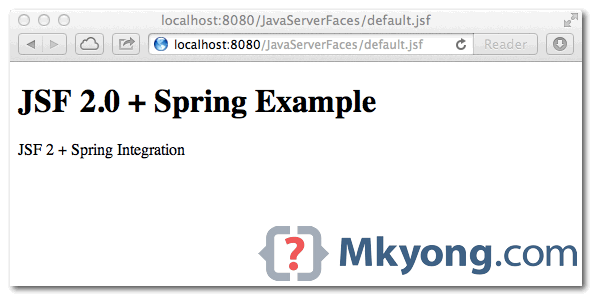
Done, see output : http://localhost:8080/JavaServerFaces/default.jsf

HI, do u having the Spring 6 with jsf 2.0 example?
Hi, Mkyong! Excellent work, but how can I define my applicationContext when my ClienteDao extends Dao class?
Hi mkyong,
How will be the flow for JSF and SpringMVC(@RequestMapping) @Controller integration?
.xhtml(primefaces – jsf)->@ManagedBean(jsf)->@Service Bean(jsf)->
->SpringMVC @Controller(@RequestMapping)->Spring @Service->Spring DAO->Spring @Entity->DB
Can i follow above flow to create a EA Application? What are the best
practice, structure, flow to create a EA with JSF and Spring
integration.
or just i need to call SpringController(@RequestMapping) from JSF view(.xhtml), so no need to
create JSF ManagedBean and JSF ServiceBean?
or i need to follow above flow and call SpringController(Which is a RESTful controller) from
JSF Service Bean class by using any RESTful client API?
can i do one thing, can i put this jsf(front end of ea application) in one .war
.xhtml(primefaces – jsf)->@ManagedBean(jsf)->@Service Bean(jsf)->
and this spring(backend of ea application) in another .war
->SpringMVC @Controller(@RequestMapping)->Spring @Service->Spring DAO->Spring @Entity->DB
and call SpringMVC RESTful controller(@RequestMapping) by using any RESTful client API from JSF’s @service bean
what are the best practice???
I want to integrate JSF(as front end)+SpringMVC(as complete backend) for a EA application.
Thanks
Excellent work ! Thanks.
Hi,
Can I know what should I use JSF’s bean or Spring’s bean. I wonder why do we have to integrate and what way should we follow to integrate?
But where is the reference outjected? There is no something like outject in Seam? References to all used classes are in context?
How do you genrate the stucture of the project ??
Hi,Mkyong,I downloaded this example.
it seems to work well,when UserBean’s scope is Sesson.
but when its scope is request/view/prototype,this annotation do not work,its behavior seems to be application.
so it is not threadsafe.
Remove listener ‘org.springframework.web.context.request.RequestContextListener’ in web.xml,it works well.
Dear Mkyong,
Could your indicate the maven archetype for creating this kind of jsf+spring maven projects?
Is it maven-archetype-webapp?
Please, provide your tip.
Hello
please give all jar file for this project
Hi,
Thank you for all your post. I have learned lot of thing from you post.
please could you provide example for spring + jsf and pretty faces with login check filter(custom)
I need urgently….
Thank you.
Hi,
i know th spring but what is the advantages of jsf over spring.
Nice tutorial.
But I wonder how this gets usable when you start to sue JSR 303 for bean validation.
Let’s say you have JSF beans and you implement them as Spring beans as shown in this tutorial, are JSR 303 validation annotations still going to work (e.g. @NotNull from javax.validation.constraints package) ?.
JSF integrates Bean Validation Framework (JSR 303). It is still the case when JSF beans are created within Spring application contexts ?
Can be good if you post a tutorial on spring MVC and Primeface
While integrating jsf and spring without annotation, make sure that managed bean you are calling from default.xhtml is same as mentioned in the managed bean name of faces-config.
Modified code is:
faces-config.xml:
——————————————————————————————
user
com.mkyong.UserBean
session
userBo
#{userBo}
—————————————————————————————–
default.xhtml:
#{user.printMsgFromSpring()}
The Spring demos of combining JSF with Spring route requests through Spring DispatcherServlet instead of FacesServlet. Here requests are routed through FacesServlet, however. Which one should we use and why? What are the relative merits of these approaches?
Of course, a demo of the DispatcherServlet approach would be highly appreciated 🙂
Hi,excellent work! but i have some problems. JSF2.0’s new scope–ViewScope, how can you define this scope? Because Spring donen’t support this scope, it belongs to JSF2.0 specially.
In the section 3.2 scan with spring annotations, @Component on UserBean makes it as a singleton, thus the UserBean is not threadsafe. Any suggestions on this?
Every spring bean is by default a singleton. What you need is the scope prototype.
This worked great – thanks for putting this together.
javax.inject.Inject
I can`t call above the package name.
I’m pretty new to Spring/JSF…I’ve followed all of the instructions except that I’m using Jetty which seems to come up fine…my question is how exactly do I demo this ?
What do I put in to the browser ?
If I type in http://localhost:8080/ I simply get the WEB-INF/ and javax.face directory.
Thanx in advance.
Thurman
i want facebook intigration zip pls will u help me
I got it. You have declared it user inside de faces-config.xml.
In the default.xhtml #{user.printMsgFromSpring()} is used, but the bean is called userBo. If you don’t provide a name to an managed bean, it defaults to userBean. Is it a typo?
Thanks for this post….
really nice post.
thanks mkyong.. good tutorial for learns…
Hie,
All of your tutorials are very easy to understand. Thanks all of this effort. Kindly can you write a simple integration example with spring webflow 2 and myfaces 2. Spring webflow is also very important topic if you touch this topic it will be very nice.
please add it.
There is another approach which follows annotation style as an option.
File : faces-config.xml
<?xml version="1.0" encoding="UTF-8"?>
<faces-config
    xmlns="http://java.sun.com/xml/ns/javaee"
    xmlns:xsi="http://www.w3.org/2001/XMLSchema-instance"
    xsi:schemaLocation="http://java.sun.com/xml/ns/javaee
    http://java.sun.com/xml/ns/javaee/web-facesconfig_2_0.xsd"
    version="2.0">

	<application>
    	        <el-resolver>
    		    org.springframework.web.jsf.el.SpringBeanFacesELResolver
    	        </el-resolver>
  	</application>
</faces-config>
File : UserBean.java
package com.mkyong;

import java.io.Serializable;

import com.mkyong.user.bo.UserBo;

//DI via JSF managed bean
@ManagedBean
@SessionScoped
@SuppressWarnings("serial")
public class UserBean implements Serializable{

	//DI via Spring
        @ManagedProperty(name="userBo", value="#{userBo}")
        UserBo userBo;

	public void setUserBo(UserBo userBo) {
		this.userBo = userBo;
	}

	public String printMsgFromSpring() {

		return userBo.getMessage();

	}

}
It gives same result as what we done with faces-config.xml.
Hi,
Thanks for the tutorial. I couldn’t understand why you didn’t add contextConfigLocation context parameter in the web.xml?
contextConfigLocation
classpath:applicationContext.xml
It isn’t needed since applicationContext.xml is placed at WEB-INF directory.
can we create this in dynamic web project also?
Very good example, thank you.
By the way if you deploy on weblogic 10.3.x, you will have to include el jars files (el-api-2-x.jar and el-empl-2-*.jar) in your war lib directory and add welogic.xml that looks like the one below (to supersede weblogic el library with the ones you provided) :
<?xml version="1.0" encoding="UTF-8"?>
<wls:weblogic-web-app xmlns:wls="http://xmlns.oracle.com/weblogic/weblogic-web-app"
    xmlns:xsi="http://www.w3.org/2001/XMLSchema-instance" xsi:schemaLocation="http://java.sun.com/xml/ns/javaee http://java.sun.com/xml/ns/javaee/web-app_2_5.xsd http://xmlns.oracle.com/weblogic/weblogic-web-app http://xmlns.oracle.com/weblogic/weblogic-web-app/1.3/weblogic-web-app.xsd">

    <wls:context-root>YOUR_APPLICATION_CONTEXT_NAME</wls:context-root>

    <container-descriptor>
       <prefer-application-packages>
         <package-name>com.sun.el.*</package-name>
         <package-name>javax.el.*</package-name>
       </prefer-application-packages>
    </container-descriptor>

    </wls:weblogic-web-app>
Don’t forget to change web.xml and add:
com.sun.faces.expressionFactory
com.sun.el.ExpressionFactoryImpl
Hope this helps.
Jean Pierre
I have tryed that. And it did not started (as i hope that wil be very simple)
I use eclipse 3.7.2
JBoss 7.1
and my problem is following :
1.Don’t forget to add jstl.jar
=> if pb will persist ,Try to use Tomcat or GlassFish.
Just Change the context param in web.xml like below and it should work.
<context-param> <param-name>contextConfigLocation</param-name> <param-value>/WEB-INF/applicationContext.xml</param-value> </context-param>I tried similar example and got the same error. can you please let me know how did you resolve it?
nice example, but i was wondering what are the advantages/disadvantages of this approach and using the spring webflow with jsf ?
Hello Mkyong,
In faces-config xml you declared managed bean xml configuration, it’s no longer required instead you can use spring web scopes. @Scope(“request”)& @Scope(“session”)
You can do like in that way, but u may use this procedure it would be some better and understandable manner.
Pretty very good post. I just stumbled upon your blog and wanted to say that I have very enjoyed reading your blog posts. Any way I am going to be subscribing for your feed and I hope you post once again soon.
Nice, like it!
Excellent tutorial and excellent site. Simple enough to be understandable but not too simple to be interesting. Thanks!!!
Hello MKYong,
Do you also have a working example/ideas for integration of JSF and Spring MVC ?
Thanks,
SS
Spring MVC and JSF, an interesting choice. How to use JSF component in Spring MVC. Put it into my pending list. Thanks for your suggestion.
Hi, did you write something about the JSF and Spring MVC idea?
thanks!
Hi Mr Young,
your articles are really very helpful.The have helped me a lot .They are simple and to the point.Can i expect few artices on Webservices and Axis.
See this link for web service (JAX-WS) tutorials
https://mkyong.com/tutorials/jax-ws-tutorials/
Axis will be in pending list. Thanks for your suggestion.
I have this error
org.apache.el.parser.ParseException: Encountered ” “(” “( “” at line 1, column 26.
Was expecting one of:
“}” …
“.” …
“[” …
“>” …
“gt” …
“=” …
“ge” …
“<=" …
"le" …
"==" …
"eq" …
"!=" …
"ne" …
"&&" …
"and" …
"||" …
"or" …
"*" …
"+" …
"-" …
"/" …
"div" …
"%" …
"mod" …
You need to use the latest EL to support method expression in JSF 2.0, view the dependencies in above pom.xml file.
Your error problem is same with me. In my way, i replace application server from tomcat to be glassfish and run again, everything is ok. just try it..
Latest Glassfish comes with latest EL library, which is lacking in Tomcat.
I changed UserBean methd printMsgFromSpring to getMsgFromSpring and in default.xhtml printMsgFromSpring() to msgFromSpring and it worked. But it is probably not in jsf 2 way.
I got the same problem. I use Weblogic 10.3, and have el-impl-2.2.jar and other .jar files in the project’s classpath.
Hi,
I am using Spring in my Jsf project but I have a problem. As I know, for Jsf2.* you can redirect from one page to another just returning the name of the page as string. But I couldn’t make it. I am returning the name of the page, but it does nothing. I put a navigation rule into faces-config.xml, but it doesn’t for it too. Could you help me for at this problem.
Thanks…
Hi Mkyong,
Thanks for all your postings.
Could you provide an example using multiple datasource in springjdbc?
Thanks a lot again.
TechFarishta