Here’s a long article to show you how to integrate JSF 2.0, Spring and Hibernate together. At the end of the article, you will create a page which display a list of the existing customer from database and a “add customer” function to allow user to add a new customer into database.
P.S In this example, we are using MySQL database and deploy to Tomcat 6 web container.
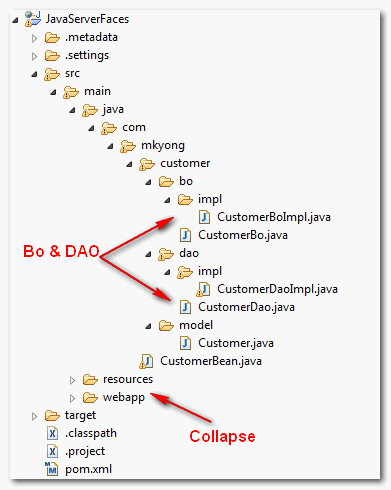
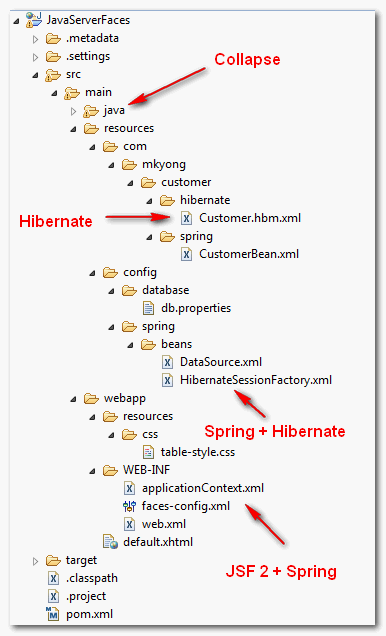
1. Project Structure
Directory structure of this example
2. Table Script
Create a customer table and insert 2 dummy records.
DROP TABLE IF EXISTS `mkyongdb`.`customer`;
CREATE TABLE  `mkyongdb`.`customer` (
  `CUSTOMER_ID` bigint(20) UNSIGNED NOT NULL AUTO_INCREMENT,
  `NAME` varchar(45) NOT NULL,
  `ADDRESS` varchar(255) NOT NULL,
  `CREATED_DATE` datetime NOT NULL,
  PRIMARY KEY (`CUSTOMER_ID`)
) ENGINE=InnoDB AUTO_INCREMENT=17 DEFAULT CHARSET=utf8;

insert into mkyongdb.customer(customer_id, name, address, created_date)
values(1, 'mkyong1', 'address1', now());
insert into mkyongdb.customer(customer_id, name, address, created_date)
values(2, 'mkyong2', 'address2', now());
3. Hibernate Stuff
A model class and Hibernate mapping file for customer table.
File : Customer.java
package com.mkyong.customer.model;

import java.util.Date;

public class Customer{

	public long customerId;
	public String name;
	public String address;
	public Date createdDate;

	//getter and setter methods

}
File : Customer.hbm.xml
<?xml version="1.0"?>
<!DOCTYPE hibernate-mapping PUBLIC
"-//Hibernate/Hibernate Mapping DTD 3.0//EN"
"http://hibernate.sourceforge.net/hibernate-mapping-3.0.dtd">
<hibernate-mapping>
    <class name="com.mkyong.customer.model.Customer"
        table="customer" catalog="mkyongdb">

        <id name="customerId" type="long">
            <column name="CUSTOMER_ID" />
            <generator class="identity" />
        </id>
        <property name="name" type="string">
            <column name="NAME" length="45" not-null="true" />
        </property>
        <property name="address" type="string">
            <column name="ADDRESS" not-null="true" />
        </property>
        <property name="createdDate" type="timestamp">
            <column name="CREATED_DATE" length="19" not-null="true" />
        </property>
    </class>
</hibernate-mapping>
4. Spring Stuff
Spring’s BO and DAO classes for business logic and database interaction.
File : CustomerBo.java
package com.mkyong.customer.bo;

import java.util.List;

import com.mkyong.customer.model.Customer;

public interface CustomerBo{

	void addCustomer(Customer customer);

	List<Customer> findAllCustomer();

}
File : CustomerBoImpl.java
package com.mkyong.customer.bo.impl;

import java.util.List;
import com.mkyong.customer.bo.CustomerBo;
import com.mkyong.customer.dao.CustomerDao;
import com.mkyong.customer.model.Customer;

public class CustomerBoImpl implements CustomerBo{

	CustomerDao customerDao;

	public void setCustomerDao(CustomerDao customerDao) {
		this.customerDao = customerDao;
	}

	public void addCustomer(Customer customer){

		customerDao.addCustomer(customer);

	}

	public List<Customer> findAllCustomer(){

		return customerDao.findAllCustomer();
	}
}
File : CustomerDao.java
package com.mkyong.customer.dao;

import java.util.List;

import com.mkyong.customer.model.Customer;

public interface CustomerDao{

	void addCustomer(Customer customer);

	List<Customer> findAllCustomer();

}
File : CustomerDaoImpl.java
package com.mkyong.customer.dao.impl;

import java.util.Date;
import java.util.List;

import com.mkyong.customer.dao.CustomerDao;
import com.mkyong.customer.model.Customer;
import org.springframework.orm.hibernate3.support.HibernateDaoSupport;

public class CustomerDaoImpl extends
       HibernateDaoSupport implements CustomerDao{

	public void addCustomer(Customer customer){

		customer.setCreatedDate(new Date());
		getHibernateTemplate().save(customer);

	}

	public List<Customer> findAllCustomer(){

		return getHibernateTemplate().find("from Customer");

	}
}
File : CustomerBean.xml
<?xml version="1.0" encoding="UTF-8"?>
<beans xmlns="http://www.springframework.org/schema/beans"
	xmlns:xsi="http://www.w3.org/2001/XMLSchema-instance"
	xsi:schemaLocation="http://www.springframework.org/schema/beans
	http://www.springframework.org/schema/beans/spring-beans-2.5.xsd">

   	<bean id="customerBo"
         class="com.mkyong.customer.bo.impl.CustomerBoImpl" >
   		<property name="customerDao" ref="customerDao" />
   	</bean>

   	<bean id="customerDao"
         class="com.mkyong.customer.dao.impl.CustomerDaoImpl" >
   		<property name="sessionFactory" ref="sessionFactory" />
   	</bean>

</beans>
5. Spring + Database
Configure database detail in Spring.
File : db.properties
jdbc.driverClassName=com.mysql.jdbc.Driver
jdbc.url=jdbc:mysql://localhost:3306/mkyongdb
jdbc.username=root
jdbc.password=password
File : DataSource.xml
<beans xmlns="http://www.springframework.org/schema/beans"
xmlns:xsi="http://www.w3.org/2001/XMLSchema-instance"
xsi:schemaLocation="http://www.springframework.org/schema/beans
http://www.springframework.org/schema/beans/spring-beans-2.5.xsd">

 <bean
   class="org.springframework.beans.factory.config.PropertyPlaceholderConfigurer">
   <property name="location">
		<value>WEB-INF/classes/config/database/db.properties</value>
   </property>
</bean>

  <bean id="dataSource" class="org.springframework.jdbc.datasource.DriverManagerDataSource">
	<property name="driverClassName" value="${jdbc.driverClassName}" />
	<property name="url" value="${jdbc.url}" />
	<property name="username" value="${jdbc.username}" />
	<property name="password" value="${jdbc.password}" />
  </bean>

</beans>
6. Spring + Hibernate
Integrate Hibernate and Spring via LocalSessionFactoryBean.
File : HibernateSessionFactory.xml
<?xml version="1.0" encoding="UTF-8"?>
<beans xmlns="http://www.springframework.org/schema/beans"
xmlns:xsi="http://www.w3.org/2001/XMLSchema-instance"
xsi:schemaLocation="http://www.springframework.org/schema/beans
http://www.springframework.org/schema/beans/spring-beans-2.5.xsd">

<!-- Hibernate session factory -->
<bean id="sessionFactory"
     class="org.springframework.orm.hibernate3.LocalSessionFactoryBean">

    <property name="dataSource">
      <ref bean="dataSource"/>
    </property>

    <property name="hibernateProperties">
       <props>
         <prop key="hibernate.dialect">org.hibernate.dialect.MySQLDialect</prop>
         <prop key="hibernate.show_sql">true</prop>
       </props>
    </property>

    <property name="mappingResources">
	<list>
          <value>com/mkyong/customer/hibernate/Customer.hbm.xml</value>
	</list>
     </property>

</bean>
</beans>
7. JSF 2.0
JSF managed bean to call Spring’s BO to add or get customer’s records from database.
File : CustomerBean.java
package com.mkyong;

import java.io.Serializable;
import java.util.List;

import com.mkyong.customer.bo.CustomerBo;
import com.mkyong.customer.model.Customer;

public class CustomerBean implements Serializable{

	//DI via Spring
	CustomerBo customerBo;

	public String name;
	public String address;
	//getter and setter methods

	public void setCustomerBo(CustomerBo customerBo) {
		this.customerBo = customerBo;
	}

	//get all customer data from database
	public List<Customer> getCustomerList(){
		return customerBo.findAllCustomer();
	}

	//add a new customer data into database
	public String addCustomer(){

		Customer cust = new Customer();
		cust.setName(getName());
		cust.setAddress(getAddress());

		customerBo.addCustomer(cust);

		clearForm();

		return "";
	}

	//clear form values
	private void clearForm(){
		setName("");
		setAddress("");
	}

}
A JSF page to display existing customer records via h:dataTable and a few text components to allow user to insert new customer record into database.
File : default.xhtml
<?xml version="1.0" encoding="UTF-8"?>
<!DOCTYPE html PUBLIC "-//W3C//DTD XHTML 1.0 Transitional//EN"
"http://www.w3.org/TR/xhtml1/DTD/xhtml1-transitional.dtd">
<html xmlns="http://www.w3.org/1999/xhtml"
      xmlns:h="http://java.sun.com/jsf/html"
      xmlns:f="http://java.sun.com/jsf/core"
      >
    <h:head>
    	<h:outputStylesheet library="css" name="table-style.css"  />
    </h:head>

    <h:body>

    	<h1>JSF 2.0 + Spring + Hibernate Example</h1>

 		<h:dataTable value="#{customer.getCustomerList()}" var="c"
    			styleClass="order-table"
    			headerClass="order-table-header"
    			rowClasses="order-table-odd-row,order-table-even-row"
    		>

    		<h:column>
    			<f:facet name="header">
    				Customer ID
    			</f:facet>
    				#{c.customerId}
    		</h:column>

    		<h:column>
    			<f:facet name="header">
    				Name
				</f:facet>
    				#{c.name}
    		</h:column>

 			<h:column>
    			<f:facet name="header">
    				Address
				</f:facet>
    				#{c.address}
    		</h:column>

    		<h:column>
    			<f:facet name="header">
    				Created Date
				</f:facet>
    				#{c.createdDate}
    		</h:column>

    	</h:dataTable>

 		<h2>Add New Customer</h2>
 		<h:form>

 			<h:panelGrid columns="3">

				Name :
				<h:inputText id="name" value="#{customer.name}"
					size="20" required="true"
					label="Name" >
				</h:inputText>

				<h:message for="name" style="color:red" />

				Address :
				<h:inputTextarea id="address" value="#{customer.address}"
					cols="30" rows="10" required="true"
					label="Address" >
				</h:inputTextarea>

				<h:message for="address" style="color:red" />

			</h:panelGrid>

			<h:commandButton value="Submit" action="#{customer.addCustomer()}" />

 		</h:form>

    </h:body>

</html>
8. JSF 2.0 + Spring
Integrate JSF 2.0 with Spring, see detail explanation here – JSF 2.0 + Spring integration example
File : applicationContext.xml
<beans xmlns="http://www.springframework.org/schema/beans"
xmlns:xsi="http://www.w3.org/2001/XMLSchema-instance"
xsi:schemaLocation="http://www.springframework.org/schema/beans
http://www.springframework.org/schema/beans/spring-beans-2.5.xsd">

	<!-- Database Configuration -->
	<import resource="classes/config/spring/beans/DataSource.xml"/>
	<import resource="classes/config/spring/beans/HibernateSessionFactory.xml"/>

	<!-- Beans Declaration -->
	<import resource="classes/com/mkyong/customer/spring/CustomerBean.xml"/>

</beans>
File : faces-config.xml
<?xml version="1.0" encoding="UTF-8"?>
<faces-config
    xmlns="http://java.sun.com/xml/ns/javaee"
    xmlns:xsi="http://www.w3.org/2001/XMLSchema-instance"
    xsi:schemaLocation="http://java.sun.com/xml/ns/javaee
    http://java.sun.com/xml/ns/javaee/web-facesconfig_2_0.xsd"
    version="2.0">

	<application>
    	<el-resolver>
    		org.springframework.web.jsf.el.SpringBeanFacesELResolver
    	</el-resolver>
  	</application>

	<managed-bean>
		<managed-bean-name>customer</managed-bean-name>
		<managed-bean-class>com.mkyong.CustomerBean</managed-bean-class>
		<managed-bean-scope>session</managed-bean-scope>
		<managed-property>
			<property-name>customerBo</property-name>
			<value>#{customerBo}</value>
		</managed-property>
	</managed-bean>

</faces-config>
File : web.xml
<?xml version="1.0" encoding="UTF-8"?>
<web-app xmlns:xsi="http://www.w3.org/2001/XMLSchema-instance"
	xmlns="http://java.sun.com/xml/ns/javaee"
	xmlns:web="http://java.sun.com/xml/ns/javaee/web-app_2_5.xsd"
	xsi:schemaLocation="http://java.sun.com/xml/ns/javaee
	http://java.sun.com/xml/ns/javaee/web-app_2_5.xsd"
	id="WebApp_ID" version="2.5">

  <display-name>JavaServerFaces</display-name>

  <!-- Add Support for Spring -->
  <listener>
	<listener-class>
		org.springframework.web.context.ContextLoaderListener
	</listener-class>
  </listener>
  <listener>
	<listener-class>
		org.springframework.web.context.request.RequestContextListener
	</listener-class>
  </listener>

  <!-- Change to "Production" when you are ready to deploy -->
  <context-param>
    <param-name>javax.faces.PROJECT_STAGE</param-name>
    <param-value>Development</param-value>
  </context-param>

  <!-- Welcome page -->
  <welcome-file-list>
    <welcome-file>faces/default.xhtml</welcome-file>
  </welcome-file-list>

  <!-- JSF mapping -->
  <servlet>
    <servlet-name>Faces Servlet</servlet-name>
    <servlet-class>javax.faces.webapp.FacesServlet</servlet-class>
    <load-on-startup>1</load-on-startup>
  </servlet>

  <!-- Map these files with JSF -->
  <servlet-mapping>
    <servlet-name>Faces Servlet</servlet-name>
    <url-pattern>/faces/*</url-pattern>
  </servlet-mapping>
  <servlet-mapping>
    <servlet-name>Faces Servlet</servlet-name>
    <url-pattern>*.jsf</url-pattern>
  </servlet-mapping>
  <servlet-mapping>
    <servlet-name>Faces Servlet</servlet-name>
    <url-pattern>*.faces</url-pattern>
  </servlet-mapping>
  <servlet-mapping>
    <servlet-name>Faces Servlet</servlet-name>
    <url-pattern>*.xhtml</url-pattern>
  </servlet-mapping>

</web-app>
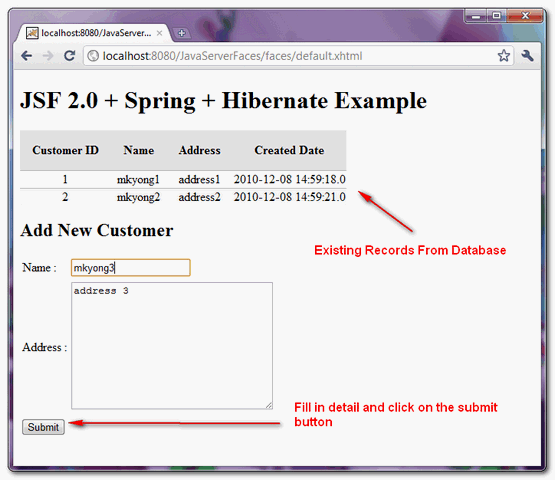
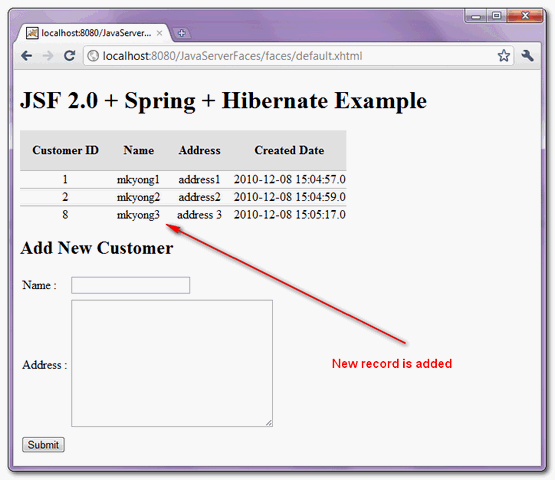
9. Demo
Run it, fill in the customer data and click on the “submit” button.

Most of this stuff is deprecated now. Maybe it is worth considering to update? It would be nice 😉
there are lack of some dependencies in pom.xml file in this example
Hi, Nice and clear tutorial. I am facing issue while launching it with Glassfish and H2 database.
java.lang.Exception: java.lang.IllegalStateException: ContainerBase.addChild: start: org.apache.catalina.LifecycleException: org.springframework.beans.factory.BeanCreationException: Error creating bean with name ‘dataSource’ defined in ServletContext resource [/WEB-INF/classes/config/spring/beans/DataSource.xml]: Error setting property values; nested exception is org.springframework.beans.InvalidPropertyException: Invalid property ‘connection’ of bean class [org.springframework.jdbc.datasource.DriverManagerDataSource]: Getter for property ‘connection’ threw exception; nested exception is java.lang.reflect.InvocationTargetException
here is how I have mention bean tag in DataSource.xml
Please let me know in case I am missing anything
Project is not running (01/10/2015) because of old dependencies.
– Follow the 3 steps to make the build and application deployement running –
1 – please add jta dependency :
javax.transaction
jta
1.1
2 – please add asm dependency because of SessionFactory exception in initialization context :
asm
asm
3.1
3 – Modify hibernate dependency declaration and add this :
org.hibernate
hibernate
3.2.7.ga
asm
asm
asm
asm-attrs
i had problems and exceptions … see all experince in the tutorial http://stackoverflow.com/questions/19086523/missing-artifact-javax-transactionjtajar1-0-1b-issue-was-different-as-you-m/31347138#31347138
ON GITHUB https://github.com/shareefhiasat/mkyong tested on spring tools sts Spring Tool Suite
Version: 3.7.0.RELEASE
Build Id: 201506290652
Platform: Eclipse Mars (4.5.0)
hi mkyong, it’s works very fine.
i’m trying to change the mapping with annotation (not with hbm file), i’ve this error in hql :
nested exception is org.hibernate.hql.ast.QuerySyntaxException: Customer is not mapped
Have anyone met and resolved such a problem when adding a new item? I’ve spent quite a long time trying to figure out how to solve such problem.
SEVERE: java.lang.ClassCastException: com.zzz.item.model.Item cannot be cast to java.util.Map
javax.faces.el.EvaluationException: java.lang.ClassCastException: com.zzz.item.model.Item cannot be cast to java.util.Map
at javax.faces.component.MethodBindingMethodExpressionAdapter.invoke(MethodBindingMethodExpressionAdapter.java:98)
at com.sun.faces.application.ActionListenerImpl.processAction(ActionListenerImpl.java:98)
at javax.faces.component.UICommand.broadcast(UICommand.java:311)
at javax.faces.component.UIViewRoot.broadcastEvents(UIViewRoot.java:790)
at javax.faces.component.UIViewRoot.processApplication(UIViewRoot.java:1255)
at com.sun.faces.lifecycle.InvokeApplicationPhase.execute(InvokeApplicationPhase.java:77)
…
I tried this example but if i run this app in server it is searching for .jsp file not accepting .xhtml file
here is my web.xml file
JavaServerFaces
org.springframework.web.context.ContextLoaderListener
org.springframework.web.context.request.RequestContextListener
javax.faces.PROJECT_STAGE
Development
default.xhtml
Faces Servlet
javax.faces.webapp.FacesServlet
1
Faces Servlet
/faces/*
Faces Servlet
*.jsf
Faces Servlet
*.faces
Faces Servlet
*.xhtml
How to add composite entity in jsf and hibernate ?
For exemple if Customer contains ‘idStore’ , (Store contains idStore and libelleStore)
in jsf, what is instruction to display libelleStore from customer ?
in hibernate, how load the object Store when find Costumer ?
Thank’s for your example.
I’ve this error when i try to add new Customer :
Caused by: java.lang.ClassCastException: com.faycal.customer.model.Customer cannot be cast to java.util.Map
at org.hibernate.property.MapAccessor$MapGetter.get(MapAccessor.java:67)
at org.hibernate.property.MapAccessor$MapGetter.getForInsert(MapAccessor.java:71)
at org.hibernate.tuple.entity.AbstractEntityTuplizer.getPropertyValuesToInsert(AbstractEntityTuplizer.java:264)
at org.hibernate.persister.entity.AbstractEntityPersister.getPropertyValuesToInsert(AbstractEntityPersister.java:3647)
at org.hibernate.event.def.AbstractSaveEventListener.performSaveOrReplicate(AbstractSaveEventListener.java:267)
at org.hibernate.event.def.AbstractSaveEventListener.performSave(AbstractSaveEventListener.java:181)
at org.hibernate.event.def.AbstractSaveEventListener.saveWithGeneratedId(AbstractSaveEventListener.java:107)
at org.hibernate.event.def.DefaultSaveOrUpdateEventListener.saveWithGeneratedOrRequestedId(DefaultSaveOrUpdateEventListener.java:187)
at org.hibernate.event.def.DefaultSaveEventListener.saveWithGeneratedOrRequestedId(DefaultSaveEventListener.java:33)
at org.hibernate.event.def.DefaultSaveOrUpdateEventListener.entityIsTransient(DefaultSaveOrUpdateEventListener.java:172)
at org.hibernate.event.def.DefaultSaveEventListener.performSaveOrUpdate(DefaultSaveEventListener.java:27)
at org.hibernate.event.def.DefaultSaveOrUpdateEventListener.onSaveOrUpdate(DefaultSaveOrUpdateEventListener.java:70)
at org.hibernate.impl.SessionImpl.fireSave(SessionImpl.java:536)
at org.hibernate.impl.SessionImpl.save(SessionImpl.java:524)
at org.hibernate.impl.SessionImpl.save(SessionImpl.java:520)
at org.springframework.orm.hibernate3.HibernateTemplate$12.doInHibernate(HibernateTemplate.java:697)
at org.springframework.orm.hibernate3.HibernateTemplate.doExecute(HibernateTemplate.java:419)
at org.springframework.orm.hibernate3.HibernateTemplate.executeWithNativeSession(HibernateTemplate.java:374)
at org.springframework.orm.hibernate3.HibernateTemplate.save(HibernateTemplate.java:694)
at com.faycal.customer.dao.impl.CustomerDaoImpl.addCustomer(CustomerDaoImpl.java:16)
at com.faycal.customer.bo.impl.CustomerBoImpl.addCustomer(CustomerBoImpl.java:18)
at com.faycal.customer.CustomerBean.addCustomer(CustomerBean.java:39)
at sun.reflect.NativeMethodAccessorImpl.invoke0(Native Method)
at sun.reflect.NativeMethodAccessorImpl.invoke(NativeMethodAccessorImpl.java:57)
at sun.reflect.DelegatingMethodAccessorImpl.invoke(DelegatingMethodAccessorImpl.java:43)
at java.lang.reflect.Method.invoke(Method.java:601)
at org.apache.el.parser.AstValue.invoke(AstValue.java:278)
at org.apache.el.MethodExpressionImpl.invoke(MethodExpressionImpl.java:273)
at com.sun.faces.facelets.el.TagMethodExpression.invoke(TagMethodExpression.java:102)
at javax.faces.component.MethodBindingMethodExpressionAdapter.invoke(MethodBindingMethodExpressionAdapter.java:84)
… 28 more
Do you find the problem pleaseee ?
I’m blocked !
Have you found any solution for such problem? I’m struggling with this too.
Yes, i resolve a problem
i update a lot of source, like exclude some jar and adding others
org.hibernate
hibernate
3.2.7.ga
asm
asm
asm
asm-attrs
where to find all jars for the above post.
i`m getting the same error … does anybody know how to fix it?
Thanks alot for this very clever tutorial, I tried to add “delete modify” but unfortunately I can not achieve, if possible you could help me.
Hi ,
thank you for this tutorial,
I want to add Primefaces but it does not work I do not know if it’s a version problem I used primeface 3.5, if you can help me plzz
thinks
if he treats this video perfectly integration between spring, jsf and hibernate.
https://www.youtube.com/watch?v=XHu541F_yOo
hhh
How does this applicationContext.xml gets loaded in Spring container. Does ContextLoaderListener load it?
Thanks a lot mkyong for the nice tutorial. I can run it without any problem on tomcat 6 but if I run on tomcat 7 then I get the following errors:
java.lang.ClassNotFoundException: javax.servlet.ServletContextListener
java.lang.ClassNotFoundException: javax.servlet.ServletRequestListener
I am really want to know the reason behind that. Is there any major difference between tomcat 6 and 7 in this context?
Any clue will be highly appreciated.
Best Regards
when you will fix that tutorial ….. you should post properly function tutorials with updated pom.xml just look that pom.xml its very old and due to that, ur tutorial is not working and its useless. plz quickly update that ……………
i’m getting an error when i’m trying to add a customer:
it crash down at the line of code that is this:
getHibernateTemplate().save(customer);
in the method
public void addCustomer(Customer customer) {
customer.setCreatedDate(new Date());
getHibernateTemplate().save(customer);
}
in the class CustomerDaoImpl in the package: com.mkyong.customer.dao.impl
I don’t know why it’s trying to cast java.util.Map; but the most baffling it’s that the error seems to be that it comes from server faces (javax.faces.el.EvaluationException), that would be comprehensible but i have make a little test by commenting the line:
getHibernateTemplate().save(customer);
the result of the test was that le application goes well, it didn’t add the custumer, but it don’t fail
even i tryed to debug to be sure that the line where the application goes down, instead of the problem in the view; but seems that in fact the problem lies at that line and i don’t know I don’t know anything else to try.
The error deails it this:
javax.faces.el.EvaluationException: java.lang.ClassCastException: com.mkyong.customer.model.Customer cannot be cast to java.util.Map
at javax.faces.component.MethodBindingMethodExpressionAdapter.invoke(MethodBindingMethodExpressionAdapter.java:98)
at com.sun.faces.application.ActionListenerImpl.processAction(ActionListenerImpl.java:98)
at javax.faces.component.UICommand.broadcast(UICommand.java:311)
at javax.faces.component.UIViewRoot.broadcastEvents(UIViewRoot.java:790)
at javax.faces.component.UIViewRoot.processApplication(UIViewRoot.java:1255)
at com.sun.faces.lifecycle.InvokeApplicationPhase.execute(InvokeApplicationPhase.java:77)
at com.sun.faces.lifecycle.Phase.doPhase(Phase.java:97)
at com.sun.faces.lifecycle.LifecycleImpl.execute(LifecycleImpl.java:114)
at javax.faces.webapp.FacesServlet.service(FacesServlet.java:334)
at org.apache.catalina.core.ApplicationFilterChain.internalDoFilter(ApplicationFilterChain.java:305)
at org.apache.catalina.core.ApplicationFilterChain.doFilter(ApplicationFilterChain.java:210)
at org.netbeans.modules.web.monitor.server.MonitorFilter.doFilter(MonitorFilter.java:393)
at org.apache.catalina.core.ApplicationFilterChain.internalDoFilter(ApplicationFilterChain.java:243)
at org.apache.catalina.core.ApplicationFilterChain.doFilter(ApplicationFilterChain.java:210)
at org.apache.catalina.core.StandardWrapperValve.invoke(StandardWrapperValve.java:222)
at org.apache.catalina.core.StandardContextValve.invoke(StandardContextValve.java:123)
at org.apache.catalina.authenticator.AuthenticatorBase.invoke(AuthenticatorBase.java:472)
at org.apache.catalina.core.StandardHostValve.invoke(StandardHostValve.java:171)
at org.apache.catalina.valves.ErrorReportValve.invoke(ErrorReportValve.java:99)
at org.apache.catalina.valves.AccessLogValve.invoke(AccessLogValve.java:953)
at org.apache.catalina.core.StandardEngineValve.invoke(StandardEngineValve.java:118)
at org.apache.catalina.connector.CoyoteAdapter.service(CoyoteAdapter.java:408)
at org.apache.coyote.http11.AbstractHttp11Processor.process(AbstractHttp11Processor.java:1023)
at org.apache.coyote.AbstractProtocol$AbstractConnectionHandler.process(AbstractProtocol.java:589)
at org.apache.tomcat.util.net.JIoEndpoint$SocketProcessor.run(JIoEndpoint.java:310)
at java.util.concurrent.ThreadPoolExecutor.runWorker(ThreadPoolExecutor.java:1145)
at java.util.concurrent.ThreadPoolExecutor$Worker.run(ThreadPoolExecutor.java:615)
at java.lang.Thread.run(Thread.java:724)
Caused by: java.lang.ClassCastException: com.mkyong.customer.model.Customer cannot be cast to java.util.Map
at org.hibernate.property.MapAccessor$MapGetter.get(MapAccessor.java:67)
at org.hibernate.tuple.entity.AbstractEntityTuplizer.getIdentifier(AbstractEntityTuplizer.java:176)
at org.hibernate.persister.entity.AbstractEntityPersister.getIdentifier(AbstractEntityPersister.java:3582)
at org.hibernate.id.Assigned.generate(Assigned.java:28)
at org.hibernate.event.def.AbstractSaveEventListener.saveWithGeneratedId(AbstractSaveEventListener.java:99)
at org.hibernate.event.def.DefaultSaveOrUpdateEventListener.saveWithGeneratedOrRequestedId(DefaultSaveOrUpdateEventListener.java:187)
at org.hibernate.event.def.DefaultSaveEventListener.saveWithGeneratedOrRequestedId(DefaultSaveEventListener.java:33)
at org.hibernate.event.def.DefaultSaveOrUpdateEventListener.entityIsTransient(DefaultSaveOrUpdateEventListener.java:172)
at org.hibernate.event.def.DefaultSaveEventListener.performSaveOrUpdate(DefaultSaveEventListener.java:27)
at org.hibernate.event.def.DefaultSaveOrUpdateEventListener.onSaveOrUpdate(DefaultSaveOrUpdateEventListener.java:70)
at org.hibernate.impl.SessionImpl.fireSave(SessionImpl.java:536)
at org.hibernate.impl.SessionImpl.save(SessionImpl.java:524)
at org.hibernate.impl.SessionImpl.save(SessionImpl.java:520)
at org.springframework.orm.hibernate3.HibernateTemplate$12.doInHibernate(HibernateTemplate.java:697)
at org.springframework.orm.hibernate3.HibernateTemplate.doExecute(HibernateTemplate.java:419)
at org.springframework.orm.hibernate3.HibernateTemplate.executeWithNativeSession(HibernateTemplate.java:374)
at org.springframework.orm.hibernate3.HibernateTemplate.save(HibernateTemplate.java:694)
at com.mkyong.customer.dao.impl.CustomerDaoImpl.addCustomer(CustomerDaoImpl.java:18)
at com.mkyong.customer.bo.impl.CustomerBoImpl.addCustomer(CustomerBoImpl.java:21)
at com.mkyong.CustomerBean.addCustomer(CustomerBean.java:49)
at sun.reflect.NativeMethodAccessorImpl.invoke0(Native Method)
at sun.reflect.NativeMethodAccessorImpl.invoke(NativeMethodAccessorImpl.java:57)
at sun.reflect.DelegatingMethodAccessorImpl.invoke(DelegatingMethodAccessorImpl.java:43)
at java.lang.reflect.Method.invoke(Method.java:606)
at org.apache.el.parser.AstValue.invoke(AstValue.java:278)
at org.apache.el.MethodExpressionImpl.invoke(MethodExpressionImpl.java:274)
at com.sun.faces.facelets.el.TagMethodExpression.invoke(TagMethodExpression.java:102)
at javax.faces.component.MethodBindingMethodExpressionAdapter.invoke(MethodBindingMethodExpressionAdapter.java:84)
… 27 more
thanks very much by such usefull information
This is a grate tutorial.Can you please explain a JSF+Hibernate application in JDeveloper IDE?
Hi
org.springframework.beans.factory.BeanCreationException: Error creating bean with name ‘sessionFactory’ defined in ServletContext resource [/WEB-INF/classes/config/spring/beans/HibernateSessionFactory.xml]: Invocation of init method failed; nested exception is org.hibernate.HibernateException: Unable to instantiate default tuplizer [org.hibernate.tuple.entity.PojoEntityTuplizer]
at org.springframework.beans.factory.support.AbstractAutowireCapableBeanFactory.initializeBean(AbstractAutowireCapableBeanFactory.java:1338)
at org.springframework.beans.factory.support.AbstractAutowireCapableBeanFactory.doCreateBean(AbstractAutowireCapableBeanFactory.java:473)
at org.springframework.beans.factory.support.AbstractAutowireCapableBeanFactory$1.run(AbstractAutowireCapableBeanFactory.java:409)
at java.security.AccessController.doPrivileged(Native Method)
at org.springframework.beans.factory.support.AbstractAutowireCapableBeanFactory.createBean(AbstractAutowireCapableBeanFactory.java:380)
at org.springframework.beans.factory.support.AbstractBeanFactory$1.getObject(AbstractBeanFactory.java:264)
at org.springframework.beans.factory.support.DefaultSingletonBeanRegistry.getSingleton(DefaultSingletonBeanRegistry.java:222)
at org.springframework.beans.factory.support.AbstractBeanFactory.doGetBean(AbstractBeanFactory.java:261)
at org.springframework.beans.factory.support.AbstractBeanFactory.getBean(AbstractBeanFactory.java:185)
at org.springframework.beans.factory.support.AbstractBeanFactory.getBean(AbstractBeanFactory.java:164)
at org.springframework.beans.factory.support.DefaultListableBeanFactory.preInstantiateSingletons(DefaultListableBeanFactory.java:423)
at org.springframework.context.support.AbstractApplicationContext.finishBeanFactoryInitialization(AbstractApplicationContext.java:728)
at org.springframework.context.support.AbstractApplicationContext.refresh(AbstractApplicationContext.java:380)
at org.springframework.web.context.ContextLoader.createWebApplicationContext(ContextLoader.java:255)
at org.springframework.web.context.ContextLoader.initWebApplicationContext(ContextLoader.java:199)
at org.springframework.web.context.ContextLoaderListener.contextInitialized(ContextLoaderListener.java:45)
at org.apache.catalina.core.StandardContext.listenerStart(StandardContext.java:4521)
at org.apache.catalina.core.StandardContext$1.call(StandardContext.java:5004)
at org.apache.catalina.core.StandardContext$1.call(StandardContext.java:4999)
at java.util.concurrent.FutureTask$Sync.innerRun(Unknown Source)
at java.util.concurrent.FutureTask.run(Unknown Source)
at java.util.concurrent.ThreadPoolExecutor.runWorker(Unknown Source)
at java.util.concurrent.ThreadPoolExecutor$Worker.run(Unknown Source)
at java.lang.Thread.run(Unknown Source)
Caused by: org.hibernate.HibernateException: Unable to instantiate default tuplizer [org.hibernate.tuple.entity.PojoEntityTuplizer]
at org.hibernate.tuple.entity.EntityTuplizerFactory.constructTuplizer(EntityTuplizerFactory.java:110)
at org.hibernate.tuple.entity.EntityTuplizerFactory.constructDefaultTuplizer(EntityTuplizerFactory.java:135)
at org.hibernate.tuple.entity.EntityEntityModeToTuplizerMapping.(EntityEntityModeToTuplizerMapping.java:56)
at org.hibernate.tuple.entity.EntityMetamodel.(EntityMetamodel.java:323)
at org.hibernate.persister.entity.AbstractEntityPersister.(AbstractEntityPersister.java:433)
at org.hibernate.persister.entity.SingleTableEntityPersister.(SingleTableEntityPersister.java:109)
at org.hibernate.persister.PersisterFactory.createClassPersister(PersisterFactory.java:55)
at org.hibernate.impl.SessionFactoryImpl.(SessionFactoryImpl.java:231)
at org.hibernate.cfg.Configuration.buildSessionFactory(Configuration.java:1313)
at org.springframework.orm.hibernate3.LocalSessionFactoryBean.newSessionFactory(LocalSessionFactoryBean.java:814)
at org.springframework.orm.hibernate3.LocalSessionFactoryBean.buildSessionFactory(LocalSessionFactoryBean.java:732)
at org.springframework.orm.hibernate3.AbstractSessionFactoryBean.afterPropertiesSet(AbstractSessionFactoryBean.java:211)
at org.springframework.beans.factory.support.AbstractAutowireCapableBeanFactory.invokeInitMethods(AbstractAutowireCapableBeanFactory.java:1369)
at org.springframework.beans.factory.support.AbstractAutowireCapableBeanFactory.initializeBean(AbstractAutowireCapableBeanFactory.java:1335)
… 23 more
Caused by: java.lang.reflect.InvocationTargetException
at sun.reflect.NativeConstructorAccessorImpl.newInstance0(Native Method)
at sun.reflect.NativeConstructorAccessorImpl.newInstance(Unknown Source)
at sun.reflect.DelegatingConstructorAccessorImpl.newInstance(Unknown Source)
at java.lang.reflect.Constructor.newInstance(Unknown Source)
at org.hibernate.tuple.entity.EntityTuplizerFactory.constructTuplizer(EntityTuplizerFactory.java:107)
… 36 more
Caused by: java.lang.NoSuchMethodError: org.objectweb.asm.ClassWriter.(I)V
at net.sf.cglib.core.DebuggingClassWriter.(DebuggingClassWriter.java:47)
at net.sf.cglib.core.DefaultGeneratorStrategy.getClassWriter(DefaultGeneratorStrategy.java:30)
at net.sf.cglib.core.DefaultGeneratorStrategy.generate(DefaultGeneratorStrategy.java:24)
at net.sf.cglib.core.AbstractClassGenerator.create(AbstractClassGenerator.java:216)
at net.sf.cglib.core.KeyFactory$Generator.create(KeyFactory.java:144)
at net.sf.cglib.core.KeyFactory.create(KeyFactory.java:116)
at net.sf.cglib.core.KeyFactory.create(KeyFactory.java:108)
at net.sf.cglib.core.KeyFactory.create(KeyFactory.java:104)
at net.sf.cglib.proxy.Enhancer.(Enhancer.java:69)
at org.hibernate.proxy.pojo.cglib.CGLIBLazyInitializer.getProxyFactory(CGLIBLazyInitializer.java:117)
at org.hibernate.proxy.pojo.cglib.CGLIBProxyFactory.postInstantiate(CGLIBProxyFactory.java:43)
at org.hibernate.tuple.entity.PojoEntityTuplizer.buildProxyFactory(PojoEntityTuplizer.java:188)
at org.hibernate.tuple.entity.AbstractEntityTuplizer.(AbstractEntityTuplizer.java:128)
at org.hibernate.tuple.entity.PojoEntityTuplizer.(PojoEntityTuplizer.java:78)
… 41 more
Jul 22, 2013 4:05:43 PM org.apache.catalina.core.StandardContext listenerStart
SEVERE: Exception sending context initialized event to listener instance of class org.springframework.web.context.ContextLoaderListener
org.springframework.beans.factory.BeanCreationException: Error creating bean with name ‘sessionFactory’ defined in ServletContext resource [/WEB-INF/classes/config/spring/beans/HibernateSessionFactory.xml]: Invocation of init method failed; nested exception is org.hibernate.HibernateException: Unable to instantiate default tuplizer [org.hibernate.tuple.entity.PojoEntityTuplizer]
at org.springframework.beans.factory.support.AbstractAutowireCapableBeanFactory.initializeBean(AbstractAutowireCapableBeanFactory.java:1338)
at org.springframework.beans.factory.support.AbstractAutowireCapableBeanFactory.doCreateBean(AbstractAutowireCapableBeanFactory.java:473)
at org.springframework.beans.factory.support.AbstractAutowireCapableBeanFactory$1.run(AbstractAutowireCapableBeanFactory.java:409)
at java.security.AccessController.doPrivileged(Native Method)
at org.springframework.beans.factory.support.AbstractAutowireCapableBeanFactory.createBean(AbstractAutowireCapableBeanFactory.java:380)
at org.springframework.beans.factory.support.AbstractBeanFactory$1.getObject(AbstractBeanFactory.java:264)
at org.springframework.beans.factory.support.DefaultSingletonBeanRegistry.getSingleton(DefaultSingletonBeanRegistry.java:222)
at org.springframework.beans.factory.support.AbstractBeanFactory.doGetBean(AbstractBeanFactory.java:261)
at org.springframework.beans.factory.support.AbstractBeanFactory.getBean(AbstractBeanFactory.java:185)
at org.springframework.beans.factory.support.AbstractBeanFactory.getBean(AbstractBeanFactory.java:164)
at org.springframework.beans.factory.support.DefaultListableBeanFactory.preInstantiateSingletons(DefaultListableBeanFactory.java:423)
at org.springframework.context.support.AbstractApplicationContext.finishBeanFactoryInitialization(AbstractApplicationContext.java:728)
at org.springframework.context.support.AbstractApplicationContext.refresh(AbstractApplicationContext.java:380)
at org.springframework.web.context.ContextLoader.createWebApplicationContext(ContextLoader.java:255)
at org.springframework.web.context.ContextLoader.initWebApplicationContext(ContextLoader.java:199)
at org.springframework.web.context.ContextLoaderListener.contextInitialized(ContextLoaderListener.java:45)
at org.apache.catalina.core.StandardContext.listenerStart(StandardContext.java:4521)
at org.apache.catalina.core.StandardContext$1.call(StandardContext.java:5004)
at org.apache.catalina.core.StandardContext$1.call(StandardContext.java:4999)
at java.util.concurrent.FutureTask$Sync.innerRun(Unknown Source)
at java.util.concurrent.FutureTask.run(Unknown Source)
at java.util.concurrent.ThreadPoolExecutor.runWorker(Unknown Source)
at java.util.concurrent.ThreadPoolExecutor$Worker.run(Unknown Source)
at java.lang.Thread.run(Unknown Source)
Caused by: org.hibernate.HibernateException: Unable to instantiate default tuplizer [org.hibernate.tuple.entity.PojoEntityTuplizer]
at org.hibernate.tuple.entity.EntityTuplizerFactory.constructTuplizer(EntityTuplizerFactory.java:110)
at org.hibernate.tuple.entity.EntityTuplizerFactory.constructDefaultTuplizer(EntityTuplizerFactory.java:135)
at org.hibernate.tuple.entity.EntityEntityModeToTuplizerMapping.(EntityEntityModeToTuplizerMapping.java:56)
at org.hibernate.tuple.entity.EntityMetamodel.(EntityMetamodel.java:323)
at org.hibernate.persister.entity.AbstractEntityPersister.(AbstractEntityPersister.java:433)
at org.hibernate.persister.entity.SingleTableEntityPersister.(SingleTableEntityPersister.java:109)
at org.hibernate.persister.PersisterFactory.createClassPersister(PersisterFactory.java:55)
at org.hibernate.impl.SessionFactoryImpl.(SessionFactoryImpl.java:231)
at org.hibernate.cfg.Configuration.buildSessionFactory(Configuration.java:1313)
at org.springframework.orm.hibernate3.LocalSessionFactoryBean.newSessionFactory(LocalSessionFactoryBean.java:814)
at org.springframework.orm.hibernate3.LocalSessionFactoryBean.buildSessionFactory(LocalSessionFactoryBean.java:732)
at org.springframework.orm.hibernate3.AbstractSessionFactoryBean.afterPropertiesSet(AbstractSessionFactoryBean.java:211)
at org.springframework.beans.factory.support.AbstractAutowireCapableBeanFactory.invokeInitMethods(AbstractAutowireCapableBeanFactory.java:1369)
at org.springframework.beans.factory.support.AbstractAutowireCapableBeanFactory.initializeBean(AbstractAutowireCapableBeanFactory.java:1335)
… 23 more
Caused by: java.lang.reflect.InvocationTargetException
at sun.reflect.NativeConstructorAccessorImpl.newInstance0(Native Method)
at sun.reflect.NativeConstructorAccessorImpl.newInstance(Unknown Source)
at sun.reflect.DelegatingConstructorAccessorImpl.newInstance(Unknown Source)
at java.lang.reflect.Constructor.newInstance(Unknown Source)
at org.hibernate.tuple.entity.EntityTuplizerFactory.constructTuplizer(EntityTuplizerFactory.java:107)
… 36 more
Caused by: java.lang.NoSuchMethodError: org.objectweb.asm.ClassWriter.(I)V
at net.sf.cglib.core.DebuggingClassWriter.(DebuggingClassWriter.java:47)
at net.sf.cglib.core.DefaultGeneratorStrategy.getClassWriter(DefaultGeneratorStrategy.java:30)
at net.sf.cglib.core.DefaultGeneratorStrategy.generate(DefaultGeneratorStrategy.java:24)
at net.sf.cglib.core.AbstractClassGenerator.create(AbstractClassGenerator.java:216)
at net.sf.cglib.core.KeyFactory$Generator.create(KeyFactory.java:144)
at net.sf.cglib.core.KeyFactory.create(KeyFactory.java:116)
at net.sf.cglib.core.KeyFactory.create(KeyFactory.java:108)
at net.sf.cglib.core.KeyFactory.create(KeyFactory.java:104)
at net.sf.cglib.proxy.Enhancer.(Enhancer.java:69)
at org.hibernate.proxy.pojo.cglib.CGLIBLazyInitializer.getProxyFactory(CGLIBLazyInitializer.java:117)
at org.hibernate.proxy.pojo.cglib.CGLIBProxyFactory.postInstantiate(CGLIBProxyFactory.java:43)
at org.hibernate.tuple.entity.PojoEntityTuplizer.buildProxyFactory(PojoEntityTuplizer.java:188)
at org.hibernate.tuple.entity.AbstractEntityTuplizer.(AbstractEntityTuplizer.java:128)
at org.hibernate.tuple.entity.PojoEntityTuplizer.(PojoEntityTuplizer.java:78)
… 41 more
Jul 22, 2013 4:05:44 PM com.sun.faces.config.ConfigureListener contextInitialized
INFO: Initializing Mojarra 2.1.0 (SNAPSHOT 20100817) for context ‘/JavaServerFaces’
Jul 22, 2013 4:05:44 PM com.sun.faces.spi.InjectionProviderFactory createInstance
INFO: JSF1048: PostConstruct/PreDestroy annotations present. ManagedBeans methods marked with these annotations will have said annotations processed.
Jul 22, 2013 4:05:45 PM com.sun.faces.config.ConfigureListener$WebConfigResourceMonitor$Monitor
INFO: Monitoring jndi:/localhost/JavaServerFaces/WEB-INF/faces-config.xml for modifications
Jul 22, 2013 4:05:45 PM com.sun.faces.config.ConfigureListener contextInitialized
SEVERE: Critical error during deployment:
java.lang.LinkageError: loader constraint violation: when resolving interface method “javax.servlet.jsp.JspApplicationContext.getExpressionFactory()Ljavax/el/ExpressionFactory;” the class loader (instance of org/apache/catalina/loader/WebappClassLoader) of the current class, com/sun/faces/config/ConfigureListener, and the class loader (instance of org/apache/catalina/loader/StandardClassLoader) for resolved class, javax/servlet/jsp/JspApplicationContext, have different Class objects for the type avax/el/ExpressionFactory; used in the signature
at com.sun.faces.config.ConfigureListener.registerELResolverAndListenerWithJsp(ConfigureListener.java:684)
at com.sun.faces.config.ConfigureListener.contextInitialized(ConfigureListener.java:240)
at org.apache.catalina.core.StandardContext.listenerStart(StandardContext.java:4521)
at org.apache.catalina.core.StandardContext$1.call(StandardContext.java:5004)
at org.apache.catalina.core.StandardContext$1.call(StandardContext.java:4999)
at java.util.concurrent.FutureTask$Sync.innerRun(Unknown Source)
at java.util.concurrent.FutureTask.run(Unknown Source)
at java.util.concurrent.ThreadPoolExecutor.runWorker(Unknown Source)
at java.util.concurrent.ThreadPoolExecutor$Worker.run(Unknown Source)
at java.lang.Thread.run(Unknown Source)
Jul 22, 2013 4:05:45 PM org.apache.catalina.core.StandardContext listenerStart
SEVERE: Exception sending context initialized event to listener instance of class com.sun.faces.config.ConfigureListener
java.lang.RuntimeException: java.lang.LinkageError: loader constraint violation: when resolving interface method “javax.servlet.jsp.JspApplicationContext.getExpressionFactory()Ljavax/el/ExpressionFactory;” the class loader (instance of org/apache/catalina/loader/WebappClassLoader) of the current class, com/sun/faces/config/ConfigureListener, and the class loader (instance of org/apache/catalina/loader/StandardClassLoader) for resolved class, javax/servlet/jsp/JspApplicationContext, have different Class objects for the type avax/el/ExpressionFactory; used in the signature
at com.sun.faces.config.ConfigureListener.contextInitialized(ConfigureListener.java:290)
at org.apache.catalina.core.StandardContext.listenerStart(StandardContext.java:4521)
at org.apache.catalina.core.StandardContext$1.call(StandardContext.java:5004)
at org.apache.catalina.core.StandardContext$1.call(StandardContext.java:4999)
at java.util.concurrent.FutureTask$Sync.innerRun(Unknown Source)
at java.util.concurrent.FutureTask.run(Unknown Source)
at java.util.concurrent.ThreadPoolExecutor.runWorker(Unknown Source)
at java.util.concurrent.ThreadPoolExecutor$Worker.run(Unknown Source)
at java.lang.Thread.run(Unknown Source)
Caused by: java.lang.LinkageError: loader constraint violation: when resolving interface method “javax.servlet.jsp.JspApplicationContext.getExpressionFactory()Ljavax/el/ExpressionFactory;” the class loader (instance of org/apache/catalina/loader/WebappClassLoader) of the current class, com/sun/faces/config/ConfigureListener, and the class loader (instance of org/apache/catalina/loader/StandardClassLoader) for resolved class, javax/servlet/jsp/JspApplicationContext, have different Class objects for the type avax/el/ExpressionFactory; used in the signature
at com.sun.faces.config.ConfigureListener.registerELResolverAndListenerWithJsp(ConfigureListener.java:684)
at com.sun.faces.config.ConfigureListener.contextInitialized(ConfigureListener.java:240)
… 8 more
yo resolvi el pojo tuplizer:
+cambiando en Customer.hbm.xml….
“name” por “entity-name”
@Evelyn: Claro que si
Thank you very much Evelyn
Hello Kannan,
I have the same message :
Caused by: org.hibernate.HibernateException: Unable to instantiate default tuplizer [org.hibernate.tuple.entity.PojoEntityTuplizer]
Did you find a solution to this problem ?
Best regards.
Hi Evelyn,
try this:
3.1.0.RELEASE
3.2.7.ga
3.1
…
org.hibernate
hibernate
${hibernate.version}
asm
asm
asm
asm-attrs
asm
asm
${asm.version}
For me this solution helped.
the solution is to replace “name” by “entity-name” in the file Customer.hbm.xml
I had the same “Tuple” error. I put these dependencies into my pom.xml file (per StackOverflow) and the problem resolved itself:
org.hibernate
hibernate
3.2.7.ga
asm
asm
asm
asm-attrs
asm
asm
3.1
Awesome .. that works!
actually groupId instead of groupid and artifactId instead of artifactid. Anyway it doesn’t solve this error in my project :'(
Dear Mr.Mkyong and friends.
I am ok in developing and running this sample. But I found one bug. It is…
Every pressing “F5” or “Refresh”, It was automatically inserted the previous row.
Why it is?. I have change scope in faces-config.xml “session” to “request” but nothing special. Any can help me?
Thanks.
Saw John Linn
United Arakan Kingdom
In file CustomerDAOImpl.java, there are an error such as:
Multiple markers at this line
– The type org.springframework.dao.support.DaoSupport cannot be resolved. It is indirectly referenced from
required .class files
– The hierarchy of the type CustomerDAOImpl is inconsistent
Please, help me. Thanks all.
got the same error. have you found a solution?
Thanks a lot for this very clever tutorial
What I can do for the compiling error “The import org.springframework.orm.hibernate3.support.HibernateDaoSupport can’t be resolved”.I have tried using spring-orm.jar and hibernet-3.3.2-ga.jar.
Can you please inform me how to resolve this issue?
Try making an Object of HibernateDaoSupport object like :
HibernateDaoSupport hd=new HibernateDaoSupport() {};
and
then add
return hd.getHibernateTemplate().find(“from Customer”);
When I follow this tutorial and I call Dao in @PostConstruct i get
org.hibernate.HibernateException: No Session found for current thread
Do you know how to solve it?
In this line i am getting the compilation error:
<h:dataTable value="#{customer.getCustomerList()}" var="c"
Below is the error:
Multiple annotations found at this line:
– Syntax error in EL
– Expression must be a value expression but is a method
expression
MkYong can you please help to resolve this.
Only write there :
value=”#{customer.customerList}”
Below is the Error I am getting in
<h:dataTable value="#{customer.getCustomerList()}" var="c"
Multiple annotations found at this line:
– Syntax error in EL
– Expression must be a value expression but is a method
expression
Hi,
this example doesn’t work in Eclipse.
javax.servlet.ServletException: Servlet.init() for servlet Faces Servlet threw exception
org.apache.catalina.authenticator.AuthenticatorBase.invoke(AuthenticatorBase.java:462)
org.apache.catalina.valves.ErrorReportValve.invoke(ErrorReportValve.java:100)
org.apache.catalina.valves.AccessLogValve.invoke(AccessLogValve.java:562)
org.apache.catalina.connector.CoyoteAdapter.service(CoyoteAdapter.java:395)
org.apache.coyote.http11.Http11Processor.process(Http11Processor.java:250)
org.apache.coyote.http11.Http11Protocol$Http11ConnectionHandler.process(Http11Protocol.java:188)
org.apache.tomcat.util.net.JIoEndpoint$SocketProcessor.run(JIoEndpoint.java:302)
java.util.concurrent.ThreadPoolExecutor.runWorker(Unknown Source)
java.util.concurrent.ThreadPoolExecutor$Worker.run(Unknown Source)
java.lang.Thread.run(Unknown Source)
root cause
java.lang.IllegalStateException: Application was not properly initialized at startup, could not find Factory: javax.faces.context.FacesContextFactory
javax.faces.FactoryFinder$FactoryManager.getFactory(FactoryFinder.java:800)
javax.faces.FactoryFinder.getFactory(FactoryFinder.java:302)
javax.faces.webapp.FacesServlet.init(FacesServlet.java:186)
org.apache.catalina.authenticator.AuthenticatorBase.invoke(AuthenticatorBase.java:462)
org.apache.catalina.valves.ErrorReportValve.invoke(ErrorReportValve.java:100)
org.apache.catalina.valves.AccessLogValve.invoke(AccessLogValve.java:562)
org.apache.catalina.connector.CoyoteAdapter.service(CoyoteAdapter.java:395)
org.apache.coyote.http11.Http11Processor.process(Http11Processor.java:250)
org.apache.coyote.http11.Http11Protocol$Http11ConnectionHandler.process(Http11Protocol.java:188)
org.apache.tomcat.util.net.JIoEndpoint$SocketProcessor.run(JIoEndpoint.java:302)
java.util.concurrent.ThreadPoolExecutor.runWorker(Unknown Source)
java.util.concurrent.ThreadPoolExecutor$Worker.run(Unknown Source)
java.lang.Thread.run(Unknown Source)
Can you help me how create a new Project, please?
1. File -> New -> Dynamic Web Project
Project name: JavaServerFaces
Target runtime: Apache Tomcat v. 7.0
Dynamic web module version: 3.0
Configuration: JavaServer Faces v2.0 Project
2. Which user libraries I must add? jsf-api-2.1.0-b003.jar?
Thank you
Hi,
It’s possible create an example like this one but with Hibernate Annotations? Thank’s.
Regards,
Miguel Machado
Hi friends,
can someone help me in setting up the projects . I downloaded the zip file from here and now i dont know what to do . how to use maven . and how to get dependency. I am new to maven and want to use this project for learning .I want end to end step by step process for setting up the project and run it.
Thanks
Jitendra
Hi friends,
can someone help me in setting up the projects . I downloaded the zip file from here and now i dont know what to do . how to use maven . and how to get dependency. I am new to maven and want to use this project for learning . Kindly tell me step by step process for setting up the project and run it.
Thanks
Jitendra
Thank u so much for this wonderful tutorial… Really helpful..
I recieved following error message.
Initializing…
deploy?DEFAULT=/home/manish/NetBeansProjects/JavaServerFaces/target/JavaServerFaces&name=com.mkyong.common_JavaServerFaces_war_1.0-SNAPSHOT&contextroot=/JavaServerFaces&force=true failed on GlassFish Server 3.1.2
Error occurred during deployment: Exception while loading the app : java.lang.IllegalStateException: ContainerBase.addChild: start: org.apache.catalina.LifecycleException: org.springframework.beans.factory.BeanCreationException: Error creating bean with name ‘sessionFactory’ defined in ServletContext resource [/WEB-INF/classes/config/spring/beans/HibernateSessionFactory.xml]: Initialization of bean failed; nested exception is java.lang.reflect.MalformedParameterizedTypeException. Please see server.log for more details.
The module has not been deployed.
See the server log for details.
at org.netbeans.modules.j2ee.deployment.devmodules.api.Deployment.deploy(Deployment.java:210)
at org.netbeans.modules.maven.j2ee.ExecutionChecker.performDeploy(ExecutionChecker.java:178)
at org.netbeans.modules.maven.j2ee.ExecutionChecker.executionResult(ExecutionChecker.java:130)
at org.netbeans.modules.maven.execute.MavenCommandLineExecutor.run(MavenCommandLineExecutor.java:212)
at org.netbeans.core.execution.RunClassThread.run(RunClassThread.java:153)
How can i fix this pblm?
Thank you very very much. Your web site is excellent
Hi!!.. thanks for this great tutorial, works like a charm.. just one question, when I start tomcat i get this error:
java.io.WriteAbortedException: writing aborted; java.io.NotSerializableException: com.mkyong.customer.bo.impl.CustomerBoImpl
The demo still works, but i’m just curious about the exception, and if will affect on my project using your code.
just implement the Serializable interface
Hello,
I have finally managed to make it work.
I have a question though, I find loading of the page( select query) and insertion of records to database is quite slow, much slow than plain JDBC. What could be the reason for this? Any settings needs to be changed?
Thanks
I am also getting in
<h:dataTable value="#{customer.getCustomerList()}" var="c"
Multiple annotations found at this line:
– Syntax error in EL
– Expression must be a value expression but is a method
expression
may be this is because the round brackets "()" but after removing it i am facing follwng problem
org.springframework.orm.hibernate3.HibernateQueryException: ClassNotFoundException: org.hibernate.hql.ast.HqlToken [from com.syntel.project.hibernate.Customer]; nested exception is org.hibernate.QueryException: ClassNotFoundException: org.hibernate.hql.ast.HqlToken [from com.syntel.project.hibernate.Customer]
please help…..thnx in advance
Hi
I am following this article and I am stuck at this point
<h:dataTable value="#{customer.getCustomerList()}"
Expression must be a value expression but is a method expression
I have added jsp-api-2.1.jar and el-impl-2.2.jar in WEB-IF/lib folder, unfortunately I couldn't resolve the issue. How can I resolve this?
Thanks
Stupid question but we will creat a new JFS Project for beginning ? Please reply soon.
I mean, I don’t know how to create the project structure for jsf+spring+hibernate using maven. coz there are a lot of archetype in maven. For example, I used
mvn archetype:generate that give me a list of archetypes and I don’t know what to use.
Thank you.
No no. I dont reply for your question. I want to ask if I use eclipse to follow this example so Should I create a JSF Project or something else to do it?
How to create that project structure please?
I got this error:”file name references to “faces/default.xhtml” that does not exist in web content”. How to solve it ? Thanks!!!
In DataSource.xml, why line 9 is “WEB-INF/classes/config/database/db.properties” ?
I had import the maven project with a lots of errors, i resolved them but now i have this insurmountable problem for me:
Can u help this wretch boy?
Post your last error caused by.
i got “The import org.springframework.orm cannot be resolved” error on below file
package com.mkyong.customer.dao.impl;
import java.util.Date;
import java.util.List;
import com.mkyong.customer.dao.CustomerDao;
import com.mkyong.customer.model.Customer;
import org.springframework.orm.hibernate3.support.HibernateDaoSupport;
public class CustomerDaoImpl extends
HibernateDaoSupport implements CustomerDao{
public void addCustomer(Customer customer){
customer.setCreatedDate(new Date());
getHibernateTemplate().save(customer);
}
public List findAllCustomer(){
return getHibernateTemplate().find(“from Customer”);
}
}
Your suggetions are excellent
Also this is not working.Why?
May I know “what” is not working?
Thank you for the example!
Have you tried the Spring 3 and JSF together without web.xml? I have tried the Spring 3 mvc based on annotation and api without web.xml. Do you think it is possible to put Spring and JSF together without web.xml?
no body want to help me to resolve the problem of the
java.lang.NullPointerException
at Beans.CustomerBean.getCustomer_list(CustomerBean.java:107)/
i’m very sadddd :((((((((((((((((( .
anyway thank u for all .
you must writing Beans.CustomerBean.Customer_list
Don’t be sad nobody knows how to solve it because it DOESN’T WORK FOR ANYONE .
@Transactional(readOnly = true)
I am getting null pointer exception in getHibernateTemplate(). Please help me to solve
Thanks
You need to add the following dependency in POM.xml
org.springframework
spring-hibernate3
2.0.6
hi mkyong,
i am getting below error during run your above code.
javax.faces.view.facelets.TagAttributeException: /index.xhtml @20,8 value=”#{Customer.getCustomerList()}” Error Parsing: #{Customer.getCustomerList()}
at com.sun.faces.facelets.tag.TagAttributeImpl.getValueExpression(TagAttributeImpl.java:401)
at com.sun.faces.facelets.tag.TagAttributeImpl.getValueExpression(TagAttributeImpl.java:351)
at com.sun.faces.facelets.tag.jsf.ComponentRule$ValueExpressionMetadata.applyMetadata(ComponentRule.java:107)
at com.sun.faces.facelets.tag.MetadataImpl.applyMetadata(MetadataImpl.java:81)
at javax.faces.view.facelets.MetaTagHandler.setAttributes(MetaTagHandler.java:129)
at javax.faces.view.facelets.DelegatingMetaTagHandler.setAttributes(DelegatingMetaTagHandler.java:102)
at org.richfaces.view.facelets.html.BehaviorsAddingComponentHandlerWrapper.setAttributes(BehaviorsAddingComponentHandlerWrapper.java:115)
at com.sun.faces.facelets.tag.jsf.ComponentTagHandlerDelegateImpl.doNewComponentActions(ComponentTagHandlerDelegateImpl.java:402)
at com.sun.faces.facelets.tag.jsf.ComponentTagHandlerDelegateImpl.apply(ComponentTagHandlerDelegateImpl.java:159)
at javax.faces.view.facelets.DelegatingMetaTagHandler.apply(DelegatingMetaTagHandler.java:120)
at javax.faces.view.facelets.CompositeFaceletHandler.apply(CompositeFaceletHandler.java:98)
at javax.faces.view.facelets.DelegatingMetaTagHandler.applyNextHandler(DelegatingMetaTagHandler.java:137)
at org.richfaces.view.facelets.html.BehaviorsAddingComponentHandlerWrapper.applyNextHandler(BehaviorsAddingComponentHandlerWrapper.java:55)
at com.sun.faces.facelets.tag.jsf.ComponentTagHandlerDelegateImpl.apply(ComponentTagHandlerDelegateImpl.java:188)
at javax.faces.view.facelets.DelegatingMetaTagHandler.apply(DelegatingMetaTagHandler.java:120)
at javax.faces.view.facelets.CompositeFaceletHandler.apply(CompositeFaceletHandler.java:98)
at com.sun.faces.facelets.compiler.NamespaceHandler.apply(NamespaceHandler.java:93)
at javax.faces.view.facelets.CompositeFaceletHandler.apply(CompositeFaceletHandler.java:98)
at com.sun.faces.facelets.compiler.EncodingHandler.apply(EncodingHandler.java:86)
at com.sun.faces.facelets.impl.DefaultFacelet.apply(DefaultFacelet.java:152)
at com.sun.faces.application.view.FaceletViewHandlingStrategy.buildView(FaceletViewHandlingStrategy.java:769)
at com.sun.faces.lifecycle.RenderResponsePhase.execute(RenderResponsePhase.java:100)
at com.sun.faces.lifecycle.Phase.doPhase(Phase.java:101)
at com.sun.faces.lifecycle.LifecycleImpl.render(LifecycleImpl.java:139)
at javax.faces.webapp.FacesServlet.service(FacesServlet.java:410)
at org.apache.catalina.core.ApplicationFilterChain.internalDoFilter(ApplicationFilterChain.java:290)
at org.apache.catalina.core.ApplicationFilterChain.doFilter(ApplicationFilterChain.java:206)
at org.apache.catalina.core.StandardWrapperValve.invoke(StandardWrapperValve.java:233)
at org.apache.catalina.core.StandardContextValve.invoke(StandardContextValve.java:191)
at org.apache.catalina.core.StandardHostValve.invoke(StandardHostValve.java:128)
at org.apache.catalina.valves.ErrorReportValve.invoke(ErrorReportValve.java:102)
at org.apache.catalina.core.StandardEngineValve.invoke(StandardEngineValve.java:109)
at org.apache.catalina.connector.CoyoteAdapter.service(CoyoteAdapter.java:286)
at org.apache.coyote.http11.Http11Processor.process(Http11Processor.java:845)
at org.apache.coyote.http11.Http11Protocol$Http11ConnectionHandler.process(Http11Protocol.java:583)
at org.apache.tomcat.util.net.JIoEndpoint$Worker.run(JIoEndpoint.java:447)
at java.lang.Thread.run(Thread.java:662)
Caused by: javax.el.ELException: Error Parsing: #{Customer.getCustomerList()}
at org.apache.el.lang.ExpressionBuilder.createNodeInternal(ExpressionBuilder.java:125)
at org.apache.el.lang.ExpressionBuilder.build(ExpressionBuilder.java:146)
at org.apache.el.lang.ExpressionBuilder.createValueExpression(ExpressionBuilder.java:190)
at org.apache.el.ExpressionFactoryImpl.createValueExpression(ExpressionFactoryImpl.java:68)
at com.sun.faces.facelets.tag.TagAttributeImpl.getValueExpression(TagAttributeImpl.java:385)
… 36 more
Caused by: org.apache.el.parser.ParseException: Encountered “getCustomerList(” at line 1, column 12.
Was expecting:
…
at org.apache.el.parser.ELParser.generateParseException(ELParser.java:2129)
at org.apache.el.parser.ELParser.jj_consume_token(ELParser.java:2009)
at org.apache.el.parser.ELParser.DotSuffix(ELParser.java:1076)
at org.apache.el.parser.ELParser.ValueSuffix(ELParser.java:1053)
at org.apache.el.parser.ELParser.Value(ELParser.java:997)
at org.apache.el.parser.ELParser.Unary(ELParser.java:967)
at org.apache.el.parser.ELParser.Multiplication(ELParser.java:730)
at org.apache.el.parser.ELParser.Math(ELParser.java:650)
at org.apache.el.parser.ELParser.Compare(ELParser.java:462)
at org.apache.el.parser.ELParser.Equality(ELParser.java:356)
at org.apache.el.parser.ELParser.And(ELParser.java:300)
at org.apache.el.parser.ELParser.Or(ELParser.java:244)
at org.apache.el.parser.ELParser.Choice(ELParser.java:198)
at org.apache.el.parser.ELParser.Expression(ELParser.java:190)
at org.apache.el.parser.ELParser.DeferredExpression(ELParser.java:128)
at org.apache.el.parser.ELParser.CompositeExpression(ELParser.java:56)
at org.apache.el.lang.ExpressionBuilder.createNodeInternal(ExpressionBuilder.java:93)
… 40 more
please helpppppppppppppppppppppppppppp ,realy i need help ,im waiting for your answers,thank u so much:)
Hi sara,
I think the error was cosed by writing the name of methode getCustomerList(),you must write the name of attribute or the name of list wich you want viewing in the table,i’m sorry if i’m writing english bad :p i’m just trying help you
Please use Tomcat 7 or JBoss 6. Support for El 2.2
I am having this problem:
HTTP Status 404 – /JavaServerFaces/faces/default.xhtml
type Status report
message /JavaServerFaces/faces/default.xhtml
description The requested resource (/JavaServerFaces/faces/default.xhtml) is not available.
Can someone help me ?
verify your web.xml whether the default.xhtml is there with faces of not. also verify your folder structure is exactly same as mentioned above or not.This kind of exception is common and the solution is only this thing.
I am getting the following error:
what could be wrong..????
SEVERE: Context initialization failed
java.lang.NoSuchMethodError: org.springframework.beans.factory.xml.XmlBeanDefinitionReader.setEnvironment(Lorg/springframework/core/env/Environment;)V
at org.springframework.web.context.support.XmlWebApplicationContext.loadBeanDefinitions(XmlWebApplicationContext.java:87)
Just a question:
Which tools did you use to create all those files.
For my JSE I always just use IntelliJ and do everything in IntelliJ. But for JEE projects I have less experience especially since I always took the shortest path to a running application.
I see that a lot of files contain very similar information. The table script, the hibernate java file, the hibernate xml, the spring java and xml files. So that got me wondering, what is the most professional way to create these files, are all of them just typed out manually, or are developers supposed to generate these files with some kind of command line tool?
Eclipse IDE is my favor tool.
The hierarchy of the type CustomerDaoImpl is inconsistent.. what does it means?
Thanks in advance;)
Hi Ian,
Verify your class path settings [ ie., required jar files are configured properly
or not…]
Hello,
Thank you for the article. It has helped a lot to understand how Spring works. I am still new to this and I do not know whether I need to take control myself over DB transactions. Is transaction management already provided by Spring automatically?
hi
i got this error in my console for simple hibernate
Exception in thread “main” java.lang.IllegalAccessError: tried to access method net.sf.ehcache.CacheManager.()V from class org.hibernate.cache.EhCacheProvider
at org.hibernate.cache.EhCacheProvider.start(EhCacheProvider.java:124)
at org.hibernate.impl.SessionFactoryImpl.(SessionFactoryImpl.java:180)
at org.hibernate.cfg.Configuration.buildSessionFactory(Configuration.java:1213)
at org.hibernate.cfg.AnnotationConfiguration.buildSessionFactory(AnnotationConfiguration.java:915)
at CD.DBHandler.main(DBHandler.java:46)
please help me if you can
thanks
hi
i got this error in my simple hibernate
can u help me on this error ?
thanks
Hi Mkyoung ,
Need little help , can you describe us the flow control . means starting from web.xml to default.xhtml . which java class comes when ,one by one and when it read which xml file so we can understand it completely
Hi!
I downloaded an example from the site, but it does not work:
SEVERE: Context initialization failed
org.springframework.beans.factory.BeanCreationException: Error creating bean with name ‘sessionFactory’ defined in ServletContext resource [/WEB-INF/classes/config/spring/beans/HibernateSessionFactory.xml]: Invocation of init method failed; nested exception is org.hibernate.HibernateException: Unable to instantiate default tuplizer [org.hibernate.tuple.entity.PojoEntityTuplizer]
at org.springframework.beans.factory.support.AbstractAutowireCapableBeanFactory.initializeBean(AbstractAutowireCapableBeanFactory.java:1338)
at org.springframework.beans.factory.support.AbstractAutowireCapableBeanFactory.doCreateBean(AbstractAutowireCapableBeanFactory.java:473)
at org.springframework.beans.factory.support.AbstractAutowireCapableBeanFactory$1.run(AbstractAutowireCapableBeanFactory.java:409)
at java.security.AccessController.doPrivileged(Native Method)
at org.springframework.beans.factory.support.AbstractAutowireCapableBeanFactory.createBean(AbstractAutowireCapableBeanFactory.java:380)
at org.springframework.beans.factory.support.AbstractBeanFactory$1.getObject(AbstractBeanFactory.java:264)
at org.springframework.beans.factory.support.DefaultSingletonBeanRegistry.getSingleton(DefaultSingletonBeanRegistry.java:222)
at org.springframework.beans.factory.support.AbstractBeanFactory.doGetBean(AbstractBeanFactory.java:261)
at org.springframework.beans.factory.support.AbstractBeanFactory.getBean(AbstractBeanFactory.java:185)
at org.springframework.beans.factory.support.AbstractBeanFactory.getBean(AbstractBeanFactory.java:164)
at org.springframework.beans.factory.support.DefaultListableBeanFactory.preInstantiateSingletons(DefaultListableBeanFactory.java:423)
at org.springframework.context.support.AbstractApplicationContext.finishBeanFactoryInitialization(AbstractApplicationContext.java:728)
at org.springframework.context.support.AbstractApplicationContext.refresh(AbstractApplicationContext.java:380)
at org.springframework.web.context.ContextLoader.createWebApplicationContext(ContextLoader.java:255)
at org.springframework.web.context.ContextLoader.initWebApplicationContext(ContextLoader.java:199)
at org.springframework.web.context.ContextLoaderListener.contextInitialized(ContextLoaderListener.java:45)
at org.apache.catalina.core.StandardContext.listenerStart(StandardContext.java:4206)
at org.apache.catalina.core.StandardContext.start(StandardContext.java:4705)
at org.apache.catalina.core.ContainerBase.addChildInternal(ContainerBase.java:799)
at org.apache.catalina.core.ContainerBase.addChild(ContainerBase.java:779)
at org.apache.catalina.core.StandardHost.addChild(StandardHost.java:601)
at org.apache.catalina.startup.HostConfig.deployDescriptor(HostConfig.java:675)
at org.apache.catalina.startup.HostConfig.deployDescriptors(HostConfig.java:601)
at org.apache.catalina.startup.HostConfig.deployApps(HostConfig.java:502)
at org.apache.catalina.startup.HostConfig.start(HostConfig.java:1317)
at org.apache.catalina.startup.HostConfig.lifecycleEvent(HostConfig.java:324)
at org.apache.catalina.util.LifecycleSupport.fireLifecycleEvent(LifecycleSupport.java:142)
at org.apache.catalina.core.ContainerBase.start(ContainerBase.java:1065)
at org.apache.catalina.core.StandardHost.start(StandardHost.java:840)
at org.apache.catalina.core.ContainerBase.start(ContainerBase.java:1057)
at org.apache.catalina.core.StandardEngine.start(StandardEngine.java:463)
at org.apache.catalina.core.StandardService.start(StandardService.java:525)
at org.apache.catalina.core.StandardServer.start(StandardServer.java:754)
at org.apache.catalina.startup.Catalina.start(Catalina.java:595)
at sun.reflect.NativeMethodAccessorImpl.invoke0(Native Method)
at sun.reflect.NativeMethodAccessorImpl.invoke(NativeMethodAccessorImpl.java:39)
at sun.reflect.DelegatingMethodAccessorImpl.invoke(DelegatingMethodAccessorImpl.java:25)
at java.lang.reflect.Method.invoke(Method.java:597)
at org.apache.catalina.startup.Bootstrap.start(Bootstrap.java:289)
at org.apache.catalina.startup.Bootstrap.main(Bootstrap.java:414)
Caused by: org.hibernate.HibernateException: Unable to instantiate default tuplizer [org.hibernate.tuple.entity.PojoEntityTuplizer]
at org.hibernate.tuple.entity.EntityTuplizerFactory.constructTuplizer(EntityTuplizerFactory.java:110)
at org.hibernate.tuple.entity.EntityTuplizerFactory.constructDefaultTuplizer(EntityTuplizerFactory.java:135)
at org.hibernate.tuple.entity.EntityEntityModeToTuplizerMapping.(EntityEntityModeToTuplizerMapping.java:56)
at org.hibernate.tuple.entity.EntityMetamodel.(EntityMetamodel.java:323)
at org.hibernate.persister.entity.AbstractEntityPersister.(AbstractEntityPersister.java:433)
at org.hibernate.persister.entity.SingleTableEntityPersister.(SingleTableEntityPersister.java:109)
at org.hibernate.persister.PersisterFactory.createClassPersister(PersisterFactory.java:55)
at org.hibernate.impl.SessionFactoryImpl.(SessionFactoryImpl.java:231)
at org.hibernate.cfg.Configuration.buildSessionFactory(Configuration.java:1313)
at org.springframework.orm.hibernate3.LocalSessionFactoryBean.newSessionFactory(LocalSessionFactoryBean.java:814)
at org.springframework.orm.hibernate3.LocalSessionFactoryBean.buildSessionFactory(LocalSessionFactoryBean.java:732)
at org.springframework.orm.hibernate3.AbstractSessionFactoryBean.afterPropertiesSet(AbstractSessionFactoryBean.java:211)
at org.springframework.beans.factory.support.AbstractAutowireCapableBeanFactory.invokeInitMethods(AbstractAutowireCapableBeanFactory.java:1369)
at org.springframework.beans.factory.support.AbstractAutowireCapableBeanFactory.initializeBean(AbstractAutowireCapableBeanFactory.java:1335)
… 39 more
Caused by: java.lang.reflect.InvocationTargetException
at sun.reflect.NativeConstructorAccessorImpl.newInstance0(Native Method)
at sun.reflect.NativeConstructorAccessorImpl.newInstance(NativeConstructorAccessorImpl.java:39)
at sun.reflect.DelegatingConstructorAccessorImpl.newInstance(DelegatingConstructorAccessorImpl.java:27)
at java.lang.reflect.Constructor.newInstance(Constructor.java:513)
at org.hibernate.tuple.entity.EntityTuplizerFactory.constructTuplizer(EntityTuplizerFactory.java:107)
… 52 more
Caused by: java.lang.NoClassDefFoundError: org/objectweb/asm/Type
at net.sf.cglib.core.TypeUtils.parseType(TypeUtils.java:180)
at net.sf.cglib.core.KeyFactory.(KeyFactory.java:66)
at net.sf.cglib.proxy.Enhancer.(Enhancer.java:69)
at org.hibernate.proxy.pojo.cglib.CGLIBLazyInitializer.getProxyFactory(CGLIBLazyInitializer.java:117)
at org.hibernate.proxy.pojo.cglib.CGLIBProxyFactory.postInstantiate(CGLIBProxyFactory.java:43)
at org.hibernate.tuple.entity.PojoEntityTuplizer.buildProxyFactory(PojoEntityTuplizer.java:188)
at org.hibernate.tuple.entity.AbstractEntityTuplizer.(AbstractEntityTuplizer.java:128)
at org.hibernate.tuple.entity.PojoEntityTuplizer.(PojoEntityTuplizer.java:78)
… 57 more
Caused by: java.lang.ClassNotFoundException: org.objectweb.asm.Type
at org.apache.catalina.loader.WebappClassLoader.loadClass(WebappClassLoader.java:1680)
at org.apache.catalina.loader.WebappClassLoader.loadClass(WebappClassLoader.java:1526)
… 65 more
Jun 21, 2012 11:01:46 AM org.apache.catalina.core.StandardContext listenerStart
SEVERE: Exception sending context initialized event to listener instance of class org.springframework.web.context.ContextLoaderListener
org.springframework.beans.factory.BeanCreationException: Error creating bean with name ‘sessionFactory’ defined in ServletContext resource [/WEB-INF/classes/config/spring/beans/HibernateSessionFactory.xml]: Invocation of init method failed; nested exception is org.hibernate.HibernateException: Unable to instantiate default tuplizer [org.hibernate.tuple.entity.PojoEntityTuplizer]
at org.springframework.beans.factory.support.AbstractAutowireCapableBeanFactory.initializeBean(AbstractAutowireCapableBeanFactory.java:1338)
at org.springframework.beans.factory.support.AbstractAutowireCapableBeanFactory.doCreateBean(AbstractAutowireCapableBeanFactory.java:473)
at org.springframework.beans.factory.support.AbstractAutowireCapableBeanFactory$1.run(AbstractAutowireCapableBeanFactory.java:409)
at java.security.AccessController.doPrivileged(Native Method)
at org.springframework.beans.factory.support.AbstractAutowireCapableBeanFactory.createBean(AbstractAutowireCapableBeanFactory.java:380)
at org.springframework.beans.factory.support.AbstractBeanFactory$1.getObject(AbstractBeanFactory.java:264)
at org.springframework.beans.factory.support.DefaultSingletonBeanRegistry.getSingleton(DefaultSingletonBeanRegistry.java:222)
at org.springframework.beans.factory.support.AbstractBeanFactory.doGetBean(AbstractBeanFactory.java:261)
at org.springframework.beans.factory.support.AbstractBeanFactory.getBean(AbstractBeanFactory.java:185)
at org.springframework.beans.factory.support.AbstractBeanFactory.getBean(AbstractBeanFactory.java:164)
at org.springframework.beans.factory.support.DefaultListableBeanFactory.preInstantiateSingletons(DefaultListableBeanFactory.java:423)
at org.springframework.context.support.AbstractApplicationContext.finishBeanFactoryInitialization(AbstractApplicationContext.java:728)
at org.springframework.context.support.AbstractApplicationContext.refresh(AbstractApplicationContext.java:380)
at org.springframework.web.context.ContextLoader.createWebApplicationContext(ContextLoader.java:255)
at org.springframework.web.context.ContextLoader.initWebApplicationContext(ContextLoader.java:199)
at org.springframework.web.context.ContextLoaderListener.contextInitialized(ContextLoaderListener.java:45)
at org.apache.catalina.core.StandardContext.listenerStart(StandardContext.java:4206)
at org.apache.catalina.core.StandardContext.start(StandardContext.java:4705)
at org.apache.catalina.core.ContainerBase.addChildInternal(ContainerBase.java:799)
at org.apache.catalina.core.ContainerBase.addChild(ContainerBase.java:779)
at org.apache.catalina.core.StandardHost.addChild(StandardHost.java:601)
at org.apache.catalina.startup.HostConfig.deployDescriptor(HostConfig.java:675)
at org.apache.catalina.startup.HostConfig.deployDescriptors(HostConfig.java:601)
at org.apache.catalina.startup.HostConfig.deployApps(HostConfig.java:502)
at org.apache.catalina.startup.HostConfig.start(HostConfig.java:1317)
at org.apache.catalina.startup.HostConfig.lifecycleEvent(HostConfig.java:324)
at org.apache.catalina.util.LifecycleSupport.fireLifecycleEvent(LifecycleSupport.java:142)
at org.apache.catalina.core.ContainerBase.start(ContainerBase.java:1065)
at org.apache.catalina.core.StandardHost.start(StandardHost.java:840)
at org.apache.catalina.core.ContainerBase.start(ContainerBase.java:1057)
at org.apache.catalina.core.StandardEngine.start(StandardEngine.java:463)
at org.apache.catalina.core.StandardService.start(StandardService.java:525)
at org.apache.catalina.core.StandardServer.start(StandardServer.java:754)
at org.apache.catalina.startup.Catalina.start(Catalina.java:595)
at sun.reflect.NativeMethodAccessorImpl.invoke0(Native Method)
at sun.reflect.NativeMethodAccessorImpl.invoke(NativeMethodAccessorImpl.java:39)
at sun.reflect.DelegatingMethodAccessorImpl.invoke(DelegatingMethodAccessorImpl.java:25)
at java.lang.reflect.Method.invoke(Method.java:597)
at org.apache.catalina.startup.Bootstrap.start(Bootstrap.java:289)
at org.apache.catalina.startup.Bootstrap.main(Bootstrap.java:414)
Caused by: org.hibernate.HibernateException: Unable to instantiate default tuplizer [org.hibernate.tuple.entity.PojoEntityTuplizer]
at org.hibernate.tuple.entity.EntityTuplizerFactory.constructTuplizer(EntityTuplizerFactory.java:110)
at org.hibernate.tuple.entity.EntityTuplizerFactory.constructDefaultTuplizer(EntityTuplizerFactory.java:135)
at org.hibernate.tuple.entity.EntityEntityModeToTuplizerMapping.(EntityEntityModeToTuplizerMapping.java:56)
at org.hibernate.tuple.entity.EntityMetamodel.(EntityMetamodel.java:323)
at org.hibernate.persister.entity.AbstractEntityPersister.(AbstractEntityPersister.java:433)
at org.hibernate.persister.entity.SingleTableEntityPersister.(SingleTableEntityPersister.java:109)
at org.hibernate.persister.PersisterFactory.createClassPersister(PersisterFactory.java:55)
at org.hibernate.impl.SessionFactoryImpl.(SessionFactoryImpl.java:231)
at org.hibernate.cfg.Configuration.buildSessionFactory(Configuration.java:1313)
at org.springframework.orm.hibernate3.LocalSessionFactoryBean.newSessionFactory(LocalSessionFactoryBean.java:814)
at org.springframework.orm.hibernate3.LocalSessionFactoryBean.buildSessionFactory(LocalSessionFactoryBean.java:732)
at org.springframework.orm.hibernate3.AbstractSessionFactoryBean.afterPropertiesSet(AbstractSessionFactoryBean.java:211)
at org.springframework.beans.factory.support.AbstractAutowireCapableBeanFactory.invokeInitMethods(AbstractAutowireCapableBeanFactory.java:1369)
at org.springframework.beans.factory.support.AbstractAutowireCapableBeanFactory.initializeBean(AbstractAutowireCapableBeanFactory.java:1335)
… 39 more
Caused by: java.lang.reflect.InvocationTargetException
at sun.reflect.NativeConstructorAccessorImpl.newInstance0(Native Method)
at sun.reflect.NativeConstructorAccessorImpl.newInstance(NativeConstructorAccessorImpl.java:39)
at sun.reflect.DelegatingConstructorAccessorImpl.newInstance(DelegatingConstructorAccessorImpl.java:27)
at java.lang.reflect.Constructor.newInstance(Constructor.java:513)
at org.hibernate.tuple.entity.EntityTuplizerFactory.constructTuplizer(EntityTuplizerFactory.java:107)
… 52 more
Caused by: java.lang.NoClassDefFoundError: org/objectweb/asm/Type
at net.sf.cglib.core.TypeUtils.parseType(TypeUtils.java:180)
at net.sf.cglib.core.KeyFactory.(KeyFactory.java:66)
at net.sf.cglib.proxy.Enhancer.(Enhancer.java:69)
at org.hibernate.proxy.pojo.cglib.CGLIBLazyInitializer.getProxyFactory(CGLIBLazyInitializer.java:117)
at org.hibernate.proxy.pojo.cglib.CGLIBProxyFactory.postInstantiate(CGLIBProxyFactory.java:43)
at org.hibernate.tuple.entity.PojoEntityTuplizer.buildProxyFactory(PojoEntityTuplizer.java:188)
at org.hibernate.tuple.entity.AbstractEntityTuplizer.(AbstractEntityTuplizer.java:128)
at org.hibernate.tuple.entity.PojoEntityTuplizer.(PojoEntityTuplizer.java:78)
… 57 more
Caused by: java.lang.ClassNotFoundException: org.objectweb.asm.Type
at org.apache.catalina.loader.WebappClassLoader.loadClass(WebappClassLoader.java:1680)
at org.apache.catalina.loader.WebappClassLoader.loadClass(WebappClassLoader.java:1526)
… 65 more
Help me =(
if u have problem – change version hibernate in pom.xml
my pom.xml
org.springframework
spring-webmvc
${org.springframework-version}
org.springframework
spring-orm
${org.springframework-version}
org.hibernate
hibernate-core
3.3.2.GA
org.hibernate
hibernate-annotations
3.3.1.GA
org.hibernate
hibernate-commons-annotations
3.3.0.ga
all pom file
http://paste.ubuntu.com/1004787/
nothing improvement.the same exception is coming again…
SEVERE: Context initialization failed
org.springframework.beans.factory.BeanCreationException: Error creating bean with name ‘sessionFactory’ defined in ServletContext resource [/WEB-INF/classes/config/spring/beans/HibernateSessionFactory.xml]: Invocation of init method failed; nested exception is org.hibernate.HibernateException: Unable to instantiate default tuplizer [org.hibernate.tuple.entity.PojoEntityTuplizer]………..
one of those tutorial which does not function
Hello, i have this error:
18-may-2012 11:37:20 org.apache.catalina.startup.Bootstrap initClassLoaders
GRAVE: Class loader creation threw exception
java.io.IOException: El nombre de archivo, el nombre de directorio o la sintaxis de la etiqueta del volumen no son correctos
at java.io.WinNTFileSystem.canonicalize0(Native Method)
at java.io.Win32FileSystem.canonicalize(Unknown Source)
at java.io.File.getCanonicalPath(Unknown Source)
at org.apache.catalina.startup.ClassLoaderFactory.createClassLoader(ClassLoaderFactory.java:201)
at org.apache.catalina.startup.Bootstrap.createClassLoader(Bootstrap.java:174)
at org.apache.catalina.startup.Bootstrap.initClassLoaders(Bootstrap.java:92)
at org.apache.catalina.startup.Bootstrap.init(Bootstrap.java:207)
at org.apache.catalina.startup.Bootstrap.main(Bootstrap.java:391)
Se trataba de un error al configurar el Tomcat 6.0.
Hi Gaya,
I have the exact same error. If you solved it, please could you help me out.
I get this error message on tomcat 6.0.14:
SEVERE: Context initialization failed
Hi
Can any one help me out with this example.
I am new to spring.
i am using this in Eclipse IDE.
i just import this application to my IDE. Where i need to create the db table.
Can any one help me out clearly with this example.
I am really thankfull if any one help me this.
i am using tomcat 7.0.3
eagerly waiting for the responce.
Please menction the things what i have to do step by step.
🙂
can you help mee please 🙁 this code dosnt work
What doesn’t work?
Thank you so much for this example.
In this example you are adding one type of Objects to the data base which is Customer,
but if you have many objects which extends from one object ?
Example :
I have pilot, first officier, second officier, hostess, steward etc ..
which extends from CrewMember.
and I need to add them to my data base.
How would be the project structure in this case ?
Thank you.
I compiled the pom.xml using the command mvn compile but I am getting this error:
[ERROR] Failed to execute goal on project JavaServerFaces: Could not resolve dependencies for project com.mkyong.common:JavaServerFaces:war:1.0-SNAPSHOT: The following artifacts could not be resolved: org.springframework:spring:jar:2.5.6, org.hibernate:hibernate:jar:3.2.7.ga: Could not transfer artifact org.springframework:spring:jar:2.5.6 from/to central (http://repo1.maven.org/maven2): No response received after 60000 -> [Help 1]
Please help!
Thank you.
and now it works fine !! o_O
Sorry for the disturb ^^
I have a peoblem with #{customer.getCustomerList()} this is th error:
The function getCustomerList must be used with a prefix when a default namespace is not specified
Thank you so much for this tutorial about javaEE.
i have this error :
[ …….
mars 06, 2012 9:42:42 PM org.apache.catalina.core.StandardContext listenerStart
Grave: Erreur lors de la configuration de la classe d’écoute de l’application (application listener) org.springframework.web.context.ContextLoaderListener
java.lang.NoClassDefFoundError: javax/servlet/ServletContextListener
………
mars 06, 2012 9:42:42 PM org.apache.catalina.core.StandardContext listenerStart
Grave: Erreur lors de la configuration de la classe d’écoute de l’application (application listener) org.springframework.web.context.request.RequestContextListener
java.lang.NoClassDefFoundError: javax/servlet/ServletRequestListener
……
]
please i need your help .
i add those file jar : WEB-INF/lib : spring.jar and Mysql-connector-java .jar
Error creating bean with name ‘sessionFactory’ defined in ServletContext resource [/WEB-INF/classes/config/spring/beans/HibernateSessionFactory.xml]: Invocation of init method failed; nested exception is org.hibernate.HibernateException: Unable to instantiate default tuplizer [org.hibernate.tuple.entity.PojoEntityTuplizer]
I found the reason: change Customer.hbm.xml:
to
,
to
,
to
Hello ranyut,
Please, could say me if you changed timestamp in createdDate too.
In other words,
change –> timestamp to java.lang.Timestamp
Thanks in advance,
Jose Ramon
I made the change, you recommended and still the same stacktrace…
I am using JDK SUN 1.7 instead of 1.6
To fix this error:
SEVERE: Error Rendering View[/index.xhtml]
javax.el.ELException: /index.xhtml @21,8 value=”#{customer.getCustomerList()}”:
Change customer to Customer in default.xhtml line 16:
value=”#{Customer.getCustomerList()}”
Do not change customer to Customer in default.xhtml line 16:(But will solve your problem. But it can not fetch your rows from database because in faces.config customerBean is defined as customer . )
It’s a BUG with eclipse :
Bug 352491 – [JSF2.0] EL 2.2 – syntax error with a method expression
https://bugs.eclipse.org/bugs/show_bug.cgi?id=352491
Just do one thing remove List word from the default.xhtml and from that bean class also . It will fix your el bug issue
i am getting below error during run your above code.
SEVERE: Error Rendering View[/index.xhtml]
javax.el.ELException: /index.xhtml @21,8 value=”#{customer.getCustomerList()}”: java.lang.NullPointerException
java.lang.NullPointerException
at com.mkyong.CustomerBean.getCustomerList(CustomerBean.java:39)
at sun.reflect.NativeMethodAccessorImpl.invoke0(Native Method)
at sun.reflect.NativeMethodAccessorImpl.invoke(NativeMethodAccessorImpl.java:39)
at sun.reflect.DelegatingMethodAccessorImpl.invoke(DelegatingMethodAccessorImpl.java:25)
at java.lang.reflect.Method.invoke(Method.java:597)
does’nt matter with the xhtml error.
You can still deploy and see the result
Hi mkyong
i am new to spring ,i have created an dynamic web project by using your example jsf+spring+hibernate ,i have followed the project structure same as in your example.but when i am running my example i am getting this exception.please help me
to get out this problem .
SEVERE: Context initialization failed
org.springframework.beans.factory.parsing.BeanDefinitionParsingException: Configuration problem: Failed to import bean definitions from relative location [classes/config/spring/beans/DataSource.xml]
Offending resource: ServletContext resource [/WEB-INF/applicationContext.xml]; nested exception is org.springframework.beans.factory.BeanDefinitionStoreException: IOException parsing XML document from URL [jndi:/localhost/Spring-Jsf/WEB-INF/classes/config/spring/beans/DataSource.xml]; nested exception is java.io.FileNotFoundException
Pls help, in tomcat6.0 print this error:
org.hibernate.HibernateException: Unable to instantiate default tuplizer [org.hibernate.tuple.entity.PojoEntityTuplizer]change to:
You need to add the following dependency pom.xml
javassist
javassist
3.12.1.GA
Then maybe u get another error related with ASM. I found the answer here:
(http://stackoverflow.com/questions/2432471/error-java-lang-nosuchmethoderror-org-objectweb-asm-classwriter-initiv)
I had the same error when initializing Spring on startup, using some different library versions, but everything worked when I got my versions in this order in the classpath (the other libraries in the cp were not important):
asm-3.1.jar
cglib-nodep-2.1_3.jar
asm-attrs-1.5.3.jar
Hi All,
In the debug mode, I added a break point in the getCustomerList function of CustomerBean.
When go to the web page http://localhost:8080/JavaServerFaces/ the getCustomerList function is called 3 times before to display the web page !
This function is only used one time in the default.xhtml file.
Why ?
Thanks
Nassa
I am facing the same issue
Have anyone found the solution for this issue?
I had some problem in figuring out the linkage errors and I had to make some changes in my pom file in order to get it workout
<project xmlns="http://maven.apache.org/POM/4.0.0" xmlns:xsi="http://www.w3.org/2001/XMLSchema-instance" xsi:schemaLocation="http://maven.apache.org/POM/4.0.0 http://maven.apache.org/maven-v4_0_0.xsd"> <modelVersion>4.0.0</modelVersion> <groupId>com.mkyong.common</groupId> <artifactId>JavaServerFaces</artifactId> <packaging>war</packaging> <version>1.0-SNAPSHOT</version> <name>JavaServerFaces Maven Webapp</name> <url>http://maven.apache.org</url> <repositories> <repository> <id>java.net.m2</id> <name>java.net m2 repo</name> <url>http://download.java.net/maven/2</url> </repository> </repositories> <dependencies> <!-- For Java EE Application Server, uncomment this library and comment the rest of the libraries --> <!-- <dependency> <groupId>javax.faces</groupId> <artifactId>jsf-api</artifactId> <version>2.0</version> <scope>provided</scope> </dependency> --> <!-- MySQL database driver --> <dependency> <groupId>mysql</groupId> <artifactId>mysql-connector-java</artifactId> <version>5.1.9</version> </dependency> <!-- Spring framework --> <dependency> <groupId>org.springframework</groupId> <artifactId>spring</artifactId> <version>2.5.6</version> </dependency> <dependency> <groupId>org.springframework</groupId> <artifactId>spring-web</artifactId> <version>2.5.6</version> </dependency> <!-- Hibernate core --> <dependency> <groupId>org.hibernate</groupId> <artifactId>hibernate</artifactId> <version>3.2.7.ga</version> </dependency> <!-- Hibernate core library dependecy start --> <dependency> <groupId>dom4j</groupId> <artifactId>dom4j</artifactId> <version>1.6.1</version> </dependency> <dependency> <groupId>commons-logging</groupId> <artifactId>commons-logging</artifactId> <version>1.1.1</version> </dependency> <dependency> <groupId>commons-collections</groupId> <artifactId>commons-collections</artifactId> <version>3.2.1</version> </dependency> <!-- <dependency> <groupId>cglib</groupId> <artifactId>cglib</artifactId> <version>2.2</version> </dependency> --> <!-- Hibernate core library dependecy end --> <!-- Hibernate query library dependecy start --> <dependency> <groupId>antlr</groupId> <artifactId>antlr</artifactId> <version>2.7.7</version> </dependency> <!-- Hibernate query library dependecy end --> <!-- For Servlet Container like Tomcat --> <!-- http://download.java.net/maven/2 --> <dependency> <groupId>com.sun.faces</groupId> <artifactId>jsf-api</artifactId> <version>2.1.0-b03</version> </dependency> <dependency> <groupId>com.sun.faces</groupId> <artifactId>jsf-impl</artifactId> <version>2.1.0-b03</version> </dependency> <!-- EL 2.2 to support method parameter in EL --> <!-- <dependency> <groupId>org.glassfish.web</groupId> <artifactId>el-impl</artifactId> <version>2.2</version> </dependency> --> <!-- http://repo1.maven.org/maven2/ --> <!-- <dependency> <groupId>javax.servlet</groupId> <artifactId>jstl</artifactId> <version>1.2</version> </dependency> <dependency> <groupId>javax.servlet</groupId> <artifactId>servlet-api</artifactId> <version>2.5</version> </dependency> <dependency> <groupId>javax.servlet.jsp</groupId> <artifactId>jsp-api</artifactId> <version>2.1</version> </dependency> --> <!-- too old <dependency> <groupId>com.sun.el</groupId> <artifactId>el-ri</artifactId> <version>1.0</version> </dependency> --> </dependencies> <build> <finalName>JavaServerFaces</finalName> <plugins> <plugin> <groupId>org.apache.maven.plugins</groupId> <artifactId>maven-compiler-plugin</artifactId> <version>2.3.1</version> <configuration> <source>1.6</source> <target>1.6</target> </configuration> </plugin> </plugins> </build> </project>Thanks. It is working.
Hi i am trying to run your project, but i get an error with tomcat. I already put the spring jars files in tomcat classpath. I am using spring 3.1.0 release.
SEVERE: Error configuring application listener of class org.springframework.web.context.ContextLoaderListener
java.lang.ClassNotFoundException: org.springframework.web.context.ContextLoaderListener
at org.apache.catalina.loader.WebappClassLoader.loadClass(WebappClassLoader.java:1701)
etc, etc.
Hello mkyong,
thank you for this tutorial,
i create the same project but I have the following errors
I am trying this example using Oracle database. I got the following error when I run this example.
NetBeans: Deploying on Apache Tomcat 7.0.22.0
profile mode: false
debug mode: false
force redeploy: true
????????????? ?? ????? ?? C:\RUAILR_PROJECTS\Portal\Test\JavaServerFaces\target\JavaServerFaces
??????????? ?????????????…
deploy?config=file%3A%2FC%3A%2FDOCUME%7E1%2Fruailr%2FLOCALS%7E1%2FTemp%2Fcontext2543221202191120930.xml&path=/JavaServerFaces_Maven_webapp
FAIL – Deployed application at context path /JavaServerFaces_Maven_webapp but context failed to start
?????? ?? ?????????.
????????? ???????? ????????? ? ????????? ???????.
at org.netbeans.modules.j2ee.deployment.devmodules.api.Deployment.deploy(Deployment.java:210)
at org.netbeans.modules.maven.j2ee.ExecutionChecker.performDeploy(ExecutionChecker.java:179)
at org.netbeans.modules.maven.j2ee.ExecutionChecker.executionResult(ExecutionChecker.java:131)
at org.netbeans.modules.maven.execute.MavenCommandLineExecutor.run(MavenCommandLineExecutor.java:211)
at org.netbeans.core.execution.RunClassThread.run(RunClassThread.java:153)
Hi
I am trying to check if the entered email ID (Column in DB) already exists in database.
Please let me where do i have to write the code for this validation and how?
Me aparece este mensaje de error. Plis help!!!
01:50:05,078 ERROR [AbstractKernelController] Error installing to Parse: name=vfszip:/D:/developer/dev-server/jboss/jboss-5.1.0.GA/server/default/deploy/soft-loto-ecommerce.war/ state=Not Installed mode=Manual requiredState=Parse
org.jboss.deployers.spi.DeploymentException: Error creating managed object for vfszip:/D:/developer/dev-server/jboss/jboss-5.1.0.GA/server/default/deploy/soft-loto-ecommerce.war/
Do you means the error is generated when you deploy above project into JBoss? How to simulate the problem?
Hai Mr mkyong,
I want a small application that changes the database properties files based on user selection in GUI level for JSF + hibernate+ Spring project.
For example:
in GUI level one combo box is there if u select option 1 it the webapplication will load the database properties file1 and use all the settings from that file.
Is it possible in the integration of 3 frame works.if it possible please send sample application.
Hi
can we use jsf backing bean as a hibernate entity bean
can we compile it in eclipse with out uing maven ? if any one have done it please reply me
thanks.
Maven created standard folder structure, you can just replace it with Ant or others tool without much efforts, just you need to handle the jars file manually.
nice tutorial
I have a problem that I can not fix it 3 days now.
Please give me hand because I have stuck on it.
I use Eclipse Tomcat-6 and hibernate3 and Spring.
The problem is the sessionFactory
Context initialization failed
org.springframework.beans.factory.BeanCreationException: Error creating bean with name ‘transactionManager’ defined in ServletContext resource [/WEB-INF/applicationContext.xml]: Cannot resolve reference to bean ‘sessionFactory’ while setting bean property ‘sessionFactory’; nested exception is org.springframework.beans.factory.BeanCreationException: Error creating bean with name ‘sessionFactory’ defined in ServletContext resource [/WEB-INF/applicationContext.xml]: Invocation of init method failed; nested exception is org.hibernate.AnnotationException: java.lang.NoSuchMethodException: org.hibernate.validator.ClassValidator.(java.lang.Class, java.util.ResourceBundle, org.hibernate.validator.MessageInterpolator, java.util.Map, org.hibernate.annotations.common.reflection.ReflectionManager)
a
The sessionFactory is this
hibernate.UserDetails
org.hibernate.dialect.MySQLDialect
true
create
and I use all the appropriate jars.
The strange is that when I don’t use hibernate and I have the following dataSource
it works properly…
classpath:jdbc.properties
Please help me!!!
Hi everyone! I´ve just downloaded the proyect and load it on SpringSource Tools Suite and I don´t know how to run it! I tried to run it like ‘Run on Server’ but I don´t know which is the correct server!! Could somebody help me???
Thanks
Julio
Hi mykong;
thanks for your nice tutorial.
spring, hibernate, and JSF tutorial works fine.
can you tell me how to publish these business object as rest web service using jboss rest easy.
thanks in advance.
Refer to this jax-rs tutorial
Hi mykong;
thanks for giving the nice referenc.
but the problem is when i integrate the Spring ,hibernate and Jsf in web application its works fine.and alone Spring with rest easy it also works fine.
but my requirement is to publish the same web application as rest service(spring+hibernate+Jsf)
so when i try to do either only Jsf fetch the data from database.or rest easy gives the null value error.or when i remove remove the Jsf configuration from the application the rest service works fine.can u provide a sample application which is running with spring+hibernate+Jsf,and rest easy.i have searched in google.but all most tutorial is based on either spring+resteasy or spring+hibernate+Jsf.
your Reponse is more valuable for me.
Thanks and Regards:
Nishant Kumar Singh
Hi mkyong,
I’m trying to run app on Apache 7.0.22 and I’m getting following error:
SEVERE: Context initialization failed
org.springframework.beans.factory.BeanCreationException: Error creating bean with name ‘sessionFactory’ defined in ServletContext
resource [/WEB-INF/classes/config/spring/beans/HibernateSessionFactory.xml]: Invocation of init method failed; nested exception is
org.hibernate.HibernateException: Unable to instantiate default tuplizer [org.hibernate.tuple.entity.PojoEntityTuplizer]
I can’t see any error in HibernateSessionFactory.xml file.
Do you know where the problem might be?
Regards
I have the same problem using Apache 6.0 , and I don’t find any error :S
Please could you help us….!!!
Thanks
I also have the same problem and i can’t fix it.
Anyone got a fix for this?
this example rocks, thanks man.
Hello Mr Yong,
I am facing sma kind of issue.
strtus1.3.10 mvc, want to use spring for IOC and the Database is iBatis So while deploying the war I am having issue that
th name ‘authorizationService’ defined in ServletContext resource [/WEB-INF/classes/spring.xml]: Cannot resolve reference to bean ‘authorizationDao’ while setting constructor argument; nested exception is org.springframework.beans.factory.BeanCreationException: Error creating bean with name ‘…Dao’ defined in ServletContext resource [/WEB-INF/classes/spring.xml]: Cannot resolve reference to bean ‘sqlMapClient’ while setting bean property ‘sqlMapClient’; nested exception is org.springframework.beans.factory.BeanCreationException: Error creating bean with name ‘sqlMapClient’ defined in ServletContext resource [/WEB-INF/classes/spring.xml]: Invocation of init method failed; nested exception is java.lang.NoSuchMethodError: parse
This example was very well working with Strtus1.3.8, spring 2.56 and iBatis.
Helios Eclipse using Tomcat and I get this error when running the sample site.
I already removed the “el” the pom.xml but the error persists, help?
Hello, started to learn JSF with this tutorial. I have three classes – Entity, DAO, BO using Spring and Hibernate, they are working (NetBeans, Ant). I am trying to add JSF just like in this tutorial and method which is getting the list of users works just like on demo picture, but when add button is pressed browser tells that “The requested resource () is not available.” And JUnit test for add method throws NullPointerException. Can you tell me what`s wrong?
Hello mkyong,
this was brilliant example and i was able to run it locally..
I had one question regarding transaction… How is the transaction getting started in above example as i do not see any transaction related information in the xml config files ?
Hi Master,
Need to know how update a row in datable. I tried your code and it doesn’t work can I post it what’s wrong with it ?
Advanced thanks
@+ ram
hi mkyong,
Thankyou very much for this begineer tutorial,
It is very helpful.
but can you explain the flow of application in this example
one great thanks to yong, the code was perfect, with certain jars needed to be modified. but finally i could able run, and understand the basics.
Thanks
Ramesh
Hi Mkyong,
I created dynamic web project and included all libs into lib folder. i am using eclipse helios, jdk1.6, tomcat 7 to run the application. when i start the server, i am not getting any error in the console but in the browser it dispays
Page cannot be displayed.
Please let me know what mistake i have done..
Hi Mkyong,
I am trying to create and build a project similar to your example. I am using oracle database, i am not able to view default.xhtml file on the site.. could you please help me in creating this project..
Looking forward….
Getting following error:
Always refer to the last caused by, Java error is in stack. Is error obvious enough?
Database is doesn’t matter. Download above example, build with Maven
Import into Eclipse and run it.
Should i import as existing maven project into eclipse?
We use Maven + Eclipse IDE to build and develop this example. So, yes.
For people facing this error in Eclipse “CustomerDaoImpl.java – The import org.springframework.orm.hibernate3.support.HibernateDaoSupport cannot be resolved”, please include the below lines in the dependency in pom.xml
Sorry I meant
Hi All,
I have been trying to execute this example, but i think i dont have the right jars… everything seems to be fine in Eclipse but in CustomerDaoImpl.java it gives me this error The import org.springframework.orm.hibernate3.support.HibernateDaoSupport cannot be resolved
Do you know how can i fix it ??
Thanks a lot!
Mario Abundis
I have added this two jars:
spring-hibernate3.jar
spring-tx-2.5.6.jar
And know it can find the HibernateDaoSupport, but now is giving me this errors:
public class CustomerDaoImpl extends HibernateDaoSupport implements CustomerDao{
It says for CustomerDaoImpl : The hierarchy of the type CustomerDaoImpl is inconsistent
And for HibernateDaoSupport: The type org.springframework.beans.factory.InitializingBean cannot be resolved. It is indirectly referenced from required .class files
Do you guys have an idea what could be the problem??
Thanks
Mario Abundis
Salam ,
Plz can u make an example ” How to use session in a JSF Project ” ?
if the visitor not logged , it will be redirected to the login page …
Hi,
Nice article on the integration of frameworks.I have a small issue, i just modified the code for my requirements to show the all the customers in a drop-down list.I placed the h:selectOneMenu and i populate the f:selectItems with the list of customerBean. It is showing the correct values in the front but, when i select one value the whole list (all f:selectItems) is showing as selected.And in the log i found that for every selectItem a hibernate call is going.I mean if i have 4 items then there will be 4 calls to the hibernate to retrieve the list.Could anyone help me in this issue?
Thank you all…
Hei,
I am trying this spring + hibernate example using postgreSQL database. I got the following error when i run this example.
Any helpful comments will be appreciate.
Encountered the same problem.
I changed the dependencies from cglib 2.2 to cglib 2.1 and it works.
Hi All,
it’s a good example. However, i encounter the same problem and even if i change cglib from 2.2 to 2.1, it’s still not working. Can you give me another peice of advice?
Many Thanks
Hi,
Your sample is fantastic and easy to learn.
I am new to Spring,Hibernate and JSF.
Please help me in resolving the issue.
I tried to run your given sample in Netbeans 7.0 and glass fish server 3.1. I can build the sample successfully but on Run it throws exceptions as below:
Java error is in stack, always see the “last caused by” error message, not the first line of the error.
Hi,
thanks lot for your tutoriel, it was very interesting and simple,i’m new to JSF Spring and hibernate so i need your help to resolve this problem if you don’t mind.
i’m using Netbeans 7 and Glassfish 3 too, and i can build the project. but when it comes to run the project it gives me this error:
BUILD SUCCESS
————————————————————————
Total time: 47.227s
Finished at: Tue May 03 22:53:40 WET 2011
Final Memory: 5M/15M
————————————————————————
NetBeans: Deploying on GlassFish Server 3.1
profile mode: false
debug mode: false
force redeploy: true
In-place deployment at C:\Users\OMAR\Documents\NetBeansProjects\mavenproject1\target\mavenproject1
Initializing…
deploy?DEFAULT=C:\Users\OMAR\Documents\NetBeansProjects\mavenproject1\target\mavenproject1&name=com.mycompany_mavenproject1_war_1.0-SNAPSHOT&force=true failed on GlassFish Server 3.1
Erreur lors du déploiement : Exception while loading the app : java.lang.IllegalStateException: ContainerBase.addChild: start: org.apache.catalina.LifecycleException: org.springframework.beans.factory.parsing.BeanDefinitionParsingException: Configuration problem: Failed to import bean definitions from relative location [classes/com/mycompany/spring/CostomerBean.xml]
Offending resource: ServletContext resource [/WEB-INF/applicationContext.xml]; nested exception is org.springframework.beans.factory.BeanDefinitionStoreException: IOException parsing XML document from ServletContext resource [/WEB-INF/classes/com/mycompany/spring/CostomerBean.xml]; nested exception is java.io.FileNotFoundException: Could not open ServletContext resource [/WEB-INF/classes/com/mycompany/spring/CostomerBean.xml]. Pour plus d’informations, consultez le fichier server.log.
The module has not been deployed.
at org.netbeans.modules.j2ee.deployment.devmodules.api.Deployment.deploy(Deployment.java:187)
at org.netbeans.modules.maven.j2ee.ExecutionChecker.performDeploy(ExecutionChecker.java:167)
at org.netbeans.modules.maven.j2ee.ExecutionChecker.executionResult(ExecutionChecker.java:123)
at org.netbeans.modules.maven.execute.MavenCommandLineExecutor.run(MavenCommandLineExecutor.java:208)
at org.netbeans.core.execution.RunClassThread.run(RunClassThread.java:154)
i couldn’t find a solution to this issue guess that i missed something there…
Make sure you build it with Maven, to avoid dependency lost, and pls post your LAST caused by error message
i’m sure that i’m building it with Maven, but as you see it says that :
Failed to import bean definitions from relative location [classes/com/mycompany/spring/CostomerBean.xml]
Offending resource: ServletContext resource [/WEB-INF/applicationContext.xml]
Could not open ServletContext resource [/WEB-INF/classes/com/mycompany/spring/CostomerBean.xml]
My regards.
Do you have a good example on Database pagination that you could share!
Working on Hibernate pagination, will release soon.
What is the difference between bean created in faces-config.xml(JSF beans) and application-context.xml(Spring Bean)? Both act same or what?
Thanks
Anil
I mean , Is it ok if i use spring bean like JSF bean(created in faces-config.xml) at the JSF page.
Thanks
Anil
With SpringBeanFacesELResolver, it let your JSF able to understand the Spring’s bean. See this – https://mkyong.com/jsf2/jsf-2-0-spring-integration-example/
Bean in faces-config.xml is belong to jsf container, where spring’s bean is under spring container. And both integrate via SpringBeanFacesELResolver.
Thank you mkyong.
Hi mkyong, nice to meet you again!
Can you post the modiffed source code which:
1.Use JSF
2.Use Spring controller with annotation(without CustomerBean.java
)
many thanks
Hi Mkyong,
Can you post this example by Annotaion ?
Bye Mario
For Spring and Hibernate annotation example, read Spring tutorials and Hibernate tutorials
Work done,
but in default.xhtml:
at “#{customer.getCustomerList()}” line get error:
————————————————-
Multiple annotations found at this line:
– Syntax error in EL
– Expression must be a value expression but is a method
expression
————————————————-
Any idea?
Read this post – https://mkyong.com/jsf2/how-to-pass-parameters-in-method-expression-jsf-2-0/
unfortunatly, it didn’t work for me 🙁
Thanks for sharing, it is fine!
Struct is very clear, easier to learn
Hi Yong,
I am trying to run your example but I am getting below error. What could be the problem
Caused by: org.springframework.beans.factory.BeanCreationException: Error creating bean with name ‘customerDao’ defined in ServletContext resource [/WEB-INF/classes/com/mkyong/customer/spring/CustomerBean.xml]: Cannot resolve reference to bean ‘sessionFactory’ while setting bean property ‘sessionFactory’; nested exception is org.springframework.beans.factory.BeanCreationException: Error creating bean with name ‘sessionFactory’ defined in ServletContext resource [/WEB-INF/classes/config/spring/beans/HibernateSessionFactory.xml]: Invocation of init method failed; nested exception is org.hibernate.HibernateException: Unable to instantiate default tuplizer [org.hibernate.tuple.entity.PojoEntityTuplizer]
The “Unable to instantiate default tuplizer [org.hibernate.tuple.entity.PojoEntityTuplizer” is a generic error message, it may caused by many reasons. So, please paste your last caused by error message.
Hi Yong,
Thanks for you prompt response, below is the last caused by error message. I have also tried your Maven+Hibernate+mysql example and tried it with spring and JSF 2.0 it works fine for me, but don’t know what I have done wrong with this example
org.hibernate.HibernateException: Unable to instantiate default tuplizer [org.hibernate.tuple.entity.PojoEntityTuplizer] at com.sun.enterprise.web.WebApplication.start(WebApplication.java:117) at org.glassfish.internal.data.EngineRef.start(EngineRef.java:126) at org.glassfish.internal.data.ModuleInfo.start(ModuleInfo.java:241)Hi Yong,
I created my own example using yours and its working fine… :). Anyway thanks for your help and your examples are really good to try.
Hi,
I am running your project as it is. And i am getting the error in CustomerDaoImpl.java at public class CustomerDaoImpl extends HibernateDaoSupport implements CustomerDao{ .
It says ‘inconsistent hierarchy’ at this ‘extends’.
I am using Eclipse Helio. Any idea?
Thanks.
Can’t simulate in my Eclipse Helio, what’s your JDK and Spring version?
I am having same problem now… did u fixed it??
Thanks!
Mario
Hi,
I tried this tutorial, everythings works fine in eclipse, but when i package it and deploy to comcat, it gives the error:
Contect initialization failed,
Error creating the bean with name ‘seesionFactory’ defined in ServletContext response.
Please help me.. looking forward for your response…
post your last “caused by” error stack, normally, at the end of your error stack.
Hi Mkyong,
I tried your tutorial using eclipse, instead use mysql I use oracle as backend DB.
when I start tomcat server I got following java.lang.ClassCastException:
java.lang.ClassCastException: javax.faces.webapp.FacesServlet cannot be cast to javax.servlet.Servlet.
any ideas to fix this?
thanks in advance
David
Hard to blind guess, contact me and send me your project as debug.
Hi, have you solve this problem? I have the same exception when tomcat starts.
java.lang.ClassCastException: javax.faces.webapp.FacesServlet cannot be cast to javax.servlet.Servlet
Thanks a lot!
Ibatis/JSF/Spring;
rich:calendar
Having a problem…
When I use “DATE” inline parameter, the hour minute does NOT save to MSsql database – but can accept null values;
When I do NOT use the “DATE” inline parameter, the hour minute saves, but cannot accept null values
Suggestions?
I am working on a JSF application using spring/Ibatis;
database is MSSQL; On a table I have a datefield;
NULL allowed;
When I fill a form I pick the date (Rich:calendar) datePattern yy/MM/dd HH:mm;
With “DATE” inline parameter the hour & minutes do not save to database;
without the “DATE” inline parameter; I cannot accept null values for dates
ANyone has a solution
What’s your persistent layer? For hibernate, to save date + time , you can define like this
@Temporal(TemporalType.TIMESTAMP) @Column(name = "CREATED_DATE", nullable = false) public Date getCreatedDate() { return this.createdDate; } public void setCreatedDate(Date createdDate) { this.createdDate = createdDate; }We use IBATIS SQL mapper;
I think the problem is there – perhaps a bug in Ibatis;
Got around the problem with dynamic SQL!
Thanks!
On this example the date nullable = false;
My problem is that I want the date to be nullable = true
tnx;
Angel
not familiar with IBATIS, but “nullable” shouldn’t be the big deal. Log your SQL statement and debug should be able to find your root caused 🙂
Hi mkyong,
Depend on your tutorial
I have tried to integrate JSF(2.0) + SPRING(2.5) + HIBERNATE(3) in my way!
Here is my directory structor:
Here is mydatabase script
—
— Table structure for table `account`
—
CREATE TABLE IF NOT EXISTS `account` (
`id` int(11) NOT NULL auto_increment,
`name` varchar(40) character set utf8 collate utf8_unicode_ci NOT NULL,
`pass` varchar(40) character set utf8 collate utf8_unicode_ci NOT NULL,
`email` varchar(40) character set utf8 collate utf8_unicode_ci NOT NULL,
`datecreated` datetime NOT NULL,
PRIMARY KEY (`id`)
) ENGINE=MyISAM DEFAULT CHARSET=latin1 AUTO_INCREMENT=2 ;
—
— Dumping data for table `account`
—
INSERT INTO `account` (`id`, `name`, `pass`, `email`, `datecreated`) VALUES
(1, ‘long’, ‘pass’, ‘[email protected]’, ‘2010-12-28 12:21:16’);
Here is my AccountDAOImpl:
package vn.loga.dao;
import java.util.Date;
import java.util.List;
import org.hibernate.SessionFactory;
import org.springframework.transaction.annotation.Transactional;
import vn.loga.domain.Account;
public class AccountDAOImpl implements AccountDAO{
private SessionFactory sessionFactory;
public void setSessionFactory(SessionFactory sessionFactory) {
this.sessionFactory = sessionFactory;
}
@Transactional
public void addNewAccount(Account account) {
// TODO Auto-generated method stub
account.setCreatedDate(new Date());
sessionFactory.getCurrentSession().saveOrUpdate(account);
}
@Transactional
public List findAllAccount() {
// TODO Auto-generated method stub
return sessionFactory.getCurrentSession().createQuery(“from account”).list();
}
}
Here is web.xml file
jsf-spring-hibernate-ex1
org.springframework.web.context.ContextLoaderListener
org.springframework.web.context.request.RequestContextListener
javax.faces.PROJECT_STAGE
Development
faces/account.xhtml
Faces Servlet
javax.faces.webapp.FacesServlet
1
Faces Servlet
/faces/*
Faces Servlet
*.jsf
Faces Servlet
*.faces
Faces Servlet
*.xhtml
Here is faces-config.xml file:
org.springframework.web.jsf.el.SpringBeanFacesELResolver
accountBean
vn.loga.bean.AccountBean
session
accountBO
#{accountBO}
Here is my applicationContext.xml file:
<!–
–>
/WEB-INF/hibernate.cfg.xml
I have re-organized the directory structre, used transction in AccountDAO.
But i had problem as image below:
[IMG]http://ca9.upanh.com/18.611.23048500.9cW0/error.png[/IMG]
Please help me!
Thanks in advance!
I didn’t use maven to manage dependency, instead I copy all dependency library to /WEB-INF/lib. So my project too large. And here my project http://www.mediafire.com/?ie9eiey1f2y1alr
I have fixed it. I added these libs: jsp-api.jar, el-api-2.2.jar, el-impl-2.2.jar
to WEB-INF/lib folder.
It’s work!
Thank you mkyong!
Sorry, don’t have time to debug for you.
ya, those libraries are needed in JSF 2.0 development, see this example, https://mkyong.com/jsf2/jsf-2-0-hello-world-example/
Thanks for your response!
I have another question. In your example I saw the directory structure really strange for me. Did you use maven to create that?
And, in real project (jsf + spring + hibernate),do we need to separeate bean config file related to the bean class.
Thank you!
Did you use maven to generate directory strure. I have trouble generating new project with maven. when i typed in cmd the command like this: mvn archetype:generate , the cmd window showed like the image bellow
The list too long and it choose number 98, but i want to see the list like this tutorial https://mkyong.com/maven/how-to-create-a-project-with-maven-template/ . What’s wrong with maven in my computer
Thanks
This example is generated via mvn archetype:generate.. choose number 5-6 i think, just a simple web project. Then the extra folders are added by myself.
Maven is good to generate a standard project structure, but some extra works are still reply on you 🙂
i have downloaded your project and import it to run on Eclipse.
But i have the following errors:
I think it miss asm library, but i have add asm library dependency to pom.xml as below:
asm
asm
3.1
but it still not working, plz help me!
Thanks you in advance!
Here my project http://www.mediafire.com/file/176c3q1il1cja52/JSF-2-Spring-Hibernate-Integration-Example__error.rar
Hi mkyong, today when I restart my computer and eclipse, your example has worked properly.
Thanks for your good tutorial.
ok, sorry, attached with a busy project, it may due to your Eclipse’s cache file, whatever, it works for you ~ GOOD
Thanks mkyong for the JSF+Spring+Hibernate tutorial . Your code is working for me . But I need comment servlet-api dependency in the pom.xml file because my tomcat lib already contains servlet-api jar.
(exception if servlet-api duplication).
Thanks a lot ….!!!
Anil
Hi,
I am using Spring and Hibernate in my Jsf 2.* project, but I got a problem. I can’t make it to navigate from one page to another. I did the configuration as you mentioned above, but when I return the name of the page that is wanted to be redirected, it does nothing. Could you help me about this problem. Thanks…
JSF 2, Hibernate and Spring with xml configuration? interesting choice