In this tutorial, we will show you how to develop a JavaServer Faces (JSF) 2.0 hello world example, shows list of JSF 2.0 dependencies, basic annotations and configurations.
Project Environment
This JSF 2.0 example is built with following tools and technologies
- JSF 2.1.7
- Maven 3
- Eclipse 3.6
- JDK 1.6
- Tomcat 6.0.26
First, review the final project structure, in case you are confused about where should create the corresponding files or folder later.
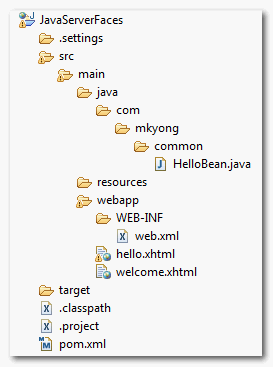
1. JSF 2.0 Dependencies
Maven central repository has the JSF version up to 1.2 only, to get the JSF 2.0, you may need to download from Java.net repository.
The maven central repository is updated JSF library to 2.1.7. The previous Java.net repository is no longer required.
For Java EE Application Server like Glassfish
In most Java EE application servers, it has build-in support for JSF 2.0, so you need to download the single JSF API for development purpose.
...
<dependencies>
  <dependency>
    <groupId>javax.faces</groupId>
    <artifactId>jsf-api</artifactId>
    <version>2.0</version>
    <scope>provided</scope>
  </dependency>
</dependencies>
<repositories>
  <repository>
    <id>java.net.m2</id>
    <name>java.net m2 repo</name>
    <url>http://download.java.net/maven/2</url>
  </repository>
</repositories>
...
For simple servlet container like Tomcat
This is a bit troublesome, you need to download following dependencies.
File : pom.xml
<project xmlns="http://maven.apache.org/POM/4.0.0"
        xmlns:xsi="http://www.w3.org/2001/XMLSchema-instance"
	xsi:schemaLocation="http://maven.apache.org/POM/4.0.0
        http://maven.apache.org/maven-v4_0_0.xsd">
	<modelVersion>4.0.0</modelVersion>
	<groupId>com.mkyong.common</groupId>
	<artifactId>JavaServerFaces</artifactId>
	<packaging>war</packaging>
	<version>1.0-SNAPSHOT</version>
	<name>JavaServerFaces Maven Webapp</name>
	<url>http://maven.apache.org</url>

	<dependencies>

		<dependency>
			<groupId>com.sun.faces</groupId>
			<artifactId>jsf-api</artifactId>
			<version>2.1.7</version>
		</dependency>
		<dependency>
			<groupId>com.sun.faces</groupId>
			<artifactId>jsf-impl</artifactId>
			<version>2.1.7</version>
		</dependency>

		<dependency>
			<groupId>javax.servlet</groupId>
			<artifactId>jstl</artifactId>
			<version>1.2</version>
		</dependency>

		<dependency>
			<groupId>javax.servlet</groupId>
			<artifactId>servlet-api</artifactId>
			<version>2.5</version>
		</dependency>

		<dependency>
			<groupId>javax.servlet.jsp</groupId>
			<artifactId>jsp-api</artifactId>
			<version>2.1</version>
		</dependency>
                <!-- Tomcat 6 need this -->
		<dependency>
			<groupId>com.sun.el</groupId>
			<artifactId>el-ri</artifactId>
			<version>1.0</version>
		</dependency>

	</dependencies>

	<build>
		<finalName>JavaServerFaces</finalName>

		<plugins>
			<plugin>
				<groupId>org.apache.maven.plugins</groupId>
				<artifactId>maven-compiler-plugin</artifactId>
				<version>2.3.1</version>
				<configuration>
					<source>1.6</source>
					<target>1.6</target>
				</configuration>
			</plugin>
		</plugins>
	</build>
</project>
For more detail about the JSF 2.0 dependencies, please refer to this official JSF 2.0 release note.
The el-ri.jar is an arguable dependency in the Tomcat servlet container, even it’s not stated in the release note, but you need this library to solve the “JSP version of the container is older than 2.1…” error message.
This “el-ri.jar” is too old, it’s recommended to use the latest “el-impl-2.2.jar”, from Java.net
     <dependency>
	  <groupId>org.glassfish.web</groupId>
	  <artifactId>el-impl</artifactId>
	  <version>2.2</version>
     </dependency>
Updated – 25-07-2012
This el-ri.jar dependency is no longer required in Tomcat 7.
2. JSF 2.0 Managed Bean
A Java bean or JSF managed bean, with a name property to store user data. In JSF, managed bean means this Java class or bean can be accessed from a JSF page.
In JSF 2.0, use @ManagedBean annotation to indicate this is a managed bean.
HelloBean.java
package com.mkyong.common;

import javax.faces.bean.ManagedBean;
import javax.faces.bean.SessionScoped;
import java.io.Serializable;

@ManagedBean
@SessionScoped
public class HelloBean implements Serializable {

	private static final long serialVersionUID = 1L;

	private String name;

	public String getName() {
		return name;
	}
	public void setName(String name) {
		this.name = name;
	}
}
In JSF 1.x, you had to declare beans in the faces-config.xml, but this is no longer required in JSF 2.0.
3. JSF 2.0 Pages
In JSF 2.0, it’s recommended to create a JSF page in XHTML file format, a file with a .xhtml extension.
See following two JSF 2.0 pages :
To use the JSF 2.0 components or features, just declared the JSF namespace at the top of the page.
<html xmlns="http://www.w3.org/1999/xhtml"
      xmlns:f="http://java.sun.com/jsf/core"
      xmlns:h="http://java.sun.com/jsf/html">
File : hello.xhtml – Renders a JSF text box and link it with the “helloBean” (JSF managed bean), “name” property, and also a button to display the “welcome.xhtml” page when it’s clicked.
<?xml version="1.0" encoding="UTF-8"?>
<!DOCTYPE html PUBLIC "-//W3C//DTD XHTML 1.0 Transitional//EN"
"http://www.w3.org/TR/xhtml1/DTD/xhtml1-transitional.dtd">
<html xmlns="http://www.w3.org/1999/xhtml"
      xmlns:f="http://java.sun.com/jsf/core"
      xmlns:h="http://java.sun.com/jsf/html">

    <h:head>
        <title>JSF 2.0 Hello World</title>
    </h:head>
    <h:body>
    	<h2>JSF 2.0 Hello World Example - hello.xhtml</h2>
    	<h:form>
    	   <h:inputText value="#{helloBean.name}"></h:inputText>
    	   <h:commandButton value="Welcome Me" action="welcome"></h:commandButton>
    	</h:form>
    </h:body>
</html>
In JSF 1.x, you had to declare the “navigation rule” in “faces-config.xml“, to tell which page to display when the button is clicked. In JSF 2.0, you can put the page name directly in the button’s “action” attribute. For simple navigation, it’s more than enough, but, for complex navigation, you are still advised to use the “navigation rule” in “faces-config.xml“.
File : welcome.xhtml – Display the submitted text box value.
<?xml version="1.0" encoding="UTF-8"?>
<!DOCTYPE html PUBLIC "-//W3C//DTD XHTML 1.0 Transitional//EN"
"http://www.w3.org/TR/xhtml1/DTD/xhtml1-transitional.dtd">
<html xmlns="http://www.w3.org/1999/xhtml"
      xmlns:h="http://java.sun.com/jsf/html">

    <h:head>
    	<title>JSF 2.0 Hello World</title>
    </h:head>
    <h:body bgcolor="white">
    	<h2>JSF 2.0 Hello World Example - welcome.xhtml</h2>
    	<h2>Welcome #{helloBean.name}</h2>
    </h:body>
</html>
The #{…} indicate this is a JSF expression language, in this case, #{helloBean.name}, when the page is submitted, JSF will find the “helloBean” and set the submitted textbox value via the setName() method. When welcome.xhtml page is display, JSF will find the same session “helloBean” again and display the name property value via the getName() method.
4. JSF 2.0 Serlvet Configuration
Just like any other standard web frameworks, you are required to configure JSF stuffs in web.xml file.
File : web.xml
<?xml version="1.0" encoding="UTF-8"?>
<web-app xmlns:xsi="http://www.w3.org/2001/XMLSchema-instance"
	xmlns="http://java.sun.com/xml/ns/javaee"
        xmlns:web="http://java.sun.com/xml/ns/javaee/web-app_2_5.xsd"
	xsi:schemaLocation="http://java.sun.com/xml/ns/javaee
	http://java.sun.com/xml/ns/javaee/web-app_2_5.xsd"
	id="WebApp_ID" version="2.5">

	<display-name>JavaServerFaces</display-name>

	<!-- Change to "Production" when you are ready to deploy -->
	<context-param>
		<param-name>javax.faces.PROJECT_STAGE</param-name>
		<param-value>Development</param-value>
	</context-param>

	<!-- Welcome page -->
	<welcome-file-list>
		<welcome-file>faces/hello.xhtml</welcome-file>
	</welcome-file-list>

	<!-- JSF mapping -->
	<servlet>
		<servlet-name>Faces Servlet</servlet-name>
		<servlet-class>javax.faces.webapp.FacesServlet</servlet-class>
		<load-on-startup>1</load-on-startup>
	</servlet>

	<!-- Map these files with JSF -->
	<servlet-mapping>
		<servlet-name>Faces Servlet</servlet-name>
		<url-pattern>/faces/*</url-pattern>
	</servlet-mapping>
	<servlet-mapping>
		<servlet-name>Faces Servlet</servlet-name>
		<url-pattern>*.jsf</url-pattern>
	</servlet-mapping>
	<servlet-mapping>
		<servlet-name>Faces Servlet</servlet-name>
		<url-pattern>*.faces</url-pattern>
	</servlet-mapping>
	<servlet-mapping>
		<servlet-name>Faces Servlet</servlet-name>
		<url-pattern>*.xhtml</url-pattern>
	</servlet-mapping>

</web-app>
Define a “javax.faces.webapp.FacesServlet” mapping, and map to those well-known JSF file extensions (/faces/*, *.jsf, *.xhtml,*.faces).
In this case, the below 4 URLs are pointing to the same hello.xhtml.
- http://localhost:8080/JavaServerFaces/hello.jsf
- http://localhost:8080/JavaServerFaces/hello.faces
- http://localhost:8080/JavaServerFaces/hello.xhtml
- http://localhost:8080/JavaServerFaces/faces/hello.jsf
In JSF 2.0 development, it’s recommended to set the “javax.faces.PROJECT_STAGE” to “Development“, it will provide many useful debugging information to let you track the bugs easily. For deployment, just change it to “Production“, you just do not want your customer to look at this annoying debugging information :).
5. Demo
A long article end with a project demo 🙂
URL : http://localhost:8080/JavaServerFaces/hello.jsf
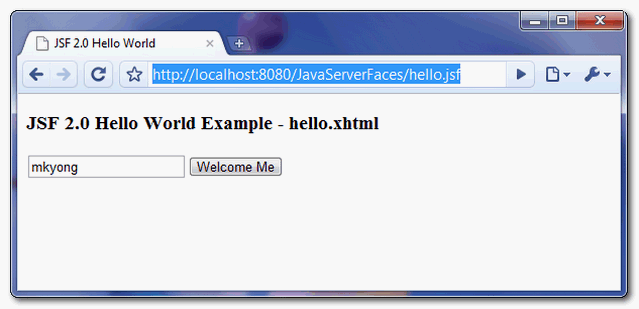
A simple JSF page, with a text box and a button.
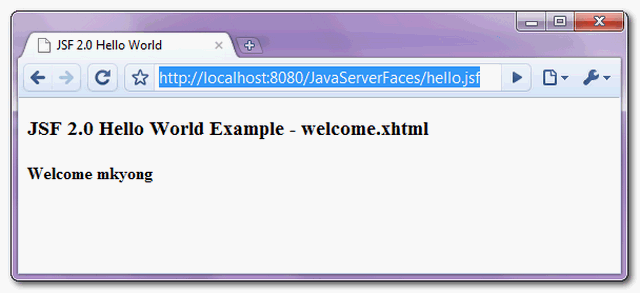
When the button is clicked, displays the submitted text box value.
Download Source Code
References
- JavaServer Faces Technology
- JSF 2.0 release note
- Wiki : JavaServer Faces
- Wiki : XHTML file explanation
- java.lang.IllegalArgumentException: javax.faces.context.ExceptionHandlerFactory
- JSF 2.0 + Tomcat : It appears the JSP version of the container is older than 2.1…
- Eclipse IDE : Unsupported content type in editor
- Eclipse IDE : .xhtml code assist is not working for JSF tag

Hi, I am getting error in mu web IDE as viewId:/hello.xhtml – View /hello.xhtml could not be restored. can any one help
Thanks a lot. This helped me get up and running quickly.
The command tags must be written within a form tag, which wasted lots of my time.
Good guide to get started with JSF. This was exactly what I was looking for.
work for me…
http://localhost:8080/hello.jsf
/hello.xhtml Not Found in ExternalContext as a Resource.
this file is under “/webapp/faces/”
can you revise topic on Tomcat 8,jdk1.8,maven,jsf 2.0 ,springframework with annotation,primefaces,eclipse mars
It works and I think it is a good example. However I needed to find another way to add managed bean to configure faces-config.xml . Here is the link I found https://www.youtube.com/watch?v=ca38FOlgDoI
Thanks.
Hi Mkyong,
I downloaded the source code form your site but I end up getting this error when I run the project on server. I use tomcat 7.
SEVERE: Servlet /jsftutorials threw load() exception
java.lang.ClassNotFoundException: javax.faces.webapp.FacesServlet
at org.apache.catalina.loader.WebappClassLoader.loadClass(WebappClassLoader.java:1713)
at org.apache.catalina.loader.WebappClassLoader.loadClass(WebappClassLoader.java:1558)
at org.apache.catalina.core.DefaultInstanceManager.loadClass(DefaultInstanceManager.java:527)
at org.apache.catalina.core.DefaultInstanceManager.loadClassMaybePrivileged(DefaultInstanceManager.java:509)
at org.apache.catalina.core.DefaultInstanceManager.newInstance(DefaultInstanceManager.java:137)
at org.apache.catalina.core.StandardWrapper.loadServlet(StandardWrapper.java:1144)
at org.apache.catalina.core.StandardWrapper.load(StandardWrapper.java:1088)
at org.apache.catalina.core.StandardContext.loadOnStartup(StandardContext.java:5033)
at org.apache.catalina.core.StandardContext.startInternal(StandardContext.java:5317)
at org.apache.catalina.util.LifecycleBase.start(LifecycleBase.java:150)
at org.apache.catalina.core.ContainerBase.addChildInternal(ContainerBase.java:901)
at org.apache.catalina.core.ContainerBase.addChild(ContainerBase.java:877)
at org.apache.catalina.core.StandardHost.addChild(StandardHost.java:633)
at org.apache.catalina.startup.HostConfig.deployDescriptor(HostConfig.java:657)
at org.apache.catalina.startup.HostConfig$DeployDescriptor.run(HostConfig.java:1637)
at java.util.concurrent.Executors$RunnableAdapter.call(Executors.java:471)
at java.util.concurrent.FutureTask$Sync.innerRun(FutureTask.java:334)
at java.util.concurrent.FutureTask.run(FutureTask.java:166)
at java.util.concurrent.ThreadPoolExecutor.runWorker(ThreadPoolExecutor.java:1145)
at java.util.concurrent.ThreadPoolExecutor$Worker.run(ThreadPoolExecutor.java:615)
at java.lang.Thread.run(Thread.java:722)
when I use the Mkyong’s code with jsf 2.2,just need add ConfigureListener in the web.xml:
com.sun.faces.config.ConfigureListener
Please say how to build this project and how to import this project (Downloaded here) for freshers
when I run with this url http://localhost:8080/JavaServerFaces/hello.jsf, it gives
<>
for other URLs it works fine.
I am getting this error, how to resolve this?
2015-08-29 11:16:27.114:INFO:oejw.StandardDescriptorProcessor:main: NO JSP Support for /JavaServerFaces, did not find org.eclipse.jetty.jsp.JettyJspServlet
2015-08-29 11:16:27.173:WARN:oejs.BaseHolder:main:
java.lang.ClassNotFoundException: javax.faces.webapp.FacesServlet
at java.net.URLClassLoader.findClass(Unknown Source)
at org.eclipse.jetty.webapp.WebAppClassLoader.findClass(WebAppClassLoader.java:510)
These examples are very useful and to get a quick dip into these java aspects. Thank you
Mkyong, Would you please consider my question below?
How can I display version and date of build in the xhtml page read from manifest in run time?
Nice Example mkyoung man u r great Your tutorial works good
Thank you very much
I am getting this error:
javax.el.PropertyNotFoundException: /hello.xhtml @14,48 value=”#{HelloBean.name}”: Target Unreachable, identifier ‘HelloBean’ resolved to null
SOLVED IT by :
org.apache.myfaces.annotation.SCAN_PACKAGES
com.veke.hello
old, but what do you mean with org.apache.myfaces.annotation.SCAN_PACKAGES
com.veke.hello?
use tomcat9 with jdk 12 and web.xml using 3.0 servlet spec, should work, cause i tested it.
thank you!!
found same issue working with jetty eclipse plugin (Run Jetty Run) (jetty vr 6.1.26).
Additionally had to add some changes like suggested in next link (add
https://stackoverflow.com/questions/21673480/maven-jsf-2-0-doesnt-work-on-embedded-tomcat)
<dependency>
<groupId>org.apache.myfaces.core</groupId>
<artifactId>myfaces-api</artifactId>
<version>2.2.0</version>
<scope>compile</scope>
</dependency>
<dependency>
<groupId>org.apache.myfaces.core</groupId>
<artifactId>myfaces-impl</artifactId>
<version>2.2.0</version>
<scope>compile</scope>
</dependency>
3. change listener-class on my web.xml
<listener>
<listener-class>org.apache.myfaces.webapp.StartupServletContextListener</listener-class>
4. add context-param on my web.xml
<context-param>
<description>Defines which packages to scan for beans, separated by commas. Useful for when using maven and jetty:run (version 6) or tomcat:run
</description>
<param-name>org.apache.myfaces.annotation.SCAN_PACKAGES</param-name>
<param-value>com.company.demo</param-value>
`javax.servlet.jsp` is causing the error is it ok to remove it .The application runs only on removing it
excellent tutorial, but I would like to correct a point about the servlet url-pattern,
in the case of /faces/* it just work with the same extension of the source code file extension, and not with the other url-pattern extension you set (*.jsf, *.faces), so the 4th url won’t work
no its working for me
http://localhost:8080/hello.jsf
good
I am a beginner of Java and have designed few pages in html where I wrote code in notepad and saved it as .html and then ran. For xml or xhtml or JSF where do I write code and run it?
You should have an application server like apache tomcat to run it. You can use a IDE like eclipse and create a dynamic web project . Then export it as a war file . then deploy in apache tomcat web apps folder. start the server and access the site localhost/yourapp
superb..fantastic..mindblowing…fabulous..marvelous….amazing stuff…just loved it…
Does Apache Tomcat 8 have already support JSF 2.0 I expect?
How i can run the project in Eclipse
How does JSF know there is a ‘helloBean’ in the above example ‘welcome.xhtml’?
can i use something like this #{myBean.name} instead of #{helloBean.name}?
I am doing hello JSF 2.2 ==============
web.xml file is :
helloJSF
index.jsf
Faces Servlet
javax.faces.webapp.FacesServlet
1
Faces Servlet
*.jsf
—————————————–
http://localhost:8080/hello —————————— NO works***
@http://localhost:8080/hello/index.jsf ————- it works fine
Hi Mkyong,
Thanks for your tutorial first. It really simple and instructive.
In this website there are lots of technologies like JSF, Spring, Struts. Some of the tutorials were made serveral years before. But technologies change a lot in even one year. Take JSF as an example, I seldom see people use it now, now more people select spring MVC. So could you please have a session on the Java Web Technology trend and the popular framework? Thanks a lot!
The example was really helpful. I am richfaces 4. would you be knowing how to enable the content assist for richfaces tag in eclipse?
in the 4URLs…… the fourth-one must be
http://localhost:8080/JavaServerFaces/faces/hello.xhtml== ite not “………./faces/hello.jsf”
For those who has this error :
java.lang.ClassNotFoundException: javax.faces.webapp.FacesServlet
The solution is to copy servlet-api-2.5-6.1.5.jar file in the tomcat lib floder.
Hi. Just wanted to say thanks. I’ve found a number of your examples extremely helpful.
Hello, thank you very much for your help in these tutorials, gives a good guide to learn more about JSF. I have a problem. I made a web application using JSF2.1, netbeans 7.2, Primefaces 4.0 and Apache Tomcat 7 and I have a managed bean scope Session, as this site is only to capture data in a form and prints it on the screen, not stored in any database. My problem is that when user 1 connects to the site, enter your data and print it, then from another computer user 2 is connected and can see the data entry user 1. I do not understand to be the problem. It will be a web server error? it is as if something is missing you can manage the user session connected. Need to add some configuration or define this administration in the web.xml file? I’m really confused on this part. I am very grateful that can help me and forgive my English is not that well written. regards
hey this site is awesome ..helped me a lot….thanks guys… good work…keep it up
Its awesome. I am a beginner and it helped a lot 🙂
I was able to import JSF2.0-hello-world-example-2.1.7.zip into eclipse and run it on apache-tomcat-7.0.42 after making a few changes.
The project is available at
https://github.com/dlee0113/jsf/tree/v1.0/jsf2_hello_world
when i dwonload and run this in eclipse its giving me 404 not found error
Thanks for share!
Thanks for this clear example!
I use mkyong.com so often it has become a vital part of my day to day work. Thanks for the high quality examples!
I am facing one error on clicking the button in hello.xhtml.
javax.el.PropertyNotFoundException: /hello.xhtml @14,48 value=”#{helloBean.name}”: Target Unreachable, identifier ‘helloBean’ resolved to null
at com.sun.faces.facelets.el.TagValueExpression.getType(TagValueExpression.java:100)
at com.sun.faces.renderkit.html_basic.HtmlBasicInputRenderer.getConvertedValue(HtmlBasicInputRenderer.java:95)
Gone through the previous comments, have tried putting beans.xml, setting 3.0 in web.xml. Not able to solve this error. Please guide.
Add faces-config.xml under src/main/webapp/WEB-INF/
helloBean
com.mkyong.common.HelloBean
session
below is faces-config.xml file content
helloBean
com.mkyong.common.HelloBean
session
i have dowloaded the source code after that , i have to import these projects as mavenprojects.File >maven>import existing maven projects , whilerunning this application i am getting this error java.lang.ClassNotFoundException: javax.faces.webapp.FacesServlet
I have the same problem
import in the Eclipse
and run on server
it says java.lang.ClassNotFoundException: javax.faces.webapp.FacesServlet
and java.lang.ClassNotFoundException: javax.faces.webapp.FacesServlet
i think you’re missing the jsf-api.jar and jsf-impl.jar files
Please change web.xml version to 3.0.
As using 2.5 caused the managed bean not to have a reference between both the pages.
Very useful, thanks for sharing!
Hi,
I want to know while creating the new project, what archetype you selected for this demo application.
Thanks,
Rahul
maven archetype :-
-DarchetypeArtifactId=maven-archetype-webapp
For more details:
http://blog.terrencemiao.com/archives/helloworld-jsf-maven-tomcat-7-quickly
Why the URL are same in both browser? Second page URL should be welcome.jsf.
What should I do, so that URL is welcome.jsf and text on welcome.jsf is also Welcome BlahBlah
Sorry, tags disappeared :
org.apache.myfaces.annotation.SCAN_PACKAGES
fr.mypalmtree.ui
I had the problem NoPropertyFoundException “Target Unreachable, identifier ‘user’ resolved to null”.
Just put in web.xml :
org.apache.myfaces.annotation.SCAN_PACKAGES
your.package
Hope it helped
Hi Mkyong, very nice post.
Do you know if there is any problem between @SessionScoped and Tomcat7, because I couldn’t make work. Everytime I click F5, the system show me the data of the last user.
always is replaced by the last change made by other user.
Can you help me?
thanks lot of .
for what
hi.tanks for your examples.
but about this example i have a problem.
when i click on commandbutton.action of commandbutton does not work 🙁
paste your code then i’ll resolve this issue
I’m still a little confused about how the name “helloBean” is obtained. Where’s the rule to state that helloBean is an instance of HelloBean? Thanks!!
Look on page 87 of http://docs.oracle.com/javaee/6/tutorial/doc/javaeetutorial6.pdf
It states there that the “By default, the expression language refers to the
class name, with the first letter in lowercase”
Hope that helps some =] I was confused as well!
Thank you so much. =)) I can’t believe that you can find this sentence in a big document 😀
http://wrestlefestwiki.com/index.php?title=User:Julianreynoldsa9
Very nice article, really sketchy English, though. It would be good if you could have someone that speaks English natively to proof read this.
This kind of “Engrish” really pisses me off, when I know it is not some random Philipine JEJEJEJE boy going ape on the keyboard, but rather an mature, sophisticated programmer, who should know better.
But anyways, great article.
Please Dude,
Be polite and relevant. Furthermore, look after your own spelling: it is a mature and not an mature. English, like any language, is always a problem for (non) native speakers. Accepting to not publish any text as long as the language is not at a native level is not a realistic hurdle as it would stop the majority of us foreigners to publish any text at all.
The most important thing of a text is the fact if the reader understands what is said. People can understand this text, hence it serves its purpose.
You could even thank Mykong for making the effort writing in a foreign language in order to share his knowledge with a bigger audience. To understand what he is/ we are doing you might try to answer in Spanish, German or French.
Hi,
Firstly, this is a good article very useful.
But, i have one question…
What kind of maven archtype do you use for this example?
I want to create a new project, but i’m note sure about the archtype.
Can you explain this for me?
Thanks
Have you tried to use JSF 2.1 without web.xml? Is it possible on Servlet 3.0?
The following was v helpful in trying to diagnose issues with runningthe above sample w/ embedded Jetty and Tomcat 7 in eclipse. I kept encountering the “Target Unreachable, identifier ‘helloBean’ resolved to null” problem:
http://stackoverflow.com/questions/2987266/why-doesnt-jsf-2-0-ri-mojarra-scan-my-class-annotations
Basically unless your managed bean is under WEB-INF/classes, or you take explicit action described in the above discussion, @ManagedBean will have no effect. It’s a real time waster / frustration inducer this one, hope it helps someone.
Is it possible to populate more than one textbox,button using drag and drop in jsf
.
Hi Mkyong,
Thanks for the informative tutorials.
Unfortunately even the downloaded ZIP did not work for me…
Description Resource Path Location Type
Unbound classpath variable: ‘M2_REPO/javax/servlet/servlet-api/2.5/servlet-api-2.5.jar’ in project ‘JavaServerFaces0u93209230923’ JavaServerFaces0u93209230923 Build path Build Path Problem
The import javax.faces cannot be resolved HelloBean.java /JavaServerFaces0u93209230923/src/main/java/com/mkyong/common line 4 Java Problem
Unbound classpath variable: ‘M2_REPO/com/sun/el/el-ri/1.0/el-ri-1.0.jar’ in project ‘JavaServerFaces0u93209230923’ JavaServerFaces0u93209230923 Build path Build Path Problem
The import javax.faces cannot be resolved HelloBean.java /JavaServerFaces0u93209230923/src/main/java/com/mkyong/common line 3 Java Problem
Unbound classpath variable: ‘M2_REPO/com/sun/faces/jsf-api/2.1.7/jsf-api-2.1.7.jar’ in project ‘JavaServerFaces0u93209230923’ JavaServerFaces0u93209230923 Build path Build Path Problem
SessionScoped cannot be resolved to a type HelloBean.java /JavaServerFaces0u93209230923/src/main/java/com/mkyong/common line 9 Java Problem
Unbound classpath variable: ‘M2_REPO/com/sun/faces/jsf-impl/2.1.7/jsf-impl-2.1.7.jar’ in project ‘JavaServerFaces0u93209230923’ JavaServerFaces0u93209230923 Build path Build Path Problem
ManagedBean cannot be resolved to a type HelloBean.java /JavaServerFaces0u93209230923/src/main/java/com/mkyong/common line 8 Java Problem
Unbound classpath variable: ‘M2_REPO/javax/servlet/jsp/jsp-api/2.1/jsp-api-2.1.jar’ in project ‘JavaServerFaces0u93209230923’ JavaServerFaces0u93209230923 Build path Build Path Problem
Unbound classpath variable: ‘M2_REPO/javax/servlet/jstl/1.2/jstl-1.2.jar’ in project ‘JavaServerFaces0u93209230923’ JavaServerFaces0u93209230923 Build path Build Path Problem
(Yes, I changed the name to “JavaServerFaces0u93209230923” in my .project file because I already had a project named that :))
do you know what went wrong??
i tried creating demo application using above example earlier i was getting exceptions in logs
servlet face servlet is not available
after keeping jsf-api.jar and jsf-impl.jar it is resolved and deployed bt not getting hello page and nothing is printed in logs also m using tomcat 6 and eclipse galileo. pls help..pls suggest wat can be the problem?
thanking in advcance.
Hi,
When I implemented in similar way… I got error
java.io.FileNotFoundException: /hello.xhtml Not Found in ExternalContext as a Resource
at com.sun.faces.facelets.impl.DefaultFaceletFactory.resolveURL(DefaultFaceletFactory.java:187)
at com.sun.faces.facelets.impl.DefaultFaceletFactory.resolveURL(DefaultFaceletFactory.java:297)
In web.xml I have written welcome file as hello.xhtml instead of faces/xhtml. But I don’t think that is the reason for this error.
What else could be the problem ? can you please help?
Thanks in advance
Thanks for posting this.
Very well and simply explained, even adding the clarifying notes at the bottom of each step. This is the way all tutorials should be.
how come servlet-api and jsp-api are not listed as provided dependencies? is there any web container missing those?
I downloaded your project, running in Juno Eclipse with Tomcat 7, but not able to navigate to hello page. All of the URL you have suggest are not working. In the console output, I see “org.apache.catalina.core.StandardWrapperValve invoke INFO: Servlet Faces Servlet is currently unavailable”. Do you have any idea with this?
Did you saw any error caused by in your console?
I also see this error in my console: java.lang.ClassNotFoundException: javax.faces.webapp.FacesServlet.
I dont know if you still need this but I had the same problem, the problem is solved by doing the follow things:
In “Project Properties” –> “Deployment Assembly”, adding “Java Build Path Entries -> Maven Dependencies” solves the problem!
I hope this works for all of the people that has this same problem
Hi mkyong, do U know how to build a personalizer theme of Primefaces. I make my own in ThemeRoller but i was unable to build the jar with the stuff downloaded. I tried with maven, but still can get what I need. Do U have any idea of how to make the jar file with the personalized theme. I´m using NetBeans 7.1.1 & Primefaces 3.3.1
thanx body
thanks! good idea to present us servlet-mapping section, where i learn how to map JSF servlet to any xhtml :-). Thanks 😉
tahnk you, it’s clear and simple to undestand
I tried to do my own project following your directions, and even when importing your project I get the same error when starting tomcat :/
Failed to process JAR [jar:file:/C:/Project/mini%20projet/.workspace/.metadata/.plugins/org.eclipse.wst.server.core/tmp1/wtpwebapps/JavaServerFaces/WEB-INF/lib/jsf-impl-2.1.7.jar!/] for TLD files
java.util.zip.ZipException: invalid LOC header (bad signature)
It seems that 2.1.7 is not compatible with tomcat 7, after having downgraded to 2.1.6 it works perfectly
I m using 2.1.6 it is getting error tomcat 7 I will try 2.1.7 it s worked
Hi Mkyong,
your explanation was in details and crystal clear.
Thanks for sharing to community.
— srihari konakanchi
Hema:
Very good topic…
Thanks
Never Mind
Thanks you Java addict 🙂
I appreciate your answers KingMario or whatever your name is ..
Thanks… your article it’s very good.
nice tutorial… just learning java….
damn gud… tnx a ton….:)
hi mkyong……your articals are good……………
so nice but u donot provide the faces-config.xml with out this file how can navigate to next page..
JSF2 support implicit navigation – https://mkyong.com/jsf2/implicit-navigation-in-jsf-2-0/
I’ve tried this sample to just get a feel of JSF2.0. But I get the following error. I use Tomcat 6. Do you know how to fix this issue?
javax.el.PropertyNotFoundException: /hello.xhtml @14,46 value=”#{helloBean.name}”: Target Unreachable, identifier ‘helloBean’ resolved to null
I found out that if you’re running this with a tomcat-maven-plugin, you need to start your server with tomcat:run-war. Simply using tomcat:run will not be able to resolve the ManagedBean Annotations.
i am not using the tomcat maven plugin, i just start the tomcat server using the catalina start command. i see the same error. i am using tomcat 7. with tomcat 6 i cant even get to the hello page.
I have the same problem as you.
Have you already solved it?
If yes, would you mind to share with me?
Thanks a lot,
@Mkyong .. First let me thank Mr Mkyong for articulating such wonderful tutorial..
While trying to run and deploy the sample app I too got the same error on Tomcat6 and Tomcat7 – javax.el.PropertyNotFoundException: /hello.xhtml @14,46 value=”#{helloBean.name}”: Target Unreachable, identifier ‘helloBean’ resolved to null.
On further googling I found that you have to have emply beans.xml file at the same location as web.xml to get the navigation resolved.. I am not sure what the empty beans.xml is required.. For further reference check this link : http://www.coderanch.com/t/536596/JSF/java/JSF-PropertyNotFoundException
Leo Gomes , solution did work. I have even tried removing the faces-config.xml and even I dint add the beans.xml, but still it worked. ( used Tomcat 6.x )
Thank you so much for your answer, tomcat:run-war worked for me!
thanks bro
I spend 4 hours to figure out the issue. The answer for the Target Unreachable is very simple. You have to create the faces-config.xml under WEB-INF folder and add the following
Make sure you have latest JSF jar file attached to the build path and copy the same jar into WEB-INF/lib folder.
helloBean
com.mkyong.common.HelloBean
session
Thanks
Suresh K
Unfortunanely, it doesn’t work in Tomcat7 environment. There are some problems with el-ri. But in Tomcat6 it works!
Hi mkyong,
Thanks for such a simple and straight forward tutorial.
I have a doubt, how can I use view files with a different extension, other than XHTML, still map to the Faces Servlet ?
I am migrating a JSF 1.2 app to 2.0, and I use file name extensions jspx. I dont want to change them to xhtml.
Hi Upon deploying this example I am getting this exception
com.sun.facelets.component.RepeatRenderer cannot be cast to javax.faces.render.Renderer
and the application is not getting deployed
hi, any how to run JSF2 hello world with Netbeans IDE
Netbean is much more easy, just choose a JSF project will do.
Hi mkyong
“to get the JSF 2.0, you may need to download from Java.net repository.”
how can I download the Java.net repository? By clicking on the link, I get only some folders. how can I implement them?
“For simple servlet container like Tomcat
This is a bit troublesome, you may need to download the following dependencies.”
In which file do I have to do this?
Thanks
Olaf
Hi, this project is Maven-based, you can download the project dependency via Maven command.
Very good article and straight to the point. Your notes comparing JSF 1.* with 2.* along the article proved to be very quite helpful indeed.
Thanks a lot.
WHAT about the jar files of jsf,where we need to save those files.i m using eclipse hellios with tomcat 6.0.Plz tell me the proper stucture of JSF how all the files should be kept.
Maven will handle it for you, usually all project dependencies will put inside the “WEB-INF\lib” folder.
Nice, helpful for a lot of people beginning with JSF! Thanks! 🙂