In this tutorial, we demonstrate the use of resource bundle to display messages in JSF 2.0. For maintainability concern, it’s always recommended to put all the messages in properties file, instead of hard-code the message in page directly.
1. Properties File
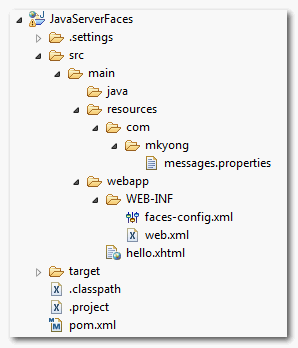
Create a properties file, contains message for the page, and put it into the project’s resource folder, see figure below
messages.properties
message = This is "message"
message.test1 = This is "message.test1"
message.test2 = This is "<h2>message.test3</h2>"
message.test3 = This is "<h2>message.test4</h2>"
message.param1 = This is "message.param1" - {0}
message.param2 = This is "message.param2" - {0} and {1}
Project folder structure.
2. Using Resource Bundles
There are two ways to load the properties file into JSF 2.0.
1. Global Resource Bundle
To load the properties file globally, so that all the jsf pages can access the messages. You can create a “faces-config.xml” file and declare the properties file explicitly.
faces-config.xml
<?xml version="1.0" encoding="UTF-8"?>
<faces-config
    xmlns="http://java.sun.com/xml/ns/javaee"
    xmlns:xsi="http://www.w3.org/2001/XMLSchema-instance"
    xsi:schemaLocation="http://java.sun.com/xml/ns/javaee
    http://java.sun.com/xml/ns/javaee/web-facesconfig_2_0.xsd"
    version="2.0">
     <application>
	  <resource-bundle>
		<base-name>com.mkyong.messages</base-name>
		<var>msg</var>
	   </resource-bundle>
     </application>
</faces-config>
2. Local Resource Bundle
To load the properties file locally, or for specified page only. Declare the <f:loadBundle /> tag in the page that need to access the message in the messages.properties.
<f:loadBundle basename="com.mkyong.messages" var="msg"/>
3. JSF 2.0 Pages
In this case, the messages.properties file is given a name of “msg“, to access the message, just use “msg.key“.
hello.xhtml
<?xml version="1.0" encoding="UTF-8"?>
<!DOCTYPE html PUBLIC "-//W3C//DTD XHTML 1.0 Transitional//EN"
"http://www.w3.org/TR/xhtml1/DTD/xhtml1-transitional.dtd">
<html xmlns="http://www.w3.org/1999/xhtml"
      xmlns:f="http://java.sun.com/jsf/core"
      xmlns:h="http://java.sun.com/jsf/html">

    <h:body>
      <h2>JSF 2.0 and Resource Bundles Examples</h2>
      <ol>

   	<li><h:outputText value="#{msg.message}" /></li>

    	<li><h:outputText value="#{msg['message.test1']}" /></li>

    	<li><h:outputText value="#{msg['message.test2']}" /></li>
    	<li><h:outputText value="#{msg['message.test2']}" escape="false" /></li>

    	<li><h:outputText value="#{msg['message.test3']}" /></li>
    	<li><h:outputText value="#{msg['message.test3']}" escape="false" /></li>

    	<li>
 	     <h:outputFormat value="#{msg['message.param1']}">
		<f:param value="param0" />
	     </h:outputFormat>
	</li>
	 <li>
	     <h:outputFormat value="#{msg['message.param2']}">
	    	<f:param value="param0" />
	    	<f:param value="param1" />
	     </h:outputFormat>
	  </li>
    	</ol>
    </h:body>
</html>
4. How it works?
Example 1
A normal way to access the message.
<h:outputText value="#{msg.message}" />

//properties file
message = This is "message"
Example 2
For a key that has a dot “.” as name, you can’t use the normal way #{msg.message.test1}, it will not work. Instead, you should use bracket like #{msg[‘message.test1’]}.
<h:outputText value="#{msg['message.test1']}" />

//properties file
message.test1 = This is "message.test1"
Example 3
To display HTML tag in the message, just add the “escape” attribute and set it to false.
<h:outputText value="#{msg['message.test2']}" />
<h:outputText value="#{msg['message.test2']}" escape="false" />
<h:outputText value="#{msg['message.test3']}" />
<h:outputText value="#{msg['message.test3']}" escape="false" />
//properties file
message.test2 = This is "<h2>message.test3</h2>"
message.test3 = This is "<h2>message.test4</h2>"
Example 4
For a parameter message, just use the <h:outputFormat /> and <f:param / > tag.
<h:outputFormat value="#{msg['message.param1']}">
   <f:param value="param0" />
</h:outputFormat>
<h:outputFormat value="#{msg['message.param2']}">
   <f:param value="param0" />
   <f:param value="param1" />
</h:outputFormat>

//properties file
message.param1 = This is "message.param1" - {0}
message.param2 = This is "message.param2" - {0} and {1}
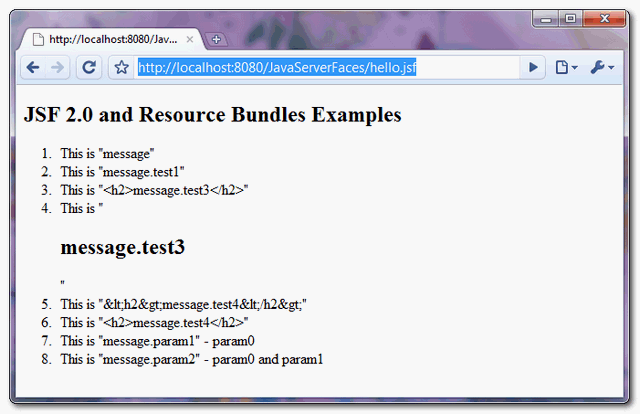
5. Demo
URL : http://localhost:8080/JavaServerFaces/hello.jsf

Hi, I have a doubt.
Whenever a property is not found it is rendered as “??????”. Is there a way to conditionally check if the property was not found,
Thanks
Guys, Don’t worry about how he writes English. Let him to focus on explaining technical things and not English. If anybody wants to learn English there are plenty of resources outside. I find Mkyong’s tutorial are very helpful and easily understandable . He is explaining even complex things in a very simple manner and easily understandable way. That shows how he himself clear about the concepts. For me his English is more than enough to understand underline concepts. Thanks a lot Mkyong . Keep it up.
I actually commented on the wrong post by you, but I already lost the page. THIS is the one that saved my life at work!
Hahahahahahahha it is saving mine too
Hi, We know the browsers hava many locales.I want many locales user a properties.
e.g:when its locale is “zh_TW” or “zh_HK”, it would user “locale_zh_TW.properties”
Instead of faces-config.xml, how to set up message.properties in application.yml and access then in jsf page ? please let me know. Thanks in advance.
hi Mkyong
do you help me pleasee ?
if if the project had been made with jsp how would ?
You can sample project???
Good and nice.
http://muhammadkhojaye.blogspot.com
thats is very good and it works, but what i can do to use this resource bundle from java code into server (i have tu use it into a managed bean)
i tried it with my project but the change on dropdown list does not fire the countryLocaleCodeChanged method. I clearly spoored all the things but it doesnt work. only if i change default properties file in faces-config. any idea?
A couple of small changes needed in the source of hello.xhtml for it to work;
These are in fact impressive ideas in concerning blogging.
You have touched some good factors here. Any way keep up wrinting.
I am sure this piece of writing has touched all the internet people, its really really
pleasant piece of writing on building up new blog.
Hi Mkyong,
I am facing an issue in
.
The sample code is as follows :
I expect the html tag should render here but this is also not able to render html tags and printing it as normal text in output . Which is not expected . Please help me in both these metioned scenerios . Waiting for the responce .
I have tried entity code here for
. But it’s not working …. 🙁
Hi , I am using in a xhtml file . The sample code is as follows :
 <ice:panelGroup id="sampleGroup">
<ice:dataTable id="sampleTable" value="#{sampleBean.variable}" var="sampleVar" >
<ice:column><ice:outputText escape="false" value="#{sampleVar.text}" /></ice:column>
</ice:dataTable>
</ice:panelGroup>
in “text” (used in ) ,I am using few html tags . It’s not able to render those tags and displaying those tags as text in output .
Hi , I am using in a xhtml file . The sample code is as follows :
in “text” (used in ) ,I am using few html tags . It’s not able to render those tags and displaying those tags as text in output . (e.g. Hello Techie )
Hi Mkyong,
I wanted to print the copyright info in my console. I have the message in Properties file.
Now i can able to print the copyright info as it is in the message using ouput tag. Here my problem is i want to edit that message to update the year in it. Please help on it ASAP….
Thanks In Advance…………
Hola, como estas una pregunta, como incorporas esos messages dentro de un ManagedBean?????
Hola Juan,
Para acceder al fichero de mensajes yo hago lo siguiente:
private static ResourceBundle mensajesBundle;
public static String getTextoMensaje( String clave, String… params ) {
if (mensajesBundle == null) {
FacesContext fContext = FacesContext.getCurrentInstance();
mensajesBundle = ResourceBundle.getBundle(
fContext.getApplication().getMessageBundle(),
fContext.getViewRoot().getLocale()
);
}
String resultado = null;
try {
String mensaje = mensajesBundle.getString( clave );
if (params.length != 0) {
resultado = MessageFormat.format( mensaje, (Object[]) params );
} else {
resultado = mensaje;
}
} catch (Exception e) {
resultado = “???” + clave + “???”;
}
return resultado;
}
Te recomiendo que guardes este código en una clase de ayuda en tu código tipo FacesUtils de manera que sea accesible no solo por un bean en concreto sino por cualquiera.
Si lo que te interesa es acceder a las etiquetas, en vez de a los mensajes, solo tienes que cambiar lo siguiente:
if (etiquetasBundle == null) {
FacesContext fContext = FacesContext.getCurrentInstance();
etiquetasBundle = fContext.getApplication().getResourceBundle( fContext, “etiquetas” );
}
Donde “etiquetas” es el nombre que tengas definido en el faces-config.xml:
es
es.corporate.project.web.i18n.etiquetas
etiquetas
es.corporate.project.i18n.mensajes
Espero te sirva. Un saludo!
La última parte no ha salido muy bien. El fichero faces-config.xml quedaría así:
es
es.corporate.project.i18n.etiquetas
etiquetas
es.corporate.project.i18n.mensajes
muchas gracias, es justo lo que me estaba preguntando,
Gracias!
Hi Mykyong.
Great article. I have one may be silly question. How do you read the property file in the backing bean.
Thanks for this helpful website
This example is pretty clear,
If i want to use this resource-bundle for different locale’s in my java code,
How can i make user of it.
Hey Mkyong, great Tutorials. I am stuck in a problem
I added messages.properties in my org.training.java package and it contains the same content as your above mentioned messages.properties file and I configure it in faces-config file and loaded on xhtml file, as u explained above but when i run my page the browser renders HTTP Status 500 Error, what am i doing wrong? Below is what i wrote in faces-config file:
And on my xhtml page i did this:
<h:outputText value="#{msg.message}" />I placed my messeges.properties in resources folder too and write in faces-config
org.trainings.mkyong.messages
this does not work
I correct base-name to
resources.org.trainings.mkyong.messages
and it work fine.
it is possible use the resource-bundle for get localizated erros messages for hibernate validation???????
help me please
mauro
Very good articles in Mkyong.com. It’s the first stop for JSF doubts.
I needed help. I am doing internationalization and running into few issues.
In our project we are using maven2 and JSF1.2(still).
I modified the pom.xml in such a way that properties file would come and sit in “classes” folder i.e. WEB-INF/classes/xyz.properties
“Local resource bundle” is working fine.
“Global resource bundle” is not working fine.
My faces.config.xml snippet looks like the following
My test.jsp:
..
..
I have placed the xyz.properties file in
src/main/resources/com/vasanth/app/internationalization
Great tutorial!! 🙂
One question :- when I load the resource-bundle locally in a page…should I add the entries in faces-config.xml? Or directly use it in the xhtml page.
I tried using it directly, did not work :/
Thanks heaps. I have to admit that your style of explaining and going through the JSF basics suits me best.
I’d like to say that your article help me a lot.
Almost articles I google don’t mention about resource bundle hierarchical message key.
They always give example such as
//properties file
message_param1 = This is “message.param1” – {0}
message_param2
Once again, you rock! You help me a lot!
Thank you very much!
Welcome, good to know that it works to you.
Hi,
Nice explanation and nice presentation including workspace structure
regards
Satya
Hey there…
Nice presentation, but I am missing a point, to be honest. The way you show resource bundles was kind of already working with JSF 1.2. Since 2.0, there is also locales and libraries. Maybe you could also state something about this?
Apart from that a good tut for starters! Thank you!
nice tutorial!
Little bit confusing in “4. How it work?” (Should be works instead of work) but it’s ok.
Keep it up! 🙂
Thanks for correction
If I were you I should make it a little bit more clear that step 1 and 2 are alternatives.
You might also want to work a little bit on your English:
“In this tutorial, it shows the use of resource bundle to display the messages in the JSF 2.0. ”
->
“In this tutorial, we demonstrate the use of a resource bundle to display messages in JSF 2.0.” or
“In this tutorial, we show how to use a resource bundle to display messages in JSF 2.0.”
Basically, you don’t seem to understand how to use articles in English. You use them where they shouldn’t be used and you omit them where they are needed.
Thanks for your kind comment and correction
@Mkyong
One of the less confusing things for me while trying to learn how to load a
is the style of English used in a Tutorial.
Your Tutorial is fine, Your English is fine, Everything is fine.
Great Website!
Thank you very much
I aggreed with you, As long as we understand the english and the articals, It is OK, The impartant thing to undestand here is that this site is for explaing techinical things but not to teach english proficiency.
Hi Mkyong, Good Articals and Tutorials. Go Ahead, Keep it up.
/*
* To change this license header, choose License Headers in Project Properties.
* To change this template file, choose Tools | Templates
* and open the template in the editor.
*/
package nhttool;
import java.io.*;
import org.apache.poi.xwpf.usermodel.*;
import org.openxmlformats.schemas.wordprocessingml.x2006.main.CTP;
import org.openxmlformats.schemas.officeDocument.x2006.math.CTOMath;
import org.openxmlformats.schemas.officeDocument.x2006.math.CTOMathPara;
import org.openxmlformats.schemas.officeDocument.x2006.math.CTR;
import javax.xml.transform.Transformer;
import javax.xml.transform.TransformerFactory;
import javax.xml.transform.stream.StreamSource;
import javax.xml.transform.stream.StreamResult;
import org.jsoup.Jsoup;
import org.jsoup.nodes.Document;
import org.jsoup.nodes.Element;
import org.jsoup.select.Elements;
import org.apache.xmlbeans.XmlCursor;
/**
*
* @author SDSV
*
* needs the full ooxml-schemas-1.3.jar as mentioned in
* https://poi.apache.org/faq.html#faq-N10025
*/
public class CreateWordFormulaFromMathML {
static File stylesheet = new File(“C:\Program Files (x86)\Microsoft Office\Office14\MML2OMML.XSL”);
static TransformerFactory tFactory = TransformerFactory.newInstance();
static StreamSource stylesource = new StreamSource(stylesheet);
static CTOMath getOMML(String mathML) throws Exception {
Transformer transformer = tFactory.newTransformer(stylesource);
StringReader stringreader = new StringReader(mathML);
StreamSource source = new StreamSource(stringreader);
StringWriter stringwriter = new StringWriter();
StreamResult result = new StreamResult(stringwriter);
transformer.transform(source, result);
String ooML = stringwriter.toString();
stringwriter.close();
CTOMathPara ctOMathPara = CTOMathPara.Factory.parse(ooML);
CTOMath ctOMath = ctOMathPara.getOMathArray(0);
//for making this to work with Office 2007 Word also, special font settings are necessary
XmlCursor xmlcursor = ctOMath.newCursor();
while (xmlcursor.hasNextToken()) {
XmlCursor.TokenType tokentype = xmlcursor.toNextToken();
if (tokentype.isStart()) {
if (xmlcursor.getObject() instanceof CTR) {
CTR cTR = (CTR) xmlcursor.getObject();
cTR.addNewRPr2().addNewRFonts().setAscii(“Cambria Math”);
cTR.getRPr2().getRFonts().setHAnsi(“Cambria Math”);
}
}
}
return ctOMath;
}
public static String html2text(String html) {
return Jsoup.parse(html).text();
}
public static void main(String[] args) throws Exception {
// String htmlString = “Simple Page”
// + “Hello”;
// Document doc = Jsoup.parse(htmlString);
// String title = doc.title();
// System.out.println(“Title : ” + title);
// System.out.println(“Content:n”);
// System.out.println(htmlString.replaceAll(“\]*>”, “”));
XWPFDocument document = new XWPFDocument();
String vd = “1) Calculate the momentum of a photon which has a wavelength of 400 nm.n”
+ “Answer:n”
+ “We replaced the wavelength and the Plank’s constant in the photon momentum equation n”
+ “p = (6.626 x 10⁻³⁴ J.s) / 400 x 10-9 mn”
+ “p = 1.65 x 10 -27 kg .m / sn”
+ “H+an=?k=0nnkxkan-kn”
+ “2) Calculate the wavelength which has a photon with a momentum of 5.4 x 10 -20 kg .m /sn”
+ “Answer:n”
+ “First we cleared the photon’s wavelength of the photon momentum equationn”
+ “? = h / pn”
+ “Now we replaced the datan”
+ “? = (6.626 x 10⁻³⁴ J.s) / 5.4 x 10⁻²⁰ kg .m / sn”
+ “? = 1.22 x 10⁻¹⁴ mn”
+ “H+an=?k=0nnkxkan-k”;
XWPFParagraph paragraph = document.createParagraph();
XWPFRun run = paragraph.createRun();
run.setText(vd.substring(0, vd.indexOf(“<math")));
String mathML
= "”
+ “”
+ “a2+b2=c2”
+ “”
+ “”;
mathML = vd.substring(vd.indexOf(“<math"), vd.indexOf("”) + 7);
System.out.println(vd.replaceAll(“\]*>”, “”));
CTOMath ctOMath = getOMML(mathML);
System.out.println(ctOMath);
CTP ctp = paragraph.getCTP();
ctp.setOMathArray(new CTOMath[]{ctOMath});
paragraph = document.createParagraph();
run = paragraph.createRun();
run.setText(“The Quadratic Formula: “);
mathML
= “”
+ “”
+ “x=-b±b2-4?a?c2?a”
+ “”
+ “”;
ctOMath = getOMML(mathML);
System.out.println(ctOMath);
ctp = paragraph.getCTP();
ctp.setOMathArray(new CTOMath[]{ctOMath});
document.write(new FileOutputStream(“D:\Private_Documents\Test\CreateWordFormulaFromMathML.docx”));
document.close();
}
}
/*
* To change this license header, choose License Headers in Project Properties.
* To change this template file, choose Tools | Templates
* and open the template in the editor.
*/
package nhttool;
import java.io.*;
import org.apache.poi.xwpf.usermodel.*;
import org.openxmlformats.schemas.wordprocessingml.x2006.main.CTP;
import org.openxmlformats.schemas.officeDocument.x2006.math.CTOMath;
import org.openxmlformats.schemas.officeDocument.x2006.math.CTOMathPara;
import org.openxmlformats.schemas.officeDocument.x2006.math.CTR;
import javax.xml.transform.Transformer;
import javax.xml.transform.TransformerFactory;
import javax.xml.transform.stream.StreamSource;
import javax.xml.transform.stream.StreamResult;
import org.jsoup.Jsoup;
import org.jsoup.nodes.Document;
import org.jsoup.nodes.Element;
import org.jsoup.select.Elements;
import org.apache.xmlbeans.XmlCursor;
/**
*
* @author SDSV
*
* needs the full ooxml-schemas-1.3.jar as mentioned in
* https://poi.apache.org/faq.html#faq-N10025
*/
public class CreateWordFormulaFromMathML {
static File stylesheet = new File(“C:\Program Files (x86)\Microsoft Office\Office14\MML2OMML.XSL”);
static TransformerFactory tFactory = TransformerFactory.newInstance();
static StreamSource stylesource = new StreamSource(stylesheet);
static CTOMath getOMML(String mathML) throws Exception {
Transformer transformer = tFactory.newTransformer(stylesource);
StringReader stringreader = new StringReader(mathML);
StreamSource source = new StreamSource(stringreader);
StringWriter stringwriter = new StringWriter();
StreamResult result = new StreamResult(stringwriter);
transformer.transform(source, result);
String ooML = stringwriter.toString();
stringwriter.close();
CTOMathPara ctOMathPara = CTOMathPara.Factory.parse(ooML);
CTOMath ctOMath = ctOMathPara.getOMathArray(0);
//for making this to work with Office 2007 Word also, special font settings are necessary
XmlCursor xmlcursor = ctOMath.newCursor();
while (xmlcursor.hasNextToken()) {
XmlCursor.TokenType tokentype = xmlcursor.toNextToken();
if (tokentype.isStart()) {
if (xmlcursor.getObject() instanceof CTR) {
CTR cTR = (CTR) xmlcursor.getObject();
cTR.addNewRPr2().addNewRFonts().setAscii(“Cambria Math”);
cTR.getRPr2().getRFonts().setHAnsi(“Cambria Math”);
}
}
}
return ctOMath;
}
public static String html2text(String html) {
return Jsoup.parse(html).text();
}
public static void main(String[] args) throws Exception {
// String htmlString = “Simple Page”
// + “Hello”;
// Document doc = Jsoup.parse(htmlString);
// String title = doc.title();
// System.out.println(“Title : ” + title);
// System.out.println(“Content:n”);
// System.out.println(htmlString.replaceAll(“\]*>”, “”));
XWPFDocument document = new XWPFDocument();
String vd = “1) Calculate the momentum of a photon which has a wavelength of 400 nm.n”
+ “Answer:n”
+ “We replaced the wavelength and the Plank’s constant in the photon momentum equation n”
+ “p = (6.626 x 10⁻³⁴ J.s) / 400 x 10-9 mn”
+ “p = 1.65 x 10 -27 kg .m / sn”
+ “H+an=?k=0nnkxkan-kn”
+ “2) Calculate the wavelength which has a photon with a momentum of 5.4 x 10 -20 kg .m /sn”
+ “Answer:n”
+ “First we cleared the photon’s wavelength of the photon momentum equationn”
+ “? = h / pn”
+ “Now we replaced the datan”
+ “? = (6.626 x 10⁻³⁴ J.s) / 5.4 x 10⁻²⁰ kg .m / sn”
+ “? = 1.22 x 10⁻¹⁴ mn”
+ “H+an=?k=0nnkxkan-k”;
XWPFParagraph paragraph = document.createParagraph();
XWPFRun run = paragraph.createRun();
run.setText(vd.substring(0, vd.indexOf(“<math")));
String mathML
= "”
+ “”
+ “a2+b2=c2”
+ “”
+ “”;
mathML = vd.substring(vd.indexOf(“<math"), vd.indexOf("”) + 7);
System.out.println(vd.replaceAll(“\]*>”, “”));
CTOMath ctOMath = getOMML(mathML);
System.out.println(ctOMath);
CTP ctp = paragraph.getCTP();
ctp.setOMathArray(new CTOMath[]{ctOMath});
paragraph = document.createParagraph();
run = paragraph.createRun();
run.setText(“The Quadratic Formula: “);
mathML
= “”
+ “”
+ “x=-b±b2-4?a?c2?a”
+ “”
+ “”;
ctOMath = getOMML(mathML);
System.out.println(ctOMath);
ctp = paragraph.getCTP();
ctp.setOMathArray(new CTOMath[]{ctOMath});
document.write(new FileOutputStream(“D:\Private_Documents\Test\CreateWordFormulaFromMathML.docx”));
document.close();
}
}