JSF 2.0 + Ajax hello world example

In JSF 2.0, coding Ajax is just like coding a normal HTML tag, it’s extremely easy. In this tutorial, you will restructure the last JSF 2.0 hello world example, so that, when the button is clicked, it will make an Ajax request instead of submitting the whole form.
1. JSF 2.0 Page
A JSF 2.0 xhtml page with Ajax support.
helloAjax.xhtml
<?xml version="1.0" encoding="UTF-8"?>
<!DOCTYPE html PUBLIC "-//W3C//DTD XHTML 1.0 Transitional//EN"
"http://www.w3.org/TR/xhtml1/DTD/xhtml1-transitional.dtd">
<html xmlns="http://www.w3.org/1999/xhtml"
      xmlns:f="http://java.sun.com/jsf/core"
      xmlns:h="http://java.sun.com/jsf/html">

    <h:body>
    	<h2>JSF 2.0 + Ajax Hello World Example</h2>

    	<h:form>
    	   <h:inputText id="name" value="#{helloBean.name}"></h:inputText>
    	   <h:commandButton value="Welcome Me">
    		 <f:ajax execute="name" render="output" />
    	   </h:commandButton>

    	   <h2><h:outputText id="output" value="#{helloBean.sayWelcome}" /></h2>
    	</h:form>

    </h:body>
</html>
In this example, it make the button Ajaxable. When the button is clicked, it will make an Ajax request to the server instead of submitting the whole form.
<h:commandButton value="Welcome Me">
    <f:ajax execute="name" render="output" />
</h:commandButton>
<h:outputText id="output" value="#{helloBean.sayWelcome}" />
In the <f:ajax> tag :
- execute=”name” – Indicate the form component with an Id of “name” will be sent to the server for processing. For multiple components, just split it with a space in between, e.g execute=”name anotherId anotherxxId”. In this case, it will submit the text box value.
- render=”output” – After the Ajax request, it will refresh the component with an id of “output“. In this case, after the Ajax request is finished, it will refresh the <h:outputText> component.
2. ManagedBean
See the full #{helloBean} example.
HelloBean.java
package com.mkyong.common;

import javax.faces.bean.ManagedBean;
import javax.faces.bean.SessionScoped;

import java.io.Serializable;

@ManagedBean
@SessionScoped
public class HelloBean implements Serializable {

	private static final long serialVersionUID = 1L;

	private String name;

	public String getName() {
	   return name;
	}
	public void setName(String name) {
	   this.name = name;
	}
	public String getSayWelcome(){
	   //check if null?
	   if("".equals(name) || name ==null){
		return "";
	   }else{
		return "Ajax message : Welcome " + name;
	   }
	}
}
3. How it work?
Access the URL : http://localhost:8080/JavaServerFaces/helloAjax.jsf
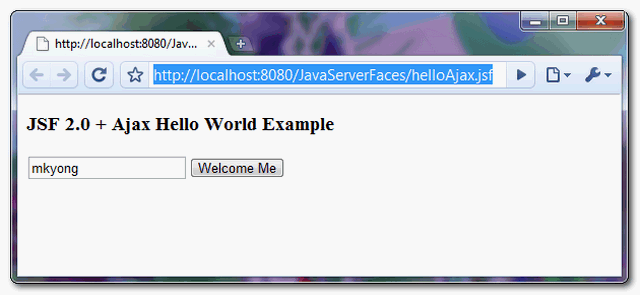
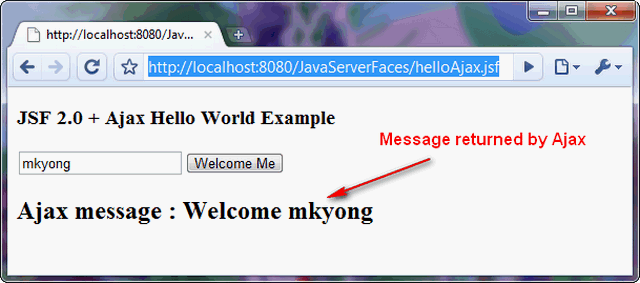
When the button is clicked, it makes an Ajax request and pass the text box value to the server for processing. After that, it refresh the outputText component and display the value via getSayWelcome() method, without any “page flipping effect“.
Download Source Code
About Author

This is not an ajax – page reloads completely!
Yeah, it does. Why then it’s called ajax?
hi..mkying. I have developed jsf with ajax.. reques is going with onkeyup event but response is not coming back on the browser..Could you please revert back with me the possible causes for this
Hi mkyong.
Can you write 01 lession JSF + JQuery, Jquery call to Backing bean and return is 01 page xhtml. Tks mkyong. @ Sory because English is not good
Tks
malformedXML: The index is not in the allowed range what is this error
awesome
Everyone said that there code is working but mine is not, it says that you can not call a method in the value expression where in the output text you calling a method in the value. I know mkyong is too busy for this silly issue but can anyone help me out ?
A simple example but quite good to explain the ajax tag. Nice 🙂
Thank you man!. This example very good for me
Dear MkYong everything seems to be allright with the code.
But could you please include information on how to run it on tomcat?
Thank you in advance
Screenshot :
http://postimg.org/image/gdfgz4nh7/
Hi Mkyong, can we use JSF manage bean in standard ajax request ?
Hello Mkyong. (Excuse me for my bad english). My names is Pablo and I’m from Argentina. Thanks for these tutorials, I wish I could give you a great hug. This is very important for me because I began to work in Java EE not long ago and without this help I don’t know what I would make (maybe I already would be in the street :P).
We worship you!.
Is it possible to pass javascript arrays into server side. If yes can you give me any example ?
i am using actionListener so when i click on button the ajax is call the method searchstudentformNo ,when thers is no data in input filed then click on button it not give any response from the bean because it not submitting the blank data
Give Reply as soon as possible
Hello Thank you. It is very simple and good example for JSF and Ajax
I this example really helped me , simple and effective…
Thanks,
Andrew
HELLO everybody,
Can someone make this using jsf 2.0 and up version. I mean like the page in this link–>
http://www.w3schools.com/PHP/php_ajax_xml.asp
<
function showCD(str)
{
if (str==””)
{
document.getElementById(“txtHint”).innerHTML=””;
return;
}
if (window.XMLHttpRequest)
{// code for IE7+, Firefox, Chrome, Opera, Safari
xmlhttp=new XMLHttpRequest();
}
else
{// code for IE6, IE5
xmlhttp=new ActiveXObject(“Microsoft.XMLHTTP”);
}
xmlhttp.onreadystatechange=function()
{
if (xmlhttp.readyState==4 && xmlhttp.status==200)
{
document.getElementById(“txtHint”).innerHTML=xmlhttp.responseText;
}
}
xmlhttp.open(“GET”,”getcd.php?q=”+str,true);
xmlhttp.send();
}
Hi,
JSF2 works on both client (jsp/html page) and server (managed bean) components.
So, translating what you wrote means write at least 2 components… It isn’t immediate and you would need to modify your back-end tecnology, because you’re using PHP…
I suggest you (if you need to simplify your code) to translate it using jQuery.
It would be something like that:
function showCD(str)
{
if (str==?”)
$(?#txtHint?).html(?”);
else
$.ajax(
{url:?getcd.php”,
data:{q:str},
success: function(response) {
$(?#txtHint?).html(response);
}
})
}
thank you.
can you do it with jsf 2.0 with jquery? if yes how?
Thank you
… strange characters…
function showCD(str){
if (str==””)
$(“#txtHint”).html(“”);
else
$.ajax(
{url:”getcd.php”,
data:{q:str},
success: function(response) {
$(“#txtHint”).html(response);
}
})
}
i am create one JSF project but during run the server i am getting error like “‘#{personBean.name}’ Target Unreachable, identifier ‘personBean’ resolved to null” but when i remove “#{personBean.name}” . then i am not getting any error.
MY jsp page is :
Home Page
and PersonBean.java class as:
package com.bean;
import javax.faces.bean.ManagedBean;
import javax.faces.bean.SessionScoped;
@ManagedBean
@SessionScoped
public class PersonBean {
private String name;
public String getName() {
return name;
}
public void setName(String name) {
this.name = name;
}
public String sum(){
String n=”ramveer”;
return n;
}
}
javax.faces.FacesException: org.apache.jasper.el.JspPropertyNotFoundException: /Home.jsp(17,3) ‘#{personBean.name}’ Target Unreachable, identifier ‘personBean’ resolved to null
at org.apache.myfaces.shared_impl.context.ExceptionHandlerImpl.wrap(ExceptionHandlerImpl.java:241)
at org.apache.myfaces.shared_impl.context.ExceptionHandlerImpl.handle(ExceptionHandlerImpl.java:156)
at org.apache.myfaces.lifecycle.LifecycleImpl.executePhase(LifecycleImpl.java:191)
at org.apache.myfaces.lifecycle.LifecycleImpl.execute(LifecycleImpl.java:118)
at javax.faces.webapp.FacesServlet.service(FacesServlet.java:189)
at org.apache.catalina.core.ApplicationFilterChain.internalDoFilter(ApplicationFilterChain.java:305)
at org.apache.catalina.core.ApplicationFilterChain.doFilter(ApplicationFilterChain.java:210)
at org.apache.catalina.core.StandardWrapperValve.invoke(StandardWrapperValve.java:224)
at org.apache.catalina.core.StandardContextValve.invoke(StandardContextValve.java:169)
at org.apache.catalina.authenticator.AuthenticatorBase.invoke(AuthenticatorBase.java:472)
at org.apache.catalina.core.StandardHostValve.invoke(StandardHostValve.java:168)
at org.apache.catalina.valves.ErrorReportValve.invoke(ErrorReportValve.java:98)
at org.apache.catalina.valves.AccessLogValve.invoke(AccessLogValve.java:928)
at org.apache.catalina.core.StandardEngineValve.invoke(StandardEngineValve.java:118)
at org.apache.catalina.connector.CoyoteAdapter.service(CoyoteAdapter.java:407)
at org.apache.coyote.http11.AbstractHttp11Processor.process(AbstractHttp11Processor.java:987)
at org.apache.coyote.AbstractProtocol$AbstractConnectionHandler.process(AbstractProtocol.java:539)
at org.apache.tomcat.util.net.JIoEndpoint$SocketProcessor.run(JIoEndpoint.java:300)
at java.util.concurrent.ThreadPoolExecutor$Worker.runTask(Unknown Source)
at java.util.concurrent.ThreadPoolExecutor$Worker.run(Unknown Source)
at java.lang.Thread.run(Unknown Source)
Caused by: org.apache.jasper.el.JspPropertyNotFoundException: /Home.jsp(17,3) ‘#{personBean.name}’ Target Unreachable, identifier ‘personBean’ resolved to null
at org.apache.jasper.el.JspValueExpression.getType(JspValueExpression.java:63)
at org.apache.myfaces.shared_impl.renderkit._SharedRendererUtils.findUIOutputConverter(_SharedRendererUtils.java:77)
at org.apache.myfaces.shared_impl.renderkit.RendererUtils.findUIOutputConverter(RendererUtils.java:407)
at org.apache.myfaces.shared_impl.renderkit.RendererUtils.getConvertedUIOutputValue(RendererUtils.java:769)
at org.apache.myfaces.shared_impl.renderkit.html.HtmlTextRendererBase.getConvertedValue(HtmlTextRendererBase.java:274)
at javax.faces.component.UIInput.getConvertedValue(UIInput.java:615)
at javax.faces.component.UIInput.validate(UIInput.java:547)
at javax.faces.component.UIInput.processValidators(UIInput.java:244)
at javax.faces.component.UIForm.processValidators(UIForm.java:137)
at javax.faces.component.UIComponentBase.processValidators(UIComponentBase.java:1218)
at javax.faces.component.UIViewRoot._processValidatorsDefault(UIViewRoot.java:1290)
at javax.faces.component.UIViewRoot.access$500(UIViewRoot.java:73)
at javax.faces.component.UIViewRoot$ProcessValidatorPhaseProcessor.process(UIViewRoot.java:1337)
at javax.faces.component.UIViewRoot._process(UIViewRoot.java:1246)
at javax.faces.component.UIViewRoot.processValidators(UIViewRoot.java:722)
at org.apache.myfaces.lifecycle.ProcessValidationsExecutor.execute(ProcessValidationsExecutor.java:34)
at org.apache.myfaces.lifecycle.LifecycleImpl.executePhase(LifecycleImpl.java:171)
… 18 more
please help me
sorry i can’t post enough content.
you need set outputDirectory for your class to src/main/webapp/WEB-INF/classes
i have the same issue,you need this in you file pom
src/main/webapp/WEB-INF/classes
fsf_001
src/main/webapp/WEB-INF/classes
updated!
i am trying this code but i am getting error like:
javax.faces.FacesException: org.apache.jasper.el.JspPropertyNotFoundException: /Home.jsp(17,3) ‘#{personBean.name}’ Target Unreachable, identifier ‘personBean’ resolved to null
at org.apache.myfaces.shared_impl.context.ExceptionHandlerImpl.wrap(ExceptionHandlerImpl.java:241)
at org.apache.myfaces.shared_impl.context.ExceptionHandlerImpl.handle(ExceptionHandlerImpl.java:156)
at org.apache.myfaces.lifecycle.LifecycleImpl.executePhase(LifecycleImpl.java:191)
at org.apache.myfaces.lifecycle.LifecycleImpl.execute(LifecycleImpl.java:118)
at javax.faces.webapp.FacesServlet.service(FacesServlet.java:189)
at org.apache.catalina.core.ApplicationFilterChain.internalDoFilter(ApplicationFilterChain.java:305)
at org.apache.catalina.core.ApplicationFilterChain.doFilter(ApplicationFilterChain.java:210)
at org.apache.catalina.core.StandardWrapperValve.invoke(StandardWrapperValve.java:224)
at org.apache.catalina.core.StandardContextValve.invoke(StandardContextValve.java:169)
at org.apache.catalina.authenticator.AuthenticatorBase.invoke(AuthenticatorBase.java:472)
at org.apache.catalina.core.StandardHostValve.invoke(StandardHostValve.java:168)
at org.apache.catalina.valves.ErrorReportValve.invoke(ErrorReportValve.java:98)
at org.apache.catalina.valves.AccessLogValve.invoke(AccessLogValve.java:928)
at org.apache.catalina.core.StandardEngineValve.invoke(StandardEngineValve.java:118)
at org.apache.catalina.connector.CoyoteAdapter.service(CoyoteAdapter.java:407)
at org.apache.coyote.http11.AbstractHttp11Processor.process(AbstractHttp11Processor.java:987)
at org.apache.coyote.AbstractProtocol$AbstractConnectionHandler.process(AbstractProtocol.java:539)
at org.apache.tomcat.util.net.JIoEndpoint$SocketProcessor.run(JIoEndpoint.java:300)
at java.util.concurrent.ThreadPoolExecutor$Worker.runTask(Unknown Source)
at java.util.concurrent.ThreadPoolExecutor$Worker.run(Unknown Source)
at java.lang.Thread.run(Unknown Source)
Caused by: org.apache.jasper.el.JspPropertyNotFoundException: /Home.jsp(17,3) ‘#{personBean.name}’ Target Unreachable, identifier ‘personBean’ resolved to null
at org.apache.jasper.el.JspValueExpression.getType(JspValueExpression.java:63)
at org.apache.myfaces.shared_impl.renderkit._SharedRendererUtils.findUIOutputConverter(_SharedRendererUtils.java:77)
at org.apache.myfaces.shared_impl.renderkit.RendererUtils.findUIOutputConverter(RendererUtils.java:407)
at org.apache.myfaces.shared_impl.renderkit.RendererUtils.getConvertedUIOutputValue(RendererUtils.java:769)
at org.apache.myfaces.shared_impl.renderkit.html.HtmlTextRendererBase.getConvertedValue(HtmlTextRendererBase.java:274)
at javax.faces.component.UIInput.getConvertedValue(UIInput.java:615)
at javax.faces.component.UIInput.validate(UIInput.java:547)
at javax.faces.component.UIInput.processValidators(UIInput.java:244)
at javax.faces.component.UIForm.processValidators(UIForm.java:137)
at javax.faces.component.UIComponentBase.processValidators(UIComponentBase.java:1218)
at javax.faces.component.UIViewRoot._processValidatorsDefault(UIViewRoot.java:1290)
at javax.faces.component.UIViewRoot.access$500(UIViewRoot.java:73)
at javax.faces.component.UIViewRoot$ProcessValidatorPhaseProcessor.process(UIViewRoot.java:1337)
at javax.faces.component.UIViewRoot._process(UIViewRoot.java:1246)
at javax.faces.component.UIViewRoot.processValidators(UIViewRoot.java:722)
at org.apache.myfaces.lifecycle.ProcessValidationsExecutor.execute(ProcessValidationsExecutor.java:34)
at org.apache.myfaces.lifecycle.LifecycleImpl.executePhase(LifecycleImpl.java:171)
… 18 more
please help me
Hi,
I have seen that the ajax requests are queued. For example if I have a jsf page with two buttons:
Action1 process take long time. If the user press button1 and after, before the action1 method finalize, the user press button2, the seond request wait the response of the first one and after the action1 method finalize action2 is processed. I have see that the requests are queued.
Basically I want both form submits to be asynchronous as in submit of one for should not make another subsequent form submit wait.
Is it possible to launch the second request and get it completed while the first one is still proccesing or is it like ajax requests in JSF 2.0 queued?
Thanks in advance.
Nice!
xmlhttp.open(“GET”,”getuser.php?q=”+str,true);
I want to know how do this line of code using jsf 2.0.
Instat of php or servlet or jsp.
Even if you how to do it with f.ajax library
which come with jsf 2.0.
Thank you.
There is a serious flaw in the code, it submits the complete form instead of ajax, to make it work in ajax, please use tag in your code, as only this tag is responsible for loading JSF-bundled Ajax helper JavaScript file.
the tag you need to use is jsf header tag present in html library of jsf
You are absolutely right!
I could not understand, how tag is working.
How is it able to recognize, which method to call (or what code to execute ) ?
The tag i am talking about is
heres a simple ajax example that works:
http://www.java-forums.org/javaserver-faces-jsf/62157-simple-ajax-keyup-example.html
hi,
this is the servers answer for the ajax example
http://codepad.org/yKbZhuSe
looks like its sending back a whole page – shouldnt it just send back the part that changes?
Hi,
I have downloaded the sample and trying to run it
But the import statements
import javax.faces.bean.ManagedBean;
import javax.faces.bean.SessionScoped;
are not recognized by eclipse
I am using weblogic and eclipse
Can you help me out with this issue and suggest the fix 🙂
Thanks in advance
We have tried the above example with addition of showing current date and time in output text which is out of ajax block. But after clicking on button, whole page gets refreshed along with date.
While running this example I noticed that the complete form is submitted.I dont think this was the intention of this example.
Any help in this regard will be helpful. here is my code.
This a snippet from my xhtml
 <h:form id="form1">
    	   <h:panelGrid>
    	   <h:inputText id="name" value="#{ajaxBean.name}"></h:inputText>
    	   <h:inputText id="place" value="#{ajaxBean.place}"></h:inputText>
    	   <h:inputText id="sex" value="#{ajaxBean.sex}"></h:inputText>
    	   <h:inputText id="read" value="#{ajaxBean.read}"></h:inputText>
    	    <h:outputText id="output" value="#{ajaxBean.sayWelcome}" />
    	   <h:outputText id="output2" value="#{ajaxBean.sex}" />
    	   </h:panelGrid>
    	   <h:commandButton value="Welcome Me">
    		<f:ajax execute="form1:name @this"  render="output output2"/>
    		   		    	   </h:commandButton>

    	   <h2>

    	   </h2>
    	</h:form>
and the managed bean
@ManagedBean(name="ajaxBean") @SessionScoped public class AjaxBean implements Serializable { private static final long serialVersionUID = 1L; private String name; private String sex; private String read; private String place; public String getSex() { return sex; } public void setSex(String sex) { System.out.println("sex"); this.sex = "M"; } public String getRead() { return read; } public void setRead(String read) { System.out.println("read"); this.read = "read"; } public String getPlace() { return place; } public void setPlace(String place) { System.out.println("place"); this.place = "place"; } public String getName() { return name; } public void setName(String name) { System.out.println("name"); this.name = name; } public String getSayWelcome(){ //check if null? if("".equals(name) || name ==null){ return ""; }else{ return "Ajax message : Welcome " + name; } } }Try to use get-set method and dont forget to use capital letter. it maybe help you
<h:panelGrid> <h:inputText id="name" value="#{AjaxBean.getName}"></h:inputText> <h:inputText id="place" value="#{AjaxBean.getPlace}"></h:inputText> <h:inputText id="sex" value="#{AjaxBean.getSex}"></h:inputText> <h:inputText id="read" value="#{AjaxBean.getRead}"></h:inputText> <h:outputText id="output" value="#{AjaxBean.getSayWelcome}" /> <h:outputText id="output2" value="#{AjaxBean.getSex}" /> </h:panelGrid>Hi, I tried this and it worked nicely, then I tried to migrate the files to a web project I have, it runs fine but after testing the page, closing web browser, then re-running it the web page opens up with the previous results instead of the results before calling ajax. Is there something in the Maven project that resets the page?
sorry to clarify – the last line should be “instead of the blank form before clicking submit”
xhtml code is a bit buggy:
mojarra is not defined and ajax refresh is not work.
place h:head /h:head before h:body
http://forums.oracle.com/forums/thread.jspa?threadID=2133512
A part of my code is missing, sorry
Look here my code complete ==> http://community.jboss.org/thread/166401
ok