Problem
In JSF, the faces-config.xml file can used to includes manages beans, navigation rules or any JSF faces configurations. But, putting all the configurations into a single faces-config.xml file will cause this file become huge very fast, and causing a serious maintainability issue.
Solution
Actually, you can split the faces-config.xml into multiple smaller files, each group by related settings. For example, group by module, managed beans, navigation rule, faces configurations in different XML files. See figure below :
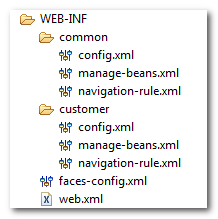
Then declared all the XML files in javax.faces.CONFIG_FILES initialize parameter, which inside the WEB-INF/web.xml file.
<web-app ...>
  ...
  <context-param>
    <param-name>javax.faces.CONFIG_FILES</param-name>
    <param-value>
    	WEB-INF/common/manage-beans.xml,
    	WEB-INF/common/navigation-rule.xml,
    	WEB-INF/common/config.xml
    </param-value>
  </context-param>
  ...
</web-app>
Note
For Struts developer, this is the exact classic problem happened in the Struts configuration file as well.
For Struts developer, this is the exact classic problem happened in the Struts configuration file as well.

org.jboss.jbossfaces.JSF_CONFIG_NAME
MyFaces-2.0
When I put this file into web.xml file.Component class get skipped by the compiler.And directly render the tag .Actually I am making custom tag in jsf2.0
And when I remove the above code from web.xml
In all my pages
This line get shown up
Please give me solution for it
SEVERE: Exception while loading the app
java.lang.Exception: java.lang.IllegalStateException: ContainerBase.addChild: start: org.apache.catalina.LifecycleException: com.sun.faces.config.ConfigurationException: CONFIGURATION FAILED! PWC1223: Path WEB-INF/manage-beans.xml does not start with ‘/’
from downloaded source i fixed by adding an extra ‘/’ at begining of WEB-INF/manage-beans.xml
nice tutorial sir
Hi mkyong,
how to get the code assistance in eclipse if use multiple faces-config.xml files, Plz help me….