In Eclipse Ganymede (v3.4) or Galileo (v3.5), it supports until JSF 1.2 only. For JSF 2.0, upgrade your Eclipse to version Helios (v3.6) onward, it has full support of Java EE 6 support, including JSF 2.0.
Here’s a quick guide to show you how to enable JSF 2.0 features like code assist and visual JSF component editor in Eclipse IDE.
Tools Used
- Eclipse 3.6
- JSF 2.0.x
1. Eclipse Project Facets
To support JSF 2.0, you need to configure Eclipse project to support Web Tools Platform (WTP).
Steps to enable the Web Tools Platform (WTP) :
- Right click on the project, choose “properties” –> “Project Facets“.
- Check “Dynamic Web Module“, select version 2.5.
- Check “Java“, choose version 1.6.
- Check “JavaServer Faces“, choose version 2.0.
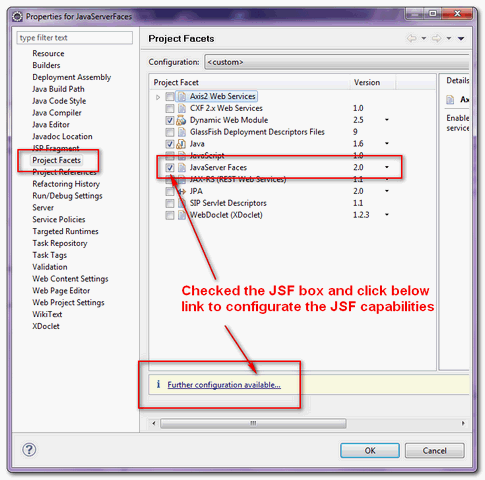
- Click on the “further configuration…” link below to do the JSF configuration.
- Create an user library and include the JSF 2.0 API and implementation libraries, jsf-api-xxx.jar and jsf-impl-xxx.jar.
P.S You can get the JSF jars official JSF website.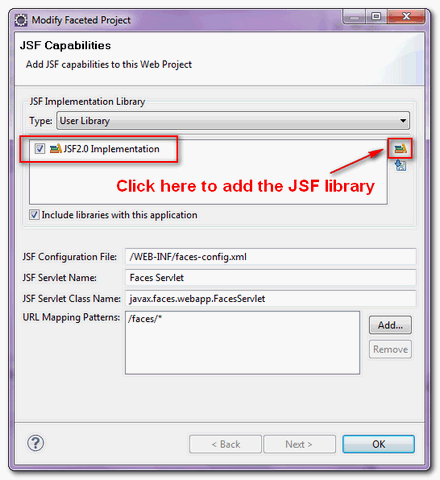 Updated on 8 Aug 2012
For JSF 2.1.11, only one jar file javax.faces-2.1.11 is required. - Done.
2. Demo
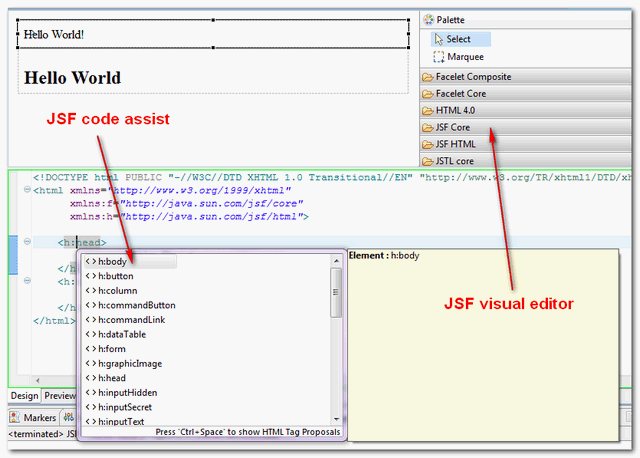
Now, Eclipse IDE is supporting the JSF 2.0 capabilities. Try it, in .xhtml file, click on the “Ctrl + Space“, it will prompts all available JSF 2.0 tags (code assist) automatically.
Furthermore, it add JSF 2.0 visual components to the web page editor as well, see figure below :

Hi! how are you ? thanks for the tutorial… didnt know where to place this comment… Have one question… Do you know which are the new schemas for JSF ?
because these ones dont work…
thank you very much
Hi M. Yong,
Thank you so much for your help 🙂
Thank you very much Mr yong.
No way to install JSF into my eclipse Luna. Anybody here?
Which is more preferable, to use the following approach or to use dependencies in Maven’s POM.xml?
This is very useful!
Hi,
i am using eclipse 4.2.2 and simple deploying your sample project as you provided the simple step but after properties -project facets-add the user libs and add jar but facing run time problem it is utilized http://localhost:8080/JavaServerFaces but not the defined path with are in web.xml like
http://localhost:8080/JavaServerFaces/hello.jsf
http://localhost:8080/JavaServerFaces/hello.faces
http://localhost:8080/JavaServerFaces/hello.xhtml
http://localhost:8080/JavaServerFaces/faces/hello.jsf
what i have to do to resolve this issue.
I for the life of me can not figure out how to get the faces-config editor to come up. I have downloaded and installed the JSF 2.0, 2.2 libraries, Mojarra, and Apache libraries. I have went into my project properties and made sure the JavaServer Faces 2.0 version was clicked. NO Editor! What is going on?
I am trying to work my way through a tutorial and this is where I am stuck because in the tutorials it says that a faces-config editor is supposed to pop up where I can select New Managed Bean wizard. There is no “new managed bean wizard” in eclipse as far as I can see. Has anyone else had this problem, all the solutions say to make sure that JavaServer FAces is clicked well it is, and still nothing. Any help would be appreciated.
Eclipse Java EE IDE for Web Developers.
Version: Kepler Release
Build id: 20130614-0229
For anyone with this problem:
Once you create an *.xhtml file, right click it in the Project Explorer view and open with “web page editor”. The palette should then show up.
Hi,
Thanks a lot for the helpful page. I am new to JSF and had done all the eclipse setup with the online help. I made my JSF project setup with the help of above article. The project is setup now and it is also showing me tag assistance on press of Ctrl + Space of jsf tags, but when I run the project, it doesn’t seems to render jsf tags like & and doesn’t show them on the webpage. Using firebug I saw that the tag remains so and is not converted to which is done in case of . Do I need to setup anything else also or any settings change ?
Please help as I need a project for my work. Thanks in advance.
I have been trying to follow the instructions that you mentioned.
There is an error which says “Failed while installing Dynamic Web Module”
Reason:Resource exists with a different case in /”ProjectName”/webcontent
Now.This project is not a dynamic web project.so does it have to anything to do with this?
And because JSF is dependent on Dynamic Web Module 2.5 or later I am unable to add JSF as well.
It helped me. Thanks
Hi mkyong….
I have used eclipse helios… but wen am try to jsf 2.0 project by using the configurations like web module 3.0, Apache tomcat 7.0,configurations jsf v2.0 project and during the jsf capabilities wen i try to choose JSF 2.0 (Mojarra 2.0.3-FCS) for library it displays an error msg “error in opening zip file”…. wat i need to do for tat… whr s the problem… pls reply me asap… its urgent for me…
please send me jsf 2.0 document am new to jsf
Hello MKYONG,
Think you very much for this Tutorial, then i want to learn from you something in J2EE, if you can give me your Email adresse or contact me in my email adresse thinks lot.
Hi mkyong,
How to get the bean assistance in xhtml page if i use multiple faces-config xml files.
please help me.
hey man, why aer you using eclipse helios and not using Galileo?
Which technology you prefer as best..?Struts2 or JSF2
I have a question regarding mixing jsp for JSF 1.2 and xhtml for JSF 2.0 in a JSF 2.0 project.
We are using websphere. Is it possible to convert a project to use JSF 2.0 facets, but keep the original jsps that use IBM’s JWL and create new pages as JSF 2.0 xhtml pages and have both run within the same application within the same webapp?
Thanks
WebSphere.. Good Luck bro, i have too many bad experienced on it. Each WebSphere version have different implementation and NOT compatible to each other, make sure you consult the IBM documentation.
To be frankly, WebSphere is a IBM standard, not Java standard, what apply on standard Java App Server may fail on WebSphere. Often times, you need to “hack” something to get what you want.
Hi ,mkyong
I have followed the steps which you mentioned to configure eclipse Helios v3.6 and the tutorials work well but the JSF visual editor does not appear at all , so what to do to show the visual editor .
thank you .
Hi Mkyong, what about Eclipse Galileo, How can I make support JSF 2.0 jar?
Is above solution not working in your Galileo?
Most of the code are uncomplete : need to know how-to-update-row-in-jsf-datatable ?
Advanced thanks
Refer here – https://mkyong.com/tutorials/jsf-2-0-tutorials/ , find under jsf datatable section.
Never mind. I got it work. I had to uncheck the Dynamic Web Moudle and apply, change the version and re-check it.
Gang
Hi, mkyong,
I followed your steps to configure my eclipse-helio for JSF 2.0. But the IDE displays error, “Cannot change version of project facet Dynamic Web Module to 2.5”. It was originally “2.3” and JavaServer Faces 2.0 requires 2.5. Any idea?
I created a Maven project using apache’s webapp architype.
Thanks,
Gang
Gang,
Try this below may work:
In your project workspace, in settings folder
edit org.eclipse.wst.common.project.facet.core (xml file)
add <installed facet="jst.web" version="”/>
Add the version you want.
Hi,
thanks for this very helpfull tutorial.
I have just one question regarding jsf 2.0 and css :
How to invoke an external stylesheet e.g. “layout.css” in my jsf 2.0 project.
I tried this :
…
…
Eclipse Helios says unknown Tag <h:outputStylesheet…
Do you have any idea \ suggestion how to fix this ?
Thanks in advance and best regards
Klaus
To include external CSS in JSF2, try following articles
https://mkyong.com/jsf2/how-to-include-cascading-style-sheets-css-in-jsf/
https://mkyong.com/jsf2/resources-library-in-jsf-2-0/
I guessed that the problem was with it being able to edit .xml configs. It seems that doing this on an existing project causes problems, but doing this with a brand new project is okay.
Must be an Eclipse bug…
What’s your Eclipse version?
Hi
When I enable the JSF facet, doing it exactly as described in your post, I get the following error:
Failed while installing JavaServer Faces 2.0
Reason:
‘myproject’ : unable to configure web module for JavaServer Faces
Netbeans is good at JSF2 develop.
Geno,
Try this below may work, In your project workspace, in settings folder edit org.eclipse.wst.common.project.facet.core (xml file)
add
add another line with facet jst.jsf and version as 2.0
It works, thanks David, and thx Mkyong!