In JSF 2.0, you can use <h:outputStylesheet /> output a css file.
For example,
<h:outputStylesheet library="css" name="style.css" />
It will generate following HTML output…
<link type="text/css" rel="stylesheet"
	href="/JavaServerFaces/faces/javax.faces.resource/style.css?ln=css" />
JSF outputStylesheet example
An example to show the use of JSF 2 <h:outputStylesheet /> to render a “style.css” file, locate in the “resources/css” folder, see figure below :
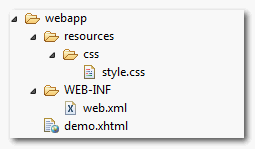
JSF file
<?xml version="1.0" encoding="UTF-8"?>
<!DOCTYPE html PUBLIC "-//W3C//DTD XHTML 1.0 Transitional//EN"
"http://www.w3.org/TR/xhtml1/DTD/xhtml1-transitional.dtd">
<html xmlns="http://www.w3.org/1999/xhtml"
      xmlns:h="http://java.sun.com/jsf/html"
      >
    <h:head></h:head>
    <h:body>

    	<h1>JSF 2 outputStylesheet example</h1>

    	<h:outputStylesheet library="css" name="style.css"  />

    	<div class="red">This is red color</div>

    </h:body>

</html>
It will generate following HTML output
<?xml version="1.0" encoding="UTF-8"?>
<!DOCTYPE html PUBLIC "-//W3C//DTD XHTML 1.0 Transitional//EN"
"http://www.w3.org/TR/xhtml1/DTD/xhtml1-transitional.dtd">
<html xmlns="http://www.w3.org/1999/xhtml">
	<head>
		<link type="text/css" rel="stylesheet"
		  href="/JavaServerFaces/faces/javax.faces.resource/style.css?ln=css" />
	</head>

	<body>

    	   <h1>JSF 2 outputStylesheet example</h1>

    	   <div class="red">This is red color</div>

	</body>

</html>
Warning
When render CSS file via
When render CSS file via
<h:outputStylesheet /> tag, remember put the <h:head /> tag as well; Otherwise the css file will not be included.
Download Source Code
Download It – JSF-2-outputStylesheet-Example.zip (9KB)

Great! Thanks!
A small note: in NetBeans 8 “webapp” is displayed as “Web Pages”.
So, the process is: create a “resource” then a “css” folder under “Web Pages” section.
library=”css” ? See: http://stackoverflow.com/questions/11988415/what-is-the-jsf-resource-library-for-and-how-should-it-be-used/11988418#11988418
Hello,
I followed all your instructions, I wrote the code in my computer but it did not work, then I sent to all the code to my friend’s computer, It did work in my friend’s computer! Do you have any suggestions?
Your tutorials are really helpful by the way!
Cheers.
tnk
its very gooooooooooooooood
I have the problem that my CSS is not working on my JSF, even is not rendered in the HTML generated, can you please give me a tip, what could be?
thanks
It is in reality a nice and helpful piece of info. I’m happy that you just shared this useful information with us. Please stay us up to date like this. Thanks for sharing.
is there a way to reference external CSS files using JSF ?
Because using this doesn’t work:
Hello Mr.Yong.
When I import a resource via
or
, is necessary match the URL mapping faces/* ???
So, If I use this URL:
http://localhost:8080/WebApp/faces/login.xhtml -> It’s work correctly
If I use this URL:
http://localhost:8080/WebApp/login.faces -> Don’t load the CSS or Javascript resources
Actually in my web.xml:
<servlet-mapping>
    <servlet-name>Faces Servlet</servlet-name>
    <url-pattern>/faces/*</url-pattern>
  </servlet-mapping>
  <servlet-mapping>
    <servlet-name>Faces Servlet</servlet-name>
    <url-pattern>*.faces</url-pattern>
  </servlet-mapping>
  <servlet-mapping>
    <servlet-name>Faces Servlet</servlet-name>
    <url-pattern>*.jsf</url-pattern>
  </servlet-mapping>
  <servlet-mapping>
    <servlet-name>Faces Servlet</servlet-name>
    <url-pattern>*.xhtml</url-pattern>
  </servlet-mapping>
Any idea?
Thanks in advance.
Fernando.
I believe this – http://localhost:8080/WebApp/login.faces , don’t load your application also, don’t you? All faces page need to be in “/faces/* ” directory. (web.xml)
Ok, matching any URL only on *.faces works correctly, the problem was in css file when I import the images:
background: transparent url(“images/bg_button_a.gif”) no-repeat scroll top right;
/faces/* is needed.
But now I wrote:
background: transparent url("#{facesContext.externalContext.requestContextPath}/resources/images/bg_button_a.gif") no-repeat scroll top right;This work perfect 🙂
Thanks, problem solved 😉
Thanks for extra input, to use JSF context to load a resources.
Hello,
If I have to import a css file in another with jsf how can I do?
e.g. @import style.css (Style.css is located in resources/css/base)
I tried @import ${facesContext.externalContext.requestContextPath}/css/base/style.css but it does not work..
Can you help me please?
Thanks a lot!
background: transparent url(“#{facesContext.externalContext.requestContextPath}/resources/images/bg_button_a.gif”)
Hello sir,
I successfully run above example. But the problem is after run one time if i apply changes in css file then that will not display effect in my xhtml pages. Though i removed the < tag from my page though its display effect on my page. So,what should be the solution.
Why do you define the output within the tag an not inside the head part?
JSF will render css output in “head” tag automatically.
What to do in case you have to reference an image inside CSS ?