Problem
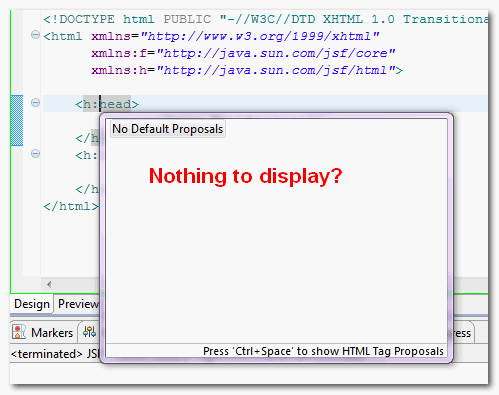
Using Eclipse Helios (3.6) and developing JSF 2.0 web application. In .xhtml file, when i pressed on the “Ctrl + Space” combination keys to call the code assist for JSF tag, it prompts nothing? It look like the code assist for JSF tag is not working properly in the .xhtml file extension?
Solution
In Eclipse project, you have to make sure the project is supported the WTP and JSF capabilities.
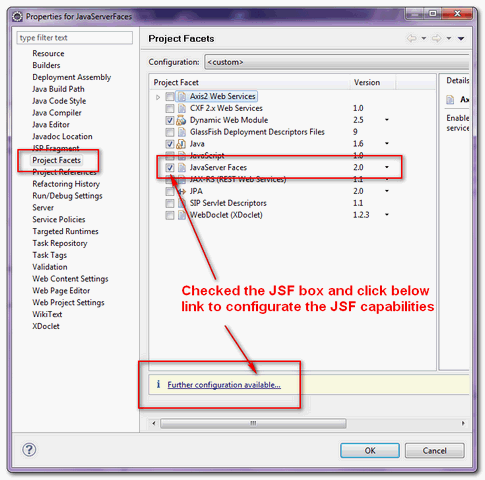
1. Right click on the project, choose properties, select “Project Facets“, make sure the “JavaServer Faces” is checked. Later, click on the “further configuration…” link to configure the JSF capabilities.
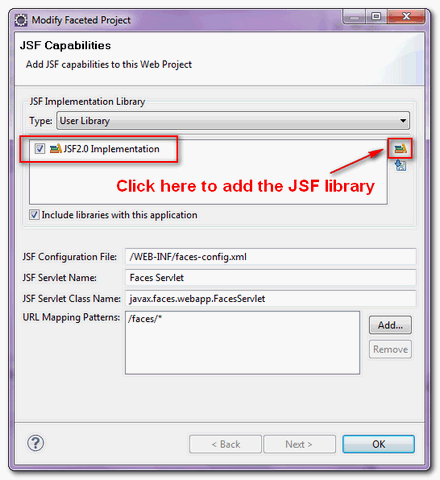
2. Create an user library and include the JSF API and implementation library, jsf-api-xxx.jar and jsf-impl-xxx.jar. It will add the JSF capabilities to your project.
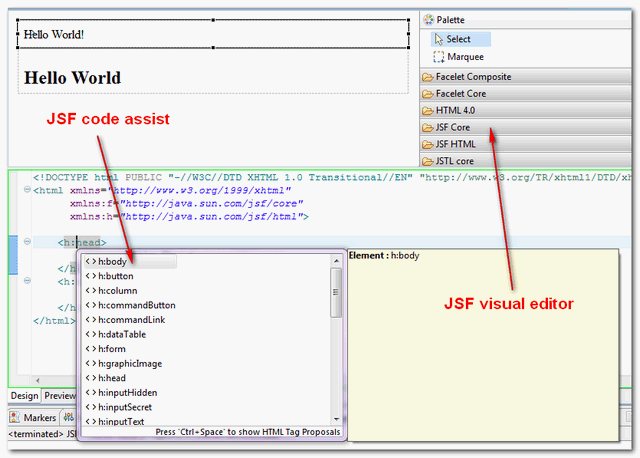
3. Done, in .xhtml file, click on the “Ctrl + Space” keys again, now it prompts the JSF tag code assist properly. Furthermore, it add JSF visual editor to the web page editor as well.

Se for xhtml
Tente primeiro a opção 1 caso não der tente a 2
1) Vá em window, preferences, General, Content Type, no lado direito vá em text, depois em jsp, em baixo clique em add (File associations), adicione *.xhtml;
2) Vá em window, preferences, General, Editor, File Associations, procure por *.xhtml, add, escolha a opção JSP Editor;
He instalado el moonrise theme para tener el fondo oscuro y cuidar la vista un poco mas, pero me he encontrado con un problema.
Y es que no consigo a la hora de hacer el “Compare whith” que los cambios me aparezcan mas resaltados como antes.
He estado cambiando varias cosas en general text and fonts pero no he conseguido avances.
Si alguien puede orientarme. Gracias
Didn’t work. Plus, it’s a maven project, so it needs to not be a faceted project.
Hello Mkyong,
I’m using Eclipse Kepler (downloaded latest version for : Eclipse IDE for Java EE Developers). I’m having JSF 1.2 added & alos *.xhtml is added in content type under HTML.
Still, code assist is not working for me in any of .xhtml. I’m using JSF 1.2 & JDK 1.7 on Windows 7 (64 bit).
Can you help me to get it working? Thanks.
Regards,
Saurabh
Hi there friends, its great post about educationand entirely
explained, keep it up all the time.
My developer is trying to persuade me to move to
.net from PHP. I have always disliked the idea because of the costs.
But he’s tryiong none the less. I’ve been using WordPress on
various websites for about a year and am concerned about switching
to another platform. I have heard great things about blogengine.
net. Is there a way I can import all my wordpress posts into it?
Any help would be really appreciated!
hi,
I have the same problem. Actaully i am using myfaces 2.1.9 and not eclips mojarra jsf libs. In this case what to do? how tags will be appeared?
very nice … doubts are cleared… thanks..
Where are the jsf-api-xxx.jar libraries? I’ve searched my entire user dir and I can’t find them.
find ~/ -name ‘jsf-api*’
Eres lo maximo cholito!!!
love u
Thx very much. Really good article. You give me a lot of time in my project.
Perfect solution. Thanks.
Finally it out! May 15th! Been waiting for many years
Tanks, works perfectly.
Thanks you’ve helped me a lot !! Now my future project at university will be easy to do.
Excelent, thanks!
Your solution did not work!
I had JSF code completion in Eclipse 3.5, but not in Eclipse 3.6.1.
Seems like Eclipse has past the prime and is only getting worse…
Hi, Mkyong.
I just wanted to thank you very much!
I was searching for a decent solution for this problem 2 days after I started developing in JSF 2.0. After many fool bugs caused by typos in xHTML, which are hard and very time consuming to debug, I simply stopped everything until I find something that solve this serious inefficiency.
If I didn’t find your solution, I would really abandon Eclipse and would try NetBeans.
Thanks once more.
Welcome, Eclipse is still the best!
Hi mkyong! I hope you’re fine.
I was following your tutorial step by step but finally I couldn’t do run the code assist for my XHTML.I’m using Eclipse Ganymede, JSF 2.0
Thanks in advance!
Daniel.
Last resort, try upgrade to latest Eclipse Helios (v3.6).
Hi mkyong,
How to get the content assist of managed beans if i use more than multiple faces-config xml fils. Please help me…