In this article, we show you how to create a custom converter in JSF 2.0.
Steps
1. Create a converter class by implementing javax.faces.convert.Converter interface.
2. Override both getAsObject() and getAsString() methods.
3. Assign an unique converter ID with @FacesConverter annotation.
4. Link your custom converter class to JSF component via f:converter tag.
Custom converter example
A detail guide to create a JSF 2 custom converter name “URLConverter”, which is used to convert a String into an URL format (add HTTP protocol in front only :)) and store it into an Object.
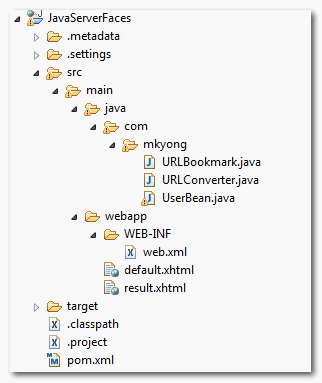
1. Folder Structure
Folder structure of this example.
2. Converter class
Create a custom converter class by implementing javax.faces.convert.Converter interface.
package com.mkyong;

import javax.faces.convert.Converter;
public class URLConverter implements Converter{
	//...
}
Override following two methods :
1. getAsObject(), converts the given string value into an Object.
2. getAsString(), converts the given object into a String.
public class URLConverter implements Converter{

	@Override
	public Object getAsObject(FacesContext context, UIComponent component,
			String value) {

		//...
	}
	@Override
	public String getAsString(FacesContext context, UIComponent component,
			Object value) {

		//...

	}
Assign an converter ID with @FacesConverter annotation.
package com.mkyong;

import javax.faces.convert.Converter;
@FacesConverter("com.mkyong.URLConverter")
public class URLConverter implements Converter{
	//...
}
See full custom converter source code :
URLConverter.java
package com.mkyong;

import javax.faces.application.FacesMessage;
import javax.faces.component.UIComponent;
import javax.faces.context.FacesContext;
import javax.faces.convert.Converter;
import javax.faces.convert.ConverterException;
import javax.faces.convert.FacesConverter;
import org.apache.commons.validator.UrlValidator;

@FacesConverter("com.mkyong.URLConverter")
public class URLConverter implements Converter{

	@Override
	public Object getAsObject(FacesContext context, UIComponent component,
		String value) {

		String HTTP = "http://";
		StringBuilder url = new StringBuilder();

		//if not start with http://, then add it
		if(!value.startsWith(HTTP, 0)){
			url.append(HTTP);
		}
		url.append(value);

		//use Apache common URL validator to validate URL
		UrlValidator urlValidator = new UrlValidator();
		//if URL is invalid
		if(!urlValidator.isValid(url.toString())){

			FacesMessage msg =
				new FacesMessage("URL Conversion error.",
						"Invalid URL format.");
			msg.setSeverity(FacesMessage.SEVERITY_ERROR);
			throw new ConverterException(msg);
		}

		URLBookmark urlBookmark = new URLBookmark(url.toString());

		return urlBookmark;
	}

	@Override
	public String getAsString(FacesContext context, UIComponent component,
			Object value) {

		return value.toString();

	}
}
In this custom converter class, it’s given a converter id as “com.mkyong.URLConverter“, and converts any given String (by adding a “http” in front) into “URLBookmark” object.
In addition, if URL validation is failed, return a FacesMessage object with declared error message.
URLBookmark.java
package com.mkyong;

public class URLBookmark{

	String fullURL;

	public URLBookmark(String fullURL) {
		this.fullURL = fullURL;
	}

	public String getFullURL() {
		return fullURL;
	}

	public void setFullURL(String fullURL) {
		this.fullURL = fullURL;
	}

	public String toString(){
		return fullURL;
	}

}
3. Managed Bean
A normal managed bean named “user”, nothing special here.
package com.mkyong;

import java.io.Serializable;
import javax.faces.bean.ManagedBean;
import javax.faces.bean.SessionScoped;

@ManagedBean(name="user")
@SessionScoped
public class UserBean implements Serializable{

	String bookmarkURL;

	public String getBookmarkURL() {
		return bookmarkURL;
	}

	public void setBookmarkURL(String bookmarkURL) {
		this.bookmarkURL = bookmarkURL;
	}

}
4. JSF Page
Link above custom converter to JSF component via “converterId” attribute in “f:converter” tag.
default.xhtml
<?xml version="1.0" encoding="UTF-8"?>
<!DOCTYPE html PUBLIC "-//W3C//DTD XHTML 1.0 Transitional//EN"
"http://www.w3.org/TR/xhtml1/DTD/xhtml1-transitional.dtd">
<html xmlns="http://www.w3.org/1999/xhtml"
      xmlns:h="http://java.sun.com/jsf/html"
      xmlns:f="http://java.sun.com/jsf/core"
      >
    <h:body>

    	<h1>Custom converter in JSF 2.0</h1>

	<h:form>

	  <h:panelGrid columns="3">

		Enter your bookmark URL :

		<h:inputText id="bookmarkURL" value="#{user.bookmarkURL}"
			size="20" required="true" label="Bookmark URL">
			<f:converter converterId="com.mkyong.URLConverter" />
		</h:inputText>

		<h:message for="bookmarkURL" style="color:red" />

	  </h:panelGrid>

	  <h:commandButton value="Submit" action="result" />

	</h:form>
    </h:body>
</html>
result.xhtml
<?xml version="1.0" encoding="UTF-8"?>
<!DOCTYPE html PUBLIC "-//W3C//DTD XHTML 1.0 Transitional//EN"
"http://www.w3.org/TR/xhtml1/DTD/xhtml1-transitional.dtd">
<html xmlns="http://www.w3.org/1999/xhtml"
      xmlns:h="http://java.sun.com/jsf/html"
      xmlns:f="http://java.sun.com/jsf/core"
      xmlns:c="http://java.sun.com/jsp/jstl/core"
      >
    <h:body>

    	<h1>Custom converter in JSF 2.0</h1>

	  <h:panelGrid columns="2">

		Bookmark URL :
		<h:outputText value="#{user.bookmarkURL}" />

	  </h:panelGrid>

    </h:body>
</html>
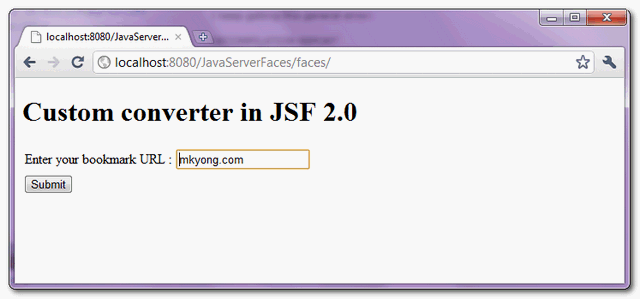
5. Demo
Enter a valid URL, without “http”.
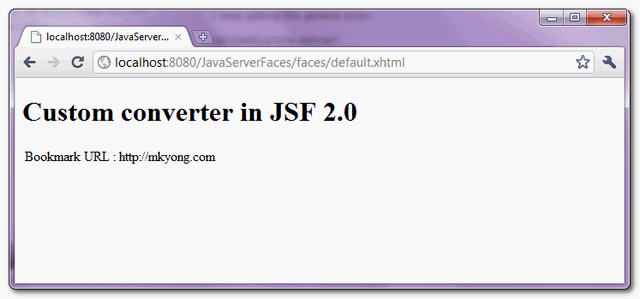
Add a “http” in front of the valid URL and display it.
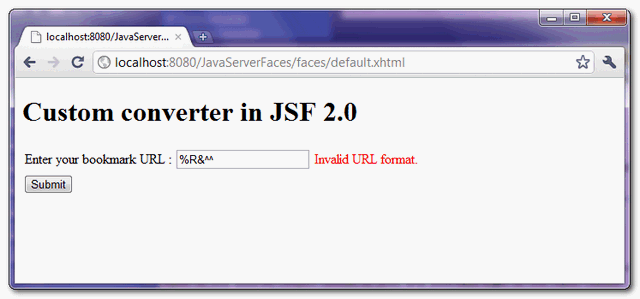
If an invalid URL is provided, return the declared error message.

In my opinion, the example picked in here is a really bad one. It should specify the object type instead of using generic.
I recommend to have a separate example using converter to convert a Java Enum to a String for a SelectOneMenu UI component. It would be far easier for others to quickly learn how to use a converter. Just my 2 cents.
You can use java.net.URL 😉
Hello. Thanks for your tutorial but I think it is worth to add that often we write custom converter to handle objects in p:selectOneMenu and then it is important to implement own equals method for such object’s class. Otherwise we will get “Value is not valid” error.
Hi mkyong,
thanks for this great example!
I refactored lots of code now, but I still have one Problem at converting a googlemaps-Geopoint into two textfields and back.
I’ve got two inputText-Fields, one for Latitude, one for Longitude.
In the database they are stored corresponding to the pattern
“lat:##,######|lon:##,#####”
But i’m only able to make a 1:1-Relationship between inputText and Converter
Do you have an idea, how to solve that?
Kind Regards
Hello mkyong..,
Thanks for this tutorial. I have a doubt.
How can I reset the inputText when conversion fails.
For example :
In this tutorial example, how can I reset the h:inputText when url is not valid?
please do reply.
Just return “” in method getAsObject inside your Converter class.
Ps: I dont recommend use converter to validate url. You can convert invalid url to valid url, but if you want to validate please use Validators. Remember that in JSF life cycle in “Process validation” converter runs before validator.
thanks, the great article you has save my job…
Thank you, very interesting topic.
Pls teach me how can Assign an converter ID with @FacesConverter annotation.
There is a bug in the code , seems to be an api issue looks like
getAsObject should return url and not url object for it to work
i am working on JSF, EJB, JPA from last one year. We did one website using jsf but i feel that these technology are heavy weight & our site became very slow. We used ViewScoped in all backing bean. please help to improve performance of site also we did Cache for images,css.
You need to analysis to find out the bottle of the system. Is this caused by slow SQL? or something else.
If your website is CMS use Frontend cache like Varnish, if not you can use cache level in JPA. Also enable slow-queries log in SQL and check it to fix some things.
I used to be recommended this website by way of my cousin. I’m no longer sure whether or not this publish is written via him as no one else know such targeted about my problem. You are wonderful! Thank you!
Hi, i am working on JSF PrimeFaces 2.0 , can any body help me in providing some sample applications,like Custom components,UI components,…………………….