
A JDBC example to show you how to connect to a MySQL database with a JDBC driver.
Tested with:
- Java 8
- MySQL 5.7
- MySQL JDBC driver
mysql-connector-java:8.0.16
1. Download MySQL JDBC Driver
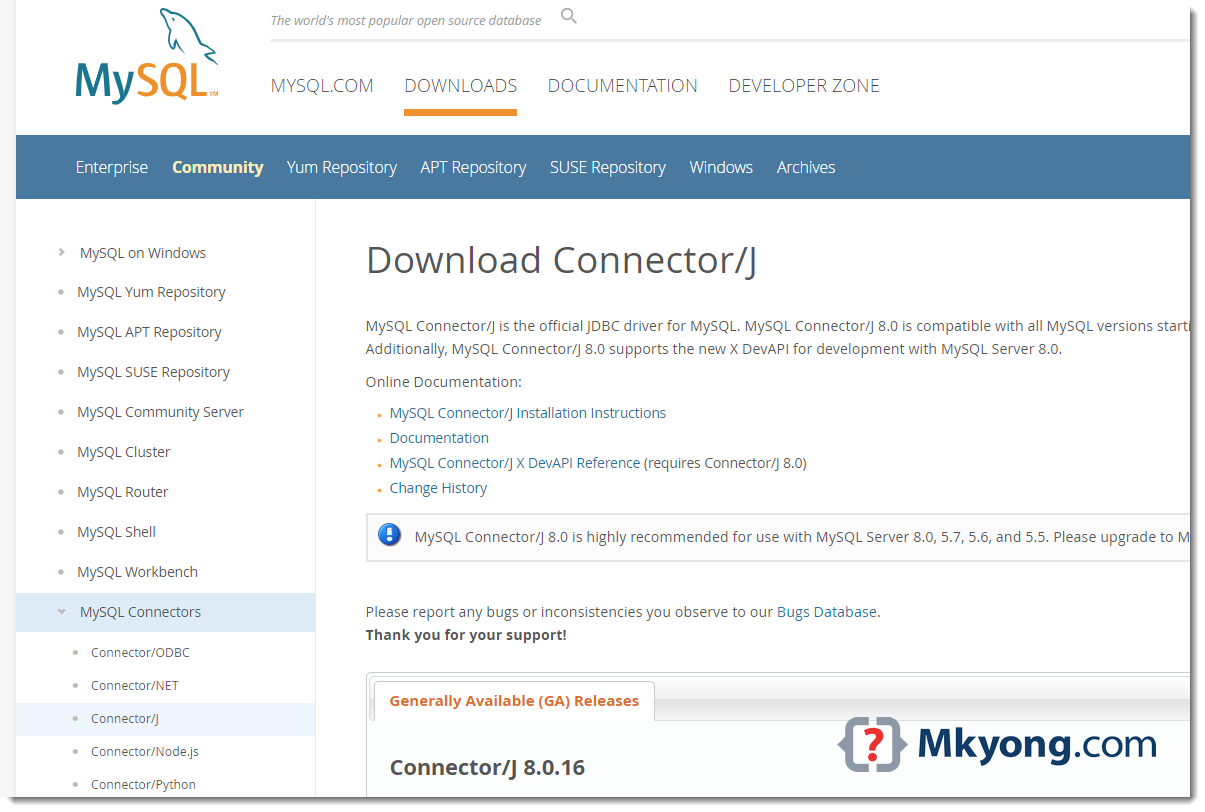
Visit https://dev.mysql.com/downloads/connector/j/ to download the latest MySQL JDBC Driver.
2. JDBC Connection
2.1 Make a connection to the MySQL database.
JDBCExample.java
import java.sql.Connection;
import java.sql.DriverManager;
import java.sql.SQLException;

public class JDBCExample {

    public static void main(String[] args) {

        // https://docs.oracle.com/javase/8/docs/api/java/sql/package-summary.html#package.description
        // auto java.sql.Driver discovery -- no longer need to load a java.sql.Driver class via Class.forName

        // register JDBC driver, optional since java 1.6
        /*try {
            Class.forName("com.mysql.jdbc.Driver");
        } catch (ClassNotFoundException e) {
            e.printStackTrace();
        }*/

        // auto close connection
        try (Connection conn = DriverManager.getConnection(
                "jdbc:mysql://127.0.0.1:3306/test", "root", "password")) {

            if (conn != null) {
                System.out.println("Connected to the database!");
            } else {
                System.out.println("Failed to make connection!");
            }

        } catch (SQLException e) {
            System.err.format("SQL State: %s\n%s", e.getSQLState(), e.getMessage());
        } catch (Exception e) {
            e.printStackTrace();
        }

    }
}
Test:
# compile
> javac JDBCExample.java

# run
> java JDBCExample

SQL State: 08001
No suitable driver found for jdbc:mysql://127.0.0.1:3306/test
To run it with java command, we need to load the MySQL JDBC driver manually. Assume everything is stored in the c:\test folder, run it again with this -cp option.
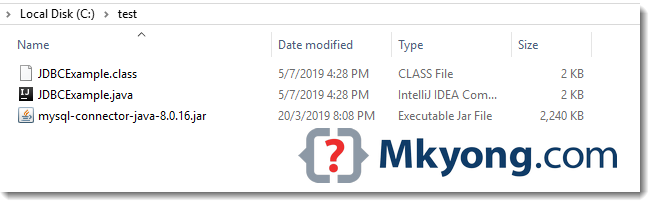
> java -cp "c:\test\mysql-connector-java-8.0.16.jar;c:\test" JDBCExample
Connected to the database!
3. Maven Project
3.1 The MySQL JDBC driver is available in the Maven central repository.
pom.xml
	<dependency>
		<groupId>mysql</groupId>
		<artifactId>mysql-connector-java</artifactId>
		<version>8.0.16</version>
    </dependency>
3.2 A simple JDBC select example.
JDBCExample2.java
import com.mkyong.jdbc.model.Employee;

import java.math.BigDecimal;
import java.sql.*;
import java.util.ArrayList;
import java.util.List;

public class JDBCExample2 {

    public static void main(String[] args) {

        System.out.println("MySQL JDBC Connection Testing ~");

        List<Employee> result = new ArrayList<>();

        String SQL_SELECT = "Select * from EMPLOYEE";

        try (Connection conn = DriverManager.getConnection(
                "jdbc:mysql://127.0.0.1:3306/test", "root", "password");
             PreparedStatement preparedStatement = conn.prepareStatement(SQL_SELECT)) {

            ResultSet resultSet = preparedStatement.executeQuery();

            while (resultSet.next()) {

                long id = resultSet.getLong("ID");
                String name = resultSet.getString("NAME");
                BigDecimal salary = resultSet.getBigDecimal("SALARY");
                Timestamp createdDate = resultSet.getTimestamp("CREATED_DATE");

                Employee obj = new Employee();
                obj.setId(id);
                obj.setName(name);
                obj.setSalary(salary);
                // Timestamp -> LocalDateTime
                obj.setCreatedDate(createdDate.toLocalDateTime());

                result.add(obj);

            }
            result.forEach(x -> System.out.println(x));

        } catch (SQLException e) {
            System.err.format("SQL State: %s\n%s", e.getSQLState(), e.getMessage());
        } catch (Exception e) {
            e.printStackTrace();
        }

    }

}
Employee.java
import java.math.BigDecimal;
import java.time.LocalDateTime;

public class Employee {

    private Long id;
    private String name;
    private BigDecimal salary;
    private LocalDateTime createdDate;

    //...
}
Table definition.
CREATE TABLE EMPLOYEE
(
    ID INT NOT NULL AUTO_INCREMENT,
    NAME VARCHAR(100) NOT NULL,
    SALARY DECIMAL(15, 2) NOT NULL,
    CREATED_DATE DATETIME NOT NULL DEFAULT CURRENT_TIMESTAMP,
    PRIMARY KEY (ID)
);
Download Source Code
$ git clone https://github.com/mkyong/java-jdbc.git
References
About Author

Founder of Mkyong.com, love Java and open source stuff. Follow him on Twitter. If you like my tutorials, consider make a donation to these charities.
Helpful, Thank you sir.
Thanks for your help. It’s really helpful !
Truly a live saver, thanks a lot!
is it really works?
thank you sir
Hi. Thank you for the excellent explanation. I wanted to ask what I am writing exactly in the url when I use localhost in mysql using jdbc in android studio. I tried all kinds of Syntax and did not work me the connection to the database. Do I need to specify the port in the url or the IP address of my computer?
3/14/19 4:36:20:213 GMT] 4f6f5df5 SystemOut U ——– MySQL JDBC Connection Testing ————
[3/14/19 4:36:20:218 GMT] 4f6f5df5 SystemOut U MySQL JDBC Driver Registered!
java.lang.NoClassDefFoundError: java/util/LinkedHashMap
at java.lang.ClassLoader.defineClass0(Native Method)
at java.lang.ClassLoader.defineClass(ClassLoader.java(Compiled Code))
at java.security.SecureClassLoader.defineClass(SecureClassLoader.java(Compiled Code))
at com.ibm.ws.classloader.CompoundClassLoader._defineClass(CompoundClassLoader.java(Compiled Code))
at com.ibm.ws.classloader.CompoundClassLoader.findClass(CompoundClassLoader.java(Compiled Code))
at com.ibm.ws.classloader.CompoundClassLoader.loadClass(CompoundClassLoader.java(Compiled Code))
at java.lang.ClassLoader.loadClass(ClassLoader.java(Compiled Code))
at com.mysql.jdbc.NonRegisteringDriver.connect(NonRegisteringDriver.java:283)
at java.sql.DriverManager.getConnection(DriverManager.java:543)
at java.sql.DriverManager.getConnection(DriverManager.java:194)
at com.portrade.ipms.icms.schedulers.TafmsInterfaceJob.execute(TafmsInterfaceJob.java:49)
at org.quartz.core.JobRunShell.run(JobRunShell.java:195)
at org.quartz.simpl.SimpleThreadPool$WorkerThread.run(SimpleThreadPool.java:520)
i try used this method. however i face this error.
i have no idea with this error.
Thanks, Helpful post
thank u
now how do i use it in struts 2 to insert
connection failed:[HY000][MYSQL] [ODBC 5.2(w)Driver] access denied for ‘root’ @localhost’
while creating the data source on ODBC data source administrator …I face this problem
Why is it important using these statements?:
try {
Class.forName(“com.mysql.jdbc.Driver”);
} catch (ClassNotFoundException e) {
System.out.println(“Where is your MySQL JDBC Driver?”);
e.printStackTrace();
return;
}
Is it just to test?
Try/catch are important. You should learn and understand the use of these, they are a very important part of modern event-driven programming, and, in some ways, one of the more problematic, as they lead to code which is very non-linear in nature (and thus much harder to debug). But you need to understand them — along with object-oriented concepts, they cannot be underestimated as to their importance to understanding how to program.
Yes it is important in the way you can test the presence of the DB Driver. If it is not present, you can properly output a message for the user “I am sorry, you want me to connect to this f… DB, but I don’t even have the driver. I can’t go on the script!” 😉
how to connect android app to sql server database……
i’m beginner in android so i m made a android apps to connect sql server so plzzz help me ..
How to set jdbc classapth permanently
OMG!! After searching the internet for 6 Hours it stranded upon this. It is not like i don’t know how to use Google.
But i was looking for any tutorial that does JDBC connection without using ANY IDE.
Actually i have a case where i don’t have any IDE, all i have is JDK and Notepad. I had to search a lot to find how to “install” or where to put this JDBC driver Jar file. Phew helped a lot. Thanks.
Your articles are always best and easier to understand. The quality that brings the visitors is the simplicity and to the point talk. I was looking for the database connectivity using Java with NetBeans and I have arrived at the right place
Thanks ,
this is very useful code for java beginner
This null check is useless:
if (connection != null)
Reason: DriverManager.getConnection(..) either returns a not null connection or fails with an exception. See method implementation:
if (con != null) {
// Success!
println(“getConnection returning ” + aDriver.driver.getClass().getName());
return (con);
}
.. throw ..
Helpful post . But to understand how these interfaces of drivers works, one should read a bit about interfaces also. I found a link for interface here javaandme.com/core-java/interfaces . Hope it will be useful.
Hi mkyong,
I am facing the com.mysql.jdbc.exceptions.jdbc4.CommunicationsException: Communications link failure
issue in JBoss 7.1.1+Spring 3+Hibernate, Please share if you resolved this problem or any suggestions
Thanks
Jay
how do i connect first to database? pls help
MySQL JDBC Connection Testing ————
MySQL JDBC Driver Registered!
Connection Failed! Check output console
com.mysql.jdbc.exceptions.jdbc4.CommunicationsException: Communications link failure
The last packet sent successfully to the server was 0 milliseconds ago. The driver has not received any packets from the server.
at sun.reflect.NativeConstructorAccessorImpl.newInstance0(Native Method)
at sun.reflect.NativeConstructorAccessorImpl.newInstance(NativeConstructorAccessorImpl.java:39)
at sun.reflect.DelegatingConstructorAccessorImpl.newInstance(DelegatingConstructorAccessorImpl.java:27)
at java.lang.reflect.Constructor.newInstance(Constructor.java:513)
at com.mysql.jdbc.Util.handleNewInstance(Util.java:411)
at com.mysql.jdbc.SQLError.createCommunicationsException(SQLError.java:1129)
at com.mysql.jdbc.MysqlIO.(MysqlIO.java:358)
at com.mysql.jdbc.ConnectionImpl.coreConnect(ConnectionImpl.java:2498)
at com.mysql.jdbc.ConnectionImpl.connectOneTryOnly(ConnectionImpl.java:2535)
at com.mysql.jdbc.ConnectionImpl.createNewIO(ConnectionImpl.java:2320)
at com.mysql.jdbc.ConnectionImpl.(ConnectionImpl.java:834)
at com.mysql.jdbc.JDBC4Connection.(JDBC4Connection.java:46)
at sun.reflect.NativeConstructorAccessorImpl.newInstance0(Native Method)
at sun.reflect.NativeConstructorAccessorImpl.newInstance(NativeConstructorAccessorImpl.java:39)
at sun.reflect.DelegatingConstructorAccessorImpl.newInstance(DelegatingConstructorAccessorImpl.java:27)
at java.lang.reflect.Constructor.newInstance(Constructor.java:513)
at com.mysql.jdbc.Util.handleNewInstance(Util.java:411)
at com.mysql.jdbc.ConnectionImpl.getInstance(ConnectionImpl.java:416)
at com.mysql.jdbc.NonRegisteringDriver.connect(NonRegisteringDriver.java:347)
at java.sql.DriverManager.getConnection(DriverManager.java:582)
at java.sql.DriverManager.getConnection(DriverManager.java:185)
at my.Connect.main(Connect.java:32)
Caused by: java.net.ConnectException: Connection refused: connect
at java.net.PlainSocketImpl.socketConnect(Native Method)
at java.net.PlainSocketImpl.doConnect(PlainSocketImpl.java:333)
at java.net.PlainSocketImpl.connectToAddress(PlainSocketImpl.java:195)
at java.net.PlainSocketImpl.connect(PlainSocketImpl.java:182)
at java.net.SocksSocketImpl.connect(SocksSocketImpl.java:366)
at java.net.Socket.connect(Socket.java:529)
at java.net.Socket.connect(Socket.java:478)
at java.net.Socket.(Socket.java:375)
at java.net.Socket.(Socket.java:218)
at com.mysql.jdbc.StandardSocketFactory.connect(StandardSocketFactory.java:256)
at com.mysql.jdbc.MysqlIO.(MysqlIO.java:308)
… 15 more
start your xamp server mysql module before running the application
u have to comment out the bind_address = 127.0.0.1 by adding a # in front of it.
Hi, i trying test the follow environment, but not worked. In emulator display message “No suitable Driver”, I using mysql connector 5.1.27. My code
package com.example.androidmysql;
import java.sql.Connection;
import java.sql.Driver;
import java.sql.DriverManager;
import java.sql.ResultSet;
import java.sql.SQLException;
import java.sql.Statement;
import android.os.Bundle;
import android.widget.TextView;
import android.app.Activity;
import android.database.*;
public class AndroidMysql extends Activity {
@Override
protected void onCreate(Bundle savedInstanceState) {
super.onCreate(savedInstanceState);
setContentView(R.layout.main);
final TextView codigo = (TextView) findViewById(R.id.codigo);
final TextView nome = (TextView) findViewById(R.id.nome);
final TextView email = (TextView) findViewById(R.id.email);
try {
Connection conexao = DriverManager.getConnection(“jdbc:mysql://192.168.3.112/banco”, “java”, “123456”);
Statement stm = conexao.createStatement();
ResultSet rs = stm.executeQuery(“SELECT id, nome, email FROM alunos”);
while (rs.next()) {
int coluna1 = rs.getInt(“id”);
String coluna2 = rs.getString(“nome”);
String coluna3 = rs.getString(“email”);
codigo.setText(String.valueOf(coluna1));
nome.setText(coluna2);
email.setText(coluna3);
}
}
catch (SQLException sqle) {
sqle.printStackTrace();
codigo.setText(sqle.getMessage());
nome.setText(sqle.getMessage());
email.setText(sqle.getMessage());
}
}
}
Any idea? what version mysql connector, using?
Thanks A Lot. This is help me lot
Maybe jdbc:mysql://hostname:port//dbname”,”username”, “password” ?
Need two // !
Hello. I have my java project in eclipse that has an sql connection with a database and is working fine. I want to export my project as a runnable jar but after exporting the connection doesnt work. Could you please advise how can I export my project with the connection intact please? thanks.
Hi Mkyong.
From your sentence: “P.S To run this example, your need mysql-connector-java-{version}-bin.jar in your classpath”
==> You mean that copy the “mysql-connector-java-{version}-bin.jar” into your classpath.
Is it right?
Id yes, could you tell us how to identify the classpath. Thanks.
How can i use JDBC with MYSQL in a JSP page ??
Can you explain that ??
hi.. can u make same tutorial for android ?
thank you for all tutorials
Hi Mr yong,
I try this test, But i don’t have mysql-connector-java-{version}-bin.jar file.
I use netbeans 7.2.1 for this,
How fix problem?
Thanks
Mr Sajjad, you just need to add mysql driver from NetBeans IDE library…
i get this error when run it:
——– MySQL JDBC Connection Testing ————
MySQL JDBC Driver Registered!
Connection Failed! Check output console
java.sql.SQLException: Communication link failure: java.io.IOException, underlying cause: Unexpected end of input stream
** BEGIN NESTED EXCEPTION **
java.io.IOException
MESSAGE: Unexpected end of input stream
STACKTRACE:
java.io.IOException: Unexpected end of input stream
at com.mysql.jdbc.MysqlIO.readPacket(MysqlIO.java:1096)
at com.mysql.jdbc.MysqlIO.doHandshake(MysqlIO.java:626)
at com.mysql.jdbc.Connection.createNewIO(Connection.java:1562)
at com.mysql.jdbc.Connection.(Connection.java:491)
at com.mysql.jdbc.NonRegisteringDriver.connect(NonRegisteringDriver.java:346)
at java.sql.DriverManager.getConnection(Unknown Source)
at java.sql.DriverManager.getConnection(Unknown Source)
at vo.Test.main(Test.java:87)
** END NESTED EXCEPTION **
at com.mysql.jdbc.MysqlIO.doHandshake(MysqlIO.java:699)
at com.mysql.jdbc.Connection.createNewIO(Connection.java:1562)
at com.mysql.jdbc.Connection.(Connection.java:491)
at com.mysql.jdbc.NonRegisteringDriver.connect(NonRegisteringDriver.java:346)
at java.sql.DriverManager.getConnection(Unknown Source)
at java.sql.DriverManager.getConnection(Unknown Source)
at vo.Test.main(Test.java:87)
i really dont now why this error occured?please help me
Hi, Elahe!
Are you using some IDE such as Eclipse or NetBeans??