A JDBC example to show you how to connect to a PostgreSQL database with a JDBC driver.
Tested with:
- Java 8
- PostgreSQL 11
- PostgreSQL JDBC driver 42.2.5
1. Download PostgreSQL JDBC Driver
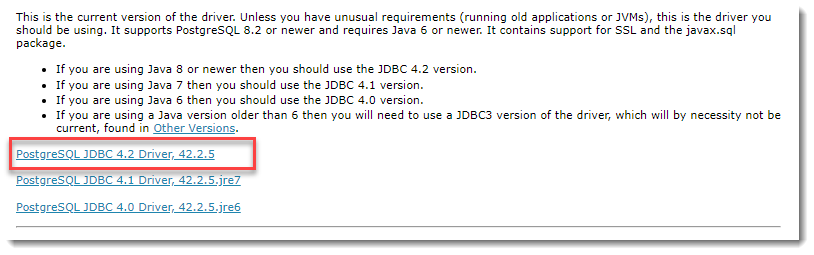
Visit http://jdbc.postgresql.org/download.html to download the latest PostgreSQL JDBC Driver.
2. JDBC Connection
2.1 Make a connection to the PostgreSQL database.
JDBCExample.java
import java.sql.Connection;
import java.sql.DriverManager;
import java.sql.SQLException;

public class JDBCExample {

    public static void main(String[] args) {

		// https://docs.oracle.com/javase/8/docs/api/java/sql/package-summary.html#package.description
        // auto java.sql.Driver discovery -- no longer need to load a java.sql.Driver class via Class.forName

        // register JDBC driver, optional, since java 1.6
        /*try {
            Class.forName("org.postgresql.Driver");
        } catch (ClassNotFoundException e) {
            e.printStackTrace();
        }*/

        // auto close connection
        try (Connection conn = DriverManager.getConnection(
                "jdbc:postgresql://127.0.0.1:5432/test", "postgres", "password")) {

            if (conn != null) {
                System.out.println("Connected to the database!");
            } else {
                System.out.println("Failed to make connection!");
            }

        } catch (SQLException e) {
            System.err.format("SQL State: %s\n%s", e.getSQLState(), e.getMessage());
        } catch (Exception e) {
            e.printStackTrace();
        }

    }
}
Output, No driver?
> javac JDBCExample.java

> java JDBCExample
SQL State: 08001
No suitable driver found for jdbc:postgresql://127.0.0.1:5432/test
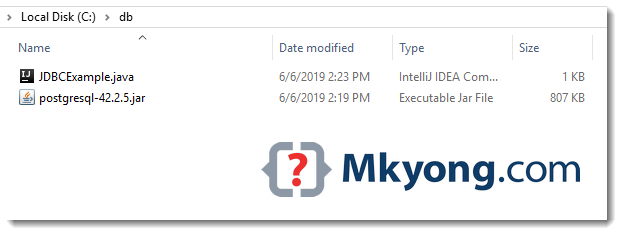
To run it with java command, we need to load the PostgreSQL JDBC driver manually. Assume everything is stored in the c:\db folder, run it again with -cp option.
> java -cp "c:\db\postgresql-42.2.5.jar;c:\db" JDBCExample
Connected to the database!
3. Maven
The PostgreSQL JDBC driver is available in the Maven central repository.
pom.xml
	<dependency>
		<groupId>org.postgresql</groupId>
		<artifactId>postgresql</artifactId>
		<version>42.2.5</version>
	</dependency>
4. JDBC Select
4.1 Another JDBC example to get all rows from a table.
JDBCExample2.java
package com.mkyong.jdbc;

import com.mkyong.jdbc.model.Employee;

import java.math.BigDecimal;
import java.sql.*;
import java.util.ArrayList;
import java.util.List;

public class JDBCExample2 {

    public static void main(String[] args) {

        List<Employee> result = new ArrayList<>();

        String SQL_SELECT = "Select * from EMPLOYEE";

        // auto close connection and preparedStatement
        try (Connection conn = DriverManager.getConnection(
                "jdbc:postgresql://127.0.0.1:5432/test", "postgres", "password");
             PreparedStatement preparedStatement = conn.prepareStatement(SQL_SELECT)) {

            ResultSet resultSet = preparedStatement.executeQuery();

            while (resultSet.next()) {

                long id = resultSet.getLong("ID");
                String name = resultSet.getString("NAME");
                BigDecimal salary = resultSet.getBigDecimal("SALARY");
                Timestamp createdDate = resultSet.getTimestamp("CREATED_DATE");

                Employee obj = new Employee();
                obj.setId(id);
                obj.setName(name);
                obj.setSalary(salary);
                // Timestamp -> LocalDateTime
                obj.setCreatedDate(createdDate.toLocalDateTime());

                result.add(obj);

            }
            result.forEach(x -> System.out.println(x));

        } catch (SQLException e) {
            System.err.format("SQL State: %s\n%s", e.getSQLState(), e.getMessage());
        } catch (Exception e) {
            e.printStackTrace();
        }

    }

}
Employee.java
package com.mkyong.jdbc.model;

import java.math.BigDecimal;
import java.time.LocalDateTime;

public class Employee {

    private Long id;
    private String name;
    private BigDecimal salary;
    private LocalDateTime createdDate;

    //...
}
Table definition.
CREATE TABLE EMPLOYEE
(
    ID serial,
    NAME varchar(100) NOT NULL,
    SALARY numeric(15, 2) NOT NULL,
    CREATED_DATE timestamp with time zone NOT NULL DEFAULT CURRENT_TIMESTAMP
    PRIMARY KEY (ID)
);
Download Source Code
$ git clone https://github.com/mkyong/java-jdbc.git

Hi!
Your code return this line to me:
“If you reach this line, please email me by telling how you do it?”
I just chage the address to:
jdbc:postgresql://192.168.0.1:6000/comecont”,”xgest”, “qwerty”
and that return the error…
Connection refused. Check that the hostname and port are correct and that the postmaster is accepting TCP/IP connections.
Please reply to my email. Thanks!
Why don’t people “READ” error messages these days… ?
Postgres is telling you that you are trying to connect to database that is not there or is connecting to a database you are not allowed to. Check these things…
Posgres database is running, i.e. you have started the service and
Does the database comecont exist?
Does 192.168.0.1 exist?
Does 192.168.0.1 accept requests via TCP/IP (the net) on port 6000?
Has the firewall has accepted you as a trusted zone? (e.g. the portmaster)
Have added postgreSQL JDBC driver, and also in PostGreSQL.app running in the background and createdb mkyong, but it is still reporting error of:
org.postgresql.util.PSQLException: FATAL: role “mkyong” does not exist
at org.postgresql.core.v3.ConnectionFactoryImpl.readStartupMessages(ConnectionFactoryImpl.java:691)
at org.postgresql.core.v3.ConnectionFactoryImpl.openConnectionImpl(ConnectionFactoryImpl.java:207)
at org.postgresql.core.ConnectionFactory.openConnection(ConnectionFactory.java:65)
at org.postgresql.jdbc2.AbstractJdbc2Connection.(AbstractJdbc2Connection.java:156)
at org.postgresql.jdbc3.AbstractJdbc3Connection.(AbstractJdbc3Connection.java:35)
at org.postgresql.jdbc3g.AbstractJdbc3gConnection.(AbstractJdbc3gConnection.java:22)
at org.postgresql.jdbc4.AbstractJdbc4Connection.(AbstractJdbc4Connection.java:47)
at org.postgresql.jdbc4.Jdbc4Connection.(Jdbc4Connection.java:30)
at org.postgresql.Driver.makeConnection(Driver.java:414)
at org.postgresql.Driver.connect(Driver.java:282)
at java.sql.DriverManager.getConnection(DriverManager.java:664)
at java.sql.DriverManager.getConnection(DriverManager.java:247)
at JDBCExample.main(JDBCExample.java:31)
Yes, you need to create the table manually.
when i run it using the cmd it gives the following error:
could not find or load main class for JDBCExample
and when i use JCreator to run it, it gives the following error:
Usage: java [-options] class [args…]
(to execute a class)
or java [-options] -jar jarfile [args…]
(to execute a jar file)…
…………………..
set the classpath
Assume .java and the jdbc driver are stored in
c:\dbCompile
javac c:\db\JDBCExample.javaRun
java -cp "c:\db\postgresql-42.2.5.jar;c:\db" JDBCExampleYou need to compile your java file to get a class file. Use javac from JDK to do so.
} catch (SQLException e) {
System.out.println(“Connection Failed! Check output console”);
e.printStackTrace();
return;
}
I canvot get what this part of the code does ,do you mind explain it in more detail for me to understand
it just print any SQL exception error messages…
When the Java application is deployed as a JAR in the Linux environment then the error is showing below, however, the same code is working in Windows machine and giving the correct data from the books table.
SQL State: 42P01
ERROR: relation “myschema.books” does not exist
please provide the solution.
my query string is:
String SQL_SELECT = “SELECT * FROM myschema.books”;
Good article, thanks
If I run TransactionExample.java I get error “org.postgresql.util.PSQLException: No value specified for parameter 1.” what I have to do?
what is meaning of this error exception in thread “main” org.postgresql.util.PSQLException :error: relation “movie” does not exist
I am getting below error while running in intellij.
SQL State: 08001
No suitable driver found for jdbc:postgresql
Missing dependency, for example:
Maven:
https://mvnrepository.com/artifact/org.postgresql/postgresql/42.2.18
Add it in pom.xml file
top
Hello Mkyong,
Hope you are doing well.
Here I am working on one of the android application which connects database without any API.
I successfully connected connection with database as per your code explanation.
Sample works proper on android 8.0 and newer versions but It is not working on lower versions. I also added compile options to JAVA 1.8 but still I am getting below error in lower devices.
Error:
Caused by: java.lang.ClassNotFoundException: Didn’t find class “java.time.Duration” on path: DexPathList[[zip file “/data/app/com.capermint.appnavdemo-2/base.apk”],nativeLibraryDirectories=[/data/app/com.capermint.appnavdemo-2/lib/arm64, /vendor/lib64, /system/lib64]]
Caused by: java.lang.NoClassDefFoundError: Class not found using the boot class loader; no stack trace available
Android Code:
launch {
var retval = “”
try {
Class.forName(“org.postgresql.Driver”)
} catch (e: ClassNotFoundException) {
e.printStackTrace()
retval = e.toString()
}
var conn: Connection? = null
val url = “jdbc:postgresql://myip:port/dbname”
val user = “username”
val password = “password”
try {
DriverManager.setLoginTimeout(5)
conn = DriverManager.getConnection(url, user, password)
Logger.d(“Connected to the PostgreSQL server successfully.”)
connectionToLiveData.postValue(true)
conn.close()
} catch (e: SQLException) {
e.printStackTrace()
Logger.d(“PostgreSQL sqlState : ” + e.sqlState)
Logger.d(“PostgreSQL errorCode : ” + e.errorCode)
connectionToLiveData.postValue(false)
}
}
Thanks
Thanks!!
Thanks! A very clear tutorial for a beginner!
Thanks!
Please add PostgreSQL JDBC Driver in your Classpath
how to get solution for this??
Please add PostgreSQL JDBC Driver in your Classpath
how to solve this?/
Please add PostgreSQL JDBC Driver in your Classpath
how to give -cp in ubuntu….????
Thanks men, your info help me more than another pages.
Excellent Work .. thanks much.. Keep up..
Anyone help me! I cannot query some data from table.
I have a table named FOO in PostgrelSQL. In java I qurey: select * from FOO. Then it make error “ERROR: relation “FOO” does not exist”. Sorry for my English
thank to much for your article.
Hi Mkyong. I’m building web service java using server tomcat and apache axis 2. But when i connect to postgresql database, so it has an error: “java.lang.NoClassDefFoundError: org/postgresql/Driver” although i have built path jdbc postgresql library.
Could you tell me an advise to solve this error.
Thanks you so much!
Thank you so much. This is a very quick and easy tutorial. Thank you 🙂
This is possibly the best guide for connecting to Postgresql with JDBC.
If I can suggest a few things before this tutorial begins, a few lines on the setup within postgresql itself that are needed first but not obvious how to do them. I will also include how I did each step, but I did it a crude way — sorry!
-create user with password (I created the user, then altered it to add a password)
-create database with user access (I created the database with owner = user)
-configure postgresql to allow user access through the localhost (I edited pg_hba.conf in the postgresql data folder. There, I changed the ‘host’ line entry: ‘ident’ to ‘md5’)
Much thanks and hope these first steps are useful to get you started!
Muchas Gracias, Bendiciones 🙂
Thanks a lot, Blessings on you 🙂
Thanks!
Mr mkyong, I have an android app that will connect to the Postgresql and when i try your code it says that my jdbc driver is registered but when i connect it to the postgre database, it can’t connect ..why?? Please help
im using eclipse. Is it about the connection?
thank you very much!
Nice and simple explaination, thanks!