
In this article, we will show you how to send an email via Gmail SMTP server.
To send email in Java, we need JavaMail
pom.xml
	<dependency>
		<groupId>com.sun.mail</groupId>
		<artifactId>javax.mail</artifactId>
		<version>1.6.2</version>
	</dependency>
1. Gmail SMTP via TLS
SMTP = smtp.gmail.com
Port = 587
SendEmailTLS.java
package com.mkyong;

import javax.mail.*;
import javax.mail.internet.InternetAddress;
import javax.mail.internet.MimeMessage;
import java.util.Properties;

public class SendEmailTLS {

    public static void main(String[] args) {

        final String username = "[email protected]";
        final String password = "password";

        Properties prop = new Properties();
		prop.put("mail.smtp.host", "smtp.gmail.com");
        prop.put("mail.smtp.port", "587");
        prop.put("mail.smtp.auth", "true");
        prop.put("mail.smtp.starttls.enable", "true"); //TLS

        Session session = Session.getInstance(prop,
                new javax.mail.Authenticator() {
                    protected PasswordAuthentication getPasswordAuthentication() {
                        return new PasswordAuthentication(username, password);
                    }
                });

        try {

            Message message = new MimeMessage(session);
            message.setFrom(new InternetAddress("[email protected]"));
            message.setRecipients(
                    Message.RecipientType.TO,
                    InternetAddress.parse("[email protected], [email protected]")
            );
            message.setSubject("Testing Gmail TLS");
            message.setText("Dear Mail Crawler,"
                    + "\n\n Please do not spam my email!");

            Transport.send(message);

            System.out.println("Done");

        } catch (MessagingException e) {
            e.printStackTrace();
        }
    }

}
2. Gmail via SSL
2.1 The logic is the same, just pass in different properties values.
SMTP = smtp.gmail.com
Port = 465
SendEmailSSL.java
package com.mkyong;

import javax.mail.*;
import javax.mail.internet.InternetAddress;
import javax.mail.internet.MimeMessage;
import java.util.Properties;

public class SendEmailSSL {

    public static void main(String[] args) {

        final String username = "[email protected]";
        final String password = "password";

        Properties prop = new Properties();
		prop.put("mail.smtp.host", "smtp.gmail.com");
        prop.put("mail.smtp.port", "465");
        prop.put("mail.smtp.auth", "true");
        prop.put("mail.smtp.socketFactory.port", "465");
        prop.put("mail.smtp.socketFactory.class", "javax.net.ssl.SSLSocketFactory");

        Session session = Session.getInstance(prop,
                new javax.mail.Authenticator() {
                    protected PasswordAuthentication getPasswordAuthentication() {
                        return new PasswordAuthentication(username, password);
                    }
                });

        try {

            Message message = new MimeMessage(session);
            message.setFrom(new InternetAddress("[email protected]"));
            message.setRecipients(
                    Message.RecipientType.TO,
                    InternetAddress.parse("[email protected], [email protected]")
            );
            message.setSubject("Testing Gmail SSL");
            message.setText("Dear Mail Crawler,"
                    + "\n\n Please do not spam my email!");

            Transport.send(message);

            System.out.println("Done");

        } catch (MessagingException e) {
            e.printStackTrace();
        }
    }

}
3. Application-specific password required
3.1 If 2-Step verification is ON. We will hits the following error message :
Caused by: javax.mail.AuthenticationFailedException: 534-5.7.9 Application-specific password required. Learn more at
534 5.7.9  https://support.google.com/mail/?p=InvalidSecondFactor - gsmtp

	at com.sun.mail.smtp.SMTPTransport$Authenticator.authenticate(SMTPTransport.java:965)
	at com.sun.mail.smtp.SMTPTransport.authenticate(SMTPTransport.java:876)
	at com.sun.mail.smtp.SMTPTransport.protocolConnect(SMTPTransport.java:780)
	at javax.mail.Service.connect(Service.java:388)
	at javax.mail.Service.connect(Service.java:246)
	at javax.mail.Service.connect(Service.java:195)
	at javax.mail.Transport.send0(Transport.java:254)
	at javax.mail.Transport.send(Transport.java:124)
	at com.mkyong.calculator.SendEmail.main(SendEmail.java:41)
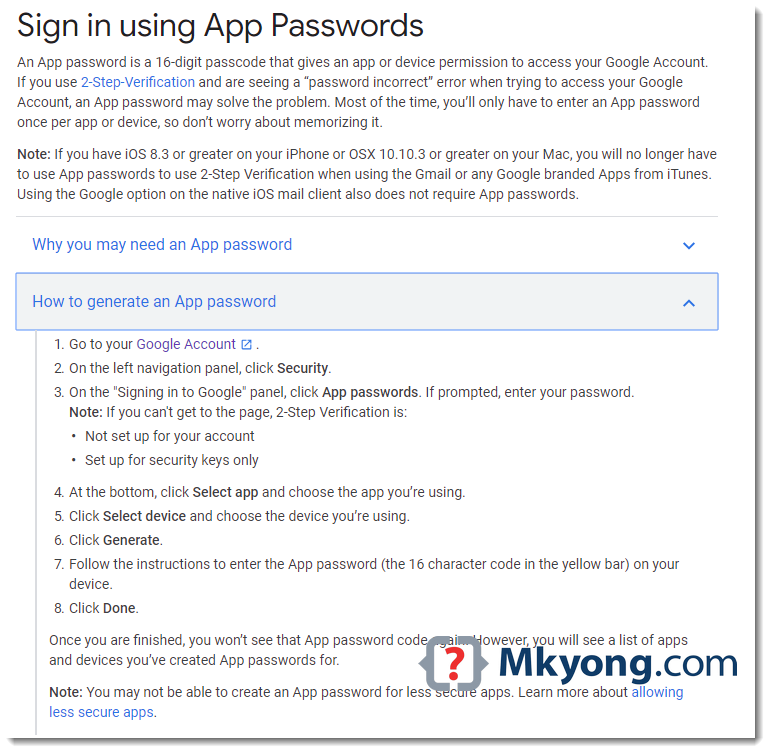
3.2 To fix it, follow this guide to create an App Password
URL : https://support.google.com/accounts/answer/185833?p=InvalidSecondFactor
URL : https://myaccount.google.com/security
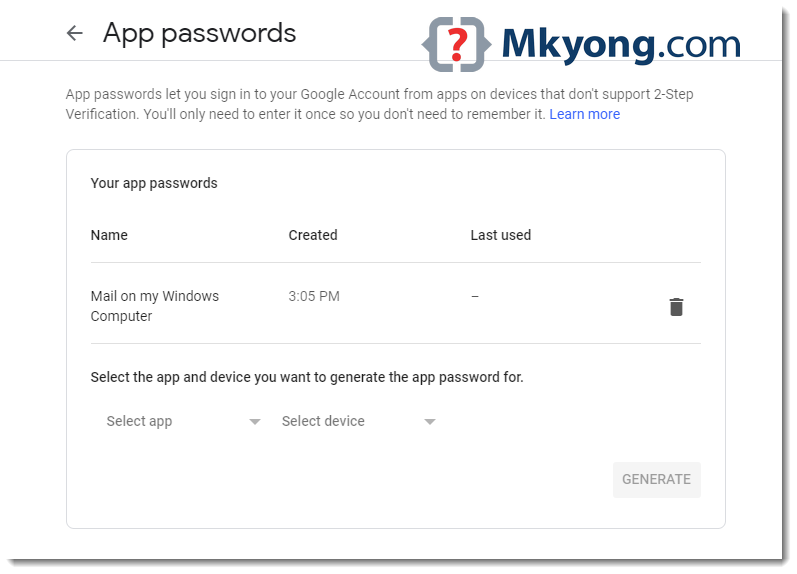
No difference in code, just puts the newly generated app password instead.
SendEmail.java
package com.mkyong;

import javax.mail.*;
import javax.mail.internet.InternetAddress;
import javax.mail.internet.MimeMessage;
import java.util.Properties;

public class SendEmail {

    public static void main(String[] args) {

        final String username = "[email protected]";
        final String password = "puts your app password here"; // update here

		// same code...
    }

}
java.net.UnknownHostException: smtp.gmail.com
Make sure firewall or proxy server didn’t block this
Make sure firewall or proxy server didn’t block this
smtp.gmail.com

Exception in thread “main” java.lang.RuntimeException: javax.mail.AuthenticationFailedException: 534-5.7.14 Please log in via your web browser and
534-5.7.14 then try again.
534-5.7.14 Learn more at
534 5.7.14 https://support.google.com/mail/answer/78754 y66sm6467856pfa.54 – gsmtp
at com.jack.javaScrapper.SendMailSSL.main(SendMailSSL.java:44)
Caused by: javax.mail.AuthenticationFailedException: 534-5.7.14 Please log in via your web browser and
534-5.7.14 then try again.
534-5.7.14 Learn more at
534 5.7.14 https://support.google.com/mail/answer/78754 y66sm6467856pfa.54 – gsmtp
at com.sun.mail.smtp.SMTPTransport$Authenticator.authenticate(SMTPTransport.java:809)
at com.sun.mail.smtp.SMTPTransport.authenticate(SMTPTransport.java:752)
at com.sun.mail.smtp.SMTPTransport.protocolConnect(SMTPTransport.java:669)
at javax.mail.Service.connect(Service.java:317)
at javax.mail.Service.connect(Service.java:176)
at javax.mail.Service.connect(Service.java:125)
at javax.mail.Transport.send0(Transport.java:194)
at javax.mail.Transport.send(Transport.java:124)
at com.jack.javaScrapper.SendMailSSL.main(SendMailSSL.java:39)
javax.mail.MessagingException: Could not connect to SMTP host: smtp.gmail.com, port: 587;
nested exception is:
java.net.ConnectException: Connection timed out: connect
i don’t know why..
Hi…I have java SE, Where may I download javaee.jar and mail.jar? Also the package com.mkyong.common… Thanks a lot..Wald
Can’tru showing this error please help me
run:
Exception in thread “main” java.lang.RuntimeException: javax.mail.MessagingException: Could not convert socket to TLS;
nested exception is:
javax.net.ssl.SSLHandshakeException: Remote host closed connection during handshake
at src.SendMailTLS.main(SendMailTLS.java:54)
Caused by: javax.mail.MessagingException: Could not convert socket to TLS;
nested exception is:
javax.net.ssl.SSLHandshakeException: Remote host closed connection during handshake
at com.sun.mail.smtp.SMTPTransport.startTLS(SMTPTransport.java:1918)
at com.sun.mail.smtp.SMTPTransport.protocolConnect(SMTPTransport.java:652)
at javax.mail.Service.connect(Service.java:317)
at javax.mail.Service.connect(Service.java:176)
at javax.mail.Service.connect(Service.java:125)
at javax.mail.Transport.send0(Transport.java:194)
at javax.mail.Transport.send(Transport.java:124)
at src.SendMailTLS.main(SendMailTLS.java:49)
Caused by: javax.net.ssl.SSLHandshakeException: Remote host closed connection during handshake
at sun.security.ssl.SSLSocketImpl.readRecord(SSLSocketImpl.java:992)
at sun.security.ssl.SSLSocketImpl.performInitialHandshake(SSLSocketImpl.java:1375)
at sun.security.ssl.SSLSocketImpl.startHandshake(SSLSocketImpl.java:1403)
at sun.security.ssl.SSLSocketImpl.startHandshake(SSLSocketImpl.java:1387)
at com.sun.mail.util.SocketFetcher.configureSSLSocket(SocketFetcher.java:548)
at com.sun.mail.util.SocketFetcher.startTLS(SocketFetcher.java:485)
at com.sun.mail.smtp.SMTPTransport.startTLS(SMTPTransport.java:1913)
… 7 more
Caused by: java.io.EOFException: SSL peer shut down incorrectly
at sun.security.ssl.InputRecord.read(InputRecord.java:505)
at sun.security.ssl.SSLSocketImpl.readRecord(SSLSocketImpl.java:973)
… 13 more
Java Result: 1
BUILD SUCCESSFUL (total time: 27 seconds)
There is solution.
Head over to Account Security Settings (https://www.google.com/settings/security/lesssecureapps) and enable “Access for less secure apps”, this allows you to use the google smtp for clients other than the official ones.
Nice one
After reducing security level
i am able to authenticate
Thanks!
It worked for me!
It doesn’t work for me. It sticks on Transport.send(message). Could someone help me?
Do you have any error message?
I have the same issue….
com.sun.mail.util.MailConnectException: Couldn’t connect to host, port: smtp.gmail.com, 587; timeout -1;
nested exception is:
java.net.ConnectException: Connection refused: connect
at com.sun.mail.smtp.SMTPTransport.openServer(SMTPTransport.java:2209)
at com.sun.mail.smtp.SMTPTransport.protocolConnect(SMTPTransport.java:740)
at javax.mail.Service.connect(Service.java:388)
… the errors log goes on
me too the same probleme
how can i Make sure firewall or proxy server didn’t block this smtp.gmail.com ???
have you found the solution if yes could you tell me how I got the same error
I copy and pasted the above code and changed the email address to mine, and the password to my password
Facing issue with the code. It gives below given exception. Please suggest solution for the same :
javax.mail.AuthenticationFailedException
at javax.mail.Service.connect(Service.java:306)
at javax.mail.Service.connect(Service.java:156)
at javax.mail.Service.connect(Service.java:105)
at javax.mail.Transport.send0(Transport.java:168)
at javax.mail.Transport.send(Transport.java:98)
at com.bullbeardevice.util.MailSender.sendMail(MailSender.java:65)
I got email from Google says: February 15, 2021 – Access to LSAs will be turned off for all G Suite accounts.
I have to turn on LSA, and then connect Gmail SMTP server smtp.gmail.com for sending email from JAVA program using JavaMail.
Question: will this Google’s change make “connect Gmail SMTP server smtp.gmail.com using JavaMail” impossible? and we hav eto change to use Gmail API for just send an email? Thanks!
Excellent!!! It works for me!! (The second one)
I am getting following problem and code is not running :
javax.mail.MessagingException: Could not convert socket to TLS;
nested exception is:
javax.net.ssl.SSLHandshakeException: sun.security.validator.ValidatorException: PKIX path building failed: sun.security.provider.certpath.SunCertPathBuilderException: unable to find valid certification path to requested target
at com.sun.mail.smtp.SMTPTransport.startTLS(SMTPTransport.java:1907)
at com.sun.mail.smtp.SMTPTransport.protocolConnect(SMTPTransport.java:666)
at javax.mail.Service.connect(Service.java:317)
at javax.mail.Service.connect(Service.java:176)
at javax.mail.Service.connect(Service.java:125)
at javax.mail.Transport.send0(Transport.java:194)
at javax.mail.Transport.send(Transport.java:124)
at module.Mail.main(Mail.java:42)
Caused by: javax.net.ssl.SSLHandshakeException: sun.security.validator.ValidatorException: PKIX path building failed: sun.security.provider.certpath.SunCertPathBuilderException: unable to find valid certification path to requested target
at sun.security.ssl.Alerts.getSSLException(Unknown Source)
at sun.security.ssl.SSLSocketImpl.fatal(Unknown Source)
at sun.security.ssl.Handshaker.fatalSE(Unknown Source)
at sun.security.ssl.Handshaker.fatalSE(Unknown Source)
at sun.security.ssl.ClientHandshaker.serverCertificate(Unknown Source)
at sun.security.ssl.ClientHandshaker.processMessage(Unknown Source)
at sun.security.ssl.Handshaker.processLoop(Unknown Source)
at sun.security.ssl.Handshaker.process_record(Unknown Source)
at sun.security.ssl.SSLSocketImpl.readRecord(Unknown Source)
at sun.security.ssl.SSLSocketImpl.performInitialHandshake(Unknown Source)
at sun.security.ssl.SSLSocketImpl.startHandshake(Unknown Source)
at sun.security.ssl.SSLSocketImpl.startHandshake(Unknown Source)
at com.sun.mail.util.SocketFetcher.configureSSLSocket(SocketFetcher.java:549)
at com.sun.mail.util.SocketFetcher.startTLS(SocketFetcher.java:486)
at com.sun.mail.smtp.SMTPTransport.startTLS(SMTPTransport.java:1902)
… 7 more
Caused by: sun.security.validator.ValidatorException: PKIX path building failed: sun.security.provider.certpath.SunCertPathBuilderException: unable to find valid certification path to requested target
at sun.security.validator.PKIXValidator.doBuild(Unknown Source)
at sun.security.validator.PKIXValidator.engineValidate(Unknown Source)
at sun.security.validator.Validator.validate(Unknown Source)
at sun.security.ssl.X509TrustManagerImpl.validate(Unknown Source)
at sun.security.ssl.X509TrustManagerImpl.checkTrusted(Unknown Source)
at sun.security.ssl.X509TrustManagerImpl.checkServerTrusted(Unknown Source)
… 18 more
Caused by: sun.security.provider.certpath.SunCertPathBuilderException: unable to find valid certification path to requested target
at sun.security.provider.certpath.SunCertPathBuilder.engineBuild(Unknown Source)
at java.security.cert.CertPathBuilder.build(Unknown Source)
… 24 more
high possible your antivirus blocked it
now i am getting same exception in production ….. any Solution for this ??
make sure to use the latest mail jar file
I get the following error here: Transport.send(message);
Caused by: java.lang.NoClassDefFoundError: sun/security/ssl/EllipticCurvesExtension
at sun.security.ssl.Handshaker.getActiveProtocols(Handshaker.java:793)
at sun.security.ssl.Handshaker.activate(Handshaker.java:549)
at sun.security.ssl.SSLSocketImpl.kickstartHandshake(SSLSocketImpl.java:1492)
at sun.security.ssl.SSLSocketImpl.performInitialHandshake(SSLSocketImpl.java:1361)
at sun.security.ssl.SSLSocketImpl.startHandshake(SSLSocketImpl.java:1413)
at sun.security.ssl.SSLSocketImpl.startHandshake(SSLSocketImpl.java:1397)
at com.sun.mail.util.SocketFetcher.configureSSLSocket(SocketFetcher.java:620)
at com.sun.mail.util.SocketFetcher.startTLS(SocketFetcher.java:547)
at com.sun.mail.smtp.SMTPTransport.startTLS(SMTPTransport.java:2150)
at com.sun.mail.smtp.SMTPTransport.protocolConnect(SMTPTransport.java:752)
at javax.mail.Service.connect(Service.java:388)
at javax.mail.Service.connect(Service.java:246)
at javax.mail.Service.connect(Service.java:195)
at javax.mail.Transport.send0(Transport.java:254)
at javax.mail.Transport.send(Transport.java:124)
The TLS connection worked like a charm for a long time for me, but now I got a javax.mail.MessagingException: 530 5.7.0 Must issue a STARTTLS command first.
The solution was to add props.put(“mail.smtp.EnableSSL.enable”, “true”);
am getting this error:
javax.mail.AuthenticationFailedException: 534-5.7.14 Please log in via your web browser and
534-5.7.14 then try again.
534-5.7.14 Learn more at
534 5.7.14 https://support.google.com/mail/answer/78754 i8sm12193467pao.26 – gsmtp
at com.sun.mail.smtp.SMTPTransport$Authenticator.authenticate(SMTPTransport.java:826)
at com.sun.mail.smtp.SMTPTransport.authenticate(SMTPTransport.java:761)
at com.sun.mail.smtp.SMTPTransport.protocolConnect(SMTPTransport.java:685)
at javax.mail.Service.connect(Service.java:317)
at javax.mail.Service.connect(Service.java:176)
at javax.mail.Service.connect(Service.java:125)
at javax.mail.Transport.send0(Transport.java:194)
at javax.mail.Transport.send(Transport.java:124)
at com.mail.SendMail.main(SendMail.java:50)
You must turn on Allow Less Secure Passwords in your google settings at https://myaccount.google.com/security
If 2-Step verification is ON, you need to use App Password.
i’m facing error in “protected PasswordAuthentication getPasswordAuthentication() ” and “PasswordAuthentication(username, password)” for above code gmail via TLS
the errors are
1)String cannot be converted to char[]
return new PasswordAuthentication(username, password);
2)getPasswordAuthentication() in cannot override getPasswordAuthentication() in Authenticator
protected PasswordAuthentication getPasswordAuthentication() {
Excellent article! I used SSL approach and able to send mail to gmail account. I was stuck in this for some time. Thanks for the help.
Hi,
you said you could success in send mail.
please can u send the which settings i have to do.
i used above ssl code but it gives exception i.e
# javax.mail.MessagingException: Unknown SMTP host: smtp.gmail.com;
# nested exception is:
# java.net.UnknownHostException: smtp.gmail.com
please send the details ,
thanks,
pandu.v
you’re welcome 🙂
i have to send a mail from seam application.i used above code but it gave one exception i.e below i give.please give solution
thanks,
java.net.UnknownHostException: smtp.gmail.com
04:46:42,407 ERROR [STDERR] javax.mail.MessagingException: Unknown SMTP host: smtp.gmail.com ;
nested exception is:
java.net.UnknownHostException: smtp.gmail.com
04:46:42,407 ERROR [STDERR] at com.sun.mail.smtp.SMTPTransport.openServer(SMTPTransport.java:1280)
04:46:42,407 ERROR [STDERR] at com.sun.mail.smtp.SMTPTransport.protocolConnect(SMTPTransport.java:370)
04:46:42,407 ERROR [STDERR] at javax.mail.Service.connect(Service.java:297)
04:46:42,407 ERROR [STDERR] at javax.mail.Service.connect(Service.java:156)
04:46:42,407 ERROR [STDERR] at javax.mail.Service.connect(Service.java:105)
04:46:42,407 ERROR [STDERR] at javax.mail.Transport.send0(Transport.java:168)
04:46:42,407 ERROR [STDERR] at javax.mail.Transport.send(Transport.java:98)
04:46:42,423 ERROR [STDERR] at com.infyz.streamline.manager.session.MailAction.forgotUser(MailAction.java:273)
04:46:42,423 ERROR [STDERR] at sun.reflect.NativeMethodAccessorImpl.invoke0(Native Method)
04:46:42,423 ERROR [STDERR] at sun.reflect.NativeMethodAccessorImpl.invoke(NativeMethodAccessorImpl.java:39)
04:46:42,423 ERROR [STDERR] at sun.reflect.DelegatingMethodAccessorImpl.invoke(DelegatingMethodAccessorImpl.java:25)
04:46:42,423 ERROR [STDERR] at java.lang.reflect.Method.invoke(Method.java:597)
04:46:42,423 ERROR [STDERR] at org.jboss.aop.joinpoint.MethodInvocation.invokeNext(MethodInvocation.java:112)
04:46:42,423 ERROR [STDERR] at org.jboss.ejb3.interceptor.InvocationContextImpl.proceed(InvocationContextImpl.java:166)
04:46:42,423 ERROR [STDERR] at org.jboss.seam.intercept.EJBInvocationContext.proceed(EJBInvocationContext.java:44)
I tried using TLS but it is giving me authentication error.
Caused by: javax.mail.AuthenticationFailedException: Error authenticating with server
at org.apache.geronimo.javamail.transport.smtp.SMTPConnection.protocolConnect(SMTPConnection.java:157)
at org.apache.geronimo.javamail.transport.smtp.SMTPTransport.protocolConnect(SMTPTransport.java:165)
at javax.mail.Service.connect(Service.java:388)
at javax.mail.Service.connect(Service.java:246)
at javax.mail.Service.connect(Service.java:195)
at javax.mail.Transport.send0(Transport.java:254)
at javax.mail.Transport.send(Transport.java:124)
Thanks mkyong bro it worked
I am getting following error
javax.net.ssl.SSLHandshakeException: No appropriate protocol (protocol is disabled or cipher suites are inappropriate)
I met this bug please help me!
Error: Unable to initialize main class javaapplication23.JavaApplication23
Caused by: java.lang.NoClassDefFoundError: javax/mail/MessagingException
C:\Users\HA NGUYEN\AppData\Local\NetBeans\Cache\12.3\executor-snippets\run.xml:111: The following error occurred while executing this line:
C:\Users\HA NGUYEN\AppData\Local\NetBeans\Cache\12.3\executor-snippets\run.xml:68: Java returned: 1
BUILD FAILED (total time: 0 seconds)
I used netbeans
Nice
Thanks!
Wow thank you!!!
is this work for linux device
Thank you very much!
Is there any way with which I will not be required to save the password in the backend? Or at least make it more secure if not remove it from the code?
Still works on 2020-May-25. I had to create the application password to get connected. If you haven’t made the application password yet and you are having trouble, check your application email [whatever account is attached to the ‘username’ getting passed into new PasswordAuthentication()], you might have a polite email from google that you might be getting hacking attempts with instructions on how to make the application password. You may need to turn on two-factor authentication to be able to generate one.
Hope this helps!
On Avast configuration Mail Shield disabling “Scan Outbound emails (SMTP)” , allowed me to have It working.
thanks for your code
Can you please tell how to add attachments also in mail(with code) in sendmailSSL
thanks for your code
Can you please tell how to add attachments also in mail(with code) in sendmailSSL
Thanks a lot!!! it solved my problem