
In this article, we will show you how to send an email via Gmail SMTP server.
To send email in Java, we need JavaMail
pom.xml
	<dependency>
		<groupId>com.sun.mail</groupId>
		<artifactId>javax.mail</artifactId>
		<version>1.6.2</version>
	</dependency>
1. Gmail SMTP via TLS
SMTP = smtp.gmail.com
Port = 587
SendEmailTLS.java
package com.mkyong;

import javax.mail.*;
import javax.mail.internet.InternetAddress;
import javax.mail.internet.MimeMessage;
import java.util.Properties;

public class SendEmailTLS {

    public static void main(String[] args) {

        final String username = "[email protected]";
        final String password = "password";

        Properties prop = new Properties();
		prop.put("mail.smtp.host", "smtp.gmail.com");
        prop.put("mail.smtp.port", "587");
        prop.put("mail.smtp.auth", "true");
        prop.put("mail.smtp.starttls.enable", "true"); //TLS

        Session session = Session.getInstance(prop,
                new javax.mail.Authenticator() {
                    protected PasswordAuthentication getPasswordAuthentication() {
                        return new PasswordAuthentication(username, password);
                    }
                });

        try {

            Message message = new MimeMessage(session);
            message.setFrom(new InternetAddress("[email protected]"));
            message.setRecipients(
                    Message.RecipientType.TO,
                    InternetAddress.parse("[email protected], [email protected]")
            );
            message.setSubject("Testing Gmail TLS");
            message.setText("Dear Mail Crawler,"
                    + "\n\n Please do not spam my email!");

            Transport.send(message);

            System.out.println("Done");

        } catch (MessagingException e) {
            e.printStackTrace();
        }
    }

}
2. Gmail via SSL
2.1 The logic is the same, just pass in different properties values.
SMTP = smtp.gmail.com
Port = 465
SendEmailSSL.java
package com.mkyong;

import javax.mail.*;
import javax.mail.internet.InternetAddress;
import javax.mail.internet.MimeMessage;
import java.util.Properties;

public class SendEmailSSL {

    public static void main(String[] args) {

        final String username = "[email protected]";
        final String password = "password";

        Properties prop = new Properties();
		prop.put("mail.smtp.host", "smtp.gmail.com");
        prop.put("mail.smtp.port", "465");
        prop.put("mail.smtp.auth", "true");
        prop.put("mail.smtp.socketFactory.port", "465");
        prop.put("mail.smtp.socketFactory.class", "javax.net.ssl.SSLSocketFactory");

        Session session = Session.getInstance(prop,
                new javax.mail.Authenticator() {
                    protected PasswordAuthentication getPasswordAuthentication() {
                        return new PasswordAuthentication(username, password);
                    }
                });

        try {

            Message message = new MimeMessage(session);
            message.setFrom(new InternetAddress("[email protected]"));
            message.setRecipients(
                    Message.RecipientType.TO,
                    InternetAddress.parse("[email protected], [email protected]")
            );
            message.setSubject("Testing Gmail SSL");
            message.setText("Dear Mail Crawler,"
                    + "\n\n Please do not spam my email!");

            Transport.send(message);

            System.out.println("Done");

        } catch (MessagingException e) {
            e.printStackTrace();
        }
    }

}
3. Application-specific password required
3.1 If 2-Step verification is ON. We will hits the following error message :
Caused by: javax.mail.AuthenticationFailedException: 534-5.7.9 Application-specific password required. Learn more at
534 5.7.9  https://support.google.com/mail/?p=InvalidSecondFactor - gsmtp

	at com.sun.mail.smtp.SMTPTransport$Authenticator.authenticate(SMTPTransport.java:965)
	at com.sun.mail.smtp.SMTPTransport.authenticate(SMTPTransport.java:876)
	at com.sun.mail.smtp.SMTPTransport.protocolConnect(SMTPTransport.java:780)
	at javax.mail.Service.connect(Service.java:388)
	at javax.mail.Service.connect(Service.java:246)
	at javax.mail.Service.connect(Service.java:195)
	at javax.mail.Transport.send0(Transport.java:254)
	at javax.mail.Transport.send(Transport.java:124)
	at com.mkyong.calculator.SendEmail.main(SendEmail.java:41)
3.2 To fix it, follow this guide to create an App Password
URL : https://support.google.com/accounts/answer/185833?p=InvalidSecondFactor
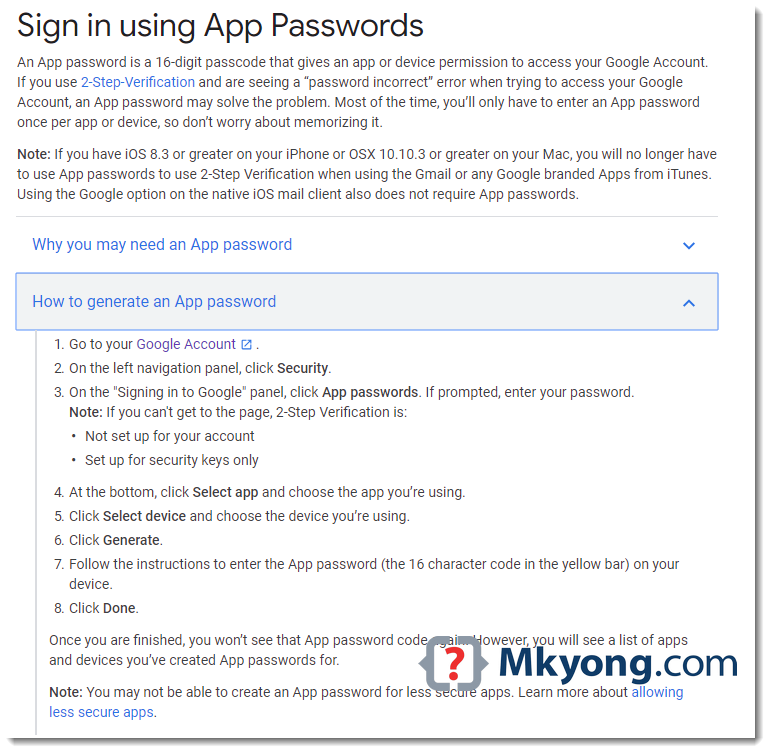
URL : https://myaccount.google.com/security
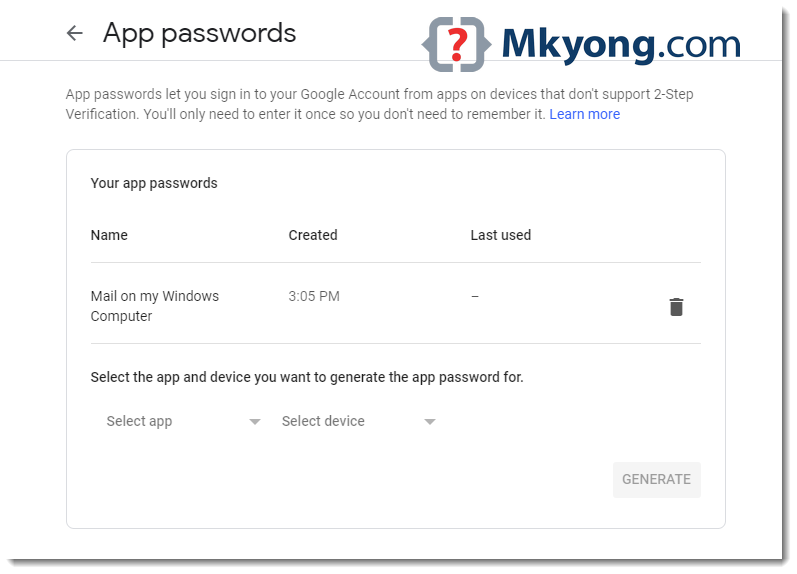
No difference in code, just puts the newly generated app password instead.
SendEmail.java
package com.mkyong;

import javax.mail.*;
import javax.mail.internet.InternetAddress;
import javax.mail.internet.MimeMessage;
import java.util.Properties;

public class SendEmail {

    public static void main(String[] args) {

        final String username = "[email protected]";
        final String password = "puts your app password here"; // update here

		// same code...
    }

}
java.net.UnknownHostException: smtp.gmail.com
Make sure firewall or proxy server didn’t block this
Make sure firewall or proxy server didn’t block this
smtp.gmail.com

I tried using TLS but it is giving me authentication error.
Caused by: javax.mail.AuthenticationFailedException: Error authenticating with server
at org.apache.geronimo.javamail.transport.smtp.SMTPConnection.protocolConnect(SMTPConnection.java:157)
at org.apache.geronimo.javamail.transport.smtp.SMTPTransport.protocolConnect(SMTPTransport.java:165)
at javax.mail.Service.connect(Service.java:388)
at javax.mail.Service.connect(Service.java:246)
at javax.mail.Service.connect(Service.java:195)
at javax.mail.Transport.send0(Transport.java:254)
at javax.mail.Transport.send(Transport.java:124)
Thanks mkyong bro it worked
I am getting following error
javax.net.ssl.SSLHandshakeException: No appropriate protocol (protocol is disabled or cipher suites are inappropriate)
I met this bug please help me!
Error: Unable to initialize main class javaapplication23.JavaApplication23
Caused by: java.lang.NoClassDefFoundError: javax/mail/MessagingException
C:\Users\HA NGUYEN\AppData\Local\NetBeans\Cache\12.3\executor-snippets\run.xml:111: The following error occurred while executing this line:
C:\Users\HA NGUYEN\AppData\Local\NetBeans\Cache\12.3\executor-snippets\run.xml:68: Java returned: 1
BUILD FAILED (total time: 0 seconds)
I used netbeans
Nice
Thanks!
Wow thank you!!!
is this work for linux device
Thank you very much!
I got email from Google says: February 15, 2021 – Access to LSAs will be turned off for all G Suite accounts.
I have to turn on LSA, and then connect Gmail SMTP server smtp.gmail.com for sending email from JAVA program using JavaMail.
Question: will this Google’s change make “connect Gmail SMTP server smtp.gmail.com using JavaMail” impossible? and we hav eto change to use Gmail API for just send an email? Thanks!
I used your code in for a test. I have the dependency in the pom.xml, so I ran it from Intellij IDE, it worked well. But after I created the jar file, then all the dependency classes were not included inside the jar file. It did not happen to the other dependencies. Do you have any idea why the dependency classes not included?
thank you,
Is there any way with which I will not be required to save the password in the backend? Or at least make it more secure if not remove it from the code?
Still works on 2020-May-25. I had to create the application password to get connected. If you haven’t made the application password yet and you are having trouble, check your application email [whatever account is attached to the ‘username’ getting passed into new PasswordAuthentication()], you might have a polite email from google that you might be getting hacking attempts with instructions on how to make the application password. You may need to turn on two-factor authentication to be able to generate one.
Hope this helps!
On Avast configuration Mail Shield disabling “Scan Outbound emails (SMTP)” , allowed me to have It working.
thanks for your code
Can you please tell how to add attachments also in mail(with code) in sendmailSSL
thanks for your code
Can you please tell how to add attachments also in mail(with code) in sendmailSSL
Thanks a lot!!! it solved my problem
Hi mkyong,
I get error javax.mail.MassagingException: can’t find local email address.
Please give suggestions for this ASAP.
this is working for me thank you so much.
Thanks a lot Mkyong 🙂 ..Solution for “Caused by: javax.mail.AuthenticationFailedException: 534-5.7.9 Application-specific password required.” works for me.
When I deploy it project to sever it produces the following message “The origin server did not find a current representation for the target resource or is not willing to disclose that one exists.”. why? and how i can solve the problem even though i implement SpringBootServletInitializer in Main class.
It was exactly what I needed. Thank you so much!
I get the following error here: Transport.send(message);
Caused by: java.lang.NoClassDefFoundError: sun/security/ssl/EllipticCurvesExtension
at sun.security.ssl.Handshaker.getActiveProtocols(Handshaker.java:793)
at sun.security.ssl.Handshaker.activate(Handshaker.java:549)
at sun.security.ssl.SSLSocketImpl.kickstartHandshake(SSLSocketImpl.java:1492)
at sun.security.ssl.SSLSocketImpl.performInitialHandshake(SSLSocketImpl.java:1361)
at sun.security.ssl.SSLSocketImpl.startHandshake(SSLSocketImpl.java:1413)
at sun.security.ssl.SSLSocketImpl.startHandshake(SSLSocketImpl.java:1397)
at com.sun.mail.util.SocketFetcher.configureSSLSocket(SocketFetcher.java:620)
at com.sun.mail.util.SocketFetcher.startTLS(SocketFetcher.java:547)
at com.sun.mail.smtp.SMTPTransport.startTLS(SMTPTransport.java:2150)
at com.sun.mail.smtp.SMTPTransport.protocolConnect(SMTPTransport.java:752)
at javax.mail.Service.connect(Service.java:388)
at javax.mail.Service.connect(Service.java:246)
at javax.mail.Service.connect(Service.java:195)
at javax.mail.Transport.send0(Transport.java:254)
at javax.mail.Transport.send(Transport.java:124)
but in case of sending mail through jsp code these is not running , javax.mail.Session field create error whats the reason for it.
Can you introduce about send mail with RTF? I’ve tried to add content as text/rtf, but It didn’t work
hi I am getting the error :–javax.mail.MessagingException: Could not connect to SMTP host: smtp.gmail.com, port: 465;
nested exception is:
java.net.ConnectException: Connection timed out: connect
0ItEtJfKHMi udPrDzy3
9oO79nBpQJlyHf hnh5gIu HWi
hi there, i’ve tried some codes including the first one this page, but it happens that my anti virus is blocking the sending. Is there a way to bypass the anti virus check, without disabling it? Some other ways of sending mail through Java? Thanks in advance
Exception:
Exception in thread “main” java.lang.RuntimeException: javax.mail.MessagingException: Can’t send command to SMTP host;
nested exception is:
javax.net.ssl.SSLHandshakeException: sun.security.validator.ValidatorException: PKIX path building failed: sun.security.provider.certpath.SunCertPathBuilderException: unable to find valid certification path to requested target
at newpackage.SendMailTLS.main(SendMailTLS.java:58)
Caused by: javax.mail.MessagingException: Can’t send command to SMTP host;
Thank, it works. Your are the best. Please keep posting code.
Thank you very much, it works for me 🙂
Please help me !!!
Exception in thread “main” java.lang.NoClassDefFoundError: com/sun/mail/util/MailLogger
at javax.mail.Session.initLogger(Session.java:227)
at javax.mail.Session.(Session.java:212)
at javax.mail.Session.getDefaultInstance(Session.java:315)
at test.SendMail.main(SendMail.java:25)
Caused by: java.lang.ClassNotFoundException: com.sun.mail.util.MailLogger
at java.net.URLClassLoader$1.run(URLClassLoader.java:366)
at java.net.URLClassLoader$1.run(URLClassLoader.java:355)
at java.security.AccessController.doPrivileged(Native Method)
at java.net.URLClassLoader.findClass(URLClassLoader.java:354)
at java.lang.ClassLoader.loadClass(ClassLoader.java:425)
at sun.misc.Launcher$AppClassLoader.loadClass(Launcher.java:308)
at java.lang.ClassLoader.loadClass(ClassLoader.java:358)
… 4 more
—–> how to fix it
The TLS connection worked like a charm for a long time for me, but now I got a javax.mail.MessagingException: 530 5.7.0 Must issue a STARTTLS command first.
The solution was to add props.put(“mail.smtp.EnableSSL.enable”, “true”);
javax.mail.MessagingException: Could not connect to SMTP host: smtp.gmail.com, port: 587;
nested exception is:
java.net.ConnectException: Connection timed out: connect
i don’t know why..
Hi…I have java SE, Where may I download javaee.jar and mail.jar? Also the package com.mkyong.common… Thanks a lot..Wald
Here how can We check invalid email address([email protected]) before Transport.send(message); I am facing this issue in my production application. Can you give me some idea!
There is solution.
Head over to Account Security Settings (https://www.google.com/settings/security/lesssecureapps) and enable “Access for less secure apps”, this allows you to use the google smtp for clients other than the official ones.
It worked for me!
Thanks!
After reducing security level
i am able to authenticate
Nice one
I used both version – via TLS and via SSL. Both don’t work!
I am getting this kind of error please help on that
Exception in thread “main” java.lang.RuntimeException: javax.mail.AuthenticationFailedException: 534-5.7.14 Please log in via your web browser and
534-5.7.14 then try again.
534-5.7.14 Learn more at
534 5.7.14 https://support.google.com/mail/answer/78754 y66sm6467856pfa.54 – gsmtp
at com.jack.javaScrapper.SendMailSSL.main(SendMailSSL.java:44)
Caused by: javax.mail.AuthenticationFailedException: 534-5.7.14 Please log in via your web browser and
534-5.7.14 then try again.
534-5.7.14 Learn more at
534 5.7.14 https://support.google.com/mail/answer/78754 y66sm6467856pfa.54 – gsmtp
at com.sun.mail.smtp.SMTPTransport$Authenticator.authenticate(SMTPTransport.java:809)
at com.sun.mail.smtp.SMTPTransport.authenticate(SMTPTransport.java:752)
at com.sun.mail.smtp.SMTPTransport.protocolConnect(SMTPTransport.java:669)
at javax.mail.Service.connect(Service.java:317)
at javax.mail.Service.connect(Service.java:176)
at javax.mail.Service.connect(Service.java:125)
at javax.mail.Transport.send0(Transport.java:194)
at javax.mail.Transport.send(Transport.java:124)
at com.jack.javaScrapper.SendMailSSL.main(SendMailSSL.java:39)
Can’tru showing this error please help me
run:
Exception in thread “main” java.lang.RuntimeException: javax.mail.MessagingException: Could not convert socket to TLS;
nested exception is:
javax.net.ssl.SSLHandshakeException: Remote host closed connection during handshake
at src.SendMailTLS.main(SendMailTLS.java:54)
Caused by: javax.mail.MessagingException: Could not convert socket to TLS;
nested exception is:
javax.net.ssl.SSLHandshakeException: Remote host closed connection during handshake
at com.sun.mail.smtp.SMTPTransport.startTLS(SMTPTransport.java:1918)
at com.sun.mail.smtp.SMTPTransport.protocolConnect(SMTPTransport.java:652)
at javax.mail.Service.connect(Service.java:317)
at javax.mail.Service.connect(Service.java:176)
at javax.mail.Service.connect(Service.java:125)
at javax.mail.Transport.send0(Transport.java:194)
at javax.mail.Transport.send(Transport.java:124)
at src.SendMailTLS.main(SendMailTLS.java:49)
Caused by: javax.net.ssl.SSLHandshakeException: Remote host closed connection during handshake
at sun.security.ssl.SSLSocketImpl.readRecord(SSLSocketImpl.java:992)
at sun.security.ssl.SSLSocketImpl.performInitialHandshake(SSLSocketImpl.java:1375)
at sun.security.ssl.SSLSocketImpl.startHandshake(SSLSocketImpl.java:1403)
at sun.security.ssl.SSLSocketImpl.startHandshake(SSLSocketImpl.java:1387)
at com.sun.mail.util.SocketFetcher.configureSSLSocket(SocketFetcher.java:548)
at com.sun.mail.util.SocketFetcher.startTLS(SocketFetcher.java:485)
at com.sun.mail.smtp.SMTPTransport.startTLS(SMTPTransport.java:1913)
… 7 more
Caused by: java.io.EOFException: SSL peer shut down incorrectly
at sun.security.ssl.InputRecord.read(InputRecord.java:505)
at sun.security.ssl.SSLSocketImpl.readRecord(SSLSocketImpl.java:973)
… 13 more
Java Result: 1
BUILD SUCCESSFUL (total time: 27 seconds)
Couldn’t connect to host, port: 127.0.0.1, 25; timeout -1
Hi dear:
I have to use TLS and got this exception:
Please help me.
javax.mail.MessagingException: Could not convert socket to TLS;
nested exception is:
javax.net.ssl.SSLHandshakeException: sun.security.validator.ValidatorException: PKIX path building failed: sun.security.provider.certpath.SunCertPathBuilderException: unable to find valid certification path to requested target
at com.sun.mail.smtp.SMTPTransport.startTLS(SMTPTransport.java:1907)
at com.sun.mail.smtp.SMTPTransport.protocolConnect(SMTPTransport.java:666)
at javax.mail.Service.connect(Service.java:317)
at javax.mail.Service.connect(Service.java:176)
at javax.mail.Service.connect(Service.java:125)
at javax.mail.Transport.send0(Transport.java:194)
at javax.mail.Transport.send(Transport.java:124)
at com.osict.ems.client.userinterface.utils.SendEmail.sendEmail(SendEmail.java:77)
at com.osict.ems.client.userinterface.form.notification.EmailForm.apply_ButtonActionPerformed(EmailForm.java:412)
at com.osict.ems.client.userinterface.form.notification.EmailForm.lambda$initComponents$2(EmailForm.java:162)
at javax.swing.AbstractButton.fireActionPerformed(AbstractButton.java:2022)
at javax.swing.AbstractButton$Handler.actionPerformed(AbstractButton.java:2348)
at javax.swing.DefaultButtonModel.fireActionPerformed(DefaultButtonModel.java:402)
at javax.swing.DefaultButtonModel.setPressed(DefaultButtonModel.java:259)
at javax.swing.plaf.basic.BasicButtonListener.mouseReleased(BasicButtonListener.java:252)
at java.awt.Component.processMouseEvent(Component.java:6533)
at javax.swing.JComponent.processMouseEvent(JComponent.java:3324)
at java.awt.Component.processEvent(Component.java:6298)
at java.awt.Container.processEvent(Container.java:2236)
at java.awt.Component.dispatchEventImpl(Component.java:4889)
at java.awt.Container.dispatchEventImpl(Container.java:2294)
at java.awt.Component.dispatchEvent(Component.java:4711)
at java.awt.LightweightDispatcher.retargetMouseEvent(Container.java:4888)
at java.awt.LightweightDispatcher.processMouseEvent(Container.java:4525)
at java.awt.LightweightDispatcher.dispatchEvent(Container.java:4466)
at java.awt.Container.dispatchEventImpl(Container.java:2280)
at java.awt.Window.dispatchEventImpl(Window.java:2746)
at java.awt.Component.dispatchEvent(Component.java:4711)
at java.awt.EventQueue.dispatchEventImpl(EventQueue.java:758)
at java.awt.EventQueue.access$500(EventQueue.java:97)
at java.awt.EventQueue$3.run(EventQueue.java:709)
at java.awt.EventQueue$3.run(EventQueue.java:703)
at java.security.AccessController.doPrivileged(Native Method)
at java.security.ProtectionDomain$JavaSecurityAccessImpl.doIntersectionPrivilege(ProtectionDomain.java:80)
at java.security.ProtectionDomain$JavaSecurityAccessImpl.doIntersectionPrivilege(ProtectionDomain.java:90)
at java.awt.EventQueue$4.run(EventQueue.java:731)
at java.awt.EventQueue$4.run(EventQueue.java:729)
at java.security.AccessController.doPrivileged(Native Method)
at java.security.ProtectionDomain$JavaSecurityAccessImpl.doIntersectionPrivilege(ProtectionDomain.java:80)
at java.awt.EventQueue.dispatchEvent(EventQueue.java:728)
at java.awt.EventDispatchThread.pumpOneEventForFilters(EventDispatchThread.java:201)
at java.awt.EventDispatchThread.pumpEventsForFilter(EventDispatchThread.java:116)
at java.awt.EventDispatchThread.pumpEventsForHierarchy(EventDispatchThread.java:105)
at java.awt.EventDispatchThread.pumpEvents(EventDispatchThread.java:101)
at java.awt.EventDispatchThread.pumpEvents(EventDispatchThread.java:93)
at java.awt.EventDispatchThread.run(EventDispatchThread.java:82)
Caused by: javax.net.ssl.SSLHandshakeException: sun.security.validator.ValidatorException: PKIX path building failed: sun.security.provider.certpath.SunCertPathBuilderException: unable to find valid certification path to requested target
at sun.security.ssl.Alerts.getSSLException(Alerts.java:192)
at sun.security.ssl.SSLSocketImpl.fatal(SSLSocketImpl.java:1949)
at sun.security.ssl.Handshaker.fatalSE(Handshaker.java:302)
at sun.security.ssl.Handshaker.fatalSE(Handshaker.java:296)
at sun.security.ssl.ClientHandshaker.serverCertificate(ClientHandshaker.java:1514)
at sun.security.ssl.ClientHandshaker.processMessage(ClientHandshaker.java:216)
at sun.security.ssl.Handshaker.processLoop(Handshaker.java:1026)
at sun.security.ssl.Handshaker.process_record(Handshaker.java:961)
at sun.security.ssl.SSLSocketImpl.readRecord(SSLSocketImpl.java:1062)
at sun.security.ssl.SSLSocketImpl.performInitialHandshake(SSLSocketImpl.java:1375)
at sun.security.ssl.SSLSocketImpl.startHandshake(SSLSocketImpl.java:1403)
at sun.security.ssl.SSLSocketImpl.startHandshake(SSLSocketImpl.java:1387)
at com.sun.mail.util.SocketFetcher.configureSSLSocket(SocketFetcher.java:549)
at com.sun.mail.util.SocketFetcher.startTLS(SocketFetcher.java:486)
at com.sun.mail.smtp.SMTPTransport.startTLS(SMTPTransport.java:1902)
… 45 more
Caused by: sun.security.validator.ValidatorException: PKIX path building failed: sun.security.provider.certpath.SunCertPathBuilderException: unable to find valid certification path to requested target
at sun.security.validator.PKIXValidator.doBuild(PKIXValidator.java:387)
at sun.security.validator.PKIXValidator.engineValidate(PKIXValidator.java:292)
at sun.security.validator.Validator.validate(Validator.java:260)
at sun.security.ssl.X509TrustManagerImpl.validate(X509TrustManagerImpl.java:324)
at sun.security.ssl.X509TrustManagerImpl.checkTrusted(X509TrustManagerImpl.java:229)
at sun.security.ssl.X509TrustManagerImpl.checkServerTrusted(X509TrustManagerImpl.java:124)
at sun.security.ssl.ClientHandshaker.serverCertificate(ClientHandshaker.java:1496)
… 55 more
Caused by: sun.security.provider.certpath.SunCertPathBuilderException: unable to find valid certification path to requested target
at sun.security.provider.certpath.SunCertPathBuilder.build(SunCertPathBuilder.java:141)
at sun.security.provider.certpath.SunCertPathBuilder.engineBuild(SunCertPathBuilder.java:126)
at java.security.cert.CertPathBuilder.build(CertPathBuilder.java:280)
at sun.security.validator.PKIXValidator.doBuild(PKIXValidator.java:382)
… 61 more
thanks
Thanks you very much 🙂
This was very helpful as a starting point, but it would be nice if you could show an example of using OAuth to connect to the Google SMTP server as well.
how to send the link along with the above message please tell
I got this error when try to send an email:
javax.mail.MessagingException: Can’t send command to SMTP host;
nested exception is:
javax.net.ssl.SSLHandshakeException: com.ibm.jsse2.util.m: PKIX path building failed: java.security.cert.CertPathBuilderException: PKIXCertPathBuilderImpl could not build a valid CertPath.; internal cause is:
java.security.cert.CertPathValidatorException: The certificate issued by CN=GeoTrust Primary Certification Authority, O=GeoTrust Inc., C=US is not trusted; internal cause is:
java.security.cert.CertPathValidatorException: Certificate chaining error
Plz help me!
Hi Even i am facing this issue. Which version of JDK you are using
How can I secure my password while using the above method?
As I know, it is not safe to use hard coded password in the app.
java.lang.RuntimeException: javax.mail.SendFailedException: Sending failed;
nested exception is:
javax.mail.MessagingException: 530 5.7.0 Must issue a STARTTLS command first. r88sm144300941pfe.93 – gsmtp
at Main.sendMail2(Main.java:57)
at Main.main(Main.java:17)
Caused by: javax.mail.SendFailedException: Sending failed;
Thanks you so much bro
its working
tell me how to send multiple email id’s bro
ty
hello
if I want to send multiple emails to different users simultaneously, are feasible these options?, because I see creates a new instance for each mail, which would make very slow execution of a program
am getting this error:
javax.mail.AuthenticationFailedException: 534-5.7.14 Please log in via your web browser and
534-5.7.14 then try again.
534-5.7.14 Learn more at
534 5.7.14 https://support.google.com/mail/answer/78754 i8sm12193467pao.26 – gsmtp
at com.sun.mail.smtp.SMTPTransport$Authenticator.authenticate(SMTPTransport.java:826)
at com.sun.mail.smtp.SMTPTransport.authenticate(SMTPTransport.java:761)
at com.sun.mail.smtp.SMTPTransport.protocolConnect(SMTPTransport.java:685)
at javax.mail.Service.connect(Service.java:317)
at javax.mail.Service.connect(Service.java:176)
at javax.mail.Service.connect(Service.java:125)
at javax.mail.Transport.send0(Transport.java:194)
at javax.mail.Transport.send(Transport.java:124)
at com.mail.SendMail.main(SendMail.java:50)
If 2-Step verification is ON, you need to use App Password.
You must turn on Allow Less Secure Passwords in your google settings at https://myaccount.google.com/security
Excellent!!! It works for me!! (The second one)
can you tell me how to send it to multiple recipients ?
thanks a lot sir. works perfectly 🙂
Guys please follow steps provided at
https://support.google.com/a/answer/176600?hl=en
And Login to https://www.google.com/settings/security/lesssecureapps
From browser and go this page. You will see this;
Click “Turn off” and try your code again.
Simple Example ! Thanks Mkyoung.
i get this error….please help me…
sending failed!
Exception in thread “main” java.lang.RuntimeException: javax.mail.SendFailedException: Sending failed;
nested exception is:
class javax.mail.MessagingException: 530 5.7.0 Must issue a STARTTLS command first. z4sm1429241par.6 – gsmtp
at javagmailsendexample.Main.main(Main.java:79)
Caused by: javax.mail.SendFailedException: Sending failed;
nested exception is:
class javax.mail.MessagingException: 530 5.7.0 Must issue a STARTTLS command first. z4sm1429241par.6 – gsmtp
at javax.mail.Transport.send0(Transport.java:218)
at javax.mail.Transport.send(Transport.java:80)
at javagmailsendexample.Main.main(Main.java:70)
Java Result: 1
BUILD SUCCESSFUL (total time: 2 seconds)
The article sound OK, but, you need write more info, same as: Step1, create a Java Class, 2) create a Servlet, 3)….. this article is not for a Begginer. thanks
i’m facing error in “protected PasswordAuthentication getPasswordAuthentication() ” and “PasswordAuthentication(username, password)” for above code gmail via TLS
the errors are
1)String cannot be converted to char[]
return new PasswordAuthentication(username, password);
2)getPasswordAuthentication() in cannot override getPasswordAuthentication() in Authenticator
protected PasswordAuthentication getPasswordAuthentication() {
Funciona bien! gracias.
Exception in thread “main” java.lang.RuntimeException: javax.mail.AuthenticationFailedException: 534-5.7.14 Please log in via your web browser and
534-5.7.14 then try again.
534-5.7.14 Learn more at
534 5.7.14 https://support.google.com/mail/answer/78754 n3sm9365265wix.1 – gsmtp
at net.typit.emailSpamCannon.SendMailSSL.main(SendMailSSL.java:43)
Caused by: javax.mail.AuthenticationFailedException: 534-5.7.14 Please log in via your web browser and
534-5.7.14 then try again.
534-5.7.14 Learn more at
534 5.7.14 https://support.google.com/mail/answer/78754 n3sm9365265wix.1 – gsmtp
at com.sun.mail.smtp.SMTPTransport$Authenticator.authenticate(SMTPTransport.java:826)
at com.sun.mail.smtp.SMTPTransport.authenticate(SMTPTransport.java:761)
at com.sun.mail.smtp.SMTPTransport.protocolConnect(SMTPTransport.java:685)
at javax.mail.Service.connect(Service.java:317)
at javax.mail.Service.connect(Service.java:176)
at javax.mail.Service.connect(Service.java:125)
at javax.mail.Transport.send0(Transport.java:194)
at javax.mail.Transport.send(Transport.java:124)
at net.typit.emailSpamCannon.SendMailSSL.main(SendMailSSL.java:38)
Hi, I am getting the same error. Please help on how this issue got resolved.
I’m very new to this JavaMail API, since when ran the program of TLS mailer, it given me the exception, how can I resolve this, please suggest me..
Exception in thread “main” java.lang.RuntimeException: javax.mail.SendFailedException: Sending failed;
nested exception is:
javax.mail.MessagingException: 530 5.7.0 Must issue a STARTTLS command first. ck4sm8629922pbc.67 – gsmtp
at com.mailer.tls.TLSMailer.main(TLSMailer.java:47)
Caused by: javax.mail.SendFailedException: Sending failed;
nested exception is:
javax.mail.MessagingException: 530 5.7.0 Must issue a STARTTLS command first. ck4sm8629922pbc.67 – gsmtp
at javax.mail.Transport.send0(Transport.java:219)
at javax.mail.Transport.send(Transport.java:81)
at com.mailer.tls.TLSMailer.main(TLSMailer.java:42)
I cannot found the .. javaee.jar 🙁
Please somebody help me 🙁
It doesn’t work for me. It sticks on Transport.send(message). Could someone help me?
Do you have any error message?
I have the same issue….
com.sun.mail.util.MailConnectException: Couldn’t connect to host, port: smtp.gmail.com, 587; timeout -1;
nested exception is:
java.net.ConnectException: Connection refused: connect
at com.sun.mail.smtp.SMTPTransport.openServer(SMTPTransport.java:2209)
at com.sun.mail.smtp.SMTPTransport.protocolConnect(SMTPTransport.java:740)
at javax.mail.Service.connect(Service.java:388)
… the errors log goes on
I copy and pasted the above code and changed the email address to mine, and the password to my password
me too the same probleme
how can i Make sure firewall or proxy server didn’t block this smtp.gmail.com ???
have you found the solution if yes could you tell me how I got the same error
Hi, Do you have sample code for Reading email content with attachment over IMAP protocol. If so please share with me.
Hello Sir,I’m finding the below exception when im sending email out of eclipse.
javax.mail.MessagingException: Exception reading response;
nested exception is:
javax.net.ssl.SSLHandshakeException: sun.security.validator.ValidatorException: PKIX path building failed: sun.security.provider.certpath.SunCertPathBuilderException: unable to find valid certification path to requested target
at com.sun.mail.smtp.SMTPTransport.readServerResponse(SMTPTransport.java:1764)
at com.sun.mail.smtp.SMTPTransport.openServer(SMTPTransport.java:1523)
at com.sun.mail.smtp.SMTPTransport.protocolConnect(SMTPTransport.java:453)
at javax.mail.Service.connect(Service.java:313)
at javax.mail.Service.connect(Service.java:172)
at javax.mail.Service.connect(Service.java:121)
at javax.mail.Transport.send0(Transport.java:190)
at javax.mail.Transport.send(Transport.java:120)
at com.airbus.fep.datatransfer.util.EmailSender.sendSSLMessage(EmailSender.java:99)
at com.airbus.fep.datatransfer.sftp.SFTPExecutor.sendNotificationEmail(SFTPExecutor.java:208)
at com.airbus.fep.datatransfer.sftp.SFTPExecutor.processFileTransferCancelledforOverwrite(SFTPExecutor.java:539)
at com.airbus.fep.datatransfer.sftp.SFTPExecutor.processFileTransferOverWrite(SFTPExecutor.java:619)
at com.airbus.fep.datatransfer.sftp.SFTPExecutor.run(SFTPExecutor.java:164)
at java.util.TimerThread.mainLoop(Unknown Source)
at java.util.TimerThread.run(Unknown Source)
Caused by: javax.net.ssl.SSLHandshakeException: sun.security.validator.ValidatorException: PKIX path building failed: sun.security.provider.certpath.SunCertPathBuilderException: unable to find valid certification path to requested target
at com.sun.net.ssl.internal.ssl.Alerts.getSSLException(Unknown Source)
at com.sun.net.ssl.internal.ssl.SSLSocketImpl.fatal(Unknown Source)
at com.sun.net.ssl.internal.ssl.Handshaker.fatalSE(Unknown Source)
at com.sun.net.ssl.internal.ssl.Handshaker.fatalSE(Unknown Source)
at com.sun.net.ssl.internal.ssl.ClientHandshaker.serverCertificate(Unknown Source)
at com.sun.net.ssl.internal.ssl.ClientHandshaker.processMessage(Unknown Source)
at com.sun.net.ssl.internal.ssl.Handshaker.processLoop(Unknown Source)
at com.sun.net.ssl.internal.ssl.Handshaker.process_record(Unknown Source)
at com.sun.net.ssl.internal.ssl.SSLSocketImpl.readRecord(Unknown Source)
at com.sun.net.ssl.internal.ssl.SSLSocketImpl.performInitialHandshake(Unknown Source)
at com.sun.net.ssl.internal.ssl.SSLSocketImpl.readDataRecord(Unknown Source)
at com.sun.net.ssl.internal.ssl.AppInputStream.read(Unknown Source)
at com.sun.mail.util.TraceInputStream.read(TraceInputStream.java:106)
at java.io.BufferedInputStream.fill(Unknown Source)
at java.io.BufferedInputStream.read(Unknown Source)
at com.sun.mail.util.LineInputStream.readLine(LineInputStream.java:84)
at com.sun.mail.smtp.SMTPTransport.readServerResponse(SMTPTransport.java:1742)
… 14 more
Caused by: sun.security.validator.ValidatorException: PKIX path building failed: sun.security.provider.certpath.SunCertPathBuilderException: unable to find valid certification path to requested target
at sun.security.validator.PKIXValidator.doBuild(Unknown Source)
at sun.security.validator.PKIXValidator.engineValidate(Unknown Source)
at sun.security.validator.Validator.validate(Unknown Source)
at com.sun.net.ssl.internal.ssl.X509TrustManagerImpl.validate(Unknown Source)
at com.sun.net.ssl.internal.ssl.X509TrustManagerImpl.checkServerTrusted(Unknown Source)
at com.sun.net.ssl.internal.ssl.X509TrustManagerImpl.checkServerTrusted(Unknown Source)
… 27 more
Caused by: sun.security.provider.certpath.SunCertPathBuilderException: unable to find valid certification path to requested target
at sun.security.provider.certpath.SunCertPathBuilder.engineBuild(Unknown Source)
at java.security.cert.CertPathBuilder.build(Unknown Source)
… 33 more
I am getting following problem and code is not running :
javax.mail.MessagingException: Could not convert socket to TLS;
nested exception is:
javax.net.ssl.SSLHandshakeException: sun.security.validator.ValidatorException: PKIX path building failed: sun.security.provider.certpath.SunCertPathBuilderException: unable to find valid certification path to requested target
at com.sun.mail.smtp.SMTPTransport.startTLS(SMTPTransport.java:1907)
at com.sun.mail.smtp.SMTPTransport.protocolConnect(SMTPTransport.java:666)
at javax.mail.Service.connect(Service.java:317)
at javax.mail.Service.connect(Service.java:176)
at javax.mail.Service.connect(Service.java:125)
at javax.mail.Transport.send0(Transport.java:194)
at javax.mail.Transport.send(Transport.java:124)
at module.Mail.main(Mail.java:42)
Caused by: javax.net.ssl.SSLHandshakeException: sun.security.validator.ValidatorException: PKIX path building failed: sun.security.provider.certpath.SunCertPathBuilderException: unable to find valid certification path to requested target
at sun.security.ssl.Alerts.getSSLException(Unknown Source)
at sun.security.ssl.SSLSocketImpl.fatal(Unknown Source)
at sun.security.ssl.Handshaker.fatalSE(Unknown Source)
at sun.security.ssl.Handshaker.fatalSE(Unknown Source)
at sun.security.ssl.ClientHandshaker.serverCertificate(Unknown Source)
at sun.security.ssl.ClientHandshaker.processMessage(Unknown Source)
at sun.security.ssl.Handshaker.processLoop(Unknown Source)
at sun.security.ssl.Handshaker.process_record(Unknown Source)
at sun.security.ssl.SSLSocketImpl.readRecord(Unknown Source)
at sun.security.ssl.SSLSocketImpl.performInitialHandshake(Unknown Source)
at sun.security.ssl.SSLSocketImpl.startHandshake(Unknown Source)
at sun.security.ssl.SSLSocketImpl.startHandshake(Unknown Source)
at com.sun.mail.util.SocketFetcher.configureSSLSocket(SocketFetcher.java:549)
at com.sun.mail.util.SocketFetcher.startTLS(SocketFetcher.java:486)
at com.sun.mail.smtp.SMTPTransport.startTLS(SMTPTransport.java:1902)
… 7 more
Caused by: sun.security.validator.ValidatorException: PKIX path building failed: sun.security.provider.certpath.SunCertPathBuilderException: unable to find valid certification path to requested target
at sun.security.validator.PKIXValidator.doBuild(Unknown Source)
at sun.security.validator.PKIXValidator.engineValidate(Unknown Source)
at sun.security.validator.Validator.validate(Unknown Source)
at sun.security.ssl.X509TrustManagerImpl.validate(Unknown Source)
at sun.security.ssl.X509TrustManagerImpl.checkTrusted(Unknown Source)
at sun.security.ssl.X509TrustManagerImpl.checkServerTrusted(Unknown Source)
… 18 more
Caused by: sun.security.provider.certpath.SunCertPathBuilderException: unable to find valid certification path to requested target
at sun.security.provider.certpath.SunCertPathBuilder.engineBuild(Unknown Source)
at java.security.cert.CertPathBuilder.build(Unknown Source)
… 24 more
now i am getting same exception in production ….. any Solution for this ??
make sure to use the latest mail jar file
high possible your antivirus blocked it
Thank u very much! it works very fine with the another app security access settings on gmail.
Hi i am getting connection error using port number so can anybody help me regarding this.
Thanks
Sailendra
10-19 01:24:43.304: E/NativeCrypto(16749): ssl=0x63db6678 cert_verify_callback x509_store_ctx=0x5fb5b938 arg=0x0
10-19 01:24:43.304: E/NativeCrypto(16749): ssl=0x63db6678 cert_verify_callback calling verifyCertificateChain authMethod=ECDHE_RSA
10-19 01:24:45.003: E/MailApp(16749): Could not send email
10-19 01:24:45.003: E/MailApp(16749): javax.mail.AuthenticationFailedException
10-19 01:24:45.003: E/MailApp(16749): at javax.mail.Service.connect(Service.java:319)
10-19 01:24:45.003: E/MailApp(16749): at javax.mail.Service.connect(Service.java:169)
10-19 01:24:45.003: E/MailApp(16749): at javax.mail.Service.connect(Service.java:118)
10-19 01:24:45.003: E/MailApp(16749): at javax.mail.Transport.send0(Transport.java:188)
10-19 01:24:45.003: E/MailApp(16749): at javax.mail.Transport.send(Transport.java:118)
10-19 01:24:45.003: E/MailApp(16749): at com.example.fetchusetaccount.Mail.send(Mail.java:121)
10-19 01:24:45.003: E/MailApp(16749): at com.example.fetchusetaccount.MainActivity$email_1.doInBackground(MainActivity.java:100)
10-19 01:24:45.003: E/MailApp(16749): at com.example.fetchusetaccount.MainActivity$email_1.doInBackground(MainActivity.java:1)
10-19 01:24:45.003: E/MailApp(16749): at android.os.AsyncTask$2.call(AsyncTask.java:288)
10-19 01:24:45.003: E/MailApp(16749): at java.util.concurrent.FutureTask.run(FutureTask.java:237)
10-19 01:24:45.003: E/MailApp(16749): at android.os.AsyncTask$SerialExecutor$1.run(AsyncTask.java:231)
10-19 01:24:45.003: E/MailApp(16749): at java.util.concurrent.ThreadPoolExecutor.runWorker(ThreadPoolExecutor.java:1112)
10-19 01:24:45.003: E/MailApp(16749): at java.util.concurrent.ThreadPoolExecutor$Worker.run(ThreadPoolExecutor.java:587)
10-19 01:24:45.003: E/MailApp(16749): at java.lang.Thread.run(Thread.java:841)
Works Perfectly for me! Thank you so much 🙂
Thanks for the code, this works perfectly, thanks for sharing.
Facing issue with the code. It gives below given exception. Please suggest solution for the same :
javax.mail.AuthenticationFailedException
at javax.mail.Service.connect(Service.java:306)
at javax.mail.Service.connect(Service.java:156)
at javax.mail.Service.connect(Service.java:105)
at javax.mail.Transport.send0(Transport.java:168)
at javax.mail.Transport.send(Transport.java:98)
at com.bullbeardevice.util.MailSender.sendMail(MailSender.java:65)
Hello…
I have used both the codes but each time i’m getting Exception saying…
Exception in thread “main” java.lang.RuntimeException: javax.mail.AuthenticationFailedException: failed to connect at com.mkyong.common.SendMailTLS.main(SendMailTLS.java:44)
Caused by: javax.mail.AuthenticationFailedException: failed to connect
at javax.mail.Service.connect(Service.java:322)
at javax.mail.Service.connect(Service.java:172)
at javax.mail.Service.connect(Service.java:121)
at javax.mail.Transport.send0(Transport.java:190)
at javax.mail.Transport.send(Transport.java:120)
at com.mkyong.common.SendMailTLS.main(SendMailTLS.java:41)
what to do..? any suggestions..?
Thanks in Advance…
Exception in thread “main” java.lang.RuntimeException: javax.mail.AuthenticationFailedException
at emailproject.Emailproject.main(Emailproject.java:53)
Caused by: javax.mail.AuthenticationFailedException
at javax.mail.Service.connect(Service.java:319)
at javax.mail.Service.connect(Service.java:169)
at javax.mail.Service.connect(Service.java:118)
at javax.mail.Transport.send0(Transport.java:188)
at javax.mail.Transport.send(Transport.java:118)
at emailproject.Emailproject.main(Emailproject.java:48)
How did you solved this Problem…? I’m getting the same…
I want to send a file and not a message how u can help me plz ???
Take a look at this link for sending files: http://www.tutorialspoint.com/java/java_sending_email.htm
i’m sending automatic email from my app but i need two jars: mailapi.jar and smtp.jar My question is are these jar files really necessary? Here is my code (actually working):
try {
Properties props = System.getProperties();
props.put(“mail.transport.protocol”,”smtp”);
props.put(“mail.smtp.starttls.enable”,”false”);
props.put(“mail.smtp.host”,host);
props.put(“mail.smtp.auth”,”true”);
props.put(“mail.smtp.user”,userid);
props.put(“mail.smtp.password”,password);
props.put(“mail.smtp.from”,userid);
Session session = Session.getInstance(props, new SMTPAuthenticator(props));
MimeMessage message = new MimeMessage(session);
InternetAddress fromAddress = null;
InternetAddress toAddress = null;
try {
fromAddress = new InternetAddress(from);
toAddress = new InternetAddress(to);
} catch (AddressException e) {
e.printStackTrace();
}
message.setFrom(fromAddress);
message.setRecipient(RecipientType.TO, toAddress);
message.setSubject(subject);
message.setText(text);
message.setSentDate(new Date());
// SMTPSSLTransport transport
// =(SMTPSSLTransport)session.getTransport(“smtps”);
Transport transport = session.getTransport(“smtp”);
transport.connect(host, userid, password);
transport.sendMessage(message, message.getAllRecipients());
transport.close();
} catch (MessagingException e) {
e.printStackTrace();
}
SMTPAuthenticator on the Session session line is underlined in red by eclipse. Any ideas why? Not an import issue
i was facing the same problem solve it by just trying another email address
and its work fine…….
Thanks A lot .Worked Well
Thank you very much! It is really working and it is well explained! Thanks again and keep up the good work!
It’s works. Thanks you!
Hi yong..
thanks for the code…
I am facing a unexpected issue at my server, above Code is working perfectly from my windows machine. Now i have deployed that code on Ubuntu server. I am not able to send email from there.
I am getting following error, please suggest me what to do now…
[java] java.lang.RuntimeException: javax.mail.AuthenticationFailedException
[java] at com.icycllic.common.EmailService.sendEmail(EmailService.java:75)
[java] at com.icycllic.common.EmailService.setMessageAndSendEmail(EmailService.java:39)
[java] at com.icycllic.dao.AmazonServiceDao.generateXml(AmazonServiceDao.java:244)
[java] at com.icycllic.manager.AmazonService.main(AmazonService.java:17)
[java] at sun.reflect.NativeMethodAccessorImpl.invoke0(Native Method)
[java] at sun.reflect.NativeMethodAccessorImpl.invoke(NativeMethodAccessorImpl.java:39)
[java] at sun.reflect.DelegatingMethodAccessorImpl.invoke(DelegatingMethodAccessorImpl.java:25)
[java] at java.lang.reflect.Method.invoke(Method.java:597)
[java] at org.apache.tools.ant.taskdefs.ExecuteJava.run(ExecuteJava.java:217)
[java] Caused by: javax.mail.AuthenticationFailedException
[java] at javax.mail.Service.connect(Service.java:267)
[java] at javax.mail.Service.connect(Service.java:137)
[java] at javax.mail.Service.connect(Service.java:86)
[java] at javax.mail.Transport.send0(Transport.java:150)
[java] at javax.mail.Transport.send(Transport.java:80)
[java] at com.icycllic.common.EmailService.sendEmail(EmailService.java:70)
[java] … 29 more
Works Fine for me!! Thanksssssss!! =D
following exception occured.
Exception in thread “main” java.lang.RuntimeException: javax.mail.SendFailedException: Sending failed;
nested exception is:
class javax.mail.MessagingException: Could not connect to SMTP host: smtp.gmail.com, port: 465;
nested exception is:
java.net.ConnectException: Connection refused: connect
at com.cts.email.SendEmail.createEmailMessage(SendEmail.java:62)
at com.cts.email.SendEmail.main(SendEmail.java:21)
Caused by: javax.mail.SendFailedException: Sending failed;
nested exception is:
class javax.mail.MessagingException: Could not connect to SMTP host: smtp.gmail.com, port: 465;
nested exception is:
java.net.ConnectException: Connection refused: connect
at javax.mail.Transport.send0(Transport.java:218)
at javax.mail.Transport.send(Transport.java:80)
at com.cts.email.SendEmail.createEmailMessage(SendEmail.java:55)
… 1 more
You are just awesome dude. You solved my lots of lots of problem. Big fan of yours. Thanks.
It works!. Thank you.
how can I use this code in android?
thanks for example. worked perfectly.
yes this code you’ve given works for me , thank you
i get this error 🙁
Exception in thread “main” java.lang.NoClassDefFoundError: SendMailSSL (
me: com/mkyong/common/SendMailSSL)
at java.lang.ClassLoader.defineClass1(Native Method)
at java.lang.ClassLoader.defineClass(Unknown Source)
at java.security.SecureClassLoader.defineClass(Unknown Source)
at java.net.URLClassLoader.defineClass(Unknown Source)
at java.net.URLClassLoader.access$100(Unknown Source)
at java.net.URLClassLoader$1.run(Unknown Source)
at java.net.URLClassLoader$1.run(Unknown Source)
at java.security.AccessController.doPrivileged(Native Method)
at java.net.URLClassLoader.findClass(Unknown Source)
at java.lang.ClassLoader.loadClass(Unknown Source)
at sun.misc.Launcher$AppClassLoader.loadClass(Unknown Source)
at java.lang.ClassLoader.loadClass(Unknown Source)
at sun.launcher.LauncherHelper.checkAndLoadMain(Unknown Source)
i get an error runtime error “Error: Could not find or load main class SendMailTLS” please help me
worked perfectly for me, thanks a lot
Hello, I have tried your example in SSL mode. Thank you for the example I always try your examples for my leaning. But I had to disable my Avast Antivirus Mail Shield. I have a question over here is if I want to upload this send email to my webpage, how can I overcome disabling of mail shield. I am very much confused.
Hi, I need to send a mail using outlook, does it work too?
Thank you.It really works. You Are Great Man!!!
Why do people insist on doing this by hand?? Just use something like Simple Java Mail, a thin API on top of the javax.mail API, which does this for you:
https://code.google.com/p/simple-java-mail/
smtp: new Mailer(“smtp.host.com”, 25, “username”, “password”)
smtps: new Mailer(“smtp.host.com”, 25, “username”, “password”, TransportStrategy.SMTP_SSL)
smtps tls: new Mailer(“smtp.host.com”, 25, “username”, “password”, TransportStrategy.SMTP_TLS)
The Project moved: https://github.com/bbottema/simple-java-mail
Now includes Builder Pattern, custom header, custom properties, custom Session.
Why do people insist on doing this by hand?? Just use something like Simple Java Mail (a thin API on top of the javax.mail API: https://code.google.com/p/simple-java-mail/), which does this for you:
smtp: new Mailer(“smtp.host.com”, 25, “username”, “password”)
smtps: new Mailer(“smtp.host.com”, 25, “username”, “password”, TransportStrategy.SMTP_SSL)
smtps tls: new Mailer(“smtp.host.com”, 25, “username”, “password”, TransportStrategy.SMTP_TLS)
very nice buddy and thankx
Hello,
Very nicely explained but I need few inputs how to set proxy properties to break through the firewall. I am getting java.net.UnknownHostException: smtp.gmail.com error due to proxy enabled.
Regards,
Dibyendu
hi facing issues while sending ™ in email content using Email class in java.can you please help me in this
hello
I have an error, I am sending several different senders mail the problem is that when sending a mail to the sender that your email is wrong or there is entered
short, non-continuous flow sending, how I can fix this? thanks
com.sun.mail.smtp.SMTPAddressFailedException: 550 5.1.1 .
thanks buddy!
Great solution. I had also watch one solution at Youtube.com which works fine. I have learned to mail using java with following youtube video
http://www.youtube.com/watch?v=ONa3TFdTS88
Your SMTP TLS code does not work. I used the same credentials for SMTP SSL and that works:
Exception in thread “main” java.lang.RuntimeException: javax.mail.MessagingException: Could not connect to SMTP host: smtp.gmail.com, port: 587;
nested exception is:
java.net.ConnectException: Connection timed out: connect
at SMTP_TLS.main(SMTP_TLS.java:48)
Caused by: javax.mail.MessagingException: Could not connect to SMTP host: smtp.gmail.com, port: 587;
nested exception is:
java.net.ConnectException: Connection timed out: connect
at com.sun.mail.smtp.SMTPTransport.openServer(SMTPTransport.java:1961)
at com.sun.mail.smtp.SMTPTransport.protocolConnect(SMTPTransport.java:654)
at javax.mail.Service.connect(Service.java:317)
at javax.mail.Service.connect(Service.java:176)
at javax.mail.Service.connect(Service.java:125)
at javax.mail.Transport.send0(Transport.java:253)
at javax.mail.Transport.send(Transport.java:124)
at SMTP_TLS.main(SMTP_TLS.java:43)
Caused by: java.net.ConnectException: Connection timed out: connect
at java.net.DualStackPlainSocketImpl.connect0(Native Method)
at java.net.DualStackPlainSocketImpl.socketConnect(DualStackPlainSocketImpl.java:69)
at java.net.AbstractPlainSocketImpl.doConnect(AbstractPlainSocketImpl.java:339)
at java.net.AbstractPlainSocketImpl.connectToAddress(AbstractPlainSocketImpl.java:200)
at java.net.AbstractPlainSocketImpl.connect(AbstractPlainSocketImpl.java:182)
at java.net.PlainSocketImpl.connect(PlainSocketImpl.java:157)
at java.net.SocksSocketImpl.connect(SocksSocketImpl.java:391)
at java.net.Socket.connect(Socket.java:579)
at java.net.Socket.connect(Socket.java:528)
at com.sun.mail.util.SocketFetcher.createSocket(SocketFetcher.java:299)
at com.sun.mail.util.SocketFetcher.getSocket(SocketFetcher.java:234)
at com.sun.mail.smtp.SMTPTransport.openServer(SMTPTransport.java:1927)
… 7 more
It means the port 587 is disabled in your systems. Check with system administrator to enable that port.
http://javarevisited.blogspot.in/2013/02/java-net-ConnectException-Connection-refused.html
How can I send Html text with this code?
Thanks!!
Thanks a lot……….
wow I’ve been looking for such a code since 2 weeks!
Great job mkyong, you are the best…
Great one!!! Works fine.
But, Here We’ve hard-coded the plain password. So, I want to know how to use encrypted password in the program.
Could you please tell me?
Very nice and perfectly working code! Thanks!
how to read email in android using javamail api?
I got this exception how can i handle this Exception : ” PKIX path building failed”
Hi all! I have a funny problem: it work perfectly the code using the server of my company….. except for hotmail users that don’t receive my emails.
Have u solutions?
Hi,
In this, since you are using SMTP server protocol, this can be broken at the network layer when we will be using it in an application. Then how can me make it secure?
Any suggestions?
This is one of the few examples online that actually works, with a good explanation.
Also, +1 for providing an SSL implementation! Great job.
hello
if I want to send multiple emails to different users simultaneously, are feasible these options?, because I see creates a new instance for each mail, which would make very slow execution of a program
bye.
thanks man….great job…keep it up..
Working great.Thanks.
Gmail refuses to send mails again if the created account is new assuming it is a spam account. Using the old account will work.Thanks again.
Not sending email and getting following error.
Could plz help on this.
Exception in thread “main” java.lang.RuntimeException: javax.mail.MessagingException: Unknown SMTP host: smtp.gmail.com;
nested exception is:
java.net.UnknownHostException: smtp.gmail.com
at view.SendMailTLS.main(SendMailTLS.java:45)
Caused by: javax.mail.MessagingException: Unknown SMTP host: smtp.gmail.com;
nested exception is:
java.net.UnknownHostException: smtp.gmail.com
at com.sun.mail.smtp.SMTPTransport.openServer(SMTPTransport.java:1389)
at com.sun.mail.smtp.SMTPTransport.protocolConnect(SMTPTransport.java:412)
at javax.mail.Service.connect(Service.java:310)
at javax.mail.Service.connect(Service.java:169)
at javax.mail.Service.connect(Service.java:118)
at javax.mail.Transport.send0(Transport.java:188)
at javax.mail.Transport.send(Transport.java:118)
at view.SendMailTLS.main(SendMailTLS.java:39)
Caused by: java.net.UnknownHostException: smtp.gmail.com
at java.net.PlainSocketImpl.connect(PlainSocketImpl.java:195)
at java.net.SocksSocketImpl.connect(SocksSocketImpl.java:366)
at java.net.Socket.connect(Socket.java:529)
at java.net.Socket.connect(Socket.java:478)
at com.sun.mail.util.SocketFetcher.createSocket(SocketFetcher.java:233)
at com.sun.mail.util.SocketFetcher.getSocket(SocketFetcher.java:189)
Try typing ping smtp.gmail.com in a command window and see if you can reach it. If the ping doesn’t respond something is blocking your connection.
Hello,
thanks for giving the example, it works for me.
But I need to know, if I want to send an email from outlook instead of gmail yahoo then how to do that.
Can anybody tell me with clear example.
Thanks in advance
The mail server works once. After that I get the following exception. then i have to restart my glassfish server again to get it work.
WARNING: StandardWrapperValve[MailServlet]: PWC1406: Servlet.service() for servlet MailServlet threw exception
java.lang.SecurityException: Access to default session denied
at javax.mail.Session.getDefaultInstance(Session.java:320)
at control.MailServlet.processRequest(MailServlet.java:49)
at control.MailServlet.doPost(MailServlet.java:106)
at javax.servlet.http.HttpServlet.service(HttpServlet.java:688)
at javax.servlet.http.HttpServlet.service(HttpServlet.java:770)
at org.apache.catalina.core.StandardWrapper.service(StandardWrapper.java:1550)
at org.apache.catalina.core.StandardWrapperValve.invoke(StandardWrapperValve.java:281)
at org.apache.catalina.core.StandardContextValve.invoke(StandardContextValve.java:175)
at org.apache.catalina.core.StandardPipeline.doInvoke(StandardPipeline.java:655)
at org.apache.catalina.core.StandardPipeline.invoke(StandardPipeline.java:595)
at org.apache.catalina.core.StandardHostValve.invoke(StandardHostValve.java:161)
at org.apache.catalina.connector.CoyoteAdapter.doService(CoyoteAdapter.java:331)
at org.apache.catalina.connector.CoyoteAdapter.service(CoyoteAdapter.java:231)
at com.sun.enterprise.v3.services.impl.ContainerMapper$AdapterCallable.call(ContainerMapper.java:317)
at com.sun.enterprise.v3.services.impl.ContainerMapper.service(ContainerMapper.java:195)
at com.sun.grizzly.http.ProcessorTask.invokeAdapter(ProcessorTask.java:860)
at com.sun.grizzly.http.ProcessorTask.doProcess(ProcessorTask.java:757)
at com.sun.grizzly.http.ProcessorTask.process(ProcessorTask.java:1056)
at com.sun.grizzly.http.DefaultProtocolFilter.execute(DefaultProtocolFilter.java:229)
at com.sun.grizzly.DefaultProtocolChain.executeProtocolFilter(DefaultProtocolChain.java:137)
at com.sun.grizzly.DefaultProtocolChain.execute(DefaultProtocolChain.java:104)
at com.sun.grizzly.DefaultProtocolChain.execute(DefaultProtocolChain.java:90)
at com.sun.grizzly.http.HttpProtocolChain.execute(HttpProtocolChain.java:79)
at com.sun.grizzly.ProtocolChainContextTask.doCall(ProtocolChainContextTask.java:54)
at com.sun.grizzly.SelectionKeyContextTask.call(SelectionKeyContextTask.java:59)
at com.sun.grizzly.ContextTask.run(ContextTask.java:71)
at com.sun.grizzly.util.AbstractThreadPool$Worker.doWork(AbstractThreadPool.java:532)
at com.sun.grizzly.util.AbstractThreadPool$Worker.run(AbstractThreadPool.java:513)
at java.lang.Thread.run(Thread.java:722)
What is recommended to use? TLs or SSL
SSL for secured access, TLS for normal purpose.
Thank you very much for your posting.
Really helpful
I just wanted to thank you for the great example. I have been trying to figure this out for awhile now. This was a really big help. ^_^
Hi, I think I’m getting the same exception both on TSL and SSL, I already ping smtp.gmail.com but its still the same, here’s what I get:
Exception in thread “main” java.lang.RuntimeException: javax.mail.MessagingException: Could not connect to SMTP host: smtp.gmail.com, port: 465;
nested exception is:
javax.net.ssl.SSLHandshakeException: sun.security.validator.ValidatorException: PKIX path building failed: sun.security.provider.certpath.SunCertPathBuilderException: unable to find valid certification path to requested target
at ext.CE.SendMailSSL.main(SendMailSSL.java:45)
Caused by: javax.mail.MessagingException: Could not connect to SMTP host: smtp.gmail.com, port: 465;
nested exception is:
javax.net.ssl.SSLHandshakeException: sun.security.validator.ValidatorException: PKIX path building failed: sun.security.provider.certpath.SunCertPathBuilderException: unable to find valid certification path to requested target
at com.sun.mail.smtp.SMTPTransport.openServer(SMTPTransport.java:1934)
at com.sun.mail.smtp.SMTPTransport.protocolConnect(SMTPTransport.java:638)
at javax.mail.Service.connect(Service.java:317)
at javax.mail.Service.connect(Service.java:176)
at javax.mail.Service.connect(Service.java:125)
at javax.mail.Transport.send0(Transport.java:194)
at javax.mail.Transport.send(Transport.java:124)
at ext.CE.SendMailSSL.main(SendMailSSL.java:40)
Caused by: javax.net.ssl.SSLHandshakeException: sun.security.validator.ValidatorException: PKIX path building failed: sun.security.provider.certpath.SunCertPathBuilderException: unable to find valid certification path to requested target
at sun.security.ssl.Alerts.getSSLException(Unknown Source)
at sun.security.ssl.SSLSocketImpl.fatal(Unknown Source)
at sun.security.ssl.Handshaker.fatalSE(Unknown Source)
at sun.security.ssl.Handshaker.fatalSE(Unknown Source)
at sun.security.ssl.ClientHandshaker.serverCertificate(Unknown Source)
at sun.security.ssl.ClientHandshaker.processMessage(Unknown Source)
at sun.security.ssl.Handshaker.processLoop(Unknown Source)
at sun.security.ssl.Handshaker.process_record(Unknown Source)
at sun.security.ssl.SSLSocketImpl.readRecord(Unknown Source)
at sun.security.ssl.SSLSocketImpl.performInitialHandshake(Unknown Source)
at sun.security.ssl.SSLSocketImpl.startHandshake(Unknown Source)
at sun.security.ssl.SSLSocketImpl.startHandshake(Unknown Source)
at com.sun.mail.util.SocketFetcher.configureSSLSocket(SocketFetcher.java:507)
at com.sun.mail.util.SocketFetcher.getSocket(SocketFetcher.java:238)
at com.sun.mail.smtp.SMTPTransport.openServer(SMTPTransport.java:1900)
… 7 more
Caused by: sun.security.validator.ValidatorException: PKIX path building failed: sun.security.provider.certpath.SunCertPathBuilderException: unable to find valid certification path to requested target
at sun.security.validator.PKIXValidator.doBuild(Unknown Source)
at sun.security.validator.PKIXValidator.engineValidate(Unknown Source)
at sun.security.validator.Validator.validate(Unknown Source)
at sun.security.ssl.X509TrustManagerImpl.validate(Unknown Source)
at sun.security.ssl.X509TrustManagerImpl.checkTrusted(Unknown Source)
at sun.security.ssl.X509TrustManagerImpl.checkServerTrusted(Unknown Source)
… 18 more
Caused by: sun.security.provider.certpath.SunCertPathBuilderException: unable to find valid certification path to requested target
at sun.security.provider.certpath.SunCertPathBuilder.engineBuild(Unknown Source)
at java.security.cert.CertPathBuilder.build(Unknown Source)
… 24 more
Try to telnet the smtp host.
telnet smtp.gmail.com 465
and see if it’s getting connected from your network. Most probably,this will not work in VPN.
Thanks mkyong for this code.
I am connected to telnet smtp.host.com 465 still i am getting error like that please help as soon as possible thanks….
getting the same Exception, help? :/
try “mail.host” instead of “smtp.mail.host”
Add
props.put(“mail.smtp.ssl.trust”, “*”);
To run this example required only one library – mail.jar.
Thanks for the post!
Great code snippets! Thanks for sharing!
I want to create a form on my website through which user can send email to two OUTLOOK email-ids.
The form is just like user enters his/her email-id, name, subject, message and send mail to outlook ids.
The users id an be gmail, yahoo etc. What should be the port number, host etc.
Getting below error —>
Exception in thread “main” java.lang.RuntimeException: javax.mail.AuthenticationFailedException
at SendMailTLS.main(SendMailTLS.java:46)
Caused by: javax.mail.AuthenticationFailedException
at javax.mail.Service.connect(Service.java:319)
at javax.mail.Service.connect(Service.java:169)
at javax.mail.Service.connect(Service.java:118)
at javax.mail.Transport.send0(Transport.java:188)
at javax.mail.Transport.send(Transport.java:118)
at SendMailTLS.main(SendMailTLS.java:41)
how u solve this Error?
are you solved this problem?i am facing the same problem………
im facing the same issue..please solve
yes i done it by just try another email address and its work fine….
Hi I am facing same issue please suggest the solution
Go to Gmail security setting (https://www.google.com/settings/security?hl=en) , under “Password”, disable to 2-step verification. Under “Account permission”, enable “Access for less secure apps” .
that should do it…
Thank you! I couldn’t resolve it during two days=(
And changing the settings of gmail help me!
thanks,
really work for me
for me not working same error
Thanks man, it works pretty
javax.mail.SendFailedException occures
What do you mean with: javax.mail.SendFailedException occures ??
Thanq…. frnd.. i got..
Thanks a lot Nick, I think this is a very important point which the author should mention….
thanks
Thank you !
Thank you, it worked
It’s working, thank you so much
Hello to all my brother.pls i’m new to restful web service and also new in using the new apache TomeePlus .My aim of using restful webservice is to integrate it in my web e-comerce websit.
FIRST:
My IDE is Netbeans 7.3.1,
In my sql ,I built a database called oko which is made up on table with ID,firstname and Lastname, this is just for testing purposes.
in My netbeans i built a web app called AGAIN
in thsi AGAIN I built entity beans from my Mysql database,”entity class = Oko.java”
i built restful web service from entity class “Oko.java”;
i used glassfish server 3.2.
when i tested the restful webservice it work pretty well.
i was very happy with this !!.
SECOND :
Now i tried to do thesame thing with my apache TomeePlus server ,
but it is not working .
i included “mysql driver jar file ” to TomeePlus /lib,
i Fololwed the step on FIRST:
it gave me an error which has kept me one week trying to resolve.
ERROR :
SEVERE: Servlet.service() for servlet [ServletAdaptor] in context with path [/AGAIN] threw exception
java.lang.NullPointerException
at service.AbstractFacade.findAll(AbstractFacade.java:40)
at service.OkoFacadeREST.findAll(OkoFacadeREST.java:66)
at sun.reflect.NativeMethodAccessorImpl.invoke0(Native Method)
at sun.reflect.NativeMethodAccessorImpl.invoke(NativeMethodAccessorImpl.java:57)
at sun.reflect.DelegatingMethodAccessorImpl.invoke(DelegatingMethodAccessorImpl.java:43)
at java.lang.reflect.Method.invoke(Method.java:606)
at com.sun.jersey.spi.container.JavaMethodInvokerFactory$1.invoke(JavaMethodInvokerFactory.java:60)
at com.sun.jersey.server.impl.model.method.dispatch.AbstractResourceMethodDispatchProvider$TypeOutInvoker._dispatch(AbstractResourceMethodDispatchProvider.java:185)
at com.sun.jersey.server.impl.model.method.dispatch.ResourceJavaMethodDispatcher.dispatch(ResourceJavaMethodDispatcher.java:75)
at com.sun.jersey.server.impl.uri.rules.HttpMethodRule.accept(HttpMethodRule.java:302)
at com.sun.jersey.server.impl.uri.rules.ResourceClassRule.accept(ResourceClassRule.java:108)
at com.sun.jersey.server.impl.uri.rules.RightHandPathRule.accept(RightHandPathRule.java:147)
at com.sun.jersey.server.impl.uri.rules.RootResourceClassesRule.accept(RootResourceClassesRule.java:84)
at com.sun.jersey.server.impl.application.WebApplicationImpl._handleRequest(WebApplicationImpl.java:1480)
at com.sun.jersey.server.impl.application.WebApplicationImpl._handleRequest(WebApplicationImpl.java:1411)
at com.sun.jersey.server.impl.application.WebApplicationImpl.handleRequest(WebApplicationImpl.java:1360)
at com.sun.jersey.server.impl.application.WebApplicationImpl.handleRequest(WebApplicationImpl.java:1350)
at com.sun.jersey.spi.container.servlet.WebComponent.service(WebComponent.java:416)
at com.sun.jersey.spi.container.servlet.ServletContainer.service(ServletContainer.java:538)
at com.sun.jersey.spi.container.servlet.ServletContainer.service(ServletContainer.java:716)
at javax.servlet.http.HttpServlet.service(HttpServlet.java:728)
at org.apache.catalina.core.ApplicationFilterChain.internalDoFilter(ApplicationFilterChain.java:305)
at org.apache.catalina.core.ApplicationFilterChain.doFilter(ApplicationFilterChain.java:210)
at org.apache.catalina.core.StandardWrapperValve.invoke(StandardWrapperValve.java:222)
at org.apache.catalina.core.StandardContextValve.invoke(StandardContextValve.java:123)
at org.apache.catalina.authenticator.AuthenticatorBase.invoke(AuthenticatorBase.java:472)
at org.apache.catalina.core.StandardHostValve.invoke(StandardHostValve.java:171)
at org.apache.catalina.valves.ErrorReportValve.invoke(ErrorReportValve.java:99)
at org.apache.catalina.valves.AccessLogValve.invoke(AccessLogValve.java:936)
at org.apache.catalina.core.StandardEngineValve.invoke(StandardEngineValve.java:118)
at org.apache.catalina.connector.CoyoteAdapter.service(CoyoteAdapter.java:407)
at org.apache.coyote.http11.AbstractHttp11Processor.process(AbstractHttp11Processor.java:1004)
at org.apache.coyote.AbstractProtocol$AbstractConnectionHandler.process(AbstractProtocol.java:589)
at org.apache.tomcat.util.net.JIoEndpoint$SocketProcessor.run(JIoEndpoint.java:312)
at java.util.concurrent.ThreadPoolExecutor.runWorker(ThreadPoolExecutor.java:1145)
at java.util.concurrent.ThreadPoolExecutor$Worker.run(ThreadPoolExecutor.java:615)
at java.lang.Thread.run(Thread.java:724)
WEB.XML:
My web.xml file looks like this
ServletAdaptor
com.sun.jersey.spi.container.servlet.ServletContainer
Multiple packages, separated by semicolon(;), can be specified in param-value
com.sun.jersey.config.property.packages
service
com.sun.jersey.api.json.POJOMappingFeature
true
1
ServletAdaptor
/webresources/*
30
CONTEXT.XML:
My context.xml file looks like this
PERSISTENCE.XML:
My persistence .xml file looks like this
org.eclipse.persistence.jpa.PersistenceProvider
PAC.Oko
false
.Please brothers this has kept me almost a week of nigthless sleep.
i need your help and support pleas.
You can also contact me via E-mail :[email protected]
THANKS FOR YOUR HELP!!
Your example works prefect! Thank you very much!
I already wrote a wrapper class where I just pass source email and password and a sendTo() method with destination mail, subject and message arguments. Also added possibility to choose between TLS and SSL. This is all done based on your example, thank you very much!
fantastic code, works very fine, remember all to add mail.jar to your classpath!
Maybe it’s just old but doesn’t seem to work at all with either of them just error messages.
Exception in thread “main” java.lang.RuntimeException: javax.mail.MessagingException: Could not connect to SMTP host: smtp.gmail.com, port: 587;
nested exception is:
java.net.SocketException: Unrecognized Windows Sockets error: 87: create
at sendMail.main(sendMail.java:47)
Caused by: javax.mail.MessagingException: Could not connect to SMTP host: smtp.gmail.com, port: 587;
nested exception is:
java.net.SocketException: Unrecognized Windows Sockets error: 87: create
at com.sun.mail.smtp.SMTPTransport.openServer(SMTPTransport.java:1961)
at com.sun.mail.smtp.SMTPTransport.protocolConnect(SMTPTransport.java:654)
at javax.mail.Service.connect(Service.java:317)
at javax.mail.Service.connect(Service.java:176)
at javax.mail.Service.connect(Service.java:125)
at javax.mail.Transport.send0(Transport.java:194)
at javax.mail.Transport.send(Transport.java:124)
at sendMail.main(sendMail.java:42)
Caused by: java.net.SocketException: Unrecognized Windows Sockets error: 87: create
at java.net.Socket.createImpl(Unknown Source)
at java.net.Socket.connect(Unknown Source)
at java.net.Socket.connect(Unknown Source)
at com.sun.mail.util.SocketFetcher.createSocket(SocketFetcher.java:321)
at com.sun.mail.util.SocketFetcher.getSocket(SocketFetcher.java:237)
at com.sun.mail.smtp.SMTPTransport.openServer(SMTPTransport.java:1927)
… 7 more
I think you have a firewall problem, are you sure port 587 is open for outside connection? Otherwise, first try with a mail client like Thunderbird and test whether it works or not (basically it’s the same).
Try using port number 465 for smtp connection. If you are using SSL connection use port number 465 and if TSL use port number 587
Hello Sir!
I’ve used your ssl code but i have this exception:
Exception in thread “main” java.lang.RuntimeException: javax.mail.MessagingException: Exception reading response;
nested exception is:
java.net.SocketException: Connection reset
at com.servlets.SendMailSSL.main(SendMailSSL.java:45)
Caused by: javax.mail.MessagingException: Exception reading response;
nested exception is:
java.net.SocketException: Connection reset
at com.sun.mail.smtp.SMTPTransport.readServerResponse(SMTPTransport.java:1764)
at com.sun.mail.smtp.SMTPTransport.openServer(SMTPTransport.java:1523)
at com.sun.mail.smtp.SMTPTransport.protocolConnect(SMTPTransport.java:453)
at javax.mail.Service.connect(Service.java:313)
at javax.mail.Service.connect(Service.java:172)
at javax.mail.Service.connect(Service.java:121)
at javax.mail.Transport.send0(Transport.java:190)
at javax.mail.Transport.send(Transport.java:120)
at com.servlets.SendMailSSL.main(SendMailSSL.java:40)
Caused by: java.net.SocketException: Connection reset
at java.net.SocketInputStream.read(Unknown Source)
at java.net.SocketInputStream.read(Unknown Source)
at sun.security.ssl.InputRecord.readFully(Unknown Source)
at sun.security.ssl.InputRecord.read(Unknown Source)
at sun.security.ssl.SSLSocketImpl.readRecord(Unknown Source)
at sun.security.ssl.SSLSocketImpl.performInitialHandshake(Unknown Source)
at sun.security.ssl.SSLSocketImpl.readDataRecord(Unknown Source)
at sun.security.ssl.AppInputStream.read(Unknown Source)
at com.sun.mail.util.TraceInputStream.read(TraceInputStream.java:106)
at java.io.BufferedInputStream.fill(Unknown Source)
at java.io.BufferedInputStream.read(Unknown Source)
at com.sun.mail.util.LineInputStream.readLine(LineInputStream.java:84)
at com.sun.mail.smtp.SMTPTransport.readServerResponse(SMTPTransport.java:1742)
… 8 more
please can you help me!
Hi, can anyone resolve this problem
i am running SMTP program.
package netexmp;
import java.util.Properties;
import javax.mail.Message;
import javax.mail.MessagingException;
import javax.mail.PasswordAuthentication;
import javax.mail.Session;
import javax.mail.Transport;
import javax.mail.internet.InternetAddress;
import javax.mail.internet.MimeMessage;
public class SimpleMail {
public static void main(String[] args) {
//final String username = “[email protected]”;
//final String password = “xyz”;
System.out.println(“hello”);
Properties props = new Properties();
props.put(“mail.smtp.host”, “smtp.gmail.com”);
props.put(“mail.smtp.socketFactory.port”, “465”);
props.put(“mail.smtp.socketFactory.class”,
“javax.net.ssl.SSLSocketFactory”);
props.put(“mail.smtp.auth”, “true”);
props.put(“mail.smtp.port”, “465”);
props.put(“mail.smtp.debug”, “true”);
Session session = Session.getDefaultInstance(props,
new javax.mail.Authenticator() {
protected PasswordAuthentication getPasswordAuthentication() {
return new PasswordAuthentication(“[email protected]”,”xyz”);
}
});
session.setDebug(true);
try {
Message message = new MimeMessage(session);
message.setFrom(new InternetAddress(“[email protected]”));
message.setRecipients(Message.RecipientType.TO,
InternetAddress.parse(“[email protected]”));
message.setSubject(“Testing Subject”);
message.setText(“Dear Mail Crawler,” +
“\n\n No spam to my email, please!”);
Transport.send(message);
System.out.println(“Done”);
} catch (MessagingException e) {
e.printStackTrace();
System.out.println(e);
throw new RuntimeException(e);
}
}
}
above program output :
hello
DEBUG: setDebug: JavaMail version 1.4.7
DEBUG: getProvider() returning javax.mail.Provider[TRANSPORT,smtp,com.sun.mail.smtp.SMTPTransport,Oracle]
DEBUG SMTP: useEhlo true, useAuth true
DEBUG SMTP: useEhlo true, useAuth true
DEBUG SMTP: trying to connect to host “smtp.gmail.com”, port 465, isSSL false
It is going in try block but not printing “Done” and taking to much time(around 10 mints).
But when i am using port” 25 ”
Output is :
hello
DEBUG: setDebug: JavaMail version 1.4.7
DEBUG: getProvider() returning javax.mail.Provider[TRANSPORT,smtp,com.sun.mail.smtp.SMTPTransport,Oracle]
DEBUG SMTP: useEhlo true, useAuth true
DEBUG SMTP: useEhlo true, useAuth true
DEBUG SMTP: trying to connect to host “smtp.gmail.com”, port 25, isSSL false
220 mx.google.com ESMTP xu10sm58096388pab.3 – gsmtp
DEBUG SMTP: connected to host “smtp.gmail.com”, port: 25
EHLO 192.168.1.186
250-mx.google.com at your service, [122.160.172.136]
250-SIZE 35882577
250-8BITMIME
250-STARTTLS
250 ENHANCEDSTATUSCODES
DEBUG SMTP: Found extension “SIZE”, arg “35882577”
DEBUG SMTP: Found extension “8BITMIME”, arg “”
DEBUG SMTP: Found extension “STARTTLS”, arg “”
DEBUG SMTP: Found extension “ENHANCEDSTATUSCODES”, arg “”
DEBUG SMTP: use8bit false
MAIL FROM:
530 5.7.0 Must issue a STARTTLS command first. xu10sm58096388pab.3 – gsmtp
DEBUG SMTP: got response code 530, with response: 530 5.7.0 Must issue a STARTTLS command first. xu10sm58096388pab.3 – gsmtp
RSET
250 2.1.5 Flushed xu10sm58096388pab.3 – gsmtp
DEBUG SMTP: MessagingException while sending, THROW:
com.sun.mail.smtp.SMTPSendFailedException: 530 5.7.0 Must issue a STARTTLS command first. xu10sm58096388pab.3 – gsmtp
at com.sun.mail.smtp.SMTPTransport.issueSendCommand(SMTPTransport.java:2108)
at com.sun.mail.smtp.SMTPTransport.mailFrom(SMTPTransport.java:1609)
at com.sun.mail.smtp.SMTPTransport.sendMessage(SMTPTransport.java:1117)
at javax.mail.Transport.send0(Transport.java:195)
at javax.mail.Transport.send(Transport.java:124)
at netexmp.SimpleMail.main(SimpleMail.java:56)
QUIT
221 2.0.0 closing connection xu10sm58096388pab.3 – gsmtp
com.sun.mail.smtp.SMTPSendFailedException: 530 5.7.0 Must issue a STARTTLS command first. xu10sm58096388pab.3 – gsmtp
at com.sun.mail.smtp.SMTPTransport.issueSendCommand(SMTPTransport.java:2108)
at com.sun.mail.smtp.SMTPTransport.mailFrom(SMTPTransport.java:1609)
at com.sun.mail.smtp.SMTPTransport.sendMessage(SMTPTransport.java:1117)
at javax.mail.Transport.send0(Transport.java:195)
com.sun.mail.smtp.SMTPSendFailedException: 530 5.7.0 Must issue a STARTTLS command first. xu10sm58096388pab.3 – gsmtp
at javax.mail.Transport.send(Transport.java:124)
at netexmp.SimpleMail.main(SimpleMail.java:56)
Exception in thread “main” java.lang.RuntimeException: com.sun.mail.smtp.SMTPSendFailedException: 530 5.7.0 Must issue a STARTTLS command first. xu10sm58096388pab.3 – gsmtp
at netexmp.SimpleMail.main(SimpleMail.java:63)
Caused by: com.sun.mail.smtp.SMTPSendFailedException: 530 5.7.0 Must issue a STARTTLS command first. xu10sm58096388pab.3 – gsmtp
at com.sun.mail.smtp.SMTPTransport.issueSendCommand(SMTPTransport.java:2108)
at com.sun.mail.smtp.SMTPTransport.mailFrom(SMTPTransport.java:1609)
at com.sun.mail.smtp.SMTPTransport.sendMessage(SMTPTransport.java:1117)
at javax.mail.Transport.send0(Transport.java:195)
at javax.mail.Transport.send(Transport.java:124)
at netexmp.SimpleMail.main(SimpleMail.java:56)
Please solve this error.
Rajat … did your problem solve?
I am facing same problem. Please help.
Hi Sir i want how to install imap mail server in linux environment…..please contact me my
mail ids are
1. [email protected]
2. [email protected]
3. [email protected]
My Phone No is
+91-959710****
Advance Thanks for u r reply…
1.Receiving mail
2.Attach mail
3.Replay and forwarding
using java
Hi,
if if anyone is using avast antiverus he should dis-activate it .
if any one is using gmail, try the port n° 25 .
good chance for u all.
thanks,i tried before but i failed.after installing avast i succeded.
// you’re welcome
Thanks for your help Java mail example but with TLS its not working Showing permission denied .Thanks for All java related help like JSF,Hibernate ,Log4j etc.
thank u thank u thank u
Hi,
Can i execute this sample program in IBM Java.?
If not can you tell me how can i make it work in ibm java??
Its very urgent.
Thanks
Shaf
Hey, there, that works fine…but what about sending mail to multiple recipients??? please share that too..
thanks
Can you please suggest, how to get rid of these errors? Am I missing anything?
Exception in thread “main” java.lang.RuntimeException: javax.mail.MessagingException: Could not connect to SMTP host: smtp.gmail.com, port: 25;
nested exception is:
java.net.ConnectException: Connection timed out: connect
at SendEmail.main(SendEmail.java:47)
Caused by: javax.mail.MessagingException: Could not connect to SMTP host: smtp.gmail.com, port: 25;
nested exception is:
java.net.ConnectException: Connection timed out: connect
at com.sun.mail.smtp.SMTPTransport.openServer(SMTPTransport.java:1282)
at com.sun.mail.smtp.SMTPTransport.protocolConnect(SMTPTransport.java:370)
at javax.mail.Service.connect(Service.java:297)
at javax.mail.Service.connect(Service.java:156)
at javax.mail.Service.connect(Service.java:105)
at javax.mail.Transport.send0(Transport.java:168)
at javax.mail.Transport.send(Transport.java:98)
at SendEmail.main(SendEmail.java:42)
Caused by: java.net.ConnectException: Connection timed out: connect
at java.net.PlainSocketImpl.socketConnect(Native Method)
at java.net.PlainSocketImpl.doConnect(PlainSocketImpl.java:383)
at java.net.PlainSocketImpl.connectToAddress(PlainSocketImpl.java:245)
at java.net.PlainSocketImpl.connect(PlainSocketImpl.java:232)
at java.net.SocksSocketImpl.connect(SocksSocketImpl.java:377)
at java.net.Socket.connect(Socket.java:539)
at java.net.Socket.connect(Socket.java:488)
at com.sun.mail.util.SocketFetcher.createSocket(SocketFetcher.java:232)
at com.sun.mail.util.SocketFetcher.getSocket(SocketFetcher.java:189)
at com.sun.mail.smtp.SMTPTransport.openServer(SMTPTransport.java:1250)
… 7 more
I got the following error,
javax.mail.MessagingException: Could not connect to SMTP host: smtp.gmail.com, port: 465;
nested exception is:
java.net.ConnectException: connect: Address is invalid on local machine, or port is not valid on remote machine
at com.sun.mail.smtp.SMTPTransport.openServer(SMTPTransport.java:1961)
at com.sun.mail.smtp.SMTPTransport.protocolConnect(SMTPTransport.java:654)
at javax.mail.Service.connect(Service.java:317)
at javax.mail.Service.connect(Service.java:176)
at javax.mail.Service.connect(Service.java:125)
at javax.mail.Transport.send0(Transport.java:194)
at javax.mail.Transport.send(Transport.java:124)
at org.bsnl.wll.sendMail.SendMail.mailReport(SendMail.java:55)
at org.bsnl.wll.sendMail.SendMail.prepareMailAndSend(SendMail.java:44)
at org.bsnl.wll.trafficAnalisis.DailyTrafficAnalysis.main(DailyTrafficAnalysis.java:24)
Caused by: java.net.ConnectException: connect: Address is invalid on local machine, or port is not valid on remote machine
at java.net.DualStackPlainSocketImpl.connect0(Native Method)
at java.net.DualStackPlainSocketImpl.socketConnect(Unknown Source)
at java.net.AbstractPlainSocketImpl.doConnect(Unknown Source)
at java.net.AbstractPlainSocketImpl.connectToAddress(Unknown Source)
at java.net.AbstractPlainSocketImpl.connect(Unknown Source)
at java.net.PlainSocketImpl.connect(Unknown Source)
at java.net.SocksSocketImpl.connect(Unknown Source)
at java.net.Socket.connect(Unknown Source)
at java.net.Socket.connect(Unknown Source)
at com.sun.mail.util.SocketFetcher.createSocket(SocketFetcher.java:321)
at com.sun.mail.util.SocketFetcher.getSocket(SocketFetcher.java:237)
at com.sun.mail.smtp.SMTPTransport.openServer(SMTPTransport.java:1927)
I am using a Win 8 machine, java version 1.7.0.17 and java mail 1.4.7
Can you please help
Thanks for neat solution.But
1. Authorization credential should be used for authentication than how come form field “message.setFrom(new InternetAddress(“[email protected]”));” be different from authentication credentials?Even I kept different credentials in form and authentication,but mail is still sent to the one I mentioned in authentication.What I am missing?
2.If I am to send a mail with no-reply option,how this can be done?
Thanks alot mkyong code works fine…..:)
Its work fine.. thanks alot Mkyong. Thank you very much
It works fine and thanks alot…
Hi
I am really thankful to you for posting this. This is wonderful. However, I have a question.
For SSL, if we use props.put(“mail.smtp.port”, “465”); under a proxy it doesn’t work. Instead, if we use props.put(“mail.smtp.port”, “25”); i.e using port 25 it works fine. What is the difference between these two port numbers and how does proxy affects it?
Thank you.
I have found the problem.
The dependency for javax.mail needs to be the first in the maven build file. I am using spring and scheduler (using a previous example of MKYONG) and somehow these are interfering with the javax.mail dependency.
All working fine now.
hello Sir How do I configure JavaMail to work through my proxy server?
i had configured Java Network Connection in Control Panel, but i doesn’t work. can you help me Sir?
Tried the code above SendMailTLS using my gmail account and got the following error
javax.mail.MessagingException: Could not connect to SMTP host: smtp.gmail.com, port: 587;
nested exception is:
java.net.SocketException: Permission denied: connect
Any ideas?
I checked my username and password and all works fine when login to gmail account.
try using SSL. It should work
I GET THIS EXCEPTION WHEN TRIED TO EXECUTE THE GIVEN CODE……
IT WORKED FINE IN MY HOME BUT …IN COMPANY I USE A VPN TO CONNECT TO A NETWORK …..WILL THIS HAVE ANY THING TO DO WITH THE EXECEPTION.
Exception in thread “main” java.lang.RuntimeException: javax.mail.MessagingException: Could not connect to SMTP host: smtp.gmail.com, port: 465;
nested exception is:
java.net.ConnectException: Connection timed out: connect
at com.igate.mail.SendEmail.main(SendEmail.java:140)
Caused by: javax.mail.MessagingException: Could not connect to SMTP host: smtp.gmail.com, port: 465;
nested exception is:
java.net.ConnectException: Connection timed out: connect
at com.sun.mail.smtp.SMTPTransport.openServer(SMTPTransport.java:1934)
at com.sun.mail.smtp.SMTPTransport.protocolConnect(SMTPTransport.java:638)
at javax.mail.Service.connect(Service.java:317)
at javax.mail.Service.connect(Service.java:176)
at javax.mail.Service.connect(Service.java:125)
at javax.mail.Transport.send0(Transport.java:194)
at javax.mail.Transport.send(Transport.java:124)
at com.igate.mail.SendEmail.main(SendEmail.java:134)
Caused by: java.net.ConnectException: Connection timed out: connect
at java.net.DualStackPlainSocketImpl.connect0(Native Method)
at java.net.DualStackPlainSocketImpl.socketConnect(Unknown Source)
at java.net.AbstractPlainSocketImpl.doConnect(Unknown Source)
at java.net.AbstractPlainSocketImpl.connectToAddress(Unknown Source)
at java.net.AbstractPlainSocketImpl.connect(Unknown Source)
at java.net.PlainSocketImpl.connect(Unknown Source)
at java.net.SocksSocketImpl.connect(Unknown Source)
at java.net.Socket.connect(Unknown Source)
at java.net.Socket.connect(Unknown Source)
at com.sun.mail.util.SocketFetcher.createSocket(SocketFetcher.java:288)
at com.sun.mail.util.SocketFetcher.getSocket(SocketFetcher.java:231)
at com.sun.mail.smtp.SMTPTransport.openServer(SMTPTransport.java:1900)
… 7 more
props.put(“mail.smtp.port”, “25”); instead of props.put(“mail.smtp.port”, “465”);
It didn’t work, i get this exception this time.
Exception in thread “main” java.lang.RuntimeException: javax.mail.MessagingException: Could not connect to SMTP host: smtp.gmail.com, port: 25;
nested exception is:
java.net.SocketException: Network is unreachable: connect
at com.igate.mail.SendEmail.main(SendEmail.java:136)
Caused by: javax.mail.MessagingException: Could not connect to SMTP host: smtp.gmail.com, port: 25;
nested exception is:
java.net.SocketException: Network is unreachable: connect
at com.sun.mail.smtp.SMTPTransport.openServer(SMTPTransport.java:1934)
at com.sun.mail.smtp.SMTPTransport.protocolConnect(SMTPTransport.java:638)
at javax.mail.Service.connect(Service.java:317)
at javax.mail.Service.connect(Service.java:176)
at javax.mail.Service.connect(Service.java:125)
at javax.mail.Transport.send0(Transport.java:194)
at javax.mail.Transport.send(Transport.java:124)
at com.igate.mail.SendEmail.main(SendEmail.java:130)
Caused by: java.net.SocketException: Network is unreachable: connect
at java.net.DualStackPlainSocketImpl.connect0(Native Method)
at java.net.DualStackPlainSocketImpl.socketConnect(Unknown Source)
at java.net.AbstractPlainSocketImpl.doConnect(Unknown Source)
at java.net.AbstractPlainSocketImpl.connectToAddress(Unknown Source)
at java.net.AbstractPlainSocketImpl.connect(Unknown Source)
at java.net.PlainSocketImpl.connect(Unknown Source)
at java.net.SocksSocketImpl.connect(Unknown Source)
at java.net.Socket.connect(Unknown Source)
at java.net.Socket.connect(Unknown Source)
at com.sun.mail.util.SocketFetcher.createSocket(SocketFetcher.java:288)
at com.sun.mail.util.SocketFetcher.getSocket(SocketFetcher.java:231)
at com.sun.mail.smtp.SMTPTransport.openServer(SMTPTransport.java:1900)
… 7 more
HI,
Even i am facing the same problem. did you resolve this?? i get error on both 25 and 465.
Its urgent please help me.
Thanks
Shaff
Thanks for your post. It is very helpful for me 🙂
I am a great faaaan of you. up till now up to 80% of my issues related to Struts, JavaMail API and Hibernate were resolved by your examples…
Thanks a lot…
nice…it works fine
Thanks for your post…! really helpful
getting this error message while using above code .Use real server address instead of 127.0.0.1 in your account. please post how to resolve this
I have tried your code but it giving me this error can you please help me . i am using websphere 7
javax.mail.MessagingException: Can’t send command to SMTP host;
nested exception is:
javax.net.ssl.SSLHandshakeException: com.ibm.jsse2.util.g: PKIX path building failed: java.security.cert.CertPathBuilderException: PKIXCertPathBuilderImpl could not build a valid CertPath.; internal cause is:
java.security.cert.CertPathValidatorException: The certificate issued by OU=Equifax Secure Certificate Authority, O=Equifax, C=US is not trusted; internal cause is:
java.security.cert.CertPathValidatorException: Certificate chaining error
Sir can u explain the code. It works well. But can’t understand how it works
Thanks for the post Mkyong!! Really helpful.. Even this website http://www.compiletimeerror.com/2013/03/java-mail-api-send-email-from-java-code.html also address something similar.. Have a look.. May help..
Thank you very much,i was stuck but thanks to your code i was able to find my error
Muito bom, obigado pelo exemplo.
abraço.
Hi mkyong,
i have tried your code for mailing purpose but it is not working giving an error for stating the TLS.
Kindly help me out from this error.
Thanks and Regards,
Aman Raikwar
Thanks for code
error occur during the implementing java mail api then what is a solution?
Error 500: java.lang.RuntimeException: javax.mail.MessagingException: Can’t send command to SMTP host; nested exception is: javax.net.ssl.SSLHandshakeException: com.ibm.jsse2.util.g: PKIX path building failed: java.security.cert.CertPathBuilderException: PKIXCertPathBuilderImpl could not build a valid CertPath.; internal cause is: java.security.cert.CertPathValidatorException: The certificate issued by OU=Equifax Secure Certificate Authority, O=Equifax, C=US is not trusted; internal cause is: java.security.cert.CertPathValidatorException: Certificate chaining error
Hey, I complied both codes but getting same error like as follows:
javax.mail.MessagingException: Could not connect to SMTP host: smtp.gmail.com, port: 465;
nested exception is:
java.net.ConnectException: Connection timed out: connect
at com.example.mail.SendMailSSL.main(SendMailSSL.java:43)
Caused by: javax.mail.SendFailedException: Sending failed;
nested exception is:
javax.mail.MessagingException: Could not connect to SMTP host: smtp.gmail.com, port: 465;
nested exception is:
java.net.ConnectException: Connection timed out: connect
at javax.mail.Transport.send0(Transport.java:219)
at javax.mail.Transport.send(Transport.java:81)
at com.example.mail.SendMailSSL.main(SendMailSSL.java:38)
Please tell me is something missing in my code ? Actually, I did the program as you mentioned in above tutorial also used the jars that you mentioned.
Thanks for the code mkyyong!
i tried both codes but the same exception occurs in both cases, that is
Exception in thread “main” java.lang.ClassFormatError: Absent Code attribute in
method that is not native or abstract in class file javax/mail/MessagingException
how can i fix this problem.thanks
Hi I am using
Front End : RAD(Rational Application Development-IBM Tool)
Back End: DB2 (IBM Tool)
So which code should I use TLS or SSL?
What are the prerequisites I need to install to run both the code.
and whether we need saparate smtp server,or any smtp protocol?
Provide me download link and give me some necessary guidance.
Thank you
Hi I want to implement Java Mail Api in my Project.
Front End : RAD(Rational Application Development-IBM Tool)
Back End: DB2 (IBM Tool)
So which code should I use TLS or SSL?
What are the prerequisites I need to install to run both the code.
and whether we need saparate smtp server,or any smtp protocol?
Provide me download link and give me some necessary guidance.
Thank you
You should use SSL connection, As it also provide seurity…:)
HELP NEEDED!!!!!!!!!!!!!!
Above program gives following output
A java Exception has occured.
Exception in thread “main” java.lang.ClassFormatError: Absent Code attribute in method that is not native or abstract in class file javax/mail/MessagingException
at java.lang.ClassLoader.defineClass1(Native Method)
at java.lang.ClassLoader.defineClass(Unknown Source)
at java.security.SecureClassLoader.defineClass(Unknown Source)
at java.net.URLClassLoader.defineClass(Unknown Source)
at java.net.URLClassLoader.access$100(Unknown Source)
at java.net.URLClassLoader$1.run(Unknown Source)
at java.net.URLClassLoader$1.run(Unknown Source)
at java.security.AccessController.doPrivileged(Native Method)
at java.net.URLClassLoader.findClass(Unknown Source)
at java.lang.ClassLoader.loadClass(Unknown Source)
at sun.misc.Launcher$AppClassLoader.loadClass(Unknown Source)
at java.lang.ClassLoader.loadClass(Unknown Source)
at java.lang.Class.getDeclaredMethods0(Native Method)
at java.lang.Class.privateGetDeclaredMethods(Unknown Source)
at java.lang.Class.getMethod0(Unknown Source)
at java.lang.Class.getMethod(Unknown Source)
at sun.launcher.LauncherHelper.getMainMethod(Unknown Source)
at sun.launcher.LauncherHelper.checkAndLoadMain(Unknown Source)
I don’t think the javaee.jar is requried.
I am on Tomcat 7 with just the mail.jar. There is no javaee.jar and the example still works fine.
Sir…mkyong…you are awesome..thanks for the code..it is working great…
I have created forgot password.jspx page.I am using spring roo.I want to send the password to the corresponding mail id fetching it(password)from the database.
Please tell me how to achieve it.
Thanks,
Girish
You’re awesome! 😀
Hi I want to implement Java Mail Api in my Project.
Front End : RAD(Rational Application Development-IBM Tool)
Back End: DB2 (IBM Tool)
So which code should I use TLS or SSL?
What are the prerequisites I need to install to run both the code.
Provide me download link and give me some necessary guidance.
Thank you
Im getting this exception, could it be because I’m using it inside a CXF project?:
Dear Sir,
i use the java send email using TLS but i meet the exception
javax.mail.MessagingException: 502 5.5.1 Unrecognized command. d2sm31624792paw.19
at com.sun.mail.smtp.SMTPTransport.issueCommand(SMTPTransport.java:1481)
at com.sun.mail.smtp.SMTPTransport.startTLS(SMTPTransport.java:1331)
at com.sun.mail.smtp.SMTPTransport.protocolConnect(SMTPTransport.java:420)
at javax.mail.Service.connect(Service.java:310)
at javax.mail.Service.connect(Service.java:169)
at javax.mail.Service.connect(Service.java:118)
at javax.mail.Transport.send0(Transport.java:188)
at javax.mail.Transport.send(Transport.java:118)
at sendemail.Sendemail.main(Sendemail.java:55)
Please Help Sir.
Post your Code here.
Dear Sir,
i use the java send email using TLS but i meet the exception
javax.mail.MessagingException: Could not connect to SMTP host: smtp.gmail.com, port: 465, response: -1
Could not connect to SMTP host: smtp.gmail.com, port: 465, response: -1
at com.sun.mail.smtp.SMTPTransport.openServer(SMTPTransport.java:1379)
at com.sun.mail.smtp.SMTPTransport.protocolConnect(SMTPTransport.java:412)
at javax.mail.Service.connect(Service.java:310)
at javax.mail.Service.connect(Service.java:169)
at javax.mail.Service.connect(Service.java:118)
at javax.mail.Transport.send0(Transport.java:188)
at javax.mail.Transport.send(Transport.java:118)
at sendemail.Sendemail.main(Sendemail.java:55)
Please Help Sir.
ya thank you mkyong, it’s working 🙂
Perfect Yong, Thanks a lot and entire code works in a jiffy.
i got the following error when i tried to run the above code u given
plz help me !
Exception in thread “main” java.lang.RuntimeException: javax.mail.AuthenticationFailedException: 535-5.7.1 Username and Password not accepted. Learn more at
535 5.7.1 http://support.google.com/mail/bin/answer.py?answer=14257 yi9sm7388072pbc.39
at examples.SendEmail.main(SendEmail.java:47)
Caused by: javax.mail.AuthenticationFailedException: 535-5.7.1 Username and Password not accepted. Learn more at
535 5.7.1 http://support.google.com/mail/bin/answer.py?answer=14257 yi9sm7388072pbc.39
Hi sir,
this code is working fine.
but it is taking 14 seconds for a mail to send.
how can i reduce this time?
i have to send bulk mails using smtp gmail account.
please guide me.
how many number of mails can i send per second using smtp.gmail.com
Hi didnt test with smtp gmail account.But it should not take 15 second to send a mail with my code. Yes if u have so many mails to send then it might take little more.
Hi shankar,
i have just installed netbeans.
i did not configure any javamail s/w is it ok?
for me it is taking 15 seconds how can i solve it?
should i install any other s/w?
Yo do not need any S/W for this. u can integrate mail with code. can you send me all your code or post here. id [email protected]
Hi Shankar,
i have mailid you the code plz check once..
hi i tried this code but it’s not working
send me full coding for java sending mail and sms
Please I designed & Implemented Java Mail Applications and I got errors.
hello
smtp.gmail.com dont exist now
it is an other address (googlemail ? ..)
use 74.125.25.109 this for smtp.gmail.com
see for detailed example.
http://www.morwalz.com/javamail-sending-email-via-gmail-smtp-example/
Obrigado…
Funcionou de Primeira!
hi,i got below exception,pls give me solution.
Exception in thread “main” java.lang.RuntimeException: javax.mail.MessagingException: Could not connect to SMTP host: smtp.gmail.com, port: 465;
nested exception is:
java.net.ConnectException: Connection timed out: connect
at com.hp.it.criticalparameters.utils.Test.main(Test.java:48)
Caused by: javax.mail.MessagingException: Could not connect to SMTP host: smtp.gmail.com, port: 465;
nested exception is:
java.net.ConnectException: Connection timed out: connect
at com.sun.mail.smtp.SMTPTransport.openServer(SMTPTransport.java:1282)
at com.sun.mail.smtp.SMTPTransport.protocolConnect(SMTPTransport.java:370)
at javax.mail.Service.connect(Service.java:297)
at javax.mail.Service.connect(Service.java:156)
at javax.mail.Service.connect(Service.java:105)
at javax.mail.Transport.send0(Transport.java:168)
at javax.mail.Transport.send(Transport.java:98)
at com.hp.it.criticalparameters.utils.Test.main(Test.java:43)
Caused by: java.net.ConnectException: Connection timed out: connect
at java.net.PlainSocketImpl.socketConnect(Native Method)
at java.net.PlainSocketImpl.doConnect(PlainSocketImpl.java:351)
at java.net.PlainSocketImpl.connectToAddress(PlainSocketImpl.java:213)
at java.net.PlainSocketImpl.connect(PlainSocketImpl.java:200)
at java.net.SocksSocketImpl.connect(SocksSocketImpl.java:366)
at java.net.Socket.connect(Socket.java:529)
at java.net.Socket.connect(Socket.java:478)
at com.sun.mail.util.SocketFetcher.createSocket(SocketFetcher.java:232)
at com.sun.mail.util.SocketFetcher.getSocket(SocketFetcher.java:189)
at com.sun.mail.smtp.SMTPTransport.openServer(SMTPTransport.java:1250)
… 7 more
check for sample code of java mail. http://morwalz.com/java-mail/
@shankar..
Ok Let me check all these code in Client’s Machine.
Thanks for your help.
@Kalpna: lemme know if my code works. i am new in blogging so kindly post if u liked that. thanks in advace.
yes ..it works..your code has been successfully ran on client’s machine.
thanks.
@kalpna: thankx alot. keep visiting my website. if u r tech geek and and like to share ur knowledge with people. thats right platform. i invite u to right some post.just login u will get author rights.
I have to send mail over without using SSL.when I test my application in my machine its working fine.when i executed my application in Client’s Machine i get the following Exception.
javax.net.ssl.SSLHandshakeException: sun.security.validator.ValidatorException: PKIX path building failed:
sun.security.provider.certpath.SunCertPathBuilderException: unable to find valid certification path to requested target
at com.sun.net.ssl.internal.ssl.Alerts.getSSLException(Alerts.java:150)
at com.sun.net.ssl.internal.ssl.SSLSocketImpl.fatal(SSLSocketImpl.java:1476)
at com.sun.net.ssl.internal.ssl.Handshaker.fatalSE(Handshaker.java:174)
at com.sun.net.ssl.internal.ssl.Handshaker.fatalSE(Handshaker.java:168)
at com.sun.net.ssl.internal.ssl.ClientHandshaker.serverCertificate(ClientHandshaker.java:846)
at com.sun.net.ssl.internal.ssl.ClientHandshaker.processMessage(ClientHandshaker.java:106)
at com.sun.net.ssl.internal.ssl.Handshaker.processLoop(Handshaker.java:495)
at com.sun.net.ssl.internal.ssl.Handshaker.process_record(Handshaker.java:433)
at com.sun.net.ssl.internal.ssl.SSLSocketImpl.readRecord(SSLSocketImpl.java:815)
at com.sun.net.ssl.internal.ssl.SSLSocketImpl.performInitialHandshake(SSLSocketImpl.java:1025)
at com.sun.net.ssl.internal.ssl.SSLSocketImpl.startHandshake(SSLSocketImpl.java:1038)
at InstallCert.main(InstallCert.java:63)
Caused by: sun.security.validator.ValidatorException: PKIX path building failed:
sun.security.provider.certpath.SunCertPathBuilderException: unable to find valid certification path to requested target
at sun.security.validator.PKIXValidator.doBuild(PKIXValidator.java:221)
at sun.security.validator.PKIXValidator.engineValidate(PKIXValidator.java:145)
at sun.security.validator.Validator.validate(Validator.java:203)
at com.sun.net.ssl.internal.ssl.X509TrustManagerImpl.checkServerTrusted(X509TrustManagerImpl.java:172)
at InstallCert$SavingTrustManager.checkServerTrusted(InstallCert.java:158)
at com.sun.net.ssl.internal.ssl.JsseX509TrustManager.checkServerTrusted(SSLContextImpl.java:320)
at com.sun.net.ssl.internal.ssl.ClientHandshaker.serverCertificate(ClientHandshaker.java:839)
… 7 more
Caused by: sun.security.provider.certpath.SunCertPathBuilderException: unable to find valid certification path to
requested target
at sun.security.provider.certpath.SunCertPathBuilder.engineBuild(SunCertPathBuilder.java:236)
at java.security.cert.CertPathBuilder.build(CertPathBuilder.java:194)
at sun.security.validator.PKIXValidator.doBuild(PKIXValidator.java:216)
… 13 more
my client is using his private mail server and port no 25.
Kindly check client mail server IP and post address. my code should work. i tested on many networks.
hi,
when i am running the above code i am getting unable to connect firsttime ,but when i run successively i am getting 404 error ,so plz let me know where is the prob.
rishi
Not very clear.. post ur code . or state ur problem clearly.
“mail.smtp.starttls.enable” What is this statment for?
this statement tells program to enable TLS protocol.
http://www.morwalz.com/what-is-tlsssl-and-difference-between-tlsssl/
Hi, i am getting this kind of exception please help me. i am using jdk 1.6 but the same code is working fine in jdk1.4.
Exception in thread "main" java.lang.RuntimeException: javax.mail.MessagingExcep tion: Can't send command to SMTP host; nested exception is: javax.net.ssl.SSLKeyException: RSA premaster secret error at SendMailTLS.main(SendMailTLS.java:47) Caused by: javax.mail.MessagingException: Can't send command to SMTP host; nested exception is: javax.net.ssl.SSLKeyException: RSA premaster secret error at com.sun.mail.smtp.SMTPTransport.sendCommand(SMTPTransport.java:1365) at com.sun.mail.smtp.SMTPTransport.sendCommand(SMTPTransport.java:1353) at com.sun.mail.smtp.SMTPTransport.ehlo(SMTPTransport.java:794) at com.sun.mail.smtp.SMTPTransport.protocolConnect(SMTPTransport.java:33 6) at javax.mail.Service.connect(Service.java:258) at javax.mail.Service.connect(Service.java:137) at javax.mail.Service.connect(Service.java:86) at javax.mail.Transport.send0(Transport.java:150) at javax.mail.Transport.send(Transport.java:80) at SendMailTLS.main(SendMailTLS.java:42)and i am using windows 2008 server and jdk1.6 and the code is working in windows 2008 jdk1.4
java version : 1.6.0-rc
Ext Dirs : C:\Program Files (x86)\Java\jdk1.6.0\jre\lib\ext;C:\Windows\Sun\Java\
lib\ext
kindly once go throw my sample code. that is fully working with jdk1.6 and windows server.http://morwalz.com/java-mail/
Hi,
Where do I download these packages from:
package com.mkyong.common;
package sendEmail;
I am trying to implement this to automatically send emails on a predetermined schedule.
ignore the “com.mkyong.common”, it’s just packaging in my development environment, not require to run above mailing program.
thank you
plz tell me how to code login page that only auntheticate gmail uname and password and redirect other page in struts2
Great Work Mkyong.
Cheers! =)
Hey Sir,
Thanks a lot for your tutorial and your great website in general!
I tried this code, but got an error:
Could not connect to SMTP host: smtp.gmail.com, port: 465;
The error appears in the both examples (with SSL and TLS).
Can you help me please?
Sorry, that was my fault. I used the older version of mail.jar library.
Everything works perfectly)
Thanks one more time!
Hello Sir,
The codes are running successfully for Gmail vis SSL ; however on button click, the event is being fired twice; that two similar email are being sent,
can you explain this please?
Dear friend,
I have implemented the GMail via SSL in my project.
The form contains a button to send notification automatically to members once directly clicking on the “SEND NOTIF” button;
Your codes run successfully(thank you loads for that) but the problem is that the mail is being sent twice. I will be very grateful if you can help me to find the reason behind this.
I Found some Issue in the code when i’m trying to send to a particular mail id for more than 3 to 4 times , its gives a error “com.sun.mail.smtp.SMTPAddressFailedException: 554 5.7.1 ” although the id is correct and even when the mail id is not proper it doesn’t give any error.
Any thing to highlight for this issue.
Hi sir this web site is helpful……
I thought that this application is developed using JSF give some hints.
Thank u in advance..
I’m getting the following error.
Exception in thread “main” java.lang.RuntimeException: javax.mail.MessagingExcep
tion: Could not connect to SMTP host: smtp.gmail.com, port: 465;
Tried with the port number 587 also but no luck.
Please help.
When I am connecting through smtp.gmail.com or my official smtp server its working fine but if Use Client’s smtp server getting the error:
Exception in thread “main” java.lang.RuntimeException: javax.mail.MessagingException: Could not connect to SMTP host: Client’s server, port: 465
When i am connecting in my localhost server in my laptop (Tomcat 7) with a web service, the unit test work fine (mail sending), but when i deployed the aplication in a WAR file in the remote server with Tomcat 7 too, getting:
Could not connect to SMTP host: smtp.gmail.com, port: 465, response -1
after ten minute of tried get a conection:
DEBUG SMTP: trying to connect to host “smtp.gmail.com”, port 465, isSSL false
DEBUG SMTP: EOF: [EOF]
DEBUG SMTP: could not connect to host “smtp.gmail.com”, port: 465, response: -1
I tried everything, but i don’t know what more can i do…any help?
@richa differnt network have differnt post address. verify port address.
Hi when i try the code below in ecplise i’m getting the following error:( can u help it out 🙁 the error is as following ..
at java.security.AccessController.doPrivileged(Native Method)
at java.net.URLClassLoader.findClass(Unknown Source)
at java.lang.ClassLoader.loadClass(Unknown Source)
at sun.misc.Launcher$AppClassLoader.loadClass(Unknown Source)
at java.lang.ClassLoader.loadClass(Unknown Source)
… 1 more
and the code is ..
package email; import java.util.Properties; import javax.mail.*; import javax.mail.internet.*; public class SendMailSSL { public static void main(String[] args) { String to="[email protected]";//change accordingly //Get the session object Properties props = new Properties(); props.put("mail.smtp.host", "smtp.gmail.com"); props.put("mail.smtp.socketFactory.port", "465"); props.put("mail.smtp.socketFactory.class", "javax.net.ssl.SSLSocketFactory"); props.put("mail.smtp.auth", "true"); props.put("mail.smtp.port", "465"); Session session = Session.getDefaultInstance(props, new javax.mail.Authenticator() { protected PasswordAuthentication getPasswordAuthentication() { return new PasswordAuthentication("[email protected]","ni$haazar");//change accordingly } }); //compose message try { MimeMessage message = new MimeMessage(session); message.setFrom(new InternetAddress("[email protected]"));//change accordingly message.addRecipient(Message.RecipientType.TO,new InternetAddress(to)); message.setSubject("Hello"); message.setText("Testing......."); //send message Transport.send(message); System.out.println("message sent successfully"); } catch (MessagingException e) {throw new RuntimeException(e);} } }I’m getting the following error while compiling the below code using ecplise .. 🙁
Please help me out DEBUG: JavaMail version 1.3.2
DEBUG: java.io.FileNotFoundException: C:\Program Files (x86)\Java\jre6\lib\javamail.providers (The system cannot find the file specified)
DEBUG: !anyLoaded
DEBUG: not loading resource: /META-INF/javamail.providers
DEBUG: successfully loaded resource: /META-INF/javamail.default.providers
DEBUG: Tables of loaded providers
DEBUG: Providers Listed By Class Name: {com.sun.mail.smtp.SMTPSSLTransport=javax.mail.Provider[TRANSPORT,smtps,com.sun.mail.smtp.SMTPSSLTransport,Sun Microsystems, Inc], com.sun.mail.smtp.SMTPTransport=javax.mail.Provider[TRANSPORT,smtp,com.sun.mail.smtp.SMTPTransport,Sun Microsystems, Inc], com.sun.mail.imap.IMAPSSLStore=javax.mail.Provider[STORE,imaps,com.sun.mail.imap.IMAPSSLStore,Sun Microsystems, Inc], com.sun.mail.pop3.POP3SSLStore=javax.mail.Provider[STORE,pop3s,com.sun.mail.pop3.POP3SSLStore,Sun Microsystems, Inc], com.sun.mail.imap.IMAPStore=javax.mail.Provider[STORE,imap,com.sun.mail.imap.IMAPStore,Sun Microsystems, Inc], com.sun.mail.pop3.POP3Store=javax.mail.Provider[STORE,pop3,com.sun.mail.pop3.POP3Store,Sun Microsystems, Inc]}
DEBUG: Providers Listed By Protocol: {imaps=javax.mail.Provider[STORE,imaps,com.sun.mail.imap.IMAPSSLStore,Sun Microsystems, Inc], imap=javax.mail.Provider[STORE,imap,com.sun.mail.imap.IMAPStore,Sun Microsystems, Inc], smtps=javax.mail.Provider[TRANSPORT,smtps,com.sun.mail.smtp.SMTPSSLTransport,Sun Microsystems, Inc], pop3=javax.mail.Provider[STORE,pop3,com.sun.mail.pop3.POP3Store,Sun Microsystems, Inc], pop3s=javax.mail.Provider[STORE,pop3s,com.sun.mail.pop3.POP3SSLStore,Sun Microsystems, Inc], smtp=javax.mail.Provider[TRANSPORT,smtp,com.sun.mail.smtp.SMTPTransport,Sun Microsystems, Inc]}
DEBUG: successfully loaded resource: /META-INF/javamail.default.address.map
DEBUG: !anyLoaded
DEBUG: not loading resource: /META-INF/javamail.address.map
DEBUG: java.io.FileNotFoundException: C:\Program Files (x86)\Java\jre6\lib\javamail.address.map (The system cannot find the file specified)
Exception in thread “main” java.lang.NoClassDefFoundError: com/sun/mail/util/SharedByteArrayInputStream
at email.MailerService.sendMail(MailerService.java:38)
at email.MailerService.main(MailerService.java:148)
Caused by: java.lang.ClassNotFoundException: com.sun.mail.util.SharedByteArrayInputStream
at java.net.URLClassLoader$1.run(Unknown Source)
at java.security.AccessController.doPrivileged(Native Method)
at java.net.URLClassLoader.findClass(Unknown Source)
at java.lang.ClassLoader.loadClass(Unknown Source)
at sun.misc.Launcher$AppClassLoader.loadClass(Unknown Source)
at java.lang.ClassLoader.loadClass(Unknown Source)
… 2 more
Hai friends , i made a little mistake , I unwantedly imported j2ee.jar , i got proper mail , when i removed that jar ..
the jar to be used for this code are , mail.jar , activation.jar..
thankyou mkyong , i’m new to java , your website is so useful for my studies 😀 ..
hello Sir ur JavaMail – GMail via TLS program will run sucessfully,but want to send an email to multiple recipients,i try to modify ur code but it won’t work ,plz upload the email to multiple recipients program as soon as….
Exception in thread “main” java.lang.RuntimeException: javax.mail.MessagingException: Could not connect to SMTP host: smtp.gmail.com, port: 587;
nested exception is:
java.net.ConnectException: Connection timed out: connect
at org.test.FirstMail.main(FirstMail.java:48)
Caused by: javax.mail.MessagingException: Could not connect to SMTP host: smtp.gmail.com, port: 587;
nested exception is:
java.net.ConnectException: Connection timed out: connect
at com.sun.mail.smtp.SMTPTransport.openServer(SMTPTransport.java:1972)
at com.sun.mail.smtp.SMTPTransport.protocolConnect(SMTPTransport.java:642)
at javax.mail.Service.connect(Service.java:317)
at javax.mail.Service.connect(Service.java:176)
at javax.mail.Service.connect(Service.java:125)
at javax.mail.Transport.send0(Transport.java:194)
at javax.mail.Transport.send(Transport.java:124)
at org.test.FirstMail.main(FirstMail.java:43)
Caused by: java.net.ConnectException: Connection timed out: connect
at java.net.DualStackPlainSocketImpl.connect0(Native Method)
at java.net.DualStackPlainSocketImpl.socketConnect(Unknown Source)
at java.net.AbstractPlainSocketImpl.doConnect(Unknown Source)
at java.net.AbstractPlainSocketImpl.connectToAddress(Unknown Source)
at java.net.AbstractPlainSocketImpl.connect(Unknown Source)
at java.net.PlainSocketImpl.connect(Unknown Source)
at java.net.SocksSocketImpl.connect(Unknown Source)
at java.net.Socket.connect(Unknown Source)
at java.net.Socket.connect(Unknown Source)
at com.sun.mail.util.SocketFetcher.createSocket(SocketFetcher.java:319)
at com.sun.mail.util.SocketFetcher.getSocket(SocketFetcher.java:233)
at com.sun.mail.smtp.SMTPTransport.openServer(SMTPTransport.java:1938)
… 7 more
Same problem! 🙁
try out ssl with port number 465
in the comment section i have added the same which can be used to send an attachment
try out ssl with port number 465
How do i do a automated mail sending with the user’s inputted email based on user input? I receive an error. Please help.
Form
 <%@ page language="java" contentType="text/html; charset=ISO-8859-1"
    pageEncoding="ISO-8859-1"%>
<!DOCTYPE html PUBLIC "-//W3C//DTD HTML 4.01 Transitional//EN" "http://www.w3.org/TR/html4/loose.dtd">
<html>
<head>
<meta http-equiv="Content-Type" content="text/html; charset=ISO-8859-1">
<title>Insert title here</title>
</head>
<body>
	<form name ="form" action="EmailSendServlet">
	Name:<input name ="name" type = 'text'><br>
	Email:<input name ="email" type = 'text'><br>
	<input type = "submit" value = "Submit">
	</form>
</body>
</html>
Email Send DB
package sendEmail;
import java.util.Arrays;
import java.util.Properties;
import java.util.Vector;

import javax.mail.Message;
import javax.mail.MessagingException;
import javax.mail.PasswordAuthentication;
import javax.mail.Session;
import javax.mail.Transport;
import javax.mail.internet.InternetAddress;
import javax.mail.internet.MimeMessage;
import javax.mail.*;

public class EmailSendDB {
	public static void main(String[] args) {
		EmailSend emailsend = new EmailSend();
		String name = emailsend.getName();
		String email = emailsend.getEmail();
		System.out.println(Arrays.asList(args));
		Properties props = new Properties();
		props.put("mail.smtp.host", "smtp.gmail.com");
		props.put("mail.smtp.socketFactory.port", "465");
		props.put("mail.smtp.socketFactory.class",
				"javax.net.ssl.SSLSocketFactory");
		props.put("mail.smtp.auth", "true");
		props.put("mail.smtp.port", "465");

		Session session = Session.getDefaultInstance(props,
			new javax.mail.Authenticator() {
				protected PasswordAuthentication getPasswordAuthentication() {
					return new PasswordAuthentication("user","password");
				}
			});

		try {

			Message message = new MimeMessage(session);
			message.setFrom(new InternetAddress("AecoSea"));
			message.setRecipients(Message.RecipientType.TO,
					InternetAddress.parse(email));
			message.setSubject("Testing Subject");
			message.setText("Dear "+name+"," +
					"\n\n No spam to my email, please!");

			Transport.send(message);
			System.out.println("Done");

		} catch (Exception e) {
		}
	}
}
Email Servlet
package sendEmail; import java.io.IOException; import java.util.Properties; import java.util.Vector; //import javax.servlet.RequestDispatcher; import javax.servlet.ServletException; import javax.servlet.annotation.WebServlet; import javax.servlet.http.HttpServlet; import javax.servlet.http.HttpServletRequest; import javax.servlet.http.HttpServletResponse; import javax.mail.*; import javax.mail.internet.InternetAddress; import javax.mail.internet.MimeMessage; import javax.mail.PasswordAuthentication; import javax.mail.Session; import javax.mail.Transport; /** * Servlet implementation class EmailSendServlet */ @WebServlet("/EmailSendServlet") public class EmailSendServlet extends HttpServlet { private static final long serialVersionUID = 1L; /** * @see HttpServlet#HttpServlet() */ public EmailSendServlet() { super(); // TODO Auto-generated constructor stub } /** * @see HttpServlet#doGet(HttpServletRequest request, HttpServletResponse response) */ protected void doGet(HttpServletRequest request, HttpServletResponse response) throws ServletException, IOException { String name = request.getParameter("name"); String email = request.getParameter("email"); //EmailSend emailsend = new EmailSend(name,email); EmailSendDB db = new EmailSendDB(); String[] args={}; db.main(args,name,email); } /** * @see HttpServlet#doPost(HttpServletRequest request, HttpServletResponse response) */ protected void doPost(HttpServletRequest request, HttpServletResponse response) throws ServletException, IOException { // TODO Auto-generated method stub } }you are using wrong architecture. Always create package from specific tasks. so here u want to send automated mails. so create a mailer class which sends a mail. test it explicitly then integrate in ur servlet code. here you created main in EmailSendDB class. that is wrong. create a mail which send a mail and except arguments like sender name, receiver name and subject and body. do not call main in servlet. this is wrong. modify ur EmailSendDB.
I wrote on mailer service class which have mathod send mail. you can use that.
call it like
MailerService mail = new MailerService();
//cc & bcc are comma separated
mail.sendMail("sender email id",
"send to", "cc",
"bcc", "first mail",
"hi, this is my first mail ");//you can leave black which fields you are not using.
find it here http://morwalz.com/java-mail/
Getting below error –
Exception in thread “main” java.lang.NoClassDefFoundError: com/sun/mail/util/SharedByteArrayInputStream
Caused by: java.lang.ClassNotFoundException: com.sun.mail.util.SharedByteArrayInputStream
at java.net.URLClassLoader$1.run(Unknown Source)
at java.net.URLClassLoader$1.run(Unknown Source)
at java.security.AccessController.doPrivileged(Native Method)
at java.net.URLClassLoader.findClass(Unknown Source)
at java.lang.ClassLoader.loadClass(Unknown Source)
at sun.misc.Launcher$AppClassLoader.loadClass(Unknown Source)
at java.lang.ClassLoader.loadClass(Unknown Source)
… 1 more
Hello Sir. I implemented to send email using SSL connection over Gmail smtp server. when i give a valid receiver email-id everything works perfectly. But when i give an invalid receiver email-id it doesn’t show any exception like invalid emailid. This invalid emailid notification is sent to the sender’s email account. But i don’t get any MessagingException on my screen. Here is the code. Please help me out. Thanks in advance.
public class SendEmail
{
public static int sendEmail(String toAddress,String userID)
{
Properties props = new Properties();
props.put(“mail.smtp.host”, “smtp.gmail.com”);
props.put(“mail.smtp.socketFactory.port”, “465”);
props.put(“mail.smtp.socketFactory.class”,”javax.net.ssl.SSLSocketFactory”);
props.put(“mail.smtp.auth”, “true”);
props.put(“mail.smtp.port”, “465”);
Session session = Session.getDefaultInstance(props,
new javax.mail.Authenticator() {
protected PasswordAuthentication getPasswordAuthentication() {
return new PasswordAuthentication(“[email protected]”,”password”);
}
});
try
{
Message message = new MimeMessage(session);
message.setFrom(new InternetAddress(“senderaddress”));
message.setRecipients(Message.RecipientType.TO,
InternetAddress.parse(toAddress));
message.setSentDate(new Date());
message.setSubject(“Account Activation for T20home”);
message.setContent(“Hello”,”text/html”);
Transport.send(message);
}
catch(MessagingException mex)
{
Exception ex=mex;
if (ex instanceof SendFailedException)
{
SendFailedException sfex = (SendFailedException)ex;
Address []invalid= sfex.getInvalidAddresses();
if(invalid!=null)
{
return -1;
}
Address []valid_sent=sfex.getValidSentAddresses();
if(valid_sent!=null)
{
return 1;
}
Address []valid_unsent=sfex.getValidUnsentAddresses();
if(valid_unsent!=null)
{
return 0;
}
}
}
}
}
That is the nature of Email. It is not possible to check for a valid receiver because the mail may be sent through many servers to eventually get to the receiving server, possibly some hours later depending on traffic.
Only the receiving server can decide whether the email address is finally valid, and the only way it can inform you is by sending an email.
It’s exactly the same if you use any email program .
So, how do the websites handle this junk data with invalid email-ids. They shouldn’t be kept in the database permanently ??
Before clalling sendEmail method. validate email address by writing your own method. Email will not validate the data.
Hi Mkyong,
Thanks very much for posting these code examples. Having working examples greating accelerates learning the JavaMail API.
One note: In my experience I only needed
, not
. I downloaded the JavaMail-1.4.5 bundle from Oracle and that was the only jar necessary to get both of these examples working: http://www.oracle.com/technetwork/java/index-138643.html
Thanks for your input, may be javaee.jar in your classpath already, this is standard j2ee jdk jar.
Hi,
Am trying to send the mail using ssl, but it has stucked on transport.send(message). I am not getting any error and it remain same for a long time. The method for sending mail, am using in servlet. But before using in servlet,I have tested with java compiler. It is working fine
Kindly provide the help.
HELP ME!
Exception in thread “main” java.lang.RuntimeException: javax.mail.MessagingException: Could not connect to SMTP host: smtp.yahoo.fr, port: 465;
nested exception is:
java.net.ConnectException: Connection timed out: connect
at SendMail.main(SendMail.java:40)
Caused by: javax.mail.MessagingException: Could not connect to SMTP host: smtp.yahoo.fr, port: 465;
nested exception is:
java.net.ConnectException: Connection timed out: connect
at com.sun.mail.smtp.SMTPTransport.openServer(SMTPTransport.java:1972)
at com.sun.mail.smtp.SMTPTransport.protocolConnect(SMTPTransport.java:642)
at javax.mail.Service.connect(Service.java:317)
at javax.mail.Service.connect(Service.java:176)
at javax.mail.Service.connect(Service.java:125)
at javax.mail.Transport.send0(Transport.java:194)
at javax.mail.Transport.send(Transport.java:124)
at SendMail.main(SendMail.java:35)
Caused by: java.net.ConnectException: Connection timed out: connect
at java.net.DualStackPlainSocketImpl.connect0(Native Method)
at java.net.DualStackPlainSocketImpl.socketConnect(Unknown Source)
at java.net.AbstractPlainSocketImpl.doConnect(Unknown Source)
at java.net.AbstractPlainSocketImpl.connectToAddress(Unknown Source)
at java.net.AbstractPlainSocketImpl.connect(Unknown Source)
at java.net.PlainSocketImpl.connect(Unknown Source)
at java.net.SocksSocketImpl.connect(Unknown Source)
at java.net.Socket.connect(Unknown Source)
at java.net.Socket.connect(Unknown Source)
at com.sun.mail.util.SocketFetcher.createSocket(SocketFetcher.java:319)
at com.sun.mail.util.SocketFetcher.getSocket(SocketFetcher.java:233)
at com.sun.mail.smtp.SMTPTransport.openServer(SMTPTransport.java:1938)
… 7 more
same here
I’ve tried so many ways already but it keeps reporting this exception:
java.lang.ClassFormatError: Absent Code attribute in method that is not native or abstract in class file javax/mail/MessagingException
at java.lang.ClassLoader.defineClass1(Native Method)
at java.lang.ClassLoader.defineClass(ClassLoader.java:621)
at java.security.SecureClassLoader.defineClass(SecureClassLoader.java:124)
at java.net.URLClassLoader.defineClass(URLClassLoader.java:260)
at java.net.URLClassLoader.access$000(URLClassLoader.java:56)
at java.net.URLClassLoader$1.run(URLClassLoader.java:195)
at java.security.AccessController.doPrivileged(Native Method)
at java.net.URLClassLoader.findClass(URLClassLoader.java:188)
at java.lang.ClassLoader.loadClass(ClassLoader.java:307)
at sun.misc.Launcher$AppClassLoader.loadClass(Launcher.java:301)
at java.lang.ClassLoader.loadClass(ClassLoader.java:252)
at java.lang.ClassLoader.loadClassInternal(ClassLoader.java:320)
Could not find the main class: test_1.mail3. Program will exit.
Exception in thread “main” Java Result: 1
You need
javaee.jarandmail.jar, both are bundle in JavaEE SDK.i have both javaee.jar and also mail.jar .. the code runs fine in eclipse.. but when the same classes are run on the server, i encounter the below error.
"C:\Program Files\Java\jre6\bin\java.exe" -classpath .\;E:\MailStrippers\util\MaWSJavaClientLibrary-1.0.jar;E:\MailStrippers\util\commons-codec-1.3.jar;E:\MailStrippers\util\commons-httpclient-3.0.1.jar;E:\MailStrippers\util\commons-logging-1.1.jar;E:\MailStrippers\util\activation2.jar;E:\MailStrippers\util\jaxb-api.jar;E:\MailStrippers\util\jaxb-impl.jar;E:\MailStrippers\util\jaxb-xjc.jar;E:\MailStrippers\util\jsr173_1.0_api.jar;E:\MailStrippers\util\log4j-1.2.14.jar;E:\MailStrippers\util\javaee-api-6.0.jar;E:\MailStrippers\util\mail.jar;E:\MailStrippers\util\jdom-1.0.jar;E:\MailStrippers\util\ojdbc14_g.jar CheckXMLInDatabase ERROR: Exception in thread "main" java.lang.ClassFormatError: Absent Code attribute in method that is not native or abstract in class file javax/mail/Authenticator at java.lang.ClassLoader.defineClass1(Native Method) at java.lang.ClassLoader.defineClassCond(Unknown Source) at java.lang.ClassLoader.defineClass(Unknown Source) at java.security.SecureClassLoader.defineClass(Unknown Source) at java.net.URLClassLoader.defineClass(Unknown Source) at java.net.URLClassLoader.access$000(Unknown Source) at java.net.URLClassLoader$1.run(Unknown Source) at java.security.AccessController.doPrivileged(Native Method) at java.net.URLClassLoader.findClass(Unknown Source) at java.lang.ClassLoader.loadClass(Unknown Source) at sun.misc.Launcher$AppClassLoader.loadClass(Unknown Source) at java.lang.ClassLoader.loadClass(Unknown Source) at CheckXMLInDatabase.parseXML(CheckXMLInDatabase.java:79) at CheckXMLInDatabase.forFile(CheckXMLInDatabase.java:105) at CheckXMLInDatabase.main(CheckXMLInDatabase.java:112)You may have a invalid javaee.jar, try get a full copy from j2ee SDK, see this thread.
how can i send mails to group of recipients
how can i send mails thru hotmail or thru facebook
how can i send mails thru hotmail or facebook and i want to know how can we send sms thru java prgs
i tried the code on my localhost it works but wn i run in in a remote web server, it throws AccessControlException
The code which i used:
package com.myprogram;
import java.util.Properties;
import javax.mail.Message;
import javax.mail.MessagingException;
import javax.mail.PasswordAuthentication;
import javax.mail.Session;
import javax.mail.Transport;
import javax.mail.internet.InternetAddress;
import javax.mail.internet.MimeMessage;
class SendMailSSL {
public static void main(String[] args) {
Properties props = new Properties();
props.put(“mail.smtp.host”, “smtp.gmail.com”);
props.put(“mail.smtp.socketFactory.port”, “465”);
props.put(“mail.smtp.socketFactory.class”,
“javax.net.ssl.SSLSocketFactory”);
props.put(“mail.smtp.auth”, “true”);
props.put(“mail.smtp.port”, “465”);
Session session = Session.getDefaultInstance(props,
new javax.mail.Authenticator() {
protected PasswordAuthentication getPasswordAuthentication() {
return new PasswordAuthentication(“username”,”password”);
}
});
try {
Message message = new MimeMessage(session);
message.setFrom(new InternetAddress(“[email protected]”));
message.setRecipients(Message.RecipientType.TO,
InternetAddress.parse(“[email protected]”));
message.setSubject(“Testing Subject”);
message.setText(“Dear Mail Crawler,” +
“\n\n No spam to my email, please!”);
Transport.send(message);
System.out.println(“Done”);
} catch (MessagingException e) {
throw new RuntimeException(e);
}
}
}
—————————————————————
I am getting these errors:
Exception in thread “main” java.lang.RuntimeException: javax.mail.AuthenticationFailedException: 535-5.7.1 Please log in with your web browser and then try again. Learn more at
535 5.7.1 https://support.google.com/mail/bin/answer.py?answer=78754 qd10sm7778242pbb.38
at com.myprogram.SendMailSSL.main(SendMailSSL.java:44)
Caused by: javax.mail.AuthenticationFailedException: 535-5.7.1 Please log in with your web browser and then try again. Learn more at
535 5.7.1 https://support.google.com/mail/bin/answer.py?answer=78754 qd10sm7778242pbb.38
at com.sun.mail.smtp.SMTPTransport$Authenticator.authenticate(SMTPTransport.java:823)
at com.sun.mail.smtp.SMTPTransport.authenticate(SMTPTransport.java:756)
at com.sun.mail.smtp.SMTPTransport.protocolConnect(SMTPTransport.java:673)
at javax.mail.Service.connect(Service.java:317)
at javax.mail.Service.connect(Service.java:176)
at javax.mail.Service.connect(Service.java:125)
at javax.mail.Transport.send0(Transport.java:194)
at javax.mail.Transport.send(Transport.java:124)
at com.myprogram.SendMailSSL.main(SendMailSSL.java:39)
Mine gives access denied error. I have the correct username, password and from field entries.
I fixed it by using getInstance instead of Default Instance.
Session session = Session.getInstance(props, new javax.mail.Authenticator() { protected PasswordAuthentication getPasswordAuthentication() { return new PasswordAuthentication("username","password");Nice one working properly, Thanks a lot!
SEND AN ATTACHMENT
import java.util.*;
import javax.mail.*;
import javax.mail.internet.*;
import javax.activation.*;
// its not mine. but mixed codes from two programs . it finely works. thanks for MKYong and TP
// called the method from a servlet.
public class AttachService {
public void sendAttachment() {
System.out.println(“attach inside “);
Properties props = new Properties();
props.put(“mail.smtp.host”, “smtp.gmail.com”);
props.put(“mail.smtp.socketFactory.port”, “465?);
props.put(“mail.smtp.socketFactory.class”,
“javax.net.ssl.SSLSocketFactory”);
props.put(“mail.smtp.auth”, “true”);
props.put(“mail.smtp.port”, “465?);
// Get the default Session object.
Session session = Session.getDefaultInstance(props,
new javax.mail.Authenticator() {
protected PasswordAuthentication getPasswordAuthentication() {
return new PasswordAuthentication(“[email protected]”,”passwd”);
}
});
try{
// Create a default MimeMessage object.
MimeMessage message = new MimeMessage(session);
// Set From: header field of the header.
message.setFrom(new InternetAddress(“[email protected]”));//no need to change
// Set To: header field of the header.
message.addRecipient(Message.RecipientType.TO,
new InternetAddress(“[email protected]”));
// Set Subject: header field
message.setSubject(“This is the Subject Line!”);
// Create the message part
BodyPart messageBodyPart = new MimeBodyPart();
// Fill the message
messageBodyPart.setText(“This is message body”);
// Create a multipar message
Multipart multipart = new MimeMultipart();
// Set text message part
multipart.addBodyPart(messageBodyPart);
// Part two is attachment
messageBodyPart = new MimeBodyPart();
String filename = “d:\\file.txt”; // file name and location
DataSource source = new FileDataSource(filename);
messageBodyPart.setDataHandler(new DataHandler(source));
messageBodyPart.setFileName(filename);
multipart.addBodyPart(messageBodyPart);
// Send the complete message parts
message.setContent(multipart );
// Send message
Transport.send(message);
System.out.println(“Sent message successfully….”);
}catch (MessagingException mex) {
mex.printStackTrace();
}
}
}
it works. All the best
I am trying to run either of sample but getting following error. Please suggest to solve this problem.
Thanks,
Rajesh
Exception in thread "main" java.lang.RuntimeException: javax.mail.MessagingExcep tion: Could not connect to SMTP host: smtp.gmail.com, port: 587; nested exception is: java.net.ConnectException: Connection refused: connect at com.deloitte.utility.mail.GMailSMTP.main(GMailSMTP.java:49) Caused by: javax.mail.MessagingException: Could not connect to SMTP host: smtp.g mail.com, port: 587; nested exception is: java.net.ConnectException: Connection refused: connect at com.sun.mail.smtp.SMTPTransport.openServer(SMTPTransport.java:1934) at com.sun.mail.smtp.SMTPTransport.protocolConnect(SMTPTransport.java:63 8) at javax.mail.Service.connect(Service.java:317) at javax.mail.Service.connect(Service.java:176) at javax.mail.Service.connect(Service.java:125) at javax.mail.Transport.send0(Transport.java:194) at javax.mail.Transport.send(Transport.java:124) at com.deloitte.utility.mail.GMailSMTP.main(GMailSMTP.java:44) Caused by: java.net.ConnectException: Connection refused: connect at java.net.PlainSocketImpl.socketConnect(Native Method) at java.net.PlainSocketImpl.doConnect(Unknown Source) at java.net.PlainSocketImpl.connectToAddress(Unknown Source) at java.net.PlainSocketImpl.connect(Unknown Source) at java.net.SocksSocketImpl.connect(Unknown Source) at java.net.Socket.connect(Unknown Source) at java.net.Socket.connect(Unknown Source) at com.sun.mail.util.SocketFetcher.createSocket(SocketFetcher.java:288) at com.sun.mail.util.SocketFetcher.getSocket(SocketFetcher.java:231) at com.sun.mail.smtp.SMTPTransport.openServer(SMTPTransport.java:1900)use port number 465
Hi yong.. Thanks for your code. I searched lots of sites. But none of them executed without exception. Your code is working fine without any exception for me.
Regards..
Mkyong you are a great man….!
I love u sooooooooooo much………..!
i getting this exception during execution of above code plz help me to solve this exception……………..
Exception in thread “main” java.lang.RuntimeException: javax.mail.SendFailedException: Sending failed;
nested exception is:
javax.mail.MessagingException: 530 5.7.0 Must issue a STARTTLS command first. hz10sm2672045pbc.32
at com.lara.SendMail.main(SendMail.java:46)
Caused by: javax.mail.SendFailedException: Sending failed;
nested exception is:
javax.mail.MessagingException: 530 5.7.0 Must issue a STARTTLS command first. hz10sm2672045pbc.32
at javax.mail.Transport.send0(Transport.java:219)
at javax.mail.Transport.send(Transport.java:81)
at com.lara.SendMail.main(SendMail.java:41)
Use below property in ur code:
mail.smtp.starttls.enable=”true”
package com.echidna.main; import java.util.Properties; import javax.mail.Message; import javax.mail.MessagingException; import javax.mail.PasswordAuthentication; import javax.mail.Session; import javax.mail.Transport; import javax.mail.internet.InternetAddress; import javax.mail.internet.MimeMessage; public class SendMailTLS { public static void main(String[] args) { final String username = "[email protected]"; final String password = "gayetrima"; Properties props = new Properties(); props.put("mail.smtp.auth", "true"); props.put("mail.smtp.starttls.enable", "true"); props.put("mail.smtp.host", "smtp.gmail.com"); props.put("mail.smtp.port", "587"); Session session = Session.getInstance(props, new javax.mail.Authenticator() { protected PasswordAuthentication getPasswordAuthentication() { return new PasswordAuthentication(username, password); } }); try { Message message = new MimeMessage(session); message.setFrom(new InternetAddress("[email protected]")); message.setRecipients(Message.RecipientType.TO, InternetAddress.parse("[email protected]")); message.setSubject("Testing Subject"); message.setText("Dear Mail Crawler," + "\n\n No spam to my email, please!"); Transport.send(message); System.out.println("Done"); } catch (MessagingException e) { throw new RuntimeException(e); } } } //i am getting error like this /* Exception in thread "main" java.lang.RuntimeException: javax.mail.MessagingException: Could not connect to SMTP host: smtp.gmail.com, port: 587; nested exception is: java.net.ConnectException: Connection timed out: connect at com.echidna.main.SendMailTLS.main(SendMailTLS.java:48) Caused by: javax.mail.MessagingException: Could not connect to SMTP host: smtp.gmail.com, port: 587; nested exception is: java.net.ConnectException: Connection timed out: connect at com.sun.mail.smtp.SMTPTransport.openServer(SMTPTransport.java:1972) at com.sun.mail.smtp.SMTPTransport.protocolConnect(SMTPTransport.java:642) at javax.mail.Service.connect(Service.java:317) at javax.mail.Service.connect(Service.java:176) at javax.mail.Service.connect(Service.java:125) at javax.mail.Transport.send0(Transport.java:194) at javax.mail.Transport.send(Transport.java:124) at com.echidna.main.SendMailTLS.main(SendMailTLS.java:43) Caused by: java.net.ConnectException: Connection timed out: connect at java.net.PlainSocketImpl.socketConnect(Native Method) at java.net.PlainSocketImpl.doConnect(Unknown Source) at java.net.PlainSocketImpl.connectToAddress(Unknown Source) at java.net.PlainSocketImpl.connect(Unknown Source) at java.net.SocksSocketImpl.connect(Unknown Source) at java.net.Socket.connect(Unknown Source) at java.net.Socket.connect(Unknown Source) at com.sun.mail.util.SocketFetcher.createSocket(SocketFetcher.java:319) at com.sun.mail.util.SocketFetcher.getSocket(SocketFetcher.java:233) at com.sun.mail.smtp.SMTPTransport.openServer(SMTPTransport.java:1938) ... 7 more */Try the SSL. it will work
try this command in ur system(in cmd):
telnet smtp.gmail.com 587
see if you are able to access this 587 port. If not then u need to open this port on ur machine.
Thanks MKyong,
Ist source code perfectly executed, but i got error in the 2nd one..
Any way thank u very much
Exception in thread “main” java.lang.RuntimeException: javax.mail.MessagingException: Unknown SMTP host: smtp.gmail.com;
nested exception is:
java.net.UnknownHostException: smtp.gmail.com
at Mailing.main(Mailing.java:46)
Caused by: javax.mail.MessagingException: Unknown SMTP host: smtp.gmail.com;
nested exception is:
java.net.UnknownHostException: smtp.gmail.com
at com.sun.mail.smtp.SMTPTransport.openServer(SMTPTransport.java:1543)
at com.sun.mail.smtp.SMTPTransport.protocolConnect(SMTPTransport.java:453)
at javax.mail.Service.connect(Service.java:313)
at javax.mail.Service.connect(Service.java:172)
at javax.mail.Service.connect(Service.java:121)
at javax.mail.Transport.send0(Transport.java:190)
at javax.mail.Transport.send(Transport.java:120)
at Mailing.main(Mailing.java:41)
Caused by: java.net.UnknownHostException: smtp.gmail.com
at java.net.AbstractPlainSocketImpl.connect(AbstractPlainSocketImpl.java:175)
at java.net.SocksSocketImpl.connect(SocksSocketImpl.java:384)
at java.net.Socket.connect(Socket.java:546)
at java.net.Socket.connect(Socket.java:495)
at com.sun.mail.util.SocketFetcher.createSocket(SocketFetcher.java:267)
at com.sun.mail.util.SocketFetcher.getSocket(SocketFetcher.java:227)
at com.sun.mail.smtp.SMTPTransport.openServer(SMTPTransport.java:1511)
… 7 more
please give me reply
Greetings,
Thanks for this very useful code that works perfect.
I just would like to ask you if you can post the same code, but with file attachment.
Thanks a lot
Starfix
hey did you find the way of attaching the file?
i did, yes 🙂
Do you need my code ?
yes i do need it
import java.util.*;
import javax.mail.*;
import javax.mail.internet.*;
import javax.activation.*;
// its not mine. but mixed codes from two programs . it finely works.
// called the method from a servlet.
public class AttachService {
public void sendAttachment() {
System.out.println(“attach inside “);
Properties props = new Properties();
props.put(“mail.smtp.host”, “smtp.gmail.com”);
props.put(“mail.smtp.socketFactory.port”, “465”);
props.put(“mail.smtp.socketFactory.class”,
“javax.net.ssl.SSLSocketFactory”);
props.put(“mail.smtp.auth”, “true”);
props.put(“mail.smtp.port”, “465”);
// Get the default Session object.
Session session = Session.getDefaultInstance(props,
new javax.mail.Authenticator() {
protected PasswordAuthentication getPasswordAuthentication() {
return new PasswordAuthentication(“[email protected]”,”passwd”);
}
});
try{
// Create a default MimeMessage object.
MimeMessage message = new MimeMessage(session);
// Set From: header field of the header.
message.setFrom(new InternetAddress(“[email protected]”));//no need to change
// Set To: header field of the header.
message.addRecipient(Message.RecipientType.TO,
new InternetAddress(“[email protected]”));
// Set Subject: header field
message.setSubject(“This is the Subject Line!”);
// Create the message part
BodyPart messageBodyPart = new MimeBodyPart();
// Fill the message
messageBodyPart.setText(“This is message body”);
// Create a multipar message
Multipart multipart = new MimeMultipart();
// Set text message part
multipart.addBodyPart(messageBodyPart);
// Part two is attachment
messageBodyPart = new MimeBodyPart();
String filename = “d:\\file.txt”; // file name and location
DataSource source = new FileDataSource(filename);
messageBodyPart.setDataHandler(new DataHandler(source));
messageBodyPart.setFileName(filename);
multipart.addBodyPart(messageBodyPart);
// Send the complete message parts
message.setContent(multipart );
// Send message
Transport.send(message);
System.out.println(“Sent message successfully….”);
}catch (MessagingException mex) {
mex.printStackTrace();
}
}
}
it works. All the best
i am getting following error
java.lang.ClassFormatError: Absent Code attribute in method that is not native or abstract in class file javax/mail/MessagingException
at java.lang.ClassLoader.defineClass1(Native Method)
at java.lang.ClassLoader.defineClass(Unknown Source)
at java.security.SecureClassLoader.defineClass(Unknown Source)
at java.net.URLClassLoader.defineClass(Unknown Source)
at java.net.URLClassLoader.access$000(Unknown Source)
at java.net.URLClassLoader$1.run(Unknown Source)
at java.security.AccessController.doPrivileged(Native Method)
at java.net.URLClassLoader.findClass(Unknown Source)
at java.lang.ClassLoader.loadClass(Unknown Source)
at sun.misc.Launcher$AppClassLoader.loadClass(Unknown Source)
at java.lang.ClassLoader.loadClass(Unknown Source)
at java.lang.ClassLoader.loadClassInternal(Unknown Source)
Exception in thread “main”
will i be able to send mail through esmtp server using same above code.
what is the difference b/w ssl and Tsl connection?
I am getting the following errors, HELP plz…
Exception in thread “main” java.lang.RuntimeException: javax.mail.MessagingException: Could not connect to SMTP host: smtp.gmail.com, port: 587;
nested exception is:
java.net.ConnectException: Connection refused: connect
at com.smtp.test.SendMailTLS.main(SendMailTLS.java:48)
Caused by: javax.mail.MessagingException: Could not connect to SMTP host: smtp.gmail.com, port: 587;
nested exception is:
java.net.ConnectException: Connection refused: connect
at com.sun.mail.smtp.SMTPTransport.openServer(SMTPTransport.java:1972)
at com.sun.mail.smtp.SMTPTransport.protocolConnect(SMTPTransport.java:642)
at javax.mail.Service.connect(Service.java:317)
at javax.mail.Service.connect(Service.java:176)
at javax.mail.Service.connect(Service.java:125)
at javax.mail.Transport.send0(Transport.java:194)
at javax.mail.Transport.send(Transport.java:124)
at com.smtp.test.SendMailTLS.main(SendMailTLS.java:43)
Caused by: java.net.ConnectException: Connection refused: connect
at java.net.PlainSocketImpl.socketConnect(Native Method)
at java.net.PlainSocketImpl.doConnect(Unknown Source)
at java.net.PlainSocketImpl.connectToAddress(Unknown Source)
at java.net.PlainSocketImpl.connect(Unknown Source)
at java.net.SocksSocketImpl.connect(Unknown Source)
at java.net.Socket.connect(Unknown Source)
at java.net.Socket.connect(Unknown Source)
at com.sun.mail.util.SocketFetcher.createSocket(SocketFetcher.java:319)
at com.sun.mail.util.SocketFetcher.getSocket(SocketFetcher.java:233)
at com.sun.mail.smtp.SMTPTransport.openServer(SMTPTransport.java:1938)
… 7 more
Thanks so much, it worked with out any issue..Great and crispy example :)..
thanks it works fine,but how to atach file .
Hi MKyong,
I am getting follwoing error message when i try to send an email.
javax.mail.SendFailedException: Sending failed;
nested exception is:
class javax.mail.MessagingException: Exception reading response;
nested exception is:
javax.net.ssl.SSLException: Unrecognized SSL message, plaintext connection?
I am getting this error when i use my customer’s SMTP server information (using port 25). When i use smtp.gmail.com, it is working.
Please let me know your suggestion.
Thank you!
Murugesan
i dont know why but it doesn’t work if I am using proxy to connect internet otherwise it works great…………
MKyong,
I am getting follwoing error message when i try to send an email.
javax.mail.SendFailedException: Sending failed;
nested exception is:
class javax.mail.MessagingException: Exception reading response;
nested exception is:
javax.net.ssl.SSLException: Unrecognized SSL message, plaintext connection?
I am getting this error when i use my customer’s SMTP server information (using port 25). When i use smtp.gmail.com, it is working.
Please let me know your suggestion.
Thank you!
Murugesan
Oops, meant SSL
Hi, im getting the;
java.net.ConnectException: Connection refused: connect
im trying the smtp example.
JavaMail – GMail via SSL
am getting following error
javax.mail.AuthenticationFailedException: 535-5.7.1 Please log in with your web browser and then try again. Learn more at 535 5.7.1 https://support.google.com/mail/bin/answer.py?answer=78754 b7sm6332724pba.2
please help me
I am also getting the same error.I took the above code only and had not changed anything.
Thanks. TLS is working. confirmed 🙂
work fine. Thanks.
What to set for the username and password…
Do reply me!!
Thanks..
Sorry, don’t get you.
Username will be your (Gmail) email address, while the password your Gmail password.
Source: The Google support link found at the beginning of the post (http://mail.google.com/support/bin/answer.py?hl=en&answer=13287).
Anyway, thanks mkyong, your code worked perfectly. Had an hour of frustration trying to figure out how to do this before I found you code. 🙂
I am getting follwoing error message when i try to send an email.
eskwork
Hi mkyong,
Exception in thread “main” java.lang.UnsupportedClassVersionError: Bad version number in .class file
at java.lang.ClassLoader.defineClass1(Native Method)
at java.lang.ClassLoader.defineClass(ClassLoader.java:621)
at java.security.SecureClassLoader.defineClass(SecureClassLoader.java:124)
at java.net.URLClassLoader.defineClass(URLClassLoader.java:260)
at java.net.URLClassLoader.access$100(URLClassLoader.java:56)
at java.net.URLClassLoader$1.run(URLClassLoader.java:195)
at java.security.AccessController.doPrivileged(Native Method)
at java.net.URLClassLoader.findClass(URLClassLoader.java:188)
at java.lang.ClassLoader.loadClass(ClassLoader.java:307)
at sun.misc.Launcher$AppClassLoader.loadClass(Launcher.java:268)
at java.lang.ClassLoader.loadClass(ClassLoader.java:252)
at java.lang.ClassLoader.loadClassInternal(ClassLoader.java:320)
please help me
i am getting following error
java.lang.ClassFormatError: Absent Code attribute in method that is not native or abstract in class file javax/mail/MessagingException
at java.lang.ClassLoader.defineClass1(Native Method)
at java.lang.ClassLoader.defineClass(Unknown Source)
at java.security.SecureClassLoader.defineClass(Unknown Source)
at java.net.URLClassLoader.defineClass(Unknown Source)
at java.net.URLClassLoader.access$000(Unknown Source)
at java.net.URLClassLoader$1.run(Unknown Source)
at java.security.AccessController.doPrivileged(Native Method)
at java.net.URLClassLoader.findClass(Unknown Source)
at java.lang.ClassLoader.loadClass(Unknown Source)
at sun.misc.Launcher$AppClassLoader.loadClass(Unknown Source)
at java.lang.ClassLoader.loadClass(Unknown Source)
at java.lang.ClassLoader.loadClassInternal(Unknown Source)
Exception in thread “main”
PasswordAuthentication(“”,””)
thanks
its unable to generate the certificate..i’m using RAD 8.0.3
please clear me
Exception in thread “main” java.lang.RuntimeException: javax.mail.AuthenticationFailedException: failed to connect
at mypack.SendMailTls.main(SendMailTls.java:50)
Caused by: javax.mail.AuthenticationFailedException: failed to connect
at javax.mail.Service.connect(Service.java:322)
at javax.mail.Service.connect(Service.java:172)
at javax.mail.Service.connect(Service.java:121)
at javax.mail.Transport.send0(Transport.java:190)
at javax.mail.Transport.send(Transport.java:120)
at mypack.SendMailTls.main(SendMailTls.java:45)
this error is generated why are error coming in sendmail program i am using eclipse helios please consider me next following step [email protected]
Thanks for article. !
A good little example.
thx
Thnks a lot for this article.
I have juste 1 question how i get the password and username for authentification ? i would install server smtp in my machine localhost or juste using the librairie ? thanks.
Thx for the code!
Hey there!!
thanx for the code..i tried for “JavaMail – GMail via SSL”…m getting no error…bt at the same time…m nt getting any output..i.e mail..
plz help..
thanx
Your are so great MAN!
Thank you very much
Hi!
I’m trying to use the URLDataSource. For some reason i cannot attach the image. I’m behind a proxy but i haven’t tried somewhere else. Can you tell me what’s wrong?
Thanks in advance!
javax.mail.MessagingException: IOException while sending message;
nested exception is:
java.net.ConnectException: Connection timed out: connect
at com.sun.mail.smtp.SMTPTransport.sendMessage(SMTPTransport.java:1141)
at EnviarMail.enviaCorreoElectronico(EnviarMail.java:121)
at EnviarMail.main(EnviarMail.java:59)
Caused by: java.net.ConnectException: Connection timed out: connect
at java.net.PlainSocketImpl.socketConnect(Native Method)
at java.net.PlainSocketImpl.doConnect(Unknown Source)
at java.net.PlainSocketImpl.connectToAddress(Unknown Source)
at java.net.PlainSocketImpl.connect(Unknown Source)
at java.net.SocksSocketImpl.connect(Unknown Source)
at java.net.Socket.connect(Unknown Source)
at java.net.Socket.connect(Unknown Source)
at sun.net.NetworkClient.doConnect(Unknown Source)
at sun.net.www.http.HttpClient.openServer(Unknown Source)
at sun.net.www.http.HttpClient.openServer(Unknown Source)
at sun.net.www.http.HttpClient.(Unknown Source)
at sun.net.www.http.HttpClient.New(Unknown Source)
at sun.net.www.http.HttpClient.New(Unknown Source)
at sun.net.www.protocol.http.HttpURLConnection.getNewHttpClient(Unknown Source)
at sun.net.www.protocol.http.HttpURLConnection.plainConnect(Unknown Source)
at sun.net.www.protocol.http.HttpURLConnection.connect(Unknown Source)
at sun.net.www.protocol.http.HttpURLConnection.getInputStream(Unknown Source)
at java.net.URL.openStream(Unknown Source)
at javax.activation.URLDataSource.getInputStream(Unknown Source)
at javax.activation.DataHandler.writeTo(Unknown Source)
at javax.mail.internet.MimeBodyPart.writeTo(MimeBodyPart.java:1476)
at javax.mail.internet.MimeBodyPart.writeTo(MimeBodyPart.java:865)
at javax.mail.internet.MimeMultipart.writeTo(MimeMultipart.java:462)
at com.sun.mail.handlers.multipart_mixed.writeTo(multipart_mixed.java:103)
at javax.activation.ObjectDataContentHandler.writeTo(Unknown Source)
at javax.activation.DataHandler.writeTo(Unknown Source)
at javax.mail.internet.MimeBodyPart.writeTo(MimeBodyPart.java:1476)
at javax.mail.internet.MimeMessage.writeTo(MimeMessage.java:1772)
at com.sun.mail.smtp.SMTPTransport.sendMessage(SMTPTransport.java:1099)
… 2 more
my code:
public void enviaCorreoElectronico(String email, String nuevoPassword) { BodyPart cuerpoMensaje; MimeMessage message = null; MimeMultipart multipart = null; URL url = null; DataSource ds; try { session = Session.getDefaultInstance(props, null); session.setDebug(true); message = new MimeMessage(session); message.setFrom(new InternetAddress(remitente)); message.addRecipient(Message.RecipientType.TO, new InternetAddress( email)); message.setSubject(subject); multipart = new MimeMultipart("related"); cuerpoMensaje = new MimeBodyPart(); cuerpoMensaje.setContent(String.format(mensaje, nuevoPassword), "text/html"); multipart.addBodyPart(cuerpoMensaje); } catch (Exception e) { System.err.println("No se pudo enviar el correo electronico" + " a la direccion:" + email); e.printStackTrace(); } cuerpoMensaje = new MimeBodyPart(); try { url = new URL("http://www.google.com.mx/images/nav_logo101.png"); } catch (MalformedURLException e) { // TODO Auto-generated catch block e.printStackTrace(); } ds = new URLDataSource(url); try { cuerpoMensaje.setDataHandler(new DataHandler(ds)); cuerpoMensaje.setHeader("Content-ID", ""); multipart.addBodyPart(cuerpoMensaje); message.setContent(multipart); } catch (MessagingException e) { // TODO Auto-generated catch block e.printStackTrace(); } Transport t = null; try { t = session.getTransport(protocolo); } catch (NoSuchProviderException e) { // TODO Auto-generated catch block e.printStackTrace(); } try { t.connect(remitente, password); t.sendMessage(message, message.getAllRecipients()); t.close(); } catch (MessagingException e) { e.printStackTrace(); } }Thanks vihor. I’ve been trying to get this working for a while and you’re code nailed it. Thanks.
Thanks a lot. It worked like charm.
Great Work
Thanks and Warm Regards,
Irfan
if your code is correct , email id and password is also correct.
and your getting google authentication exceptition.
then open gmail using web browser enter username & password
then gmail will ask for word verification. after word verfication you will login into account.
then run you java code…no google authentication exceptition will come
Thanks, this code works fine
Hi all,
and thanks for the hints.
However, I have a little problem;
I’m trying example ‘JavaMail – GMail via TLS’
and I can say it basically ‘works’.
However, what I am finding, and perhaps I misunderstand the goal here, is that gmail hijacks my ‘from’ field.
My goal, or intention, is to simply use gmail as a smtp relay, to send on email from my own email server, which existing on a dynamic IP range, has troubles being accepted out there in the spam jittery world.
The actual wanted results being that email sent on, be identified as having come from :
[email protected]
and not,
@gmail.com
Yet, this is what happens.
Any ideas? What are others experience?
Oh, and I forgot to mention;
I have tried almost the exact same thing with my own ISP smtp server, and things come out as hoped/expected.
/* TLS also need authentication,you have to give authentication in your session value */
import java.util.Properties; import javax.mail.Message; import javax.mail.MessagingException; import javax.mail.PasswordAuthentication; import javax.mail.Session; import javax.mail.Transport; import javax.mail.internet.InternetAddress; import javax.mail.internet.MimeMessage; public class SendMailTLS { public static void main(String[] args) { String host = "smtp.gmail.com"; int port = 587; String username = "username"; String password = "password"; Properties props = new Properties(); props.put("mail.smtp.host", "smtp.gmail.com"); props.put("mail.smtp.auth", "true"); props.put("mail.smtp.starttls.enable", "true"); Session session = Session.getInstance(props,new javax.mail.Authenticator() { protected PasswordAuthentication getPasswordAuthentication() { return new PasswordAuthentication("username","password"); } }); try { Message message = new MimeMessage(session); message.setFrom(new InternetAddress("[email protected]")); message.setRecipients(Message.RecipientType.TO, InternetAddress.parse("[email protected]")); message.setSubject("Testing Subject"); message.setText("Dear Mail Crawler," + "\n\n No spam to my email, please!"); Transport transport = session.getTransport("smtp"); transport.connect(host,port,username, password); Transport.send(message); System.out.println("Done"); } catch (MessagingException e) { throw new RuntimeException(e); } } }Your program is giving javax.mail.MessagingException: Could not convert socket to TLS;
please hint for solve it.
thanks in Advance.
SSL worked but the TLS sample failed with this:
Exception in thread “main” java.lang.RuntimeException: javax.mail.AuthenticationFailedException: failed to connect, no password specified?
The password is specified but no joy. Pls advise. Thanks.
The original code is badly written. When the Transport.send is being called the authentication might still not be completed, that’s probably why you got the error. One should add ConnectionListener to the transport object and then call Transport.send when the connection is fully opened which means putting the call inside the ‘opened’ event handler of the ConnectionListener object.
Transport transport = session.getTransport("smtp"); transport.addConnectionListener(new ConnectionListener() { @Override public void closed(ConnectionEvent e) { } @Override public void disconnected(ConnectionEvent e) { } @Override public void opened(ConnectionEvent e) { try { Transport.send(message); } catch (MessagingException ex) { ex.printStackTrace(); } } }); transport.connect(host, port, username, password);Well, I must correct myself. I tried both, the original version and mine. Neither works. However, I found extremely strange that it worked for other users here. Javadoc API for Transport.send says:
“Note that send is a static method that creates and manages its own connection. Any connection associated with any Transport instance used to invoke this method is ignored and not used.”
So, transport.connect(host, port, username, password) is actually irrelevant and is not used at all during the invocation of Transport.send. Having in mind that, I managed to construct the following working version:
package blah.blah; import java.util.Properties; import javax.mail.Message; import javax.mail.MessagingException; import javax.mail.PasswordAuthentication; import javax.mail.Session; import javax.mail.Transport; import javax.mail.internet.InternetAddress; import javax.mail.internet.MimeMessage; public class TLSGmail { public static void send(final String username, final String password, String sender, String destination, String subject, String messageText) { Properties props = new Properties(); props.put("mail.smtp.auth", "true"); props.put("mail.smtp.starttls.enable", "true"); props.put("mail.transport.protocol", "smtp"); props.put("mail.smtp.host", "smtp.gmail.com"); props.put("mail.smtp.port", "587"); Session session = Session.getDefaultInstance(props, new javax.mail.Authenticator() { protected PasswordAuthentication getPasswordAuthentication() { return new PasswordAuthentication(username, password); } }); try { Message message = new MimeMessage(session); message.setFrom(new InternetAddress(sender)); message.setRecipients(Message.RecipientType.TO, InternetAddress.parse(destination)); message.setSubject(subject); message.setText(messageText); Transport.send(message); System.out.println("Done"); } catch (MessagingException e) { throw new RuntimeException(e); } } }I tried using the script it says no password specified… which username and passowr dis it pertaining to? where do we register? tnx
Help a lot
Thank you !!
I have the same exception as you. I tested this piece of code at home and it worlkd OK. Then I tried it at my work place and I got the exception (ping also times out).
So I guess it may have something to do with the internal proxies or conf features oin my company’s intranet. Checking with my IT services.
Any help will be welcome.
thanks, i’ve been looking for this in a lot of sites, and your code is the only, that i found that works!
sir i cannot add multiple recipients in sendmailtls as said by comment(in program).whenever i separate them by cooma i get an error
Amit,
First, you’re an idiot…
Second, post the actual error you’re whining about!
Third, read the JavaDoc…
message.addRecipient(RecipientType.TO, new InternetAddress(“[email protected]”));
message.addRecipient(RecipientType.TO, new InternetAddress(“[email protected]”));
message.addRecipient(RecipientType.TO, new InternetAddress(“[email protected]”));
i am getting following error
i used my own username and password
Caught: java.lang.RuntimeException: javax.mail.MessagingException: Could not connect to SMTP host: smtp.gmail.com, port: 465;
nested exception is:
java.net.ConnectException: Connection refused: connect
java.lang.RuntimeException: javax.mail.MessagingException: Could not connect to SMTP host: smtp.gmail.com, port: 465;
nested exception is:
java.net.ConnectException: Connection refused: connect
at Groovy.EMail.main(EMail.groovy:45)
Caused by: javax.mail.MessagingException: Could not connect to SMTP host: smtp.gmail.com, port: 465;
nested exception is:
java.net.ConnectException: Connection refused: connect
at com.sun.mail.smtp.SMTPTransport.openServer(SMTPTransport.java:1706)
at com.sun.mail.smtp.SMTPTransport.protocolConnect(SMTPTransport.java:525)
at Groovy.EMail.main(EMail.groovy:40)
Caused by: java.net.ConnectException: Connection refused: connect
at com.sun.mail.util.SocketFetcher.createSocket(SocketFetcher.java:284)
at com.sun.mail.util.SocketFetcher.getSocket(SocketFetcher.java:227)
at com.sun.mail.smtp.SMTPTransport.openServer(SMTPTransport.java:1672)
… 2 more
Mail sending is working superb.
But do you know , how can we check whether the mail sent is successful or failed?
I would appritiate if ur SSL code works for connecting other smtp too.
I am trying to connect 10.5.128.146 at port 25.
but it is not connecting. Connection timed out msg is coming.
plz help
Thanks in Advance
The problem is that TCP/25 the normal , un-crypted port is. So it depends on your SMTP-server-config if it allows encrypted connection or if you have to use plain connection.
This problem does not come from the code but rather from your server-config.
Well … now … I found the problem with TSL Method.
Your code works as follows
-setting up a new Transport-Connection
-connecting the Transport-Object
so far so good
but then your code goes wrong
-using the static method Transport.send(Message)
The Doc says : this method handles its OWN connection
So why this is the reason for failure ?
Because there no information in the Properties wich Username nor wich Password to use. So to fix this there two ways:
1) setting up the properties correct and delete the whole manual connection set-up
2) using SMTPTransport.sendMessage(Message, Address[]) to send the message
and finaly clean up the connection by invoking CLOSE()
to use the 2nd method you need to set-up a SMTPTransport or a SMTPSSLTransport with properties wich contains the TSL information and then invoke Service.connect(String, int, String, String)
a working example with TSL
// simplyfied package-imports
import java.util.*;
import javax.mail.*;
import javax.mail.internet.*;
public class SendMailTLS
{
	// simplyfied Exception-handling by simple throwing
	public static void main(String[] args) throws Exception
	{
		// setting up connection parameters
		String host="smtp.gmail.com";
		int port=587;
		String user="username";
		String pass="password";

		// setting up security properties
		Properties props=new Properties();
		props.put("mail.smtp.auth", "true");
		props.put("mail.smtp.starttls.enable", "true");

		// setting up connection to SMTP-Server and connect
		Session session=Session.getInstance(props);
		Transport transport=session.getTransport("smtp");
		transport.connect(host, port, user, pass);

		// building Address-Array with recipients
		// for more than one address seperate them by simple comma
		Address[] addresses=InternetAddress.parse("[email protected]");

		// setting up new MimeMessage
		Message message=new MimeMessage(session);

		// setting the FROM-Header wich should equal to username
		message.setFrom(new InternetAddress(user));

		// setting the TO-Headder
		// CC and BCC must set with seperate setRecipents() calls
		message.setRecipients(Message.RecipientType.TO, addresses);

		// setting subject
		message.setSubject("TEST SUBJECT");

		// constructing text/plain body of mail
		// for text/html mail ask google =D
		message.setText("text/plain BODY");

		// sending message with connected Transport
		transport.sendMessage(message, addresses);

		// printing status if success
		System.out.println("SEND");

		// closing Transport-connection clean
		transport.close();
	}
}
hope this helps
Thanks sir ,now its work properly.
finaly
got it work with the other SMTP-Server web.de
simply used TLS-version with changes as i said …
addition
please add comment that G-Mail only works on Port 465 for SSL Method !!
Sorry … hit RETURN to fast … my bad
what i want to say :
SSL works fine with G-Mail … but not with some other Servers … tried 465 and 587 as port value …
error :
javax.net.ssl.SSLException: Unrecognized SSL message, plaintext connection?
Server : web.de *germany*
TLS doesnt work at all
always get this
javax.mail.AuthenticationFailedException: failed to connect, no password specified?
i am Java-Programmer for 6 years now … and i know what these exceptions mean … but i dont know WHY they are thrown …
any ideas ?
found a solution for TLS-Method
simply use the SSL-Class
BUT
-remove the SSL-Factory-Settings
-set Port to 587
-add the StartTLS-line from TLS-Class to it
DONE
the TLS-Method seems to have bugs in the connect()-Method
Hello sir,i went to send mail in my email id with help of java.mail,for this code use by me is following
package mail;
import java.util.Properties;
import javax.mail.Message;
import javax.mail.MessagingException;
import javax.mail.Session;
import javax.mail.Transport;
import javax.mail.internet.InternetAddress;
import javax.mail.internet.MimeMessage;
public class Main {
public static void main(String[] args) {
String host = “smtp.gmail.com”;
int port = 587;
String username = “ajitsingh17985”;
String password = “557216557216”;
Properties props = new Properties();
props.put(“mail.smtp.auth”, “true”);
props.put(“mail.smtp.starttls.enable”, “true”);
Session session = Session.getInstance(props);
try {
Message message = new MimeMessage(session);
message.setFrom(new InternetAddress(“gmail.com”));
message.setRecipients(Message.RecipientType.TO,
InternetAddress.parse(“gmail.com”));
message.setSubject(“Testing Subject”);
message.setText(“Dear Mail Crawler,” +
“\n\n No spam to my email, please!”);
Transport transport = session.getTransport(“smtp”);
transport.connect(host, port, “ajitsingh17985”, “557216557216”);
Transport.send(message);
System.out.println(“Done”);
} catch (MessagingException e) {
throw new RuntimeException(e);
}
}
}
and it not works for me error is:-
at mail.Main.main(Main.java:43)
Caused by: javax.mail.AuthenticationFailedException: failed to connect, no password specified?
at javax.mail.Service.connect(Service.java:329)
at javax.mail.Service.connect(Service.java:176)
at javax.mail.Service.connect(Service.java:125)
at javax.mail.Transport.send0(Transport.java:194)
at javax.mail.Transport.send(Transport.java:124)
at mail.Main.main(Main.java:37)
Java Result: 1
BUILD SUCCESSFUL (total time: 6 seconds)
Please help me
can any one help me
thank u soo much..it works..
Hi All
Can you help me this problem?
That is: I want send mail from any address mail to a static address mail using stmp. How can I code? Thanks!
Addition…
That’s: Any Address From Email has not
Authentication but it can send mail. Please help me!
You need to code it yourself, and tell me what’s your problem. Not asking others to do it for you.
Hi mkyong
I had code as:
Properties props = new Properties();
props.put(“mail.smtp.host”, “mailserver.com”);
Session s = Session.getInstance(props,null);
InternetAddress from = new InternetAddress(dynamic_email);// get customer input
InternetAddress to = new InternetAddress([email protected]”); //this’s my email
MimeMessage message = new MimeMessage(s);
message.setFrom(from);
message.addRecipient(Message.RecipientTy
pe.TO, to);
message.setSubject(“Your subject”);
message.setText(“Your text”);
Transport.send(message);
But it is not send mail, Please help me! thanks so much!
Please post your last caused by error message
Error: authentication require.
Now I want receive mail from any client will send for me, my account email is Gmail. How should I code for the correct?
Hi mkyong
I have been coding as:
import java.util.Properties;
import javax.mail.Message;
import javax.mail.MessagingException;
import javax.mail.Session;
import javax.mail.Transport;
import javax.mail.internet.InternetAddress;
import javax.mail.internet.MimeMessage;

public class SendMailTLS {

	public void receiveMailFromClient(String mailclient, String subject, String content) {
		String host = "smtp.gmail.com";
		int port = 587;
		String username = "[email protected]";
		String password = "123456";

		Properties props = new Properties();
		props.put("mail.smtp.auth", "true");
		props.put("mail.smtp.starttls.enable", "true");

		Session session = Session.getInstance(props);

		try {

			Message message = new MimeMessage(session);
			message.setFrom(new InternetAddress(mailclient));
			message.setRecipients(Message.RecipientType.TO,
				InternetAddress.parse("[email protected]"));
			message.setSubject(subject);
			message.setText(content);
);

			Transport transport = session.getTransport("smtp");
			transport.connect(host, port, username, password);

			Transport.send(message);

			System.out.println("Done");

		} catch (MessagingException e) {
			throw new RuntimeException(e);
		}
	}
}
Now I call method above: receiveMailFromClient(“[email protected]”,”Hello Mydream”,”How are you?”);
But I had not been received mail from any client sent for me. Can you help
2nd one worked for me….thanks buddy……………………………..
.. hello guys the second example works for me….
i just get that codes and paste to my struts 2 application
and it did fine thanks for the codes…
I’m a 17 years old programmer ….
Looking forward for being a good programmer surfing only in
the internet..
Nice to meet you, wonder a 17 years old guy will interest at programming. When i was 17, I just know to use computer to play game :p
Thank you so much, the 2nd program works. The first one doesn’t seem to work.
thanks,
mkyong
finally i succeed thanks a lot buddy really u did a nice work i never forgot u……
I used SSL its worked yar
OK, I will try the SSL version.
Hi Mkyong,
I am new to Java and tried your TLS version, as I need to add an email function to an existing app. I am getting the following error. I have sent the code I am using as well. Any help or comments are greatly appreciated.
Thanks,
Michael
Java -cp c:/fis/jre/lib/rt.jar;/fis/lib/mail.jar;/fis/jre/lib/jsse.jar;/fis/lib/xerces.jar;/fis/jre/lib/jce.jar;/fis/jre/lib/sunrsasign.jar;/fis/lib/com.checksol.dex.gateway_v1r1m1f1.jar;/fis/lib/importscrubber.jar;/fis/lib/bcel.jar;/fis/lib/junit.jar;/fis/lib/DoxygenTask.jar;/fis/lib/jalopy-ant-bundle-0.5.2.jar;/fis/lib/jdepend.jar;/fis/lib/xalan.jar;/fis/lib/jaxen-full.jar;/fis/lib/saxpath.jar;/fis/lib/Quick4rt.jar;/fis/lib/regexp.jar;/fis/lib/mail.jar;/fis/lib/mailapi.jar;/fis/lib/activation.jar;/fis/lib/smtp.jar;/fis/lib/tools.jar; SendTLS/SendMailTLS
DEBUG: setDebug: JavaMail version 1.3
DEBUG: getProvider() returning javax.mail.Provider[TRANSPORT,smtp,com.s
mtp.SMTPTransport,Sun Microsystems, Inc]
DEBUG SMTP: useEhlo true, useAuth true
DEBUG: SMTPTransport trying to connect to host “smtp.gmail.com”, port 5
DEBUG SMTP RCVD: 220 mx.google.com ESMTP g3sm226831vce.18
DEBUG: SMTPTransport connected to host “smtp.gmail.com”, port: 587
DEBUG SMTP SENT: EHLO NISTEST
DEBUG SMTP RCVD: 250-mx.google.com at your service, [4.58.28.162]
250-SIZE 35882577
250-8BITMIME
250-STARTTLS
250 ENHANCEDSTATUSCODES
DEBUG SMTP Found extension “SIZE”, arg “35882577”
DEBUG SMTP Found extension “8BITMIME”, arg “”
DEBUG SMTP Found extension “STARTTLS”, arg “”
DEBUG SMTP Found extension “ENHANCEDSTATUSCODES”, arg “”
DEBUG: getProvider() returning javax.mail.Provider[TRANSPORT,smtp,com.s
mtp.SMTPTransport,Sun Microsystems, Inc]
DEBUG SMTP: useEhlo true, useAuth true
Exception in thread “main” java.lang.RuntimeException: javax.mail.SendF
ption: Sending failed;
nested exception is:
class javax.mail.AuthenticationFailedException
at SendTLS.SendMailTLS.main(SendMailTLS.java:47)
Caused by: javax.mail.SendFailedException: Sending failed;
nested exception is:
class javax.mail.AuthenticationFailedException
at javax.mail.Transport.send0(Transport.java:218)
at javax.mail.Transport.send(Transport.java:80)
at SendTLS.SendMailTLS.main(SendMailTLS.java:42)
package SendTLS; import java.util.Properties; import javax.mail.Message; import javax.mail.MessagingException; import javax.mail.Session; import javax.mail.Transport; import javax.mail.internet.InternetAddress; import javax.mail.internet.MimeMessage; public class SendMailTLS { public static void main(String[] args) { String host = "smtp.gmail.com"; int port = 587; String username = "mygmailaccount"; String password = "mypassword"; Properties props = new Properties(); props.put("mail.smtp.auth", "true"); props.put("mail.smtp.starttls.enable", "true"); Session session = Session.getInstance(props); session.setDebug(true); try { Message message = new MimeMessage(session); message.setFrom(new InternetAddress("[email protected]")); message.setRecipients(Message.RecipientType.TO, InternetAddress.parse("[email protected]")); message.setSubject("Testing Subject"); message.setText("Dear Mail Crawler," + "\n\n No spam to my email, please!"); Transport transport = session.getTransport("smtp"); transport.connect(host, port, username, password); Transport.send(message); System.out.println("Done"); } catch (MessagingException e) { throw new RuntimeException(e); } } }Hi Mkyong!
Thanks for the SSL codes, it works for me.
I also added a file attachment option.
I run it in a JSP file on Tomcat 6.0 local host server. My question is “how can I publish it on a distant server? Does it require a simple configuration?”
package orthogonal.tags.model; import java.util.Properties; import javax.activation.DataHandler; import javax.activation.DataSource; import javax.activation.FileDataSource; import javax.mail.BodyPart; import javax.mail.Message; import javax.mail.MessagingException; import javax.mail.Multipart; import javax.mail.PasswordAuthentication; import javax.mail.Session; import javax.mail.Transport; import javax.mail.internet.AddressException; import javax.mail.internet.InternetAddress; import javax.mail.internet.MimeBodyPart; import javax.mail.internet.MimeMessage; import javax.mail.internet.MimeMultipart; public class SendMailSSLwAttach { public static void main(String[] args) { Properties props = new Properties(); props.put("mail.smtp.host", "smtp.gmail.com"); props.put("mail.smtp.socketFactory.port", "465"); props.put("mail.smtp.socketFactory.class", "javax.net.ssl.SSLSocketFactory"); props.put("mail.smtp.auth", "true"); props.put("mail.smtp.port", "465"); Session session = Session.getDefaultInstance(props, new javax.mail.Authenticator() { protected PasswordAuthentication getPasswordAuthentication() { return new PasswordAuthentication("yourusername","password"); } }); try { Message message = new MimeMessage(session); message.setFrom(new InternetAddress("[email protected]")); message.setRecipients(Message.RecipientType.TO, InternetAddress.parse("[email protected]")); message.setSubject("Testing Subject"); // Create a message part to represent the body text BodyPart messageBodyPart = new MimeBodyPart(); messageBodyPart.setText("Dear User. Here is the attachment: "); //use a MimeMultipart as we need to handle the file attachments Multipart multipart = new MimeMultipart(); //add the message body to the mime message multipart.addBodyPart(messageBodyPart); // add any file attachments to the message String[] attachments = {"PATH/filename.txt"}; addAttachments(attachments, multipart); // Put all message parts in the message message.setContent(multipart); // Send the message Transport.send(message); System.out.println("Done"); } catch (MessagingException e) { throw new RuntimeException(e); } } protected static void addAttachments(String[] attachments, Multipart multipart) throws MessagingException, AddressException { for(int i = 0; i<= attachments.length -1; i++) { String filename = attachments[i]; MimeBodyPart attachmentBodyPart = new MimeBodyPart(); //use a JAF FileDataSource as it does MIME type detection DataSource source = new FileDataSource(filename); attachmentBodyPart.setDataHandler(new DataHandler(source)); //assume that the filename you want to send is the same as the //actual file name - could alter this to remove the file path attachmentBodyPart.setFileName(filename); //add the attachment multipart.addBodyPart(attachmentBodyPart); } } }// end of classhow sending mail using struts please help me some one…
Just implements the code in your struts action or any business object.
… hello guys i have an error like this…
authentication required, obviously, make sure you are using correct username and password.
Hi, i’ve tried the both TLS and SSL, no one worked….please if you have any idea of what the problem is then please help me!
that what i get when i run the SSL :
Exception in thread “main” java.lang.NoClassDefFoundError: com/sun/mail/util/LineInputStream
at javax.mail.Session.loadProvidersFromStream(Session.java:928)
at javax.mail.Session.access$000(Session.java:174)
at javax.mail.Session$1.load(Session.java:870)
at javax.mail.Session.loadResource(Session.java:1084)
at javax.mail.Session.loadProviders(Session.java:889)
at javax.mail.Session.(Session.java:210)
at javax.mail.Session.getDefaultInstance(Session.java:299)
at com.servlet.JavaMail.main(JavaMail.java:22)
Caused by: java.lang.ClassNotFoundException: com.sun.mail.util.LineInputStream
at java.net.URLClassLoader$1.run(Unknown Source)
at java.security.AccessController.doPrivileged(Native Method)
at java.net.URLClassLoader.findClass(Unknown Source)
at sun.misc.Launcher$ExtClassLoader.findClass(Unknown Source)
at java.lang.ClassLoader.loadClass(Unknown Source)
at java.lang.ClassLoader.loadClass(Unknown Source)
… 8 more
And that’s what i get when i run the TLS:
Exception in thread “main” java.lang.NoClassDefFoundError: com/sun/mail/util/BASE64EncoderStream
at javax.mail.internet.MimeMessage.setSubject(MimeMessage.java:793)
at javax.mail.internet.MimeMessage.setSubject(MimeMessage.java:757)
at com.servlet.JavaMail.main(JavaMail.java:30)
Caused by: java.lang.ClassNotFoundException: com.sun.mail.util.BASE64EncoderStream
at java.net.URLClassLoader$1.run(Unknown Source)
at java.security.AccessController.doPrivileged(Native Method)
at java.net.URLClassLoader.findClass(Unknown Source)
at sun.misc.Launcher$ExtClassLoader.findClass(Unknown Source)
at java.lang.ClassLoader.loadClass(Unknown Source)
at java.lang.ClassLoader.loadClass(Unknown Source)
… 3 more
please replay me!
The error messages are obvious…
You need javaee.jar and mail.jar, both are available in JavaEE SDK.
i didn’t tried second method.
but when i tried first method. it shows following exception.
Seems like it need authontication
i gave my mail id and password in the line
in following variables
String username = “my gmail id”;
String password = “my password”;
i m not sure why it is showing the exception.
Exception in thread “main” java.lang.RuntimeException: javax.mail.AuthenticationFailedException: failed to connect, no password specified?
at JavaMailTest.main(JavaMailTest.java:47)
Caused by: javax.mail.AuthenticationFailedException: failed to connect, no password specified?
at javax.mail.Service.connect(Service.java:329)
at javax.mail.Service.connect(Service.java:176)
at javax.mail.Service.connect(Service.java:125)
at javax.mail.Transport.send0(Transport.java:194)
at javax.mail.Transport.send(Transport.java:124)
at JavaMailTest.main(JavaMailTest.java:42)
Try 2nd way, see if this work?
For the first example, use this instead in send:
transport.sendMessage(message, message.getAllRecipients());
pls help me out
i m new to java
what is this com.mkyong.common package??
tls ??
ssl??
Study what is java package – http://en.wikipedia.org/wiki/Java_package , the “com.mkyong.common package” is just my package name 🙂 , in future , you can try post your question at http://javanullpointer.com
hay..when i am trying this logic from my localhost laptop.
it’s working well, but it is not working when i m uploading this logic on my hosting panel….:-(
so any idea about this…
Thanks lot, i done my project through this coding
thanks again,
thusitha
dear sir,
I am always getting the exception connection is timed out so could not connect!!!
please help asap
It is not working when i put the code in my servlet (but no error is shown)
Does this work for servlets or there is some workaround to make them work?
Help appreciated.
hi,
i am using ssl but i got an following error please help me
Exception in thread “main” java.lang.RuntimeException: javax.mail.MessagingException: Unknown SMTP host: smtp.gmail.com;
nested exception is:
java.net.UnknownHostException: smtp.gmail.com
at email.main(email.java:42)
Caused by: javax.mail.MessagingException: Unknown SMTP host: smtp.gmail.com;
nested exception is:
java.net.UnknownHostException: smtp.gmail.com
at com.sun.mail.smtp.SMTPTransport.openServer(SMTPTransport.java:1389)
at com.sun.mail.smtp.SMTPTransport.protocolConnect(SMTPTransport.java:412)
at javax.mail.Service.connect(Service.java:288)
at javax.mail.Service.connect(Service.java:169)
at javax.mail.Service.connect(Service.java:118)
at javax.mail.Transport.send0(Transport.java:188)
at javax.mail.Transport.send(Transport.java:118)
at email.main(email.java:37)
Caused by: java.net.UnknownHostException: smtp.gmail.com
at java.net.PlainSocketImpl.connect(PlainSocketImpl.java:177)
at java.net.SocksSocketImpl.connect(SocksSocketImpl.java:366)
at java.net.Socket.connect(Socket.java:520)
at java.net.Socket.connect(Socket.java:470)
at com.sun.mail.util.SocketFetcher.createSocket(SocketFetcher.java:233)
at com.sun.mail.util.SocketFetcher.getSocket(SocketFetcher.java:189)
at com.sun.mail.smtp.SMTPTransport.openServer(SMTPTransport.java:1359)
… 7 more
Java Result: 1
BUILD SUCCESSFUL (total time: 9 seconds)
SSL example test at 26/feb/2011, with my gmail account, working fine.
Try ping smtp.gmail.com and make sure your connection is able to access it.
i am a beginner in java
you could give reply please..
thanks.
i am a beginner in java.how to send mail from application use with java mail in j-seam framework & server is jboss
Hi Iam getting following error while executing code
Exception in thread “main” java.lang.RuntimeException: javax.mail.MessagingException: Unknown SMTP host: smtp.gmail.com;
nested exception is:
java.net.UnknownHostException: smtp.gmail.com
at emailtestapps.JavaMailApp2.main(JavaMailApp2.java:53)
Caused by: javax.mail.MessagingException: Unknown SMTP host: smtp.gmail.com;
nested exception is:
java.net.UnknownHostException: smtp.gmail.com
at com.sun.mail.smtp.SMTPTransport.openServer(SMTPTransport.java:1280)
at com.sun.mail.smtp.SMTPTransport.protocolConnect(SMTPTransport.java:370)
at javax.mail.Service.connect(Service.java:297)
at javax.mail.Service.connect(Service.java:156)
at javax.mail.Service.connect(Service.java:105)
at javax.mail.Transport.send0(Transport.java:168)
at javax.mail.Transport.send(Transport.java:98)
at emailtestapps.JavaMailApp2.main(JavaMailApp2.java:48)
Caused by: java.net.UnknownHostException: smtp.gmail.com
at java.net.PlainSocketImpl.connect(PlainSocketImpl.java:177)
at java.net.SocksSocketImpl.connect(SocksSocketImpl.java:366)
at java.net.Socket.connect(Socket.java:529)
at java.net.Socket.connect(Socket.java:478)
at com.sun.mail.util.SocketFetcher.createSocket(SocketFetcher.java:232)
at com.sun.mail.util.SocketFetcher.getSocket(SocketFetcher.java:189)
at com.sun.mail.smtp.SMTPTransport.openServer(SMTPTransport.java:1250)
… 7 more
Java Result: 1
please suggest way ..
Thanks
Vijay
HI,
i am also got same exception.
could you find out the reason of that exception.
how did u solve that problem?
please give reply to me.
thanks,
Your program cannot find the smtp.gmail.com host. You should configure DNS servers or use some DNS server configuration property in JavaMail.
Gmail TLS didn’t work for me. It gave me authentication failed exception as mention by yehia. So I added pass Anonymous instance of javgax.mail.Authenticator class as shown below.
Session session = Session.getInstance(props,new Authenticator() {
protected PasswordAuthentication getPasswordAuthentication() {
return new PasswordAuthentication(username,
password);
}
});
It did resolved the issue but not I am getting SendFailureException as shown below:
Exception in thread “main” java.lang.RuntimeException: javax.mail.SendFailedException: Invalid Addresses;
nested exception is:
com.sun.mail.smtp.SMTPAddressFailedException: 550 5.7.1 Unable to relay for [email protected]
at com.mkyong.common.JavaMailApp1.main(JavaMailApp1.java:55)
Caused by: javax.mail.SendFailedException: Invalid Addresses;
nested exception is:
com.sun.mail.smtp.SMTPAddressFailedException: 550 5.7.1 Unable to relay for @gmail.com
at com.sun.mail.smtp.SMTPTransport.rcptTo(SMTPTransport.java:1196)
at com.sun.mail.smtp.SMTPTransport.sendMessage(SMTPTransport.java:584)
at javax.mail.Transport.send0(Transport.java:169)
at javax.mail.Transport.send(Transport.java:98)
at com.mkyong.common.JavaMailApp1.main(JavaMailApp1.java:50)
Caused by: com.sun.mail.smtp.SMTPAddressFailedException: 550 5.7.1 Unable to relay for [email protected]
at com.sun.mail.smtp.SMTPTransport.rcptTo(SMTPTransport.java:1047)
… 4 more
Thanks a lot………really appreciate your work..
Hi Your JavaMailApp2.java works very well and thanks for proving here .
You are great .
Sir,i would like to send mail via gmail using JAVAMAIL with JSP…
This was the easiest example of all others listed on google and worked in the first shot. Good work.
i got an unknown smtp host error please help me
thank you mkyong;
kindly help me in the following:
i used the following code in a program, but it is showing error;
props.put(“mail.smtp.host”, “mail.yourisp.com”);
can you tell, what is the smtp host for gmail and how to find isp…. please help me…..
For gmail smtp detail, check here http://mail.google.com/support/bin/answer.py?hl=en&answer=13287
Btw, what’s your error message?
this is the error, it is showing.
“Sending failed; nested exception is: javax.mail.MessagingException: Could not connect to SMTP host: localhost, port: 25; nested exception is: java.net.SocketException: Network is unreachable: connect”
and this is the coding:
package com.test;
import java.io.*;
import java.util.*;
import javax.mail.*;
import javax.mail.event.*;
import javax.mail.internet.*;
public final class MailerBean extends Object implements Serializable {
/* Bean Properties */
private String to = null;
private String from = null;
private String subject = null;
private String message = null;
public static Properties props = null;
public static Session session = null;
static {
/* Setting Properties for STMP host */
props = System.getProperties();
props.put(“mail.smtp.host”, “smtp.gmail.com”);
session = Session.getDefaultInstance(props, null);
}
/* Setter Methods */
public void setTo(String to) {
this.to = to;
}
public void setFrom(String from) {
this.from = from;
}
public void setSubject(String subject) {
this.subject = subject;
}
public void setMessage(String message) {
this.message = message;
}
/* Sends Email */
public void sendMail() throws Exception {
if(!this.everythingIsSet())
throw new Exception(“Could not send email.”);
try {
MimeMessage message = new MimeMessage(session);
message.setRecipient(Message.RecipientType.TO,
new InternetAddress(this.to));
message.setFrom(new InternetAddress(this.from));
message.setSubject(this.subject);
message.setText(this.message);
Transport.send(message);
} catch (MessagingException e) {
throw new Exception(e.getMessage());
}
}
/* Checks whether all properties have been set or not */
private boolean everythingIsSet() {
if((this.to == null) || (this.from == null) ||
(this.subject == null) || (this.message == null))
return false;
if((this.to.indexOf(“@”) == -1) ||
(this.to.indexOf(“.”) == -1))
return false;
if((this.from.indexOf(“@”) == -1) ||
(this.from.indexOf(“.”) == -1))
return false;
return true;
}
}
moreover, i am in need of a jsp code, that could send mail. can you help me.
Again, check THIS Gmail smtp detail http://mail.google.com/support/bin/answer.py?hl=en&answer=13287
Gmail is required special workaround to send email, please compare your code with this article example.
do you have coding to send mail using jsp…. it may be useful for me…
my mail id is [email protected].
i am a beginner in java…. can you please tell, how to compile and run this code.
This is a normal Java program, uses javac to compile and java to run.
i need email coding and chating room coding in j2ee
This was extremely useful! I’ve been troubleshooting my code with the API and with examples. Yours solved my problem. Thanks
You’re welcome, good to know it helped someone 🙂
Top notch code that i can’t find even in google!
Thank you!
Thank you sir for the code but can u please publish the code for receiving the email.
thank you sir, but it dose not work witn me and give me this erroe:
Exception in thread “main” java.lang.RuntimeException: javax.mail.AuthenticationFailedException: 535-5.7.1 Username and Password not accepted. Learn more at
535 5.7.1 http://mail.google.com/support/bin/answer.py?answer=14257 g17sm4815100wee.5
at com.mkyong.common.JavaMailAppl2.main(JavaMailAppl2.java:78)
Caused by: javax.mail.AuthenticationFailedException: 535-5.7.1 Username and Password not accepted. Learn more at
535 5.7.1 http://mail.google.com/support/bin/answer.py?answer=14257 g17sm4815100wee.5
at com.sun.mail.smtp.SMTPTransport$Authenticator.authenticate(SMTPTransport.java:648)
at com.sun.mail.smtp.SMTPTransport.protocolConnect(SMTPTransport.java:583)
at javax.mail.Service.connect(Service.java:313)
at javax.mail.Service.connect(Service.java:172)
at javax.mail.Service.connect(Service.java:121)
at javax.mail.Transport.send0(Transport.java:190)
at javax.mail.Transport.send(Transport.java:120)
at com.mkyong.common.JavaMailAppl2.main(JavaMailAppl2.java:57)
and I’m sure from username and password
Very good site thank you for all the content.
Using the above email prog how would I go about adding in the ability to attach a file?
Many thanks,
Peter
thank you sir this example helped me a lot and is very useful
it complete as you have shown the settings to be done on gmail for this
purpose via link
plz tell what should be done for rediffmail
Sorry, i dont have rediffmail account, you should check with rediffmail mail server setting and modify the code accordingly
TLS Failed for me? No tuts seem to work for GMail or Windows Live TLS :\
Thank you ! This example is very useful for me.
SSL works fine, and is very easier!!! Thanks man!
Cheers!!
SSL worked but TLS did not worked it says the authentication failed so may i know the reason why it say so and thanks for the code it worked after i tried so many codes and each code failed except urs so thank u so much
Excellent article! I used SSL approach and able to send mail to gmail account. I was stuck in this for some time. Thanks for the help.
you’re welcome 🙂
i have to send a mail from seam application.i used above code but it gave one exception i.e below i give.please give solution
thanks,
java.net.UnknownHostException: smtp.gmail.com
04:46:42,407 ERROR [STDERR] javax.mail.MessagingException: Unknown SMTP host: smtp.gmail.com ;
nested exception is:
java.net.UnknownHostException: smtp.gmail.com
04:46:42,407 ERROR [STDERR] at com.sun.mail.smtp.SMTPTransport.openServer(SMTPTransport.java:1280)
04:46:42,407 ERROR [STDERR] at com.sun.mail.smtp.SMTPTransport.protocolConnect(SMTPTransport.java:370)
04:46:42,407 ERROR [STDERR] at javax.mail.Service.connect(Service.java:297)
04:46:42,407 ERROR [STDERR] at javax.mail.Service.connect(Service.java:156)
04:46:42,407 ERROR [STDERR] at javax.mail.Service.connect(Service.java:105)
04:46:42,407 ERROR [STDERR] at javax.mail.Transport.send0(Transport.java:168)
04:46:42,407 ERROR [STDERR] at javax.mail.Transport.send(Transport.java:98)
04:46:42,423 ERROR [STDERR] at com.infyz.streamline.manager.session.MailAction.forgotUser(MailAction.java:273)
04:46:42,423 ERROR [STDERR] at sun.reflect.NativeMethodAccessorImpl.invoke0(Native Method)
04:46:42,423 ERROR [STDERR] at sun.reflect.NativeMethodAccessorImpl.invoke(NativeMethodAccessorImpl.java:39)
04:46:42,423 ERROR [STDERR] at sun.reflect.DelegatingMethodAccessorImpl.invoke(DelegatingMethodAccessorImpl.java:25)
04:46:42,423 ERROR [STDERR] at java.lang.reflect.Method.invoke(Method.java:597)
04:46:42,423 ERROR [STDERR] at org.jboss.aop.joinpoint.MethodInvocation.invokeNext(MethodInvocation.java:112)
04:46:42,423 ERROR [STDERR] at org.jboss.ejb3.interceptor.InvocationContextImpl.proceed(InvocationContextImpl.java:166)
04:46:42,423 ERROR [STDERR] at org.jboss.seam.intercept.EJBInvocationContext.proceed(EJBInvocationContext.java:44)
Hi,
you said you could success in send mail.
please can u send the which settings i have to do.
i used above ssl code but it gives exception i.e
# javax.mail.MessagingException: Unknown SMTP host: smtp.gmail.com;
# nested exception is:
# java.net.UnknownHostException: smtp.gmail.com
please send the details ,
thanks,
pandu.v