Normally, Java properties file is used to store project configuration data or settings. In this tutorial, we will show you how to read and write to/from a .properties file.
	Properties prop = new Properties();

	// set key and value
	prop.setProperty("db.url", "localhost");
	prop.setProperty("db.user", "mkyong");
	prop.setProperty("db.password", "password");

	// save a properties file
	prop.store(outputStream, "");

	// load a properties file
	prop.load(inputStream)

	// get value by key
	prop.getProperty("db.url");
    prop.getProperty("db.user");
    prop.getProperty("db.password");

	// get all keys
	prop.keySet();

	// print everything
	prop.forEach((k, v) -> System.out.println("Key : " + k + ", Value : " + v));
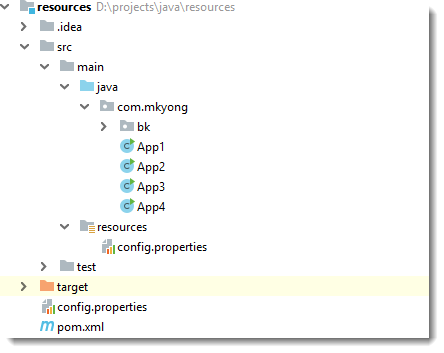
A simple Maven project structure for testing.
1. Write to the properties file
Set the property key and value, and save it somewhere.
App1.java
package com.mkyong;

import java.io.FileOutputStream;
import java.io.IOException;
import java.io.OutputStream;
import java.util.Properties;

public class App1 {

    public static void main(String[] args) {

        try (OutputStream output = new FileOutputStream("path/to/config.properties")) {

            Properties prop = new Properties();

            // set the properties value
            prop.setProperty("db.url", "localhost");
            prop.setProperty("db.user", "mkyong");
            prop.setProperty("db.password", "password");

            // save properties to project root folder
            prop.store(output, null);

            System.out.println(prop);

        } catch (IOException io) {
            io.printStackTrace();
        }

    }
}
Output
{db.user=mkyong, db.password=password, db.url=localhost}
The path/to/config.properties is created.
path/to/config.properties
#Thu Apr 11 17:37:58 SRET 2019
db.user=mkyong
db.password=password
db.url=localhost
2. Load a properties file
Load a properties file from the file system and retrieved the property value.
App2.java
package com.mkyong;

import java.io.FileInputStream;
import java.io.IOException;
import java.io.InputStream;
import java.util.Properties;

public class App2 {

    public static void main(String[] args) {

        try (InputStream input = new FileInputStream("path/to/config.properties")) {

            Properties prop = new Properties();

            // load a properties file
            prop.load(input);

            // get the property value and print it out
            System.out.println(prop.getProperty("db.url"));
            System.out.println(prop.getProperty("db.user"));
            System.out.println(prop.getProperty("db.password"));

        } catch (IOException ex) {
            ex.printStackTrace();
        }

    }

}
Output
localhost
mkyong
password
3. Load a properties file from classpath
Load a properties file config.properties from project classpath, and retrieved the property value.
src/main/resources/config.properties
db.url=localhost
db.user=mkyong
db.password=password
App3.java
package com.mkyong;

import java.io.IOException;
import java.io.InputStream;
import java.util.Properties;

public class App3 {

    public static void main(String[] args) {

        try (InputStream input = App3.class.getClassLoader().getResourceAsStream("config.properties")) {

            Properties prop = new Properties();

            if (input == null) {
                System.out.println("Sorry, unable to find config.properties");
                return;
            }

            //load a properties file from class path, inside static method
            prop.load(input);

            //get the property value and print it out
            System.out.println(prop.getProperty("db.url"));
            System.out.println(prop.getProperty("db.user"));
            System.out.println(prop.getProperty("db.password"));

        } catch (IOException ex) {
            ex.printStackTrace();
        }

    }

}
Output
localhost
mkyong
password
4. Prints everything from a properties file
Load a properties file config.properties from project classpath, and print out the keys and values.
App4.java
package com.mkyong;

import java.io.IOException;
import java.io.InputStream;
import java.util.Properties;
import java.util.Set;

public class App4 {

    public static void main(String[] args) {
        App4 app = new App4();
        app.printAll("config.properties");
    }

    private void printAll(String filename) {

        try (InputStream input = getClass().getClassLoader().getResourceAsStream(filename)) {

            Properties prop = new Properties();

            if (input == null) {
                System.out.println("Sorry, unable to find " + filename);
                return;
            }

            prop.load(input);

            // Java 8 , print key and values
            prop.forEach((key, value) -> System.out.println("Key : " + key + ", Value : " + value));

            // Get all keys
            prop.keySet().forEach(x -> System.out.println(x));

            Set<Object> objects = prop.keySet();

            /*Enumeration e = prop.propertyNames();
            while (e.hasMoreElements()) {
                String key = (String) e.nextElement();
                String value = prop.getProperty(key);
                System.out.println("Key : " + key + ", Value : " + value);
            }*/

        } catch (IOException ex) {
            ex.printStackTrace();
        }

    }

}
Output
Key : db.user, Value : mkyong
Key : db.password, Value : password
Key : db.url, Value : localhost
db.user
db.password
db.url
Download Source Code
Download – java-properties-file.zip (6KB)

it is possible to use variables into a properties file? something like this:
key=value1
key2=value3
key3=${value2}${value3}
Hi,
I’m always getting “Sorry, unable to find ” + filename in scenario 4
Note: I have a properties file which works just fine with scenario no. 2
Can you please help?
For App4, it loads fro
src/main/resources/config.propertiesI can’t find config.properties file. Can anyone help me ?
Ohhh man that you can create by your ownan that’s easy part
Article is updated, for App1 and App2, you need to defined your own location, by default it will saved into the project root folder.
For App3, it loads from
src/main/resources/config.propertiesYou need to add to the project manually. ???
you can either give the exact directory or go one level higher i.e. src/main/resources/config.properties
“input = App3.class.getClassLoader().getResourceAsStream(filename);”
What is App3?
Article is updated, App3 is the class name.
App3 is mistake there. It should be App.
That means the name of class thats all.
Thanks a lot
Hi, is there a way to put properties in the GUI admin console from glassfish and get it via @Resource?
I see how to read from the classpath but what about writing to it?
Refer to App1 and App2 examples.
can anyone help me how to retrieve pdfs from path stored in database
sir i need simplry programme of properties file pls reply my emaid:[email protected]
Useless. Overwrites the whole file.
Can we read from class path and store in the same class path with different file name.
I need to update the application.properties with the application-prod.properties
Can .load be used to read a property file of another Java app within the same package? Like I want to read the other java apps .property file, create an Enum Map of key value pair and then compare it to the property file in the calling Java app. Thanks
Don’t you have to close the stream ? e.g. in finally ?
Can you share the ide theme name plz
Muito obrigado !!!
How to read and write .cfg file in java?
I included this as a jar in my main application. Not getting any errors but I am unable to see .properties file being created on liberty server and subsequently properties not getting loaded in other java files.
Thansk , I found this very useful
Well done
Hello, i’m new to java, can u tell me what’s the different between point 2 (Load a properties file from the file system) and point 3 (Load a properties file config.properties from project classpath), and can you suggest me when i should use point 2 or point 3 ? Thank you very much.
i want to read from config.properties and store it into new environment.properties. anyone help
Is that possible to add the property name on the run time, which the existing property file dosent have such value.
Yes, see App1 example.
@Mkyong you are a living legend!!!
how to add html tags and affect in front-end through resource bundle file, Ex: i need to show bolder text front-end, i tried BOLDER but it doesn’t work.
My file is not getting picked up for reading. Please give me some suggestion
static public void main(String args[]) throws IOException {
Properties prop = new Properties();
InputStream input = new FileInputStream(“F:\workspace\Practice\config.properties”);
prop.load(input);
Set set = prop.keySet();
for (Object r : set) {
System.out.println(r + ” value is: ” + prop.getProperty((String) r));
}
}
a simple way to have key value pair printed
i followed the tutorial, using this code:
1. Write to properties file
tested the code on a tomcat but not create the file why? how to know why?
2) in wich path was created the file?
my tomcat is installed on /opt/tomcat
not i tested sam ecode on a glassfish server and worked, created the file on:
/opt/glassfish4/glassfish/domains/swManzana/config/
and i am happy but in tomcat why not work?
thanks
Good Article!!
Thanks!
worked fine.
how do i preserve the existing comments in the properties file, while still modifying a key value pair or two ?