In Java, the InputStreamReader accepts a charset to decode the byte streams into character streams. We can pass a StandardCharsets.UTF_8 into the InputStreamReader constructor to read data from a UTF-8 file.
import java.nio.charset.StandardCharsets;

  //...
  try (FileInputStream fis = new FileInputStream(file);
       InputStreamReader isr = new InputStreamReader(fis, StandardCharsets.UTF_8);
       BufferedReader reader = new BufferedReader(isr)
  ) {

      String str;
      while ((str = reader.readLine()) != null) {
          System.out.println(str);
      }

  } catch (IOException e) {
      e.printStackTrace();
  }
In Java 7+, many file read APIs start to accept charset as an argument, making reading a UTF-8 very easy.
  // Java 7
  BufferedReader reader = Files.newBufferedReader(path, StandardCharsets.UTF_8);

  // Java 8
  List<String> list = Files.readAllLines(path, StandardCharsets.UTF_8);

  // Java 8
  Stream<String> lines = Files.lines(path, StandardCharsets.UTF_8);

  // Java 11
  String s = Files.readString(path, StandardCharsets.UTF_8);
1. UTF-8 File
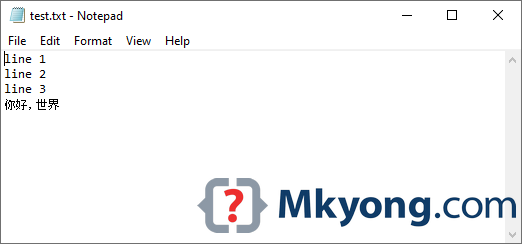
A UTF-8 encoded file c:\\temp\\test.txt, with Chinese characters.
2. Read UTF-8 file
This example shows a few ways to read a UTF-8 file.
package com.mkyong.io.howto;

import java.io.*;
import java.nio.charset.StandardCharsets;
import java.nio.file.Files;
import java.nio.file.Path;
import java.nio.file.Paths;
import java.util.List;
import java.util.stream.Stream;

public class UnicodeRead {

    public static void main(String[] args) {

        String fileName = "c:\\temp\\test.txt";

        //readUnicodeJava11(fileName);
        readUnicodeBufferedReader(fileName);
        //readUnicodeFiles(fileName);
        //readUnicodeClassic(fileName);

    }

    // Java 7 - Files.newBufferedReader(path, StandardCharsets.UTF_8)
    // Java 8 - Files.newBufferedReader(path) // default UTF-8
    public static void readUnicodeBufferedReader(String fileName) {

        Path path = Paths.get(fileName);

        // Java 8, default UTF-8
        try (BufferedReader reader = Files.newBufferedReader(path)) {

            String str;
            while ((str = reader.readLine()) != null) {
                System.out.println(str);
            }

        } catch (IOException e) {
            e.printStackTrace();
        }

    }

    public static void readUnicodeFiles(String fileName) {

        Path path = Paths.get(fileName);
        try {

            // Java 11
            String s = Files.readString(path, StandardCharsets.UTF_8);
            System.out.println(s);

            // Java 8
            List<String> list = Files.readAllLines(path, StandardCharsets.UTF_8);
            list.forEach(System.out::println);

            // Java 8
            Stream<String> lines = Files.lines(path, StandardCharsets.UTF_8);
            lines.forEach(System.out::println);

        } catch (IOException e) {
            e.printStackTrace();
        }

    }

    // Java 11, adds charset to FileReader
    public static void readUnicodeJava11(String fileName) {

        Path path = Paths.get(fileName);

        try (FileReader fr = new FileReader(fileName, StandardCharsets.UTF_8);
             BufferedReader reader = new BufferedReader(fr)) {

            String str;
            while ((str = reader.readLine()) != null) {
                System.out.println(str);
            }

        } catch (IOException e) {
            e.printStackTrace();
        }

    }

    public static void readUnicodeClassic(String fileName) {

        File file = new File(fileName);

        try (FileInputStream fis = new FileInputStream(file);
             InputStreamReader isr = new InputStreamReader(fis, StandardCharsets.UTF_8);
             BufferedReader reader = new BufferedReader(isr)
        ) {

            String str;
            while ((str = reader.readLine()) != null) {
                System.out.println(str);
            }

        } catch (IOException e) {
            e.printStackTrace();
        }

    }
}
Output
Terminal
line 1
line 2
line 3
你好,世界
Further Reading
How to write to a UTF-8 file in Java
Download Source Code
$ git clone https://github.com/mkyong/core-java
$ cd java-io

Thanks Man.. this fixed my issue. I am grateful.
According to http://docs.oracle.com/javase/6/docs/api/java/nio/charset/Charset.html
maybe you should specify the encoding name to be “UTF-8” rather than “UTF8”?
Thanks, we update the article with
StandardCharsets.UTF_8Thanks a lot, you really saved me a load of time.
I had a problem with a simple config text file which didn’t have any BOM. It contained ASCII text and a 16 character password with non-ASCII characters (>127), a string like “Ahsy5&ç@2AjS3”.
This file is read perfectly under Windows (and the code works) but not under Linux where the length of the string resulted longer by 1 character.
So I thought I cound use .readUTF() instead of .readLine() but it didn’t work [ and WTH is “modified UTF”? That’s what it said in the source code for .readUTF() ]
Your code worked first go. Keep it up man!
thank you
thanks!!, this tutorial helped with my problem.
Hey,
I am getting only sybmols from the extracted gzip file.
Can anyone helps me?
go to the project properties and set “Text encoding file” as UTF8.
“copywrite symbol” get converted to “question mark inside blackdiamond “
You are amazing thank you mr mkyong
Hi Mkyong, How to get the encoding characterset of a file in java? Please provide the source code for this. And is UTF-8-> ANSI ?
Does not work for me! I am getting a ? prefixed to the first line.
I just want to ask why you put a lot of catch statements wherein you already put a generalized catch statement at the bottom?
sorry, I am still a newbie~
to catch any other exception that could be trowed without being catched by the other catch statements
this is a real stupidity that i can’t post UTF-8 string to explain the problem in code
i dint get utf abbrivation