
The “javax.imageio” package is used to deal with the Java image stuff. Here’s two “ImageIO” code snippet to read an image file.
1. Read from local file
File sourceimage = new File("c:\\mypic.jpg");
Image image = ImageIO.read(sourceimage);
2. Read from URL
URL url = new URL("https://mkyong.com/image/mypic.jpg");
Image image = ImageIO.read(url);
ImageIO Example
In this example, you will use ImageIO to read a file from an URL and display it in a frame.
package com.mkyong.image;

import java.awt.Image;
import java.io.IOException;
import java.net.URL;
import javax.imageio.ImageIO;
import javax.swing.ImageIcon;
import javax.swing.JFrame;
import javax.swing.JLabel;

public class ReadImage
{
    public static void main( String[] args )
    {
    	Image image = null;
        try {
            URL url = new URL("https://mkyong.com/image/mypic.jpg");
            image = ImageIO.read(url);
        } catch (IOException e) {
        	e.printStackTrace();
        }

        JFrame frame = new JFrame();
        frame.setSize(300, 300);
        JLabel label = new JLabel(new ImageIcon(image));
        frame.add(label);
        frame.setVisible(true);
    }
}
Output…
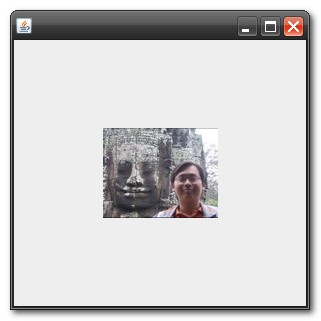
About Author

Founder of Mkyong.com, love Java and open source stuff. Follow him on Twitter. If you like my tutorials, consider make a donation to these charities.
Really helpful! Thanks so much 🙂
Really helpful! Thanks a lot!
I also tried but showing 403 error. How it can be resolve
Nice sample…!! what about take screenshot from url instead download image…!!! for example, screenshot of Google earth…!!!
saved the day in a small console app i’m just running.
thank you
Excelente, solo revisar que la url de la imagen esta activo y que la imagen exista
Preciso e direto, realmente salvou o meu dia, muito obrigado pelo conteúdo!
hi Can any help me out how to convert local path image to url formate.
Hey buddy, I wanted to ask you something. I’m working on a program that brings screenshots from a security camera, and it worked very well, but I wanted to add a reload method to keep getting the screenshots from the ip camera until the user closes the frame. Thanks in advance.
URL url = new URL(“https://mkyong.com/image/mypic.jpg”);
image = ImageIO.read(url);
will this work for https://
Yes
try below url,
https://www.google.co.in/images/branding/googlelogo/1x/googlelogo_color_272x92dp.png
private String imagedir = “C:\”;
Not working neither
Hi, i need help, i am so desperate.
I am trying to show and image which is out of the project. Using a path like:
c:\mypic.jpg is not working for me.
My program is kind of:
private String imagedir = “C://”;
private String imageFileNames = “s02a01.jpg”;
ImageIcon icon;
icon = createImageIcon(imagedir + imageFileNames);
Can someone help me with the correct imagedir?
C:\mypic.jpg is where the image mypic with the extension of a JPEG is stored, change “C:\mypic.jpg” to the exact location of your picture
is that really you in the pic? 🙂
I am developing an web application with Struts2 and jsp. I have an issue
to store images. I am storing images in folder and their relative
path’s in mysql database.
when I retrieve path from database then using tag i have displayed image like:
<img src="” alt=” height=400 weight=100>
It is working fine with eclipse default browser but not working (that is Not displaying image) in chrome/mozilla.
when im keep this
not working
How to read text from image? I want to extract text from image, for example I have passport, from that i want names and all information and image.
Nice one Yong!! Check out this tutorial http://www.compiletimeerror.com/2013/08/java-downloadextract-all-images-from.html to download all the images from a website URL.. May help..
Mkyong, I’m making an application that’s requiring you to pretty much press a JButton to load information from a JSon page and needless to say I need it to load an image too.. I can’t figure out the button code.. Could you please help me?
Great tutorial, really clear and to the point. Keep it up 😀
I tested your code, and I keep getting javax.imageio.IIOException: Can’t get input stream from URL! error
hi sir, iam ramesh thank u very much given this code i am doing project on visual cryptography i want to do the overlap with another share so for that one what i have to do
File sourceimage = new File(“commonshare.png”); this image is visible now we browse the another image and it is overlap with the common share.
what should i do sir plz help me plz help me sir
I am getting error in the line
” Image image = ImageIO.read(sourceimage); ”
saying
” Default constructor cannot handle exception type IOException thrown by implicit super constructor. Must define an explicit constructor ” what is the solution for this.
Cant simulate it, please post your full source code