In this tutorial, we will show you how to create a executable JAR – When you double click on it, it runs the defined main class in manifest file.
1. AWT Example
Create a simple AWT Java application, just display label and print out some funny characters ~
package com.mkyong.awt;

import java.awt.Frame;
import java.awt.Label;
import java.awt.event.WindowAdapter;
import java.awt.event.WindowEvent;

public class AwtExample {

	public static void main(String[] args) {

		Frame f = new Frame();
		f.addWindowListener(new WindowAdapter() {
			public void windowClosing(WindowEvent e) {
				System.exit(0);
			}
		});
		f.add(new Label("This JAR file is executable!"));
		f.setSize(500, 500);
		f.setVisible(true);
	}
}
2. Manifest.txt
Create a manifest.txt file.
Main-Class: com.mkyong.awt.AwtExample
Uses Main-Class as the entry point of this Jar file, when you double click on this Jar file, the “AwtExample.class” main() method will be launched.
Be sure that your manifest file ends with a new line, else your manifest file will not be parsed and failed to generate the
manifest.mf. Read this http://docs.oracle.com/javase/1.4.2/docs/tooldocs/windows/jar.html
Read this jar reference guide :
“Be sure that any pre-existing manifest file that you use ends with a new line. The last line of a manifest file will not be parsed if it doesn’t end with a new line character.”
3. Jar file
Create a Jar file by adding “AwtExample.class” and “manifest.txt” files together.
Assume your project folder structure as follows :
c:\test\classes\com\mkyong\awt\AwtExample.class
c:\test\classes\manifest.txt
You can issue following command to create a “AwtExample.jar.
jar -cvfm AwtExample.jar manifest.txt com/mkyong/awt/*.class
Output
C:\test\classes>jar -cvfm AwtExample.jar manifest.txt com/mkyong/awt/*.class
added manifest
adding: com/mkyong/awt/AwtExample$1.class(in = 638) (out= 388)(deflated 39%)
adding: com/mkyong/awt/AwtExample.class(in = 880) (out= 541)(deflated 38%)
4. Demo
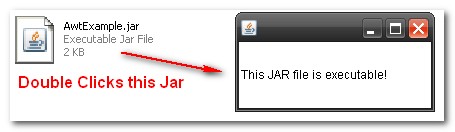
Now, the “AwtExample.jar” is executable, double clicks on it, see the output :

Hello I create Java swing app with database MySql. I created .exe file using launch4j as well advancedinstaller. Running jar file is working perfectly but after installing exe the app opens but wont work after providing credentials. It seems it is not able to connect or verify with DB. Can you suggest what could be the problem
Please tell me how to add database file with jar
How to include static content like html pages?
I have an application where I start jetty in embedded mode and include some web files. but when created executable jar (I tried maven-assembly-plugin ) it is NOT including web content. Is it possible?
So in a nut shell, creating an executable WAR (or JAR) that serves html pages too.
how to create .exe file by using java code ..?
Hi Sir,
can anyone tell me how to create .jar file from .class file in java programmatically?
Thank you!
It was simple, easy and useful.
hai, i create exe jar file but it could not work i need some help…………………….
How to run jar file double click on it in jdk 7 Please sir tell me
Hi Mkyong,
I have created a spring-hibernate standalone app ( NOT web app). It’s running successfully in eclipse but when i create a runnable jar and run it from terminal using “java -jar jarname.jar” then it is running and printing the println statements but its not able to find the beans declared in applicationContext file and saying :
“Exception in thread “main” org.springframework.beans.factory.NoSuchBeanDefinitionException: No bean named ‘lbFileUploadService’ is defined”
i have done something like this in the main class:
ConfigurableApplicationContext context = new ClassPathXmlApplicationContext(“classpath*:**/applicationContext*.xml”);
NOTE: Its running successfully in eclipse.
I am not sure but i think it’s not able to read “applicationContext.xml”
And i have to create a jar out of this project and configure into cron job.
Please suggest me ASAP.
Thanks
If you use Eclipse, you could also rightclick on the project -> export -> Jar file. Than you can run the jar file like this: java -jar your.jar
i need a video tutorials fr this
i hope its gonna help http://codeheaven.wordpress.com/f-a-qs/create-executable-jar-fileeasiest-way-from-eclipse/
could anyone tell me, what is the difference between technology and programming language?
Thanks in advance…
@santoshvarma:disqus
With such a question, I think you are in the wrong place
Hello sir,
I am develop one application for my company, and they need .exe file (not a.jar) file, so how i can do?
Hello sir,
I need a help i am develop the one application for my company and i want to create .exe(not .jar) file, so how can i do??
u may need izpack
Hi Prashant,
helpful Link : http://javapapers.com/core-java/executable-java-jar-file-and-windows-exe-file-creation/
hey i have create a mini project where an objective type question display..these question are being fetched from mysql database..
by using your syntex for jar files
jar -cvfm AwtExample.jar manifest.txt com/mkyong/awt/*.class
i have successfully created jar file
but not able to access the database questions etc
Thanks!
Created my first jar file following your article!
thank you very much!
It is the best time to make some plans for the future and it’s time to be happy. I’ve read this post and if I could I wish to suggest you few interesting things or advice.
Maybe you can write next articles referring to this article.
I desire to read more things about it!
sir i am making a project on “internet download manager”.
i have done coding in 4 parts and save them with diff naames in my system..
now my problem is i have to make a jar file but i dont know how to combine all 4 progam in my jar file
this textbox for comments should be at the top of the comments.
I am having issues with trying to compile my main program via the command line, I am getting an error that says “cannot find symbol” a shitton of times. I think it’s because that java file requires other java files to operate and they’re not compiled yet, but to go and compile those one by one is tedious. The current method to compile these that I am using is javac *.java.
Are there any solutions to this?
Its working as expected,, Thank you so much…
friends i m creating jar programmatically . help me i surf lot of stuff in internet via them
i can create jar file but created jar not connected with ide. my concept is one program create jar with proper package structure that jar is going to used in other program.
but in my case the jar what i created is not linked. if i try to add that as in classpath it
not linked in programmes
Thanks for this but am getting following error
I have copied full code to check but still giving the same
Error: Could not find or load main class Hello
Also in My code I am getting FileNotFoundException
Please Help
Hi I tried out this solution but my jar didnt run, the problem is in the jar, the jars that i had added in my project want not present in the newly built jar file so got the classNotFound exception. can anyone suggest a solution to it. Thanx in advance
thank you posting this information
Thank you.
The information turned out to be really useful for my Project.
Thanks for the walk-through, was able to get my first .JAR working!
One question though, the .jar wasn’t working with my main method as:
but when I changed around the brackets to:
it worked. I thought these two were supposed to be equivalent?
Hi, Very easy to understand. But in my case its not working. If i double click on jar nothing happens.
I’ll give you a short description about my task.
I have created JAVA UI with WindowBuilder in Eclipse IDE. Then I have added Selenium scripts created using TestNG framework in Eclipse in same package that of java UI. I called selenium scripts on button click event. Now I am trying to create executable jar which can be executed on other machines also. By following your steps JAR is created, but on double clicking on it nothing happens.
Folder structure is as below:
C:\Selenium\Code\GUIForSelenium\bin\TestUI
Code where I have created project
GUIForSelenium is project
TestUI is package
TestUi folder contains all 3 class files 1 JAVA UI and 2 Selenium Code.
Can you help in this issue?
Thanks alot. l did got some new thing here about jar files
Thanks a lot for this really useful tutorial and it makes a lot of sense.But as i am a sort of beginner, I really need some help 🙁
First of all, what exactly i have to do with the manifest file.What do i write in it?
then If i have multiple class files how do i define them and i have to do all these things in cmd promt right?
I have two classes here, a simple prime factor find program.One of them is main
please tell me what else do i need to add in the code and what would be my manifest file in this case and also the commands for making them a runnable .jar file . please!
import java.util.Scanner;
public class TestDriver
{
  public static void main(String[]args)
  {
    System.out.println("Enter a number from 2 to 100 to find the prime factors");
    Scanner s=new Scanner(System.in);
    int input=s.nextInt();
    factorcounter f=new factorcounter(input);
    System.out.println("Here are the prime factors: ");
    f.FindPrimeNo();
  }
}
public class factorcounter { public factorcounter(int a) { input=a; } public int input; public int temp; public int[]counter=new int[101]; public void FindPrimeNo() { int judge; if(input%2==0) { judge=1; } else { judge=2; } switch (judge) { case 1: while(input>1) { if(input%2==0) { counter[2]++; input=(input/2); } else if(input%3==0) { counter[3]++; input=(input/3); } else if(input%5==0) { counter[5]++; input=(input/5); } else if(input%7==0) { counter[7]++; input=(input/7); } else { counter[input]++; input=1; } } case 2: while(input>1) { if(input%3==0) { counter[3]++; input=(input/3); } else if(input%5==0) { counter[5]++; input=(input/5); } else if(input%7==0) { counter[7]++; input=(input/7); } else { counter[input]++; input=1; } } for(int i=1;i<100;i++) { if(counter[i]!=0) { System.out.println(i+" occured "+counter[i]+" time"); } } } } }I have created executable jar TestDS32.jar which uses some external Axis jars.
Required jars path and main class name are set in the manifest file.
My manifest file is look like :
Main-Class: test.TestDS32
Class-Path: TestDS32.jar D:\Axis\lib\log4j-1.2.8.jar D:\Axis\lib\axis-ant.jar D:\Axis\lib\axis.jar D:\Axis\lib\commons-discovery-0.2.jar D:\Axis\lib\commons-logging-1.0.4.jar D:\Axis\lib\jaxrpc.jar D:\Axis\lib\saaj.jar D:\Axis\lib\wsdl4j-1.5.1.jar
But while executing TestDS32.jar from cmd by command java -jar TestDS32.jar i got below error :
Exception in thread “main” java.lang.NoClassDefFoundError: \test\TestDS32
Caused by: java.lang.ClassNotFoundException: \test\TestDS32
at java.net.URLClassLoader$1.run(URLClassLoader.java:202)
at java.security.AccessController.doPrivileged(Native Method)
at java.net.URLClassLoader.findClass(URLClassLoader.java:190)
at java.lang.ClassLoader.loadClass(ClassLoader.java:307)
at sun.misc.Launcher$AppClassLoader.loadClass(Launcher.java:301)
at java.lang.ClassLoader.loadClass(ClassLoader.java:248)
Could not find the main class: \test\TestDS32 . Program will exit.
can you please tell me why this error is coming and how to solve it?
thankx thats realy easy to Understand
but don’t know why my jar file is not Running.(Executing)
(when i m going to Double click on my jar File, its not Working)
🙁
Can you show me your code and mainfest?
sir,
i had a problem life time ago
but still no reply
🙁
i would still love to have a reply……
Actuly Sir, My Code is So large. its not easy to Post over here.
in my Code there are 2 Parent class & many child classes.
having many classes in my code,is that really Creating any Problem for my JAR file.
hi mkyoung,
This is santosh.i have one problem with generating executable jar. in my project i have have some .clas files ,two .dll files and one jar file. i want to make these as executable jar. could you help me how to do?
Thanks in advance.
Than you!!! simple and easy :)))
Thank u very much, excellent content.great job