This article shows you a few ways to generate the serialVersionUID for serialization class.
1. serialver
JDK has a built-in command serialver to generate a serialVersionUID automatically.
In this example, we use serialver to generate a serialVersionUID for an Address class.
Terminal
$ serialver Address

Address:    static final long serialVersionUID = -687991492884005033L;
2. Eclispe IDE
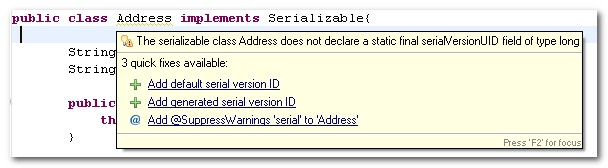
For Eclipse IDE, move the mouse over the serialization class, or click on the serialization class and press CTRL + 1.
3. Intellij IDEA
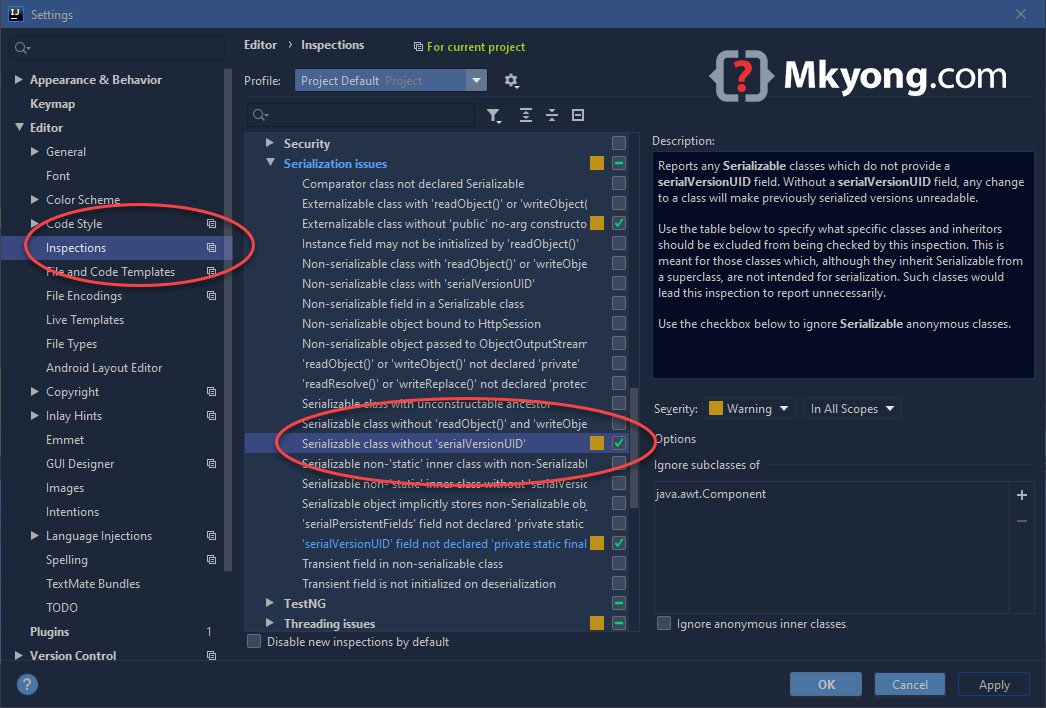
Unlinke Eclipse IDE, we need to enable the auto generate serialVersionUID option manually. Refer to this guide – How to generate serialVersionUID in Intellij IDEA
4. 1L
Puts serialVersionUID=1L; It should be sufficient in most cases.
private static final long serialVersionUID = 1L;
Further Reading
What is serialVersionUID

Netbeans ???
Hi,
In Eclipse wa can also do that for a set of classes :
ource Cleanup…->Custome Profile->Missing Code->Add serial version ID
Thx.
Thanks for this
Very nice..
Nice tutorial.. its good Help for the Beginners
thanks, this is very useful for me!
Thanks this helped me a lot, as I was trying to get it through batch files…
I can now find it with the click of a button in eclipse.
thx,very useful.
another way to generate serialVersionUID(only for jdk1.6 or higher) :
// compile the java source code in the memory JavaCompiler compiler = ToolProvider.getSystemJavaCompiler(); DiagnosticCollector diagnostics = new DiagnosticCollector(); JavaFileObject file = new JavaSourceFromString("com.xx.yy.HelloWord", "java source string here"); Iterable compilationUnits = Arrays.asList(file); JavaCompiler.CompilationTask task = compiler.getTask(null, null, diagnostics, null, null, compilationUnits); if (task.call()) { ObjectStreamClass osc = ObjectStreamClass.lookupAny(Class.forName("com.xx.yy.HelloWord")); long svuid = osc.getSerialVersionUID(); } ====================================== public class JavaSourceFromString extends SimpleJavaFileObject { private String code; public JavaSourceFromString(String name, String code) { super(URI.create("string:///" + name.replace('.', '/') + Kind.SOURCE.extension), Kind.SOURCE); this.code = code; } public CharSequence getCharContent(boolean ignoreEncodingErrors) { return code; } }Thanks, helped me.
Thanks, can better explain private static final long serialVersionUID = -5371928597516312539L;