This article shows how to write data to a comma-separated values (CSV) file.
Topics:
- OpenCSV – Write data to a CSV file
- Single class CSV writer – Write data to a CSV file
- Single class CSV writer – Unit Tests
Note
The RFC 4180 defines the format or definitions of a CSV file or text/csv file.
1. OpenCSV – Write data to CSV file
1.1 The OpenCSV is a easy to use CSV Parser and Writer.
  <dependency>
      <groupId>com.opencsv</groupId>
      <artifactId>opencsv</artifactId>
      <version>5.3</version>
  </dependency>
1.2 This OpenCSV example uses CSVWriter to write a List<String[]> to a file.
package com.mkyong.io.csv.opencsv;

import com.opencsv.CSVWriter;

import java.io.FileWriter;
import java.io.IOException;
import java.util.ArrayList;
import java.util.List;

public class OpenCsvWriterExample {

    public static void main(String[] args) throws IOException {

        List<String[]> csvData = createCsvDataSimple();

        // default all fields are enclosed in double quotes
        // default separator is a comma
        try (CSVWriter writer = new CSVWriter(new FileWriter("c:\\test\\test.csv"))) {
            writer.writeAll(csvData);
        }

    }

    private static List<String[]> createCsvDataSimple() {
        String[] header = {"id", "name", "address", "phone"};
        String[] record1 = {"1", "first name", "address 1", "11111"};
        String[] record2 = {"2", "second name", "address 2", "22222"};

        List<String[]> list = new ArrayList<>();
        list.add(header);
        list.add(record1);
        list.add(record2);

        return list;
    }

}
Review the newly created CSV file. By default, all fields are enclosed in double-quotes, and the default separator is a comma.
"id","name","address","phone"
"1","first name","address 1","11111"
"2","second name","address 2","22222"
1.3 This OpenCSV example shows the use of custom separator, semicolon ;.
  try (ICSVWriter writer = new CSVWriterBuilder(
          new FileWriter("c:\\test\\test.csv"))
          .withSeparator(';')
          .build()) {
      writer.writeAll(csvData);
  }
Output
"id";"name";"address";"phone"
"1";"first name";"address 1";"11111"
"2";"second name";"address 2";"22222"
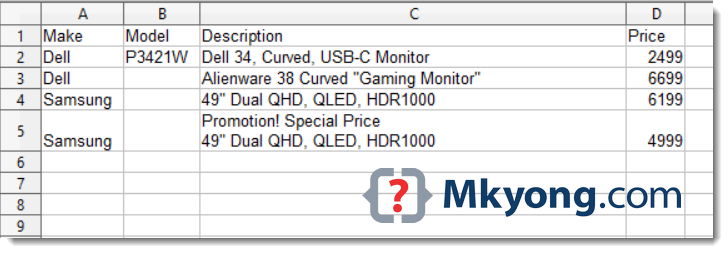
1.4 This OpenCSV example test the common embedded issues in CSV files – embedded comma, double quotes and line breaks. Read RFC 4180.
package com.mkyong.io.csv.opencsv;

import com.opencsv.CSVWriter;

import java.io.FileWriter;
import java.io.IOException;
import java.util.ArrayList;
import java.util.List;

public class OpenCsvWriterExample {

    public static void main(String[] args) throws IOException {

        List<String[]> csvData = createCsvDataSpecial();

        // default all fields are enclosed in double quotes
        // default separator is a comma
        try (CSVWriter writer = new CSVWriter(new FileWriter("c:\\test\\monitor.csv"))) {
            writer.writeAll(csvData);
        }

    }

    private static List<String[]> createCsvDataSpecial() {

        String[] header = {"Make", "Model", "Description", "Price"};
        String[] record1 = {"Dell", "P3421W", "Dell 34, Curved, USB-C Monitor", "2499.00"};
        // embedded double quotes
        String[] record2 = {"Dell", "", "Alienware 38 Curved \"Gaming Monitor\"", "6699.00"};
        // embedded double quotes and commas
        String[] record3 = {"Samsung", "", "49\" Dual QHD, QLED, HDR1000", "6199.00"};
        // embedded line break
        String[] record4 = {"Samsung", "", "Promotion! Special Price\n49\" Dual QHD, QLED, HDR1000", "4999.00"};

        List<String[]> list = new ArrayList<>();
        list.add(header);
        list.add(record1);
        list.add(record2);
        list.add(record3);
        list.add(record4);

        return list;

    }

}
Review the CSV file content. All the embedded commas, double quotes, and line breaks are enclosed in double-quotes.
"Make","Model","Description","Price"
"Dell","P3421W","Dell 34, Curved, USB-C Monitor","2499.00"
"Dell","","Alienware 38 Curved ""Gaming Monitor""","6699.00"
"Samsung","","49"" Dual QHD, QLED, HDR1000","6199.00"
"Samsung","","Promotion! Special Price
49"" Dual QHD, QLED, HDR1000","4999.00"
Further Reading
Read this OpenCSV example to read or parse a CSV file
2. Single class CSV writer – Write data to a CSV file
2.1 The OpenCSV library is good, but it contains many dependencies, which let me wonder if we really need a third party library to write data to a CSV file, it’s up to your preference.
2.2 However, below is my single class CSV writer implementation. It supports a custom separator and takes care of the embedded commas, double quotes, and line breaks. Read code comments for self-explanatory. The key is in the method formatCsvField(final String field, final boolean quote), which defines how to format the CSV fields.
package com.mkyong.io.csv;

import java.io.BufferedWriter;
import java.io.File;
import java.io.FileWriter;
import java.io.IOException;
import java.util.ArrayList;
import java.util.List;
import java.util.stream.Collectors;
import java.util.stream.Stream;

public class CsvWriterSimple {

    private static final String COMMA = ",";
    private static final String DEFAULT_SEPARATOR = COMMA;
    private static final String DOUBLE_QUOTES = "\"";
    private static final String EMBEDDED_DOUBLE_QUOTES = "\"\"";
    private static final String NEW_LINE_UNIX = "\n";
    private static final String NEW_LINE_WINDOWS = "\r\n";

    public static void main(String[] args) throws IOException {

        CsvWriterSimple writer = new CsvWriterSimple();
        writer.writeToCsvFile(createCsvDataSpecial(), new File("c:\\test\\monitor.csv"));

    }

    public String convertToCsvFormat(final String[] line) {
        return convertToCsvFormat(line, DEFAULT_SEPARATOR);
    }

    public String convertToCsvFormat(final String[] line, final String separator) {
        return convertToCsvFormat(line, separator, true);
    }

    // if quote = true, all fields are enclosed in double quotes
    public String convertToCsvFormat(
            final String[] line,
            final String separator,
            final boolean quote) {

        return Stream.of(line)                              // convert String[] to stream
                .map(l -> formatCsvField(l, quote))         // format CSV field
                .collect(Collectors.joining(separator));    // join with a separator

    }

    // put your extra login here
    private String formatCsvField(final String field, final boolean quote) {

        String result = field;

        if (result.contains(COMMA)
                || result.contains(DOUBLE_QUOTES)
                || result.contains(NEW_LINE_UNIX)
                || result.contains(NEW_LINE_WINDOWS)) {

            // if field contains double quotes, replace it with two double quotes \"\"
            result = result.replace(DOUBLE_QUOTES, EMBEDDED_DOUBLE_QUOTES);

            // must wrap by or enclosed with double quotes
            result = DOUBLE_QUOTES + result + DOUBLE_QUOTES;

        } else {
            // should all fields enclosed in double quotes
            if (quote) {
                result = DOUBLE_QUOTES + result + DOUBLE_QUOTES;
            }
        }

        return result;

    }

    // a standard FileWriter, CSV is a normal text file
    private void writeToCsvFile(List<String[]> list, File file) throws IOException {

        List<String> collect = list.stream()
                .map(this::convertToCsvFormat)
                .collect(Collectors.toList());

        // CSV is a normal text file, need a writer
        try (BufferedWriter bw = new BufferedWriter(new FileWriter(file))) {
            for (String line : collect) {
                bw.write(line);
                bw.newLine();
            }
        }

    }

    private static List<String[]> createCsvDataSpecial() {

        String[] header = {"Make", "Model", "Description", "Price"};
        String[] record1 = {"Dell", "P3421W", "Dell 34, Curved, USB-C Monitor", "2499.00"};
        String[] record2 = {"Dell", "", "Alienware 38 Curved \"Gaming Monitor\"", "6699.00"};
        String[] record3 = {"Samsung", "", "49\" Dual QHD, QLED, HDR1000", "6199.00"};
        String[] record4 = {"Samsung", "", "Promotion! Special Price\n49\" Dual QHD, QLED, HDR1000", "4999.00"};

        List<String[]> list = new ArrayList<>();
        list.add(header);
        list.add(record1);
        list.add(record2);
        list.add(record3);
        list.add(record4);

        return list;

    }

}
Review the CSV file content. The embedded commas, double quotes, and line breaks are enclosed with double quotes properly. The output is the same as the above OpenCSV 1.4 example.
"Make","Model","Description","Price"
"Dell","P3421W","Dell 34, Curved, USB-C Monitor","2499.00"
"Dell","","Alienware 38 Curved ""Gaming Monitor""","6699.00"
"Samsung","","49"" Dual QHD, QLED, HDR1000","6199.00"
"Samsung","","Promotion! Special Price
49"" Dual QHD, QLED, HDR1000","4999.00"
3. Single class CSV writer – Unit Tests
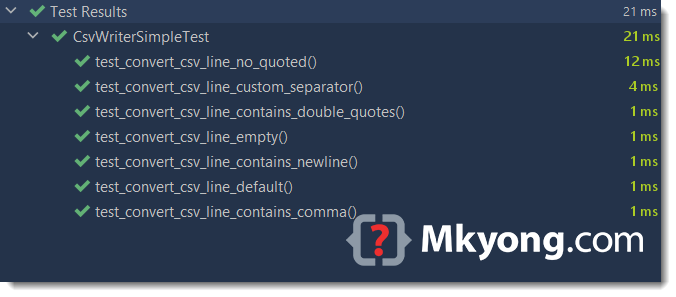
Here are some unit tests for the the above CsvWriterSimple.
package com.mkyong.io.csv;

import org.junit.jupiter.api.Test;

import static org.junit.jupiter.api.Assertions.assertEquals;

public class CsvWriterSimpleTest {

    private CsvWriterSimple writer = new CsvWriterSimple();

    @Test
    void test_convert_csv_line_default() {
        String[] record = {"1", "apple", "10", "9.99"};
        String expected = "\"1\",\"apple\",\"10\",\"9.99\"";

        String result = writer.convertToCsvFormat(record);
        assertEquals(expected, result);
    }

    @Test
    void test_convert_csv_line_empty() {
        String[] record = {"1", "", "10", ""};
        String expected = "\"1\",\"\",\"10\",\"\"";

        String result = writer.convertToCsvFormat(record);
        assertEquals(expected, result);
    }

    @Test
    void test_convert_csv_line_custom_separator() {
        String[] record = {"1", "apple", "10", "9.99"};
        String expected = "\"1\";\"apple\";\"10\";\"9.99\"";

        String result = writer.convertToCsvFormat(record, ";");
        assertEquals(expected, result);
    }

    @Test
    void test_convert_csv_line_no_quoted() {
        String[] record = {"1", "apple", "10", "9.99"};
        String expected = "1,apple,10,9.99";

        String result = writer.convertToCsvFormat(record, ",", false);
        assertEquals(expected, result);
    }

    @Test
    void test_convert_csv_line_contains_comma() {
        String[] record = {"1", "apple,orange", "10", "9.99"};
        String expected = "\"1\",\"apple,orange\",\"10\",\"9.99\"";

        String result = writer.convertToCsvFormat(record);
        assertEquals(expected, result);
    }

    @Test
    void test_convert_csv_line_contains_double_quotes() {
        String[] record = {"1", "12\"apple", "10", "9.99"};
        String expected = "\"1\",\"12\"\"apple\",\"10\",\"9.99\"";

        String result = writer.convertToCsvFormat(record);
        assertEquals(expected, result);
    }

    @Test
    void test_convert_csv_line_contains_newline() {
        String[] record = {"1", "promotion!\napple", "10", "9.99"};
        String expected = "\"1\",\"promotion!\napple\",\"10\",\"9.99\"";

        String result = writer.convertToCsvFormat(record);
        assertEquals(expected, result);
    }

}
P.S Let me know if you found bugs in the CsvWriterSimple.
Further Reading
How to read and parse CSV file in Java
Download Source Code
$ git clone https://github.com/mkyong/core-java
$ cd java-io/csv

CsvWriterSimple will throw null point exception whenever there is null value for attributes..
Can you save the output on another folder like on the current user Downloads folder? Tried saving it like this “C:\\Users\\%username%\\Downloads\\test.csv” but encountered FileNotFound exception.
Hi mkyong,
i am facing some issue in unicode characters like “પ્રિય ગાહકો , રક્ષાબંધન પર્વ ની શુભકામનાઓ લી . સોફ્ટ ટેક સોલ્યૂશન , અમદાવાદ” it is not export properly . Please help.
The above seems like a fine solution for small data sets, but what would be a better way to approach writing out MILLIONS of lines of data?
I feel the above would result in Out of Memory exceptions if trying to load into any list or objects.
For millions of lines or large datasets, the common practice is don’t load everything in one shot.
Try to split the data sets by portion, and the related techniques are data streaming, pagination, batching, etc.
How can we embed an image in the CSV file??? Please help
The short answer is NO; the CSV file is a text file.
Alternative solution.
Try Base64 to encode the image’s byte[] to text format and write it into the CSV file.