By default, Eclipse will output Chinese or non-English characters as question marks (?) or some weird characters. This is because the Eclipse’s default console encoding is Cp1252 or ASCII, which is unable to display other non-English words.
To enable Eclipse to display Chinese or other non-English characters correctly, do following :
1. In Eclipse, right click on your application class, and choose Run As –> Run Configurations
2. In Common tab, Encoding group, click on the “Other” and select the UTF-8.
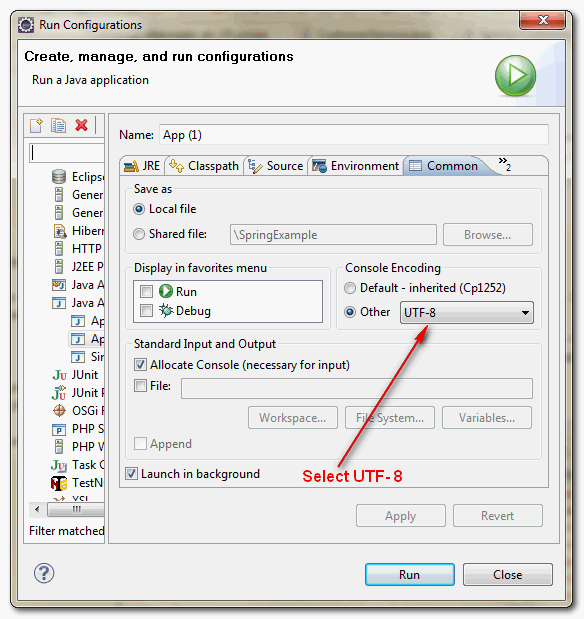
3. Done, Eclipse is able to display the Chinese character now.
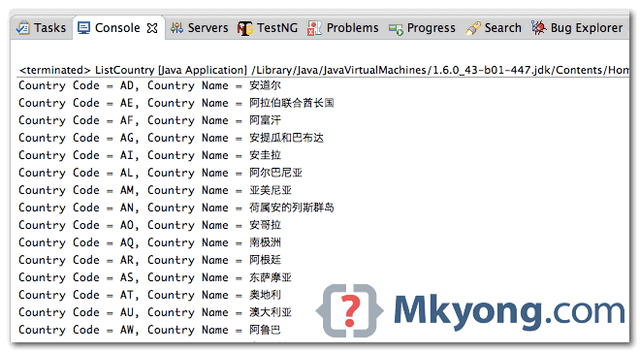
Note
The main idea is to change the output decoding to
The main idea is to change the output decoding to
UTF-8.

I have done the same thing but it is not working
same here, did you find the solution ?
Good information.
Request you to let us know how to set the encoding during the runtime on J2EE servers ?
We have tried to set the System.setProperty(“file.encoding”, ENCODING_ISO88591)
but it does not work. How ever if we run the program with the above setting in debug configuration by selecting the custom encoding than it works.
Request you to advice. Appreciated your help.
thanks, mkyong! such a great treasure of information.
Thank you so much! 🙂 This was giving me a major headache!
Thank you!
great! that helped a lot 🙂 🙂
Thank U !!
great!
The information is very helpful, thanks:-)
Great information 🙂