Hibernate Tools is a handy tool for Java’s developers to generate tedious hibernate related stuffs like mapping files and annotation code. The common use case is the “reverse engineering” feature to generate Hibernate model class, hbm mapping file or annotation code from database tables.
Hibernate Tools is bundled as the core component of JBoss Tools. So, after installed JBoss tools, you installed the Hibernate tools as well.
Here’s a guide to show you how to install Hibernate / JBoss Tools in Eclipse IDE.
1. Know your Eclipse & JBoss Tools version to download
First, you have to find out the correct version of Hibernate/JBoss tool for your Eclipse IDE. Go here – http://www.jboss.org/tools/download for the available combination version to download.
For example,
- If you are using Eclipse 3.6 / Helios , download JBoss Tools 3.2
- If you are using Eclipse 3.5 / Galileo, download JBoss Tools 3.1
2. Eclipse update site for JBoss Tools
Point to your correct version, right click to copy the Eclipse update site for JBoss tools. For Eclipse 3.6, the URL is ” http://download.jboss.org/jbosstools/updates/stable/helios/ ”
3. Install It
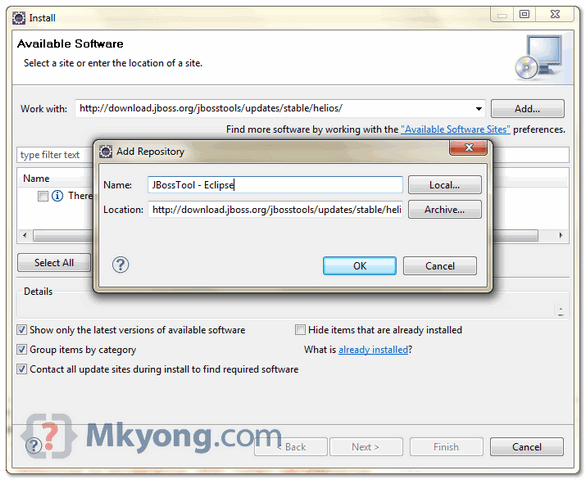
In Eclipse IDE, menu bar, select “Help” >> “Install New Software …” , put the Eclipse update site URL.
Type “hibernate” in the filter box, to list down the necessary components for Hibernate tools. Select all the “Hibernate Tools” components and click next to download.
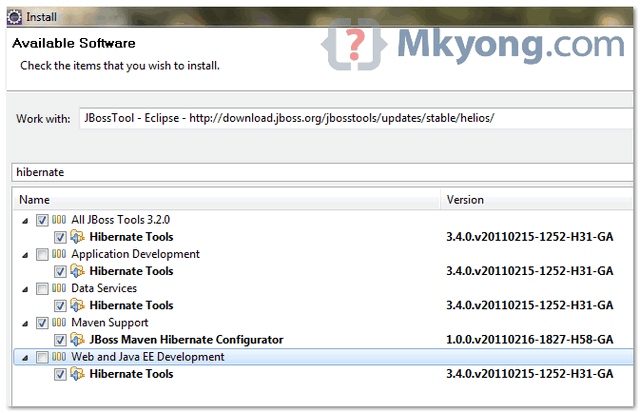
Do not select all components, it will take much longer time download many unnecessary components. You want Hibernate tools only, not others.
4. Restart Eclipse
After the download progress is completed, restart Eclipse to take effect.
5. Verification
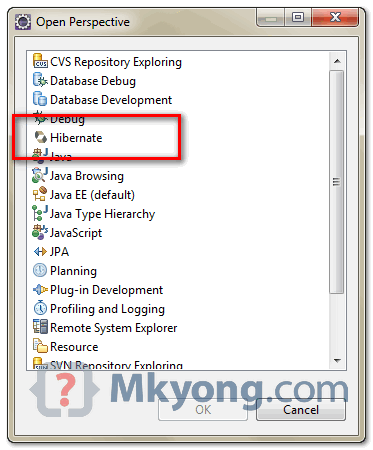
If Hibernate tools is installed properly, you are able to see the “Hibernate Perspective” in “Windows” >> “Open Perspective” >> “Others“.
Done.

Could you please share a link to generate Annotation based classes using STS ?
Thanks a lot!! 😀
Thank you, I long searched for this kind of content
thanks a lot
Thanks a lot
hiii
how to resolve this error,while i a installing hibernate tools under jboos for eclipse luna…getting this error again and again..
An error occurred during the org.eclipse.equinox.internal.p2.engine.phases.CheckTrust phase.
session context was:(profile=epp.package.jee, phase=org.eclipse.equinox.internal.p2.engine.phases.CheckTrust, operand=, action=).
Error reading signed content.
D:Eclipse Luna Softwareeclipsepluginsorg.hibernate.eclipse_4.0.0.Final-v20141016-1911-B82 (The system cannot find the file specified)
Thanks man it worked!!
you make my life so easy .. u r champ
Hi ,
I installed the plugin and did all the configuration for an oracle DB . I checked that connectivity is fine and driver is available.But when I expand the Database in the hibernate configuration perspective, it says fetching children and after a while does not show any tables. Tried a lot but could not get this list of tables. Any idea what could be going wrong ?
I have the exact same problem ( in May 2016) .. I quit this plugin
I’ve had the same problem as that,did u solve it ?
Thanks. It helped.
Thank you. It helped.
Very nice article. Brief but useful. Thanks 🙂
Hello mkyong,
I like the way you wrote tutorials for Hibernate and Maven. I followed above mentioned steps to install hibernate in eclipse (Juno Release 1 in my case) but its not being shown up in perspective view. Can you please help me out ?
same problem how did you solve?
Hello mkyong,
I like the way, you wrote tutorials for Hibernate and maven. I followed above described steps to install hibernate in eclipse (Juno Release 1 in my case). But after installing it,I am not able to see it in perspective view. Can you please help me out ?
Hi All,
I have tried to install Jboss with different eclipse release but , I am not successful in doing that.
Currently I am trying this on eclipse and I always see this one;
Cannot complete the install because one or more required items could not be found.
Software being installed: Hibernate Tools 3.4.0.v20111025-0625-H210-Final (org.hibernate.eclipse.feature.feature.group 3.4.0.v20111025-0625-H210-Final)
Missing requirement: Hibernate Tools 3.4.0.v20111025-0625-H210-Final (org.hibernate.eclipse.feature.feature.group 3.4.0.v20111025-0625-H210-Final) requires ‘org.eclipse.gef 3.2.0? but it could not be found
I did this trough:
In Eclipse IDE, menu bar, select “Help” >> “Install New Software …” , put the Eclipse update site URL.
Point to your correct version, right click to copy the Eclipse update site for JBoss tools. For Eclipse 3.6, the URL is ” http://download.jboss.org/jbosstools/updates/stable/helios
Please help me.
Thanks.
Shashikant
Thanks for quick, easy to understand guide,
You can add the following link for Eclipse Juno: http://download.jboss.org/jbosstools/updates/stable/juno/
thanks dear 🙂 well tell me how’s juno ??
Thank you so such .. It helped.
Thanks,
Vineet Kaushik
Hello
I am following your instructions but I receive an error alert when the eclipse trys to install the updates. I use Indigo version
An error occurred while collecting items to be installed
session context was:(profile=epp.package.jee, phase=org.eclipse.equinox.internal.p2.engine.phases.Collect, operand=, action=).
No repository found containing: osgi.bundle,org.eclipse.net4j.jms.api,3.1.0.v20120521-0710
Thank you in advance
Nikos
Thank u it’s working
Hey its really helpful.
Thanks & Regards,
Sridhar Goranti
Thanz…
thank you mkyong your step by step tutorials of Hibernate and the tutorial about
“How to install hibernate tools in eclipse” helped me alot..
great work
Thanks ..
In eclipse enter the work with field and location field but both are same gives duplicate error in eclipse helios please give solution
Thanks for detailed instruction. Can u refer any article where I can learn how to use hibernet in real projects. A simple example with project that run 100%
But indeed this is a good article
Grab a source code from examples on this – Hibernate tutorials
Thank you very much mykong for your suggestions and guide. This stuff really help
guys who started learning java escpecially Hibernate.
Did Eclipse Juno had Hibernate tool?
Yes, you can have it.
It is contained in JBoss Tools.
Go to eclipse market place and search for hibernate.
JBoss tools for Juno will pop up.
From the list choose Hibernate tools and install it.
Thanks lot. Very usefull
thanks for this informations
Thanks for the instructions…
I am using STS 2.9.1. Can I still follow the same way to get the Hinernate Prespective in my STS 2.9.1. Pls. suggest.
Hi All,
I have tried to install Jboss with different eclipse release but , I am not successful in doing that.
Currently I am trying this on eclipse and I always see this one;
Cannot complete the install because one or more required items could not be found.
Software being installed: Hibernate Tools 3.4.0.v20111025-0625-H210-Final (org.hibernate.eclipse.feature.feature.group 3.4.0.v20111025-0625-H210-Final)
Missing requirement: Hibernate Tools 3.4.0.v20111025-0625-H210-Final (org.hibernate.eclipse.feature.feature.group 3.4.0.v20111025-0625-H210-Final) requires ‘org.eclipse.gef 3.2.0’ but it could not be found
I did this trough:
In Eclipse IDE, menu bar, select “Help” >> “Install New Software …” , put the Eclipse update site URL.
Point to your correct version, right click to copy the Eclipse update site for JBoss tools. For Eclipse 3.6, the URL is ” http://download.jboss.org/jbosstools/updates/stable/helios
Please help me.
Thanks.
Pradeep