Try logback logging framework, read this article for the “reasons to prefer logback over log4j. To integrate logback with Hibernate, refer this – How to configure logging in Hibernate – Logback
Hibernate uses Simple Logging Facade for Java (SLF4J) to redirect the logging output to your perfer logging frameworkis (log4j, JCL, JDK logging, lofback…). In this tutorial, we show you how to do logging in Hibernate with SLF4j + Log4j logging framework.
Technologies used in this article :
- Hibernate 3.6.3.Final
- slf4j-api-1.6.1
- slf4j-log4j12-1.6.1
- Eclipse 3.6
- Maven 3.0.3
1. Get SLF4j + Log4j
To do logging in Hibernate, you need “slf4j-api.jar” and your preferred binding, like log4j “slf4j-log4j12.jar“. Just declares the dependency in your pom.xml.
File : pom.xml
<project ...>
	<repositories>
		<repository>
			<id>JBoss repository</id>
			<url>http://repository.jboss.org/nexus/content/groups/public/</url>
		</repository>
	</repositories>

	<dependencies>

		<dependency>
			<groupId>org.hibernate</groupId>
			<artifactId>hibernate-core</artifactId>
			<version>3.6.3.Final</version>
		</dependency>

		<!-- slf4j-log4j -->
		<dependency>
			<groupId>org.slf4j</groupId>
			<artifactId>slf4j-log4j12</artifactId>
			<version>1.6.1</version>
		</dependency>

	</dependencies>
</project>
The slf4j-api.jar is defined as the dependency of “hibernate-core“, so , you do not need to declare it again.
2. Log4j properties file
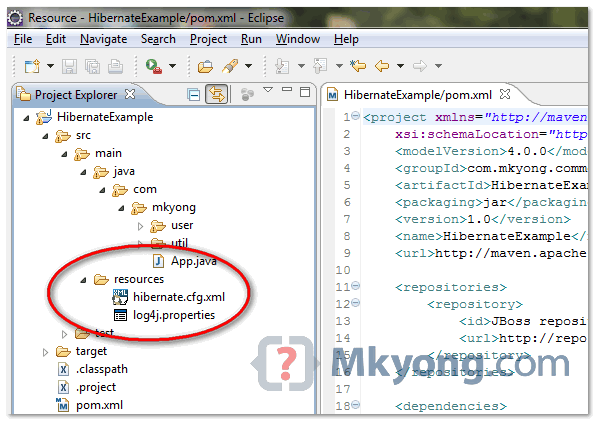
Create a “log4j.properties” file and put it into your project’s classpath, see figure below :
File : log4.properties
# Direct log messages to a log file
log4j.appender.file=org.apache.log4j.RollingFileAppender
log4j.appender.file.File=C:\\mkyongapp.log
log4j.appender.file.MaxFileSize=1MB
log4j.appender.file.MaxBackupIndex=1
log4j.appender.file.layout=org.apache.log4j.PatternLayout
log4j.appender.file.layout.ConversionPattern=%d{ABSOLUTE} %5p %c{1}:%L - %m%n

# Direct log messages to stdout
log4j.appender.stdout=org.apache.log4j.ConsoleAppender
log4j.appender.stdout.Target=System.out
log4j.appender.stdout.layout=org.apache.log4j.PatternLayout
log4j.appender.stdout.layout.ConversionPattern=%d{ABSOLUTE} %5p %c{1}:%L - %m%n

# Root logger option
log4j.rootLogger=INFO, file, stdout

# Log everything. Good for troubleshooting
log4j.logger.org.hibernate=INFO

# Log all JDBC parameters
log4j.logger.org.hibernate.type=ALL
With this log4j configuration, it will redirect all the logging output to console and also a file at “C:\\mkyongapp.log“.
Hibernate provides many settings to let developer to decide what to log. Always refer to this Hibernate Log Categories, choose some and implement it in your log file.
3. Output
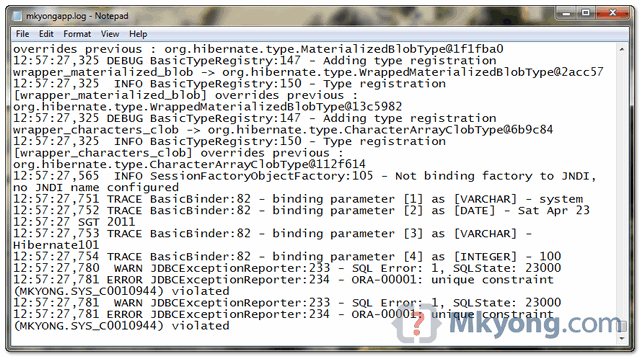
Try run your Hibernate web application, all logging output will be logged in “C:\\mkyongapp.log” file. See figure below :

Even though I have put show_sql to be fasle , it is generating all queries in logs. How to stop it generating all queries in logs. Due to this my log file size is increasing a lot
you have a typo here: File : log4.properties > File : log4j.properties
How it can be in desktop application . means to show hibernate log file in desktop application . ?
Hi..thanks…
But i have one question..
Does it work on online application,i mean my application in now on cloud does log4j will work on that,or i have to make some changes in log4j properties.
please help me,i just want to see error logs of my application which is on amezon cloud..plz help me..
Thank you…
Thanks, this is the only one that worked. Cheers
I got a question.
If I don´t want to see the queries and parameters in the console what do I need to do?
I already try putting show_sql=false in my hibernate.cfg.xml and my log4j.properties like this:
log4j.logger.org.hibernate=WARN
log4j.logger.org.hibernate.SQL=OFF
# Log all JDBC parameters
log4j.logger.org.hibernate.type=WARN
But I still see the queries and parameters in my console.
mkyong saves the day…AGAIN.
How can I use log4j.properties file to log second level cache activities? Thanks
I do as same as what you guide but my runtime is Geronimo and it doesn’t work! No log file in directory which I give path for it!
File name log4.properties is not correct, rename to log4j.properties
My pom.xml has
————
displaytag
displaytag
1.1.1
org.slf4j
jcl104-over-slf4j
org.slf4j
slf4j-log4j12
displaytag
displaytag
1.1
log4j
log4j
1.2.9
———–
And My log4j.properties file has
———–
log4j.rootLogger=INFO,file
#Log4J File Appender Configuration
log4j.appender.file=org.apache.log4j.RollingFileAppender
log4j.appender.file.File=C:/logfile.log
log4j.appender.file.MaxFileSize=1000KB
log4j.appender.file.MaxBackupIndex=5
log4j.appender.file.layout=org.apache.log4j.PatternLayout
log4j.appender.file.layout.ConversionPattern=[%d{dd-MM-yyyy HH:mm:ss}] %5p %c{1}:%L – %m%n
# ***** Hibernate logging configuration.
# Hibernate logging options
log4j.logger.org.hibernate=INFO
# Log JDBC bind parameter runtime arguments
log4j.logger.org.hibernate.type=INFO
# CaveatEmptor debugging
log4j.logger.org.hibernate.ce=INFO
————
I am getting log messages on console but not in file. What could be the reason? Could you help me?
Thanks for the tutorial. However, there is a typo. Could you replace “File : log4.properties” with “File : log4j.properties”? (the “j” is missing)
Logging is not working. I have log4j in proper location. Do I need to enable it in anyway?please help.
How do I run the application?
Hi
I am using Hibernate + C3P0 + log4j. When the log level is info the hibernate log shows the password. How to prevent hibernate from printing the password? It should ideally display *****
Adarsh
Show what password? Mind to elaborate more?
Hi mkyong
The log file actually displays the user id and the real password. I want to prevent the actual password being displayed and instead should display only ******
Please help me in disabling the printing of real password in log files
Adarsh
Hash the password before store it into database.
Do you save real user password on database?
there’s a typo on your tutorial
when you say “File : log4.properties” should be “File : log4j.properties”
Hello, MYKONG
Thanks for your tutorial
that is very simple and clear.
I have clear understanding about annotations.
Thank You
one thing is mising. the log4j.jar must be included in the classpath too.
Hello, MYKONG
Thanks for your tutorial 🙂 that is very simple and clear.
But try that tutorial above, i have not see my log. 🙁
This my step :
1. In my library slf4j-api-1.6.4.jar , slf4j-simple-1.6.4.jar , slf4j-log4j12-1.6.4.jar
2. I create pom.xml file in src/
3. I set pom.xml according to my version of Hibernate and slf4j. I use Hibernate 3.3.0GA
4. I create log4j.properties in src/ and in the log4j i set directory for my log :
D:\\Goes to Campus\Belajar\Hibernate\hibernatefirst.log
I run my Hibernate Application and it not shown in hibernatefirst.log file.
Please help me..
Thank you..
Great help, thanks!
I was struggling to get the log4j.properties to do anything until I came across your guide. Quick change in the .pom file to switch from simple to log4j… done!
superb……………
Do not forget, that Hibernate internally uses SLF4J logging.
To bind SLF4J logging to LOG4J logging put slf4j-log4j12-x.y.jar into your class path (and avoid any other binding like slf4j-jdk14-x.y.jar).
Only than your Log4J configuration will be taken into account.
Thanks for your input.