A one-to-many relationship occurs when one entity is related to many occurrences in another entity.
In this tutorial, we show you how to works with one-to-many table relationship in Hibernate, via XML mapping file (hbm).
Tools and technologies used in this tutorials :
- Hibernate 3.6.3.Final
- MySQL 5.1.15
- Maven 3.0.3
- Eclipse 3.6
Project Structure
Project structure of this tutorial.
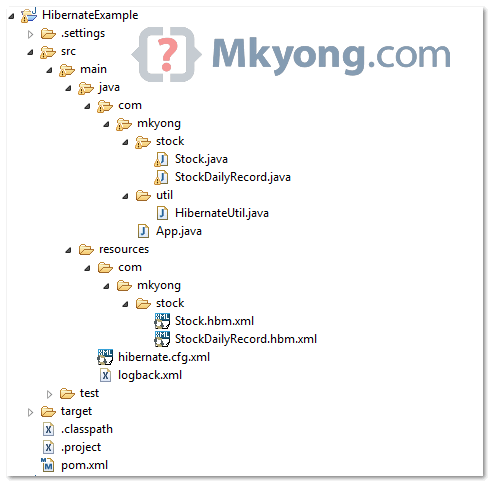
Project Dependency
Get hibernate.jar from JBoss repository, Maven will take care all the related dependencies for you
File : pom.xml
<project ...>

	<repositories>
		<repository>
			<id>JBoss repository</id>
			<url>http://repository.jboss.org/nexus/content/groups/public/</url>
		</repository>
	</repositories>

	<dependencies>

		<!-- MySQL database driver -->
		<dependency>
			<groupId>mysql</groupId>
			<artifactId>mysql-connector-java</artifactId>
			<version>5.1.15</version>
		</dependency>

		<dependency>
			<groupId>org.hibernate</groupId>
			<artifactId>hibernate-core</artifactId>
			<version>3.6.3.Final</version>
		</dependency>

		<dependency>
			<groupId>javassist</groupId>
			<artifactId>javassist</artifactId>
			<version>3.12.1.GA</version>
		</dependency>

	</dependencies>
</project>
1. “One-to-many” example
This is a one-to-many relationship table design, a STOCK table has many occurrences STOCK_DAILY_RECORD table.
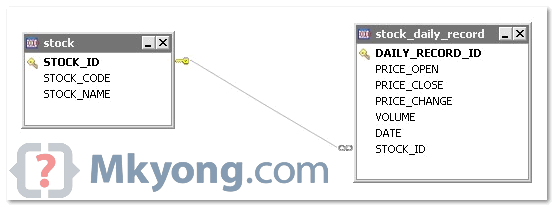
See MySQL table scripts
DROP TABLE IF EXISTS `stock`;
CREATE TABLE `stock` (
  `STOCK_ID` int(10) unsigned NOT NULL AUTO_INCREMENT,
  `STOCK_CODE` varchar(10) NOT NULL,
  `STOCK_NAME` varchar(20) NOT NULL,
  PRIMARY KEY (`STOCK_ID`) USING BTREE,
  UNIQUE KEY `UNI_STOCK_NAME` (`STOCK_NAME`),
  UNIQUE KEY `UNI_STOCK_ID` (`STOCK_CODE`) USING BTREE
) ENGINE=InnoDB AUTO_INCREMENT=34 DEFAULT CHARSET=utf8;


DROP TABLE IF EXISTS `mkyongdb`.`stock_daily_record`;
CREATE TABLE  `mkyongdb`.`stock_daily_record` (
  `RECORD_ID` int(10) unsigned NOT NULL AUTO_INCREMENT,
  `PRICE_OPEN` float(6,2) DEFAULT NULL,
  `PRICE_CLOSE` float(6,2) DEFAULT NULL,
  `PRICE_CHANGE` float(6,2) DEFAULT NULL,
  `VOLUME` bigint(20) unsigned DEFAULT NULL,
  `DATE` date NOT NULL,
  `STOCK_ID` int(10) unsigned NOT NULL,
  PRIMARY KEY (`RECORD_ID`) USING BTREE,
  UNIQUE KEY `UNI_STOCK_DAILY_DATE` (`DATE`),
  KEY `FK_STOCK_TRANSACTION_STOCK_ID` (`STOCK_ID`),
  CONSTRAINT `FK_STOCK_TRANSACTION_STOCK_ID` FOREIGN KEY (`STOCK_ID`)
  REFERENCES `stock` (`STOCK_ID`) ON DELETE CASCADE ON UPDATE CASCADE
) ENGINE=InnoDB AUTO_INCREMENT=36 DEFAULT CHARSET=utf8;
2. Hibernate Model Class
Create two model classes – Stock.java and StockDailyRecord.java, to represent the above tables.
File : Stock.java
package com.mkyong.stock;

import java.util.HashSet;
import java.util.Set;

public class Stock implements java.io.Serializable {

	private Integer stockId;
	private String stockCode;
	private String stockName;
	private Set<StockDailyRecord> stockDailyRecords =
				new HashSet<StockDailyRecord>(0);

	//getter, setter and constructor
}
File : StockDailyRecord.java
package com.mkyong.stock;

import java.util.Date;

public class StockDailyRecord implements java.io.Serializable {

	private Integer recordId;
	private Stock stock;
	private Float priceOpen;
	private Float priceClose;
	private Float priceChange;
	private Long volume;
	private Date date;

	//getter, setter and constructor
}
3. Hibernate XML Mapping
Now, create two Hibernate mapping files (hbm) – Stock.hbm.xml and StockDailyRecord.hbm.xml.
File : Stock.hbm.xml
<?xml version="1.0"?>
<!DOCTYPE hibernate-mapping PUBLIC "-//Hibernate/Hibernate Mapping DTD 3.0//EN"
"http://hibernate.sourceforge.net/hibernate-mapping-3.0.dtd">
<hibernate-mapping>
    <class name="com.mkyong.stock.Stock" table="stock" catalog="mkyongdb">
        <id name="stockId" type="java.lang.Integer">
            <column name="STOCK_ID" />
            <generator class="identity" />
        </id>
        <property name="stockCode" type="string">
            <column name="STOCK_CODE" length="10" not-null="true" unique="true" />
        </property>
        <property name="stockName" type="string">
            <column name="STOCK_NAME" length="20" not-null="true" unique="true" />
        </property>
        <set name="stockDailyRecords" table="stock_daily_record"
				inverse="true" lazy="true" fetch="select">
            <key>
                <column name="STOCK_ID" not-null="true" />
            </key>
            <one-to-many class="com.mkyong.stock.StockDailyRecord" />
        </set>
    </class>
</hibernate-mapping>
File : StockDailyRecord.hbm.xml
<?xml version="1.0"?>
<!DOCTYPE hibernate-mapping PUBLIC "-//Hibernate/Hibernate Mapping DTD 3.0//EN"
"http://hibernate.sourceforge.net/hibernate-mapping-3.0.dtd">
<hibernate-mapping>
    <class name="com.mkyong.stock.StockDailyRecord" table="stock_daily_record"
		catalog="mkyongdb">
        <id name="recordId" type="java.lang.Integer">
            <column name="RECORD_ID" />
            <generator class="identity" />
        </id>
        <many-to-one name="stock" class="com.mkyong.stock.Stock" fetch="select">
            <column name="STOCK_ID" not-null="true" />
        </many-to-one>
        <property name="priceOpen" type="java.lang.Float">
            <column name="PRICE_OPEN" precision="6" />
        </property>
        <property name="priceClose" type="java.lang.Float">
            <column name="PRICE_CLOSE" precision="6" />
        </property>
        <property name="priceChange" type="java.lang.Float">
            <column name="PRICE_CHANGE" precision="6" />
        </property>
        <property name="volume" type="java.lang.Long">
            <column name="VOLUME" />
        </property>
        <property name="date" type="date">
            <column name="DATE" length="10" not-null="true" unique="true" />
        </property>
    </class>
</hibernate-mapping>
4. Hibernate Configuration File
Puts Stock.hbm.xml and StockDailyRecord.hbm.xml in your Hibernate configuration file, and also MySQL connection details.
File : hibernate.cfg.xml
<?xml version="1.0" encoding="utf-8"?>
<!DOCTYPE hibernate-configuration PUBLIC
"-//Hibernate/Hibernate Configuration DTD 3.0//EN"
"http://www.hibernate.org/dtd/hibernate-configuration-3.0.dtd">

<hibernate-configuration>
<session-factory>
    <property name="hibernate.connection.driver_class">com.mysql.jdbc.Driver</property>
    <property name="hibernate.connection.url">jdbc:mysql://localhost:3306/mkyongdb</property>
    <property name="hibernate.connection.username">root</property>
    <property name="hibernate.connection.password">password</property>
    <property name="hibernate.dialect">org.hibernate.dialect.MySQLDialect</property>
    <property name="show_sql">true</property>
    <property name="format_sql">true</property>
    <mapping resource="com/mkyong/stock/Stock.hbm.xml" />
    <mapping resource="com/mkyong/stock/StockDailyRecord.hbm.xml" />
</session-factory>
</hibernate-configuration>
5. Run It
Run it, Hibernate will insert a row into the STOCK table and a row into the STOCK_DAILY_RECORD table.
File : App.java
package com.mkyong;

import java.util.Date;

import org.hibernate.Session;

import com.mkyong.stock.Stock;
import com.mkyong.stock.StockDailyRecord;
import com.mkyong.util.HibernateUtil;

public class App {
	public static void main(String[] args) {

        System.out.println("Hibernate one to many (XML Mapping)");
	Session session = HibernateUtil.getSessionFactory().openSession();

	session.beginTransaction();

	Stock stock = new Stock();
        stock.setStockCode("7052");
        stock.setStockName("PADINI");
        session.save(stock);

        StockDailyRecord stockDailyRecords = new StockDailyRecord();
        stockDailyRecords.setPriceOpen(new Float("1.2"));
        stockDailyRecords.setPriceClose(new Float("1.1"));
        stockDailyRecords.setPriceChange(new Float("10.0"));
        stockDailyRecords.setVolume(3000000L);
        stockDailyRecords.setDate(new Date());

        stockDailyRecords.setStock(stock);
        stock.getStockDailyRecords().add(stockDailyRecords);

        session.save(stockDailyRecords);

	session.getTransaction().commit();
	System.out.println("Done");
	}
}
Output …
Hibernate one to many (XML Mapping)
Hibernate:
    insert
    into
        mkyongdb.stock
        (STOCK_CODE, STOCK_NAME)
    values
        (?, ?)
Hibernate:
    insert
    into
        mkyongdb.stock_daily_record
        (STOCK_ID, PRICE_OPEN, PRICE_CLOSE, PRICE_CHANGE, VOLUME, DATE)
    values
        (?, ?, ?, ?, ?, ?)
For one-to-many in Hibernate annotation, please refer to this example.

Thanks Mkyong for great tutorial…but can you please let me know as how to write controller and jsp/jstl page for such object. i have tried many ways but unable to reach my destination. it will be great help if you share with code.
Nice article sir
Will you please give an example for one to many/many to one association on join table with xml mapping for this similar or different example
Thanks, nice post
http://www.javatportal.com
Is it mandatory to use
session.getTransaction().commit();? Cant we just use session.save()
No, we cannot use save() only method because it will save the session objects to database or memory but changes will no reflect back until transaction(commit or rollback) is not called
Nice work. I must make a point though. The example can confuse a newbie whether the column name “STOCK_ID” mentioned in Stock.hbm.xml refers to the STOCK_ID in stock table, or the stock_daily_record table. Here is another example in hibernate many-to-one(xml mapping): http://www.tutorialspoint.com/hibernate/hibernate_one_to_many_mapping.htm . This example does not create any confusion.
very Helpfull.
Now what if i want to add more stock_daily_record with the same stock??
Best Example for clear image of One to Many …. 🙂
cascade=”all” with set worked for me.
Stock s = new Stock();
s.setStockCode(“1012”);
s.setStockName(“Hutch”); //single stock called “Hutch”
// Two stock prices for “Hutch” stock
StockPrice sp = new StockPrice();
StockPrice sp1 = new StockPrice();
sp.setDate(new Date());
sp.setPriceChange(745);
sp.setPriceClose(643);
sp.setPriceOpen(734);
sp.setVolume(134);
sp1.setDate(new Date());
sp1.setPriceChange(879);
sp1.setPriceClose(433);
sp1.setPriceOpen(124);
sp1.setVolume(86);
sp.setStock(s);
sp1.setStock(s);
Set spSet = new HashSet(); // Add stock price (StockDailyRecord) to the set
spSet.add(sp);
spSet.add(sp1);
s.setStockPrice(spSet); //setting the stock price set “spSet ” to Stock.setStockPrice()
sDao.saveStock(s);
In case I’m using Spring, should I inject Stock class in StockDailyRecord (Dependency Injection)?
Nice post and a rocking blog
Nice article but you’ve inadvertently made it confusing. STOCK_ID is the primary key for Stocks and STOCK_ID is the secondary key name in StockDailyRecord.
The result of this is that when you mention STOCK_ID in the mapping files, I don’t know which you are referring to. In my schema “id” is the primary key name and “person_id” is the secondary key name.
Any chance you could update the article with different columns names? Pretty please!?!
Hello mkyong,
It would be very usefull that the foreing column doesn’t have the same name that the primary column
Regards
Nice Article for One to Many Relationship. It is very useful for me. Thank you
Hi,
I am getting this exception when i am using the above source code. Please help
SEVERE: Cannot add or update a child row: a foreign key constraint fails (`new_db`.`stock_daily_record`, CONSTRAINT `FK_STOCK_TRANSACTION_STOCK_ID` FOREIGN KEY (`STOCK_ID`) REFERENCES `stock` (`STOCK_ID`) ON DELETE CASCADE ON UPDATE CASCADE)
Mar 12, 2013 10:02:30 PM org.hibernate.event.def.AbstractFlushingEventListener performExecutions
SEVERE: Could not synchronize database state with session
org.hibernate.exception.ConstraintViolationException: Could not execute JDBC batch update
at org.hibernate.exception.SQLStateConverter.convert(SQLStateConverter.java:71)
at org.hibernate.exception.JDBCExceptionHelper.convert(JDBCExceptionHelper.java:43)
at org.hibernate.jdbc.AbstractBatcher.executeBatch(AbstractBatcher.java:253)
at org.hibernate.engine.ActionQueue.executeActions(ActionQueue.java:266)
at org.hibernate.engine.ActionQueue.executeActions(ActionQueue.java:167)
at org.hibernate.event.def.AbstractFlushingEventListener.performExecutions(AbstractFlushingEventListener.java:298)
at org.hibernate.event.def.DefaultFlushEventListener.onFlush(DefaultFlushEventListener.java:27)
at org.hibernate.impl.SessionImpl.flush(SessionImpl.java:1000)
at org.hibernate.impl.SessionImpl.managedFlush(SessionImpl.java:338)
at org.hibernate.transaction.JDBCTransaction.commit(JDBCTransaction.java:106)
at in.greensoft.dao.impl.test.DoctorHibernateTest.main(DoctorHibernateTest.java:44)
Caused by: java.sql.BatchUpdateException: Cannot add or update a child row: a foreign key constraint fails (`new_db`.`stock_daily_record`, CONSTRAINT `FK_STOCK_TRANSACTION_STOCK_ID` FOREIGN KEY (`STOCK_ID`) REFERENCES `stock` (`STOCK_ID`) ON DELETE CASCADE ON UPDATE CASCADE)
at com.mysql.jdbc.PreparedStatement.executeBatchSerially(PreparedStatement.java:1269)
at com.mysql.jdbc.PreparedStatement.executeBatch(PreparedStatement.java:955)
at org.hibernate.jdbc.BatchingBatcher.doExecuteBatch(BatchingBatcher.java:48)
at org.hibernate.jdbc.AbstractBatcher.executeBatch(AbstractBatcher.java:246)
… 8 more
org.hibernate.exception.ConstraintViolationException: Could not execute JDBC batch update
getting following error while insert more than one record.
org.hibernate.exception.ConstraintViolationException: Could not execute JDBC batch update
nice tutorial, thx
Content and tutorial in this website is very helpfull and good. please add some tutorial on LINUX/UNIX , Shell scripting tutorial
In all of your examples you include a reference to the other object (Stock in this case) inside the other objects (such as StockItem). I completely understand why Stock would have a StockItem Object but why does each StockItem have a reference back to the stock object?
Please can you explain.
If I use cascade=”all” and call
session.save(stock);
then it should save data in both the table.
But getting child constrains exception.
But this work fine with Bag
Why cascade”all” doesn’t work with Set?
Hi,
Great article, thanks!
My husband and i ended up being absolutely joyful when Jordan managed to finish off his researching while using the precious recommendations he grabbed when using the blog. It’s not at all simplistic to just continually be handing out points that many others may have been trying to sell. We really fully understand we have the writer to give thanks to for that. The specific illustrations you’ve made, the simple website navigation, the relationships you can assist to create – it is mostly impressive, and it is helping our son in addition to us imagine that this issue is cool, and that is truly essential. Thank you for all!
plz tell me how to retrieve database inner-joined values to jsp page and list box . and how to save only id from the list box to database ?? plz tell me by considering the above example
Hi Mkyong,
I have a user table which consists of multiple roles.(Pointing to Roles Table)
(One user multiple Roles).
When i am saving the Record its inserting successfully.
But when i am trying to update the record,Its updating and
even deleting the record from the created Relation-table.(USER_ROLES)
USER TABLE
@OneToMany(fetch = FetchType.EAGER)
public Set getUserroles() {
return userroles;
}
public void setUserroles(Set userroles) {
this.userroles = userroles;
}
When i am trying to go with my mapby its throwing error AnnotationException and mappedBy reference an unknown target entity property: .
Please help me.
Hi mkyong,
Nice article.
I am a noob to hibernate. Your tutorials are very helpful in understanding the core concepts since examples are provided. Appreciate it.
I had a question. If I try to run the above program for first time, the parameters are all inserted into stock and stock_daily_record tables correctly. However when I try to run this again, I get the exception below. I may be wrong, but I thought hibernate would detect if there was a duplicate insertion and not insert the values.
Caused by: java.sql.SQLException: Duplicate key or integrity constraint violation message from server: “Duplicate entry ‘7052’ for key ‘STOCK_CODE'”
How to handle the exception gracefully?
Thanks
Because STOCK_CODE need to be unique. Hibernate is prompts exception is expected.
You need to add your own checking like this
find if key exists = true
ignore and prompt key is duplicated.
else
insert record
In One to Many Example
why you have to specify (StockDailyRecord.hbm.xml)
I don’t understand , Please can you explain
can u give a similar example for many to many mapping?
Hi Mkyong,
Can you help me with my mapping? I am in doubt on whats the best approach?
I have an insurance table and user could change the rate plan associated with it.
Table Insurance:
    id long;
    accountHolder varchar;
    ratePlanId int;  -->Rate Plan Id is Foreign Key to the RatePlanTable

Table RatePlan:
    ratePlanId int;
    ratePlanDesc varchar;
    discountRate double;
I have a class structure like this:
public class Insurance{
	private long id;
    private String accountHolder;
    private int ratePlanId;
}
public class RatePlan{
	private int ratePlanId;
    private String ratePlanDesc;
    private double discountRate;
}
Is my table-class hierarchy correct?
or should I change my Insurance class to this?
public class Insurance{
	private long id;
    private String accountHolder;
    private RatePlan plan;
}
What should be the proper mapping? Is this a one-to-many mapping also?
Try Hibernate tool – https://mkyong.com/hibernate/how-to-generate-code-with-hibernate-tools/ , it will generate Hibernate mapping automatically, and customize it if require.
Hi..
in hibernate there is association mapping,collection mapping…component mapping and then one to many vice versa and also uni/bi directional..a bit confusing sometimes..can u provide some light on this
thanks for the suggestion, i’m seeing a lot missing chapters in the current Hibernate tutorials as well, will create more examples in future.
Hi,
I need help. I have entities like in your tutorial, but in my project, I need to retrieve an entity (like “stock” in your tutorial) as list and in that list I should reach the related entity (like “stock_daily_record” in the tutorial) in a loop and get the values in that entity. But I got lazy initialization erro when I do that. What may be the reason, could you help please??
What’s your error stacks?
Here is my error stack
Caused by: org.hibernate.LazyInitializationException: failed to lazily initialize a collection of role:
Send your full error stack and source code to my mail.
In your test code posted above, you do:
session.save(stockDailyRecords);
session.save(stock);
However, this generates an error (for me at least). I believe it should be:
session.save(stock);
session.save(stockDailyRecords);
(It is this way in the zip file, so that doesn’t need corrected.)
Er…Do you means that the code sequence in Zip file is correct, but the code in above posted article is wrong?
Hi i am just learner of hibernate,
we deals with one to many relationship, stock object we create, it contains stockdetailrecord set . you creating instance for stock through which you adding a record for stockdetailrecord. but while saving you calling session.save(stockdetailrecord) then how it will update stock table. because stock table haveing forginekey column in stock_detail_record table. hope it will be like session.save(stock) which interns update stock_detail_record, stock is parent and stock_detail_record is child rite… If i am wrong pl correct me.
Assign parent to his child, configure inverse = true in parent.
As long as you are assigning the correct nested parent or child, Hibernate will take care of the relationship automatically.
Thanks a lot 🙂
Very concise & straightforward articles… really helpful.
Keep it up !
AG
PS : One small issue is with the link ‘read more about it…’.
Thank for your link check, now the link is updated and working fine.
how many files needed to create a hibernate & which folder we have to placed tell me plz……….
Just download this project and find it out yourself 🙂
Thanks for putting this out. Helpful info indeed
Nice article !. One question : Is it necessary to have a many-to-one relationship always on the other side of the one-to-many relationship (like the one you mentioned above) or it’s needed only in specific cases (if yes what are they) ?
yes, configure the relationship in both sides are always recommended, else the other site (many-to-one) or stock_daily_record can not retrieve the data from stock table directly, you may need some workaround for it.
If you really sure the other site (many-to-one) should not have the relationship, you can just disable it, the Hibernate will still work. But you have to manage both relationship manually. In most cases, it just doesn’t make sense.
ok great…thanks for the reply
Hey yong…thanks for posting such a nice article….but i’m facing some issues with the one-to-many mapping…actually instead of Set i’m using a List..can you please provide any example with on-to-many relationship involving List??