Problem
Using Eclipse Ganymede (3.4) , developing JSF 2.0 web application. However when open the xhtml file with the Eclipse web page editor , it prompts a dialog box and saying …
Unsupported content type in editor
To associate file extension with a supported content type, please see Content Types Preference Page.
To associate file extension with a supported content type, please see Content Types Preference Page.
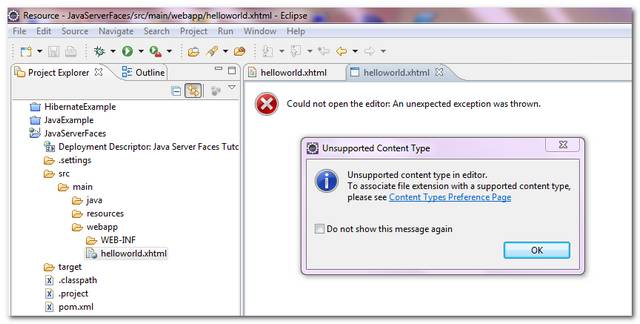
P.S The .xhtml file extension is configured and associated property in the Content Types Preference Page.
Solution
Thousand time of tries and errors, but still unable to get rid of the “unsupported content type” error, may be it is caused by the Eclipse IDE itself ? Give up, just upgrade to the latest Eclipse Helios (3.6), solve the problem immediately 🙂
Note
Not sure what’s the root cause of it, may be i had installed too many plugins, and some caused the conflicts. Just get a clean copy of the Eclipse IDE will get rid of the annoying error message immediately.
Not sure what’s the root cause of it, may be i had installed too many plugins, and some caused the conflicts. Just get a clean copy of the Eclipse IDE will get rid of the annoying error message immediately.

Just had the same issue on Eclipse Indigo, all I had to do to fix the problem was to restart the IDE.