Problem
Recently, i have installed an Aptana plugins in Eclipse IDE, after that , when i pressed “ctrl + space” in a Struts 2 xml file, the content assist is not working anymore. See picture :
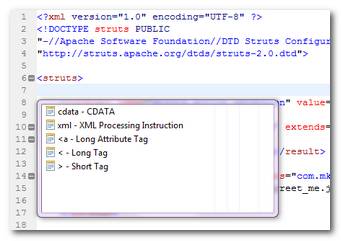
The content assist is not suggesting any Struts 2 elements, even the Struts 2 dtd is included correctly in the beginning of the xml file.
<!DOCTYPE struts PUBLIC
"-//Apache Software Foundation//DTD Struts Configuration 2.0//EN"
"http://struts.apache.org/dtds/struts-2.0.dtd">
...
Solution
After many tries and errors, i found out this is caused by the Apatana XML editior. When you double clicks on the xml file, Eclipse will always use back the last used xml editor to open it, in this case, it is Apatana XML editor (the content assist is not working in this editor).
The solution is quite simple, just use the normal Eclipse’s XML editor to open the xml file. Right on the xml file, and choose the normal XML editor. Done, See picture :
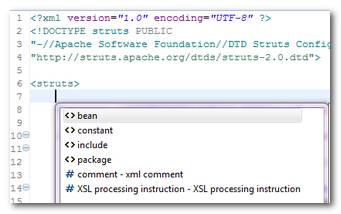
Now, the content assist is working properly.

Thanks! This is great. I have a question, is there a safe way to use the file association prefrence not to open any XMLs via the Aptana editor?
i was suffering with this issue ,, thanks for solution