Simple question, but not anyone will know the answer. Actually the Firefox 3.x does stored the Cookies in the following folder
C:\Documents and Settings\{your username}
\Application Data\Mozilla\Firefox\Profiles\{random mix char}.default
The cookie information is stored in the files “cookies.sqlite” and “permissions.sqlite”. However the content inside are all rubbish characters, you may not able to view it easily.
How to view the Cookies content
Firefox provide two ways for users to view the cookie’s detail.
1) Click Tool –> Options –> Choose “Remember History” –> Click on the “remove individual cookies”
2) Click Tool –> Options –> Choose “Use custom settings for history”–> Click on the “remove individual cookies”
Cookie search box will appear… users are allow to search the particular cookie , view the cookie’s detail and delete the cookie
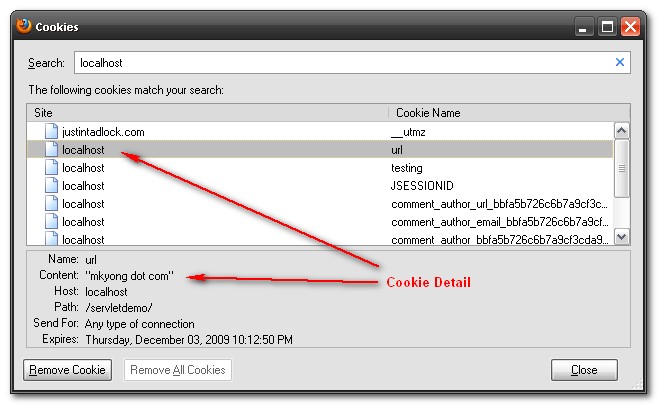
Please check here for more information about “Firefox cookie“

Thanks for the detailed explanation!