Windows store all the documents , images or files you have recently opened in “Recent Documents Folder” . Sometime it’s a handy function to access your recent document, but it also raise out a serious privacy issue, because anyone who has access to your computer can know what files you’ve opened recently.
How to clear recent document history?
1) Right click on your Windows task bar, click on properties.
2) Select the Start Menu tab. click on the “Customize” button
3) Select the Advanced tab , inside the Recent documents group, click on the “Clear List” button.
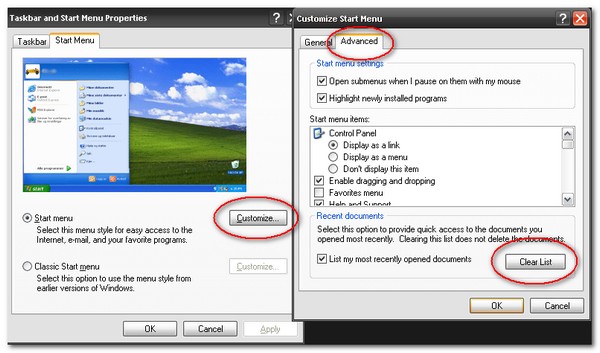
4) Done, all your Recent documents history is gone.

thank you. it is very useful to me.
Amazing! Not clear for me, how offen you updating your http://www.mkyong.com.
Pett
when i have something to share.. but i try to make it update by daily ~
Hi there,
Can i take a one small picture from your blog?
Zoran
ya sure, just press the print screen button
UnxOUS I want to say – thank you for this!
http://www.mkyong.com to GoogleReader!
Where are you from? Is it a secret? 🙂
Thank you
just for someone may not know about this