Java Compact Source File: No Class, No Static Main
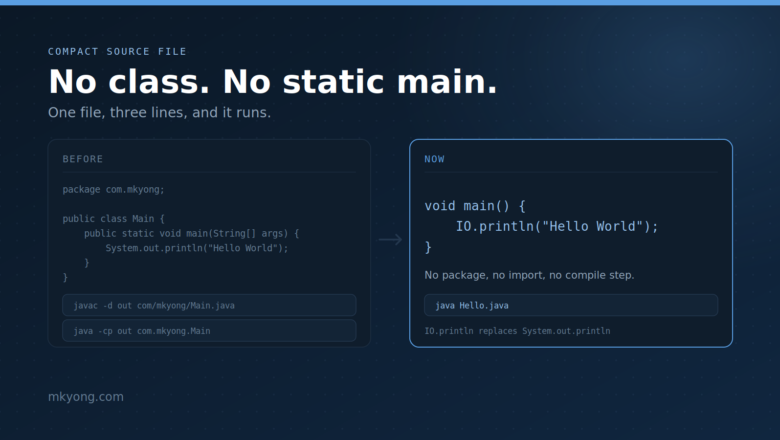
Java compact source file example – a Java file with no class and no public static void main. Learn instance main methods, the IO class, and the launch order, with full runnable code and real output.
Java compact source file example – a Java file with no class and no public static void main. Learn instance main methods, the IO class, and the launch order, with full runnable code and real output.
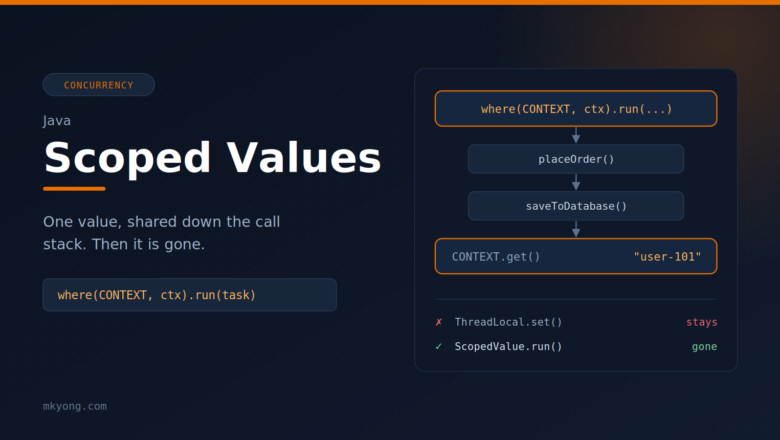
Learn Java scoped values (JEP 506) with simple, runnable examples. See the problem they solve, how other languages do it, and how to share data with callees and child threads without method parameters. Tested with Java 25.
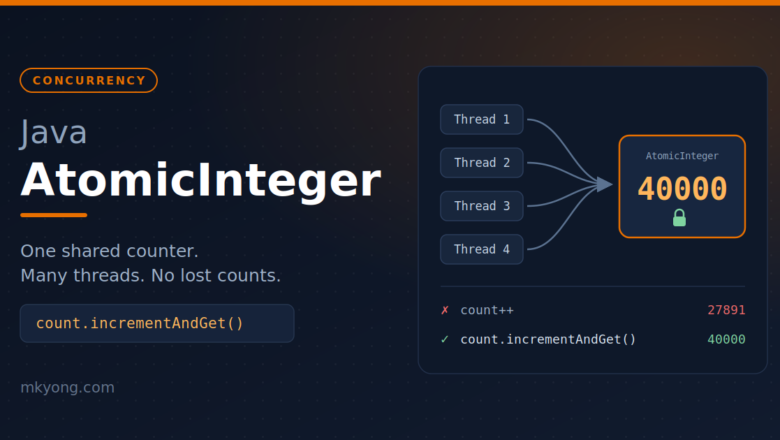
Learn Java AtomicInteger with simple examples, tested on Java 25. See why a normal int breaks with threads, and how incrementAndGet, compareAndSet and updateAndGet fix it.
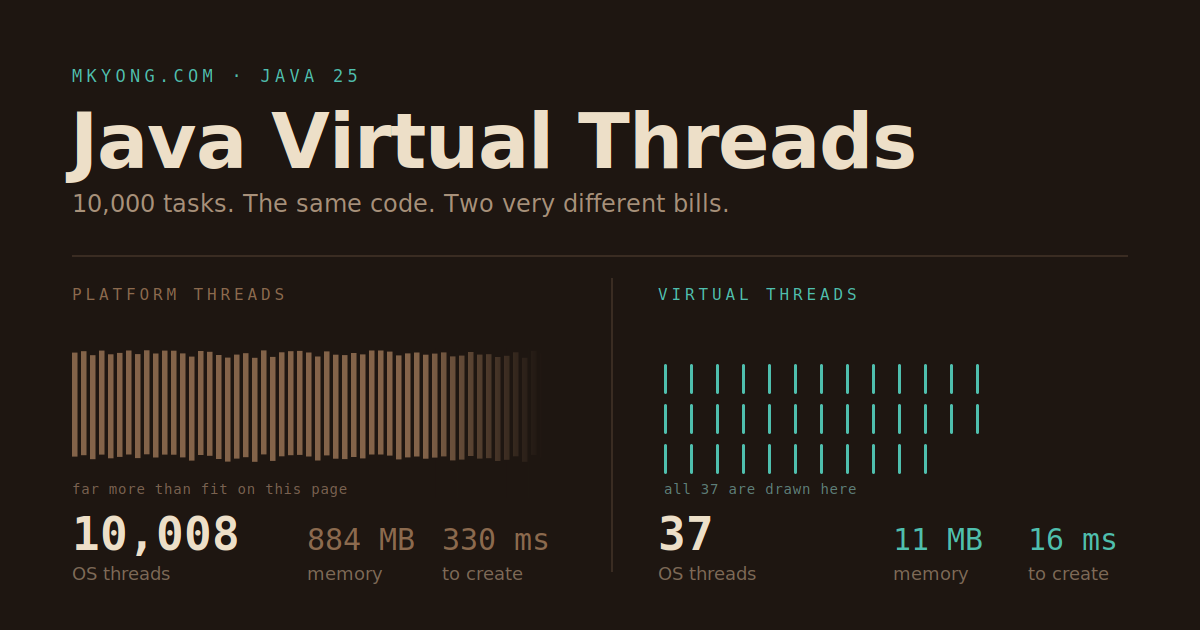
Learn Java virtual threads with simple, runnable examples on Java 25. Start one virtual thread, run 10,000 tasks at once, and see how virtual threads fix a slow thread pool without rewriting your code.
Learn how to install Java 21 (Oracle and Temurin) on Windows with screenshots and easy-to-follow instructions.
Encountering a java.lang.OutOfMemoryError can be frustrating, but we can take several practical steps to prevent it. In this article, we explain what causes this error, provide real world examples, and discuss effective techniques to manage memory in our Java applications. Table of contents Understanding java.lang.OutOfMemoryError Common Causes and Prevention Techniques 1. Optimize Heap Size 2. […]
Java remains one of the most powerful and versatile programming languages, widely used in enterprise applications, web development, microservices, and cloud-based solutions. As technology evolves, new frameworks continue to emerge, improving development efficiency, scalability, and security. In this article, we explore the top 10 Java frameworks to watch in 2025. Java Frameworks 2025 Framework Microservices […]
Java application servers play a crucial role in deploying and managing Java-based applications. They provide essential features such as security, transaction management, scalability, and performance optimization. In this article, we explore the top 10 Java application servers that developers and enterprises commonly use. Java Application Servers Server Jakarta EE Support Cloud-Native Performance Scalability Use Case […]
In this tutorial, we show how to use the Zip4j library for handling ZIP files like adding files and directories, updating existing ZIPs, password protection, and encryption. Table of Content: 1. Adding Zip4j Dependency 2. Creating a ZIP File and Adding Files 3. Adding a Directory to ZIP 4. Adding Files to an Existing ZIP […]
Swapping two variables is a common task in programming. Traditionally, we use a temporary variable to hold one value while swapping, but Java allows us to swap two variables without using a temp variable. In this tutorial, we will explore different ways to achieve this in Java with real-world examples. Table of contents: 1. Swapping […]
We can use the Java String built-in `replace()` or `replaceAll()` methods to replace spaces with dashes (`-`) easily.
In Java, we can use the Files.walk() API to traverse all files from a folder and its subfolders. Table of contents: 1. Traverse all files from a folder in Java 2. Traverse all files from a folder and its subfolders in Java 3. List all file name from a folder in Java 4. Find a […]
This article shows how to pretty print JSON with JSON.simple. Table of contents: 1. Setup JSON.simple 2. Default Compact Print JSON 3. Pretty Print JSON with JSON.simple 4. Write Pretty Print JSON to a File 5. Download Source Code 6. References P.S Tested with json-simple 4.0.1 1. Setup JSON.simple pom.xml <dependency> <groupId>com.github.cliftonlabs</groupId> <artifactId>json-simple</artifactId> <version>4.0.1</version> </dependency> […]
In GSON, we can use the transient keyword, ExclusionStrategy, and @Expose to exclude fields during the JSON serialization or deserialization process. Table of contents: 1. Setup Google Gson 2. Using the "transient" Keyword 3. Using the "ExclusionStrategy" 4. Using the "ExclusionStrategy" and custom annotation 5. Using the @Expose annotation 6. Download Source Code 7. References […]
Gson does not directly support Java 8’s date-time APIs like LocalDate, LocalDateTime, and ZonedDateTime. However, we can create a custom JSON serializer to support Java 8 date-time types. This article shows how to use Gson to handle the LocalDate type. Table of contents: 1. Setup Google Gson 2. Default, Gson does not support Java 8 […]
When the JSON field name doesn’t exactly match the Java object field names, we can use @SerializedName to change the JSON’s matching field name in Gson. Table of contents: 1. Setup Google Gson 2. JSON Unrecognized Field 3. Custom field name with @SerializedName 4. Download Source Code 5. References P.S Tested with Gson 2.10.1 1. […]
This article shows how to use Gson to write a Java object to a JSON file and read that JSON file back into a Java object. Table of contents: 1. Download Google Gson 2. A Java Object 3. Write Java object to JSON file using Gson 4. Read JSON from a file using Gson 5. […]
This article shows how to create a Jackson custom serializer and deserializer to parse JSON data that contains a LocalDate type. The Jackson custom serializer or deserializer is useful when we want to process a specific format that is not the default. Table of contents: 1. Setup Jackson 2. Jackson Custom Serializer for LocalDate 3. […]
When the JSON field name doesn’t exactly match the Java field names, we can use @JsonProperty to change the name of a JSON field in Jackson. Table of contents: 1. Setup Jackson 2. JSON Unrecognized field 3. Custom field name with @JsonProperty 4. Download Source Code 5. References P.S Tested with Jackson 2.17.0 1. Setup […]
Moshi does not have built-in adapters to process types like Java 8 date time APIs java.time.* or JSR-310; we need to manually provide a custom adapter to handle the Java 8 date time type. This article shows how to use Moshi to convert the Java 8 Localdate type to JSON data. Table of contents: 1. […]
This article shows how to use Moshi’s JsonAdaptor indent method to enable the pretty print JSON. Table of contents: 1. Download Moshi 2. Compact print JSON (Default) 3. Pretty print JSON using Moshi 4. Download Source Code 5. References P.S Tested with Moshi 1.15.1 1. Download Moshi Declare moshi in the pom.xml. pom.xml <dependency> <groupId>com.squareup.moshi</groupId> […]
Moshi does not have built-in adapters to process types like java.math.BigDecimal; we need to manually provide a custom adapter to handle the BigDecimal type. Table of contents: 1. Download Moshi 2. BigDecimal requires explicit JsonAdapter 3. Make Moshi supports BigDecimal 3.1 Define BigDecimal Adapter 3.2 Register the Adapter with Moshi 4. Download Source Code 5. […]
This article shows how to write JSON to a file using Moshi. Table of contents: 1. Download Moshi 2. Write JSON to a file using Moshi 3. Read JSON from a file using Moshi 4. Download Source Code 6. References P.S Tested with Moshi 1.15.1 1. Download Moshi Declare moshi in the pom.xml. pom.xml <dependency> […]
This article shows how to parse JSON using Moshi. Table of contents: 1. Download Moshi 2. Parse JSON using Moshi 3. Parse JSON Array using Moshi 4. Convert Java Object to JSON String 5. Download Source Code 6. References P.S Tested with Moshi 1.15.1 1. Download Moshi Declare moshi in the pom.xml, and it will […]
This article shows how to use Jackson and Lombok together. Table of contents: 1. Download Jackson and Lombok 2. Model with Lombok annotations 3. Parse JSON using Jackson 5. Download Source Code 6. References P.S Tested with Jackson 2.17.0 and Lombok 1.18.32 1. Download Jackson and Lombok Declares jackson-databind and lombok at pom.xml. pom.xml <dependency> […]
This article shows how to map a subset of a JSON file using Jackson. Table of contents: 1. Download Jackson 2. Map a subset of a JSON file 3. Define Java Classes that reflect JSON structure 4. Ignoring Unneeded Fields with Jackson 5. Testing the subset of JSON using Jackson 6. Download Source Code 7. […]
This article shows you write JSON to a file with Jackson. Table of contents: 1. Download Jackson 2. Define a Java Object 3. Write JSON to a File 4. Download Source Code 5. References P.S Tested with Jackson 2.17.0 1. Download Jackson Declare jackson-databind in the pom.xml. pom.xml <dependency> <groupId>com.fasterxml.jackson.core</groupId> <artifactId>jackson-databind</artifactId> <version>2.17.0</version> </dependency> 2. Define […]
This article will show you how to convert Java objects to JSON with Jackson. Table of contents: 1. Setup Jackson 2. Jackson quick examples 3. Convert Java Object to JSON using Jackson 4. Convert JSON to Java object using Jackson 5. Write Java object to JSON file 6. Read from JSON file to Java object […]
In Jackson, we can use @JsonIgnore to ignore a single field, @JsonIgnoreProperties to ignore multiple fields and @JsonIgnoreType to ignore a specified type during JSON serialization and deserialization. Table of contents: 1. Setup Jackson 2. Jackson @JsonIgnore – Ignores a field 3. Jackson @JsonIgnoreProperties – Ignores multiple fields 4. Jackson @JsonIgnoreType – Ignores a specified […]
When we compile our Java programs, each generated .class file carries a major version that indicates which Java version was used during compilation. For example, if we compile our code using Java 21 (major version 65), and then run the class file on an environment with an older Java version, we will encounter the error: […]
This article shows how Jackson can support the Java 8 date time APIs or JSR-310. Table of contents: 1. Download Jackson 2. Jackson does not support Java 8 date time APIs 3. Make Jackson support Java 8 date time APIs or JSR310 3.1 jackson-datatype-jsr310 3.1 Register JavaTimeModule() 4. Download Source Code 5. References P.S Tested […]
A Java project builds with Maven and runs on IntelliJ IDE but hits the following error message, and the IntelliJ IDE can’t compile the project. java: warning: source release 17 requires target release 17 1. Solution The above warning message tells you the Java project needs to compile and run with Java 17, but we […]
Java 19 reached general availability on 20 September 2022, download Java 19 here. Java 19 has 7 JEP items. 1. JEP 405: Record Patterns (Preview) 1.1 Normal Record Patterns Example 1.2 Record Nested Patterns Example 2. JEP 422: Linux/RISC-V Port 3. JEP 424: Foreign Function & Memory API (Preview) 4. JEP 425: Virtual Threads (Preview) […]
Java 18 reached general availability on 22 March 2022, download Java 18 here. Java 18 has 9 JEP items. 1. JEP 400: UTF-8 by Default 2. JEP 408: Simple Web Server 3. JEP 413: Code Snippets in Java API Documentation 4. JEP 416: Reimplement Core Reflection with Method Handles 5. JEP 417: Vector API (Third […]
This article talks about XML external entity attack (XXE attack) and how to prevent XXE from a list of the popular XML parsers like DOM, SAX, JDOM, etc. 1. What is XML external entity attack (XXE attack) 2. XXE attack example 3. How to prevent XXE attack in SAX parser 4. Sonar Rule to prevent […]
When we compile our Java programs, each resulting .class file contains a major version number. For example, if we compile our code with Java 17 (major version 61), and then try to run the class file on Java 16 or earlier, we will encounter the error: Unsupported class file major version 61. This situation often […]
This article shows how to convert a String to an XML document and an XML document back to a String in Java, using DOM parser and JDOM2 parser. 1. Convert String to XML (DOM Parser) 2. Convert String to XML (JDOM2 Parser) 3. Download Source Code 4. References 1. Convert String to XML (DOM Parser) […]
This article shows all the major version of the Java class file, for example, Java 17 (61), Java 11 (55), and Java 8 (52).
The Java String compareTo() method compares two strings lexicographically (alphabetical order). It returns a positive number, negative number, or zero. s1.compareTo(s2) if s1 < s2, it returns negative number. if s1 > s2, it returns positive number. if s1 == s2, it returns 0. Table of contents 1. "a".compareTo("c"), negative integer 2. "c".compareTo("a"), positive integer […]
In Java, we can use substring(0, 1).toUpperCase() + str.substring(1) to make the first letter of a String as a capital letter (uppercase letter) String str = "mkyong"; String str1 = str.substring(0, 1).toUpperCase(); // first letter = M String str2 = str.substring(1); // after 1 letter = kyong String result = str.substring(0, 1).toUpperCase() + str.substring(1); // […]